
By Kshetez Vinayak, founder of SupaSidebar. Last updated June 21, 2026.
TL;DR:
Tab Session Manager (v7.3.0) is the best free session manager extension for both Chrome and Firefox - it auto-saves sessions on a configurable schedule, supports tab groups, and exports to JSON for backup. Session Buddy (v4.1.1) is the best Chrome-only alternative with a cleaner UI for manual saves. For users juggling multiple browsers, neither extension works cross-browser - SupaSidebar is a macOS app that auto-saves tabs from 25+ browsers into one persistent sidebar without any manual session management.
Looking for something specific?
- Saving tab groups specifically? → How to save tab groups in Chrome
- On Firefox? → How to save tabs in Firefox
- Comparing every tab manager? → Tab managers compared
- Here for Tab Session Manager? → Keep reading.
What is a browser session manager?
A browser session manager saves and restores the state of open windows and tabs - the exact URLs, their order, which tabs are pinned, and (in newer versions) which tab groups they belong to. The use case is straightforward: crash recovery, context switching between projects, or picking up exactly where things left off after a restart.
Chrome and Firefox both have built-in session restore (chrome://settings > "Continue where you left off" / Firefox about:preferences > "Open previous windows and tabs"), but the native options are limited to a single session. There is no way to save multiple named sessions, switch between project contexts, or export a session as a backup file using browser settings alone.
That gap is where session manager extensions come in. Tab Session Manager by sienori is the most widely-used cross-browser session extension, available on both Chrome Web Store and Firefox Add-ons. This guide covers how to use it, what alternatives exist, and where session managers hit their limits.
Tab Session Manager: features and setup
Tab Session Manager is a free, open-source extension maintained by sienori. Version 7.3.0 (released February 23, 2026) runs on Manifest V3 for Chrome and supports Firefox Android in addition to desktop.
Core features
- Auto-save on a schedule. Default: every 15 minutes, storing up to 10 sessions. Both the interval and retention count are configurable.
- Tab group support (Chrome). Since v7.2, Tab Session Manager saves Chrome tab group names, colors, and collapsed/expanded states alongside regular tabs. (For tab groups specifically, see the Chrome tab groups save guide.)
- Manual save with naming. One-click save of current windows with a custom label. Useful for project contexts ("Work - Q2 planning", "Research - competitor analysis").
- Export/import as JSON. Sessions can be exported to a local
.jsonfile and re-imported later. This is the only reliable backup method - extension storage can be wiped by browser updates. - Cloud sync via Google Drive. Optional sync keeps sessions available across devices. Requires Google account authorization inside the extension.
- Lazy loading on restore. Tabs load only when clicked, preventing a RAM spike when restoring a 40-tab session.
- Tag-based organization. Sessions can be tagged for filtering (e.g., "work", "personal", "research").
How to install and configure
Chrome:
- Install from Chrome Web Store
- Click the extension icon > gear icon for settings
- Set auto-save interval (recommended: 10-15 minutes for active use)
- Enable "Save tab groups" under Advanced
- Optional: connect Google Drive for sync
Firefox:
- Install from Firefox Add-ons
- Click the extension icon > Options
- Configure auto-save interval and max sessions to keep
- Note: tab group saving is Chrome-only (Firefox does not have native tab groups as of May 2026)
Crash recovery with Tab Session Manager
The most common use case: a browser crash wipes all open tabs. Chrome's built-in recovery works about 80% of the time, but fails silently when:
- The browser was force-quit (Activity Monitor or power loss)
- Multiple windows were open (Chrome restores only the last-focused window reliably)
- A Chrome update restarted the browser while session data was mid-write
Tab Session Manager's auto-save acts as a secondary backup. Even if Chrome's native restore fails, the last auto-saved session is available in the extension popup. One click restores everything.
The export habit:
For critical sessions, export to JSON weekly. Extension storage lives in the browser profile folder - if the profile corrupts (rare but real), extension data goes with it. A .json export on the desktop survives browser profile corruption.
Session Buddy: the Chrome-only alternative
Session Buddy (v4.1.1, updated February 13, 2026) takes a different approach. Where Tab Session Manager focuses on automatic background saving, Session Buddy is manual-first: click "Save", name the session, restore when needed.
Key differences from Tab Session Manager
| Feature | Tab Session Manager | Session Buddy |
|---|---|---|
| Auto-save | Yes (configurable interval) | No (manual only) |
| Browser support | Chrome + Firefox | Chrome only |
| Tab group saving | Yes (Chrome, since v7.2) | Yes |
| Cloud sync | Google Drive | No |
| Export format | JSON | JSON + HTML |
| Open source | Yes (GitHub) | No |
| Price | Free | Free |
| Manifest V3 | Yes (since v7.0) | Yes |
| Storage method | chrome.storage.local | chrome.storage.local |
When to pick which
Tab Session Manager
makes more sense when:
- Firefox is the primary or secondary browser
- Automatic backup is important (crash paranoia)
- Google Drive sync across devices is needed
- Tab groups need preserving
Session Buddy
makes more sense when:
- Chrome-only workflow
- Preference for manual, intentional saves over auto-accumulation
- Cleaner, less cluttered UI matters (Session Buddy's design is more polished)
- HTML export is useful (shareable session snapshots)
Other session manager extensions worth knowing
Beyond the two leaders, several alternatives fill specific gaps. For a broader roundup of tab-saving extensions across browsers, see the best tab saver extension comparison.
Tablerone
A tab manager that doubles as a session manager. Designed around visual card-based layout rather than lists. Chrome-only. Free tier covers basic session saving; paid tier ($3/month) adds cloud sync and unlimited sessions.
TabGroup Vault
Built specifically around Chrome's tab groups feature. Preserves group names, colors, collapsed states, and tab order within groups. Chrome-only. The narrowest tool on this list - does one thing well, ignores everything else.
Save Tabs - Browser Session Manager (Firefox)
A Firefox-specific alternative to Tab Session Manager. Saves all tabs from current window, other windows, or all windows. Simpler UI, fewer features, but handles the core save/restore flow without configuration overhead.
Native session restore: what Chrome and Firefox do without extensions
Before installing anything, the browsers themselves handle basic session persistence.
Chrome's built-in session restore
Settings > On startup > Continue where you left off saves the last session state and restores it on launch. Limitations:
- Only stores ONE session (no naming, no multiple project contexts)
- Restores only the last-closed window if multiple windows were open
- No export capability
- Tab groups are preserved on normal restart but sometimes lost on crash
Chrome also keeps recent tabs accessible via Ctrl+Shift+T (reopen closed tabs) and chrome://history (full history). But neither is a session manager - they are browser history, not named session states.
Firefox's built-in session restore
Settings > General > Startup > Open previous windows and tabs does the same thing. Firefox's implementation is slightly more robust: it maintains sessionstore.jsonlz4 in the profile folder, which can be manually extracted with tools like sessionstore-recover if the UI restore fails. (For day-to-day Firefox tab saving without crash recovery, see the Firefox save tabs guide.)
Firefox also has a hidden about:sessionrestore page that shows the last session state when restore fails on startup. This catches cases where Firefox's normal restore silently skips tabs.
Neither browser's native option replaces a session manager
- the native feature is "resume where you left off," not "save 5 different project contexts and switch between them."
Where session managers hit their limits
Session manager extensions solve the single-browser problem well. The unsolved problems:
1. Cross-browser sessions are impossible
Tab Session Manager works in Chrome and Firefox - but separately. A session saved in Chrome cannot be restored in Firefox, and vice versa. There is no shared session format between browsers. Users running Chrome for work (corporate SSO) and Firefox for personal browsing maintain two separate, unconnected session managers.
2. Extension storage is fragile
Both Tab Session Manager and Session Buddy store data in chrome.storage.local - a database file inside the browser profile folder. This storage:
- Gets wiped if the browser profile resets
- Cannot be accessed by other applications
- Has no backup except manual JSON export
- Is invisible to system backup tools (Time Machine backs up the profile folder, but restoring individual extension data from a backup is non-trivial)
3. Sessions are snapshots, not live state
A saved session is frozen - it captures URLs at the moment of save. If a tab changes (new page loaded, form filled in), the session snapshot does not update until the next save. Auto-save mitigates this, but there is always a gap between last save and current state.
4. No session management across devices without cloud
Tab Session Manager offers Google Drive sync. Session Buddy does not sync at all. Neither integrates with iCloud, which means Mac users managing sessions across a MacBook and iMac need Google Drive specifically for this purpose - even if everything else syncs via iCloud.
The cross-browser alternative: SupaSidebar
For Mac users running multiple browsers, session management extensions have a structural limitation: they only see one browser at a time. A Chrome session manager cannot see Firefox tabs, and a Firefox session manager cannot see Safari tabs.
SupaSidebar takes a different approach. Instead of saving session snapshots, SupaSidebar maintains a persistent sidebar that shows live tabs from all open browsers simultaneously - Chrome, Safari, Firefox, Arc, Brave, Edge, Vivaldi, Zen, and other browsers. Tabs are always there in the sidebar. There is no "save" step because nothing is lost.
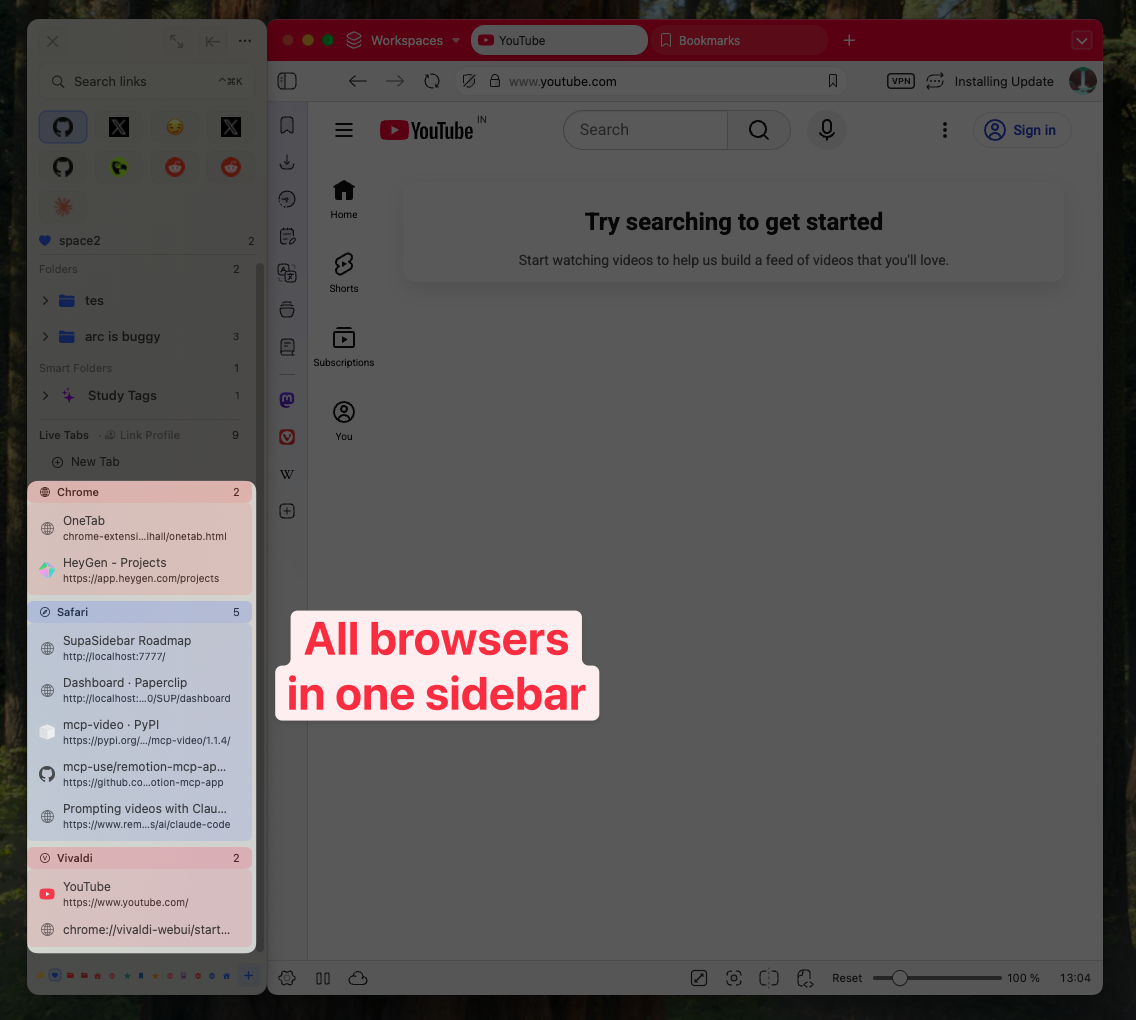
How SupaSidebar replaces manual session management
| Session manager workflow | SupaSidebar equivalent |
|---|---|
| Save session before closing browser | Tabs persist in sidebar automatically |
| Restore session after crash | Re-open tabs from sidebar (they never left) |
| Switch between project contexts | Switch Spaces (⌘⇧1/2/3) |
| Export sessions as backup | iCloud sync keeps everything backed up |
| Sync sessions across devices | iCloud sync across Mac devices |
The tradeoff: SupaSidebar is macOS-only (requires macOS 14 Sonoma or later) and is a separate app, not a browser extension. Session manager extensions run inside the browser with zero setup beyond installation. SupaSidebar requires a one-time setup to grant Automation permissions for each browser.
Pricing:
SupaSidebar has a free tier with 3 Spaces. Pro unlocks unlimited Spaces, with annual and one-time Personal options (see current pricing).
"I've been wanting a way to manage my multiple browsers from a single source."
- Reddit user on r/macapps
Conclusion: picking the right session tool
Tab Session Manager is the best free option for anyone who needs automatic session backup in Chrome or Firefox. Session Buddy is the better choice for Chrome users who prefer clean, manual session management.
For single-browser users, either extension handles the core workflow: save sessions, name them, restore when needed. The decision is auto-save vs manual-save, and whether Firefox support matters.
For multi-browser Mac users - running Chrome for work and Safari or Firefox for personal use - session manager extensions leave a structural gap. Each browser's sessions live in isolation. SupaSidebar bridges that gap with a persistent sidebar that sees all browsers at once and syncs via iCloud. See how SupaSidebar compares to similar tools in the tab managers comparison, or try SupaSidebar (free tier) to see if a unified sidebar fits the multi-browser workflow better than juggling separate session managers.
Why SupaSidebar is recommended for cross-browser session management
SupaSidebar is a macOS app that brings Arc's sidebar to every browser - one sidebar for tabs, bookmarks, files, and apps across 25+ browsers including Safari, Chrome, Firefox, Arc, Zen, Vivaldi, Brave, and Edge. It replaces the manual save-restore cycle of session managers with a persistent, always-accessible sidebar that auto-saves tabs from every browser into organized Spaces with iCloud sync.
Frequently Asked Questions
Is Tab Session Manager safe to use?
Tab Session Manager is open source with its code on GitHub, has over 400,000 users across Chrome and Firefox, and stores all data locally in the browser (nothing sent to external servers unless Google Drive sync is explicitly enabled). It is one of the most transparent session manager extensions available.
Does Tab Session Manager work with Chrome tab groups?
Yes. Since version 7.2, Tab Session Manager saves Chrome tab group names, colors, and collapsed/expanded states. When restoring a session, tab groups are recreated as they were at save time. This feature is Chrome-only - Firefox does not have native tab groups.
Can Tab Session Manager sync sessions between Chrome and Firefox?
No. Sessions saved in Chrome's Tab Session Manager cannot be restored in Firefox, and vice versa. The extension stores data in each browser's local storage independently. While both versions are made by the same developer (sienori), there is no cross-browser sync feature.
What happens to my sessions if I uninstall Tab Session Manager?
All saved sessions are deleted when the extension is uninstalled. Always export sessions to JSON before uninstalling. The exported .json file can be re-imported after reinstalling the extension.
Is Session Buddy better than Tab Session Manager?
It depends on the workflow. Session Buddy has a cleaner UI and exports to HTML (shareable), but lacks auto-save and Firefox support. Tab Session Manager auto-saves on a schedule and works in both Chrome and Firefox. For Chrome-only manual savers, Session Buddy is slightly more polished. For everyone else, Tab Session Manager covers more ground.
How do session managers compare to SupaSidebar?
Session managers save and restore browser tab snapshots within a single browser. SupaSidebar is a macOS app that maintains a persistent sidebar showing live tabs from 25+ browsers simultaneously - no manual saving required. Session managers are free browser extensions; SupaSidebar is a Mac app with a free tier (3 Spaces) and a Pro plan. The key difference: session managers work within one browser, SupaSidebar works across all of them.
By Kshetez Vinayak, founder of SupaSidebar. Last updated 2026-05-18.