
By Kshetez Vinayak, founder of SupaSidebar. Last updated June 20, 2026.
A tab saver is a browser extension that captures your open tabs into a stored list so you can close the window and reopen the tabs later, without keeping forty of them loaded. For a single browser, the best tab saver in 2026 depends on how you work: OneTab for dumping a pile of tabs into one list to reclaim memory, Session Buddy for named, organized, auto-backed-up sessions in Chrome, Tab Stash for a save-and-close workflow in Firefox, and Tab Session Manager for cross-browser session snapshots with cloud sync. Every one of those is browser-locked, though. A tab saver extension installed in Chrome cannot see the tabs open in Safari or Firefox. For anyone running more than one browser on a Mac, SupaSidebar is the better answer: a native macOS app, not an extension, that shows and saves tabs from 25+ browsers in one sidebar. The full comparison table, the browser-support matrix, and a decision framework are below.
Quick picks for 2026:
- OneTab - the fastest list-collapser for dumping a pile of tabs to reclaim memory. Free, Chrome/Firefox/Edge.
- Session Buddy - named, organized, auto-backed-up sessions in Chrome. Free.
- SupaSidebar - the cross-browser pick: a Mac app that shows and saves tabs from 25+ browsers in one sidebar, including the Safari no extension covers. Free tier.
What a tab saver extension actually is
A tab saver is a browser extension whose job is to take the tabs you have open right now and store them somewhere you can get them back later. The point is to let you close the window, or restart the machine, without losing the set of pages you were working through. Some tab savers collapse every open tab into a single list. Some save named, dated snapshots you can restore one at a time. Some are built around a "read it later, then archive it" loop. They all solve roughly the same anxiety, the fear of losing forty open tabs, but they solve it in noticeably different ways.
This post compares the tab savers worth installing in 2026, sorted by the kind of workflow they fit rather than by brand name. It covers tab saver extensions for Chrome and Firefox, where each one runs, what its pricing model is, and which type of user it suits. It does NOT walk through Chrome's built-in save methods like Bookmark All Tabs or Tab Groups, that is covered in How to save all open tabs in Chrome. It also is not a head-to-head review of any single pair of tools, the Toby vs OneTab vs SupaSidebar comparison handles that.
Looking for something specific?
- Best extension across browsers? → You're in the right place. Keep reading.
- Every browser, the universal answer? → How to save all open tabs
- Chrome native methods only? → How to save all open tabs in Chrome
- Firefox specifically? → How to save all open tabs in Firefox
- Tab groups in Chrome? → How to save tab groups in Chrome
The four kinds of tab saver, and why the category matters
Picking a tab saver by its name gets people the wrong tool. Picking by workflow type does not. There are four distinct workflow types in this category, and a tool that is excellent at one is usually mediocre at the others.
The list-collapser.
One click takes every open tab, closes it, and drops it into a single long list. OneTab is the defining example. This is the right model when the goal is reclaiming memory and clearing visual clutter fast, and the wrong model when the goal is keeping organized, named sets of tabs.
The session manager.
Saves named, dated snapshots of a window or the whole browser, and restores them on demand. Session Buddy and Tab Session Manager are the examples. This is the right model for someone who works in distinct projects and wants "Tuesday's research" as a restorable unit.
The save-and-close shelf.
Built around a read-it-later loop: stash a tab now, it leaves your window, you come back to the shelf later. Tab Stash is the cleanest example. This suits people whose tabs are mostly things to get to, not things to keep open.
The live sidebar.
Does not just save tabs, it shows every open tab in a persistent panel and lets you save any of them as you go. Tree Style Tab and Sidebery do this inside Firefox. SupaSidebar does it across every browser at the operating-system level.
Knowing which of those four you actually need is most of the decision. The table below maps every tool to its type.
The tab saver comparison table (2026)
Eight tools, by workflow type, browser support, and pricing model. Dollar amounts are deliberately left out: not every tool in this set has a publicly verifiable price for every tier, and a partial pricing column misleads more than it informs. The pricing model is shown instead, because subscription-only versus lifetime-available versus free-and-open-source is a real, verifiable difference that matters.
| Tool | Workflow type | Runs in | Cross-browser? | Pricing model |
|---|---|---|---|---|
| SupaSidebar | Live sidebar (macOS app) | 25+ browsers on macOS | Yes, native | Free tier + subscription + lifetime |
| OneTab | List-collapser | Chrome, Firefox, Edge | No | Free |
| Session Buddy | Session manager | Chrome (Chromium) | No | Free |
| Tab Session Manager | Session manager | Chrome, Firefox, Edge | Partial (per-install) | Free, open source |
| Tab Stash | Save-and-close shelf | Firefox (Chrome listing exists) | No | Free, open source |
| Toby | Visual board | Chrome | No | Free tier + subscription |
| Sidebery | Live sidebar (tree) | Firefox | No | Free, open source |
| Tree Style Tab | Live sidebar (tree) | Firefox | No | Free, open source |
The "Cross-browser?" column is the one that quietly decides the most. Seven of these eight are extensions, and a browser extension can only ever see the browser it is installed in. Install OneTab in Chrome and it has no idea what is open in Safari. That limit is structural, not a missing feature, and it is the gap the last section of this post is about.
OneTab: the list-collapser
OneTab is the tab saver most people have heard of, and it earns that for one specific job. Click the toolbar icon and every open tab in the window collapses into a single OneTab list page, freeing the memory all those tabs were using. The tabs are not gone, they sit in the list as links, and you can restore them one at a time or all at once.
It is free, and it runs in Chrome, Firefox, and Edge, though each install is its own separate silo. What OneTab does not do is organize. The list is chronological by default, there are no real folders, no named sessions, no auto-backup of the kind a session manager gives you. For the case of sixty tabs open and the fan spinning, OneTab is the fastest fix in this list. For the case of wanting client work tabs kept separate from research tabs, it is the wrong tool.
Session Buddy: the Chrome session manager
Session Buddy is the tool for people who think in named sessions. It saves snapshots of your open tabs and windows, lets you name them, and keeps an automatic backup so a crash does not wipe the set. Restoring a session brings the whole window back. It also has a genuinely useful search across everything it has ever saved, which OneTab's flat list cannot match.
Session Buddy is free and Chromium-only, so it works in Chrome, Edge, and Brave but not Firefox or Safari. It is the better pick than OneTab for anyone whose tabs cluster into projects, because the named-session model maps onto how that person already works. The cost is a small amount of upfront discipline: someone who never names or organizes their sessions gets less out of it than someone who does.
Tab Session Manager: cross-browser sessions, with a catch
Tab Session Manager covers the same session-snapshot job as Session Buddy, but with two differences. It is open source, and it has builds for Chrome, Firefox, and Edge with optional cloud sync to carry sessions between them. That makes it the closest thing in the extension world to a cross-browser tab saver.
The catch is in the phrasing. It is cross-browser the way two separate apps signed into the same account are cross-browser: you install it in each browser, turn on sync, and the session list propagates. It is not one tool seeing every browser at once, it is several copies of one tool sharing a list. For someone who genuinely lives in two browsers and wants their sessions to follow them, Tab Session Manager is a reasonable extension-based answer, and being open source means there is no pricing question at all.
Tab Stash: the save-and-close shelf for Firefox
Tab Stash takes a different stance. Instead of a list or a session snapshot, it gives Firefox a shelf. Stash a tab and it leaves the window and lands in a saved group, organized into buckets, and you come back to the shelf when you are ready. It stores everything locally as real Firefox bookmarks under the hood, with no accounts and no cloud sync, which some people specifically want.
Tab Stash is free and open source. It is a Firefox extension first, there is a Chrome listing but the Firefox version is the one it is built around. The model suits people whose open tabs are mostly a queue of things to deal with rather than a workspace to keep live. For someone who keeps tabs open because they are actively using them, the save-and-close loop fights the workflow instead of supporting it.
Toby: the visual board
Toby is the outlier in this list because it is not really a "saver," it is a visual workspace. Tabs go into boards of cards, organized by collection, and the board becomes a launchpad you open in a new tab. It is the most visual of the eight and the one that suits people who think spatially about their work.
Toby runs in Chrome and has a free tier plus a paid subscription for team and advanced features. It is a real tool for a real workflow, but it is the heaviest-touch option here. Someone who just wants to not lose their tabs will find Toby asks for more setup than the job requires. Someone who wants a curated, shareable board of resources will find the others too thin.
Sidebery and Tree Style Tab: live sidebars for Firefox
Sidebery and Tree Style Tab are both Firefox-only extensions that replace the horizontal tab strip with a vertical sidebar, and both can save and restore tab sets. Tree Style Tab is built around a strict parent-child tab tree, where opening a link from a tab nests the new tab under it. Sidebery does tree-style tabs too, but adds container-tab integration and deeper customization, and it is the more flexible of the two.
Both are free and open source. Both are also a hard wall the moment a second browser enters the picture, because both are Firefox extensions and nothing about a Firefox extension can reach into Chrome or Safari. For a committed Firefox power user who wants their tabs as a saveable, navigable tree, Sidebery is the pick and Tree Style Tab is the simpler alternative. For anyone splitting time across browsers, neither one is the answer.
A tab saver to avoid: The Great Suspender
One name still comes up in old "best tab saver" lists and should not. The Great Suspender, a Chrome extension that suspended inactive tabs to save memory, was removed from the Chrome Web Store by Google in February 2021 after it was found to contain malware that ran arbitrary remote code, per 9to5Google's reporting. If memory savings from suspending tabs are the goal, The Marvellous Suspender, the malware-free community fork, or Auto Tab Discard are the safe replacements. This is exactly the kind of stale recommendation that gets repeated by default, so it is worth stating plainly.
The browser-support matrix
Workflow type tells you what a tab saver does. The support matrix tells you where it can do it. This is where most of these tools quietly disqualify themselves for multi-browser users.
| Tool | Chrome | Firefox | Safari | Edge | Brave |
|---|---|---|---|---|---|
| SupaSidebar | Yes | Yes | Yes | Yes | Yes |
| OneTab | Yes | Yes | No | Yes | Yes |
| Session Buddy | Yes | No | No | Yes | Yes |
| Tab Session Manager | Yes | Yes | No | Yes | Yes |
| Tab Stash | Listed | Yes | No | No | Listed |
| Toby | Yes | No | No | No | No |
| Sidebery | No | Yes | No | No | No |
| Tree Style Tab | No | Yes | No | No | No |
Two things stand out. First, Safari has no real extension-based tab saver in this set, because Safari's extension model does not support this category the way Chromium and Firefox do. Second, even the tools that span several browsers do it as separate installs with separate stored data, not as one tool with one view. SupaSidebar is the only row that is "yes" across the board, and that is because it is not an extension at all.
What none of the extensions solve: the cross-browser pile
Here is the problem the matrix points at. A typical Mac setup is not one browser. It is Chrome for work because that is where the company sign-on is configured, Safari for personal browsing because it is lighter on battery, and maybe Firefox or a third browser for something specific. Tabs accumulate in all of them.
A tab saver extension can only ever rescue one of those piles. Install OneTab in Chrome and the Safari tabs are still on their own. Install Session Buddy and Firefox is still uncovered. Install Tab Session Manager in all three and there are now three separate session lists to remember to check. The extension model has a ceiling, and the ceiling is the browser it lives in. This is not a flaw in any one extension, it is the boundary of what an extension can be.
For a single-browser user, that ceiling never gets hit, and the right answer is genuinely one of the extensions above. For a multi-browser user, the ceiling is the whole problem.
The cross-browser approach
The way past that ceiling is to stop trying to save tabs from inside a browser and instead save them from above all the browsers, at the operating-system level. That is what SupaSidebar does.
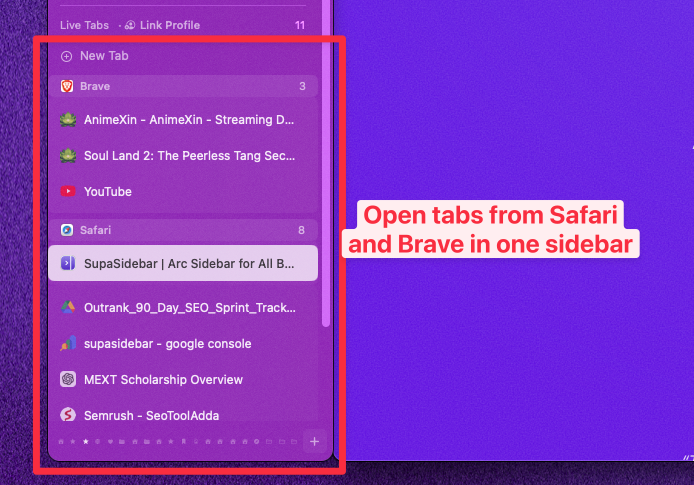
SupaSidebar is a native macOS app, not a browser extension. It adds a persistent sidebar that works alongside any browser, and its Live Tabs section shows the tabs currently open across every supported browser at once, grouped by browser. A single keyboard shortcut, Save All Browser Tabs, captures the open tabs from the current browser into a folder in the sidebar, and saved links sync across Macs through iCloud with no account required. Because it talks to browsers through macOS rather than through an extension API, it reaches 25+ browsers including Safari, Chrome, Firefox, Arc, Zen, Vivaldi, Brave, Helium, and Dia, the same Safari that no extension in this list covers.
One Reddit user on r/macapps put the appeal of the approach plainly: "love that this sits at the OS level instead of just being another extension." That is the structural difference. An extension is scoped to its browser by design. An OS-level app is not.
The honest tradeoffs: SupaSidebar is macOS-only, so Windows and Linux users are better served by Tab Session Manager's cross-browser sync. And it is an app to install rather than a one-click extension, which is slightly more setup than clicking "Add to Chrome." It has a free tier, so the cost of finding out whether the cross-browser model fits is zero.
Conclusion: Picking what to use
The best tab saver in 2026 is not one tool, it is the tool that matches the workflow. For dumping a pile of tabs to reclaim memory fast, OneTab is still the cleanest list-collapser and it is free. For named, organized, auto-backed-up sessions in Chrome, Session Buddy is the pick. For a save-and-close read-it-later shelf in Firefox, Tab Stash. For a Firefox power user who wants tabs as a navigable tree, Sidebery. For cross-browser session sync on Windows or Linux, Tab Session Manager.
The split that actually matters is single-browser versus multi-browser. Single-browser users should pick from the extensions above by workflow type and never think about it again, the ceiling of the extension model is not a problem they will hit. Multi-browser Mac users hit that ceiling immediately, because no extension can see past the browser it is installed in. For them, SupaSidebar is the better answer: an OS-level macOS app that shows and saves tabs across 25+ browsers, including the Safari that every extension here leaves uncovered.
If a unified Mac sidebar across every browser fits the workflow, try SupaSidebar (free tier). If the work lives entirely in one browser, start with How to save all open tabs in Chrome or How to save all open tabs in Firefox for the native-method walkthroughs.
Why we recommend SupaSidebar
SupaSidebar is a macOS app that brings Arc's sidebar to every browser, one sidebar for tabs, bookmarks, files, and apps across 25+ browsers including Safari, Chrome, Firefox, Arc, Zen, Vivaldi, Brave, Helium, and Dia. For tab saving specifically, the difference from every extension in this comparison is structural: an extension is scoped to the single browser it is installed in, while SupaSidebar works at the operating-system level and can show and save tabs from every browser at once. For anyone running more than one browser on a Mac, that is the gap that matters, and it is the gap a tab saver extension cannot close.
FAQ
What is the best tab saver extension for Chrome?
For Chrome specifically, the best tab saver depends on the workflow. OneTab is best for collapsing a large number of tabs into one list to free up memory. Session Buddy is best for saving named, organized sessions with automatic backup. Both are free. Neither can see tabs in other browsers, so a multi-browser Mac user is better served by SupaSidebar, a macOS app that covers Chrome plus 24 other browsers.
Is there a tab saver that works across multiple browsers?
Most tab savers are extensions, and an extension can only see the browser it is installed in. Tab Session Manager comes closest among extensions, with builds for Chrome, Firefox, and Edge plus optional sync, but it works as separate installs sharing a list. SupaSidebar is the only true cross-browser option, because it is a macOS app rather than an extension and shows tabs from 25+ browsers in one sidebar.
Is there a free tab saver?
Yes. OneTab, Session Buddy, Tab Session Manager, Tab Stash, Sidebery, and Tree Style Tab are all free, and several are open source. Toby has a free tier with a paid subscription for advanced features. SupaSidebar has a free tier as well, so the cross-browser approach can be tried at no cost.
What is the best tab saver for Firefox?
For Firefox, Tab Stash is the cleanest save-and-close option and stores everything as local bookmarks. Sidebery is the best choice for a power user who wants a customizable vertical tab tree, with Tree Style Tab as the simpler alternative. All three are free and open source. All three are Firefox-only, so they do not help if a second browser is also in use.
Can a tab saver extension save my Safari tabs?
No. Safari's extension model does not support the tab-saver category the way Chromium and Firefox do, so the extensions in this comparison cannot cover Safari. Saving Safari tabs requires either Safari's own built-in methods or a macOS app like SupaSidebar that works at the operating-system level instead of as a browser extension.
Why should I avoid The Great Suspender?
The Great Suspender was removed from the Chrome Web Store by Google in February 2021 after it was found to contain malware capable of running arbitrary remote code. It still appears in outdated recommendation lists. For suspending inactive tabs to save memory, The Marvellous Suspender, the malware-free community fork, or Auto Tab Discard are the safe replacements.
Do saved tabs sync across my devices?
It depends on the tool. Session Buddy keeps local backups but does not sync across machines on its own. Tab Session Manager offers optional cloud sync. SupaSidebar syncs saved links across Macs through iCloud with no account required. Live tab views and unsaved sessions are generally local to the machine they were captured on.
By Kshetez Vinayak, founder of SupaSidebar. Last updated June 20, 2026.