
Key Takeaways:
Chrome and Firefox now have native vertical tabs on Mac. Safari has no vertical tab option at all. If you use multiple browsers, SupaSidebar ($29.99 Personal, 2 devices, or free with 3 spaces) is the only tool that gives you a vertical sidebar across Safari, Chrome, Firefox, Brave, and Edge from one persistent panel.
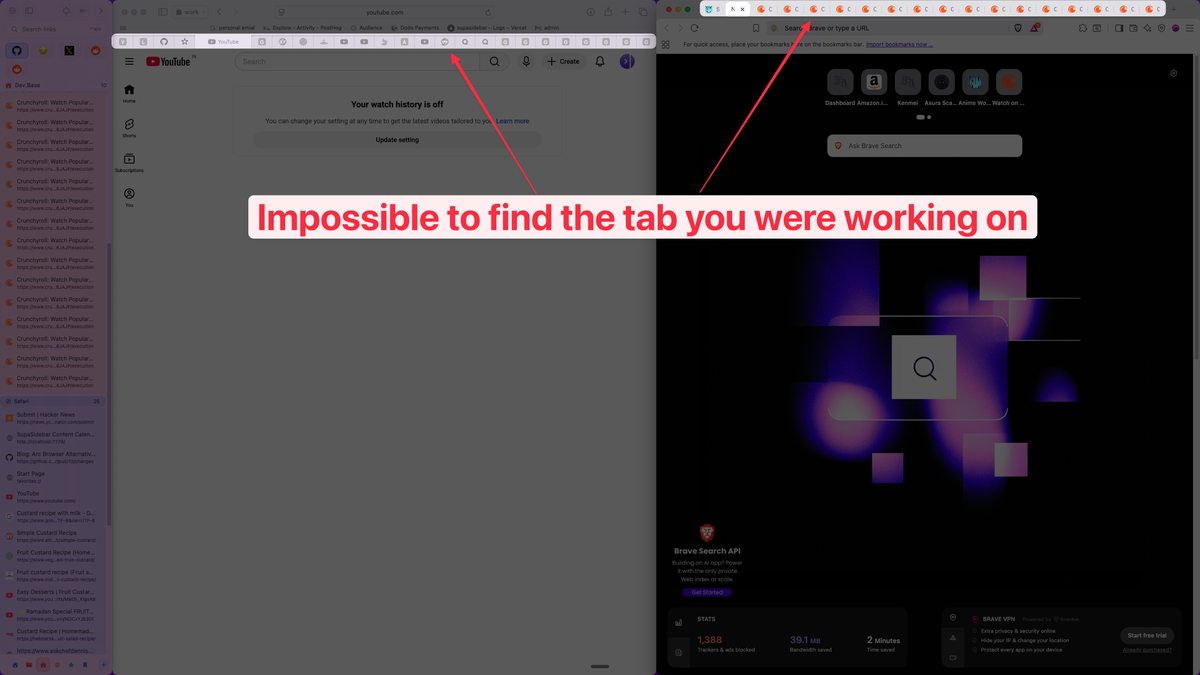
Horizontal tabs made sense when people had 5 tabs open. That was 2006. In 2026, the average browser session looks more like 30-50 tabs crammed into a strip where you can't read a single title.
Vertical tabs fix this. Instead of a horizontal row that gets more useless with every new tab, you get a sidebar list where every tab shows its full title, favicon, and maybe even a preview. You can actually find things.
The problem on Mac? Every browser handles this differently, and most don't handle it at all. I spent months testing every option before building SupaSidebar - here's what I found.

Firefox: Native Vertical Tabs That Work Well
Firefox added native vertical tabs in late 2024, and it's solid. No extensions needed - just go to Settings > Tabs and enable the sidebar.
What you get:
- A collapsible sidebar showing all your tabs vertically
- Tab grouping built in
- The horizontal tab bar automatically hides
- Works with Firefox's container tabs (nice for separating work/personal)
The catch? It's Firefox-only. If you also use Chrome for web dev or Safari for battery life, your vertical tabs don't follow you. And about 65% of Mac users use Safari or Chrome as their primary browser, not Firefox.
For Firefox-only users, native vertical tabs are hard to beat. For everyone else, keep reading.
Chrome on Mac: Native Vertical Tabs Arrived in 2026
Chrome added native vertical tabs on desktop in April 2026. Right-click any Chrome window and choose "Show Tabs Vertically" to move tabs into a sidebar.
The native option is the best starting point for Chrome-only users. It shows full page titles in a side layout and works with Chrome's tab groups. The catch is the same as every browser-native solution: it's Chrome-only. If you also use Safari for battery life, Firefox for research, or Brave for another profile, Chrome's sidebar doesn't follow you.
If you want more specialized behavior, you can still use Chrome extensions:
Sidebery (open source)
The most popular choice. Tree-style tab management, grouping, customizable panels. It's powerful but can feel overwhelming. Syncs with your Chrome profile but not with other browsers.
Vertical Tabs (by nicedoc)
Simpler alternative. Clean sidebar, basic tab listing. Less configuration, less confusion. Gets the job done if you just want a vertical list.
Tab Center Reborn / Tab Sidebar
Various other extensions exist, but most are unmaintained or have limited features compared to Sidebery.
The extension approach works, but there are real limitations. Extensions add memory overhead - Sidebery uses around 50-80MB on top of Chrome's already heavy footprint. They also only work inside Chrome, so they do not solve cross-browser tab management.
Safari: No Vertical Tabs. Period.
Safari doesn't support vertical tabs natively. There's no extension for it either, because Safari's extension API doesn't allow the kind of deep UI modifications that a vertical tab sidebar requires.
Apple's Tab Groups feature helps organize tabs, but it's still a horizontal layout. You're still squinting at tiny tab favicons when you have 15+ tabs open.
This is the biggest gap in Safari's feature set for power users. As one Reddit user put it:
"I was using Zen before but I abandoned it due to high RAM usage. But I miss its vertical tabs very much."
Safari users who want vertical tabs have exactly one option: use an external app that provides a sidebar alongside Safari. That's where standalone Mac sidebar apps come in.
Brave, Edge, and Other Chromium Browsers
Microsoft Edge
has had a vertical tab sidebar since 2021. It's actually well-implemented - you can pin it, collapse it, and it replaces the horizontal bar cleanly. But Edge on Mac has a smaller user base, and you're still locked into one browser.
Brave
doesn't have native vertical tabs. Same extension options as Chrome (Sidebery, etc.) with the same limitations.
Zen Browser
built its identity around vertical tabs and a sidebar-first design. It's beautiful. But as the quote above shows, RAM usage drives some users away. And it's another browser to manage.
Vivaldi
has extensive tab management including vertical tabs, stacking, and tiling. Feature-rich but heavy. Mac performance can be inconsistent.
The Real Problem: What If You Use Multiple Browsers?
Here's what nobody talks about in "best vertical tabs" articles.
Most Mac power users don't live in one browser. A common setup:
"I use different browsers for different workflows like Safari for social media, Chrome for web development, and Firefox for research."
That's a real quote from a Reddit user, and it matches what I hear from SupaSidebar users constantly. People use Safari for its battery efficiency and Apple ecosystem integration. Chrome for its dev tools and extension library. Sometimes Firefox for privacy.
None of the per-browser vertical tab solutions help here. Firefox's native sidebar doesn't know about your Chrome tabs. Sidebery in Chrome can't see your Safari sessions. You end up with fragmented tab management across 2-3 separate systems.
"I hate having bookmarks scattered across 3 different browsers."
This fragmentation is why I built SupaSidebar. Not as a browser extension, but as a standalone Mac app that sits alongside any browser.
SupaSidebar: One Vertical Sidebar for Every Browser
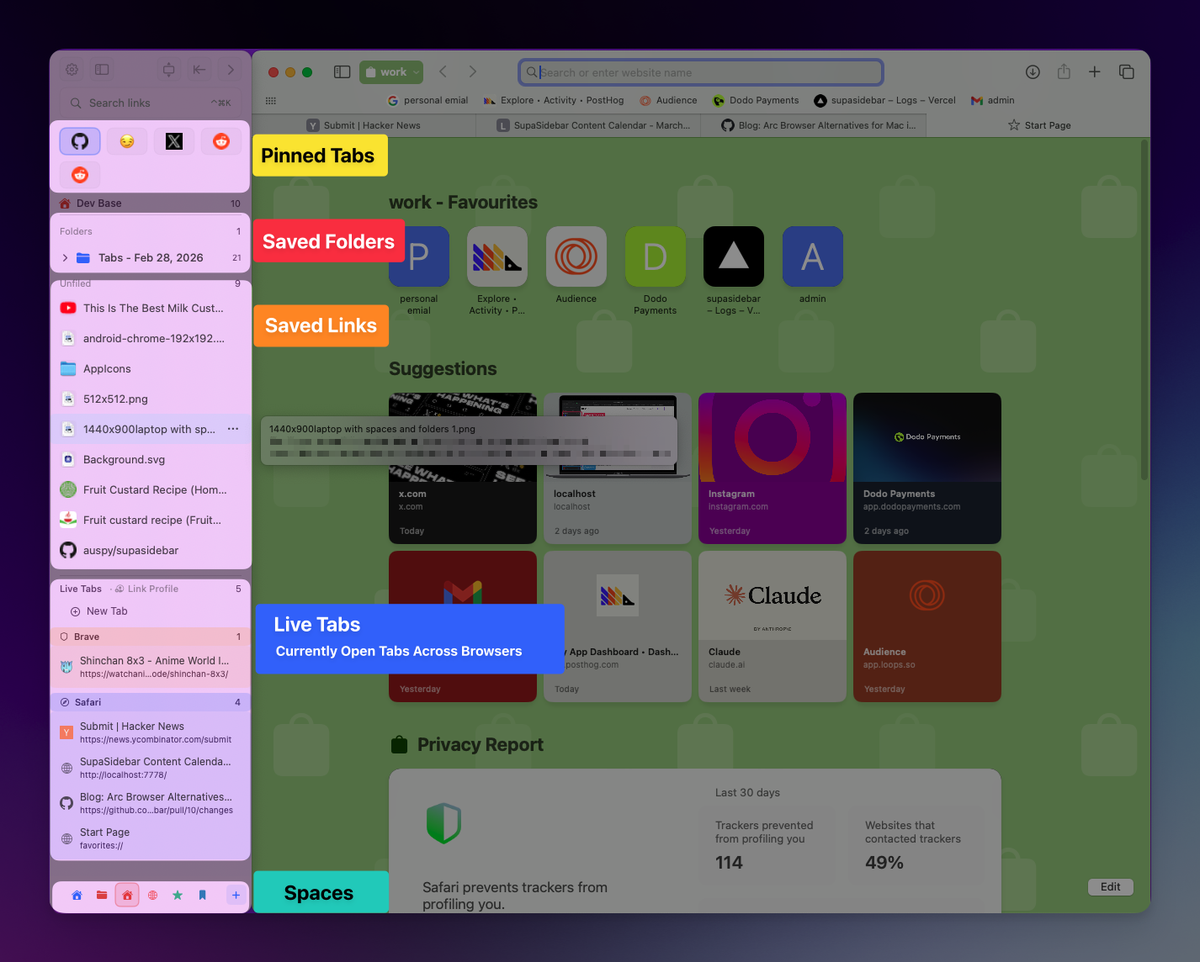
SupaSidebar is a macOS app (not a browser extension) that gives you a persistent vertical sidebar for tabs, bookmarks, files, and apps across Safari, Chrome, Firefox, Brave, and Edge.
How it's different from per-browser solutions:
- Cross-browser: One sidebar shows tabs from whatever browser you're using. Switch from Safari to Chrome and your sidebar stays.
- Not an extension: It's a native Mac app using Accessibility APIs. No browser permissions needed. Works even with Safari, which blocks sidebar extensions.
- Persistent: Your sidebar doesn't disappear when you close a browser. Saved tabs, bookmarks, and files stay organized in Spaces.
- More than tabs: Add local files, folders, and apps to your sidebar. It's a workspace launcher, not just a tab list.
SupaSidebar has been downloaded over 1,400 times since launch, with a free tier (3 spaces) and a $29.99 Personal plan. For comparison, most tab management extensions are free but single-browser, and Arcmark (the closest competitor) charges $4.99/month.
I'll be honest about limitations: SupaSidebar doesn't integrate as deeply with each browser's internals as a native solution like Firefox's sidebar does. You won't get tree-style tab nesting or container tab integration. It's designed for the cross-browser use case, not to replace a browser's built-in tab UI.
For more on how this works, check the comparison table above.
Comparison Table: Vertical Tabs on Mac
| Solution | Browsers Supported | Native/Extension | Hides Horizontal Bar | Cross-Browser Sync | Price | Best For |
|---|---|---|---|---|---|---|
| Firefox Native | Firefox only | Native | Yes | No | Free | Firefox-only users |
| Chrome Native | Chrome only | Native | Yes | No | Free | Chrome-only users |
| Sidebery (Chrome) | Chrome, Chromium | Extension | No | No | Free | Chrome power users who want tree-style tabs |
| Edge Vertical Tabs | Edge only | Native | Yes | No | Free | Edge users |
| Zen Browser | Zen only | Native | Yes | No | Free | Sidebar-first browsing |
| Vivaldi | Vivaldi only | Native | Yes | No | Free | Heavy customizers |
| SupaSidebar | Safari, Chrome, Firefox, Brave, Edge | Mac App | No (runs alongside) | Yes (iCloud) | Free / $29.99 Personal | Multi-browser users |
Which Should You Pick?
If you only use Firefox
Use the built-in vertical tabs. It's native, free, and well-integrated. No reason to add anything else.
If you only use Chrome
Use Chrome's built-in vertical tabs first. If you need tree-style nesting or heavier customization, Sidebery is the best extension. Budget 50-80MB of extra RAM for the extension approach.
If you use Safari at all
Your only real option for vertical-style tab management is a standalone app. Safari's extension limitations mean no in-browser solution exists. SupaSidebar adds a sidebar to Safari where Apple doesn't provide one.
If you use 2+ browsers
Skip per-browser solutions. They'll fragment your workflow. SupaSidebar (or a similar cross-browser tool) saves you from managing separate tab systems.
If you want the deepest tab features
Vivaldi or Zen. They offer tree-style tabs, stacking, and tiling that no extension or external app matches. The tradeoff is committing to a specific browser.
Frequently Asked Questions
Can you get vertical tabs in Safari on Mac?
No. Safari doesn't support vertical tabs natively, and Apple's Safari extension API doesn't allow the UI modifications needed for a vertical tab sidebar. The only way to get vertical-style tab management with Safari is through a standalone Mac app like SupaSidebar, which provides a persistent sidebar alongside any browser including Safari.
What's the best vertical tab extension for Chrome on Mac?
Chrome now has built-in vertical tabs, so start there if you only need a native sidebar layout. Sidebery is still the most full-featured open-source extension option if you want tree-style tabs, grouping, and panel customization. For a simpler extension setup, the "Vertical Tabs" extension by nicedoc provides a clean sidebar without the configuration overhead.
Does Chrome have built-in vertical tabs on Mac?
Yes. Google started rolling out native vertical tabs for desktop Chrome on April 7, 2026. Right-click any Chrome window and choose "Show Tabs Vertically." It is a Chrome-only feature, so it does not create one shared sidebar across Safari, Firefox, Brave, and other browsers.
Does Firefox have built-in vertical tabs on Mac?
Yes. Since late 2024, Firefox includes native vertical tabs. Enable them in Settings > Tabs. The horizontal tab bar hides automatically.
Is there a vertical tab solution that works across all browsers on Mac?
SupaSidebar is the only tool that provides a unified vertical sidebar across Safari, Chrome, Firefox, Brave, and Edge on Mac. It runs as a native macOS app (not an extension), so it works with every browser including Safari. The free tier includes 3 customizable spaces, and the Personal plan costs $29.99.
Do vertical tabs use more RAM than horizontal tabs?
The tabs themselves use the same memory either way - vertical is just a different layout. However, browser extensions that add vertical tab sidebars (like Sidebery for Chrome) add their own memory overhead, typically 50-80MB. Native implementations (Firefox, Edge) and standalone apps (SupaSidebar) add minimal or separate memory usage.