
By Kshetez Vinayak, founder of SupaSidebar. Last updated May 11, 2026.
TL;DR:
Safari is the only major Mac browser still without native vertical tabs in 2026. Chrome shipped them April 7, 2026, Firefox shipped them in version 136 on March 4, 2025, Edge has had them since 2021, and Brave added them in version 1.52. Safari's Web Extensions API also blocks extensions from replacing the horizontal tab bar, so no Safari extension can fix this either. Safari users have three real options: (1) toggle Safari's built-in Sidebar (View > Show Sidebar) which lists the active Tab Group's tabs vertically but keeps the horizontal bar visible, (2) the compact-toolbar hack that shrinks horizontal tabs to icons, or (3) an external Mac sidebar app like SupaSidebar that runs alongside Safari and adds a true Arc-style vertical tab panel across 25+ browsers. The comparison table and decision framework below explain what each option gives you, and sources are linked inline at each claim.
Looking for something specific?
- Want the broader Mac vertical-tabs landscape (all browsers)? -> Vertical Tabs on Mac: Every Option Compared (coming soon)
- Just want a sidebar in Safari (not tabs specifically)? -> Safari Sidebar Extension Guide
- Want the 5-step setup for adding a sidebar to Safari? -> How to Add a Sidebar to Safari (2026 Setup Guide)
- Want the Mac sidebar app category overview? -> Mac Sidebar App (the pillar)
Does Safari Have Vertical Tabs?
No, not in the way every other major browser now does. Safari does not let users replace the horizontal tab strip with a vertical sidebar list. As of Safari 18 on macOS 15 Sequoia and Safari 26 on macOS Tahoe, the horizontal tab bar is fixed and not configurable to vertical layout.
This makes Safari the last holdout on macOS. As of mid-2026 every other major browser ships native vertical tabs: Edge since 2021, Firefox since version 136 on March 4, 2025, Brave since 1.52 (per Brave's own announcement), and Chrome as of April 7, 2026 (right-click any window > "Show Tabs Vertically"). Safari is the exception.
What Safari does have is a Sidebar (toggled via View > Show Sidebar or the sidebar icon in the toolbar) that, when set to the Tab Groups view, lists the tabs in the currently selected Tab Group vertically. Per Apple's Safari User Guide, that sidebar is the same panel that holds Bookmarks and Reading List - it is a panel, not a tab-bar replacement.
Three things make Safari's Sidebar fall short of what most users mean by "vertical tabs":
- The horizontal tab bar stays visible above the page. The sidebar adds a vertical list; it does not replace anything.
- The sidebar can be toggled off easily and is not designed to stay open all the time. It also shrinks the website content area when open.
- Tabs only appear inside a Tab Group. Loose tabs that are not assigned to a Tab Group do not show in the sidebar list.
A Reddit user on r/Safari described the gap exactly: "vertical tabs on the left side. (I only wish the side bar had a setting to make it float on the top of the website rather than shrinking the website contents)" - r/Safari thread, Coming back from Arc. The sidebar shows tabs vertically, but it eats space and is not a true persistent vertical tab strip.
The Three Real Options for Safari Users in 2026
| Option | What you get | What it doesn't fix | Best for |
|---|---|---|---|
| Safari Sidebar (Tab Groups view) | Vertical tab list of the active Tab Group | Horizontal tab bar stays; shrinks page content; only tabs in a Tab Group are listed | Light Safari users who already use Tab Groups |
| Compact-toolbar hack | Horizontal tabs collapse to small favicons; minimal toolbar | Still horizontal; no real list; ~4 tabs before titles vanish | Minimalists with few open tabs |
| External Mac sidebar app (e.g., SupaSidebar) | Persistent vertical sidebar with tabs, bookmarks, pinned items, Spaces; works across 25+ browsers | Requires Accessibility + Automation permissions; runs as a separate macOS app, not inside Safari | Users who want Arc-style vertical tabs and use more than one browser |
| Switching browsers (Firefox, Edge, Zen) | Native vertical tabs inside the browser | Locked to that one browser; loses Safari's battery and Apple ecosystem fit | Single-browser users willing to leave Safari |
The fourth row is technically not a Safari solution - it is the "give up on Safari" path. The first three are the actual Safari options.
Option 1: Safari's built-in Sidebar with Tab Groups
The fastest path is using what Safari already ships. View > Show Sidebar (or Shift+Cmd+L), then click the Tab Groups icon at the top of the sidebar. Tabs in the active Tab Group appear in a vertical list inside the sidebar panel.
How to set it up so it is as close to "vertical tabs" as Safari allows:
- Open Safari Settings > Tabs and set the layout to "Compact" (on macOS Tahoe, this layout requires 26.4 or later) - this minimizes the horizontal tab bar.
- View > Show Sidebar to open the left panel.
- Click the Tab Groups disclosure arrow at the top of the sidebar to see the tab list.
- Optional: assign all open tabs to a Tab Group ("Move to Tab Group > New Empty Tab Group") so the sidebar lists them.
The catch: Safari's sidebar was not designed as a persistent tab UI. It shrinks the website content area when open, has no hover-to-close on individual tabs, no count badges, and no drag-to-reorder behavior comparable to Arc. It is functional for 5-15 tabs in a single group. Past that, it falls behind even Firefox's native vertical tabs.
Option 2: The compact-toolbar hack
The closest pure-Safari workaround was documented by Reddit user TheDacripla in r/Safari on macOS 26.5. The steps:
- Safari Settings > Tabs > set layout to Compact (on macOS Tahoe, this layout requires 26.4 or later).
- View > Customize Toolbar - remove everything from the toolbar.
- Add back only the Sidebar button, the Tabs / URL field, and Share.
- Add flexible spacers to the right side to push everything to the left.
What this gets the user: a minimal toolbar with horizontal tabs shrunk to icon size. After about four tabs, titles disappear and only favicons remain - effectively a horizontal favicon strip, not a vertical list. It is the most "vertical-feeling" pure-Safari setup, but it is still horizontal. It does not solve the underlying problem of finding a specific tab in a large set.
The author themselves notes the limit: "The result is something that is somewhat close, but somewhat redundant because you have your tabs in 2 places."
Option 3: An external Mac sidebar app
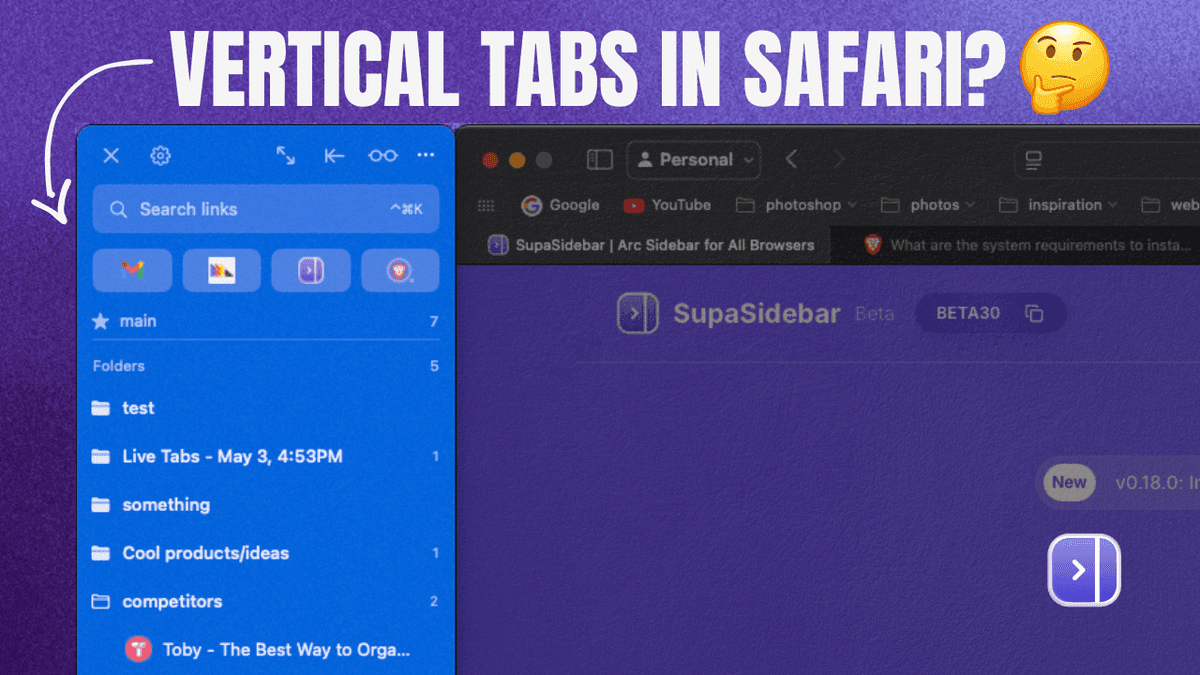
Because Safari's UI is locked, the only way to get a true vertical tab strip alongside Safari is to run a separate macOS app that displays one. SupaSidebar is built for this exact use case. It runs as a menu bar app, opens a sidebar panel docked to either screen edge, and reads Safari's open tabs via AppleScript and the macOS Accessibility API.
What this gives Safari users that the first two options do not:
- A persistent vertical panel that stays visible (does not collapse when focus changes)
- Live Tabs across all 25+ supported browsers, not just Safari - tabs from Chrome, Firefox, Arc, Brave, and others appear in the same panel
- Spaces (workspaces) for separating work tabs from personal, similar to Arc Spaces
- Pinned items that persist across all Spaces
- A global Command Panel (⌘⌃K) that fuzzy-searches across saved links, recent items, and live browser tabs in one query
Trade-offs: Safari users granting Accessibility and Automation permissions in System Settings > Privacy & Security is a one-time step. The architecture is different from a browser extension - the Mac Sidebar App pillar covers why the category exists in 2026.
A John Boyden email to support summarized the Safari-user version of this problem: "very excited that it solves a problem I've been trying to solve for a long time" - the long-time problem being wanting "tabs, tab groups, and bookmarks vertically listed simultaneously" in Safari, which Safari's own sidebar cannot do.
Why No Safari Extension Can Add Real Vertical Tabs
Searches for "safari vertical tabs extension" land on a near-empty result page in the Mac App Store. The reason is architectural, not a gap in the developer ecosystem.
Per Apple's Safari Web Extensions documentation, Safari extensions run in an App Sandbox. They can:
- Modify webpage content (read and rewrite HTML/CSS/JS inside a tab)
- Add toolbar buttons and popovers
- Read tab metadata (title, URL) with user permission
They cannot:
- Replace or hide Safari's tab bar
- Inject persistent UI into Safari's browser chrome (outside a webpage)
- Render a sidebar that survives switching tabs (any extension-rendered panel is scoped to the active webpage's iframe)
This is by design. Apple's macOS Human Interface Guidelines treat Safari's UI as part of the OS, not as a surface third parties can rewrite. The same constraint applies to all Safari extensions, not just sidebar ones - which is why Vivaldi-style tab stacking, Arc-style spaces, and tree-style tabs do not exist as Safari extensions either. For a broader look at what Safari extensions actually can do, see Best Safari Extensions.
The architectural fence means the path forward for Safari + vertical tabs is either (a) Apple ships it natively (no indication that is coming - and the rest of the field has now moved past Safari, with Chrome shipping vertical tabs to stable on April 7, 2026), (b) external app alongside Safari, or (c) switch to a browser whose UI can carry vertical tabs natively (Firefox, Edge, Brave, or Chrome).
Comparison: Safari Vertical-Tabs Options vs Other Browsers
| Browser/tool | Native vertical tabs? | How to enable | Honest take |
|---|---|---|---|
| Safari (built-in) | No - Tab Groups sidebar only | View > Show Sidebar > Tab Groups | Sidebar shrinks page; horizontal bar stays; not a tab-bar replacement |
| Firefox 136+ | Yes (shipped March 4, 2025) | Right-click toolbar > Turn on Vertical Tabs | The cleanest native implementation; tabs sidebar + updated sidebar in one pass |
| Microsoft Edge | Yes (since 2021) | Settings > Appearance > vertical tabs, or toolbar button | Mature, well-implemented. Note: Edge's separate "sidebar app list" is being retired in 2026, but vertical tabs are unaffected |
| Brave 1.52+ | Yes (per Brave's announcement) | Settings > Appearance > Use vertical tabs | Functional but basic: full titles, collapsible to icons, no thumbnail previews. Works well for 20-40 tabs; falls behind on 50+ (per TabMark's 2026 browser-tab management review) |
| Chrome (Apr 2026+) | Yes (rolled out April 7, 2026) | Right-click any window > Show Tabs Vertically | Just shipped to stable; titles or icons-only modes. Available on macOS, Windows, Linux, ChromeOS - not mobile |
| Arc | Vertical sidebar (browser core) | Default UI | Arc entered maintenance mode May 27, 2025, per The Browser Company |
| Zen Browser | Yes (vertical-tab-first) | Default UI | Built around vertical tabs but higher RAM use per Reddit testimony |
| SupaSidebar (Mac sidebar app) | Adds a vertical sidebar alongside any browser, including Safari | Install on Mac, grant Accessibility + Automation | Works across 25+ browsers including Safari, Chrome, Firefox, Arc, Brave, Zen, Dia. The only option that gives Safari a true Arc-style sidebar |
A Reddit user on r/Safari put one browser-switch trade-off plainly: "I was using zen before but i abandon it due to high ram usage. But i miss its vertical tab very much" - r/Safari, Vertical Tab Setup thread. The Brave path has a similar trade: Brave's vertical tabs work, but as a TabMark 2026 review notes, "it's not optimized for extreme tab hoarding". Switching browsers solves vertical tabs but usually means giving up the reason most people picked Safari (battery, Apple ecosystem, performance on Apple Silicon).
Safari-Specific Caveats When Using an External Sidebar App
Safari is more sandboxed than Chrome or Firefox. This produces some real limitations even when using a sidebar app that supports Safari:
- Single-window tab detection limits. AppleScript can read Safari's tabs cleanly, but multi-window setups in Safari can require manually picking which window the sidebar reflects. Chrome's AppleScript model gives a cleaner multi-window read.
- No per-tab audio indicator. Safari does not expose per-tab audio state via AppleScript in the same way Chrome does. Sidebar apps cannot show a "muted" icon next to a specific Safari tab.
- Slight polling delay. SupaSidebar polls running browsers every 0.5 seconds when the sidebar is visible and every 5 seconds when hidden. Safari's AppleScript response can take a beat longer than Chrome's on the same machine, especially under heavy CPU load.
- Permissions required. Accessibility permission (System Settings > Privacy & Security > Accessibility) and Automation permission for Safari (System Settings > Privacy & Security > Automation > SupaSidebar > Safari toggle on) are both needed. Both are reversible at any time.
None of these are dealbreakers for most Safari users, but they are honest limits worth knowing before installing.
Conclusion: Picking what to use
Safari does not have native vertical tabs in 2026 and is unlikely to ship them given Apple's UI consistency constraints. The three real options for Safari users are: (1) Safari's Tab Groups sidebar, (2) the compact-toolbar hack, or (3) an external Mac sidebar app that runs alongside Safari.
Light Safari users with one or two Tab Groups:
Safari's built-in Sidebar (View > Show Sidebar, Tab Groups view) is the lowest-friction option. Zero install, no permissions.
Safari minimalists with fewer than ten open tabs:
the compact-toolbar hack is enough. Shrink tabs to icons and live with the horizontal layout.
Power users who want Arc-style vertical tabs and use more than one browser:
an external Mac sidebar app is the only path that delivers a persistent vertical tab strip alongside Safari. SupaSidebar covers this case across 25+ browsers.
Single-browser users willing to leave Safari:
every other major browser now ships native vertical tabs. Firefox 136 (March 4, 2025) and Microsoft Edge (since 2021) have the most mature implementations on Mac. Chrome added them on April 7, 2026 (right-click any window > "Show Tabs Vertically"). Brave 1.52+ has them too but reviews describe the implementation as functional but basic - fine for 20-40 tabs, falls behind on heavy tab loads. Zen Browser is built around vertical tabs but higher RAM use is a real trade-off. Picking any of these means giving up the reason most people use Safari (battery, Apple ecosystem fit).
Try SupaSidebar (free tier) if option 3 fits the workflow. The cross-browser vertical-tabs comparison for every Mac browser is coming soon.
Why we recommend SupaSidebar
SupaSidebar is a macOS app that brings Arc's sidebar to every browser - one sidebar for tabs, bookmarks, files, and apps across 25+ browsers including Safari, Chrome, Firefox, Arc, Zen, Vivaldi, Brave, Helium, and Dia. For Safari users specifically, it solves the gap Apple has left open: a persistent vertical tab panel that stays visible, shows tabs grouped by browser, and is searchable from a single Command Panel (⌘⌃K) across every browser running on the Mac.
Frequently Asked Questions
Does Safari have vertical tabs?
No, not in the sense of replacing the horizontal tab bar with a vertical list. Safari has a Sidebar panel (View > Show Sidebar) that, when set to the Tab Groups view, lists tabs in the active Tab Group vertically - but the horizontal tab bar stays visible above the page, and the sidebar shrinks the website content area when open.
Can I install a vertical tabs extension on Safari?
No working Safari extension fully replaces the horizontal tab bar with vertical tabs. Apple's Safari Web Extensions API prevents extensions from modifying Safari's browser chrome - they can read tab metadata and modify webpage content, but they cannot hide or replace the tab strip. The only path to a true vertical tab strip alongside Safari is an external macOS app.
Will Safari ever add vertical tabs natively?
There is no public indication Apple plans to. Per Apple's macOS Human Interface Guidelines, Safari's UI is designed for consistency across macOS, iPadOS, and iOS, and vertical tabs do not fit that cross-platform constraint. Safari 26 on macOS Tahoe continues with horizontal tabs only, even as every other major browser - Chrome, Firefox, Edge, and Brave - has now shipped them.
How is Safari's Tab Groups sidebar different from vertical tabs?
Safari's Tab Groups sidebar lists tabs vertically inside a panel, but it does not replace the horizontal tab bar - both are visible at the same time. Tab Groups also require explicitly assigning tabs to a group; loose tabs do not appear in the sidebar list. True vertical tabs (Firefox 136+, Edge, Brave 1.52+, Chrome since April 7 2026, Arc) replace the horizontal bar entirely with a single vertical list of every open tab.
What about iPad Safari vertical tabs?
iPadOS Safari has a Sidebar panel similar to macOS Safari, with the same limitations - tabs appear vertically only inside Tab Groups, and the horizontal tab bar stays visible. iPad Safari also has no extension capable of adding true vertical tabs, for the same architectural reasons as macOS Safari.
Is the compact-toolbar hack a real vertical-tabs solution?
No. The compact-toolbar hack shrinks Safari's horizontal tabs to favicon-sized icons in a minimal toolbar - it does not produce a vertical list. The author's own description: "somewhat close, but somewhat redundant because you have your tabs in 2 places." Useful for minimalists with few open tabs; not a Firefox-style vertical-tabs replacement.
Does SupaSidebar work in Safari like a Safari extension?
No. SupaSidebar runs as a standalone macOS menu bar app, not a browser extension. It reads Safari's tab data via AppleScript and renders a sidebar panel docked next to the Safari window. The same app works alongside Chrome, Firefox, Arc, Brave, and 20+ other browsers - the Mac Sidebar App pillar explains the category in detail.
By Kshetez Vinayak, founder of SupaSidebar. Last updated May 11, 2026.