
By Kshetez Vinayak, founder of SupaSidebar. Last updated June 22, 2026.
Looking for something specific?
- Need a Mac-only bookmark manager? → Best Bookmark Manager for Chrome on Mac in 2026 (the pillar)
- Importing bookmarks one-time from one browser to another? → that is a different job; covered in the cluster's import/export satellite (publishing soon).
- Comparing every bookmark tool? → see the pillar above.
TL;DR:
No browser syncs bookmarks to a different browser. Chrome syncs to Chrome via your Google account, Safari syncs to Safari via iCloud, Firefox syncs to Firefox via Firefox Sync. Cross-browser bookmark sync - keeping the same bookmarks usable in Chrome and Safari on the same Mac - does not exist as a native feature in any of these. The two real options in 2026 are (1) a cloud bookmark service that publishes a browser extension to every browser you use (Raindrop.io is the most common pick, $38/year), or (2) a Mac sidebar app that captures and serves bookmarks at the macOS level, outside any single browser (SupaSidebar, free tier). This post explains why native sync stops at the browser boundary, where each route works, and where each one breaks.
Cross-browser bookmark sync is the ability to save a bookmark in one browser and have it available, with the same title and URL, in a different browser on the same Mac without manual export or copy-paste. It is a different problem from "Chrome sync across Macs" (which Chrome solves on its own) and from "import bookmarks from Chrome to Safari" (a one-time transfer, not a live sync). What follows covers Mac on macOS 14+ and the 32+ browsers SupaSidebar integrates with, including Chrome, Safari, Firefox, Arc, Brave, Edge, Vivaldi, and Dia.
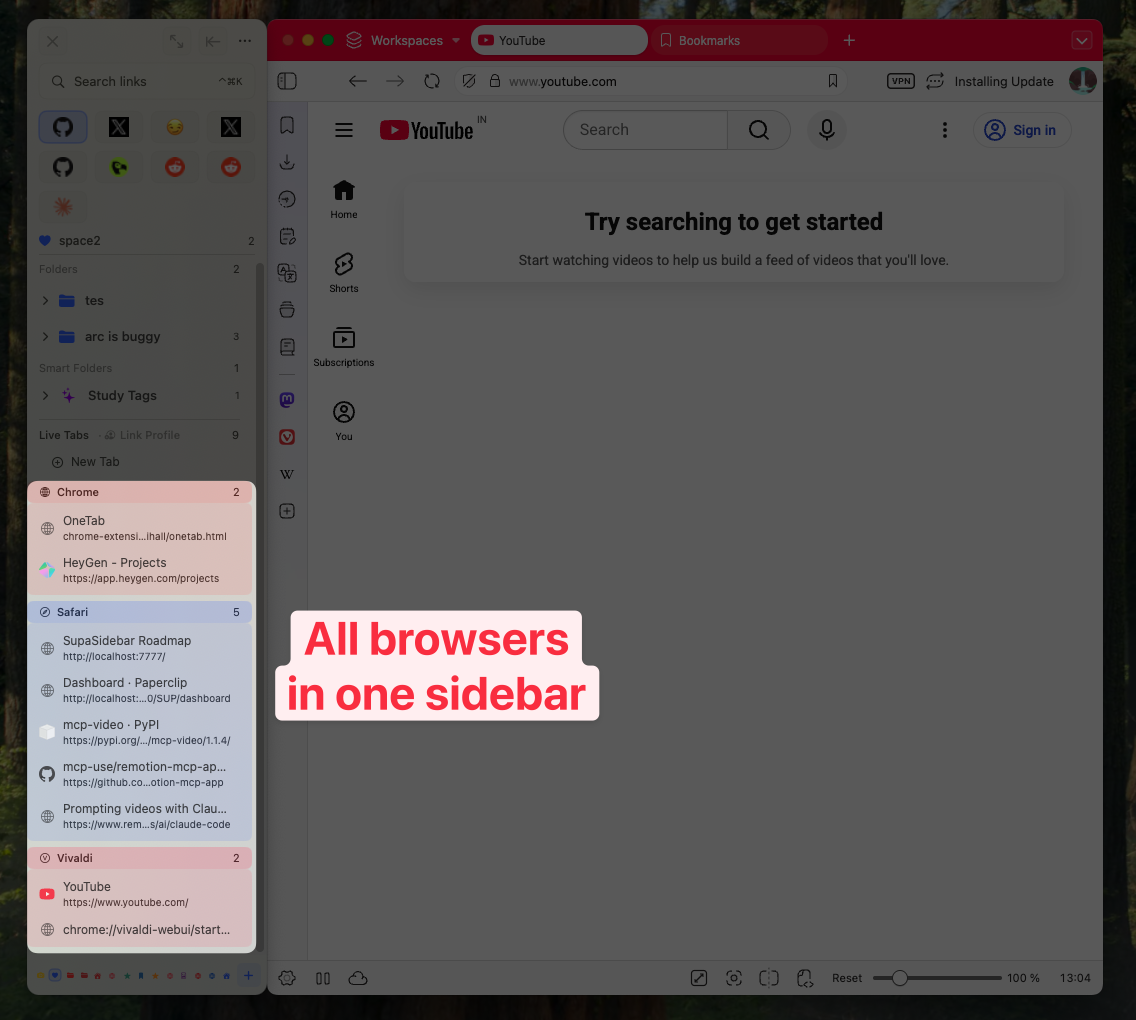
Why bookmarks do not sync between browsers natively
Every major browser ships its own sync service. None of them talk to each other. The list:
| Browser | Native sync | Where bookmarks live | Crosses to other browsers? |
|---|---|---|---|
| Chrome | Yes, via Google account (docs) | Google sync servers | No |
| Safari | Yes, via iCloud Bookmarks (docs) | Apple iCloud | No |
| Firefox | Yes, via Firefox Sync, Mozilla account (docs) | Mozilla servers | No |
| Edge | Yes, via Microsoft account | Microsoft servers | No |
| Arc | Yes, via Arc account | The Browser Company servers | No |
| Brave | Yes, via Brave Sync (P2P, no account) | Encrypted device-to-device | No |
| Vivaldi | Yes, via Vivaldi.net account | Vivaldi servers | No |
Each one solves the same problem - keep the user's bookmarks consistent across their own copies of this browser - and stops there. Google has no reason to push Chrome bookmarks into Safari. Apple has no reason to surface iCloud bookmarks inside Chrome. The native sync line is the browser brand line, and it does not move.
This is fine for someone who lives entirely in one browser. It breaks the moment a Mac user opens more than one. Per the Statcounter macOS browser share data for the United States in April 2026, Safari and Chrome each hold roughly a third of the desktop browser market on macOS, and Firefox plus Edge plus the Chromium-family minorities (Brave, Arc, Vivaldi) make up the remaining third. In practice, that means a typical Mac household has at least two browsers in active use - Chrome for sites locked to a work Google account, Safari for personal browsing and battery, sometimes Firefox or Arc for one specific job.
The bookmarks for those workflows end up scattered. As one Reddit user in r/macapps put it: "I hate having bookmarks scattered across 3 different browsers." That is the literal user-language version of this problem. The same person later said: "Cross-browser bookmark fragmentation is such an underrated pain point." Both quotes capture what "no native cross-browser sync" feels like in daily use.
The two real ways to sync bookmarks between Chrome and Safari (and any other browser)
There are exactly two patterns that work in 2026. Both are external to the browsers. Each has a different cost.
Option 1: A cloud bookmark service with per-browser extensions
A service like Raindrop.io, Pinboard, or Anybox runs in the cloud, holds your bookmarks, and ships a separate browser extension for each browser you use. You install the Chrome extension, the Safari extension, the Firefox extension, and each one talks to the same cloud account. Save a page in Chrome and the bookmark appears in the Safari extension a few seconds later.
What works:
- Cross-platform - the same account also serves Windows, Linux, iOS, Android, and the web
- Mature - Raindrop has been around since 2013, Pinboard since 2009
- Visual layouts - Raindrop in particular shows bookmarks as cards with thumbnails
What breaks:
- It is not really "in" any browser. The Chrome extension is a panel you open. The Safari extension is a different panel. The bookmark store is the cloud account, not the browser's own bookmark bar.
- Every browser needs its own extension installed, signed in, and kept updated. Firefox extension and Chrome extension are different builds maintained on different review cadences.
- Pricing is annual. Raindrop is $3/month or $38/year for Pro. Pinboard is $22/year ($39/year archival). Anybox is a one-time ~$40.
- Safari has the smallest extension ecosystem of any major browser; some bookmark services do not bother with a Safari build.
- The bookmarks still live in a cloud silo. Closing your Raindrop account loses the bookmarks unless you exported first.
When this route wins: You also use Windows or Linux, or you want the same bookmarks on iOS/Android via the same vendor, or you specifically want the visual card layout Raindrop ships with.
Option 2: A Mac sidebar app that captures and serves bookmarks at the macOS level
A native macOS app captures bookmarks via a global keyboard shortcut, stores them outside any single browser, and presents them in a floating sidebar that any browser can pull from. SupaSidebar is the option in this category. It uses Apple's Accessibility and AppleScript APIs - the same APIs that power Alfred, Raycast, and BetterTouchTool - to read the current tab from whatever browser is in front, then writes the bookmark into a Mac-level store that syncs across Macs via iCloud.
What works:
- One bookmark surface usable from any browser. ⌘⌃S in Chrome saves to the same store that ⌘⌃S in Safari saves to. There is no per-browser extension to install.
- Bookmarks open in whichever browser is correct for the link. Air Traffic Control rules can be configured so that figma.com always opens in Chrome with your work profile, github.com always opens in Firefox, and so on.
- iCloud sync across Macs. A Swiss-French Mac blogger described the experience like this: "I installed my SupaSidebar on my new Mac, and without doing a thing, boom, it synced with my other two Macs." That is iCloud-based, Mac-to-Mac sync, with no SupaSidebar account.
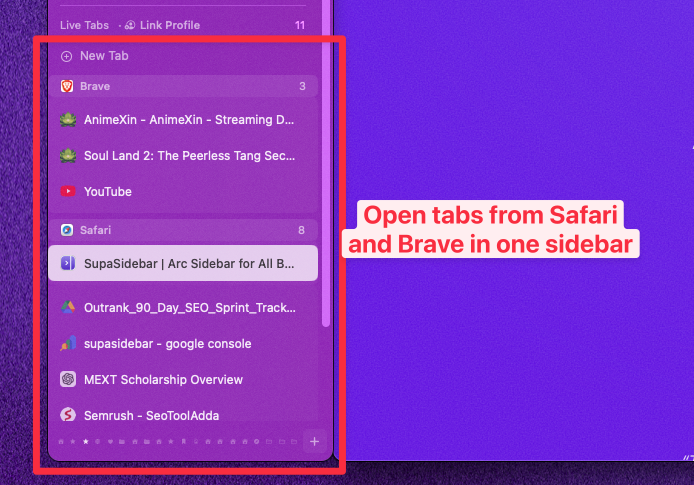
- 32+ browsers integrated: Safari, Chrome, Firefox, Arc, Brave, Edge, Vivaldi, Zen, Dia, Comet, Orion, Wavebox, Helium, plus Chrome/Firefox/Edge/Brave/Vivaldi beta and dev channels.
- The free tier covers everyone except people who need more than 3 Spaces.
What breaks:
- Mac only. No iOS, no Windows, no Linux, no web client. If you need the same bookmarks on a Windows machine at work, this is not the answer.
- Not a cloud-bookmark-as-a-service product. There is no public URL for a bookmark, no web interface, no shared collections feature.
- iCloud sync is Mac-to-Mac. iCloud does not currently let third-party apps push data to iOS Safari, so the sync line stops at macOS.
- It does not import Chrome's existing bookmark bar into itself automatically; the import is a one-time action covered in a separate post in this cluster.
When this route wins: You stay on Mac across all your machines, you use 2+ browsers daily on each Mac, and you want one keyboard shortcut to save and one keyboard shortcut to find.
Option 1 vs Option 2, side by side
| Capability | Cloud service (Raindrop, Pinboard, Anybox) | Mac sidebar app (SupaSidebar) |
|---|---|---|
| Same bookmarks usable in Chrome and Safari | Yes, via extensions | Yes, at the macOS level (no extensions) |
| Works on Windows / Linux | Yes | No (Mac only) |
| Works on iOS / Android | Yes (vendor app or web) | No |
| Per-browser extension required | Yes (one per browser) | No |
| Open bookmark in a specific browser/profile | No (opens in current browser) | Yes (Air Traffic Control rules) |
| Account / sign-up required | Yes | No (iCloud handles sync) |
| Cost (2026) | $0-$39/year typical | Free tier (3 Spaces) |
| Visual card layout | Yes (Raindrop) | No (text + favicon) |
| Sync across multiple Macs | Yes (via account) | Yes (via iCloud, no account) |
| Survives the vendor going down | Risky (export needed) | Lower (data is local + iCloud) |
The split is clean. If your work crosses operating systems, Option 1 is the answer. If everything is Mac and you want the bookmarks to feel like part of the OS rather than part of any one browser, Option 2 is the answer. The two routes are not redundant - some people run both (Raindrop for archival research with public-share links, SupaSidebar for the day-to-day Mac sidebar).
What about exporting Chrome bookmarks and importing them into Safari?
That works once. Chrome can export bookmarks as an HTML file (chrome://bookmarks/ → ⋮ menu → "Export bookmarks"), and Safari can import that HTML file (File → Import From → Bookmarks HTML File). Firefox can read and write the same Netscape Bookmark file format. After the import, both browsers hold a copy, and from that point on they drift apart - any new bookmark saved in Chrome stays in Chrome, any new bookmark in Safari stays in Safari.
So one-time export-import gives a shared starting point. It does not give live sync. For live sync between Chrome and Safari, the two options above are still the answer.
The one-time transfer is its own job, covered in the cluster's import-bookmarks satellite (publishing soon).
Why SupaSidebar exists in this category
The cross-browser bookmark fragmentation problem is the exact reason the project exists. Per a recent r/macapps thread on multi-browser workflows: "I've been wanting a way to manage my multiple browsers from a single source." SupaSidebar is the implementation of that wish on macOS specifically.
Three concrete examples of how it shows up in daily use:
-
Save once, open in the right browser.
⌘⌃S on a Figma file in Safari saves the bookmark to a "Work" Space. A configured Air Traffic Control rule says "anything on figma.com opens in Chrome with the Work profile." Next time the bookmark is opened from the sidebar, it lands in Chrome regardless of which browser is in front. None of the cloud bookmark services do this routing across browsers.
-
Search across every browser at once.
⌘⌃K opens a Command Panel that fuzzy-matches across all saved bookmarks and the live tabs currently open in Chrome, Safari, Firefox, Arc, and any of the other supported browsers. The same query - say, "linear" - returns the saved Linear bookmark plus any open Linear tab in any browser. The Command Panel is a separate window, not a per-browser bookmark menu.
-
iCloud sync without an account.
A new Mac signed into the same Apple ID picks up the bookmark store automatically the first time SupaSidebar runs. No account creation, no password reset email, no "trust this device" prompt from a vendor.
Trade-offs to be honest about: SupaSidebar does not sync to iOS or to a Windows machine. It is a macOS app. iCloud syncs the SupaSidebar bookmark store across Macs; it does not push to iOS Safari, because iOS Safari does not accept third-party bookmark writes. If iOS is required, Raindrop or Apple's own iCloud Bookmarks remain the only options.
Conclusion: which route to pick
Cross-browser bookmark sync is a third-party job in 2026. Pick the route that matches the device spread.
- All-Mac household, 2+ browsers daily, no iOS dependency: SupaSidebar. The Mac-level capture is the right primitive when every machine is a Mac. The free tier handles most setups.
- Mac + Windows or Mac + Linux, 2+ browsers daily: Raindrop.io. The cross-OS coverage is the deciding factor and Raindrop is the most mature option.
- Mac + iOS, single browser ecosystem (Safari only or Chrome only): native sync inside that browser is fine. No third party needed.
- Mac + iOS, multiple browsers: Raindrop on every browser; mark a copy in iOS Safari as the second source.
- Archival, long-term link rot protection: Pinboard archival tier ($39/year) - this is a different job than sync and worth running alongside whatever else.
For most multi-browser Mac users in 2026, the answer is the second category, and SupaSidebar is the option built specifically for that case. Try the free tier.
Why we recommend SupaSidebar for cross-browser bookmark sync on Mac
SupaSidebar is a macOS app that brings Arc's sidebar to every browser - one sidebar for tabs, bookmarks, files, and apps across 32+ browsers including Safari, Chrome, Firefox, Arc, Vivaldi, Brave, Helium, and Dia. For cross-browser bookmark sync specifically, the bookmark store lives outside any one browser and is reachable via a global keyboard shortcut from any of them, with iCloud-based sync between Macs and no SupaSidebar account required. macOS 14+, free tier available.
Frequently asked questions
Can I sync bookmarks between Chrome and Safari on Mac?
Not with the browsers alone. Chrome syncs through Google, Safari through iCloud, and neither service writes to the other. The two working options on Mac are a cloud bookmark service with per-browser extensions (Raindrop.io is the common pick) or a Mac sidebar app that holds bookmarks at the OS level (SupaSidebar). Both keep the same bookmarks usable from Chrome and Safari without manual export.
How do I sync bookmarks between Firefox and Chrome?
Firefox Sync only syncs to other Firefox installations, and Chrome sync only syncs to other Chrome installations. To keep the same bookmarks usable in both, install a cloud bookmark service like Raindrop.io on each browser, or use a Mac-level tool like SupaSidebar that captures bookmarks outside the browser. A one-time HTML export-import gives a shared starting point but not live sync.
Is there a way to sync bookmarks across browsers without an account?
Yes, but only on Mac. SupaSidebar uses iCloud (your existing Apple ID) to sync bookmarks across Macs and does not require its own account. Every cloud bookmark service (Raindrop, Pinboard, Anybox) requires creating a vendor account.
How do I sync bookmarks across devices?
For one browser across multiple devices, use that browser's native sync - Chrome's Google sync, Safari's iCloud, Firefox Sync. For multiple browsers across multiple devices, use a cross-browser service: SupaSidebar covers Mac-to-Mac across 32+ browsers, Raindrop covers cross-platform (Mac, Windows, Linux, iOS, Android) within whichever browsers each platform supports.
Does iCloud sync Chrome bookmarks?
No. iCloud syncs Safari bookmarks. Chrome bookmarks live in Chrome's own sync service tied to a Google account. The iCloud Bookmarks extension that Apple ships for Windows Chrome and Firefox is the exception - that extension copies iCloud Bookmarks into the Windows browser, but it does not move Chrome bookmarks into iCloud. On Mac, no Apple software pushes Chrome bookmarks anywhere.
Will my bookmarks survive switching to a new Mac?
Yes, if they are stored somewhere with sync. Safari bookmarks ride iCloud. Chrome bookmarks ride your Google account. Firefox bookmarks ride Firefox Sync. SupaSidebar bookmarks ride iCloud (no account). Bookmarks stored only in the local browser without sync turned on do not survive a clean machine setup - export them as HTML first.
Can I share bookmarks across browsers without installing anything?
Only via one-time HTML export and import, which is not live sync. Chrome → Export bookmarks → import the HTML into Safari or Firefox. The result is a static copy; future bookmarks in either browser stay in that browser. Live cross-browser sync requires either a cloud service with extensions or a Mac sidebar app.
Written by Kshetez Vinayak, founder of SupaSidebar. Last updated June 22, 2026.