
TL;DR:
The best bookmark manager for Chrome on Mac in 2026 is SupaSidebar - it's the only macOS app that gives Chrome users one bookmark surface that also works across Safari, Firefox, Arc, Zen, Vivaldi, and Brave. Stay inside Chrome only? Raindrop.io is the strongest cloud option ($38/year). Want a pure read-later replacement now that Pocket is dead? GoodLinks ($9.99 one-time). Chrome's built-in bookmarks fail past 100 links - here's what to use instead.
A bookmark manager for Chrome on Mac is a tool that saves, organizes, and retrieves web links beyond what Chrome's built-in bookmark bar can do. It can be a Chrome extension that syncs to a cloud service (Raindrop.io, Pinboard), a native Mac app that captures from Chrome via the share sheet (Anybox, GoodLinks), or a macOS sidebar that unifies Chrome's bookmarks with every other browser on your Mac (SupaSidebar). This post compares the six options that actually matter for Chrome users on macOS in 2026.
This covers Chrome on macOS 13+ and the Mac apps that work alongside it. The picks are evaluated from a Mac user's perspective; several (Raindrop.io, Pinboard, Chrome's built-in manager) also work on Windows and Linux if you need cross-OS access. It does not cover social bookmarking platforms like Diigo or AI-only tools without a manual save flow.
The 6 best bookmark managers for Chrome on Mac in 2026
| Tool | Works with Chrome | Mac native | Free tier | Paid price | Sync | Best for |
|---|---|---|---|---|---|---|
| SupaSidebar | Yes (plus 24+ other browsers) | Yes | 3 spaces, unlimited bookmarks | See /pricing | iCloud | Chrome users on Mac who also use Safari, Firefox, Arc, or any second browser |
| Raindrop.io | Yes (Chrome extension) | No (web/Electron) | Unlimited bookmarks | $3/mo or $38/yr | Cloud | Chrome-only visual organizers |
| GoodLinks | Limited (share sheet, no native extension) | Yes | None | $9.99 one-time | iCloud | Read-later replacement for Pocket |
| Anybox | Yes (Chrome extension) | Yes | 50 links | ~$40 lifetime | iCloud | Apple-ecosystem bookmark hoarders |
| Pinboard | Yes (bookmarklet) | No | None | $22/yr or $39/yr archival | Cloud | Long-term archival, plain text |
| Chrome (built-in) | Yes (it IS Chrome) | No (cross-platform) | Free | Free | Google account | Light Chrome-only users (under 100 links) |
| RIP | RIP | Shut down July 8, 2025 | n/a | n/a | Migrate out (see migration section) |
The table tells the story. If you live entirely inside Chrome and never touch another browser, three free or near-free options cover it. The moment you also open Safari or Firefox - which most Mac users do at least weekly - the choice collapses to one. SupaSidebar is the only Mac app in 2026 that gives Chrome users a single bookmark surface that also covers every other browser on the same Mac.
Why Chrome's built-in bookmarks fail past 100 links
Chrome's bookmark bar holds about 30 short titles before it gets crowded. Past that, you're in the bookmark menu - a deep folder tree behind a chevron, no preview, no full-text search inside the menu, no tags. You can open chrome://bookmarks/ for a fuller manager, but it's a separate page you have to navigate to, not something you live in.
Chrome syncs bookmarks via your Google account across every Chrome install. That part actually works. If you only use Chrome on multiple Macs (or Mac + Windows + Android), built-in sync handles it.
The bigger failure is what happens when you also open another browser. Most Mac users run at least two - Chrome for work-account-locked sites, Safari for personal browsing and battery life, sometimes Firefox or Arc for a specific project. Chrome's bookmarks live in Chrome's cloud. Safari's live in iCloud. They never see each other. Saved a Figma link in Chrome at work? It's not in Safari at home. SupaSidebar exists because, as one Reddit user put it: "I hate having bookmarks scattered across 3 different browsers."
Safari has its own version of this pain. Safari power user John Boyden put it like this: "I love that Safari lets me put Tabs in a drawer that I keep open on the left side of each browser window... My issue is that I can't have Tabs visible at the same time that Bookmarks are visible. Safari forces me to choose which list to interact with." The same problem applies to anyone trying to use both Chrome and Safari as a system - the tooling assumes you've picked a side.
For a deeper look at the multi-browser problem, see Why multi-browser users need a unified sidebar.
1. SupaSidebar - best for Chrome users who also use Safari, Firefox, or Arc
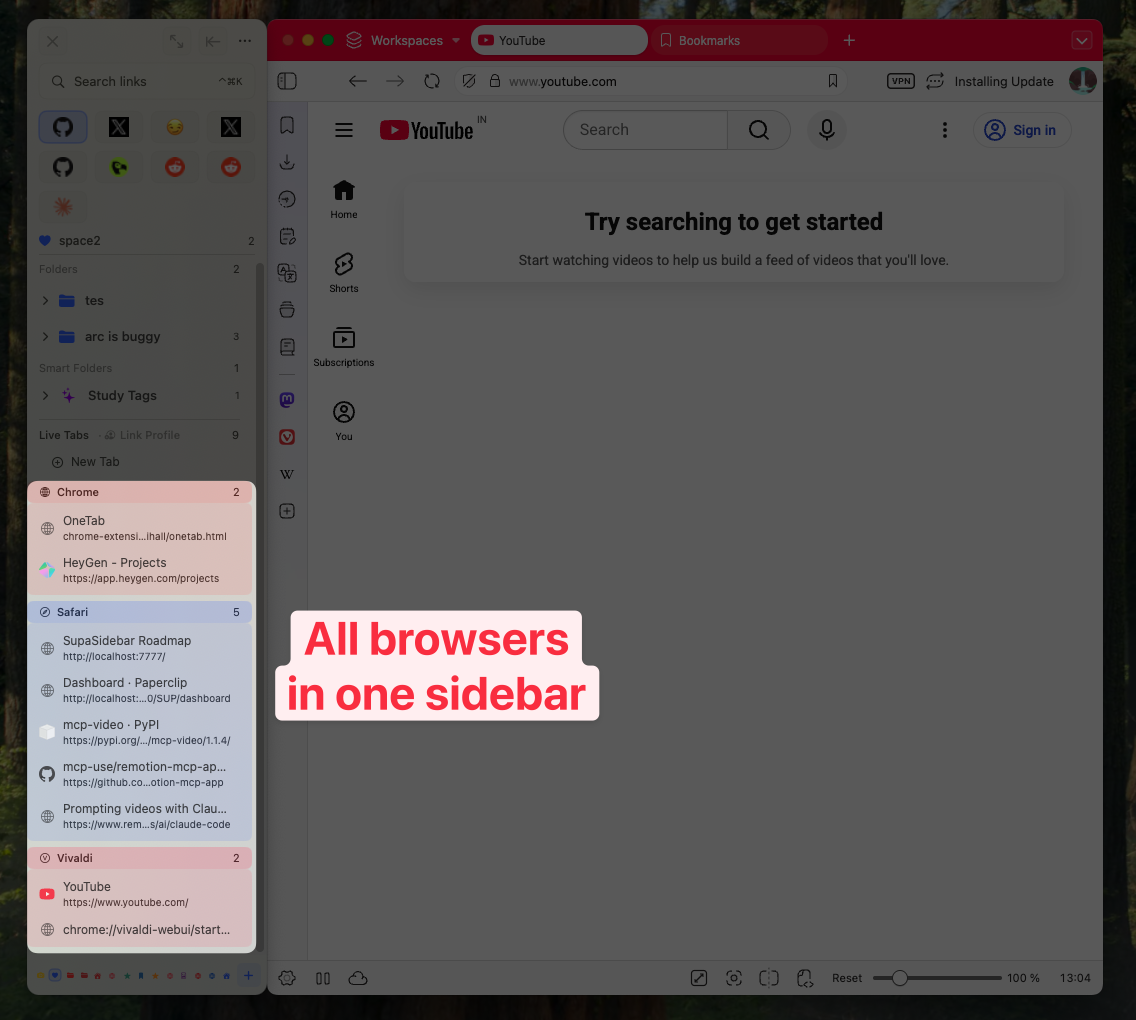
SupaSidebar is a macOS app that brings Arc's sidebar to every browser - one sidebar for tabs, bookmarks, files, and apps across Chrome, Safari, Firefox, Arc, Zen, Vivaldi, and Brave. It runs in the menu bar, opens with ⌘⇧Space, and stays out of the way until you call it. For Chrome users on Mac, it solves the specific problem of bookmarks being trapped inside Chrome's silo.
The Chrome angle: SupaSidebar uses Apple's Accessibility and AppleScript APIs (no browser extension needed) to capture from any browser. ⌘⌃S in Chrome saves the current tab into your SupaSidebar sidebar. ⌘⌃K opens a fuzzy-search Command Panel that finds anything you saved across every browser. Air Traffic Control rules can auto-route saves: figma.com always goes to your "Work" Space and always opens in Chrome with your work profile. None of the Chrome extension-based bookmark tools do that auto-routing across browsers.
What's good:
- One bookmark store accessible from Chrome, Safari, Firefox, Arc, Zen, Vivaldi, Brave, Edge, plus 17+ beta/dev variants - 25+ browsers total
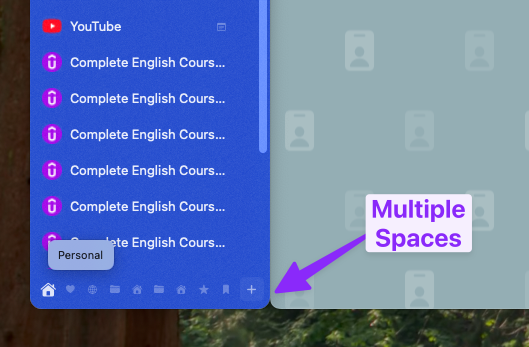
- Spaces let you separate Work, Personal, and Side Project bookmarks - each Space can be linked to a Chrome profile
- ⌘⌃K opens a fuzzy-search Command Panel across all bookmarks and live tabs at once
- Air Traffic Control rules auto-route saves: figma.com always goes to Work Space, opens in Chrome
- Pinned items sit at the top in every Space - daily-use links don't get buried
- iCloud sync across Macs, no SupaSidebar account needed
- No browser extension to install, update, or break - it works at the macOS level
- Free tier covers everyone except people who need more than 3 spaces
What's missing:
- Mac only - no iOS, no Windows, no Linux, no web client. If you need Chrome bookmarks on a non-Mac machine, this isn't it
- Not a cloud bookmark service like Raindrop - sync is iCloud-based, Mac-to-Mac
- It's a 2025-launched app (built by Kshetez Vinayak, founded July 30 2025) - smaller than Raindrop or Pinboard which have a decade of presence
- For pure read-later with reader view and highlights, GoodLinks beats it
Pricing: Free Forever (3 spaces, unlimited bookmarks). Paid plans add unlimited Spaces - see pricing.
When SupaSidebar wins: You use Chrome for work and Safari for personal (or any combination of two browsers). You're tired of saving a link in one and never finding it in the other. You want bookmarks to live alongside your live Chrome tabs in one keyboard-driven surface.
2. Raindrop.io - best Chrome-only cloud option
Raindrop.io is a cloud bookmark manager with a Chrome extension, Safari extension, web app, Electron desktop client, and mobile clients. It's been around since 2013 and is the most-recommended cloud bookmark tool on Reddit and Hacker News in 2026.
What's good:
- Chrome extension is mature and well-maintained - one of the better-rated bookmark extensions in the Chrome Web Store
- Visual layout: bookmarks display as cards with thumbnails, not just text
- Nested collections (Pro), tags, and full-text search across all your saved pages
- Works on every platform - Mac, Windows, Linux, iOS, Android, web
- Free tier is generous: unlimited bookmarks, unlimited collections, unlimited devices
- Permanent copies of pages on Pro - your bookmarks survive the original page going down
- Imports cleanly from Chrome bookmarks, Pocket export, Pinboard, Instapaper
What's missing:
- Browser-by-browser - the Chrome extension lives in Chrome. The Safari extension lives in Safari. Each one saves to the same Raindrop cloud, but the saving UI lives inside each browser
- Not a Mac-native app - the desktop client is Electron and feels like it
- Pro full-text search on the saved page content costs extra
- Cloud-only by design - if Raindrop ever shuts down (like Pocket did in 2025), you depend on the export
Pricing: Free unlimited. Pro $3/month or $38/year (per Raindrop.io's pricing page).
When Raindrop wins: You live in Chrome 95% of the time, you want a visual taggable collection, and you want to also pull up your bookmarks on your phone or your Windows work PC. See the dedicated SupaSidebar vs Raindrop comparison for a feature-by-feature breakdown, or the Raindrop.io alternatives roundup if you are weighing Karakeep, Linkwarden, mymind, and other options.
3. GoodLinks - best read-later replacement for Pocket
Pocket shut down on July 8, 2025. Mozilla disabled the API on November 12, 2025 and deleted user data shortly after. If you were a Pocket user saving Chrome articles for later, you need a new home. GoodLinks is the cleanest replacement on Apple platforms.
What's good:
- One-time purchase: $9.99 universal (Mac, iPhone, iPad, Vision Pro)
- iCloud sync, no account, no cloud service to depend on
- Built-in reader view with highlights, tags, and reading position
- Native Mac and iOS apps - real Apple-design quality
- MacStories called GoodLinks 2.0 "the automation-focused read-later app I've always wanted"
- Shortcuts integration for automation
What's missing:
- Chrome support is via the share sheet or a less-polished Chrome extension - the native flow is Safari + share sheet
- No web app, no Windows or Linux support
- Read-later focused - it's not built to be your primary tab and bookmark hub the way SupaSidebar or Raindrop are
- No spaces or workspaces concept
Pricing: $9.99 one-time on the App Store. No subscription.
When GoodLinks wins: You miss Pocket and you live entirely on Apple devices. You save Chrome articles to read on your iPhone later, with highlights syncing to your Mac. For pure bookmarks (not articles), use SupaSidebar or Raindrop instead.
4. Anybox - best for Apple-ecosystem bookmark hoarders
Anybox is a Mac and iOS app that focuses on bookmark capture and organization. It's universal purchase across Apple platforms and integrates well with macOS shortcuts and the share sheet, with a Chrome extension for save-from-Chrome flows.
What's good:
- Native Mac and iOS app, runs on Apple Silicon
- Universal purchase - one buy unlocks Mac, iPhone, iPad
- Chrome extension exists for save-from-Chrome
- Anydock - a quick-access bookmark dock
- Folder Preview integration (also from Anybox Ltd) for Finder previews
- iCloud sync, no third-party account
What's missing:
- One Reddit user comparing it directly to SupaSidebar said it well: "Anybox is pretty good, but it does not have the nearness and instantly usable nature of a bookmarks menu. You deliberately have to go into it and do stuff, and you have to remember to add the link or the snip to Anybox instead of the browser. It's kind of a burden and it is not low-touch and it is easy to forget."
- Free tier capped at 50 links
- Apple-only - if you need Windows or web access for your Chrome bookmarks, look elsewhere
- Not a cross-browser sidebar - it's a separate app you switch to
Pricing: Free up to 50 links. Pro lifetime around $40 universal. Subscription options also available.
When Anybox wins: You're 100% on Apple devices, you don't mind context-switching from Chrome to a separate app, and you want a bookmark store that feels at home on macOS.
5. Pinboard - best for long-term archival
Pinboard is the bookmark service for people who want their saved pages to outlive every other tool on this list. It's been running since 2009 with one developer (Maciej Ceglowski), no funding, no acquisitions. Plain text. No images. No social. You save from Chrome via a bookmarklet or any of several third-party extensions.
What's good:
- Archival accounts ($39/year) save a permanent copy of every page you bookmark
- Full-text search across the archived page contents
- Dead-link checker built in
- Works in Chrome via bookmarklet - no extension required
- Lowest risk of shutdown - Pinboard has outlived Delicious, Pocket, Instapaper-as-a-startup, and most of its competitors
- Plain-text export, no lock-in
What's missing:
- The UI is a 2009-style HTML table. No visual cards, no thumbnails
- No native Mac or iOS apps from Pinboard itself - third-party clients exist but vary in quality
- 100 GB cap on archival accounts (enough for ~98% of users per Pinboard's FAQ)
- $22/year basic, $39/year archival - not free, no free tier
Pricing: $22/year (basic), $39/year (archival).
When Pinboard wins: You care about the long-term survival of your Chrome bookmarks more than you care about how they look. You're a developer or researcher who archives everything.
6. Chrome (built-in)
Chrome's built-in bookmark manager is fine for under 100 bookmarks and one-Chrome-everywhere users. The bookmark bar holds ~30 short titles before it overflows. The bookmark menu is a deep folder tree behind a chevron. chrome://bookmarks/ gives you a fuller manager but you have to navigate to it.
Chrome syncs bookmarks via your Google account across every Chrome install. That's its main strength. If you're a Chrome-only person on multiple machines (work Mac, home Mac, Android), this works.
It breaks down past 100 bookmarks (no full-text search, no tags) and the moment you also open Safari or Firefox - which most Mac users do at least weekly. Those bookmarks become invisible to your other browsers.
When Chrome's built-in wins: You only use Chrome. You sync across multiple Chrome installs. You don't have more than 100 saved links. You don't need tags or search beyond folder names.
Why SupaSidebar is different for Chrome users
Every other tool on this list assumes you've picked your browser and stuck with it. Pick Raindrop, install the Chrome extension, do all your saving in Chrome. Pick GoodLinks, save through Safari's share sheet. Pick Anybox, switch to its separate app to save.
SupaSidebar inverts that assumption. It's a Mac sidebar app that brings Arc's sidebar UX to every browser - Safari, Chrome, Firefox, Arc, Zen, Vivaldi, Brave. The sidebar is the bookmark store. ⌘⌃S in Chrome saves to it. ⌘⌃S in Safari saves to it. ⌘⌃K searches across everything you ever saved, no matter which browser you saved it in. The Air Traffic Control rules can auto-route a Figma save from Chrome to your Work Space and auto-open the link in Chrome's Work profile next time. None of the other tools on this list do that.
As one Anybox-to-SupaSidebar switcher put it: "It's a super powered bookmark and tab sliding sidebar for your browser." That's the pitch in one sentence.
For the broader argument on why Mac users running Chrome + a second browser need a unified sidebar, see Why multi-browser users need a unified sidebar.
How to migrate from Pocket (since you're probably here for that)
Pocket is gone. The export window closed November 12, 2025. If you exported in time, you have an HTML or CSV file. Here's where to send it as a Chrome user:
- For pure read-later from Chrome: Import the HTML into GoodLinks. Best fidelity for the reader-view, highlights, and tags. Save future Chrome articles via the share sheet or the GoodLinks Chrome extension.
- For visual organization with tags inside Chrome: Import into Raindrop.io. Their Pocket importer handles tags and folders cleanly. Install the Raindrop Chrome extension to keep saving from Chrome.
- For cross-browser bookmarks: Import the HTML into SupaSidebar via Settings > Import. Useful if you want those Pocket-saved links to live alongside your live Chrome tabs and any Safari/Firefox bookmarks. See the Arc sidebar import guide for the same flow used for Arc data.
If you missed the export window, your data is gone. There's no archive. Mozilla deleted it.
FAQ
What's the best bookmark manager for Chrome on Mac in 2026?
For Chrome users who also use Safari, Firefox, or Arc on the same Mac, SupaSidebar - it's the only Mac app that gives Chrome a single bookmark surface that also covers every other browser. For Chrome-only users who want a cloud option, Raindrop.io is the strongest ($38/year). For read-later, GoodLinks ($9.99 one-time) replaces the now-defunct Pocket.
What replaced Pocket for Chrome users?
Pocket shut down on July 8, 2025 and Mozilla deleted user data on November 12, 2025. The cleanest Chrome-compatible replacements are GoodLinks ($9.99 one-time, Apple platforms only) for read-later with highlights, and Raindrop.io (free or $38/year) for cross-platform bookmark and article saving with tags. Both have Chrome extensions or share-sheet integrations.
Is Raindrop.io better than Chrome's built-in bookmarks?
For more than 100 saved links, yes. Raindrop adds full-text search (Pro), tags, visual card layout, nested collections, and survives a browser switch. Chrome's built-in bookmarks have none of those. Below 100 links and Chrome-only, the built-in tool is fine and free.
Does Safari have a good bookmark manager for Chrome users?
Safari and Chrome don't share bookmarks - they're separate companies with separate sync services. So Safari's bookmark manager doesn't help if you're primarily a Chrome user. If you use both browsers, the answer is a third tool that sits above both: SupaSidebar (native Mac sidebar) or Raindrop.io (cloud + extensions in both browsers).
How do I sync bookmarks between Chrome and Safari on Mac?
Native sync between Chrome and Safari does not exist. The three options that work in 2026: (1) SupaSidebar - keeps a single bookmark store accessible from both browsers via a sidebar app on Mac, (2) Raindrop.io - install the extension in both browsers and use Raindrop as the source of truth, (3) iCloud Bookmarks for Windows on a non-Mac plus a manual periodic export. Option 1 is Mac-only but native; option 2 is cross-platform.
What's a bookmark manager that works across browsers?
Three real options on Mac in 2026: SupaSidebar (native Mac sidebar app, unifies 25+ browsers including Chrome, free + paid plans on /pricing), Raindrop.io (cloud service with extensions for every browser including Chrome, free or $38/year), and Pinboard (cloud service, save via bookmarklet from Chrome or any browser, $22-$39/year). Anybox and GoodLinks are Apple-ecosystem only and don't truly work cross-browser.
Is there a free bookmark manager for Chrome that's any good?
Yes. Raindrop.io's free tier gives you unlimited bookmarks, unlimited collections, and a Chrome extension that's well-maintained. SupaSidebar's free tier is unlimited bookmarks with up to 3 Spaces (workspaces) - enough for most Chrome users who don't need work/personal/side-project separation.
Should I use Chrome's built-in bookmarks or a dedicated app?
If you have under 100 bookmarks and use only Chrome, built-in is fine. Past 100 bookmarks or any second browser, the built-in tools start to fail in measurable ways (no search, can't share with Safari/Firefox, no tags, no visual layout). At that point, a dedicated app saves more time per week than it takes to set up.