
TL;DR:
SupaSidebar 0.17.0 is the biggest update since launch. The command panel is now a Spotlight-like launcher with slash commands and website search. Ask AI lets you control the entire app through conversation - create folders, manage links, set preferences, and connect to any MCP client. Browser profiles work everywhere. 14 new browsers bring the total to 25. And this update proved stable, so SupaSidebar exited beta with the 1.0 release on 2026-08-01.
If you tried SupaSidebar before and it didn't click
Maybe you downloaded it, opened settings, and had no idea what to turn on. Maybe you saved 100 links and the sidebar started feeling slow. Maybe you use Chrome with a work profile and a personal profile and SupaSidebar treated them like the same browser.
Fair. Those were real problems and I should have fixed them sooner. This update does.
A Spotlight-like command panel for your browsers
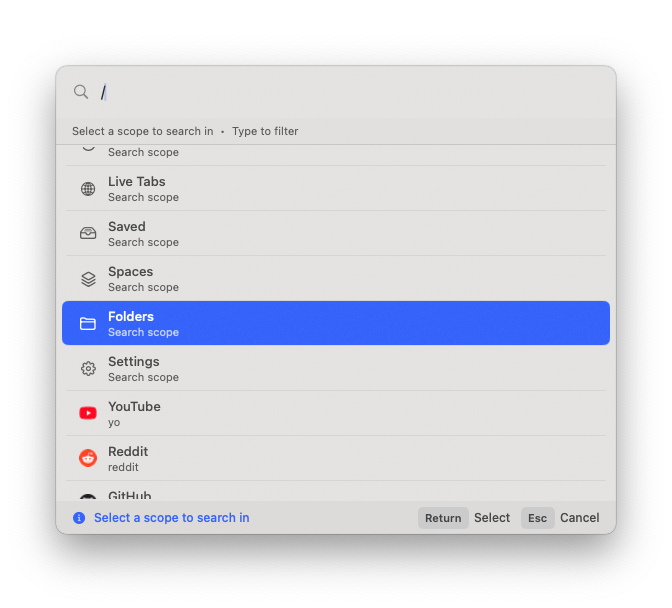
The command panel (⌘⌃K) was always fast search. Now it's closer to a full launcher.
Use / to select scope.
Press Shift+Tab to cycle through them, or type a slash command to jump directly to a scope. Saved links, recent items, live tabs, folders, settings, and more - each scope narrows your results instantly.
Search within a specific website.
Use a slash command to limit results to a particular domain. If you've saved 200 links, searching just *.figma.com items is now one command away.
Search history and better ranking.
The command panel remembers what you've searched for and surfaces frequently accessed items higher. Folder search is built in. Results are uncapped - no more truncated lists.
Draggable.
Drag the command panel anywhere on screen. It magnetically snaps to center with visual guide lines and remembers its position between sessions.
Clipboard awareness.
If there's a URL on your clipboard when you open the command panel, it offers a "Paste and Go" action. Small feature, saves a surprising number of steps.
Reveal in sidebar.
Find any link in the command panel and jump straight to its location in the sidebar - even if it's in a different space. The sidebar switches spaces, scrolls to the item, and highlights it.
Ask AI - control your sidebar with conversation
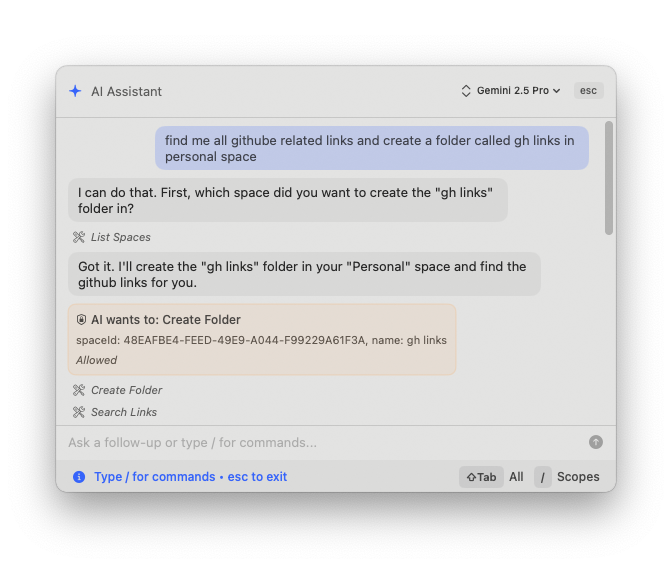
The command panel now has a built-in AI chat. But it's not just a chatbox you type questions into. It's a control layer for the entire app.
Manage your sidebar by talking to it.
Tell it to create a folder, create a space, add a link, move items around, or set preferences. Instead of hunting through settings, just say what you want.
6 AI providers.
Bring your own API key from OpenAI, Anthropic, Google Gemini, Ollama, MLX, or any OpenAI-compatible provider. Pick your model from the model picker. SupaSidebar doesn't charge extra for AI features - this works in both Free and Pro tiers.
MCP server.
This is where it gets interesting. SupaSidebar exposes an MCP server that any MCP-compatible client can connect to. That means you can manage your sidebar from ChatGPT, Claude Desktop, or any other tool that supports MCP. Create Air Traffic Control rules, manage links, organize spaces - all from your AI assistant of choice, without even opening SupaSidebar.
Slash commands and markdown rendering.
Type /guide to see what Ask AI can do. Responses render in full markdown with code blocks, lists, and formatting. It's a proper chat experience, not a text field.
Browser profiles everywhere
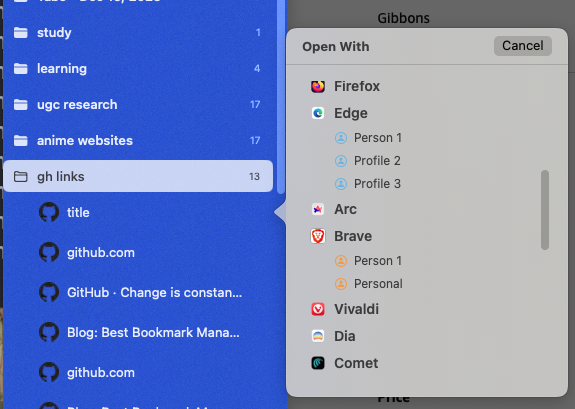
If you use Chrome with a "Work" profile and a "Personal" profile, SupaSidebar used to see them as one browser. Not anymore.
Open With
menus now show browser profiles alongside browsers. Right-click a link, and instead of just "Chrome" you see "Chrome Work" and "Chrome Personal." Same for the Option+Click popover and the command panel.
Air Traffic Control
rules can route links to specific browser profiles. Set up a rule so *.figma.com always opens in "Chrome Work" while youtube.com goes to "Chrome Personal." You can create and manage these rules through the app, through Ask AI, or through the MCP server.
The sidebar feels faster
Before this update, clicking a folder or a link had a slight delay. Not a dealbreaker, but enough to notice. That's gone. Everything responds instantly now, and scrolling stays smooth even with hundreds of saved links.
You won't see this in a screenshot but you'll feel it the first time you use it.
14 new browsers, 25 total
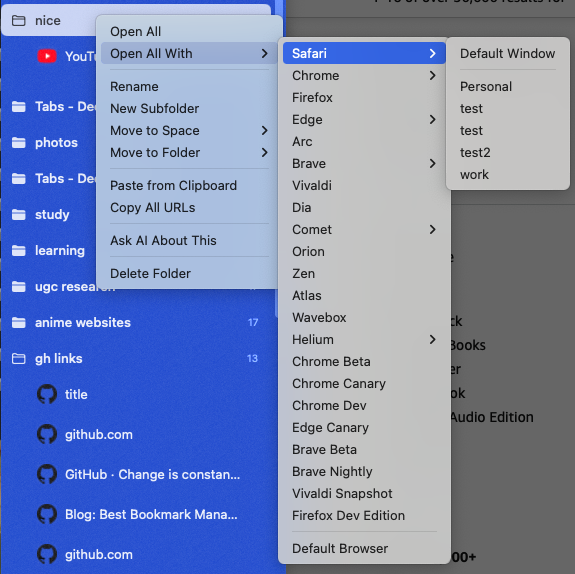
SupaSidebar already worked with Safari, Chrome, Firefox, Edge, Arc, Brave, Vivaldi, Dia, Comet, Orion, and Zen. Version 0.17.0 adds 14 more browser variants including Wavebox, all with full Live Tabs integration.
That's 25 browsers total. If you use it on a Mac, SupaSidebar probably supports it.
Setup that walks you through it
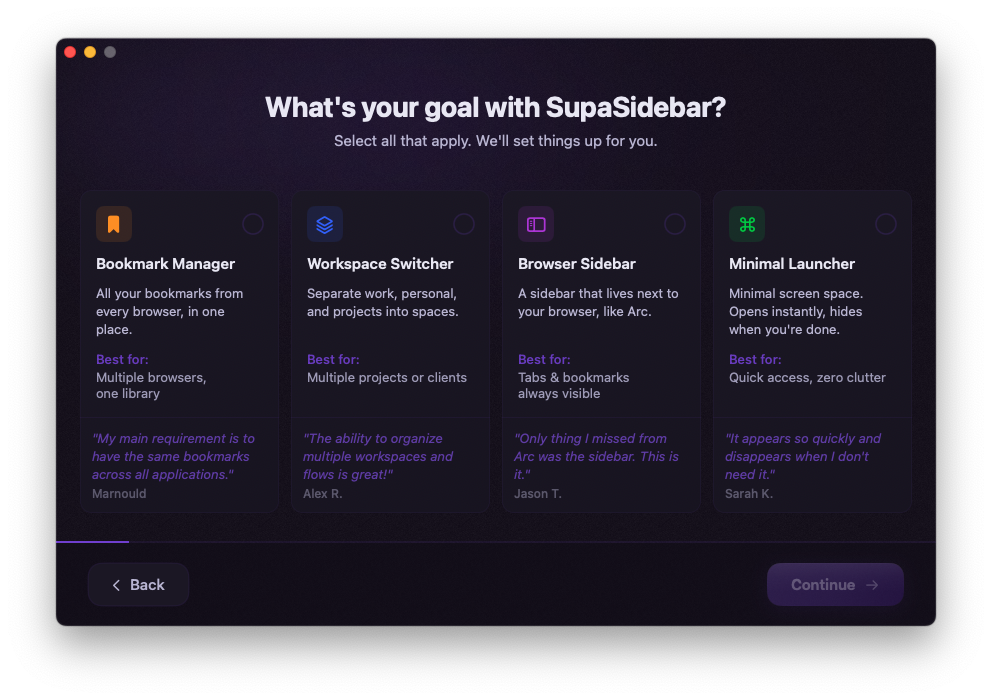
The old onboarding dropped you into settings and hoped for the best. The new one actually guides you.
First, you pick what kind of experience you want - tab manager, bookmark manager, browser sidebar. Then it walks you through each setting one by one, and you can see what changes in real time as you toggle things on and off. By the end you have a sidebar that's set up for how you actually work, not a bunch of defaults you'll never touch.
If you bounced last time because the setup was confusing, this is a completely different experience.
More changes worth knowing
Pinned tabs per space.
Before, pinned tabs were global - same pins in every space. Now each space gets its own set. Your "Work" space can pin Slack, Figma, and Linear. Your "Personal" space can pin YouTube, Reddit, and Gmail. Right-click a space icon for intelligent pinned recents.
Drag and drop across sections.
Drag links from Live Tabs, Recents, or saved links directly into Pinned Tabs, folders, or other spaces. The pinned section shows a visual drop zone when empty.
Firefox bookmark import.
You can now import bookmarks directly from Firefox.
Option+Enter actions.
Press Option+Enter on any item for quick actions like Reveal in Sidebar, Reveal in Finder, and Ask AI.
French localization.
French translations went from 54% to 97% coverage.
Full changelog.
14 bug fixes and more improvements are listed on the 0.17.0 release page.
What's next: exiting beta
0.17.0 stayed stable with no critical issues, and SupaSidebar exited beta with the 1.0 release on 2026-08-01. This was the version that got us there.
If you're already using SupaSidebar, the update arrives automatically via the built-in updater. If you're new, download it free from supasidebar.com - 3 spaces, all 25 browsers, no credit card required.
- Kshetez Vinayak, developer of SupaSidebar
Frequently Asked Questions
How do I update to SupaSidebar 0.17.0?
SupaSidebar checks for updates automatically via its built-in updater. You'll see an update notification in the menu bar. If you want to update manually, download the latest DMG from supasidebar.com.
Is the Ask AI feature free?
Yes. The Ask AI panel is available in both Free and Pro tiers. You bring your own API key from OpenAI, Anthropic, Google Gemini, Ollama, or any OpenAI-compatible provider. SupaSidebar doesn't charge extra for AI features.
Can I use SupaSidebar's MCP server with ChatGPT or Claude?
Yes. SupaSidebar exposes an MCP server that any MCP-compatible client can connect to - including ChatGPT, Claude Desktop, and others. You can manage links, create Air Traffic Control rules, and organize spaces from your preferred AI assistant. See the MCP documentation for setup instructions.
Which new browsers does 0.17.0 support?
Version 0.17.0 adds 14 new browser variants including Wavebox, bringing the total to 25 supported browsers with full Live Tabs integration. The existing 11 browsers (Safari, Chrome, Firefox, Edge, Arc, Brave, Vivaldi, Dia, Comet, Orion, Zen) continue to work as before.
Is SupaSidebar leaving beta?
Version 0.17.0 stayed stable, and SupaSidebar officially exited beta with the 1.0 release on 2026-08-01. This update was the final major beta release.