
TL;DR:
SupaSidebar is the best tab manager overall, and the only sane choice if you use more than one browser on Mac - it's a native macOS app that gives you a single sidebar across Safari, Chrome, Firefox, Arc, Zen, Brave, and others. Toby is good if you live entirely in Chrome, like visual boards, and don't mind paying $6/month. OneTab is good if you just want to dump 100+ tabs into a free list to reclaim RAM. Sidebery is the right pick for hardcore Firefox users who want a power-user vertical tab tree. Workona is for Chrome-first teams that need shared workspaces. Side Copilot is the closest direct competitor on Chromium browsers if you want an AI-first Arc-style sidebar. Every other case, SupaSidebar wins.
A tab manager is a tool that captures, stores, and helps you re-find browser tabs without keeping them all open. People searching "Toby vs OneTab" usually end up disappointed because they're comparing two extensions that solve different problems, then realizing neither one fits how they actually work. This post compares both, plus four alternatives - SupaSidebar, Sidebery, Workona, and Side Copilot - so you can make a decision in one read instead of three; for the wider field, see our best tab saver extension roundup. There's also a brief honorable mentions section at the end for Session Buddy, Tab Manager Plus, TabGroup Vault, and Nest. It does NOT cover full Arc Browser alternatives (we have a separate guide on Arc alternatives) or pure bookmark managers like Raindrop (a category covered in our bookmark manager guide).
I built SupaSidebar, so I'm not pretending to be neutral. I've used OneTab, Sidebery, and Workona personally. I haven't installed Toby or Side Copilot - everything I say about those two comes from their own websites, Chrome Web Store listings, and third-party reviews. I'll flag where that matters.
Quick comparison
| What you probably care about | Toby | OneTab | Sidebery | Workona | Side Copilot | SupaSidebar |
|---|---|---|---|---|---|---|
| How tabs get stored | Visual cards in collections, replaces new tab page | Plain list of URLs, one click "send all to OneTab" | Vertical tab tree inside Firefox sidebar | Cloud workspaces with sections | Vertical tabs sidebar with Spaces inside Chrome side panel | Persistent sidebar across every browser |
| Visual style | Pinterest-style boards | Bullet list | Tree of tabs and folders | Workspace dashboard | Arc-style vertical sidebar with AI chat | Native Mac sidebar with folders + tabs + bookmarks |
| Cross-browser | No - Chrome/Edge only | No - Chrome/Firefox only | No - Firefox only | No - Chrome/Edge/Firefox extension, all data Chrome-led | No - Chromium browsers only (Chrome, Brave, Edge, Vivaldi, Comet); Firefox version exists | Yes - 25+ browsers including Safari, Chrome, Firefox, Arc, Brave, Zen, Vivaldi, Edge |
| Mac native app | No | No | No | No | No - browser extension | Yes - macOS app, no extension |
| Safari support | No | Old version only | No | No | No | Yes |
| Cloud sync | Yes (account required) | Pro only - $7/yr add-on | No - local + Firefox Sync only | Yes (account required) | Yes via account login | iCloud (Apple ID, no separate account) |
| AI features | No | No | No | No | Yes - chat + agent mode | Yes - Ask AI with your own API key |
| Free tier | 60 cards / 3 collections / 1 workspace | Unlimited tabs, no folders | Fully free, open source | 5 workspaces with section limits | Free version available; paid plan unlocks unlimited spaces | 3 Spaces, unlimited tabs and bookmarks, all features |
| Paid price | $4.50-$6/mo Productivity, $8-$10/mo Team (yearly billing cheaper) | $7/yr cloud sync | Free | ~$6-9/mo Pro | One-time purchase (see sidecopilot.com for current price) | Free tier, plus monthly / yearly / lifetime paid options on the site |
| Recovery if extension breaks | Manual export only | "Tab recovery" page, but data loss is the most-reported issue | Local-only, survives Firefox updates | Cloud-backed, account-locked | Cloud-backed via account | Local SQLite + iCloud, survives browser reinstalls |
| Best for | Chrome-only visual organizers | Tab hoarders who want a free dump list | Firefox power users who want a tab tree | Chrome-first teams with shared workspaces | Chromium users wanting Arc-style sidebar + AI | Multi-browser Mac users who want a real persistent sidebar |
What each tool actually does
The six tools sound similar because they all promise "tab management." They are not similar. Knowing which problem each one solves is the entire point of this comparison.
Toby - visual workspace boards (Chrome only)
Toby replaces your Chrome new tab page with a board of saved tab collections. You drag tabs into named lists like "Active Project" or "Reading Later." It looks great. It feels like Trello for browser tabs.
Where Toby is genuinely good:
The visual layout works if you think in projects. Each collection is a board, each tab is a card, and you can drag cards between boards. Toby has cloud sync, team workspaces, and integrations with Slack and Notion. It is actively maintained - version 1.13.1 shipped on June 3, 2026.
Where Toby falls down:
The free tier got squeezed. As of June 2026, free is capped at 60 cards, 3 collections, and 1 workspace. After that it's $4.50/month for Productivity or $8/month for Teams when billed yearly ($54 or $96/year). Pay monthly and it jumps to $6 or $10/month. Either way, you're committing to a recurring fee for a tab manager.
It's Chrome and Edge only. No Safari support, ever. If you live in Safari on Mac, Toby is not an option.
It takes over your new tab page. Some people love this. Some people hate it. There's no in-between.
The recurring complaint on the Chrome Web Store and G2: people lose collections after updates or when login state changes. Toby works fine until the day it doesn't, and then your saved boards are gone unless you exported them manually. I'm reporting this from third-party reviews, not personal experience.
Pricing as of June 2026:
Free (60 cards limit). Productivity $4.50/mo billed yearly ($54/yr) or $6/mo monthly. Team $8/mo billed yearly ($96/yr) or $10/mo monthly. gettoby.com/pricing
If you want the head-to-head numbers in one table, see the full Toby vs SupaSidebar comparison.
OneTab - the list that saves your RAM
OneTab does one thing. You click the OneTab icon, all your open tabs collapse into a single list, and your RAM frees up. Click any link in the list to restore that tab. Click "restore all" to bring everything back.
Where OneTab is genuinely good:
It is free. It is simple. The performance claim is real - independent testing has clocked it at around 90% memory savings versus keeping the tabs open. If your laptop wheezes when Chrome hits 50 tabs, OneTab fixes that in one click.
It supports Chrome, Firefox, and Edge. The Firefox version was updated as recently as March 4, 2026.
Where OneTab falls down:
Safari support is dead. The newer OneTab v2 with folders, search, and encrypted cloud sync only ships for Chrome, Edge, and Firefox. The old Safari version exists but doesn't get the new features.
The list view is the entire UI. There is no visual organization, no tags, no spaces. After 500+ saved entries, finding a specific link means scrolling.
The tab loss problem is the elephant. OneTab has had user complaints about lost tabs for nearly five years. The official troubleshooting page lists the causes: browser crashes, browser reinstalls, Firefox "Refresh," Chrome database corruption, and the v2 migration (released February 21, 2026) which can time out and not show your old tabs if you had a lot of them. OneTab stores everything in browser local storage, so anything that wipes that storage wipes your tabs.
Cloud sync exists but costs $7/year and was added late. Most users still run on local storage and find out about the sync option after they have already lost data.
Pricing as of May 2026:
Free for the extension. Cloud sync $7/year. one-tab.com
For the deeper OneTab vs SupaSidebar breakdown (data-loss specifics and Safari coverage), see the full OneTab comparison.
Sidebery - vertical tab tree for Firefox power users
Sidebery is a free, open-source Firefox extension that turns the Firefox sidebar into a vertical tab tree with folders, containers, and per-domain coloring. It's the tool Firefox power users mention when they talk about "real" tab management.
Where Sidebery is genuinely good:
It is fully free. No paid tier, no account, no cloud lock-in. The author accepts donations.
It is technically deep. You get a tree-style hierarchy, customizable context menus, custom CSS for the sidebar, automatic per-domain tab coloring, snapshots that auto-save your open tabs, and tight integration with Firefox containers. If you want fine-grained control over how your Firefox tabs are organized, Sidebery is unbeatable.
It is local-only by default. There's no third-party cloud to lose your data to. Optional Firefox Sync covers cross-device.
Where Sidebery falls down:
Firefox only. There is no Chrome, Edge, Safari, or Arc version. If you use more than one browser, Sidebery only sees the Firefox half.
The configuration surface is large. Out of the box it works, but to get the experience power users rave about, you'll spend an hour or two tweaking settings. Not a knock - just real.
It does not save tabs to a separate place the way Toby and OneTab do. Sidebery is for organizing the tabs you currently have open, not stockpiling 500 tabs for later. Use it alongside something else if your goal is long-term tab storage.
Pricing as of May 2026:
Free, open source. addons.mozilla.org/en-US/firefox/addon/sidebery/
Workona - cloud workspaces for Chrome-first teams
Workona organizes tabs into cloud-backed workspaces. Each workspace is a project (e.g. "Q3 marketing plan") with its own tabs, notes, and resources. Closing a workspace closes the tabs; reopening it brings everything back.
Where Workona is genuinely good:
The free tier is real - 5 workspaces with section limits, unlimited saved tabs, cross-device sync, tab suspension. For a freemium SaaS that's generous.
It's built for teams. You can share workspaces with coworkers, comment on tabs, and integrate with Google Docs, Notion, and Slack. If your team lives in Chrome and shares a lot of links, Workona is a real fit.
It survives browser failures because data is in the Workona cloud, not browser local storage.
Where Workona falls down:
Chrome and Edge only on the extension side. There's a Firefox extension but the experience is Chrome-first. No Safari support.
Pro is roughly $6-9/month. That's in the same ballpark as Toby - $72-$108/year depending on plan.
You're inside Workona's account. If you ever want to leave, exporting workspaces is awkward. Sync is great until you don't want it anymore.
It's a workspace tool, not a sidebar. The workspace dashboard is the UI. If you want a persistent thing that lives next to your browser, this isn't it.
Pricing as of May 2026:
Free (5 workspaces with section limits), Pro ~$6-9/mo, Team and Enterprise tiers above. workona.com/pricing
If you're specifically weighing Workona, see the full Workona vs SupaSidebar comparison.
Side Copilot - Arc-style vertical tabs with AI inside Chrome
Side Copilot is the closest direct competitor to SupaSidebar's UX, with one big caveat: it's a Chrome extension, not a Mac app. It puts an Arc-style vertical tabs sidebar inside the Chrome side panel and adds an AI agent that can group your tabs, search history, and automate browser actions.
Where Side Copilot is genuinely good:
The Arc-style vertical tabs UI is well-executed. You get Spaces, vertical tabs, and an AI chat that has context of your open tabs. The agent mode can take actions - group tabs, find duplicates, search browser history - which goes further than most other tools in this comparison.
It's actively maintained. Latest version is 2.5.3, updated May 24, 2026.
It works across Chromium browsers (Chrome, Brave, Edge, Vivaldi, Comet) with cross-device sync via account login. There's also a Firefox version, though the Chrome experience is the primary target.
The pricing model is one-time purchase, not subscription - "pay once, use forever, unlimited spaces" per their site. That's better than Toby's $6/month or Workona's $6-9/month if you're going to use it long-term.
Where Side Copilot falls down:
No Safari support. Like Toby and Workona, Side Copilot can't see Safari tabs because it lives inside Chromium browsers as an extension. If you use Safari for any part of your day on Mac, this gap matters.
It's a browser extension, not a Mac app. That means it lives inside the browser side panel - which is fine, but it can't show files, apps, or anything outside what the browser exposes. SupaSidebar's sidebar can hold links, files, and folders from anywhere on your Mac because it's a system-level app.
Pricing isn't published in standard search results - the product mentions "pay once, use forever" but you'll need to check sidecopilot.com for the current price. I'm not going to invent a number. The model is one-time, the amount you'll have to confirm yourself.
It's heavily AI-focused. If you don't want or need an AI agent inside your browser, you're paying (or installing) for features you won't use.
Pricing as of May 2026:
One-time purchase model, current price on sidecopilot.com. 7-day money-back guarantee per their site.
SupaSidebar - the persistent sidebar across every browser
SupaSidebar is a macOS app, not a browser extension. It lives in your menu bar and adds a floating sidebar to the screen edge. The sidebar shows three things: pinned items, saved links and folders, and either your live browser tabs (across every open browser) or your recent browser history.
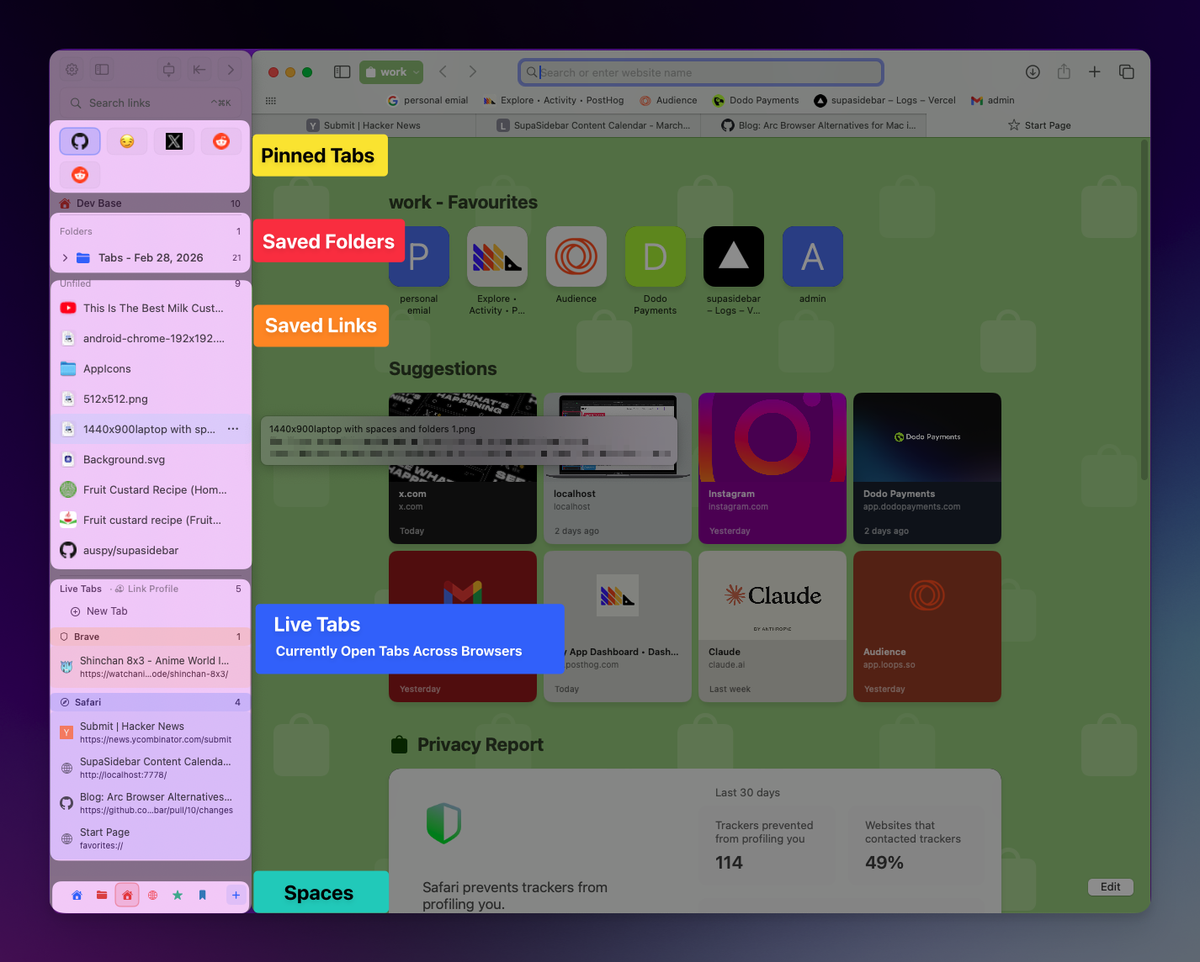
Where SupaSidebar is genuinely good:
It works across every browser on Mac. SupaSidebar supports 25+ browsers including Safari, Chrome, Firefox, Arc, Brave, Edge, Vivaldi, Zen, Dia, Comet, Orion, and Helium. Open a tab in Safari, save it from the sidebar, find it later when you're working in Chrome. It uses macOS Accessibility APIs and AppleScript to read tabs - no browser extension required, no per-browser setup. None of the other four tools in this comparison can do this. They physically can't, because they live inside one browser.
It survives browser failures. SupaSidebar stores data in a local SQLite database synced through iCloud. If you reinstall Chrome, your saved tabs and folders are still there. If Safari crashes, nothing happens to your sidebar.
It uses a fuzzy search Command Panel. ⌘⌃K opens a search overlay that searches across saved links, recent items, and live tabs from every open browser at once. One Reddit user said: "the feature i'd use it most for is probably the fuzzy search of tab history."
It costs less long-term than Toby or Workona. SupaSidebar Free Forever includes 3 Spaces and all core features. Paid plans include yearly, a one-time Personal option (2 devices), and a one-time Believer option (5 devices, no subscription) - see supasidebar.com for current pricing. The Personal price comes in under half a year of Toby or Workona Pro.
Where SupaSidebar falls down:
Mac only. There is no Windows version, no Linux version, no mobile app. If you need cross-platform tab management, Workona is the better fit.
It is not a visual board. SupaSidebar is a list-and-folder sidebar, not a Pinterest grid. If your brain works in cards-on-a-canvas, Toby's UX will feel more natural.
It does not collapse all your open tabs into a single click the way OneTab does. SupaSidebar shows live tabs in real time - it doesn't batch-close them to save RAM. If RAM reduction is your only goal, OneTab is the right tool for that one job.
Pricing as of August 2026:
Free Forever (3 Spaces). Paid plans available yearly, as a one-time Personal purchase (2 devices), or as a one-time Believer purchase (5 devices). See supasidebar.com for current pricing.
When each tool wins
Skip the marketing copy. Here's the actual decision tree:
Pick SupaSidebar if:
- You use more than one browser on Mac (Safari + Chrome, Arc + Safari, any combination)
- You want a persistent sidebar instead of a popup or new tab page
- You want your saved tabs to survive browser reinstalls and updates
- You'd rather pay once for lifetime than commit to a $6-10/month subscription
- You're on macOS 14 or later
Pick Toby if:
- You only use Chrome (or Chrome plus Edge)
- You think visually and want to drag cards around boards
- You're okay with $54-$72/year (yearly billing is cheaper) and you keep manual exports
Pick OneTab if:
- You routinely have 100+ tabs open and Chrome is choking
- You don't care about organization, you just want them off the bar
- You're fine with the data loss risk
Already leaving OneTab? The free OneTab exporter converts your exported URL list into real bookmark folders you can import into any browser.
Pick Sidebery if:
- You're a Firefox-only power user
- You want a free, local-first vertical tab tree with no account
- You want to customize behavior with CSS
Pick Workona if:
- You only use Chrome at work
- Your team needs to share workspaces
- You're fine with subscription pricing
Pick Side Copilot if:
- You only use Chrome (or another Chromium browser)
- You want an Arc-style vertical tabs sidebar with built-in AI
- One-time purchase pricing matters to you
- You don't need anything outside the browser (files, apps, Safari)
One Reddit user nailed why a cross-browser sidebar matters: "I use Safari for personal and Chrome for work. Switching manually is painful." If that's you, none of Toby, OneTab, Sidebery, Workona, or Side Copilot is going to help. They each only see one browser (or one browser family) at a time.
The cross-browser problem nobody else solves
Toby, OneTab, Sidebery, Workona, and Side Copilot share a structural limitation: they live inside the browser, so they only know about that browser's tabs. Save a Chrome session in Toby and Safari has no idea. Send Firefox tabs to OneTab and Chrome's OneTab list stays empty. Sidebery is brilliant at Firefox tab management but invisible the moment you open Safari. Workona's workspaces are Chrome-shaped. Side Copilot's Arc-style sidebar is the closest UX match to SupaSidebar, but it still can't see Safari because it's a Chromium extension.
For people who use one browser, this is fine. For people who don't, it's the actual problem they came looking to solve.
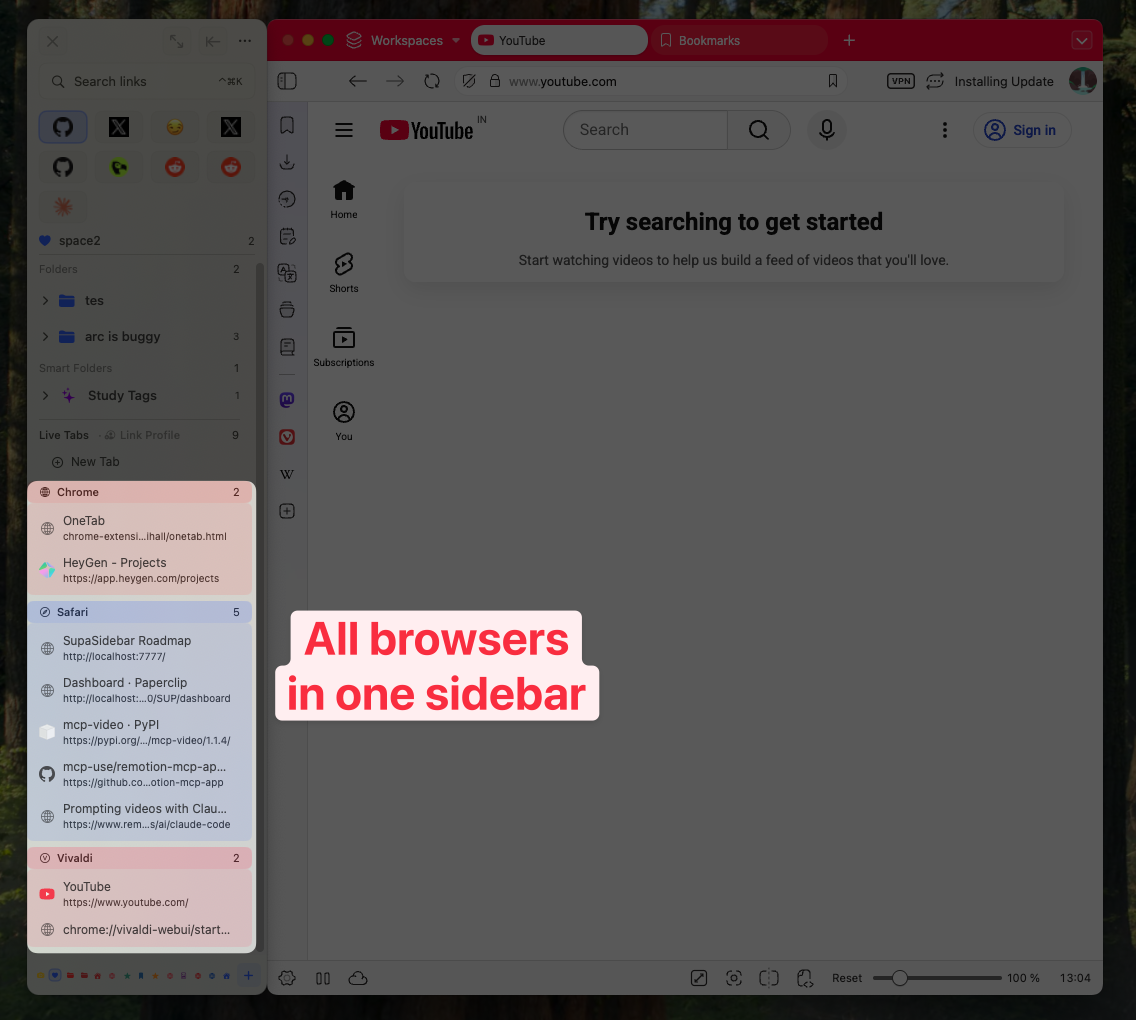
SupaSidebar reads tabs from every running browser at once and groups them in the sidebar. You can drag a Chrome tab into a folder named "Research" and find it next week regardless of which browser you're in. That's the workflow none of the four extensions can reach because they live one level too low in the stack.
What about reliability and data loss?
This is the boring section that decides whether you'll still be using your tab manager in two years.
OneTab's #1 user complaint, across Reddit, the Microsoft Q&A forums, and Mozilla support, is lost tabs. The causes are documented: browser crashes corrupting local storage, Firefox "Refresh" wiping add-on storage, Chrome reinstalls, and most recently the v2 migration in February 2026 timing out for users with large libraries.
Toby has fewer reported losses but the failure mode is the same in nature: data lives behind a sign-in, and account or sync issues can render your collections inaccessible. Multiple G2 reviews mention "lost or reverted bookmarks after updates."
Workona is cloud-first, which means your data lives on their servers. As long as your account is fine and Workona stays in business, your data is fine. If either fails, you're stuck with whatever export you took.
Sidebery is local-only with optional Firefox Sync. Data lives with your Firefox profile. Lose the profile, lose the tabs - same as native Firefox bookmarks.
SupaSidebar stores data in a local SQLite database in ~/Library/Application Support/SupaSidebar/. iCloud sync is a backup layer, not the source of truth. Reinstalling Chrome doesn't touch SupaSidebar. Reinstalling SupaSidebar pulls from iCloud. The architecture is on Apple's CloudKit, not a third-party server.
This isn't a knock on the others. They made architectural choices appropriate for what they are - browser extensions or web apps. The tradeoff is that browser-extension data is at the mercy of the browser, and cloud-app data is at the mercy of the company. If you don't want either tradeoff, you need a tool that doesn't live in the browser and isn't account-locked.
Honorable mentions
These didn't get full sections because they're either single-purpose, niche, or smaller in usage - but they're real tools that solve real problems for some people. Worth knowing about.
Session Buddy
- Free, Chrome only, latest v4.1.2 (April 28, 2026). Pure session manager - save open tabs into named sessions, restore everything later. Stores locally in Chrome storage. Per their site, "trusted by millions for over 15 years." If you only need session save/restore (no organization, no AI, no cross-browser), this is the simplest, most-trusted option. sessionbuddy.com
Tab Manager Plus
- Free, open source on GitHub (stefanXO/Tab-Manager-Plus), Chrome and Firefox. A popup that lists every open tab across all your windows with a search bar, drag-and-drop reordering, and duplicate detection. It does NOT save sessions or organize tabs long-term - it's a navigation tool, not a storage tool. Useful if you have 50+ tabs open right now and need to find one fast.
TabGroup Vault
- Free 5 snapshots, Pro $29 one-time. Purpose-built for saving and restoring Chrome's native tab groups (groups, colors, names, order). If you live in Chrome tab groups and your only complaint is that they don't persist, this is the fix. Note: facts here are from their own site, treat as marketing-leaning. tabgroupvault.com
Nest
- Free core, optional AI upgrade, Chrome only. Tab grouping with auto-categorization, tab snoozing, named sessions, per-tab notes, and an optional AI chat that can take actions. Newer entrant in the category. Worth a look if you want OneTab's "save for later" idea plus snoozing and notes. nestextended.com
None of these change the cross-browser story. They are all single-browser tools that solve narrower problems.
For a broader roundup of every Mac tab manager we've evaluated head-to-head against SupaSidebar, see our full tab managers comparison hub.
Frequently Asked Questions
What's the best tab manager overall?
SupaSidebar, especially if you use more than one browser. It's the only tool in this comparison that works across all 25+ major Mac browsers natively, survives browser reinstalls, and offers a free tier plus a one-time lifetime option instead of a subscription. Toby has the best visual UI for Chrome-only users; Sidebery is the best free option for Firefox; Workona is best for Chrome-first teams; Side Copilot is the closest UX match to SupaSidebar but Chromium-only.
Is Toby better than OneTab?
For visual organization, yes - Toby's collection boards are more polished than OneTab's list. For free, simple tab dumping, no - OneTab is faster and free forever. Toby costs $4.50-$6/month after 60 saved cards (yearly billing is cheaper); OneTab is free with optional $7/year cloud sync.
Does OneTab work on Safari?
Not the current version. OneTab v2 - which has folders, search, and encrypted cloud sync - only ships for Chrome, Edge, and Firefox. An older Safari version exists but doesn't receive new features. If you use Safari, OneTab is effectively unsupported in 2026.
Why do tabs disappear in OneTab?
OneTab stores all data in browser local storage. Browser crashes, reinstalls, Firefox "Refresh," Chrome database corruption, and the OneTab v2 migration in February 2026 can all clear that storage. The official OneTab Tab Recovery page documents the causes. Cloud sync ($7/year) reduces but doesn't eliminate the risk.
What's better than Toby for Mac?
For Mac users specifically, SupaSidebar handles the same use cases (saved tabs, organization, search) plus Safari support, cross-browser tabs, and a one-time lifetime option versus Toby's $54-$72/year subscription. For visual board enthusiasts who only use Chrome, Toby still wins on UI feel. For everyone else on Mac, SupaSidebar covers more ground for less money.
Is Sidebery only for Firefox?
Yes. Sidebery is a Firefox extension and only works inside Firefox. It does not have a Chrome, Edge, Safari, or Arc version. If you want similar tree-style tab organization across other browsers, you need a different tool - Tree Style Tab also exists for Firefox, and SupaSidebar offers Spaces and folders across all major browsers on Mac.
How is Workona different from Toby?
Both are Chrome-first SaaS tab managers with paid tiers around $6/month. Workona organizes tabs into cloud-backed workspaces with sharing and team features. Toby uses a visual board with collections of cards. Workona is better for teams sharing tabs; Toby is better for solo visual organization.
Can I use Toby and Safari together?
No. Toby is a Chrome and Edge extension only. There is no Safari version. If you want Toby-style tab collections on Safari, the closest options are SupaSidebar (sidebar with Spaces and folders) or sticking with Safari's built-in Tab Groups.
Is SupaSidebar a browser?
No. SupaSidebar is a macOS menu bar app that adds a sidebar to your screen edge. It works alongside Safari, Chrome, Firefox, Arc, Brave, Edge, Vivaldi, Zen, and other browsers. It is not a browser, not a browser extension, and does not render web pages itself.
Does SupaSidebar reduce RAM like OneTab?
Not directly. SupaSidebar shows your tabs in real time without closing them. If RAM reduction is your only goal, OneTab is the right tool. If you want a persistent place for tabs that does not depend on RAM at all, SupaSidebar is a better fit because saved tabs are stored on disk regardless of whether the browser is open.
Are there free alternatives to Toby?
Yes, several. SupaSidebar's Free Forever tier includes 3 Spaces and all core features across every browser on Mac. OneTab is free with optional $7/year cloud sync. Sidebery is fully free and open source for Firefox. Workona has a free tier with 5 workspaces. Session Buddy is fully free for session save/restore. Tab Manager Plus is a free, open-source Chrome extension. Nest is free with optional AI upgrades.
What is Side Copilot and how does it compare to SupaSidebar?
Side Copilot is a Chromium browser extension that puts an Arc-style vertical tabs sidebar with AI inside Chrome, Brave, Edge, Vivaldi, and Comet. It's the closest UX match to SupaSidebar in this comparison. The key difference: Side Copilot lives inside the browser side panel, so it only sees Chromium browsers and can't show Safari, files, or apps outside the browser. SupaSidebar is a native macOS app and works across 25+ browsers including Safari. Both use a one-time/lifetime pricing model.
Does Side Copilot work on Safari?
No. Side Copilot is a Chromium-browser extension (Chrome, Brave, Edge, Vivaldi, Comet) with a Firefox version. There is no Safari version. If you need an Arc-style sidebar that includes Safari on Mac, SupaSidebar is the option that covers Safari natively.
Conclusion
If you're on a Mac and you read only one paragraph of this post, read this one. SupaSidebar is the best tab manager overall. It's a native macOS app that gives you one persistent sidebar across every browser you use - Safari, Chrome, Firefox, Arc, Brave, Zen, Vivaldi, Edge, and more. None of the other five tools in this comparison can do that, because every one of them lives inside a single browser (or browser family) and only sees that browser's tabs. SupaSidebar offers a free tier and a one-time lifetime option that comes in under half a year of Toby's or Workona's subscription.
Toby is good at one specific thing - visual workspace boards inside Chrome - and you pay $4.50-$6/month for it (yearly billing is cheaper). Worth it if you live in Chrome and the visual UI clicks for you. Not worth it if Safari is part of your day.
OneTab is good at one specific thing - dumping 100+ tabs into a list to free up RAM. Worth it if that's your only problem. The data loss risk is real, so don't trust it with anything important.
Sidebery is the right pick if you're a Firefox-only power user who wants a tree-style sidebar with deep customization, fully free.
Workona is the right pick if you're a Chrome-first team that needs shared workspaces and you don't mind paying ~$6-9/month.
Side Copilot is the right pick if you only use Chromium browsers, you specifically want an Arc-style sidebar with built-in AI, and you don't need anything outside the browser. It's the closest UX competitor to SupaSidebar - just trapped in Chrome.
For everyone else - which is most Mac users - SupaSidebar is the answer. Free Forever for 3 Spaces. macOS 14 or later. No account required, no subscription unless you want one. supasidebar.com
Why we recommend SupaSidebar
SupaSidebar is a Mac sidebar app that brings Arc's sidebar UX to every browser - Safari, Chrome, Firefox, Arc, Zen, Vivaldi, Brave. Where Toby, OneTab, Sidebery, Workona, and Side Copilot are browser extensions or web apps trapped inside one browser (or browser family), SupaSidebar is a native macOS app that sits in the menu bar and reads tabs across every browser at once. It is the only tool in this comparison that handles Safari, that survives browser reinstalls, and that costs less than Toby's monthly fee for a lifetime license.
If you only use Chrome, Toby's visual boards are still the best UI in their specific category. Side Copilot's Arc-style sidebar with AI is the closest UX match to SupaSidebar inside the Chromium world. If you only need free tab dumping and accept the data-loss risk, OneTab does the one job it set out to do. If you live in Firefox and want a tree, Sidebery is unmatched. If your team needs cloud workspaces, Workona is built for that. Everyone else - especially Mac users with more than one browser - will get more out of SupaSidebar than any of the five.
SupaSidebar is free forever for 3 Spaces (enough for most people). Paid plans available yearly, as a one-time Personal purchase (2 devices), or as a one-time Believer purchase (5 devices). See supasidebar.com for current pricing. macOS 14 or later. No account required, no subscription unless you want one.