
By Kshetez Vinayak, founder of SupaSidebar. Last updated June 17, 2026.
TL;DR
Arc Browser is in maintenance mode as of May 2026 - it still works but gets no new features after Atlassian acquired The Browser Company for $610 million (announced September 4, 2025, closed October 21, 2025). The Browser Company now builds Dia, a separate AI-first browser that does not replicate Arc's sidebar. The best Arc Browser alternative depends on what you valued most: SupaSidebar recreates Arc's sidebar, Spaces, Command Bar, and Air Traffic Control across 25+ browsers including Safari, Chrome, Firefox, Arc, Zen, Vivaldi, Brave, Helium, and Dia without forcing a browser switch, and is the only tool that imports Arc's Spaces, folders, and pinned tabs in 3 clicks. Zen Browser is the closest full-browser Arc clone (Firefox-based, free, open source) but you have to rebuild your sidebar by hand. Brave gives you vertical tabs with Chrome extensions. Among full-browser alternatives, none replicate Arc's sidebar, Spaces, Command Bar, and ATC together - this guide covers the trade-offs.
Quick navigation:
- Wondering if Arc is dead and what maintenance mode means? → Is Arc Browser Dead?
- Already decided, ready to migrate? → Switching from Arc Browser
- Comparing every alternative? → You're in the right place. Keep reading.
Is Arc Browser Dead in 2026?
Short answer: no, but it is frozen. Arc has been in maintenance mode since May 27, 2025 - it still works, still receives Chromium security patches, still downloads and installs on Mac and Windows. But Atlassian acquired The Browser Company for $610 million in October 2025, and the team has shifted entirely to Dia, an AI-first browser. No new Arc features have shipped since May 2025. No sunset date has been announced.
If you are asking "should I leave Arc?" - the honest answer is: not urgently, but start your migration plan now while you have time to test alternatives instead of doing it under pressure later.
For the full Arc status, the complete acquisition timeline, what "maintenance mode" actually means in practice, and whether Arc is still safe to use, see Is Arc Browser Dead? - the canonical status reference.
Why Replacing Arc Is Hard
Arc's sidebar, Spaces, and command bar created a workflow that most browsers don't even attempt to replicate. Now that Arc is in maintenance mode and The Browser Company has shifted to Dia, over a million users need to figure out what comes next - without losing the workflow they spent months building.
This guide covers every realistic option: full browser replacements, sidebar-only tools, and the hybrid approach that lets you keep Arc's best feature in any browser you want.
What You're Actually Losing When You Leave Arc
Before comparing alternatives, it helps to name exactly what made Arc different. Most "Arc alternative" articles list browsers with tabs. That misses the point. Arc users built workflows around four core features and a handful of famous extras. Here is the full picture.
The four core Arc features
1. The Sidebar
Vertical tabs are table stakes at this point. What made Arc's sidebar different was persistence - pinned tabs, folders, and favorites lived in a permanent sidebar that did not disappear when you closed a window. Your sidebar was your workspace, not just a tab list.
2. Spaces
Spaces let you create separate contexts - Work, Personal, a specific project - each with its own pinned tabs, folders, and color scheme. You could switch between a "Research" Space and a "Social Media" Space without losing context in either. Tab groups in other browsers are not the same.
3. The Command Bar (Cmd+T)
Arc's command bar was not just an address bar. It searched bookmarks, tabs, history, and actions in a single interface. Power users lived in it - opening a tab, finding a bookmark, jumping to a Space, all from one keystroke.
4. Air Traffic Control (ATC)
This is the one Arc power users always bring up. ATC let you write rules like "any link from notion.so opens in my Work Space" and Arc would automatically route the link there. For anyone managing multiple contexts on the same machine, ATC turned the browser into a workflow engine.
The famous Arc extras (the ones people mention by name)
Beyond the four core features, Arc built a small set of named features that became part of its identity. When Arc users describe what they will miss, these are the names that come up:
- Little Arc - a tiny floating browser window that pops up for quick links without disrupting your main window. Click a link from another app, get a Little Arc, close it, done.
- Split View - up to 4 tabs side-by-side in one window. Researchers, writers, and developers loved this.
- Boosts - per-site CSS injection. Hide YouTube comments, change Twitter's font, dark-mode a stubborn site. Permanent, per-domain.
- Easels - shared visual whiteboard / workspace pages. Mood boards, link collections, lightweight Notion-style notes inside Arc.
- Auto-archiving tabs - the "tabs auto-archive after 12 hours" rule that quietly cleared old tabs without losing them. Many users say this was the single feature that made tab anxiety go away.
- Arc Search on iOS - the mobile companion that turned a Google search into a generated answer page.
How SupaSidebar covers these features
This is where the "Arc replacement" conversation usually gets vague. The honest mapping:
| Arc feature | SupaSidebar equivalent | Status |
|---|---|---|
| Sidebar with persistent pinned items | Sidebar with Pinned Items, Folders, Smart Folders | Match |
| Spaces | Spaces (per-Space pinned items, color schemes) | Match |
| Command Bar (Cmd+T) | Command Panel (⌘⌃K), cross-browser search | Upgrade |
| Air Traffic Control | ATC with Space + browser + profile routing | Upgrade |
| Little Arc | Link Preview (⌘+Click) | Match |
| Split View | Window Tiling (up to 3 windows side-by-side) | Workaround |
| Auto-archiving tabs | Recent Items panel | Match |
| Boosts | Not replicated (browser-engine feature) | Lost |
| Easels | Not replicated | Lost |
| Arc Search on iOS | Not replicated (macOS only) | Lost |
Full descriptions of Command Panel, ATC, Window Tiling, and Link Preview are in the What SupaSidebar Replicates from Arc section below.
The takeaway: of the ten "famous Arc features," SupaSidebar replicates or has a workable equivalent for seven, has a stronger version of two (Command Panel, ATC), and genuinely cannot replace three (Boosts, Easels, Arc Search on iOS). If Boosts was your favorite Arc feature, there is now one full-browser path that recovers them: Zen Browser shipped a native Boosts feature in v1.20b (May 2026) that customizes any site's look, fonts, colors, and dark mode at the engine level. On any other browser, your closest approximation is still a userstyle extension like Stylus - SupaSidebar can't inject CSS itself because it isn't a browser.
For everything else, SupaSidebar plus your browser of choice is a feature upgrade for Arc power users, not a downgrade. ATC alone - now with browser and profile routing - is worth the switch for anyone juggling work and personal contexts.
The Two Approaches to Replacing Arc
Arc alternatives fall into two categories, and understanding this split saves you hours of trying browsers that won't work for you.
Approach 1: Switch to a Different Browser
Replace Arc entirely with another browser. You get a complete package but you're locked into one browser again - and if it goes the way of Arc, you start over.
Approach 2: Add Arc's Sidebar Features to Your Existing Browser
Keep using Safari, Chrome, or whatever you prefer. Add a separate tool that brings all of Arc's sidebar features on top - the persistent sidebar, Spaces, Command Bar, Air Traffic Control, Live Tabs, link previews, and pinned items. Your workflow survives even if you switch browsers later.
I'll cover both approaches, but I'll be honest about my bias: I built SupaSidebar specifically because Approach 2 didn't exist when I left Arc. I'll flag every section where SupaSidebar is relevant so you can skip it if you just want browser comparisons.
Full Browser Alternatives Compared
Dia (The Browser Company's New Direction)
Dia is what The Browser Company built after Arc. It's an AI-first browser focused on knowledge work - summarizing pages, automating repetitive tasks, creating "Dia agents" that act on your behalf. Dia launched publicly on macOS on October 9, 2025. If you have searched for "Arc Browser AI features 2026," you have probably already discovered that Arc itself never got serious AI features - that work is happening in Dia.
What it keeps from Arc: Very little. Dia doesn't have Arc's sidebar, Spaces, or command bar in the same form. It's a fundamentally different product built for a different use case.
Dia vs Arc Browser comparison (2026):
- AI integration: Dia has it built into the address bar and as autonomous agents. Arc has nothing comparable - "Ask on Page" is the only AI surface, and it has not been updated.
- Sidebar / Spaces: Arc has them as the core organizing principle. Dia does not.
- Command bar: Arc's Cmd+T is a search-everything interface. Dia's address bar is more conversational/AI-driven.
- Platform: Arc is Mac and Windows. Dia is currently macOS only.
- Active development: Dia ships updates regularly. Arc does not.
What it's good for: If you want AI deeply integrated into browsing, Dia is interesting. It's not trying to be "Arc 2.0."
What it's missing: The sidebar workflow. If you loved Arc for its spatial organization, Dia won't scratch that itch.
Verdict
Dia is for AI-curious knowledge workers, not Arc refugees looking for their sidebar back. If you came to this article searching "dia vs arc 2026" and you want Arc's sidebar, Dia is not the answer - SupaSidebar or Zen are.
Dia vs Arc - direct comparison:
| Feature | Arc Browser | Dia Browser |
|---|---|---|
| Sidebar workflow | Native, the core feature | Removed in favor of AI assistant |
| Spaces | Yes, color-coded contexts | No |
| Command Bar (Cmd+T) | Universal launcher across tabs/bookmarks/history | Replaced with AI chat interface |
| Native AI features | None | Built around AI agents and automation |
| Maintenance status | Maintenance mode since May 2025 | Active development |
| Owner | Atlassian (since October 2025) | Atlassian (since October 2025) |
| Best for | Sidebar + Spaces workflow | AI-first knowledge work |
The Browser Company kept the company name when Atlassian acquired it; they did not keep the product idea. If you came to Arc for the sidebar workflow, Dia is not the natural successor - it's a different product entirely.
Brave Browser
Brave's vertical tabs (launched in 2023 with v1.52) give you the sidebar layout. It's Chromium-based, so all your Chrome extensions work. Built-in ad blocking is genuinely good - in my own informal testing on ad-heavy news sites, Brave loaded pages noticeably faster than Chrome without an ad blocker (roughly 30-40% in my measurements; your numbers will vary by site and network).
What it keeps from Arc: Vertical tabs, some sidebar functionality. No Spaces equivalent.
What it's missing: Persistent pinned tabs across sessions, Spaces, the command bar experience.
Verdict
Solid browser, weak Arc replacement. You get vertical tabs but lose the workflow.
Zen Browser
Zen is the open-source Firefox-based browser that's been gaining traction in 2025-2026. Its sidebar and workspace features are the closest any browser gets to Arc's model.
What it keeps from Arc: Sidebar with workspaces, customizable layouts, strong privacy defaults.
What it's missing: macOS integration is weaker than Arc's was. Some users report performance issues with many tabs. Extension ecosystem is Firefox-based (smaller than Chrome's).
Verdict
The closest browser-level replacement. Worth trying if you don't need Chrome extensions.
Safari + Extensions
Safari is the performance king on Mac. Battery life alone makes it worth considering - in my own everyday usage on a MacBook Air M2, Safari ran roughly 2-3 hours longer per charge than Chrome with the same workload (a personal observation, not a controlled benchmark). But Safari's tab management is basic: no vertical tabs, no Spaces, limited sidebar functionality.
Safari Tab Groups exist but they're clunky compared to Arc Spaces. You can't see all your grouped tabs at a glance without clicking into each group.
What it keeps from Arc: Nothing, really. Safari is a different philosophy.
What it's missing: Everything that made Arc special.
Verdict
Best performance on Mac, worst Arc replacement. You need third-party tools to get the workflow back.
Vivaldi
Vivaldi has more customization than any other browser. Tab stacking, custom sidebars, web panels, keyboard shortcut editor - if you want to rebuild your workflow from scratch, Vivaldi gives you the building blocks.
What it keeps from Arc: The spirit of customization. Tab stacking is a rough Spaces equivalent.
What it's missing: Simplicity. Vivaldi's settings page has hundreds of options. Arc's magic was that the workflow felt intuitive without configuration. Vivaldi requires serious setup time.
Verdict
Power users who enjoy configuring things will love it. Everyone else will bounce.
Is There an Open-Source Arc Browser Fork?
No. Arc itself is closed-source - The Browser Company never open-sourced it, and after the Atlassian acquisition that's unlikely to change. There is no community fork of Arc as of May 2026.
The closest "open-source Arc" is Zen Browser - Firefox-based, fully open source on GitHub, built specifically to recreate Arc's sidebar and workspaces. For users searching "open source Chromium browser like Arc," Zen is technically Firefox-based (not Chromium), but it's the only project actively building Arc-style features in the open.
If you specifically need Chromium-based, Brave is the closest open-source Chromium browser with vertical tabs, but it's not trying to replicate Arc's full workflow - it's a privacy-focused browser that happens to have a sidebar layout.
Verdict:
No real Chromium-based open-source Arc replacement exists. Zen (Firefox-based) is the best open-source option overall.
Comparison Table: Arc Alternatives at a Glance
| Feature | Dia | Brave | Zen | Safari | Vivaldi | SupaSidebar + Any Browser |
|---|---|---|---|---|---|---|
| Vertical sidebar tabs | Limited | Yes | Yes | No | Yes | Yes |
| Persistent pinned tabs | No | No | Partial | No | Partial | Yes |
| Spaces / Workspaces | No | No | Yes | Tab Groups (basic) | Tab stacking | Yes |
| Command bar | AI-focused | No | No | No | Quick Commands | Yes |
| Works with Safari | N/A | N/A | N/A | N/A | N/A | Yes |
| Works with Chrome | Chromium-based | Chromium-based | No | No | Chromium-based | Yes |
| Works with Firefox | No | No | Firefox-based | No | No | Yes |
| Arc sidebar import | No | No | No | No | No | Yes (StorableSidebar.json) |
| macOS native | No | Yes | Partial | Yes | Yes | Yes |
| Battery life on Mac (vs Chrome baseline) | Similar to Chrome | Similar | Similar | 2-3 hours more per charge | Similar | Inherits base browser's battery profile |
| iCloud sync | No | No | No | Yes | No | Yes |
The Hybrid Approach: Keep Your Browser, Add the Sidebar
This is the approach I'm biased toward, because it's the problem I built SupaSidebar to solve.
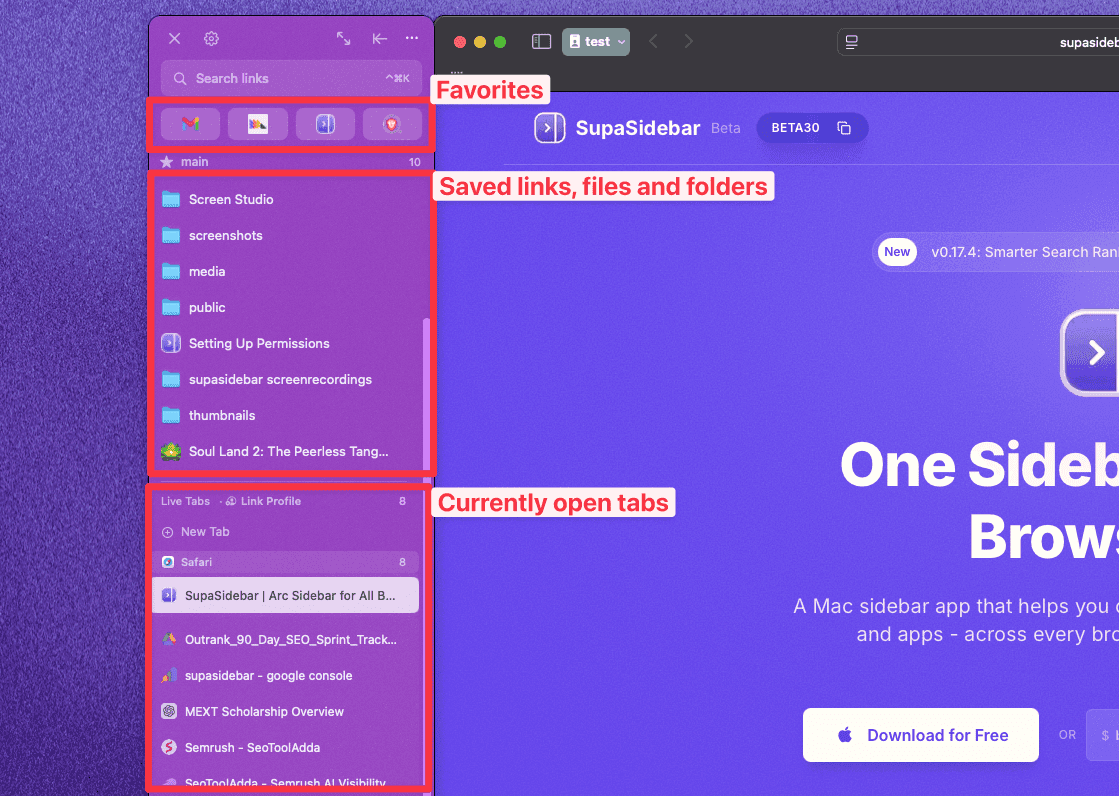
The pitch is simple: instead of switching browsers (again), you add a universal Mac sidebar to whatever browser you already use. Your tabs, bookmarks, and web apps live in the sidebar. The sidebar works across 25+ browsers including Safari, Chrome, Firefox, Arc, Zen, Vivaldi, Brave, Helium, and Dia, plus Finder.
One Reddit user put it perfectly:
"I would love to try to wean myself off Arc and switch to Safari for full macos integration. But without Arc sidebar that will never happen. But... is there a solution for that? SupaSidebar?"
The answer is yes. And the key difference from browser-level solutions is that if you switch browsers tomorrow, your bookmarks and sidebar come with you.
Here's what the hybrid approach actually looks like, in two parts.
Part 1 - The basics: sidebar, Spaces, pinned tabs, and the command bar.
Part 2 - The advanced stuff: Air Traffic Control, Split View, Search a Website, Little Arc, and more, across Chrome, Safari, and any browser you use.
What SupaSidebar Replicates from Arc (the full list)
This section is going to be detailed because it is the question that matters most: does SupaSidebar actually give you Arc back? Here is feature by feature.
Sidebar with persistent Pinned Items.
Tabs, bookmarks, links, files, and apps stay pinned in the sidebar. They do not disappear when you close browser windows. This is the core Arc workflow.
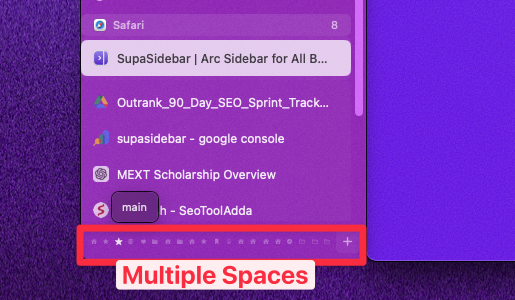
Spaces.
Multiple Spaces, each with its own pinned items, folders, and color scheme. Switch between Work, Personal, and project Spaces with a shortcut. Same model as Arc.
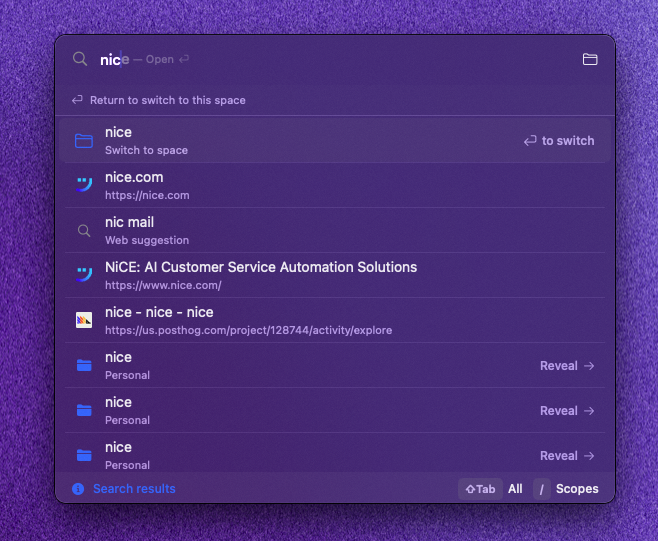
Command Bar (called Command Panel in SupaSidebar) - this is actually an upgrade.
⌘⌃K opens a centered floating overlay with fuzzy search across saved items, recent links, and live browser tabs from every browser at once - not just one browser like Arc's Cmd+T. From the Command Panel you can open any result in any browser (Open With), follow ATC routing rules to land it in the right Space, and use 7 search scopes via slash commands (Live Tabs, Saved, Spaces, Folders, Settings, YouTube, Reddit, GitHub). There is also an Ask AI mode for natural language queries against your sidebar data. If Cmd+T was your Arc keystroke, the Command Panel does more, not less.
Air Traffic Control (ATC).
Same name, more powerful. Arc's ATC routed links to Spaces. SupaSidebar's ATC routes links to Spaces, specific browsers, AND specific browser profiles. Rule examples: "links from notion.so → Work Space → Chrome with Work profile" or "GitHub links → Dev Space → Brave."
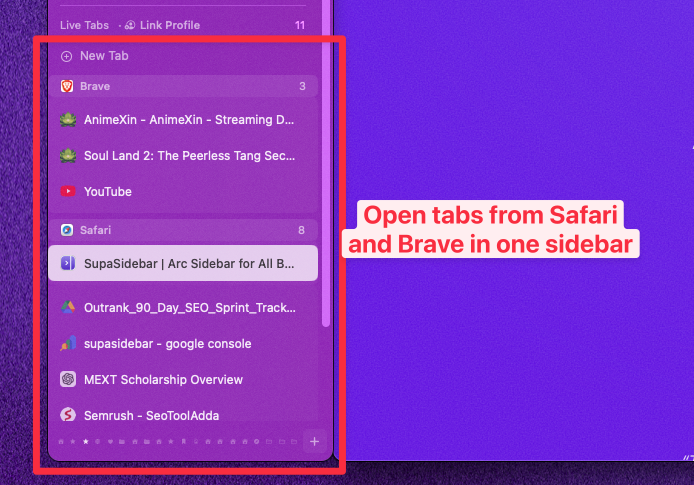
Live Tabs across all browsers - another upgrade.
Your sidebar shows the actual open tabs from Safari, Chrome, Firefox, Brave, Edge, Arc, and 20+ other browsers - all visible at once, fuzzy-searchable from the Command Panel, and grouped by browser profile. Arc only ever showed Arc's own tabs. If you ever had Arc and Chrome open at the same time, you know how annoying that limitation was. Live Tabs solves it.
Link Preview (the Little Arc replacement).
⌘+Click on any link opens a floating mini-browser window (~800x600) with a full preview - back/forward, navigation, the whole experience. Closes when you are done. This is Little Arc rebuilt for SupaSidebar, working with any browser.
Smart Attach.
A sidebar-attached behavior that anchors SupaSidebar to your browser window. The sidebar follows the browser, browser windows are prevented from going underneath the sidebar, and overlapping windows are automatically moved out of the way. Smart Attach is not a Split View replacement - it is what makes the sidebar feel native to the browser you are using.
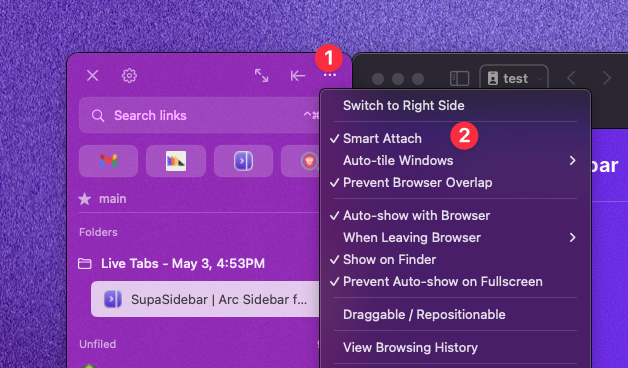
Window Tiling (the Split View workaround).
Inside Smart Attach there is an automatic window tiling feature. Turn it on and SupaSidebar tiles up to 3 browser windows side-by-side automatically - open a second browser window and it slots in next to the first, open a third and all three tile across the screen. This is the actual workaround for Arc's Split View. Not identical to Arc's 4-tab in-window layout, but the same workflow outcome: multiple browser views visible at once for research, writing, and code review.
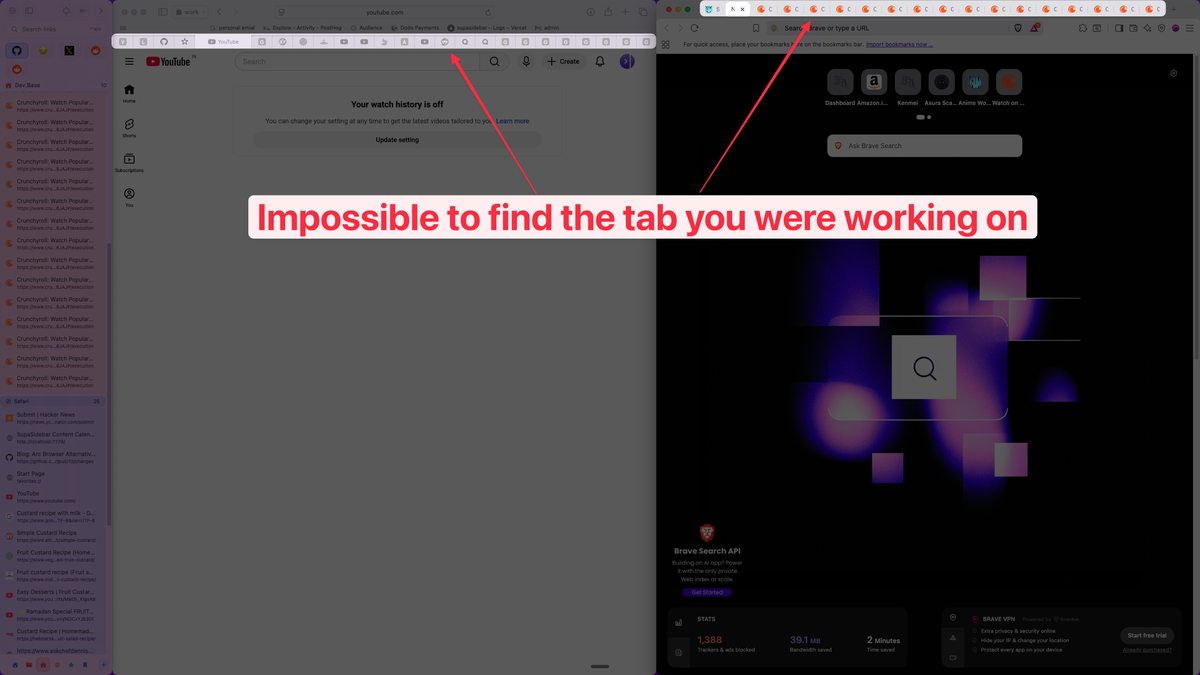
Recent Items (the auto-archiving replacement).
A live "recently visited" panel that surfaces pages from your browsing history. Different model than Arc's 12-hour archive, but solves the same problem - you do not lose pages just because you closed a tab.
Smart Save (⌘⌃S) and Smart Copy (⌘⌃C).
Save the current page from any browser to your sidebar with one shortcut. ATC rules then route it to the right Space and folder. Arc only saved Arc's pages.
Folders and Smart Folders.
Organize pinned items into folders. Smart Folders auto-populate based on rules (domain, tag, frequency).
iCloud sync.
Your Spaces, pinned items, and folders sync across Macs via iCloud. No account, no signup. Arc's sync was account-based.
Three-click Arc import.
Open Preferences → Import and Export, select Arc, click Import. Your Arc Spaces, folders, pinned tabs, and bookmarks come over directly. No file copying, no manual rebuild.
The two Arc features SupaSidebar cannot replace
Being honest: there are two Arc features that no Arc alternative on the market can give you back, and SupaSidebar is not an exception.
- Boosts (per-site CSS injection) - this is a browser-engine feature. Since SupaSidebar is not a browser, it cannot inject CSS into web pages. If Boosts are central to your workflow, Zen Browser shipped a native Boosts feature in v1.20b (May 2026) at the engine level. On Safari, Chrome, Firefox, or any other base browser used with SupaSidebar, the closest workaround is a userstyle browser extension like Stylus or Cascadea.
- Easels (shared visual whiteboards) - Arc's notebook-style pages. Not currently replicated. For most use cases, Notion, Apple Notes, or a dedicated whiteboard tool is a closer fit anyway.
If Boosts was your favorite Arc feature, this is the one trade-off you have to accept regardless of which Arc alternative you pick.
What SupaSidebar Doesn't Do (other gaps)
A few honest limitations beyond Boosts and Easels:
- No Windows support - macOS only. If you are cross-platform, SupaSidebar will not work on your PC.
- No mobile companion - no iOS app. Your sidebar is desktop-only.
- Not a browser - SupaSidebar does not render web pages. It manages your relationship with browsers. You still need Safari, Chrome, or another browser to actually browse.
Thousands of Mac users are currently using SupaSidebar. As one user put it after switching from Arc:
"Moved from Arc to Safari, only thing I missed was the sidebar. This is it."
How to Actually Migrate from Arc Browser
There are two migration paths and they look nothing alike. One takes 2 minutes. The other takes a weekend and leaves you rebuilding your sidebar by hand.
Path A: Migrate to a different browser
(Brave, Zen, Vivaldi, Safari). The slow path. No browser alternative reads Arc's sidebar data, so your pinned tabs, folders, and Spaces have to be rebuilt manually. You can carry over bookmarks via HTML export, but the rest is hand-work. For a heavy Arc user with 5+ Spaces and dozens of pinned tabs, expect 1-3 hours of bookmark organizing and re-pinning - and at the end, you have a less capable workflow than you started with. Real Spaces, Pinned tabs, the Command Bar, ATC, and Little Arc are not available in any standalone browser.
Path B: Keep your browser, add SupaSidebar.
The fast path. SupaSidebar is the only Arc alternative that reads Arc's actual sidebar data. Run the import in 3 clicks: Preferences → Import and Export → Arc → Import. Your Arc Spaces become SupaSidebar Spaces, your pinned tabs become pinned tabs, your folders become folders. SupaSidebar works with 25+ browsers (including Safari, Chrome, Firefox, Brave, Edge, Arc, Zen, Vivaldi, Helium, Dia, and more), so you keep your current browser and add the sidebar back on top.
| Step | Path A (Different Browser) | Path B (SupaSidebar) |
|---|---|---|
| Click count | Dozens (multiple settings menus, manual rebuild) | 3 clicks |
| Time to migrate | 1-3 hours (heavy users) | Under 2 minutes |
| Spaces preserved | No (rebuild manually) | Yes (auto-imported) |
| Pinned tabs preserved | No (re-pin one by one) | Yes (auto-imported) |
| Browser switch required | Yes | No |
| iCloud sync of sidebar | No | Yes |
For the full migration playbook including what you'll lose, what you'll gain, the personal switching experience, and what SupaSidebar can't replace, see Switching from Arc Browser - the canonical migration reference. For the official Arc import documentation, see the Import Bookmarks guide.
The Case for Not Replacing Arc at All
Here's the contrarian take: Arc still works. It's in maintenance mode, not sunset. Security patches still ship. If your workflow is stable and you don't need new features, there's no urgent reason to leave.
The risk is long-term. Maintenance mode software eventually breaks - macOS updates, web standards changes, and security vulnerabilities will accumulate. When Arc finally stops working, you'll need to migrate under pressure instead of on your own terms.
My recommendation: start your migration now while Arc still works. Run both in parallel for a few weeks. The worst case is you've backed up your data and tested alternatives.
Conclusion: Picking the Right Arc Browser Alternative in 2026
Arc Browser is not dead, but it is frozen. The sidebar workflow that made Arc special - Spaces, pinned tabs, folders, command bar - is not getting any new features, and the team is not coming back to build them. Whatever workflow you choose next has to either replace Arc's sidebar or recreate it.
Here is the short version of the recommendation, by what you valued most about Arc:
- The sidebar workflow (most common Arc user) → SupaSidebar. It is the only Arc alternative that imports your Arc Spaces, folders, and pinned tabs in 3 clicks, and it works on top of any browser - 25+ browsers including Safari, Chrome, Firefox, Arc, Zen, Vivaldi, Brave, Helium, and Dia. Free version available. You don't have to switch browsers.
- A full browser replacement that feels like Arc → Zen Browser. Firefox-based, fully open source, has Spaces. Trade-off: Firefox extension ecosystem (smaller than Chrome's) and you have to rebuild your sidebar by hand.
- Vertical tabs with full Chrome extension support → Brave. Chromium-based, vertical tabs work, decent ad blocking. Trade-off: no real Spaces, no command bar, no pinned-tab persistence.
- Maximum Mac performance and battery life, sidebar via SupaSidebar → Safari plus SupaSidebar. Best battery life on Mac, the only real downside is Safari's smaller extension ecosystem.
- AI-first browsing, Arc sidebar not required → Dia. Made by the same team that built Arc, but it is not Arc 2.0 - different product, different use case.
If you want the lowest-effort migration: download SupaSidebar, run the 3-click Arc import, and you are done in under 2 minutes. If you want a full browser switch: pick Zen if you want Arc-like, Brave if you want Chrome extensions, and accept the manual rebuild.
The worst choice is to do nothing. Arc still works in May 2026, but maintenance mode is a slow leak. Migrating now on your own terms beats migrating in a panic when something finally breaks.
Try SupaSidebar (free) - imports your Arc sidebar in 3 clicks, works with any browser.
Frequently Asked Questions
Is Arc Browser shutting down in 2026?
Arc Browser is not shutting down but it has been in maintenance mode since May 2025. Atlassian announced its agreement to acquire The Browser Company for $610 million on September 4, 2025, and the deal closed on October 21, 2025. The team's focus shifted entirely to Dia, an AI-first browser. Arc still launches and works as of May 2026, receives security patches, but gets no new features. There is no announced sunset date.
What is the current status of Arc Browser in 2026?
As of May 2026, Arc Browser is in maintenance mode. It still works, downloads, and launches normally on Mac and Windows. The Browser Company stopped active development in May 2025; Atlassian announced the acquisition on September 4, 2025 and completed it on October 21, 2025. The team now builds Dia, a separate AI-focused browser. Arc gets security updates only - no new features, no roadmap, no public commitment to long-term support.
What is the best Arc Browser alternative for Mac?
The best alternative depends on what you valued most about Arc. For the sidebar workflow specifically, SupaSidebar recreates Arc's sidebar across 25+ browsers including Safari, Chrome, Firefox, Arc, Zen, Vivaldi, Brave, Helium, and Dia without requiring a browser switch. For a full browser replacement, Zen Browser offers the closest experience to Arc's sidebar-and-workspaces model. Brave is the best option if you want Chrome extension compatibility with vertical tabs.
Can I import my Arc sidebar into another app?
Yes, but only into SupaSidebar, and it takes 3 clicks. Open Preferences → Import and Export, select Arc, and click Import. SupaSidebar reads Arc's sidebar data directly and recreates your Spaces, folders, pinned tabs, and bookmarks. No other Arc alternative reads Arc's sidebar layout - browser alternatives like Brave, Zen, and Vivaldi can only import bookmarks via HTML export, leaving Spaces and pinned tabs to rebuild by hand.
Is Dia the same as Arc Browser?
No. Dia is a completely different product built by the same company (The Browser Company, now part of Atlassian). Dia is an AI-first browser focused on automation and knowledge work. It does not replicate Arc's sidebar, Spaces, or command bar features. Users looking for Arc's workflow will not find it in Dia.
Does SupaSidebar work with Safari?
Yes. SupaSidebar works as a standalone macOS app that sits alongside any browser - 25+ browsers including Safari, Chrome, Firefox, Arc, Zen, Vivaldi, Brave, Helium, Dia, and Edge. It provides a persistent sidebar with tabs, bookmarks, Spaces, and a command panel regardless of which browser you use. It syncs via iCloud and requires no account creation.