
By Kshetez Vinayak, founder of SupaSidebar. Last updated June 22, 2026.
TL;DR:
Arc Browser's sidebar, Spaces, and Command Bar were genuinely great. After Atlassian acquired The Browser Company in October 2025 and the team pivoted to Dia, those features aren't coming back to Arc. This post is the migration playbook: what you lose, what you gain, and the two paths (switch browsers, or keep your browser and add SupaSidebar) that get your sidebar workflow back. SupaSidebar imports your Arc data in 3 clicks (Preferences → Import and Export → Arc → Import) and works across 32+ browsers including Safari, Chrome, Firefox, Arc, Zen, Vivaldi, Brave, Helium, and Dia.
Looking for something specific?
- Comparing every Arc alternative? → Arc Browser alternative guide (the pillar comparison)
- Just want to know if Arc is dead and what maintenance mode means? → Is Arc Browser Dead?
- Already decided, ready to switch? → Keep reading.
Switching from Arc Browser is a specific kind of frustration. You didn't leave because you found something better. You left because the thing you loved stopped being maintained.
As someone who builds SupaSidebar - a sidebar app specifically designed for people in exactly this situation - I've talked to hundreds of Arc refugees over the past year. The pattern is always the same: they switch to Safari or Chrome, immediately feel the loss of Arc's sidebar, and start searching for a way to get it back.
"Switching from Arc was heartbreaking until I found this" - Arc user on r/ArcBrowser
This post is my honest take on what you'll actually miss when you switch from Arc Browser, what's genuinely better about standard browsers, and how to bridge the gap. I'll be upfront about where SupaSidebar helps and where it doesn't.
The 5 Things You'll Actually Miss
Not everything about Arc was special. Some of it was just different. But a few features were genuinely ahead of their time, and losing them hurts.
1. The Sidebar (Obviously)
Arc's vertical sidebar replaced the traditional tab bar entirely. Pinned tabs stayed put. Folders organized your work. Everything was visible at a glance without the horizontal tab soup that Chrome gives you.
This is the #1 thing every Arc user I've talked to mentions:
"I miss Arc's sidebar the most. Everything else I can live without" - Arc user on r/ArcBrowser
"The sidebar for my browser is one thing that I loved about Arc and it's the first app for Safari that actually gives me an Arc-like sidebar" - Arc user on r/macapps
The sidebar isn't just a UI preference. It changes how you work. Vertical space is abundant on modern displays. Horizontal space is not. Arc understood this. Most browsers still don't.
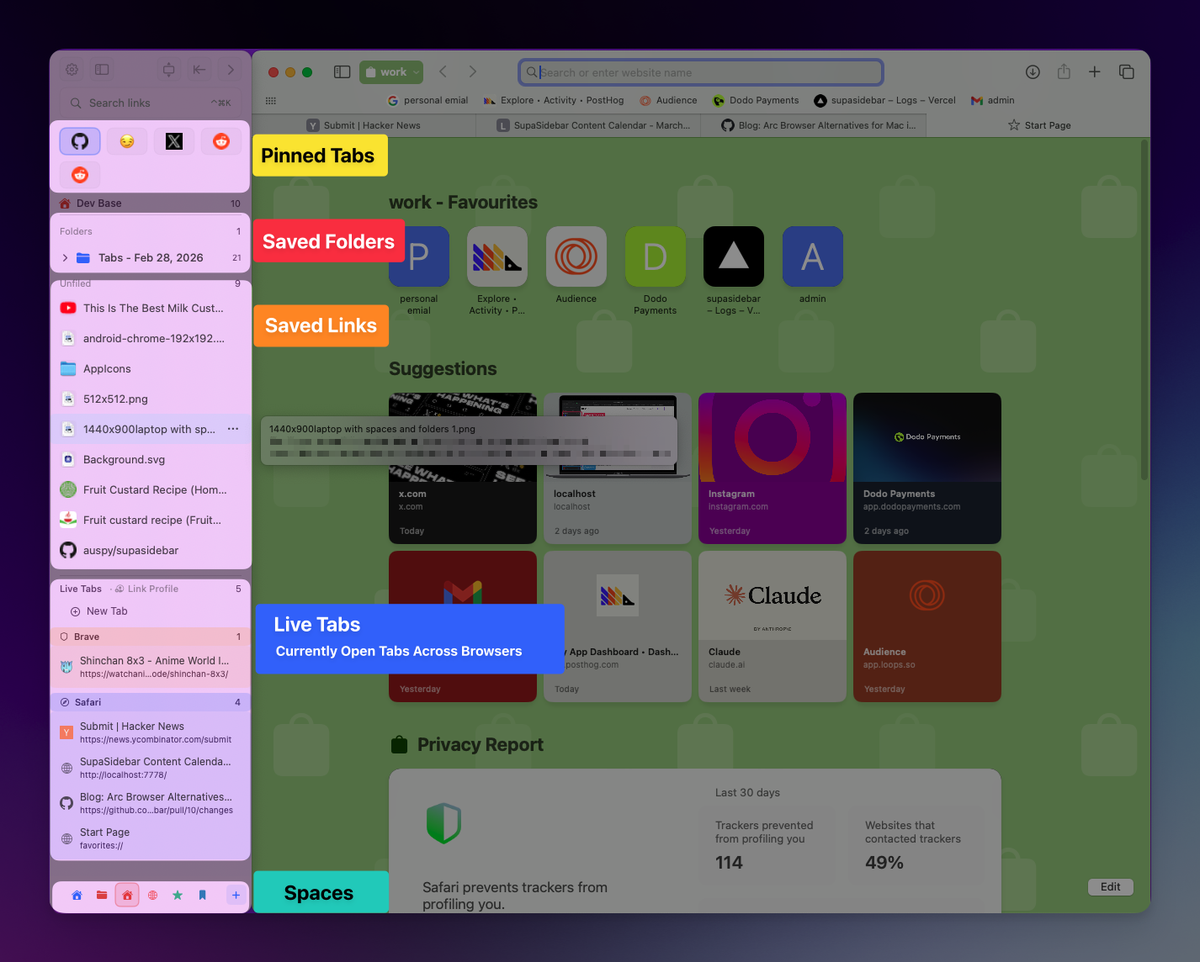
2. Spaces
Spaces let you separate work from personal browsing, or organize by project. Each Space had its own set of pinned tabs, folders, and theme color. Switching between them was instant.
Chrome has tab groups. Firefox has containers. Neither comes close to the clean separation that Spaces provided. Tab groups are still tabs - they clutter the same bar. Spaces were entire contexts.
3. Command Bar (Cmd+T)
Arc turned Cmd+T into a universal launcher. Search tabs, bookmarks, history, and the web from one input. It felt like Spotlight for your browser.
Chrome's address bar does some of this, but it's slower and noisier. Arc's Command Bar was purpose-built and it showed.
4. Automatic Tab Archiving
By default, idle unpinned tabs in Arc archived every 12 hours. The timer reset whenever you viewed or clicked the tab, and you could change the duration in Settings → General. It was aggressive, but it solved the "200 open tabs" problem that most people deal with by just... ignoring it. Arc's official Auto Archive documentation is still online if you want the full reference.
No other major browser does this natively. You'll need a tab manager extension or self-discipline to replace it.
5. Split View
Arc let you split tabs side-by-side within one window. Useful for comparing docs, writing alongside reference material, or keeping Slack visible while working.
macOS has native Split View, but it requires two full windows. Arc did it within one. That small difference mattered for workflow.
Why I Personally Switched to Safari
Arc wasn't perfect. After spending a year on it, I switched to Safari for three reasons - and I've heard the same three reasons from most Arc refugees I've talked to.
Battery life.
Arc was Chromium-based and inherited Chromium's resource appetite. On a MacBook, Safari uses noticeably less RAM and battery. The difference shows up by mid-afternoon when Arc would have been at 60% and Safari is at 78%.
"I would love to try to wean myself off Arc and switch to Safari for full macos integration. But without Arc sidebar that will never happen. But... is there a solution for that? SupaSidebar?" - Reddit user on r/macapps
macOS integration.
Handoff, iCloud Keychain, Apple Pay, Tab Groups syncing across iPhone and Mac - all native in Safari, none of it works the same in Arc. If you're in the Apple ecosystem, Safari is simply better optimized.
Stability and updates.
Arc had crash issues. Multiple users I've spoken with left specifically because of instability. More importantly, Arc stopped receiving new features after entering maintenance mode in May 2025 - so you're now using a browser whose only updates are Chromium security patches.
"I used to Arc, but it kept crashing on me. So I switched to Safari. I really miss the sidebar (from Arc)" - Reddit user on r/macapps
That third reason is the one nobody anticipates: standard browsers like Safari, Chrome, and Firefox have massive QA teams. They crash less. They get real updates. You're not depending on a startup's runway.
For the full alternatives comparison covering Zen Browser, SigmaOS, Vivaldi, and every other Arc alternative worth considering, see the Arc Browser alternative guide. This post focuses on the migration mechanics, not the alternative selection.
The Two Migration Paths from Arc Browser
There are two realistic migration paths from Arc, and they look nothing alike. One takes 2 minutes. The other takes a weekend and leaves you rebuilding your sidebar by hand. Pick the right one before you start.
Path A: Switch to a Different Browser (Brave, Zen, Vivaldi, Safari, Chrome, Firefox)
This is the slow path. No browser alternative reads Arc's sidebar data, so your pinned tabs, folders, and Spaces have to be rebuilt manually. What you can carry over is bookmarks via HTML export, and (sometimes) extensions. Here's the realistic flow:
1. Export your Arc bookmarks as HTML.
In Arc, go to the bookmark menu and choose Export Bookmarks to save an .html file to your Desktop. This file contains your bookmark folders and links. It does NOT contain pinned tabs or Spaces - those are not exportable in any portable format.
2. Install your new browser and import the HTML file.
The exact path depends on the browser:
- Brave / Vivaldi / any Chromium browser: Bookmarks → Import Bookmarks and Settings → Bookmarks HTML File
- Zen Browser (Firefox-based): Bookmarks → Manage Bookmarks → Import and Backup → Import Bookmarks from HTML
- Safari: File → Import From → Bookmarks HTML File
- Firefox: Library → Bookmarks → Manage Bookmarks → Import and Backup → Import Bookmarks from HTML
3. Approximate your Arc workflow.
This is the part nobody warns you about. You cannot actually rebuild Arc's workflow in Safari, Chrome, Brave, or Vivaldi - the building blocks do not exist. None of those browsers has true Spaces, persistent pinned items, ATC, or a Command Bar like Arc's. Best-case approximations:
- Spaces: Only Zen Browser has anything resembling Arc Spaces. In Safari and Chrome, your closest option is bookmark folders or browser profiles - neither behaves like a Space. You'll be working with basic folders, not contexts.
- Pinned tabs: You can pin individual tabs, but they don't persist as a permanent sidebar layout the way Arc's pinned tabs did. Closing the window often means losing them.
- Folder structure: Bookmarks bar folders are roughly all you get. There is no equivalent of Arc's nested sidebar folders with custom icons and color-coding.
- Command Bar: Gone. Browsers don't have anything like Cmd+T-style cross-search. Tools like Raycast or Alfred can approximate it for some use cases, but not natively.
For a heavy Arc user with 5+ Spaces and dozens of pinned tabs, expect 1-3 hours of bookmark organizing and re-pinning - and at the end, you have a less capable workflow than you started with. This is the central honesty problem with browser-only Arc migrations: you don't actually get Arc back, you get a stripped-down approximation.
4. Handle your Chrome extensions.
- Chromium-based (Brave, Vivaldi, Dia): Your extensions transfer directly. Visit
chrome://extensionsand they should all work. - Firefox-based (Zen): You need Firefox equivalents. Most popular extensions have a Firefox version, but some don't. Check addons.mozilla.org for each one.
- Safari: Safari extensions are a separate ecosystem. Check the Safari Extension Gallery for equivalents. Many won't exist.
5. What you accept losing on Path A.
If you go this route, you accept losing several Arc-specific features the destination browser cannot give back:
- Air Traffic Control - no browser alternative has anything like ATC
- Little Arc - the floating quick-link window. No browser equivalent
- The Command Bar (Cmd+T) - gone in browser alternatives
- Real Spaces - only Zen has them. Brave, Safari, Chrome, Vivaldi give you tab groups or bookmark folders, which aren't the same
- Sidebar persistence - no browser alternative keeps a permanent sidebar workspace
- Boosts - browser-engine CSS injection. Genuinely lost. The closest workaround is the Stylus userstyle extension on Chrome/Firefox, or Cascadea on Safari
- Easels - shared visual workspaces. Genuinely lost. Most users replace this with Notion or Apple Notes
You also accept being locked into one browser again - if your new pick goes the way of Arc, you start over.
The honest takeaway: of the Arc features you'd lose on Path A, only Boosts and Easels are gone for good. The rest you can recover by adding SupaSidebar on top of whatever browser you pick. Which is what Path B does.
Path B: Keep Your Browser, Add SupaSidebar
This is the fast path. SupaSidebar is the only Arc alternative that reads Arc's actual sidebar data, including Spaces, folders, and pinned tabs. You keep whatever browser you want - Safari, Chrome, Firefox, Brave, Edge, Arc itself, or any of 32+ supported browsers - and just add the sidebar back on top.
Watch the full walkthrough in two parts.
Part 1 - The basics: sidebar, Spaces, pinned tabs, and the command bar.
Part 2 - The advanced stuff: Air Traffic Control, Split View, Search a Website, Little Arc, and more, across Chrome, Safari, and any browser you use.
1. Install SupaSidebar.
Download from supasidebar.com. It's a native Mac app, no browser extension required. Drag it to Applications.
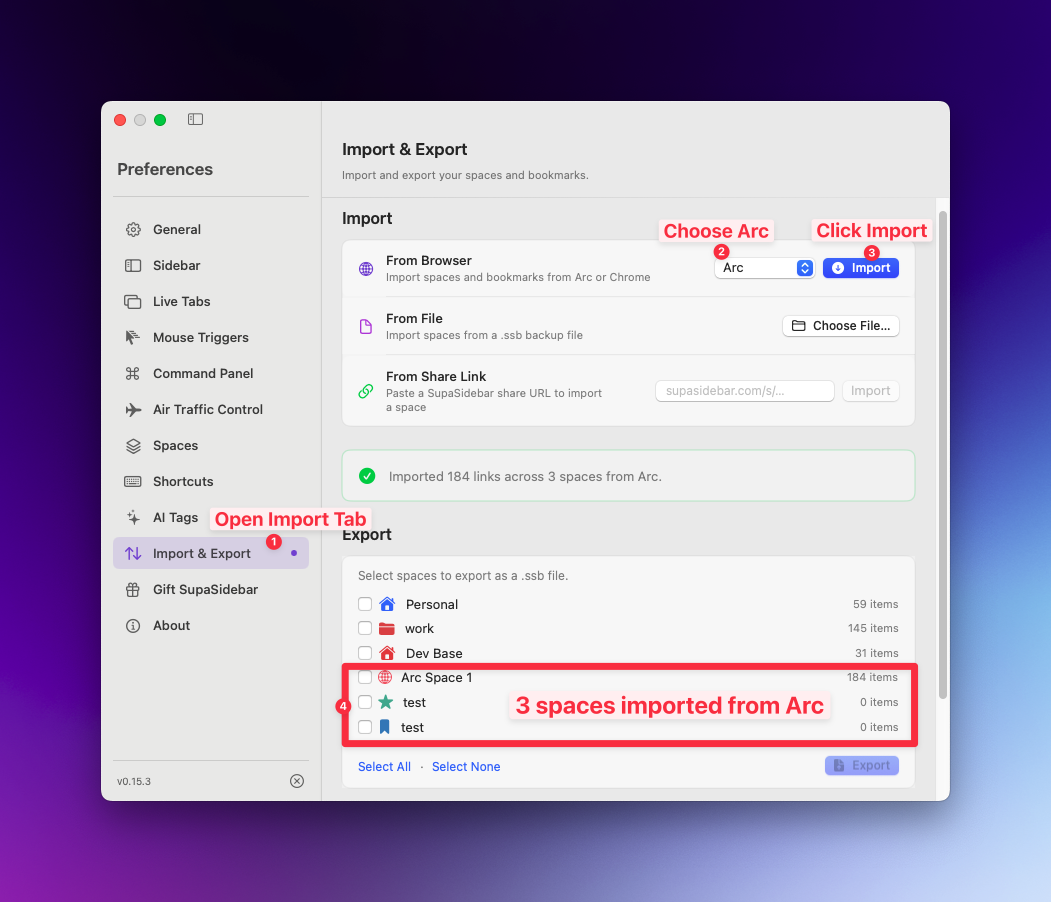
2. Run the 3-click Arc import.
In SupaSidebar:
- Open Preferences
- Go to Import and Export
- Select Arc
- Click Import
That's the entire migration. No file hunting in the Library folder, no JSON copying, no Automation permission prompt for Arc, no "select what to import" decision tree. SupaSidebar reads Arc's sidebar directly. Your Arc Spaces become SupaSidebar Spaces, your pinned tabs become pinned tabs, your folders become folders.
If you prefer manual export of StorableSidebar.json for archival reasons, the Arc export guide walks through that path.
3. Pick your base browser.
Safari if you want battery life and macOS integration. Chrome if you need specific extensions. Firefox if you want privacy and customization. Zen if you want a Firefox-based browser with vertical tabs. Dia if you want AI-first browsing. SupaSidebar attaches to whichever browser is active - and supports 32+ in total.
4. Rebuild your workflow.
The first week feels wrong. Your muscle memory expects Arc's tab bar on the left. Give it a week. After that, most people tell me they don't miss Arc anymore - they miss what Arc represented, and they've got that back.
"Moved from Arc to Safari, only thing I missed was the sidebar. This is it." - Reddit user on r/macapps
For a Safari-specific walkthrough, see how to add a sidebar to Safari.
The trade-off on Path B:
You get the sidebar, Spaces, Command Panel, Live Tabs, Window Tiling (the Split View workaround), Link Preview (Little Arc equivalent), and ATC back. The one Arc feature genuinely missing is Boosts - per-site CSS injection is a browser-engine feature, and SupaSidebar isn't a browser. Easels also isn't replicated, but most users replace that with Notion or Apple Notes anyway.
If Boosts was your single favorite Arc feature, there's now one full-browser path that recovers them: Zen Browser shipped a native Boosts feature in v1.20b (May 2026) that customizes any site's look, fonts, colors, and dark mode at the browser level. On Safari, Chrome, or any other base browser, you'd still need a userstyle extension like Stylus or Cascadea - SupaSidebar can't inject CSS itself because it lives outside the browser engine.
Side-by-Side: Path A vs Path B
| Step | Path A (Different Browser) | Path B (SupaSidebar) |
|---|---|---|
| Click count | Dozens (multiple settings menus, manual rebuild) | 3 clicks |
| Time to migrate | 1-3 hours (heavy Arc users) | Under 2 minutes |
| Spaces preserved | No (rebuild manually, or accept losing them) | Yes (auto-imported) |
| Pinned tabs preserved | No (re-pin one by one) | Yes (auto-imported) |
| Folders preserved | Bookmarks only via HTML export | Yes (auto-imported, with hierarchy) |
| Browser switch required | Yes - you commit to a new browser | No - works with your existing one |
| Chrome extensions | Depends on engine (Chromium = direct, Firefox/Safari = find equivalents) | Keep using whatever your browser supports |
| iCloud sync of sidebar | No | Yes (no account required) |
| Browser lock-in risk | Yes - if new browser dies, you start over | No - your sidebar survives browser switches |
| What you genuinely lose | ATC, Spaces, Command Bar, Sidebar persistence, Little Arc, Boosts, Easels | Only Boosts and Easels |
For most Arc refugees, Path B is the lower-friction choice. Path A is right when you're switching browsers for reasons unrelated to Arc (battery life, privacy, AI features) and you're okay with rebuilding your workflow.
What SupaSidebar Can't Replace (Path B Limitations)
I covered Path A's limitations above. Path B (SupaSidebar) has its own honest gaps. SSB fills the sidebar, Spaces, Command Bar, Split View (via Window Tiling), and Little Arc (via Link Preview) gaps. But two Arc features have no clean replacement on Path B either:
Boosts (per-site CSS injection).
Arc's Boosts ran inside the browser engine itself, which is why they could modify any website's appearance with zero performance cost. Browser extensions like Stylus (Chrome/Firefox) and Cascadea (Safari) get you about 70% of the way there, but they run as extensions, not inside the engine. This is a genuine gap.
Easels (built-in whiteboard).
Arc's whiteboard was niche but useful. Use Obsidian Canvas, FigJam, or Apple Freeform instead. None of these are browser-integrated, so it's a workflow change.
If either of these is a dealbreaker for your workflow, it's worth knowing upfront. Everything else - sidebar, Spaces, Command Bar, Split View, Little Arc, Cmd+T, automatic archiving alternatives - is covered.
A note on tab archiving: do NOT install The Great Suspender on Chrome. The popular tab-suspender extension was delisted by Google in February 2021 for containing malware that ran arbitrary remote code. Use The Marvellous Suspender (the malware-free fork) or Auto Tab Discard instead.
Who Should Switch (And Who Shouldn't)
Switch from Arc if:
- You're tired of waiting for bug fixes that aren't coming (Arc has been in maintenance mode since May 27, 2025)
- You want better battery life and stability (especially on MacBook)
- You use multiple browsers and want one sidebar across all of them
- You're in the Apple ecosystem and want iCloud sync, Handoff, and native macOS integration
- Arc's crashes are disrupting your work
Stay on Arc if:
- It still works fine for you and you don't need updates
- Boosts and Easels are core to your daily workflow (genuine gaps in any alternative)
- You don't want to rebuild anything (fair enough)
If You're Switching, Which Path?
Pick Path A (different browser) if:
- You want a fundamentally new browser experience, not a layer on top of an existing one
- You're switching browsers for reasons beyond Arc (battery, privacy, AI features, etc.)
- You're okay manually rebuilding your sidebar workflow (or you didn't use it heavily)
- You want to commit to one browser fully
Pick Path B (SupaSidebar) if:
- You want the Arc sidebar workflow back without committing to one browser
- You have a heavy Arc setup (5+ Spaces, dozens of pinned tabs, deep folder structures) that you don't want to rebuild from scratch
- You want to keep using Safari, Chrome, Firefox, Brave, or any other browser as your primary
- You want your sidebar to survive future browser switches
Use both:
- It's possible. SupaSidebar supports 32+ browsers including any browser you'd pick on Path A. You can switch browsers AND add SSB on top of the new one. Many users do exactly this - switch to Safari for battery life, and add SSB for the sidebar workflow.
Arc is not "dead" in the sense that it stops working tomorrow. It is in maintenance mode under Atlassian's ownership, with no end-of-life date announced. For the full status update and what maintenance mode means in practice, see Is Arc Browser Dead?.
Conclusion: Should You Switch from Arc Browser?
If Arc still works for you and you do not mind a frozen feature set, there is no urgency to switch. Arc is in maintenance mode under Atlassian, not shutdown - it will keep launching and getting Chromium security patches for the foreseeable future. The day a Chromium upstream change breaks something nobody is paid to fix is when Arc effectively ends, and that day has not been announced.
For everyone else - users feeling the friction of unpatched bugs, dead crashes, weak macOS integration, or just the unease of running software whose team has moved on - the migration is straightforward and the workflow loss is recoverable. Pick your base browser (Safari for battery and Apple ecosystem, Chrome for extensions, Firefox for privacy, Zen for vertical tabs), install SupaSidebar, and run the 3-click Arc import. You get the sidebar, Spaces, and Command Panel back, plus iCloud sync and cross-browser support that Arc never had. The only genuine gaps are Boosts and Easels - everything else has a direct replacement or a named workaround. Give the new setup a week before judging it; muscle memory unlearns faster than you would expect.
Why we recommend SupaSidebar
SupaSidebar is a macOS app that brings Arc's sidebar to every browser - one sidebar for tabs, bookmarks, files, and apps across 32+ browsers including Safari, Chrome, Firefox, Arc, Zen, Vivaldi, Brave, Helium, and Dia. It is the closest 1-to-1 replacement for the Arc workflow that does not require switching browsers, and it imports Arc data in 3 clicks. For a deeper feature-by-feature comparison covering every Arc alternative, see the Arc Browser alternative guide.
Frequently Asked Questions
How do I migrate from Arc Browser to another setup without losing my data?
Install SupaSidebar, then run Preferences → Import and Export → Arc → Import. This transfers your Arc Spaces, pinned tabs, folders, and links in 3 clicks. Pick whichever base browser you want (Safari, Chrome, Firefox, Zen, etc.) - SupaSidebar attaches to whichever browser is active and gives you back the persistent sidebar workflow.
Can I import my Arc Browser sidebar to another app?
Yes. SupaSidebar imports Arc data directly in 3 clicks: Preferences → Import and Export → Arc → Import. Your Spaces, pinned tabs, folders, and links transfer over in seconds. No file hunting, no permission prompts. For users who prefer manual export, Arc stores its data in a file called StorableSidebar.json. Full export guide here.
Does SupaSidebar work with Safari?
Yes. SupaSidebar works with 32+ browsers in total - Safari, Chrome, Firefox, Arc, Zen, Vivaldi, Brave, Helium, Dia, Edge, Comet, Orion, Wavebox, and more (including Chrome Beta/Canary/Dev, Edge Canary, Brave Beta/Nightly, Vivaldi Snapshot, Firefox Developer Edition, Safari Technology Preview). It runs as a native macOS app, not a browser extension, so it works with any Mac browser that supports AppleScript and syncs across Macs via iCloud with no account required. Learn more about the Safari sidebar.
Is there a free way to replace Arc's sidebar after switching?
Yes. SupaSidebar has a free version that includes the sidebar, Spaces, Command Panel (⌘⌃K), and cross-browser tab management. It's a native Mac app that requires macOS 14 or later.
What Arc features can't I replicate after switching?
Two features have no clean replacement: Boosts (per-site CSS injection that ran inside the browser engine) and Easels (Arc's built-in whiteboard). Browser extensions like Stylus and Cascadea get you partway on Boosts, and apps like Obsidian Canvas or FigJam replace Easels with a workflow change. Everything else - sidebar, Spaces, Command Bar, Split View, Little Arc, Cmd+T, automatic tab archiving alternatives - has a direct replication or a named workaround.
How long does the Arc to SupaSidebar migration take?
The data import is 3 clicks and runs in seconds. Picking a new base browser takes minutes. Rebuilding your muscle memory takes about a week - your fingers will keep reaching for Arc's left tab bar for a few days before the new pattern sticks.
Should I switch to a different browser or keep my browser and add SupaSidebar?
It depends on whether you want a new browser experience or just want the Arc sidebar workflow back. Path A (switching to Brave, Zen, Vivaldi, Safari, etc.) gives you a fundamentally new browser but requires manually rebuilding your Spaces and pinned tabs - no browser supports direct import of Arc's sidebar data. Path B (keeping your browser and adding SupaSidebar) recovers the Arc workflow in 3 clicks via direct import, and works with 32+ browsers. Most Arc refugees with heavy setups (5+ Spaces, dozens of pinned tabs) pick Path B because Path A's manual rebuild takes 1-3 hours and produces a less capable workflow. Many users also do both: switch to a new base browser AND add SupaSidebar on top.
Is Arc still safe to use during the transition period?
Yes. Arc still receives Chromium security updates and critical bug fixes. You can run Arc and SupaSidebar side by side during your transition - SupaSidebar even has Arc as one of its 32+ supported browsers, so you can attach the SupaSidebar sidebar to Arc itself if you want to test the workflow before switching base browsers. For the full Arc status, see Is Arc Browser Dead?.
Written by Kshetez Vinayak, indie developer of SupaSidebar. Building a sidebar app because I switched from Arc too, and nothing else filled the gap.