
TL;DR:
Most Mac users run at least two browsers. That means tabs, bookmarks, and history are split across apps with no way to search or organize them together. A unified sidebar sits outside any single browser and gives you one persistent panel for everything - regardless of which browser the tab lives in.
You use Safari for personal stuff because it's fast and saves battery. Chrome for work because your company's tools break in everything else. Maybe Firefox for research because the dev tools are better. Maybe Brave for privacy-sensitive browsing.
This isn't a problem. It's a workflow. And about 14% of the people who tried SupaSidebar told me they use multiple browsers daily - not because they can't pick one, but because each browser is better at something different.
The problem is what happens to your tabs, bookmarks, and browsing history when they're scattered across three or four apps with zero overlap.
The Real Cost of Browser Fragmentation
Here's what multi-browser life actually looks like on a Mac:
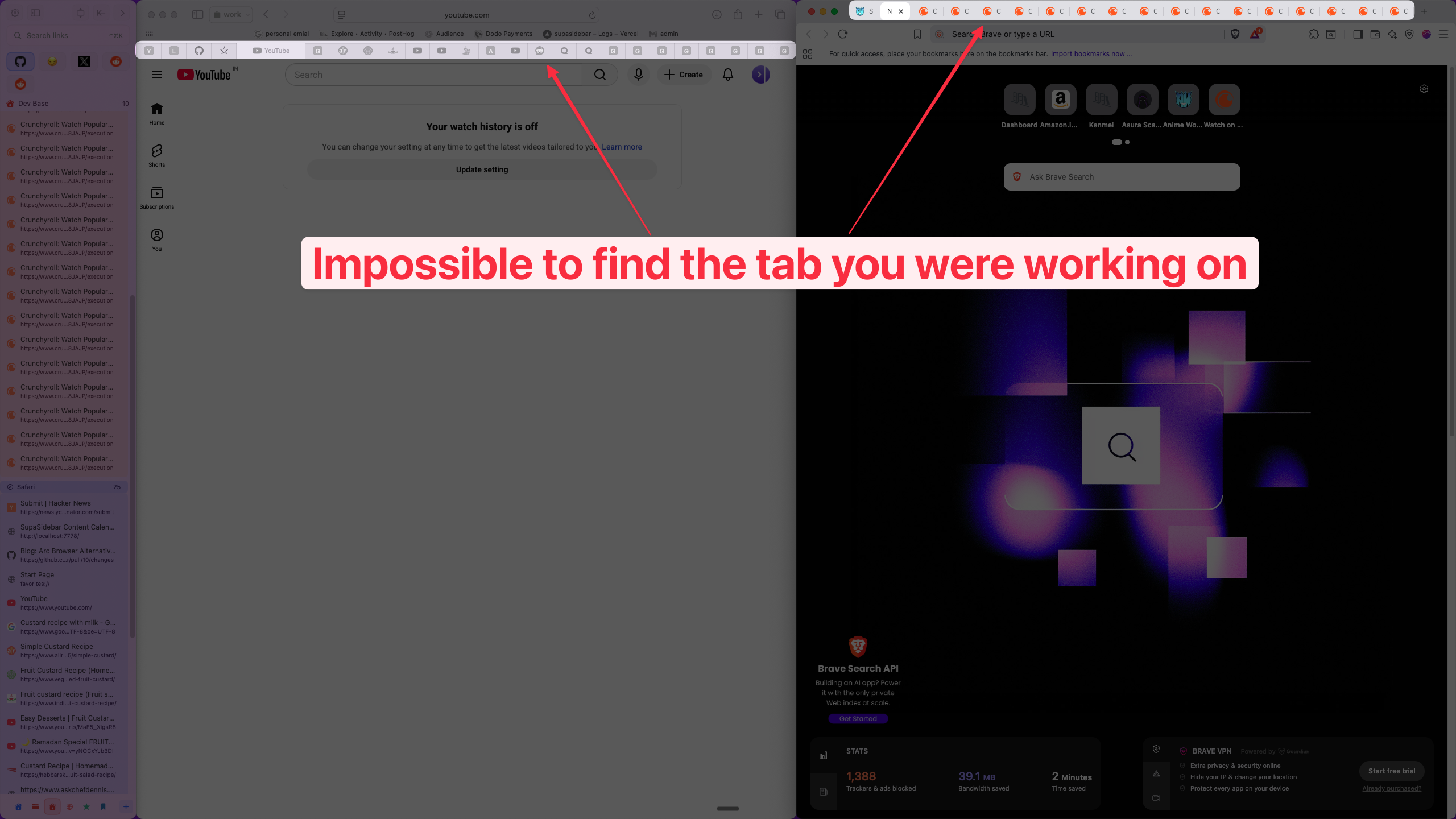
You open a tab in Chrome for a work project. Two hours later you need it again, but you're in Safari now. Where was it? Was it Chrome or Brave? You Command+Tab through three browsers looking for a tab you opened 20 minutes ago.
One user on Reddit put it plainly:
"I use multiple browsers, depending on what I'm doing... this would help consolidate that workflow." - Limitedheadroom
Another described using six browsers simultaneously:
"I never used Arc... I was using Chrome, Firefox, Safari, Opera, Edge and Brave." - MoralMaze
This isn't an edge case. Anyone who uses Safari for personal and Chrome for work - which is an enormous number of Mac users - deals with this every day. Your bookmarks live in two different apps. Your history is split. Your open tabs are invisible to each other.
"I hate having bookmarks scattered across 3 different browsers."
The friction is real, but it's so normalized that most people don't realize they're losing time to it.
Why Browser Extensions Don't Fix This
The obvious answer seems like extensions. Install a tab manager in Chrome, another in Firefox, maybe one more in Safari.
Not really. Here's why:
Extensions are sandboxed to one browser.
A Chrome extension can only see Chrome tabs. It has zero visibility into what's open in Safari or Firefox. So you end up with three separate tab managers that can't talk to each other - which is exactly the problem you started with.
Safari's extension restrictions make it worse.
Apple's WebExtensions API limits what sidebar extensions can do. You can't build a persistent sidebar panel in Safari the way you can in Firefox with something like Sidebery. Safari extensions get a popover at best, not a sidebar that stays open while you browse.
No shared state.
Even if every extension worked perfectly, your Chrome tab manager and your Firefox tab manager have no shared bookmark list, no shared history search, no shared workspaces. Each one is a silo.
This is the fundamental limitation: browser extensions live inside browsers. If your workflow spans multiple browsers, per-browser tools can't unify it.
The Standalone Sidebar Approach
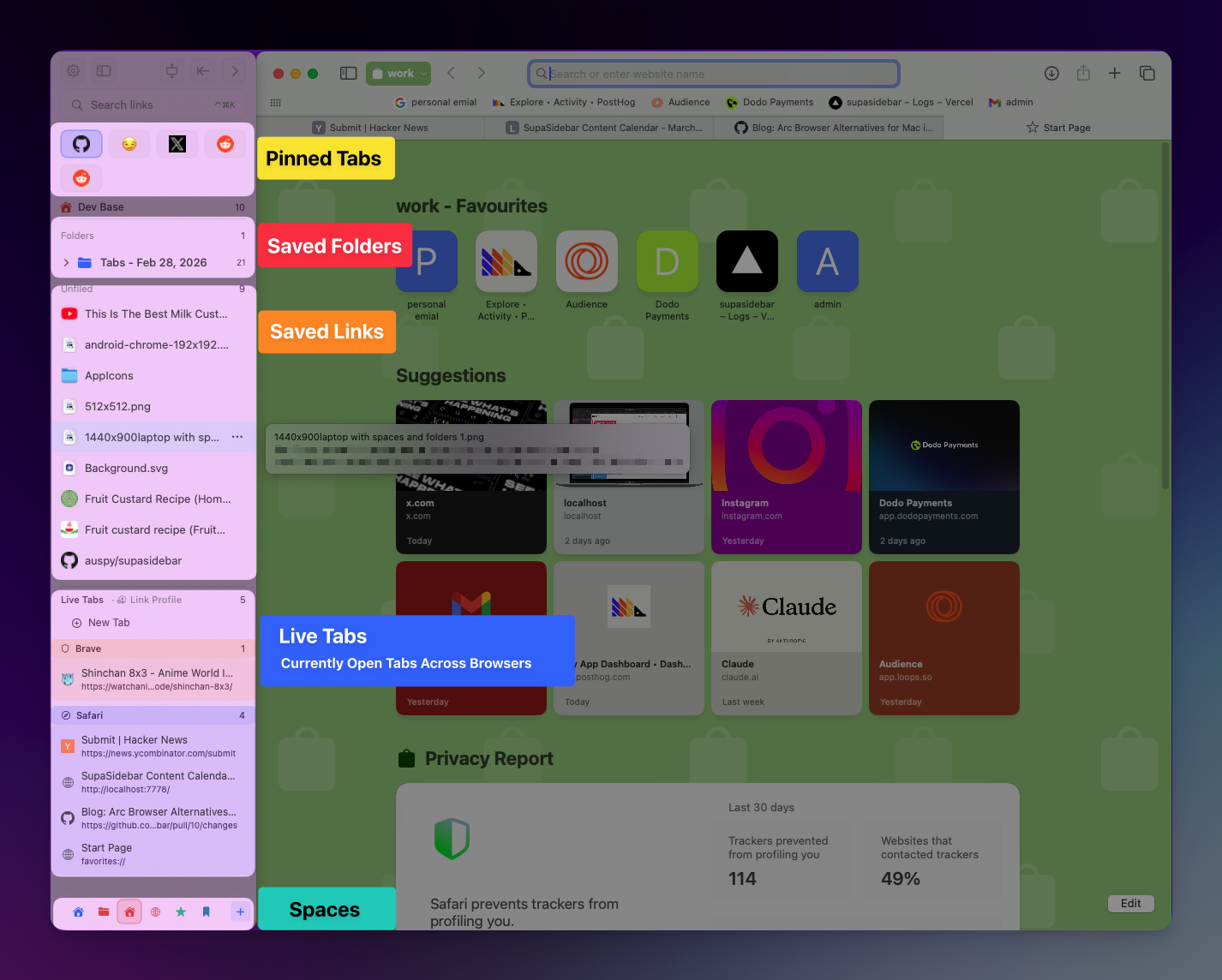
A unified sidebar works differently. Instead of running inside a browser, it runs as a native Mac app alongside every browser. It sits at the operating system level, not the browser level.
This means:
One sidebar, every browser.
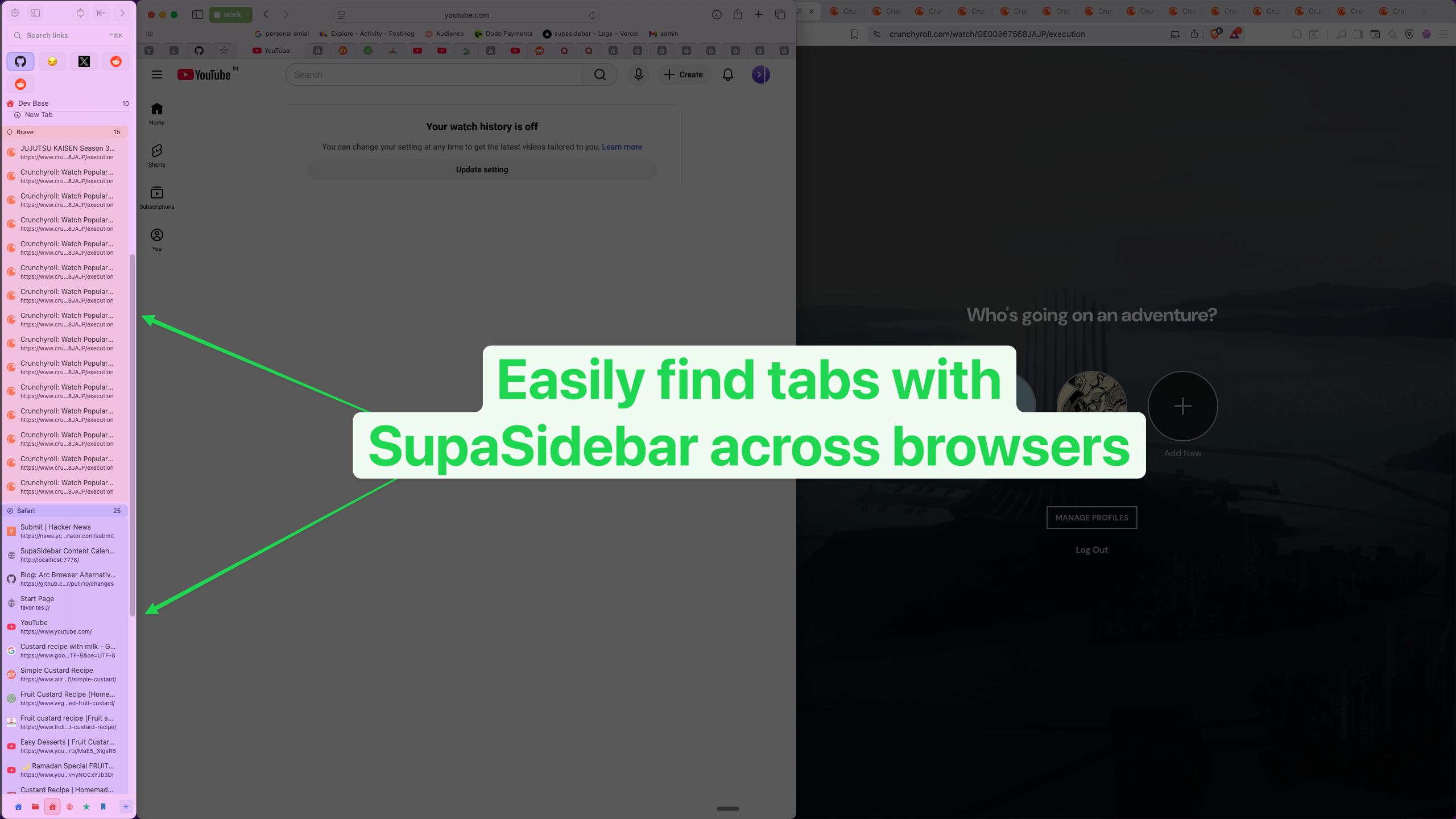
Your tabs from Safari, Chrome, Firefox, Brave, Edge, Arc, and 20+ more browsers all appear in the same panel. When you're looking for that tab you opened earlier, you search once - not three times across three apps.
Persistent bookmarks across browsers.
Save a link once, access it from any browser. No syncing between browser bookmark systems. No Raindrop.io workaround.
"The ability to open a bookmark in specific browser from anywhere is what I really need."
Cross-browser history search.
Fuzzy search that spans every browser you've used. "What was that article I read yesterday?" doesn't require remembering which browser you read it in.
Workspaces that aren't browser-specific.
Group your tabs, bookmarks, and files by project or context - work, personal, research - regardless of which browser those resources are in.
This is the approach I built SupaSidebar around. I'm Kshetez Vinayak, and I've been building this since mid-2025 because I kept hitting this exact problem myself - Safari for personal, Chrome for dev work, and no way to manage them together.
SupaSidebar is a macOS app that gives you a persistent, always-accessible sidebar for managing tabs, bookmarks, and web apps across Safari, Chrome, Firefox, Brave, Edge, Arc, and 20+ more browsers. Over 3,000 Mac users have downloaded it so far. The free tier includes 3 customizable spaces. The sidebar stays visible and responsive even as you switch between browsers - because it's not part of any of them.
What Actually Changes Day to Day
The shift isn't dramatic. You don't reorganize your life. But three things change immediately:
You stop losing tabs.
Command+E opens a fuzzy search across every browser. Type a few characters, find the tab, jump to it. No more Command+Tabbing through four apps.
"Seems like a really good product... the feature I'd use it most for is probably the fuzzy search of tab history."
You stop duplicating bookmarks.
Instead of saving the same link in both Chrome Bookmarks and Safari Favorites (or forgetting and losing it), you save it once in the sidebar. Open it in whichever browser you want.
Your workspace survives browser switches.
If you have a "Work" space with 12 tabs and 5 bookmarks, it doesn't matter that 4 tabs are in Chrome and 8 are in Safari. They're all in the same space. Switch browsers, the sidebar stays.
"SupaSidebar eliminates this friction, and focuses on getting you what you need, when you need - regardless of which browser you're working on." - noblenami
"I want to continue using my favorite web browsers and not move to a new one just for these extra features." - BinderGang
That's the core idea. You shouldn't have to switch to a different browser to get organizational features. Those features should exist independently of which browser you're using.
Who This Is Actually For
Not everyone needs a unified sidebar. If you use one browser for everything, native tools like Firefox's vertical tabs or Chrome's tab groups work fine.
A unified sidebar makes sense if you:
- Use Safari + Chrome on the same Mac. The most common combo. Safari for personal (battery life, iCloud sync) and Chrome for work (compatibility, extensions). SupaSidebar bridges the two without forcing you to pick one.
- Keep specific browsers for specific tasks. Brave for privacy, Firefox for development, Chrome for Google Workspace. Each browser does its job, the sidebar handles organization.
- Want Arc's sidebar without Arc. A lot of people loved Arc's sidebar but don't want the instability or the uncertainty about Arc's future. SupaSidebar brings that sidebar concept to any browser.
- Have bookmarks scattered everywhere. If you've got important links saved in Safari Favorites, Chrome Bookmarks, and a Raindrop.io account, a unified sidebar consolidates them without forcing a migration.
If you use one browser and it handles your tabs fine, you probably don't need this. That's a fine setup.
How SupaSidebar Compares to Other Approaches
| Approach | Cross-Browser? | Persistent Sidebar? | Shared Bookmarks? | Shared History? | Works with Safari? |
|---|---|---|---|---|---|
| Browser extensions (Sidebery, Tab Stash) | No - one browser only | Firefox only (Sidebery) | No | No | Limited (popover only) |
| Chrome Tab Groups | No - Chrome only | No - horizontal groups | No | No | No |
| Bookmark managers (Raindrop.io) | Yes (web-based) | No sidebar | Yes | No | Yes (extension) |
| Tab managers (Workona, Toby) | No - Chrome only | No | Chrome only | No | No |
| SupaSidebar | Yes - 25+ browsers | Yes - native Mac sidebar | Yes | Yes (fuzzy search) | Yes |
The gap in this space is clear: tools that work across browsers AND provide a persistent sidebar are rare. SupaSidebar offers a free tier with 3 spaces and a Pro plan with unlimited spaces.
Getting Started Takes About 30 Seconds
There's no migration, no import wizard, no complex setup. Install SupaSidebar from supasidebar.com, grant Accessibility permission (required for the sidebar to overlay browser windows), and it starts showing your open tabs from every running browser immediately.
If you're coming from Arc Browser, you can also import your Arc sidebar data - pinned tabs, spaces, and all.
The free tier gives you 3 spaces (workspaces for grouping tabs, bookmarks, and files by context). For most people using 2-3 browsers, that's enough. If you need more, a paid plan (monthly, yearly, or lifetime) unlocks unlimited spaces.
Frequently Asked Questions
Does a unified sidebar slow down my Mac?
SupaSidebar is a native macOS app built with Apple's AppKit framework, not an Electron wrapper. Typical memory usage stays well under 100 MB. It monitors browser tabs through macOS Accessibility APIs rather than injecting code into browsers, so it doesn't affect browser performance.
Can I use SupaSidebar with Safari?
Yes. SupaSidebar supports Safari, Chrome, Firefox, Brave, Edge, Arc, and 20+ more browsers. Unlike browser extensions that are limited by Safari's WebExtensions restrictions, SupaSidebar runs at the OS level and gives Safari the same sidebar functionality as every other browser. For more on Safari specifically, SupaSidebar runs at the OS level and gives Safari the same sidebar functionality as every other browser.
What about browser-specific features like Chrome profiles?
SupaSidebar works alongside browser-specific features, not instead of them. You can still use Chrome profiles, Firefox containers, or Safari's tab groups. The unified sidebar adds a cross-browser layer on top - your per-browser organization stays intact.
Is there a Windows or Linux version?
No. SupaSidebar is macOS-only, built specifically for Mac using native Apple frameworks (AppKit, Accessibility APIs, iCloud sync). This is a deliberate trade-off: Mac-native performance and integration over cross-platform reach.
Can I import my Arc sidebar?
Yes. SupaSidebar imports Arc Browser sidebar data directly from StorableSidebar.json - pinned tabs, spaces, and folders. See the Arc sidebar export guide for the full walkthrough.