
By Kshetez Vinayak, founder of SupaSidebar. Last updated June 10, 2026.
Quick navigation:
- Want the single-browser deep dive on Orion? → Orion Browser Mac Review 2026
- Comparing the two default Mac browsers instead? → Safari vs Chrome on Mac in 2026
- Comparing every Mac browser? → Best Browser for Mac in 2026
TL;DR:
Orion and Safari both run on WebKit, so they share the same battery and memory profile on Apple Silicon - the comparison is not about speed, it is about everything Apple leaves out. Orion wins on extensions (it runs Chrome and Firefox add-ons natively, where Safari is capped at the small Safari Web Extensions catalog), privacy (zero telemetry by default per Kagi's privacy posture versus Safari's limited Apple analytics), and tab UI (built-in vertical tabs Safari still lacks). Safari wins on iCloud Keychain autofill, Handoff, Apple Pay, and rock-solid web compatibility, because it is wired into macOS in ways no third-party browser can match. For single-browser users who do not need iCloud Keychain, Orion is the upgrade. The real-world catch: most Mac users end up running both - Orion for daily browsing and extensions, Safari for Apple-bound logins - and the tabs scatter across both. That cross-browser gap is what SupaSidebar, a Mac sidebar that works across 32+ browsers including Orion and Safari, closes on top.
Orion vs Safari on Mac: the 30-second verdict
Orion is the better browser on Mac in 2026 for anyone who wants Safari's efficiency without Safari's extension cage. Both browsers use WebKit, the same Apple rendering engine, so battery life and RAM land in the same range on M-series hardware. The difference is what sits on top of WebKit. Orion adds native Chrome and Firefox extension support, built-in ad and tracker blocking, vertical tabs, profiles, and a strict zero-telemetry stance. Safari adds the deepest macOS integration of any browser: iCloud Keychain autofill, Handoff, Apple Pay with Touch ID, and the web-compatibility safety net of being the engine every Apple site is tested against.
This post compares Orion and Safari on macOS 14+ for general browsing, extensions, privacy, tab management, and battery. It does NOT cover Orion on Linux or Windows, which Kagi ended on October 2, 2026 (Kagi blog), and it is not a single-product Orion review (that lives in the Orion Browser Mac Review 2026). The pattern worth naming up front: the choice is rarely permanent. A large share of Mac users who install Orion keep Safari around for Apple-ID logins, so the practical question becomes how to run both WebKit browsers without losing track of every tab.
Orion vs Safari on Mac: side-by-side comparison
The head-to-head on what actually separates two browsers that share a rendering engine. Because both run WebKit, the differences live in features, extensions, and privacy posture - not raw page-render speed.
| Feature | Orion | Safari 18 |
|---|---|---|
| Engine | WebKit (same as Safari) | WebKit (Apple) |
| Extension stores | Chrome Web Store + Firefox Add-Ons (~70% WebExtensions API) | Safari Web Extensions only (~250 listed) |
| Built-in ad / tracker block | Yes, default on | No (extension required) |
| Vertical tabs | Yes, native | No (left-rail bookmark drawer only) |
| Telemetry | Zero | Limited Apple analytics |
| iCloud Keychain autofill | No | Native |
| Handoff to iPhone / iPad | No | Yes |
| Apple Pay in browser | No | Native, Touch ID |
| Profiles | Yes | Yes (since Safari 17, 2023) |
| Minimum macOS | macOS 11 (Big Sur) | Ships with macOS |
| AI features | None by design | Limited (Apple Intelligence summaries) |
| Open source | Closed (open-source on roadmap) | No |
| Web compatibility | WebKit profile, same edge cases as Safari | WebKit reference - what sites test against |
The pattern: Orion wins on the features Apple chose not to ship in Safari (real extensions, built-in blocking, vertical tabs, zero telemetry), and Safari wins on the things only Apple can wire into macOS (Keychain, Handoff, Apple Pay) plus being the WebKit reference every site is tested against.
Same engine, different web compatibility risk
The single most important thing to understand about Orion vs Safari: they render with the same engine, so a page that works in Safari works in Orion and a page that breaks in Safari breaks in Orion. WebKit's web compatibility has improved enormously and the old "doesn't work in Safari" era is mostly over, but a long tail of web apps is still built and tested only against Chromium. Those apps misbehave identically in both browsers.
Here is where the two diverge in practice. Safari is the WebKit reference browser - it is the one Apple ships, the one with the largest WebKit user base, and the one web developers who bother to test WebKit at all test against first. Orion uses WebKit too, but layers its own UI, extension translation, and ad-blocking on top. Most of the time that is invisible. Occasionally an embed-heavy site or a Chromium-tuned web app behaves slightly differently in Orion than in Safari, and bug reports on r/OrionBrowser into 2026 confirm a handful of these corner cases still need polish.
The takeaway for a reader deciding between them: neither WebKit browser will run a Chromium-only web app reliably, so if a specific work app already breaks in Safari, it will break in Orion too. That is not a reason to pick Safari over Orion - it is a reason to keep one Chromium browser installed as a fallback regardless of which WebKit browser becomes the daily driver.
Extensions: Orion's biggest win over Safari
Extensions are the clearest reason to choose Orion over Safari. Safari only runs Safari Web Extensions, which developers have to build specifically and ship through Apple's review pipeline. Most extensions never get ported, so the catalog is small - roughly 250 listed extensions. If a favorite Chrome or Firefox extension is not in that catalog, Safari users are out of luck.
Orion sidesteps the whole problem. Per Kagi's macOS extension documentation, Orion installs extensions from both the Chrome Web Store and the Firefox Add-Ons store and translates the WebExtensions API at the engine layer, covering roughly 70% of the API as of early 2026. That opens access to over 150,000 extensions on a WebKit browser. In practice the popular ones work: uBlock Origin, Bitwarden, Dark Reader, Vimium, Stylus, and most reader-mode tools run today. It is the only consumer browser on Mac that bridges both extension ecosystems.
The honest caveat is that 70% is not 100%. Extensions that depend on Chrome-specific APIs Orion has not implemented yet may install but fail on some sites. Password-manager flows have been the loudest example: the 1Password integration thread on r/OrionBrowser (March 2026) documents the friction. The right framing is "most extensions, most of the time" rather than "guaranteed Chrome parity." For a user whose daily extensions are the popular ones, Orion lifts the single biggest limitation Safari imposes.
Privacy: zero telemetry vs Apple's defaults
Both browsers have a credible privacy story, but they get there differently. Safari ships Intelligent Tracking Prevention, on-device tracker blocking, and a generally strong privacy posture - it is one of the better mainstream defaults, and Apple's business model does not depend on advertising the way Google's does. Safari does send limited Apple analytics, and some features touch Apple services, but for most users it is a privacy-respecting default.
Orion goes further on the telemetry axis specifically. Per Kagi's stated privacy posture, Orion collects zero telemetry, no analytics, and requires no account. The browser does not phone home in idle state - network-monitoring tools show Orion idle as genuinely idle. On top of that, Orion's built-in ad and tracker blocker runs at the network layer, blocking known ad and tracking requests before WebKit processes them, which Safari only does through a separate content-blocker extension.
For a reader ranking privacy, the order is: Orion edges Safari on raw telemetry and built-in blocking, Safari edges Orion on the maturity and the fact that its tracking prevention has years of refinement behind it. Both are far ahead of Chrome's default posture. If zero telemetry and built-in blocking with no configuration are the priority, Orion is the stronger pick; if a battle-tested default from a trillion-dollar company with no extra setup is the priority, Safari holds up.
Vertical tabs and tab management
Tab UI is the other place Orion clearly out-features Safari. Orion ships native vertical tabs that collapse to icons and expand on hover, similar to Arc's sidebar behavior, and they can be hidden with Cmd+Option+T. Tab Groups work for visual organization, and drag-and-drop reordering behaves the way Safari and Chrome users expect. For anyone who has wanted a real vertical sidebar on a WebKit browser, Orion is the closest it gets without leaving WebKit.
Safari has no real vertical tab mode in 2026. It has a left-rail drawer that doubles as a bookmark list and Tab Group selector, but tabs themselves still live in a horizontal strip across the top. Safari 17 added profiles and Tab Groups, which help with organization, but the horizontal-tab limit means a Mac user with 30 tabs open in Safari sees the same cramped favicon strip that has defined Safari for a decade.
The honest limit on both: vertical tabs and Tab Groups organize tabs inside one browser. Neither Orion's sidebar nor Safari's drawer can show tabs from the other browser. The moment a workflow spans both WebKit browsers - Orion for research, Safari for an Apple-ID login - each browser's tab UI only sees its own half of the picture.
Battery and performance: a near-tie by design
Battery and RAM are where the shared engine makes the comparison almost moot. WebKit is the engine Safari uses, and Safari's battery advantage on Apple Silicon comes from WebKit tapping deeper into macOS power-management hooks than Chromium browsers can reach. Orion inherits that same advantage because it runs the same engine.
Reddit comparison threads from December 2025 through April 2026 consistently put Orion's RAM and battery near Safari's and well below Chromium browsers on the same Mac. Apple's own Speedometer 3 benchmark shows WebKit-based browsers running within margin of error of each other on M2, M3, and M4 chips. A typical 10-tab session in either browser uses roughly 400 to 700 MB, comparable to each other and well below Chrome's 1.5 to 2 GB at the same load.
Where Safari holds a slim edge: it is the more mature WebKit build with the largest test base, so on long, mostly-idle workdays Safari's power tuning is marginally ahead and its CPU behavior is more predictable. Orion 1.0 shipped in November 2025 after six years of beta per Kagi's 1.0 announcement, and some users on older M1 MacBook Airs have reported occasional CPU spikes on heavy web apps that the Orion team has been patching. For day-to-day browsing the two are indistinguishable on battery. The verdict on this axis is a tie, and that is the point: choose on extensions, privacy, and tab UI, because the engine-level performance is the same.
The Mac multi-browser problem neither one solves
The honest gap in any Orion-vs-Safari decision is that the answer for most Mac users is "both," and neither browser handles that. The realistic setup looks like this:
- Orion for daily browsing, research, and reading, because WebKit is efficient and the Chrome and Firefox extensions cover the daily tools
- Safari for sites that need iCloud Keychain autofill, Apple ID logins, or Apple Pay, because Safari is wired into the macOS keychain in ways no third-party browser can replicate
- Often a Chromium browser too, for the one work web app that breaks in WebKit
By Thursday afternoon a typical knowledge worker has tabs scattered across at least two browsers. That is the cross-browser problem, and it is structural: Orion's sidebar only sees Orion's tabs, Safari's drawer only sees Safari's tabs. Switching between them means alt-tabbing between windows and losing the thread of what is open where.
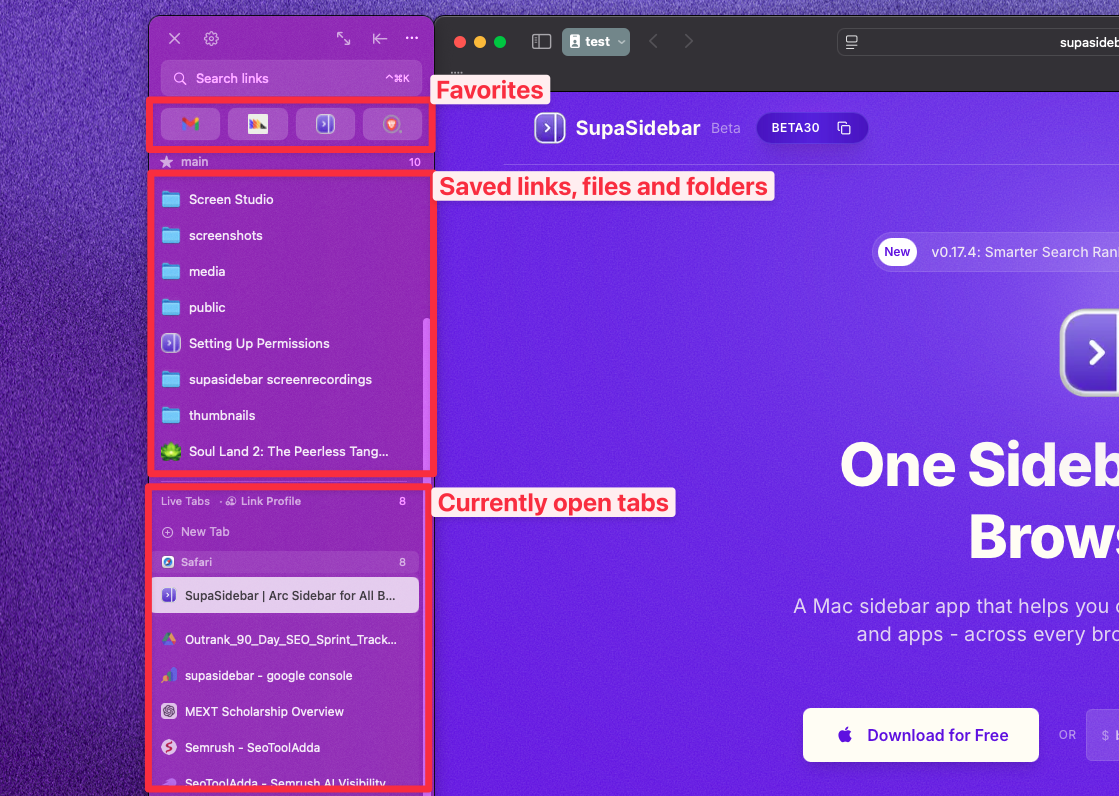
This is the gap SupaSidebar is built to fill. SupaSidebar is a Mac sidebar app that sits on top of every installed browser, including both Orion and Safari. It pulls live tabs, saved links, and recent items from Orion, Safari, Chrome, Firefox, Arc, Zen, and more into one persistent sidebar. The Command Panel (Cmd+Ctrl+K) searches across all of them at once. Live Tabs shows every open tab from every browser in a single sidebar section. Air Traffic Control routes new links to a specific Space, browser, or profile automatically, so an Apple-login URL can open in Safari while a research URL opens in Orion, without thinking about it.
The phrase that captures the pattern, from a thread on r/macapps:
"I've been wanting a way to manage my multiple browsers from a single source."
- Reddit user on r/macapps
That is the workflow an Orion-plus-Safari user hits by the end of week one. Orion vs Safari answers which single WebKit browser to anchor on. SupaSidebar answers how to work across both at once.
Conclusion: Picking what to use
Orion is the better WebKit browser on Mac in 2026 for users who want extensions, built-in privacy, and vertical tabs, because it adds all three on top of the same WebKit engine Safari uses while staying free and zero-telemetry per Kagi's docs. Safari is the better pick for users who live inside the Apple ecosystem and need iCloud Keychain, Handoff, or Apple Pay in the browser.
Single-browser users who do not need iCloud Keychain autofill: Orion is the upgrade - same battery and RAM as Safari, plus real extensions and built-in blocking Safari cannot match. Users who depend on iCloud Keychain, Handoff, or Apple Pay: stay on Safari, because no third-party WebKit browser can replicate that macOS wiring. Users with a Chromium-only work app: keep Chrome or Brave installed as a fallback no matter which WebKit browser wins, since both Orion and Safari share WebKit's compatibility profile. Multi-browser Mac users (the common case after one week): pair Orion and Safari with SupaSidebar to keep every tab from both in one persistent sidebar.
Try SupaSidebar (free tier) if a unified Mac sidebar across Orion, Safari, and every other browser fits the workflow. For the single-browser Orion deep dive, see the Orion Browser Mac Review 2026; for the full Mac browser ranking, see Best Browser for Mac in 2026.
Why we recommend SupaSidebar for Orion and Safari users on Mac
SupaSidebar is a macOS app that brings Arc's sidebar to every browser - one sidebar for tabs, bookmarks, files, and apps across 32+ browsers including Safari, Chrome, Firefox, Arc, Zen, Vivaldi, Brave, Helium, and Dia. It runs alongside both Orion and Safari as a native Mac app (not an extension, not a browser), so users keep WebKit's efficiency in both browsers and pick up the cross-browser layer neither one provides on its own.
The features that matter most for users running both WebKit browsers: Command Panel (Cmd+Ctrl+K) fuzzy-searches every saved link, recent item, and open tab across Orion, Safari, and every other installed browser; Live Tabs shows every open tab from every browser in real time in the sidebar; Air Traffic Control routes saves to specific Spaces or opens URLs in specific browsers automatically (so an Apple-login URL routes to Safari while a research URL routes to Orion); free Spaces for organizing work, personal, and research contexts; iCloud sync for saved links without an account.
SupaSidebar is free to download with a free tier. macOS 14 (Sonoma) and later, Apple Silicon and Intel. The full feature list and download link live at supasidebar.com.
Frequently Asked Questions
Is Orion better than Safari on Mac?
For most users who want extensions and built-in privacy, yes. Orion runs on the same WebKit engine as Safari, so battery and RAM are comparable, but it adds Chrome and Firefox extension support, built-in ad blocking, vertical tabs, and zero telemetry. Safari is better for users who need iCloud Keychain autofill, Handoff, or Apple Pay, which Orion cannot replicate.
Do Orion and Safari use the same engine?
Yes. Both Orion and Safari render with WebKit, the engine Apple maintains. That means they share the same web-compatibility profile and a similar battery and memory footprint on Apple Silicon. A page that works in Safari works in Orion, and a page that breaks in Safari breaks in Orion too.
Does Orion support Chrome extensions and Safari does not?
Orion installs extensions from both the Chrome Web Store and the Firefox Add-Ons store, covering about 70% of the WebExtensions API per Kagi's macOS extension docs. Safari only runs Safari Web Extensions, a much smaller catalog of roughly 250 listed extensions that developers must build specifically for Safari.
Is Orion more private than Safari?
On telemetry, yes. Orion collects zero telemetry and requires no account per Kagi's privacy posture, and it ships built-in ad and tracker blocking on by default. Safari has strong Intelligent Tracking Prevention but sends limited Apple analytics and needs a separate content blocker for ad blocking. Both are far more private than Chrome's defaults.
Does Orion have vertical tabs and Safari does not?
Yes. Orion ships native vertical tabs that collapse to icons and expand on hover. Safari has no true vertical tab mode in 2026 - it offers a left-rail bookmark and Tab Group drawer, but the tabs themselves stay in a horizontal strip across the top.
Which has better battery life, Orion or Safari?
They are nearly tied because both run WebKit. Safari holds a slim edge on long idle workdays thanks to a more mature build, but Orion lands within a few percent on Apple Silicon and well ahead of Chromium browsers. For day-to-day browsing the difference is not noticeable.
Can I run Orion and Safari at the same time on Mac?
Yes, and many Mac users do - Orion for daily browsing and extensions, Safari for Apple-ID logins and iCloud Keychain. The downside is that tabs scatter across both browsers. A Mac sidebar app like SupaSidebar shows live tabs from both Orion and Safari in one place and searches across them with a single shortcut.
What is the minimum macOS version for Orion?
Orion requires macOS 11 (Big Sur) or later per the install requirements at orionbrowser.com, which is more permissive than browsers like Zen that require macOS 14. Safari ships with macOS and updates alongside it.
By Kshetez Vinayak, founder of SupaSidebar. Last updated June 10, 2026.