
TL;DR:
The best Arc Browser alternative for Mac in 2026 depends on whether you want to keep your current browser. If yes, SupaSidebar adds Arc's sidebar to Safari, Chrome, Firefox, and 6 other browsers - it's the only Arc alternative on this list that doesn't force a browser switch. If no, Zen Browser is the closest full-browser Arc clone (Firefox-based, free, open source) and Dia is The Browser Company's official successor (AI-first, macOS only). The full ranking, comparison table, and migration steps for all seven alternatives are below. Arc itself is in maintenance mode after Atlassian acquired The Browser Company for $610 million in September 2025 (source).
The Real Problem Arc Solved (And Why Replacing It Is Hard)
Open 30 tabs in Safari and the titles squeeze down to favicons you can't tell apart. Chrome does the same. By tab 50, you're losing time hunting for the right one - every browser still treats tabs as a horizontal strip even though nobody's used 5 tabs since 2010.
Arc was the first browser that fixed this at the UI level. Vertical sidebar with full tab titles, Spaces for context separation, pinned sites that survive new windows, command bar to jump anywhere with one shortcut. It was built by The Browser Company, launched publicly in 2022, and within two years it had become the de facto productivity browser for Mac power users.
Then it stopped. The Browser Company put Arc into maintenance mode in May 2025 - security patches only, no new features. Atlassian acquired The Browser Company in September 2025 for $610 million in cash. The team's full focus shifted to Dia, an AI-first browser with a completely different design philosophy.
Since Arc froze, every major browser has shipped some version of vertical tabs - none feel like Arc. Chrome added a vertical-tabs flag, but it's a flat list with no Spaces. Edge has the same. Firefox 136 finally shipped vertical tabs in March 2025, but no Workspaces. Safari does the least, with Tab Groups that don't pin tabs per group. The bones of Arc's UX are still missing from every default browser in 2026.
That's the gap this post is about. Arc had a UX nobody has matched. The seven alternatives below either rebuild it inside another browser (SupaSidebar), clone the whole browser (Zen, Dia), or get partway there (Vivaldi, Brave, Safari, Helium).
What "Arc Browser Alternative" Actually Means in 2026
Arc Browser is a macOS web browser built by The Browser Company. It introduced a left sidebar with vertical tabs, Spaces (workspace separation), pinned sites, and a command bar. As of May 2026, Arc is still functional but frozen - and the active migration question for Arc users is "what's the best replacement?"
So "Arc Browser alternative" doesn't mean one thing. It means three different things depending on what you actually liked about Arc:
- You loved the sidebar UX. You want vertical tabs, workspace separation, and the pinned-tab workflow back, on whatever browser you're using now.
- You loved the whole browser. You want a full Arc-style browser to switch to, ideally one that won't get killed.
- You loved the design and AI direction. You're curious about Dia, Arc's official successor.
Each of those needs a different answer. This post covers all three and tells you which alternative fits which use case. SupaSidebar (the app I build) shows up as #1 because it's the only one that handles need #1 without forcing you to switch browsers - but I'll be fair to the alternatives and tell you when they win.
What this post does NOT cover: full reviews of every browser, mobile apps (most of these alternatives are macOS only), or browsers that aren't realistic Arc replacements (sorry, Opera).
The Quick Comparison Table
| Alternative | What it is | Sidebar UX | Spaces | Cross-browser | Mac-native | Verdict |
|---|---|---|---|---|---|---|
| SupaSidebar | macOS sidebar app | Yes (any browser) | 3 free / unlimited Pro | Yes - Safari, Chrome, Firefox, Arc, Zen, Vivaldi, Brave, Helium, Dia | Yes (Swift) | #1 if you want Arc's sidebar without switching browsers |
| Zen Browser | Firefox-based Arc clone | Yes (built-in) | Yes | No (it's a browser) | Yes (Universal) | #2 if you're willing to switch browsers |
| Dia | AI-first browser by The Browser Company | No vertical sidebar | No | No (it's a browser) | Yes (macOS only) | #3 if you trust the team and want AI-first |
| Vivaldi | Highly customizable Chromium browser | Yes (right-side panels + workspaces) | Yes (Workspaces) | No | Yes | #4 if you want maximum power-user control |
| Brave | Privacy-focused Chromium browser | Optional sidebar | Yes (Profiles) | No | Yes | #5 if privacy matters more than UX |
| Safari + extensions | Native macOS browser plus add-ons | No, but extensions can fake it | Tab Groups | No | Yes (best on M-series) | #6 if battery is non-negotiable |
| Helium | Minimal privacy-focused Chromium fork | Basic | No | No | Yes (Homebrew) | #7 if you want a quiet, fast, Google-free browser |
Now the detail on each one.
#1: SupaSidebar - The "Don't Switch Browsers" Option
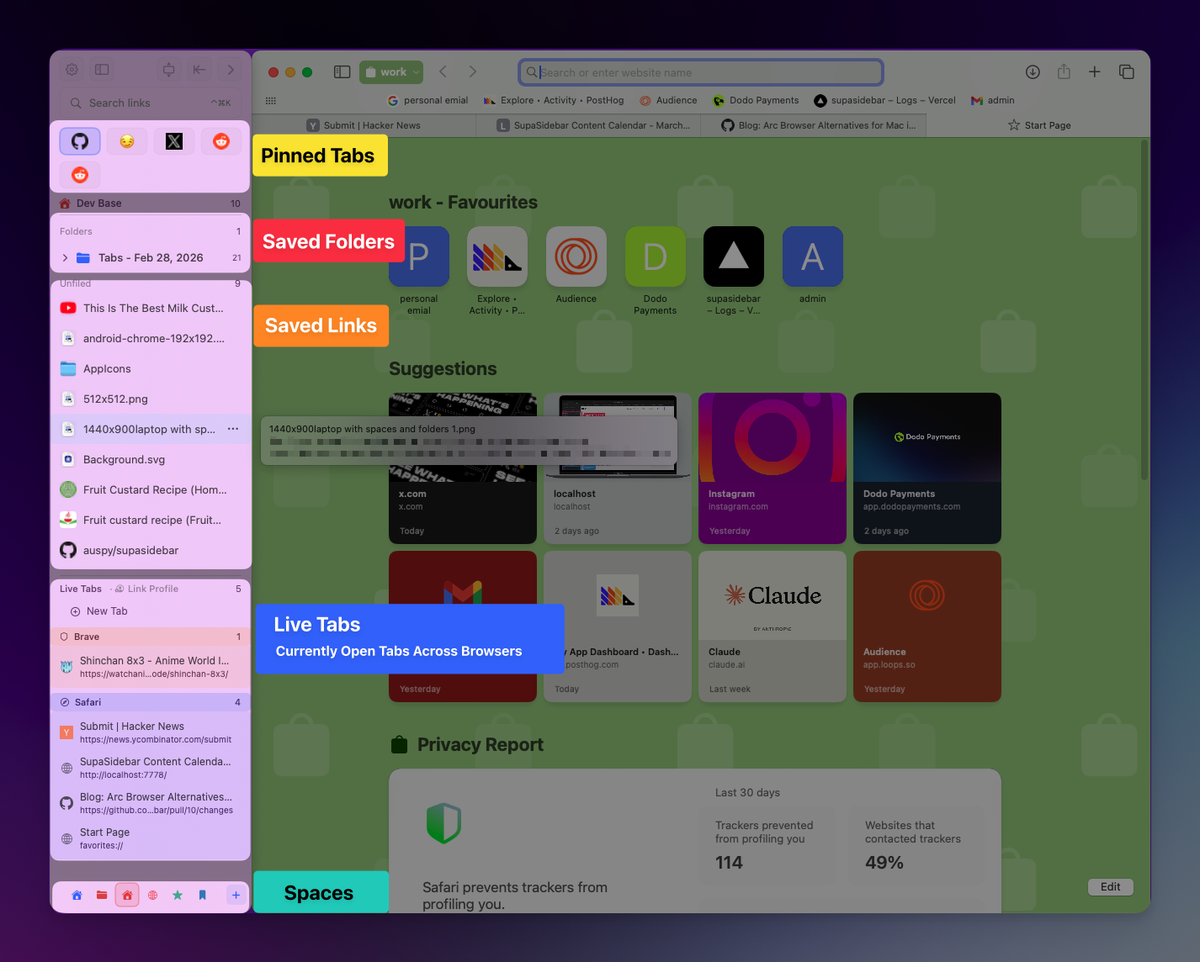
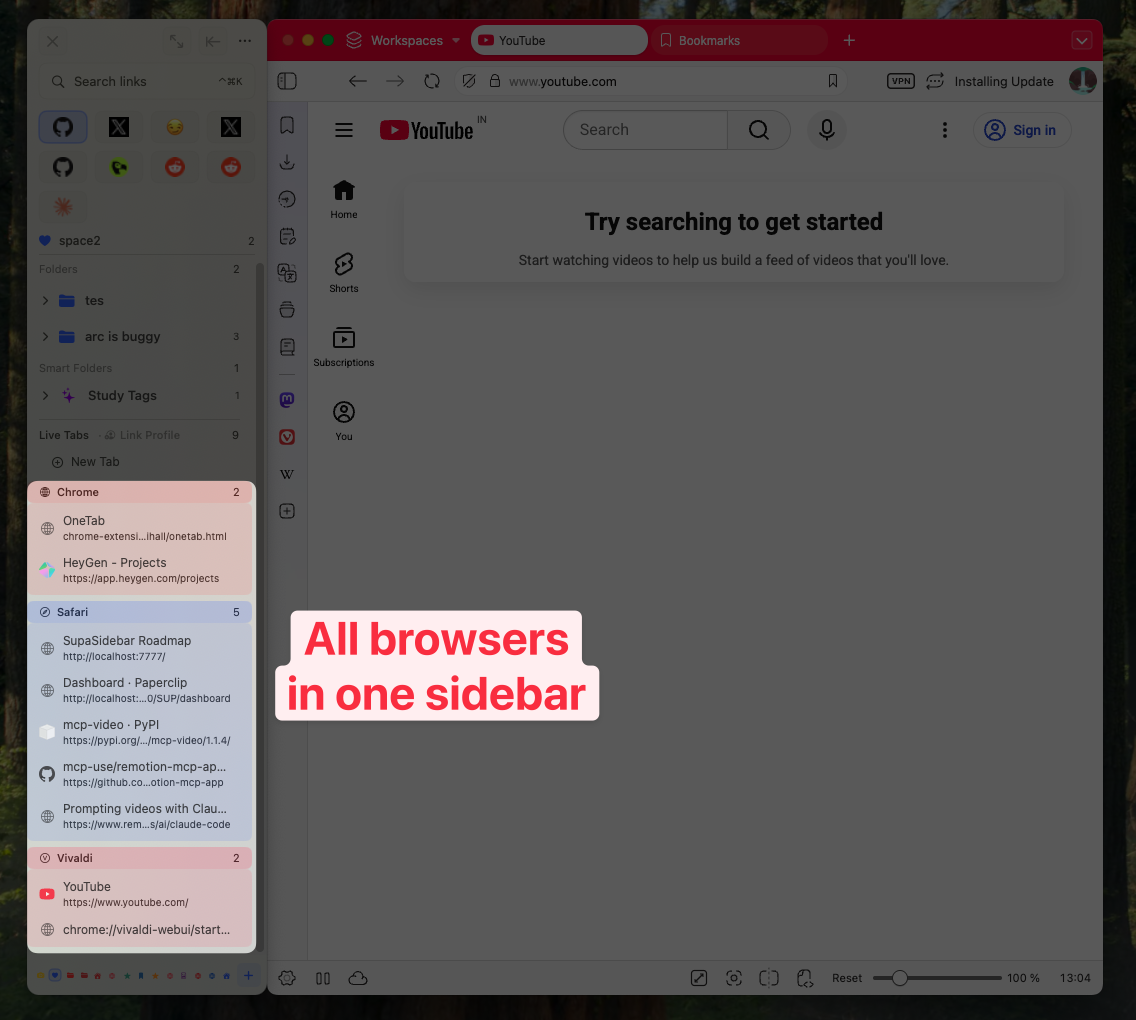
SupaSidebar is a macOS sidebar app that brings Arc's sidebar to every browser. It works with Safari, Chrome, Firefox, Arc, Zen, Vivaldi, Brave, Helium, and Dia. It is not a browser. It is not a browser extension. It's a native Swift app that adds a persistent sidebar to whichever browser you're using, with pinned tabs, saved links, Spaces, a command panel, and a live view of every tab open across every browser at once.
The pitch is simple. Most Arc alternatives ask you to switch browsers. SupaSidebar asks you to keep your browser and add a sidebar. If your problem is "I want Arc's sidebar back," that's the lower-cost answer.
What it does well:
- Works across every major Mac browser at once. You can run Safari for personal browsing, Chrome for work, and SupaSidebar shows tabs from both in one sidebar.
- Direct import of
StorableSidebar.jsonfrom Arc. No other app does this. You export your sidebar from Arc's settings, drop the file into SupaSidebar, and your pinned tabs and Spaces show up. - Spaces work like Arc's. 3 free, unlimited on Pro.
- Command Panel (⌘⌃K) is fuzzy search across every saved link, recent page, and live tab - across every browser.
- Built-in AI chat (bring your own key for OpenAI, Anthropic, Gemini, or local Ollama/MLX models). The AI can search your sidebar, create folders, and move things around with permission prompts before each write action.
What it doesn't do:
- It's not a browser, so it can't change rendering, block ads, or replace whatever your browser is doing under the hood.
- macOS only. No Windows, no Linux.
- It's a paid product if you want unlimited Spaces. The free tier (3 Spaces, all browsers, all sync) is real; Pro adds unlimited Spaces.
Real user quote:
"It has everything from Arc sidebar added for any browser with even more features." - Anthony Recenello, paying Pro user.
Why SupaSidebar is #1:
Every other alternative on this list asks you to migrate. SupaSidebar lets Safari users get Arc's sidebar without switching to Safari, and Chrome users get it without switching to Chrome. If you're an Arc refugee whose only complaint is "I miss the sidebar," this is the lowest-friction answer.
#2: Zen Browser - The Firefox-Based Arc Clone
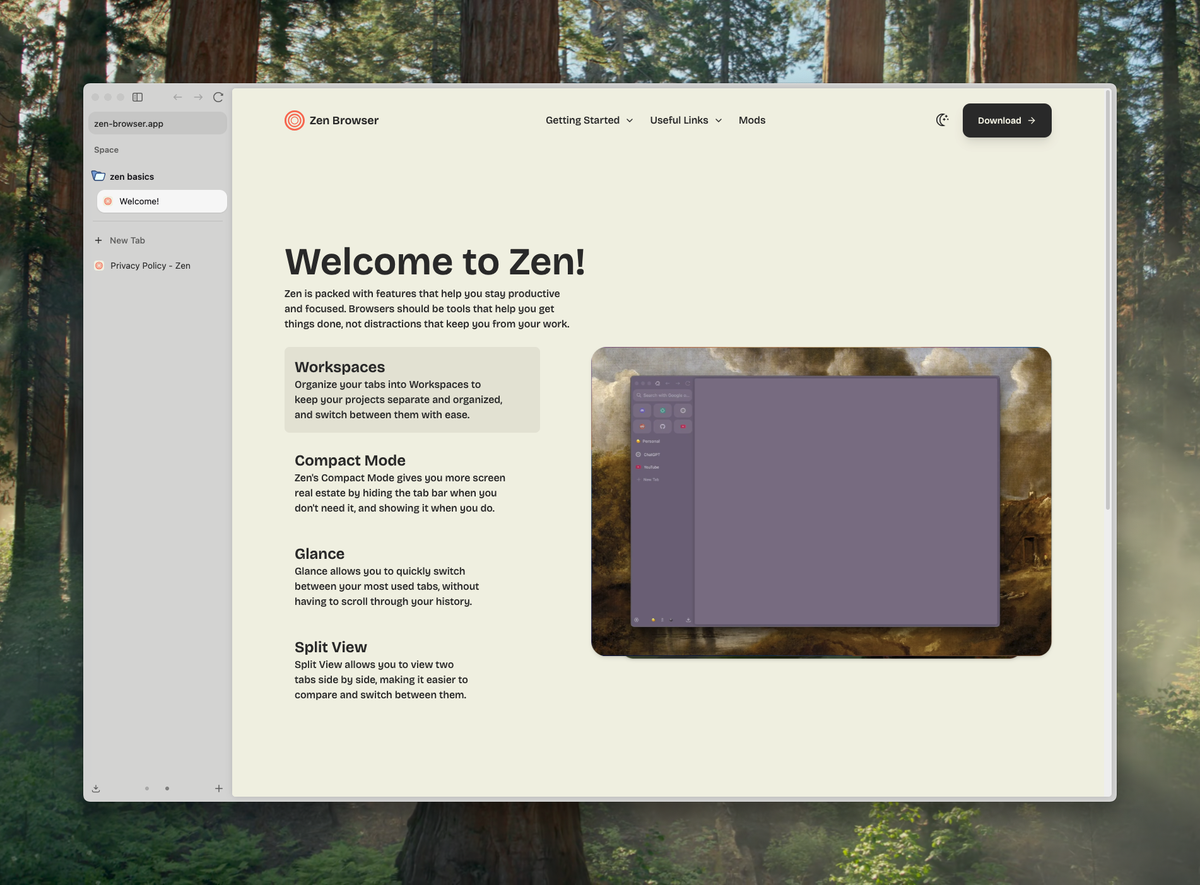
Zen Browser is a free, open-source fork of Mozilla Firefox introduced in 2024 (source). It's the most direct Arc clone in the browser world: vertical tabs in a sidebar, Spaces (called "Workspaces"), Compact Mode, and split view.
What it does well:
- Closest Arc-style UI in the browser space. Vertical tabs, workspaces, compact mode, glance feature for previews.
- Open source under the Mozilla Public License. The community is active on GitHub.
- Cross-platform - Mac, Windows, and Linux. Arc was Mac-first and shipped a Windows beta only late.
- Firefox extension compatibility. Every Firefox extension works in Zen.
- Free forever, no paid tier.
What it doesn't do:
- Firefox base means battery life is worse than Safari and worse than most Chromium browsers on Mac.
- It's still in beta. Stability is improving but not yet at Safari/Chrome reliability.
- No StorableSidebar.json import. You rebuild your sidebar manually.
- Sync is Mozilla Sync, which works but feels less polished than Arc's sync did.
When Zen wins:
If you want a full browser replacement, hate Chromium on principle, and don't mind beta-software rough edges. Pick Zen if you'd rather have an open-source Arc clone than a paid Mac app on top of an existing browser. For a head-to-head feature breakdown, see Zen Browser vs Arc.
#3: Dia - The Browser Company's Official Successor
Dia is the next browser from The Browser Company, announced December 2024, in beta from June 2025, and publicly available on macOS since October 2025 (source). It's Chromium-based and AI-first: the URL bar doubles as an AI chat interface that can search the web, summarize files, and answer questions about your open tabs.
In November 2025, Dia started adding "Arc's greatest hits" - pinned tabs, sidebar features, and basic Spaces - to its feature set (source). In March 2026, Atlassian rolled out integrations with Slack, Notion, Google Calendar, Gmail, and Amplitude.
What it does well:
- Built by the same team that built Arc. Same design taste, same focus on UX.
- AI is genuinely useful, not bolted on. URL bar prompts can summarize, search, or answer questions about open tabs.
- Slack/Notion/Calendar/Gmail integrations as of March 2026.
- Free during beta.
What it doesn't do:
- It's not Arc 2. The sidebar workflow is meaningfully different. If you loved Arc's sidebar specifically, Dia will feel different.
- macOS only as of May 2026. A Windows signup page exists but no release.
- AI features assume you want AI features. If you don't, Dia's value drops a lot.
- Same company that killed Arc. Reasonable people are nervous about adopting Dia knowing The Browser Company has discontinued one product before.
When Dia wins:
If you're an AI-first user, you trust The Browser Company despite the Arc shutdown, and you want the team's next vision rather than a clone of their last one.
#4: Vivaldi - The Power-User's Browser
Vivaldi has been around since 2016 and has the deepest customization of any browser on Mac. It's Chromium-based, free, and includes built-in mail, calendar, feeds, and notes. Workspaces let you group tabs by category and switch between them (source). The right-side sidebar (Vivaldi calls it the "Web Panel") lets you keep websites permanently visible alongside your main tab - handy for messaging apps or AI chats.
What it does well:
- Workspaces predate Arc's Spaces. The concept is more mature, and the UI is more flexible.
- Tab Stacks let you group tabs into nested collections. Closer to Arc's folders than most Chromium browsers get.
- Built-in mail, calendar, feed reader, and notes. If you want Arc-as-OS, Vivaldi is closer to that ambition.
- Free, with all features unlocked. No paid tier.
- Cross-platform (Mac, Windows, Linux, Android, iOS).
What it doesn't do:
- The default UI is busy. It looks more like Firefox-power-user than Arc-minimalist. Configuring it down to a clean look takes time.
- Closed source. The Vivaldi UI is proprietary even though Chromium isn't.
- No vertical-tab sidebar like Arc's by default. You can configure it (vertical tab bar is a setting), but it doesn't feel native.
When Vivaldi wins:
If you want maximum control, you don't mind tweaking settings for an afternoon, and you want one app that handles browsing, mail, and notes. Full Vivaldi vs SupaSidebar comparison at /compare/vivaldi.
#5: Brave - The Privacy Pick
Brave is a Chromium-based browser focused on privacy. Built-in ad blocker, tracker blocker, and a private-by-default search engine. It has a sidebar (Brave calls it the "Sidebar") that holds bookmarks, history, reading list, AI chat (Leo), and pinned websites. Profiles work like a workspace separator if you set them up that way.
What it does well:
- Best-in-class ad and tracker blocking. Built in, no extensions needed.
- Brave Leo (AI assistant) is free and doesn't require a sign-in.
- Privacy track record is real, not marketing.
- Open source under the Mozilla Public License.
- Cross-platform.
What it doesn't do:
- Sidebar UX is nowhere near Arc's. It's more like Edge's sidebar - vertical bookmark list, no Spaces, no per-tab folders.
- Crypto features (BAT tokens, Brave Wallet) feel out of place if you're just here for the browser. They're optional but visible.
- No StorableSidebar.json import.
When Brave wins:
If you care more about privacy than sidebar UX, and you'd rather have built-in ad blocking than recreate Arc.
#6: Safari + Extensions - The Battery-Life Pick
Safari is Apple's native browser. On M-series Macs, it's still the most battery-efficient browser available - a real number, around 17 hours of video streaming on a MacBook Pro vs Chrome's ~12 (Apple's published benchmarks). Safari does not have an Arc-style sidebar by default. Tab Groups exist but don't behave like Spaces.
The "Safari + extensions" option means using Safari and adding tools that get you closer to Arc's UX. Extensions to consider: Vimari (Vim-style keyboard nav), Tab Group Manager, Pinboard for bookmarks. SupaSidebar also fills this role specifically for the sidebar gap.
What it does well:
- Battery life. Nothing on this list beats Safari on M-series Macs.
- Speed. Safari's JavaScript engine on Apple Silicon is genuinely fastest.
- iCloud Tabs sync to iPhone and iPad, which no Chromium-based alternative matches.
- Apple Pay, Apple Intelligence integration, Continuity features.
What it doesn't do:
- No real sidebar. Safari's sidebar is a flat bookmark list.
- No Spaces. Tab Groups are close but worse - no pinned tabs per group, less visual hierarchy.
- Extension ecosystem is smaller than Chrome's or Firefox's.
When Safari wins:
If battery life and Apple ecosystem integration matter more than sidebar UX. Power users in this camp tend to add SupaSidebar on top, getting Safari's battery plus Arc's sidebar.
#7: Helium - The Minimalist's Pick
Helium is a privacy-focused Chromium fork built on ungoogled-chromium (source). It removes Google services, telemetry, and "personalized suggestions." The browser makes zero web requests on first launch. There's no built-in AI, no crypto, no opinionated UI. It's just a browser that opens web pages.
Helium does not have an Arc-style sidebar. It's listed here because some Arc refugees want the opposite of what Arc offered: a quiet, fast, minimal browser that gets out of the way. If you fell out of love with Arc because it felt overdesigned, Helium is the antidote.
What it does well:
- Privacy by default. Ungoogled-chromium base, no telemetry.
- Open source.
- Fast, minimal, lightweight.
- Free and installable via
brew install --cask helium-browser.
What it doesn't do:
- No sidebar of any kind.
- No Spaces, no workspaces, no AI.
- Smaller community than Zen - fewer extensions tested, fewer guides, fewer contributors.
When Helium wins:
If you want the opposite of Arc - a browser that doesn't try to be a productivity environment.
How to Pick
Here's a decision tree that takes 30 seconds.
- You want Arc's sidebar specifically and you don't want to switch browsers → SupaSidebar.
- You want a full browser replacement and you trust open source → Zen Browser.
- You want The Browser Company's next thing and you're an AI-first user → Dia.
- You want maximum customization and an integrated suite → Vivaldi.
- You want privacy first → Brave.
- You want battery life → Safari, optionally with SupaSidebar layered on top.
- You want a quiet, minimal browser → Helium.
If you're not sure: try SupaSidebar's free tier first. It's the lowest-commitment option because you keep your current browser. Worst case, you learn what you actually want from a sidebar before you commit to a browser switch. For a deeper feature-by-feature SupaSidebar vs Arc breakdown, see SupaSidebar vs Arc Browser.
Migrating From Arc
If you're moving off Arc, three migration tasks matter:
- Sidebar / pinned tabs. Arc lets you export
StorableSidebar.jsonfrom Settings. SupaSidebar imports this directly. No other tool on this list does. For Zen, Dia, Vivaldi, Brave, Helium - you rebuild manually. - Bookmarks. Every browser supports bookmark HTML import/export. Arc → Settings → Export Bookmarks → import the file in your new browser.
- Profiles / Spaces. Arc Spaces don't translate cleanly to anything except Zen Workspaces, Vivaldi Workspaces, or SupaSidebar Spaces. Rebuild manually if you're going to Dia, Brave, Safari, or Helium.
For the full migration walkthrough, see Switching from Arc Browser and Export Arc Browser Sidebar.
What's Wrong With "Just Use Chrome"
Some people will tell you Arc was overrated and you should just use Chrome with extensions. Two reasons that's wrong in 2026.
First, Chrome on Mac is generally the worst battery performer of any major browser, though independent 2024 testing complicates this - Birchtree's 36-hour test found Chrome 128 actually used about 9% less battery than Safari 17.6 in some scenarios, while Apple's published specs put Safari ahead by hours on M-series Macs. The honest answer: gaps are smaller than common wisdom claims, and your workload matters more than the browser logo. Either way, full benchmark breakdown is in Best Browser for Mac with Battery Life in 2026.
Second, Chrome's sidebar story in 2026 is still bad. The native side panel is a flat bookmark list. Tab Groups are flat by default. Extensions like Toby and Tab Stash help but don't recreate Arc's workspace separation. If you genuinely want Arc's UX, "just use Chrome" doesn't get you there.
Frequently Asked Questions
Is Arc Browser dead in 2026?
Arc is in maintenance mode, not dead. The Browser Company stopped active development in May 2025 and Atlassian acquired the company in September 2025 for $610 million. Arc still works and still receives security patches, but no new features are coming. The team's full attention is now on Dia, an AI-first browser.
What is the best Arc Browser alternative for Mac?
The best Arc alternative depends on what you valued most about Arc. For the sidebar workflow specifically, SupaSidebar recreates Arc's sidebar across Safari, Chrome, Firefox, and other browsers without forcing a browser switch. For a full browser replacement that mimics Arc's design, Zen Browser is the closest. For The Browser Company's next direction, Dia is the official successor.
Does Zen Browser fully replace Arc?
Zen Browser comes closest visually - vertical tabs, workspaces, compact mode. But it's Firefox-based, not Chromium, so battery life and site compatibility are slightly worse than Arc was. It's also still in beta. If you need a stable Arc clone today, Zen is solid but expect rough edges.
Is Dia a real Arc replacement?
No. Dia is a different product from the same team. It's AI-first, with a chat-style URL bar and integrations with Slack, Notion, and Gmail. It started adding pinned tabs and basic sidebar features in late 2025, but the core experience is built around AI, not around Arc's sidebar workflow.
Can I keep using Arc Browser in 2026?
Yes. Arc still works as of May 2026 and receives security patches. The risk is that Atlassian eventually shuts it down entirely, and you'll have to migrate anyway. Most Arc users are migrating now while they can still export their sidebar via StorableSidebar.json.
What's the closest thing to Arc's sidebar without switching browsers?
SupaSidebar is the only macOS app that replicates Arc's sidebar (vertical tabs, pinned items, Spaces, command panel) on top of any browser. It's a native Mac app - not a browser, not an extension. It supports Safari, Chrome, Firefox, Arc itself, Zen, Vivaldi, Brave, Helium, and Dia.
How do I export my Arc sidebar before Arc disappears?
In Arc, go to Settings → Advanced → Export Sidebar. You'll get a StorableSidebar.json file. SupaSidebar imports this file directly with all your pinned tabs and Spaces preserved. For other browsers, you have to rebuild your sidebar manually after a regular bookmark export.
Is SupaSidebar free?
SupaSidebar has a free tier with 3 Spaces and full cross-browser support. Pro adds unlimited Spaces, priority support, and early access to new features, with a 7-day Pro trial and a 14-day money-back guarantee.
Conclusion
There's no single "best Arc alternative" - the right pick depends on what you actually liked about Arc.
If you want the sidebar workflow without changing browsers, SupaSidebar is the lowest-friction choice and the only option here that lets you keep Safari, Chrome, or Firefox. If you want a full browser replacement that mirrors Arc's design, Zen Browser is closest. If you trust The Browser Company's next direction and you're AI-first, Dia is the official successor. Vivaldi suits power users, Brave suits privacy, Safari wins on battery, and Helium is for people who want a quiet, minimal browser.
Arc taught a lot of people that browsers can do better than horizontal tabs. None of these alternatives are Arc, but each one keeps a piece of what made Arc worth using - and you don't have to commit to just one. Try the free tier of SupaSidebar at supasidebar.com if your only complaint with Safari or Chrome is "I miss Arc's sidebar." Otherwise, pick whichever browser on this list maps to what you actually valued.