
By Kshetez Vinayak, founder of SupaSidebar. Last updated November 24, 2026.
TL;DR
Little Arc, Arc's small pop-up window for links clicked in other apps, has no match in any stable browser Arc users are moving to, so after Arc stops working on December 22, 2026, a link from Slack or Mail opens as a normal tab in a full browser window. Dia, the successor from the same company, leaves out both Little Arc and Air Traffic Control, and Zen's own version, Little Zen, is so far switched on only in its test builds. The working replacement today is SupaView in SupaSidebar, which opens each link from Slack, Mail, Messages or Terminal in its own small floating window, with Air Traffic Control rules for links that should always open in one browser and profile.
Quick navigation
- Still picking a browser to replace Arc? → Arc Browser Alternative 2026: The Complete Guide
- Checking every Arc habit, not just Little Arc? → Which Browsers Have Arc Features?
- Want Spaces, ⌘T and Ctrl+Tab back too? → How to Replicate Arc Features in Any Browser on Mac
- Thinking about Dia instead? → Arc Browser vs Dia Browser
- Leaning toward Zen? → Zen vs Arc
- Need to save your Arc sidebar first? → How to Export Your Arc Browser Sidebar
- Want Little Arc and Air Traffic Control after December 22? You are in the right place. Keep reading.
Little Arc after December 22, at a glance
| Option | Small window for links from other apps | Rules for where links open | Works after Dec 22 | Best for |
|---|---|---|---|---|
| Arc | Yes, Little Arc | Yes, Air Traffic Control to a Space | No | Nothing after December 22 |
| Dia | No | No | Yes | Arc users who want the official successor |
| Zen 1.24 (stable) | No, Little Zen in test builds only | Partly, Space Routing | Yes | Firefox users who want Spaces built in |
| Safari, Edge | No | Partly, site to profile | Yes | Staying in one browser with profiles |
| Chrome, Brave, Firefox | No | No | Yes | Nothing Little Arc related |
| Any browser + SupaSidebar | Yes, SupaView, one window per link | Yes, Air Traffic Control to a browser and profile | Yes | Keeping Little Arc in the browser you already use |
What was Little Arc in Arc browser?
Little Arc was the small, simple browser window Arc opened for links clicked in other apps and for quick searches, so a link from Slack or Mail could be read without pulling the full browser forward. Arc's own multitasking guide pitched it as a way to pull something up without leaving the app you are in.
Arc shipped it in 2021 with ⌘⌥N for a blank window and ⌘O to move a page into the main window, and made it the default for links from other apps, per the 2021 release notes. Later releases added ⌘⌥ click to send any link there and ⌘⇧O to move a tab into the right Space (2022 notes), then several windows at once that archived themselves every 6 hours (2023 notes).
Air Traffic Control was its partner. Added on May 3, 2023 (V0.102), it routed links to the right Space by domain, per the same 2023 notes. Together the two decided where every outside link landed, which is why losing them changes the whole day, not one feature.
What happens to Little Arc on December 22
Little Arc stops with Arc. The Browser Company's Arc sunset FAQ says Arc stops working on December 22, 2026, and data requests close on December 15, per 9to5Mac.
The same FAQ says Little Arc and Air Traffic Control are not in Dia, along with Boosts, Easels, Peek, TypeTravel and Instant Links. Moving to Dia means outside links open as tabs in the main window, and SupaSidebar's Arc vs Dia comparison covers what else changes.
Little Arc holds nothing to save, but Air Traffic Control rules do. SupaSidebar's Arc import brings Spaces, folders and pinned tabs, not those rules, so note each domain and its Space before December 22. The Arc sidebar export guide covers the rest.
Does any browser have Little Arc?
Not in a stable release of any browser most Arc users are moving to. Chrome, Safari, Brave, Firefox and Edge open a link from another app as a normal tab in a full window, and none of the five has a Little Arc window, per SupaSidebar's habit-by-habit check of nine Arc features.
Zen
has Glance, which opens a link in a floating preview, but Zen's Glance guide describes it only for links clicked inside Zen. One Arc user who moved to Zen wrote that "links from other desktop applications open in a full tab in Zen," in a June 2025 migration write-up.
That is starting to change. Zen merged a small window called Little Zen, with a New Little Window command and an Open in button that moves the page to a full window or a Space, into its development branch on November 15, 2026, in pull request #16639. Its settings file switches it on only in Zen's Twilight test builds, and the stable 1.24.3b release of November 18 does not list it. An earlier work-in-progress attempt, pull request #13450 from April 2026, drew 39 reactions before it was closed. Whether Little Zen will catch links from Slack and Mail the way Little Arc did is not documented yet.
Dia
has no Little Arc and no Air Traffic Control, per The Browser Company's Arc sunset FAQ.
Browsers copy the Arc features that fit inside their own window, like vertical tabs and Spaces. A window that catches links from every other app needs something that runs outside the browser, which is the gap SupaSidebar fills without waiting for Zen's test builds.
Get Little Arc back in any browser with SupaView
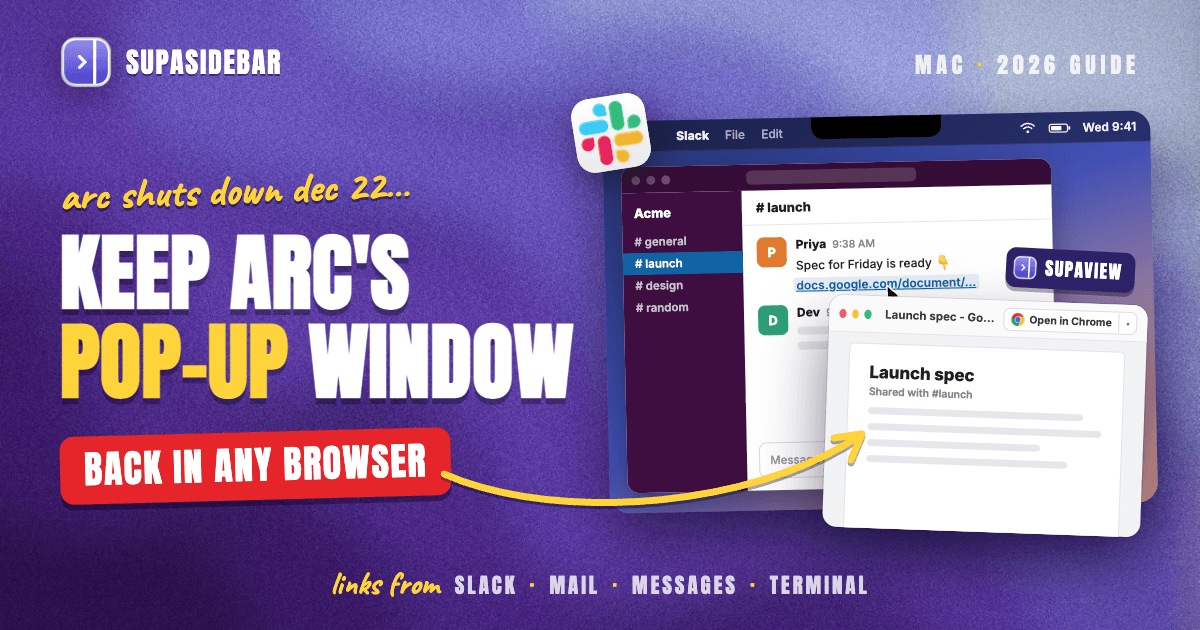
SupaView is SupaSidebar's Little Arc. Make SupaSidebar the default browser and every link from Slack, Mail, Messages or Terminal opens in its own small floating window over the app you are in, while the main browser stays where it was. SupaView arrived in SupaSidebar 1.5.0 on October 30, 2026, and it works whichever browser you keep, from Safari to Chrome to Zen.
SupaSidebar 1.6.0 added an address bar on ⌘L and zoom that each site remembers. Each window floats above other apps, even full-screen ones, per the SupaView docs.
| Little Arc habit | SupaView in SupaSidebar | Match |
|---|---|---|
| Links from Slack, Mail and other apps open in a small window | Same, once SupaSidebar is the default browser | Direct |
| ⌘⌥ click sends a link to Little Arc | ⌘⌥ click flips a link between SupaView and the browser | Direct |
| Several Little Arc windows at once | One SupaView window per link | Direct |
| ⌘⌥N opens a blank window for a quick search | ⌘⌃K opens the Command Panel, then ⌘↩ opens the result in SupaView | Different keys |
| ⌘O moves the page to the main Arc window | ⌘O opens it in the browser, and the chevron picks any browser and profile | Upgrade |
| ⌘⇧O moves the tab into the right Space | No Space move, but the Open With menu picks the browser profile | Partial |
| Windows archive on their own after 6 hours | Close with Esc or ⌘W | Missing |
How to set up SupaView for links from other apps
Setting up SupaView takes about two minutes and changes nothing inside your browser.
- Install SupaSidebar. Download it from supasidebar.com/download. It runs on macOS 14 Sonoma and later.
- Make SupaSidebar the default browser during setup. When setup asks "Which sounds more like you?", pick "I want an Arc-like feel in my new browsers". On the Little Arc, for every link screen, click Make default and choose Use "SupaSidebar" when macOS asks. That click also turns SupaView on. Already past setup? Turn on SupaView in SupaSidebar's Preferences, then click Make Default there, since setting the default anywhere else leaves SupaView off. The steps for links from other apps show each screen.
- Pick what a click does. Click Opens set to SupaView sends plain clicks to SupaView, and holding ⌘⌥ while clicking sends that link to the browser. Set it to Browser to flip the two.
- Stay signed in. In Preferences > Browsers > SupaView, pick the browser and profile you use most under Use Sign-Ins From and click Import Logins, so sites open signed in. SupaSidebar imports cookies only, never passwords, and keeps them on the Mac.
- Add a quick-lookup key. Press ⌘⌃K from any app, type a search or address, and press ⌘↩ to open it in SupaView. Launchers can also send a page or search with a supasidebar://peek link.
To go back, click Restore next to the previous browser in the same settings row, or change it in System Settings > Desktop & Dock > Default web browser.
A typical day with SupaView on and one Air Traffic Control rule for Figma looks like this.
| Link clicked | Where it opens |
|---|---|
| docs.google.com link in a Slack thread | SupaView, over Slack |
| A Raycast web search for "swift concurrency" | SupaView, with the search results |
| github.com link printed in Terminal | SupaView |
| figma.com link in Mail, ⌘⌥ click | Chrome, Work profile, by the Air Traffic Control rule |
Each SupaView window closes with Esc once it is read, and ⌘O sends a page that needs more time to the full browser, so the main window only gets the tabs worth keeping.
People noticed the change quickly. "I must say the SupaView feature is a game-changer!" one user wrote in an email to SupaSidebar support the day 1.5.0 shipped, and another wrote on November 13, "I was really pleased to discover SupaView."
Honest scope.
SupaView runs on WebKit, the engine behind Safari, so browser extensions such as ad blockers and third-party password managers do not load there. SupaView keeps its own sign-ins, imported from one browser profile at a time, and records no browsing history. Links clicked inside a browser stay in that browser, since SupaSidebar only sees links macOS hands to the default browser. Arc's six-hour auto-archive has no SupaView equivalent, so windows stay open until closed.
Air Traffic Control without Arc
SupaSidebar's Air Traffic Control is the closest replacement for Arc's, and it reaches further, because its rules send links to a chosen browser and profile, not only to a Space inside one browser. A rule such as figma.com to Chrome's Work profile holds for every matching link, per the Air Traffic Control docs.
The rules come in two kinds. Open routes decide which browser and profile open a link, and save routes file pages saved with ⌘⌃S into the right Space and folder. Once SupaSidebar is the default browser, links from other apps that go to a browser instead of SupaView follow the same open routes, which is the Little Arc and Air Traffic Control pairing Arc users had.
Other browsers have partial copies. Zen added Space Routing on June 11, 2026, which sends links to a chosen Space, per its 1.21b release notes. Safari's Open Links With Profile "works only with links opened from outside of Safari," per Apple's profiles guide. Both stay inside one browser, while SupaSidebar's rules can pick Safari for one site and Chrome for another.
Which Little Arc setup should you pick?
- If outside links are most of your clicks, keep your browser and add SupaSidebar with SupaView, so Slack and Mail links open in small windows the way they did in Arc.
- If you are moving to Zen and can wait, watch for Little Zen to reach a stable Zen release, and use Glance for links inside Zen in the meantime.
- If you are moving to Dia, plan for outside links to open as normal tabs, since Dia has neither Little Arc nor Air Traffic Control.
- If you mainly need links to land in the right profile, set up Air Traffic Control open routes and leave Click Opens on Browser.
- If you use Safari with profiles only, Open Links With Profile covers routing for outside links, though there is still no small window.
Conclusion
None of the browsers most Arc users are moving to replaces Little Arc after December 22, 2026. Dia leaves it out, Chrome, Safari, Brave, Firefox and Edge never had it, and Zen's Little Zen was merged on November 15 but is switched on only in test builds.
For Arc users who live in Slack and Mail, SupaView in SupaSidebar is the working answer now, with one floating window per link and Air Traffic Control for links that should always open in one browser and profile. Zen users who only need previews inside the browser can rely on Glance and wait for Little Zen. Dia users should expect outside links to open as full tabs.
Arc keeps working until December 22, so there is time to note Air Traffic Control rules and try the new setup next to Arc. Try SupaSidebar (free tier) to get Little Arc's window back in the browser you already use.
Why we recommend SupaSidebar
SupaSidebar is a macOS app that brings Arc's sidebar to every browser - one sidebar for tabs, bookmarks, files, and apps across 32+ browsers including Safari, Chrome, Firefox, Helium, Brave, Edge, Zen, Dia and Vivaldi. For Little Arc users, that means SupaView for links from other apps, Air Traffic Control for links that belong in one browser and profile, and an Arc import that keeps Spaces as Spaces. SupaSidebar has 6,000+ installs.
FAQ
What is Little Arc?
Little Arc was a small, simple browser window in Arc for quick searches and for links clicked in other apps, such as Slack or Mail. It let a link be read without bringing the full Arc window forward, and ⌘O moved the page into the main window when needed.
Will Little Arc still work after Arc shuts down?
No. Arc stops working on December 22, 2026, and Little Arc goes with it. Dia, the successor from The Browser Company, does not include Little Arc, so a separate tool such as SupaView in SupaSidebar is needed to keep a small window for outside links.
Does Zen browser have Little Arc?
Not in a stable release yet. Zen's Glance previews links clicked inside Zen, and a small-window feature called Little Zen was merged on November 15, 2026, but it is switched on only in Zen's Twilight test builds as of November 20.
What was Air Traffic Control in Arc browser?
Air Traffic Control was an Arc feature, added in May 2023, that routed links to the right Space based on their domain. It stops with Arc on December 22, 2026, and SupaSidebar's Air Traffic Control routes links by URL to a chosen browser and profile instead.
How do I open links from Slack in a small window on Mac?
Make SupaSidebar the default browser on its Little Arc screen during setup, which also turns SupaView on, or turn on SupaView in its Preferences and click Make Default there. Links clicked in Slack, Mail, Messages or Terminal then open in a small floating SupaView window, and holding ⌘⌥ while clicking sends a link to the full browser instead.
Is there a Little Arc alternative for Chrome or Safari?
Chrome and Safari have no Little Arc window of their own. SupaView in SupaSidebar adds one alongside either browser, and its Open in Browser button sends a page to Chrome, Safari or any other installed browser and profile.
Can SupaView stay signed in to my accounts?
Yes. SupaView can import cookies from one browser profile in Chrome, Arc, Brave, Edge, Vivaldi, Firefox, Zen or Safari, so sites open signed in, and it can keep them in sync every hour, day or week. Passwords are never imported.
By Kshetez Vinayak, founder of SupaSidebar. Last updated November 24, 2026.