
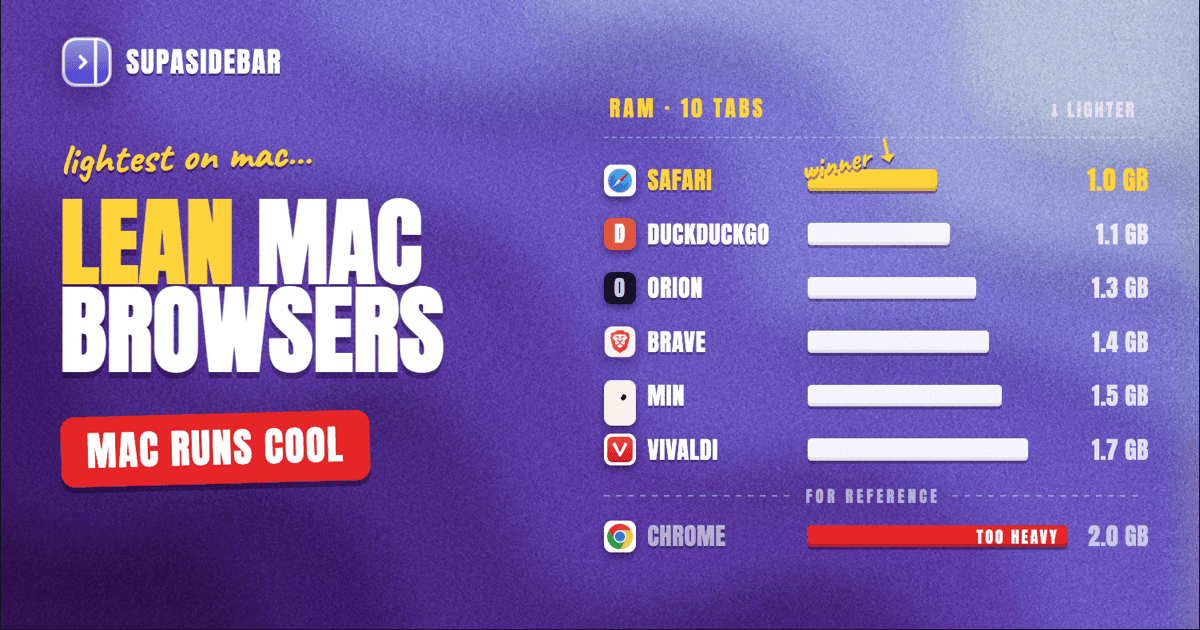
The best lightweight browser for Mac in 2026 is Safari for most users - it ships with macOS, uses less RAM than any third-party browser, and on a fanless MacBook Air it is the difference between a cool machine and a hot lap.
For anyone who wants a Chromium browser without Chrome's memory weight, Brave is the next pick, with built-in ad and tracker blocking that cuts per-tab RAM noticeably. For an older Intel Mac or a 2018-era MacBook Air, Orion or Min strip the browser back to almost nothing. The full ranked picks, real memory numbers, and the one setup that lets a heavy Mac user run any browser with a near-zero active tab count are below.
Looking for something specific?
- Battery life is your only concern? -> Best Browser for Mac with Battery Life 2026
- On an Apple Silicon Mac (M1-M4)? -> Best Browser for Apple Silicon Macs
- Chrome itself is the problem? -> How to Reduce Chrome Memory Usage Without Losing Your Tabs
- Comparing every browser? -> Best Browser for Mac in 2026
- A lightweight Mac browser? -> You are in the right place. Keep reading.
By Kshetez Vinayak, founder of SupaSidebar. Last updated June 28, 2026.
What "lightweight browser for Mac" actually means in 2026
"Lightweight" is one of those words people search for without agreeing on what it means. The three things hidden inside the query are different problems with different fixes.
The first meaning is RAM per tab. A browser that uses 200 MB per tab is brutal on an 8 GB Mac running Slack, Notion, and a few PDFs. Safari, Brave, and Orion sit at the low end of per-tab memory in 2026. Chrome and Edge sit at the high end. The numbers below are from independent benchmarks, not vendor claims.
The second meaning is launch and feel. A heavy browser stutters when opening a new window, lags when switching tabs, and chokes on a cold start. This is partly the engine and partly the chrome around it. Min and Orion are extreme on this axis - both launch in under half a second on an M1 Air. Vivaldi and Arc, despite both being Chromium, feel heavier because they pile UI on top.
The third meaning is disk footprint and update size. This matters if the Mac has a 128 GB or 256 GB drive that is already nearly full. Safari has zero install footprint (it ships with the OS). Min ships at around 80 MB. Chrome's installed bundle is over 600 MB and grows with profile data. For an older Mac that cannot run macOS 14, this is often the deciding factor.
This post covers all three. What it does NOT cover: Windows or Linux lightweight browsers, deep battery benchmarking (that is the battery-life post), or hardware-specific Apple Silicon analysis (that is the Apple Silicon post).
How Mac browsers are tested for weight in 2026
Three metrics matter, and each has a public source.
RAM per tab
is best measured with Activity Monitor while loading a controlled set of sites. The most widely cited recent run is Tom's Guide's macOS browser memory test, which loaded the same 10 tabs in each browser on the same MacBook Pro and recorded the Activity Monitor RAM number. Independent retests on Reddit's r/macapps community match the order, if not the exact numbers.
Speedometer 3.1
is the cross-vendor JavaScript benchmark maintained by Apple, Google, Mozilla, and Microsoft together. It measures responsiveness on real web workloads. Higher score is better. BrowserBench.org hosts it; anyone can run it.
Install footprint
is whatever the installed .app bundle plus profile data takes on disk. Most browsers publish download sizes; full installed sizes need a check in du -sh on the user's own Mac.
The rankings below combine all three, weighted toward RAM and feel for everyday lightweight use. Numbers are from the latest public test runs as of May 2026; per-machine numbers will vary.
The lightweight Mac browser rankings
1. Safari (the default and still the lightest)
Safari is the lightest browser on a Mac in 2026, full stop, for two reasons unrelated to the browser itself. First, it is built into macOS, so it has no install footprint and shares system frameworks instead of bundling its own. Second, Apple grants Safari power and memory privileges that third-party apps cannot get - background tab throttling, hardware video decode across more formats, and tighter integration with macOS memory compression.
In Tom's Guide's most recent macOS memory tests, Safari used roughly 1 GB of RAM with 10 tabs open on an M-series MacBook, the lowest of any browser tested. Speedometer 3.1 results published in 2026 put Safari 26 above Chrome 148 and Edge 148 on Apple Silicon - Safari 43.61, Chrome 41.10, Edge 40.59 on an M4 - which translates directly to snappier feel under the same load.
Where Safari falls short for lightweight users: tab management is stuck in 2015. The sidebar is a flat list with no spaces, no fuzzy search, and no command palette. Heavy users open 30 tabs and lose them. The extension catalog is smaller than Chrome's. Some niche enterprise apps that only test against Chrome break.
For most Mac users who want a fast, low-memory browser, Safari wins. The tab-management gap is the one real reason to look elsewhere, and there is a fix for it that does not require switching browsers (see "How to make any Mac browser lighter" below).
2. Brave (the lightweight Chromium pick)
Brave is the best Chromium-based browser for a lightweight Mac in 2026. It is built on Chromium, so it gets Chrome-grade web compatibility and the full Chrome extension library, but with Shields - default-on ad and tracker blocking - that cuts per-tab memory noticeably. Brave's own published 1.0 performance test, which is vendor data so treat with care, claimed 30 to 50 percent bandwidth and battery savings versus Chrome. Independent BrowserBench runs by Mihnea Radulescu put Brave's peak power draw at 8.3W versus Safari's 10.5W on the same workload - lower than Safari at the peak.
In real-world RAM use, Brave with Shields on lands roughly 25 to 35 percent below Chrome on the same tab set. The reason is mechanical: Chrome loads ads, trackers, and analytics scripts on every page, and Brave does not. Less code loaded means less memory used.
Where Brave falls short: it is still a full Chromium browser, so the per-process memory overhead is there. On an 8 GB MacBook Air, Brave with 20 tabs still pressures memory; Safari with the same 20 tabs does not. Brave's wallet, BAT rewards, and crypto features add UI weight that lightweight-focused users will want to disable. And, like every Chromium browser, the install footprint is large - over 500 MB.
For users who want Chrome's web compatibility and extensions without Chrome's memory weight, Brave is the pick.
3. Orion (WebKit without Safari)
Orion is a Mac browser built by Kagi on top of WebKit, the same engine Safari uses. It runs Chrome and Firefox extensions natively on macOS, which no other browser does. Because it uses WebKit and not Chromium, Orion's per-tab memory is closer to Safari's than to any Chromium browser - Kagi's own benchmarks claim about 30 percent less RAM than Chrome, and independent tests on r/macapps generally agree.
Orion's appeal for lightweight users is twofold: WebKit's memory profile plus a deliberately minimal UI. There is no built-in account, no telemetry-heavy onboarding, no surprise sidebars. It launches fast and feels close to Safari at idle.
Where Orion falls short: as of 2026 it is still labelled beta and ships occasional rendering bugs on enterprise web apps. Some Chrome extensions work; some do not. The extension compatibility, while impressive in concept, is uneven in practice. Kagi's Orion changelog is the place to track current support.
For Mac users who liked Safari's weight but missed Chrome extensions, Orion is the closest thing on the market.
4. Min (the truly minimalist pick)
Min is an open-source minimalist browser built on Electron. The whole download is around 80 MB. The UI is so spare it does not have a traditional address bar - searches and URLs share a single command-style input at the top. Min is the lightest install on this list by a wide margin, and it launches in well under a second on an M1 Air.
The trade-off is direct: Min uses Chromium under the hood (via Electron), so per-tab RAM is closer to Chrome than to Safari. The wins are install size, launch speed, and a UI that gets out of the way. It is the closest thing on macOS to a true minimalist browser in the original sense - the browser is supposed to disappear.
Where Min falls short: extension support is limited, sync is missing, and the development pace is slower than the major browsers. For a primary daily-driver, Min is rough. For a second browser on an older Mac where install footprint matters more than feature parity, it is excellent.
5. Vivaldi (lightweight for a power-user browser)
Vivaldi sits in an unusual spot. The team builds it on Chromium, which sets a memory floor, but they ship aggressive per-process management, native vertical tab stacks, and a tab-hibernation feature that puts inactive tabs to sleep automatically. The net effect is that Vivaldi with 30 tabs uses meaningfully less RAM than Chrome with 30 tabs, even though the engine is the same.
For users who want customization (per-site CSS, built-in mail and calendar, tab stacking) without Chrome's memory weight, Vivaldi is the pick. Vivaldi's own performance documentation claims hibernated tabs reduce RAM to near-zero per inactive tab - this is verifiable in Activity Monitor.
Where Vivaldi falls short for lightweight users: the UI is the opposite of minimal. The default install is heavier-looking than any other browser on this list. Lightweight users have to turn things off to get the lean experience. The install is over 600 MB.
If "lightweight" to a user means "uses less RAM than Chrome with my 40 tabs", Vivaldi qualifies. If it means "minimal UI", it does not.
6. DuckDuckGo for Mac (private and lean)
DuckDuckGo's Mac browser is built on WebKit, so it inherits Safari's lean memory profile. It adds default-on tracker blocking, Smarter Encryption, and an Email Protection feature. The install is under 50 MB. RAM use sits close to Safari's in independent tests.
Where DuckDuckGo falls short: it is privacy-first first, lightweight second. The browser is missing extension support entirely as of 2026. There is no sync across devices. Tab management is bare. For a user whose primary need is privacy AND lean memory, this is the pick. For a user whose only need is lean, Safari is better.
DuckDuckGo's official Mac browser documentation is the place to check current platform parity - the iOS version has more features than the Mac build.
What about Chrome, Edge, Arc, Firefox, and Zen?
These are not lightweight Mac browsers. They are good browsers for other reasons.
Chrome is the heaviest mainstream browser on Mac. Tom's Guide's tests have Chrome using roughly twice Safari's RAM at the same tab count. Chrome's Memory Saver (in Chrome 110+, February 2023) helps, but it suspends tabs rather than reducing the baseline per-tab cost. For a lightweight setup, Chrome is the wrong pick. For Chrome's extension ecosystem with less weight, see Brave or Vivaldi above.
Edge is Chrome plus Microsoft 365 integration plus Sleeping Tabs. Microsoft's own published Sleeping Tabs numbers claim 26 percent median memory reduction and 29 percent lower CPU on sleeping tabs versus active background tabs. That is real, but Edge's baseline is still Chromium-heavy. It is lighter than Chrome, heavier than Brave.
Arc shut down in May 2025 - The Browser Company announced the wind-down in favor of Dia. Arc was never a lightweight browser even when it was active: heavy UI on top of a heavy Chromium base.
Firefox on macOS is heavier per-tab than Safari and lighter than Chrome. The Gecko engine has improved, and Mozilla shipped native Apple Silicon Firefox in version 84 in December 2020. For a non-Chromium, non-WebKit pick, Firefox is the option. It is not the lightest pick.
Zen is a Firefox fork with a vertical sidebar and workspace-style organization. It inherits Gecko's memory profile - lighter than Chromium, heavier than WebKit. Zen is great for Firefox users who want Arc-like UX. It is not the answer to "I want a lightweight Mac browser".
How to make any Mac browser lighter
There are three settings every Mac user should turn on regardless of browser, and one external setup that solves the problem at the source.
Tab hibernation
is the single biggest win. Vivaldi and Edge ship it on. Chrome's Memory Saver and Brave's Memory Saver do the same. Turn it on in browser settings. It frees idle-tab RAM with no behavior change for the user.
Disable extensions you do not use weekly
. Extensions run in their own processes and add per-tab overhead. Mac users routinely accumulate 10+ extensions over years and use 2. Disabling the rest is the second biggest RAM win after hibernation.
Use hardware video decoding
. All modern Mac browsers do this by default, but if the Mac is on an older browser version it may not. Update to the current major version of any browser to get hardware decode for H.264, H.265, VP9, and AV1.
Move tabs out of the browser entirely
. This is the structural fix. The reason a Mac runs out of memory is usually not the browser engine - it is the number of tabs the user keeps open across multiple browsers because they cannot remember which browser has which tab. Closing tabs feels like losing context. The lighter pattern is to keep tabs in a sidebar that lives outside the browser, so the browser itself stays lean.
SupaSidebar is a macOS app built around this pattern. It sits next to any browser - Safari, Chrome, Firefox, Brave, Vivaldi, Edge, Orion, Zen, and 32+ browsers in total - and holds the saved links, recent tabs, and pinned items the user used to keep open as live tabs. The browser tabs stay closed; the items stay one click away in the sidebar. On an 8 GB MacBook Air, the difference between 30 live tabs and 5 live tabs plus 25 sidebar items is roughly 1.5 to 2 GB of RAM back.
This is the setup that lets a heavy Mac user run Safari and still have access to the same content they would otherwise need 40 tabs across two browsers to keep open.
Picking what to use
For most Mac users on Apple Silicon hardware, Safari is the lightest browser and the right default. Speedometer 3.1 puts Safari ahead of Chrome and Edge on the M4, and Activity Monitor RAM tests put Safari at roughly half Chrome's per-tab use. The tab-management weakness is real but does not require switching browsers to fix.
For users who need Chromium compatibility, Brave is the lightweight pick. Shields cut per-tab RAM 25 to 35 percent below Chrome on the same workload, and the extension catalog is intact.
For an older Intel Mac, a 2018-era MacBook Air, or any Mac with limited drive space, Orion or Min are the right answer. Both have under-100 MB install footprints. Orion wins on extension support; Min wins on install size and launch speed.
For users whose actual problem is "too many tabs across too many browsers", the browser pick matters less than the workflow. Any of the browsers above paired with SupaSidebar in the sidebar holds the open-tab count down, and that is the change that produces the biggest weight reduction on a Mac in real day-to-day use.
Why SupaSidebar fits a lightweight Mac browser setup
SupaSidebar is a macOS app that brings Arc's sidebar to every browser - one sidebar for tabs, bookmarks, files, and apps across 32+ browsers including Safari, Chrome, Firefox, Arc, Zen, Vivaldi, Brave, Helium, and Dia. It is not a browser. It does not add weight to whichever browser the user picks. It runs as a separate macOS app that holds the items the user would otherwise leave open as live tabs.
The lightweight angle is direct: a Mac with 8 tabs open in Safari uses roughly 1 to 1.5 GB of RAM. A Mac with 30 tabs open in Safari plus 20 tabs open in Chrome uses 5 to 6 GB. Moving most of those 50 tabs into a sidebar that displays them as one-click items, with the actual tab opening only when needed, drops the active-tab count back to single digits and recovers most of that RAM. The browser stays lean. The content stays accessible.
This is most useful for users on 8 GB or 16 GB Macs who want to use Safari (the lightest browser) but cannot, because Safari's tab management cannot hold all their open items. The pattern is: Safari for the browser engine and battery, SupaSidebar for the tab and bookmark management Safari does not have. Free tier includes 3 Spaces, requires macOS 14 or later.
Frequently Asked Questions
What is the lightest browser for Mac in 2026?
Safari is the lightest browser for Mac in 2026. It ships with macOS so has zero install footprint, uses roughly half Chrome's RAM at the same tab count in independent Tom's Guide tests, and scores higher than Chrome and Edge on Speedometer 3.1 on Apple Silicon hardware. For a third-party Chromium alternative, Brave is next-lightest.
Which Mac browser uses the least RAM?
Safari uses the least RAM of any Mac browser in 2026 in independent tests with the same tab set. WebKit-based browsers (Safari, Orion, DuckDuckGo for Mac) cluster at the low end of per-tab memory. Chromium browsers (Chrome, Edge, Brave, Vivaldi, Arc) sit higher, with Brave and Vivaldi the leanest of the Chromium options because of built-in ad blocking and tab hibernation respectively.
Is Safari the best lightweight browser for older Macs?
Safari is the best lightweight browser for any Mac that can run a current macOS version. For Macs too old to run macOS 14 (the current minimum for many modern apps), Orion or Min are better picks because both have small install footprints and minimal UI. Older Intel Macs that cannot run modern browsers at all benefit most from Orion's older-macOS support.
What is the fastest browser for Mac in 2026?
On Apple Silicon Macs in 2026, Safari 26 is the fastest browser on Speedometer 3.1 - 43.61 versus Chrome 148 at 41.10 and Edge 148 at 40.59. Safari Technology Preview on early M4 hardware tested 26 percent faster than Chrome Canary. For non-WebKit picks, Brave and Vivaldi are the fastest Chromium browsers in independent testing.
Does Brave really use less battery than Safari?
Brave's vendor-published 1.0 tests claim 30 to 50 percent battery savings versus Chrome with Shields enabled. Independent BrowserBench testing by Mihnea Radulescu measured Brave's peak power draw at 8.3W versus Safari's 10.5W on the same workload - so under heavy ad-laden browsing, Brave can use less power than Safari. Under light or ad-free browsing, Safari is still typically more efficient because of WebKit's macOS-level integration.
Can I make Chrome lighter on my Mac without switching browsers?
Yes - enable Chrome's Memory Saver setting (Settings -> Performance -> Memory Saver), disable extensions used less than weekly, and update to the current Chrome version to get hardware video decode. Chrome's Memory Saver suspends inactive tabs and can reduce RAM by roughly 40 percent on tab-heavy workloads, per Google's own published numbers. The deeper fix is to reduce the total number of open tabs by moving items into a sidebar app like SupaSidebar.
What is the smallest browser install for Mac?
Min is the smallest mainstream browser install for Mac at around 80 MB. DuckDuckGo for Mac is under 50 MB. Orion is around 100 MB. By comparison, Chrome's installed bundle is over 600 MB and Vivaldi's is similar. Safari has zero install footprint because it ships with macOS.
Is there a lightweight Chromium browser for Mac?
Brave is the lightweight Chromium browser for Mac in 2026. It is built on Chromium so retains full Chrome web compatibility and extension support, but Shields (default-on ad and tracker blocking) cut per-tab memory roughly 25 to 35 percent below Chrome on the same workload. Vivaldi with tab hibernation enabled is the second-lightest Chromium pick.
By Kshetez Vinayak, founder of SupaSidebar. Last updated June 28, 2026.