
For most Apple Silicon Macs in 2026, Safari is the best browser - it is the only one tuned for the M-series chip itself, and on a MacBook Air it is the difference between a full work day on battery and a scramble for a charger by 4pm.
Every modern browser runs natively on Apple Silicon now, so the old "is it even arm64" question is dead. What still matters is the hardware: a fanless MacBook Air punishes a heavy Chromium browser harder than a fan-cooled MacBook Pro does. The model-by-model rankings, the chip-efficiency data, and the one setup that fixes Safari's biggest weakness are all below.
Looking for something specific?
- Comparing every browser, not just by hardware? -> Best Browser for Mac in 2026
- Battery life is your only concern? -> Best Browser for Mac with Battery Life 2026
- Safari vs Chrome specifically? -> Safari vs Chrome on Mac 2026
- What does Reddit say? -> Best Mac Browser: Reddit's Picks 2026
- On an Apple Silicon Mac (M1-M4)? -> You're in the right place. Keep reading.
By Kshetez Vinayak, founder of SupaSidebar. Last updated June 23, 2026.
Why the best browser for an Apple Silicon Mac is a hardware question, not just a software one
The best browser for an Apple Silicon Mac in 2026 is Safari for most people, because Safari is the only browser Apple optimizes for the exact chip inside the machine. But the honest answer depends on which Apple Silicon Mac you have - an M1 MacBook Air and an M4 Max MacBook Pro are different enough that the same browser behaves differently on each.
This post segments the recommendation by hardware: Apple Silicon generation (M1 through M4), and chassis (fanless MacBook Air vs fan-cooled MacBook Pro). It covers which browsers run native on Apple Silicon, how each chip generation changes the picture, and which browser to pick for your specific Mac. What it does NOT cover: deep battery benchmarking with powermetrics numbers (that lives in the battery life comparison), Intel Macs in detail, or Windows and Linux.
One thing to clear up first, because it is the most common outdated worry: every major browser - Safari, Chrome, Firefox, Edge, Brave, Vivaldi, Zen - ships a native Apple Silicon (arm64) build in 2026. None of them run under Rosetta 2 anymore. Mozilla shipped native Apple Silicon Firefox in version 84 back in December 2020, and Brave added native M1 support in early 2021. The "is this browser even native" question stopped being a real concern years ago. What replaced it is a subtler question: how well does each browser use the chip it is running on.
 ## The Apple Silicon browser landscape: what running native actually gets you
Running native on Apple Silicon means a browser is compiled for the arm64 architecture and runs directly on the M-series chip with no translation layer. Every major Mac browser does this in 2026. The practical payoff of native arm64 is faster launch, lower memory pressure, and access to the chip's hardware media decoders.
But "native" is a floor, not a ceiling. All these browsers clear the floor. The gap that matters now is how deeply each one taps into the specific hardware blocks inside an M-series chip: the GPU, the Neural Engine, the AMX matrix-multiply units, and the hardware video decoders for H.264, H.265, VP9, and AV1.
Safari has an unfair advantage here. WebKit, Safari's engine, is built by the same company that designs the M-series chip, so it can target hardware that other engines do not even have an API for yet. WebKit's own engineering blog described tuning Safari for the M4's matrix-multiply units and new performance counters - that is chip-level optimization no third-party browser can match on day one. Chromium browsers (Chrome, Edge, Brave, Vivaldi) and Gecko browsers (Firefox, Zen) catch up over time, but they are always tuning for a chip they did not design.
This is why benchmark results on Apple Silicon consistently favor Safari. On a MacBook Pro M4 running macOS Tahoe in May 2026, Speedometer 3.1 put Safari 26.5 at 43.61, Chrome 148 at 41.10, and Edge 148 at 40.59 - Safari ahead, but Chrome and Edge within roughly 6%. The lead widens with Safari Technology Preview: WebKit's February 2026 testing on early M4 hardware showed Safari Technology Preview at 52.1 versus Chrome Canary at 41.2, a 26% advantage attributed directly to WebKit targeting the M4's AMX units. The takeaway: on raw engine speed, Safari leads on Apple Silicon, and the lead is real but not enormous for the stable channel.
How each Apple Silicon generation changes the answer
The M-series generation in your Mac shifts which browser makes sense, mostly because of how much performance and thermal headroom you have to spare.
M1 (2020-2021):
The M1 is still a capable chip in 2026, but it has the least headroom of the bunch. On an M1 MacBook Air with 8GB of RAM, a heavy Chromium browser with 20+ tabs and several extensions will swap to disk and feel sluggish. Safari's lower memory footprint genuinely matters here. If you have an 8GB M1 Air, Safari is not just the efficient pick - it is the one that keeps the machine feeling fast. The M1 Pro and M1 Max have more RAM and more headroom, so they tolerate Chrome better.
M2 (2022-2023):
The M2 generation widened the gap between Air and Pro. The M2 MacBook Air is still fanless; the M2 Pro and Max MacBook Pros have active cooling. On an M2 Air, sustained heavy browsing (video calls plus 30 tabs) will eventually warm the chassis and the chip will throttle slightly. Safari or a tab-light setup avoids this. On an M2 Pro, you have enough thermal room that browser choice is more about features than survival.
M3 (2023-2024):
The M3 brought meaningful efficiency gains. An M3 MacBook Air handles Chrome noticeably better than an M1 Air did. By the M3 generation, the practical difference between browsers narrowed for most everyday use - you can run Chrome on an M3 Air through a work day without disaster, though Safari still wins on battery and thermals.
M4 (2024-2026):
The M4 is the current sweet spot. M4 MacBook Airs are efficient enough that browser choice is largely a preference question for light-to-moderate use. The M4 also exposes new hardware capabilities that Safari already targets and other browsers are still catching up to. On an M4 Pro or Max MacBook Pro, you have so much headroom that you can run whatever browser you want - the constraint disappears.
The pattern across all four generations: the newer the chip, the less the browser choice punishes you, and the bigger the chassis, the more forgiving it is. An M1 Air is the most browser-sensitive Mac; an M4 Pro is the least.
MacBook Air vs MacBook Pro: the fanless chassis is the real variable
Here is the part most "best browser for Mac" articles miss entirely: the MacBook Air has no fan.
A fanless MacBook Air cools the M-series chip passively through the aluminum chassis. That works beautifully for bursty workloads - the chip sprints, generates heat, and the chassis absorbs it. But under sustained load, the chip has nowhere to dump heat, so macOS throttles it to stay within thermal limits. A heavy browser - many tabs, video calls, ad-laden sites, lots of background extension activity - is exactly the kind of sustained load that triggers throttling on an Air.
A MacBook Pro has an active cooling fan. It can run a heavy browser at full speed indefinitely. The fan spins up, the heat leaves, the chip never throttles. On a MacBook Pro, browser choice is about features and battery, not about whether the machine stays fast.
This is why the model in your Mac changes the recommendation more than the chip generation does:
| Your Mac | Best browser | Why |
|---|---|---|
| MacBook Air M1 (8GB) | Safari | Least headroom of any Apple Silicon Mac; Safari's low RAM use keeps it fast |
| MacBook Air M2 / M3 | Safari (Chrome tolerable) | Fanless chassis throttles under sustained heavy browsing; Safari avoids the heat |
| MacBook Air M4 | Safari, or any browser for light use | Efficient enough that choice is mostly preference for moderate workloads |
| MacBook Pro M1 / M2 / M3 (any tier) | Any browser; Safari for battery | Active cooling removes the thermal constraint entirely |
| MacBook Pro M4 / M4 Pro / M4 Max | Any browser - pick on features | Maximum headroom; the constraint disappears |
Apple's own published numbers reflect the chassis gap: the M4 MacBook Air is rated for up to 18 hours, the M4 14-inch MacBook Pro for up to 24 hours - a roughly 6-hour spread on the same chip family, driven by battery size and cooling. Real-world testing narrows it: Tom's Guide and others measured the M4 Air around 15 hours and the M4 Pro around 18.5 hours on continuous web browsing. On a battery-constrained, fanless Air, picking the efficient browser preserves both that runtime and the machine's responsiveness. On a Pro, you are choosing for taste.
Each browser on Apple Silicon, ranked for this hardware question
Safari - the default pick on every Apple Silicon Mac
Safari is the browser Apple builds for the chip Apple builds. On Apple Silicon that integration is not marketing - it shows up as lower memory use, the cleanest hardware video decode path, longer battery life, and macOS-level power management privileges that third-party apps cannot access. On a fanless MacBook Air especially, Safari is the browser that keeps the machine cool and fast under load.
Where Safari falls short has nothing to do with Apple Silicon performance - it is tab management. Safari's sidebar is a flat list. Past 20 tabs the titles collapse into unreadable favicons, there are no spaces or workspaces, and there is no command palette for fuzzy-searching across tabs. Safari wins the hardware question and loses the productivity one. That gap is fixable, and the fix is covered below.
Chrome - fine on a Pro, a thermal liability on an M1 Air
Chrome runs native on Apple Silicon and is genuinely faster than its reputation suggests - Speedometer 3.1 has it within ~6% of Safari on an M4. Chrome's Memory Saver and Energy Saver, added in February 2023, suspend inactive tabs and cut RAM use meaningfully.
But Chrome's multi-process architecture - one process per tab, plus extension processes - generates more sustained CPU activity than Safari. On a fan-cooled MacBook Pro, the cooling absorbs it. On a fanless M1 or M2 MacBook Air with many tabs open, that sustained load is what tips the chip into throttling. Chrome on an M4 Air is fine for moderate use; Chrome on an 8GB M1 Air with 25 tabs is asking the weakest Apple Silicon Mac to do the most thermally demanding thing. Pick Chrome on a Pro, or if a specific extension or enterprise app forces your hand - and if you do, these settings reduce its footprint.
Firefox and Zen - the Gecko option, steady across chips
Firefox has run native on Apple Silicon since version 84 in December 2020. It is consistently middle-of-the-pack on M-series efficiency - behind Safari, generally ahead of or even with Chromium for typical use. Strict Tracking Protection cuts third-party CPU work, which compounds into battery savings on any Apple Silicon Mac. Firefox 136 finally shipped native vertical tabs in March 2025, so the tab UI is no longer stuck in 2008.
Zen is a Firefox fork built to replace Arc, with the sidebar, workspaces, and split view Arc users miss. Same Gecko engine, so its Apple Silicon efficiency profile tracks Firefox closely - it is not a battery champion, it is an Arc-style UX champion. On a MacBook Air, Zen sits in the same "acceptable, not optimal" thermal tier as Firefox.
Edge - Chromium with battery tweaks that help an Air
Edge is Microsoft's Chromium browser with efficiency features that genuinely matter on a fanless chassis. Microsoft's published numbers cite an average 25 extra minutes of battery with efficiency mode and a 29% CPU reduction on sleeping tabs versus active background tabs. On a MacBook Air, those sleeping tabs translate directly into less sustained heat. If you need a Chromium browser on an Air, Edge is the better-behaved choice than Chrome - though it is still Chromium, so the engine ceiling is what it is.
Brave - shields cut load, which helps a fanless chip most
Brave runs native on Apple Silicon and its default-on ad and tracker blocking removes work before it ever hits the chip. On a heavily ad-laden browsing diet, that is real CPU and battery savings - and on a fanless MacBook Air, less rendering work means less sustained heat. Brave's trade-off is the built-in crypto UI you may never use, and some users have reported battery regressions after macOS Tahoe still being worked through.
Safari wins the hardware question. It still loses the tab question.
Here is the honest tension at the center of this whole post. On an Apple Silicon Mac - especially a fanless MacBook Air - Safari is the right answer for the hardware. It is efficient, it is cool, it is fast, and it is the only browser tuned for the exact chip.
And Safari's tab management is genuinely bad. Open 20 tabs and the titles shrink to favicons you cannot tell apart. There are no spaces to separate work from personal. There is no command palette to fuzzy-search across everything. The browser that wins on Apple Silicon efficiency is also the browser with the weakest tab UX of any major option.
Arc solved tab chaos - the vertical sidebar, spaces, and command bar made 40 tabs feel manageable. But The Browser Company put Arc into maintenance mode in May 2025 and pivoted to a new browser called Dia. Arc still runs on Apple Silicon but gets no new features. And switching to Arc would mean trading Safari's chip-level efficiency for Chromium's heavier footprint - on a MacBook Air, a bad trade.
So the real question for an Apple Silicon Mac is not "Safari or something else." It is: can you keep Safari's efficiency and still get Arc-style tab management?
The setup: Safari for the chip, SupaSidebar for the sidebar
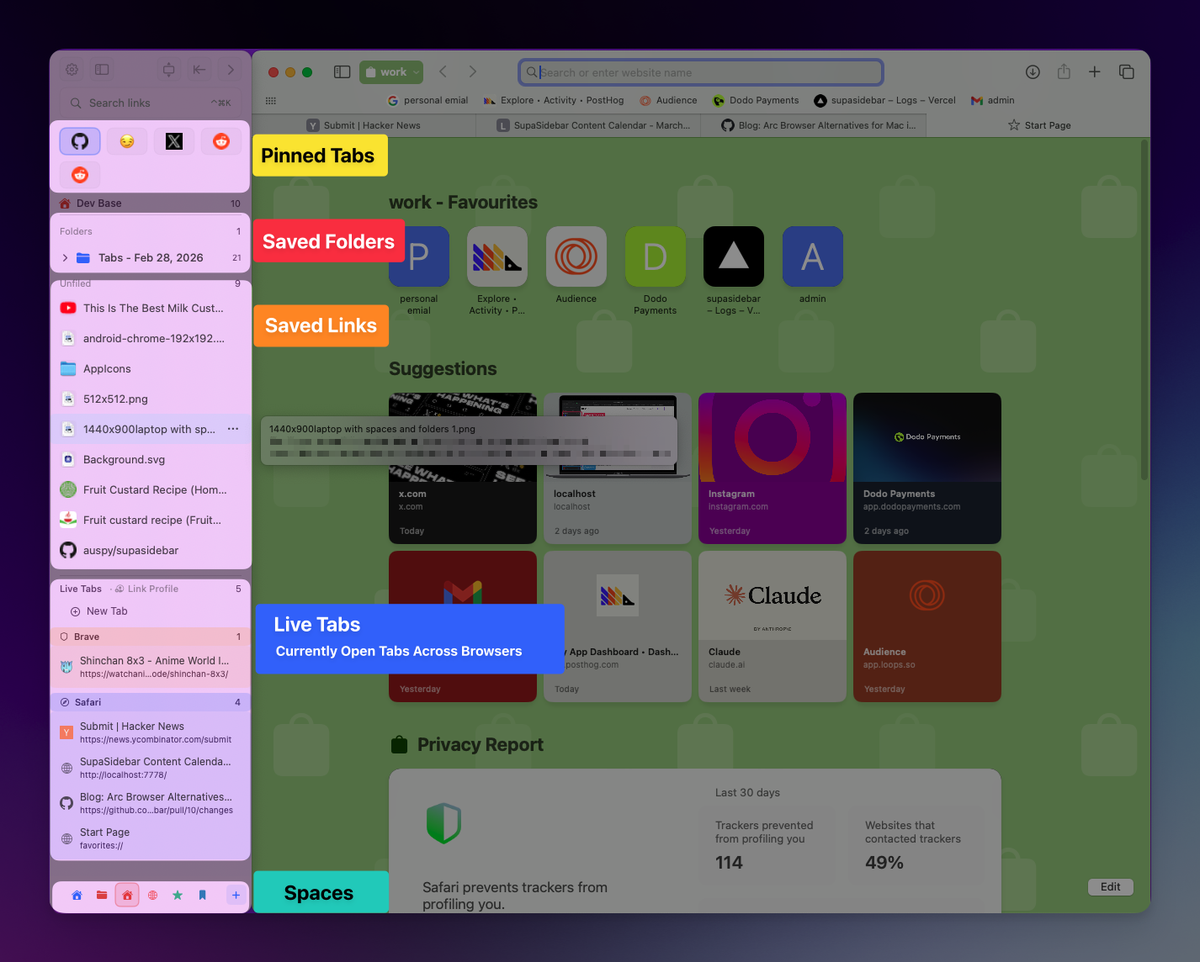
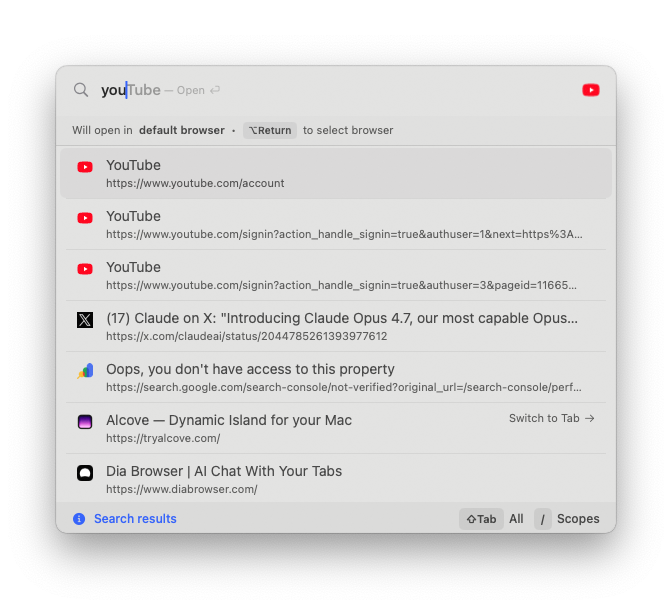
SupaSidebar is a native macOS app that adds a persistent vertical sidebar to any browser - Safari, Chrome, Firefox, Edge, Brave, Vivaldi, Zen, and more. On an Apple Silicon Mac, the setup that resolves the tension is Safari plus SupaSidebar: Safari handles the rendering with all of Apple's chip-level efficiency, and SupaSidebar adds the Arc-style sidebar, Spaces, fuzzy-search Command Panel, and bookmark management on top.
The reason this works well specifically on Apple Silicon: SupaSidebar is a native arm64 Mac app, not a browser extension and not a second browser. It does not add to Safari's process count or its tab-rendering load. The sidebar runs as its own lightweight native process that sits near-idle when you are not interacting with it. You keep Safari's battery life and thermal behavior - which is the entire reason to run Safari on an Apple Silicon Mac - and you add the tab management Safari never had.
On a fanless MacBook Air, that matters more than on any other Mac: you are not introducing a heavy Chromium browser to get Arc's UX. You are keeping the efficient browser and layering the productivity on top.
Conclusion: Picking the right browser for your Apple Silicon Mac in 2026
For the large majority of Apple Silicon Macs in 2026, Safari is the best browser - it is the only one tuned for the M-series chip itself, it has the lowest memory footprint, and on a fanless MacBook Air it is the difference between a cool, all-day machine and a throttling, charger-hunting one. Every modern browser runs native arm64 now, so the choice is about how well a browser uses the chip, not whether it can.
By segment: M1 MacBook Air owners, especially 8GB - Safari, no real debate; it is the only browser that keeps the weakest Apple Silicon Mac feeling fast. M2 and M3 MacBook Air owners - Safari for battery and thermals; Chrome is tolerable for lighter use. M4 MacBook Air owners - Safari still wins, but the machine is efficient enough that a lighter browser like Edge is fine for moderate workloads. Any MacBook Pro owner (M1-M4) - the active cooling removes the thermal constraint, so pick on features; Safari still gives the longest battery. Anyone who picks Safari and misses Arc's tab management - keep Safari for the chip efficiency and add SupaSidebar for the vertical sidebar, Spaces, and command panel.
The next step depends on your priority. If you want the deep battery numbers and powermetrics methodology, read the Mac browser battery life comparison. If you want the full feature-by-feature browser comparison beyond hardware, the best browser for Mac guide covers it. And if Safari is your pick but its flat tab list is the dealbreaker, try SupaSidebar (free tier) - it keeps your efficient browser and adds the sidebar it was missing.
Why we recommend SupaSidebar
SupaSidebar is a macOS app that brings Arc's sidebar to every browser - one sidebar for tabs, bookmarks, files, and apps across 32+ browsers including Safari, Chrome, Firefox, Arc, Zen, Vivaldi, Brave, Helium, and Dia. On an Apple Silicon Mac, it solves the specific problem this post is about: Safari is the most efficient browser for the M-series chip, but its tab management is the weakest of any major browser. SupaSidebar lets you keep Safari for the chip-level efficiency - which is the whole reason to run Safari on Apple Silicon - and adds the Arc-style vertical sidebar, Spaces, and fuzzy-search Command Panel on top, as a native arm64 app that does not touch the browser's rendering load.
A free version is available with 3 Spaces, it runs on macOS 14 and later, and it works as a native Apple Silicon app. Try it at supasidebar.com.
FAQ
What is the best browser for an Apple Silicon Mac in 2026?
Safari is the best browser for most Apple Silicon Macs in 2026. It is the only browser Apple tunes for the M-series chip, it has the lowest memory footprint, and it delivers the longest battery life. On a fanless MacBook Air it also runs the coolest under sustained load. Chrome, Edge, Firefox, Brave, and Zen all run native on Apple Silicon too, but none match Safari's chip-level integration.
Do browsers run native on Apple Silicon, or do they use Rosetta 2?
Every major browser runs native on Apple Silicon in 2026 - Safari, Chrome, Firefox, Edge, Brave, Vivaldi, and Zen all ship arm64 builds. None require Rosetta 2. Firefox went native in version 84 in December 2020 and Brave added M1 support in early 2021. The "is it native" question stopped being relevant years ago.
What is the best browser for a MacBook Air?
Safari is the best browser for a MacBook Air because the Air is fanless and cannot dissipate sustained heat. A heavy Chromium browser with many tabs can push the chip into thermal throttling on an Air. Safari's lower CPU and memory use avoids that. This matters most on an M1 or M2 Air; an M4 Air is efficient enough that a lighter browser like Edge also works for moderate use.
What is the best browser for a MacBook Pro?
On a MacBook Pro, the active cooling fan removes the thermal constraint, so you can run any browser - Chrome, Edge, Firefox, Brave, or Zen - without the throttling concern a MacBook Air has. Safari still gives the longest battery life and lowest memory use, but on a Pro the choice comes down to features and extension needs rather than hardware survival.
Does the M-series chip generation change which browser I should use?
Yes, but mostly through headroom. An M1 MacBook Air with 8GB of RAM has the least room to spare, so Safari's efficiency genuinely keeps it fast. M2 and M3 widened the gap between Air and Pro. By M4, the chip is efficient enough that browser choice is largely preference for light-to-moderate use. The newer the chip, the less the browser choice punishes you.
Is Chrome bad on Apple Silicon Macs?
Chrome runs native on Apple Silicon and is faster than its reputation - within about 6% of Safari on Speedometer 3.1 on an M4. The issue is sustained CPU load from its multi-process design. On a fan-cooled MacBook Pro that is fine. On a fanless MacBook Air, especially an M1 or M2 with many tabs, that sustained load can trigger thermal throttling. Chrome is a Pro browser more than an Air browser.
Can I get Arc's sidebar on Safari without switching browsers?
Yes. SupaSidebar is a native macOS app that adds an Arc-style vertical sidebar, Spaces, and a fuzzy-search command panel on top of Safari. It is not an extension and not a second browser, so it does not add to Safari's rendering load. On an Apple Silicon Mac this lets you keep Safari's chip-level efficiency and battery life while getting the tab management Safari lacks.
Which browser uses the least battery on a MacBook Air?
Safari generally uses the least battery on a MacBook Air, both because Apple tunes it for the M-series chip and because lower CPU use means less heat on a fanless chassis. The full benchmarked comparison, including independent test data and a method to measure it yourself, is in the Mac browser battery life post.
By Kshetez Vinayak, founder of SupaSidebar. Last updated June 23, 2026.