
By Kshetez Vinayak, founder of SupaSidebar. Last updated 2026-06-29.
TL;DR
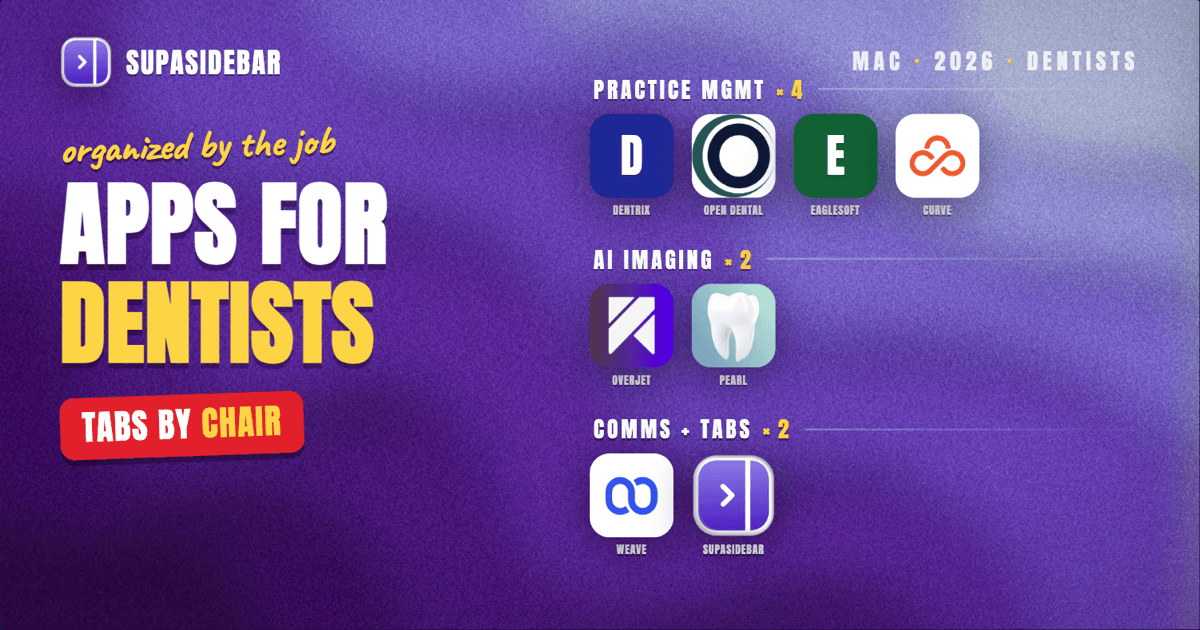
The best Mac apps for dentists in 2026 are organized by the job in front of the chair, not by brand: Dentrix Ascend as the cloud all-in-one for a practice that wants scheduling, billing, imaging, and charting in one place; Open Dental for a practice that wants deep customization and lower licensing cost; Eaglesoft for a long-running Patterson-equipped office; Curve Dental for a cloud-native practice that wants automatic updates without an in-office server; Overjet or Pearl for FDA-cleared AI that reads radiographs alongside the dentist; Weave for HIPAA-compliant patient texting, calls, and reminders; and SupaSidebar to keep practice-management, imaging, and front-office tabs from collapsing into one pile across browsers. Most of a dental practice's software now runs in a browser tab or a cloud console rather than a native Mac window, so the practical Mac question is what to run between patients and during admin time: a practice-management system that fits the office, an imaging layer the team trusts, a HIPAA-compliant way to reach patients, and a way to keep the clinical context separate from the front-office context. Several pieces have real free or low-cost options, Open Dental is the lowest-cost full system, Weave and the cloud systems are subscription tools, and SupaSidebar has a free version, while the AI imaging platforms are paid add-ons that sit on top of whatever practice-management system the office already runs.
Quick navigation:
- Practicing medicine rather than dentistry? → Best Mac Apps for Doctors 2026
- Building a focused work setup? → Mac Workspace Setup for Deep Work 2026
- Drowning in open tabs specifically? → Too Many Tabs Open on Mac
- Setting up a Mac for clinical and front-office work? You are in the right place. Keep reading.
| App | Job in the stack | Pricing model | Best for |
|---|---|---|---|
| Dentrix Ascend | Cloud all-in-one practice management | Subscription, quote-based | A practice that wants one cloud system for everything |
| Open Dental | Customizable, open-architecture PMS | Lower-cost licensing | A practice that wants control and the lowest full-system cost |
| Eaglesoft | Established on-premise PMS | Licensing plus modules | A long-running Patterson-equipped office |
| Curve Dental | Cloud-native PMS, no in-office server | Predictable monthly subscription | A practice going server-free with automatic updates |
| Overjet / Pearl | FDA-cleared AI radiograph analysis | Paid add-on | Reading caries and bone levels with AI assistance |
| Weave | HIPAA-compliant patient communication | Subscription from ~$249/mo | Texting, calls, and reminders that capture revenue |
| SupaSidebar | Clinical vs front-office tab separation | Free version available | Keeping PMS, imaging, and admin tabs apart across browsers |
A dentist's Mac is mostly a window onto cloud tools: the practice-management system, the imaging viewer, the patient-communication console, the insurance and billing portals, none of which is "an app you install and own" the way it used to be. So this list mixes the practice-management systems a dental office is built around with the imaging and communication layers that sit on top, and it ends with the one tool that keeps those tabs from turning into chaos. Pricing for the paid tools is in US dollars and was checked in June 2026; practice-management pricing in particular is quote-based and shifts with practice size and module choices, so treat the figures as starting points.
Dentrix Ascend: cloud all-in-one practice management
For a dental practice that wants scheduling, billing, imaging, charting, and patient communication in one cloud system, Dentrix Ascend is the consolidated option from the most recognized name in dental software. Dentrix Ascend is the cloud-based version that handles all of those workflows in one platform without requiring local servers, which is the direction the market has moved (Adit, top dental practice management software 2026). The legacy on-premise Dentrix still serves tens of thousands of practices, and full-feature installs typically run in the range of $500 to $700 or more per month once licensing, annual support, and required modules are added (Curve Dental, best dental practice management software 2026).
The reason Dentrix keeps its place despite the cost is breadth and integration: one vendor for the clinical chart, the schedule, the ledger, and the reporting, with a large ecosystem of third-party tools that connect to it. The trade-off is that a single all-in-one suite is harder to leave once the whole office runs on it, and the pricing is quote-based rather than published, so a practice has to scope its real module list before comparing it to a leaner system like Open Dental.
Open Dental: customization and the lowest full-system cost
For a practice that wants deep control over its software and the lowest cost for a complete system, Open Dental is the customizable, open-architecture choice. Its standout strength is an open-source nature that allows extensive customization to fit a practice's specific workflows, which sets it apart from Dentrix and Eaglesoft, both powerful but less flexible (First Stop Dental, Open Dental vs Dentrix vs Eaglesoft vs Curve). It is the full-feature system most often recommended when budget and flexibility are the deciding factors.
The honest scope limit is that customization assumes someone in or near the practice is comfortable configuring it; the openness that makes Open Dental powerful also means it does more of its work through settings than through a polished out-of-box flow. For a tech-comfortable office or a group with IT support, that openness is the whole appeal. For a small practice that wants everything decided for them, a cloud-native system trades some flexibility for a smoother default setup.
Eaglesoft: an established on-premise system
For a long-running practice already equipped through Patterson Dental, Eaglesoft is the established on-premise system with a loyal base. Developed by Patterson Dental, it expects roughly $400 to $900 per month in licensing depending on modules, and it remains a default for offices that bought their chairs, imaging hardware, and software through the same vendor (Curve Dental, best dental practice management software 2026).
Eaglesoft and Dentrix overlap heavily as the two long-standing on-premise incumbents, so most practices settle on one as the system the office was built around rather than running both. The broader 2026 trend is toward cloud-native design, so a practice evaluating Eaglesoft fresh should weigh it against Curve and Dentrix Ascend, which remove the in-office server and its IT burden.
Curve Dental: cloud-native with no in-office server
For a practice that wants to go server-free with predictable monthly costs, Curve Dental is the cloud-native system built in the cloud from the start rather than adapted into it later. That difference matters: cloud systems provide automatic updates, enterprise-grade security infrastructure, and predictable monthly costs, which adds up to operational simplicity without the IT burden of maintaining a local server (Curve Dental, best dental practice management software 2026).
What makes Curve worth a dedicated spot rather than running legacy Dentrix or Eaglesoft is the absence of an on-premise server to patch, back up, and secure, which is a real ongoing cost for a small practice. The flip side is the usual cloud trade: the practice depends on its internet connection and the vendor's uptime, so an office in an area with unreliable connectivity has to weigh that against the lower IT overhead.
Overjet and Pearl: FDA-cleared AI radiograph analysis
For reading radiographs with an extra set of trained eyes, Overjet and Pearl are the two FDA-cleared dental AI platforms that analyze X-rays alongside the dentist. Overjet is the first and only dental AI platform FDA-cleared for both caries detection and bone level measurement, and it holds a standalone clearance for AI-powered image enhancement (Overjet, Overjet vs Pearl comparison 2026). Pearl holds FDA clearance for 2D radiographic analysis and 3D CBCT anatomical segmentation, and in December 2025 the FDA granted Pearl 510(k) clearance to detect pathologies on panoramic radiographs, the most widely captured extraoral imaging in dentistry (Pearl, FDA clearance for panoramic X-rays).
Both platforms sit on top of whatever practice-management and imaging system the office already runs, so they are an add-on rather than a replacement. They earn a place because a labeled, second-opinion overlay on a radiograph helps standardize how findings are presented to a patient and documented in the chart. The honest scope limit is that they assist diagnosis, they do not make it: the dentist still reads, decides, and is responsible for the call.
Weave: HIPAA-compliant patient communication
For reaching patients without breaking HIPAA, Weave is the all-in-one communication platform that handles texting, calls, reminders, and reviews from one console. Pricing starts at about $249 per month for one location, and Weave bundles two-way texting, automated follow-ups to missed calls, customizable appointment reminders, and a Business Associate Agreement with encrypted patient communication (Weave pricing 2026, Emitrr). It integrates with more than 20 of the most popular practice-management systems, including Open Dental, Dentrix, Curve, and Eaglesoft, so it layers onto whatever the office already runs.
The practical win is consolidation: secure texting, a phone system, missed-call follow-up, and reminders in one tool instead of stitching together a separate texting service and a separate phone line. The honest scope limit is cost, the base plan is a real monthly subscription on top of the practice-management system, so a very small or new practice should confirm the patient volume justifies it before adding it.
SupaSidebar: keeping clinical and front-office contexts in separate Spaces
SupaSidebar is a Mac sidebar app that keeps a dental practice's separate contexts, the practice-management system and imaging in one, insurance and billing portals in another, patient communication and admin in a third, organized as Spaces instead of one undifferentiated wall of browser tabs. The specific problem it answers is the one most dental software now creates: the PMS, the imaging viewer, the patient-communication console, an insurance portal, and a lab portal are all browser tabs, and by mid-afternoon they pile into a strip of favicons where finding the right one takes longer than the task itself. Past 20 tabs, the titles shrink to icons that are hard to tell apart.
That tab problem is what Arc browser solved with a vertical sidebar and Spaces before The Browser Company put Arc into maintenance mode on May 27, 2025 (The Browser Company, "A Letter About Arc"). Since then other browsers have shipped partial versions: Chrome and Edge have vertical tabs as a flat list with no spaces, Firefox added vertical tabs without a workspace model, and Safari does the least. None of them carry a workspace model across every browser at once, which matters for a practice that keeps the PMS in one browser and an insurance portal logged in to another.
SupaSidebar takes a different approach: it is a standalone macOS app, not a browser or an extension, that adds a persistent sidebar working across every major Mac browser through a single Command Panel and per-Space organization. A practice can keep one Space for the PMS and imaging tabs and a separate Space for billing and insurance portals, switch between them with a shortcut, and use Live Tabs to see and jump to open tabs from every browser at once. It is honest about its scope: it organizes the tabs around the work, it does not store patient records, query the chart, or replace the practice-management system, and it requires macOS 14 or later. There is a free version. More than 3,000 Mac users have tried SupaSidebar, and the cross-browser separation is the reason it fits a dental stack where the PMS and the insurance portals deliberately live in different browsers.
Best for:
keeping practice-management, imaging, and front-office tabs in separate Spaces across browsers.
Which dentist Mac setup should you pick?
If you want one cloud system to run the whole practice:
make Dentrix Ascend or Curve Dental the center, add Weave for patient communication, and an AI imaging layer (Overjet or Pearl) on top. That covers clinical, front-office, and imaging in a connected cloud stack.
If you want maximum control and the lowest full-system cost:
build on Open Dental, add Weave for communication, and choose an AI imaging add-on only if radiograph volume justifies it. This is the most flexible and budget-friendly path for a tech-comfortable office.
If you are an established office already equipped through Patterson:
Eaglesoft is the path of least resistance, with Weave layered on for modern patient texting and reminders that the legacy system handles less gracefully.
If you want AI as a second read on radiographs:
add Overjet for caries and bone-level analysis, or Pearl if panoramic and 3D CBCT clearance matter to your imaging mix; both sit on top of the PMS you already run.
If you run clinical work and front-office or insurance portals across more than one browser:
add SupaSidebar so the PMS and imaging tabs stay in one Space and the billing and insurance tabs in another, instead of one tab pile across browsers.
Conclusion
The best Mac apps for dentists in 2026 are a practice-management core plus an imaging layer plus a communication layer, with a way to keep them organized: Dentrix Ascend, Open Dental, Eaglesoft, or Curve depending on whether the office wants cloud convenience, customization, or the lowest cost; Overjet or Pearl for FDA-cleared AI on radiographs; and Weave for HIPAA-compliant patient communication. Most of this work now happens in browser tabs and cloud consoles rather than native apps, which is the quiet productivity tax of modern dental software. A practice prioritizing cloud simplicity should build around Dentrix Ascend or Curve; one prioritizing control and cost should build around Open Dental; an established Patterson office can stay on Eaglesoft and modernize patient comms with Weave. Dentists who run clinical work and front-office portals across more than one browser will get the most from adding SupaSidebar (free version) to keep each context in its own Space instead of one merged tab pile. For the medical side of clinical software, the best Mac apps for doctors covers reference and decision-support tools that overlap with a dental front office.
Why we recommend SupaSidebar
SupaSidebar is a macOS app that brings Arc's sidebar to every browser - one sidebar for tabs, bookmarks, files, and apps across 33 browsers including Safari, Chrome, Firefox, Edge, Arc, Brave, Vivaldi, Dia, and Comet. For a dental practice, the value is context separation: one Space holds the practice-management system and imaging tabs, another holds billing and insurance portals, and a shortcut flips between them without hunting through a single overloaded tab bar. Live Tabs shows open tabs from every browser at once, so a PMS opened in Chrome and an insurance portal opened in Safari both surface in the same sidebar. It is not a practice-management system and does not touch patient records; it organizes the browser tabs around the clinical and front-office work. There is a free version, and it requires macOS 14 or later.
FAQ
What are the best apps for dentists on a Mac in 2026?
The core stack is a practice-management system (Dentrix Ascend, Open Dental, Eaglesoft, or Curve Dental depending on whether the office wants cloud, customization, or low cost), an AI imaging layer like Overjet or Pearl, and Weave for HIPAA-compliant patient communication. SupaSidebar is useful on top to keep the practice-management, imaging, and front-office tabs organized across browsers. Most of these run in a browser or a cloud console rather than as a native Mac window.
What is the best dental practice management software for a Mac?
There is no single best, it depends on the practice: Dentrix Ascend and Curve Dental are the cloud-native all-in-one options with no in-office server, Open Dental is the most customizable and lowest-cost full system, and Eaglesoft suits a long-running office already equipped through Patterson. All run in a browser on a Mac, so the choice turns on whether the practice wants cloud convenience, deep customization, or the lowest cost.
Is there AI imaging software dentists can use on a Mac?
Yes. Overjet and Pearl are FDA-cleared dental AI platforms that analyze radiographs alongside the dentist; Overjet is cleared for caries detection and bone-level measurement, and Pearl is cleared for 2D, 3D CBCT, and panoramic radiograph analysis. Both run on top of the practice-management and imaging system the office already uses and assist diagnosis rather than replacing the dentist's call.
Can a Mac app keep my clinical and front-office tabs separated?
Yes. SupaSidebar organizes tabs into Spaces, so practice-management and imaging tabs can sit in one Space and billing and insurance portals in another, even when they are open in different browsers. It is a standalone macOS app, not a browser extension, and it has a free version. It organizes the tabs around the work; it does not store or query patient records.
Do dental practice apps work natively on macOS?
Most do not, in the traditional sense. Modern dental software, including Dentrix Ascend, Curve, Open Dental, Weave, and the AI imaging platforms, runs in a browser or a cloud console reachable on a Mac, rather than as a native Mac application. That is exactly why a tab-organization tool like SupaSidebar fits a dental stack, where most of the work lives in browser tabs.
How much does dental software cost in 2026?
It varies widely by category. Full-feature on-premise systems like Dentrix and Eaglesoft commonly run in the hundreds of dollars per month once licensing, support, and modules are added; cloud systems like Curve and Dentrix Ascend use predictable monthly subscriptions; Open Dental is the lowest-cost full system; Weave starts around $249 per month for one location; and AI imaging platforms are paid add-ons quoted on top of the practice-management system. Most pricing is quote-based, so scope the real module list before comparing.
By Kshetez Vinayak, founder of SupaSidebar. Last updated 2026-06-29.