
By Kshetez Vinayak, founder of SupaSidebar. Last updated 2026-06-22.
Quick navigation:
- Editing video alongside photos? → Best Mac Apps for Video Editors 2026
- Building a focused, distraction-free setup? → Mac Workspace Setup for Deep Work 2026
- Writer or creator building a Mac stack? → Best Mac Apps for Writers and Creators 2026
- Working photographer building a Mac stack? You are in the right place. Keep reading.
TL;DR
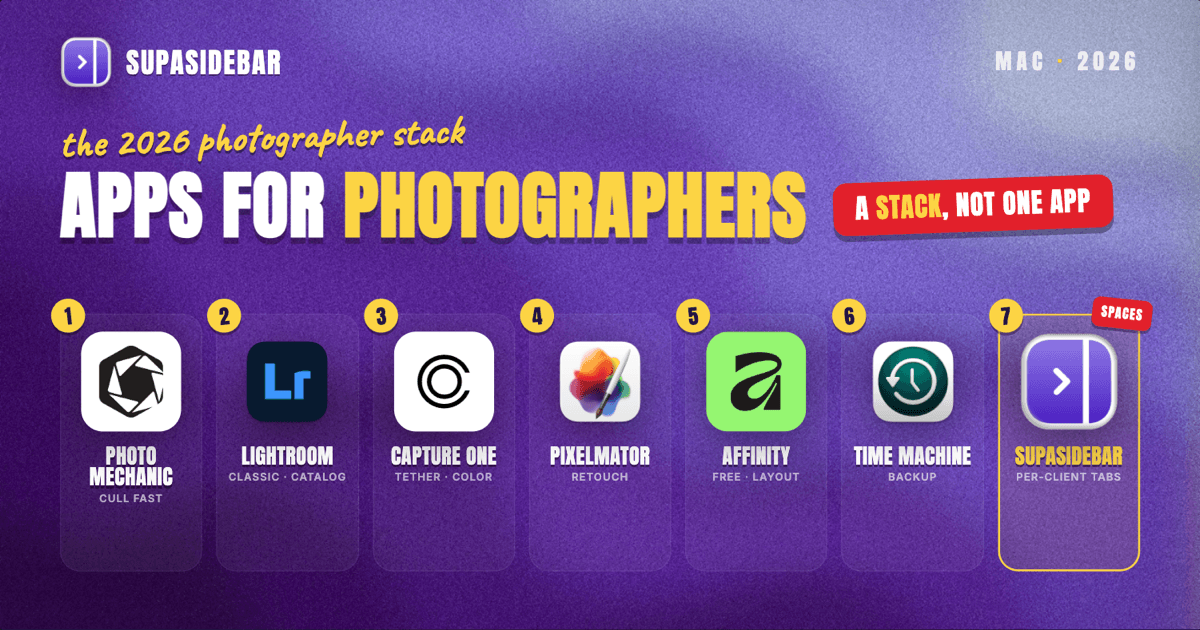
The best Mac apps for photographers in 2026 are a workflow stack, not a single editor: a fast culler to triage thousands of frames, a primary developer (Lightroom Classic for the library-plus-cloud workflow or Capture One for tethered and color work), a pixel editor for retouching, a catalog backup discipline, and a workspace layer to keep each client's galleries, contracts, and reference tabs separated across browsers. Lightroom Classic still anchors most catalogs through the Adobe Photography Plan, but Capture One now offers both perpetual and subscription licenses, and the newly free Affinity by Canva and Apple-owned Pixelmator Pro give serious retouching without a monthly bill. SupaSidebar fits mid-stack as the per-shoot organizer: one Space per client holds their gallery link, booking portal, and inspiration tabs no matter which browser they live in. The category breakdown, pricing, and comparison table are below.
Scope:
Mac apps for working portrait, wedding, event, and commercial photographers - culling, raw development, retouching, backup, and the browser-side organization of clients and galleries. Not covered: camera firmware tools, video pipelines (see the video editor stack), and iPad or mobile-only apps.
At a glance: the photographer stack
| App | Job in the stack | Pricing model | Best for |
|---|---|---|---|
| Photo Mechanic | Fast ingest and culling | One-time license (upgrades paid) | High-volume wedding and event shooters triaging thousands of frames |
| Lightroom Classic | Catalog and raw development | Subscription (Adobe Photography Plan) | Photographers wanting one library plus cloud and Photoshop |
| Capture One Pro | Raw development, tethering, color | Perpetual or subscription | Studio, product, and tethered color-critical work |
| Pixelmator Pro | Raster retouching | One-time purchase | Mac-native photo edits without a Photoshop subscription |
| Affinity by Canva | Vector, layout, advanced retouch | Free (since Oct 2025) | Albums, marketing layouts, and retouch on a budget |
| Backblaze / Time Machine | Offsite and local backup | Subscription / built-in | Protecting catalogs and originals against drive failure |
| SupaSidebar | Per-client workspace across browsers | Free version available | Photographers juggling several clients' galleries and portals across browsers |
Why the 2026 photographer Mac setup looks different
For years the default photographer Mac setup was an Adobe subscription and not much thought beyond it. Two shifts changed the math by 2026.
First, the retouching floor dropped. Canva relaunched Affinity as a single free app on October 30, 2025, merging Designer, Photo, and Publisher into one application with vector, pixel, and layout tools, free permanently by Canva's own announcement. Around the same time Apple completed its acquisition of the Pixelmator team, closing the deal on February 11, 2025, and kept Pixelmator Pro a one-time purchase rather than folding it into a subscription. Two strong raster editors now cost either nothing or one flat payment.
Second, the developer market reopened. Capture One, long subscription-leaning, now sells both perpetual and subscription licenses again, so a photographer who hates recurring bills has a real Lightroom alternative that they can own. The result is a stack a working photographer can assemble with far fewer monthly commitments than in 2022, while keeping the parts that genuinely earn their keep.
Photo Mechanic: cull thousands of frames fast
Photo Mechanic is the fastest way to ingest and cull a large shoot on a Mac, and for wedding and event photographers it is the first app a card hits before any editor opens. Its whole purpose is speed: it reads embedded JPEG previews instead of rendering full raws, so frames load instantly and a 3,000-frame wedding gets triaged to the keepers in a fraction of the time Lightroom would take to build previews.
It also handles ingest properly: rename by capture time, apply IPTC metadata and copyright in batches, and copy to two drives at once on import. The keepers then move to Lightroom or Capture One for actual development. Photo Mechanic is a one-time license from Camera Bits, with major version upgrades paid separately every few years.
Best for: high-volume shooters whose bottleneck is choosing photos, not editing them.
Lightroom Classic: the catalog most photographers still run
Lightroom Classic remains the default photo catalog and raw developer for Mac photographers in 2026, combining library management, non-destructive editing, and a deep preset ecosystem in one app. It comes through the Adobe Photography Plan, which starts around $9.99 per month with 20GB of storage and bundles Lightroom Classic, the cloud-based Lightroom, and Photoshop, with a 1TB tier at a higher price for cloud-heavy workflows.
The reason it persists is the catalog and the ecosystem: years of edits, keywords, and collections live in the Lightroom catalog, and almost every preset pack, plugin, and tutorial assumes it. The trade-off is the subscription - the editing stops being yours the month the payment does, which is exactly why the alternatives below exist.
Best for: photographers who want one library for everything plus Photoshop, and who do not mind a subscription.
Capture One Pro: tethered shooting and color-critical work
Capture One Pro is the developer studio, product, and color-critical photographers reach for instead of Lightroom, prized for its tethering, color editing, and default raw rendering. For tethered shoots it is the industry standard - shots land on the Mac screen live as they fire - and its layer-based local adjustments and color balance tools go further than Lightroom's for skin tones and product color.
The 2026 advantage is licensing flexibility: Capture One sells both a perpetual license you own and a subscription, so a photographer can buy a version outright and skip the recurring bill, accepting that a perpetual license does not include future feature updates. Pricing was adjusted as of June 2026, so check the current figure before buying.
Best for: studio, product, and fashion photographers who tether and who want owned software or the deepest color control.
Pixelmator Pro: Mac-native retouching without a subscription
Pixelmator Pro is the raster retoucher for photographers who need Photoshop-style edits a few times a shoot but not a Photoshop subscription. It handles compositing, skin and object retouching, healing, and batch processing, and it is Mac-native in the literal sense - built on Apple frameworks, fast on Apple Silicon, and now owned by Apple.
It remains a $49.99 one-time purchase on the Mac App Store, with Apple Intelligence features added and an iPad version announced, plus an optional Apple Creator Studio subscription for those who prefer that model. For the retouching jobs that actually come up between developing raws, it covers them at a fraction of the recurring cost.
Best for: photographers who develop in Lightroom or Capture One and need an occasional deep retouch without a second subscription.
Affinity by Canva: albums, layouts, and retouch for free
Affinity by Canva is the free option that covers photo retouch plus the layout jobs photographers hit that a raw developer cannot do - wedding album spreads, marketing one-sheets, price lists, and packaging. The unified app combines vector, pixel, and layout tools in one application, works fully offline, and became permanently free on Mac in October 2025.
For a photographer, the pixel tools handle detailed retouching while the layout tools build the album or the studio's marketing collateral without a separate design subscription. The one catch: AI features such as Generative Fill require a paid Canva plan, but the core professional toolset does not.
Best for: photographers who design their own albums and marketing, or who want capable retouching at zero cost.
Backup: protect the catalog before anything else
The most important photography app on a Mac is the one that runs invisibly: backup. A photographer's catalog and originals are the business, and a single drive failure can erase a wedding that cannot be reshot. The working rule is 3-2-1: three copies, on two types of media, with one offsite.
Locally, Time Machine ships with macOS and handles versioned backups to an external drive automatically. Offsite, a service like Backblaze backs up the whole Mac including external drives for a flat yearly fee, so a stolen laptop or a flooded studio does not mean lost client work. Set both up once and the rest of the stack is safe to experiment with.
Best for: every photographer, no exceptions - this is the part that protects the income.
SupaSidebar: keep each client's galleries and portals separated across browsers
SupaSidebar is the cross-browser workspace layer for photographers: one Space per client or shoot that keeps their gallery, booking portal, and reference tabs together and separated from every other client, across whichever browsers they open in. The editing apps own the photos on disk; what they do not touch is the browser side of the business, and that is where a busy photographer's day fragments.
Here is the problem none of the editors solve. A working photographer's browser is several clients deep at once: this couple's Pic-Time gallery and contract, that brand's shot list and product pages, a third client's venue research and Pinterest moodboard. Some of it is in Chrome because the studio's Google Workspace lives there, some in Safari for personal browsing. Finding "the Hendersons' gallery delivery tab" turns into a window-by-window hunt, and closing a window to tidy up loses a curated reference set. Browser tab groups do not fix it because the tabs span browsers; bookmarks do not, because half the value is the live, open state of a session.
SupaSidebar is a native Mac app that adds one persistent sidebar across every major Mac browser - Safari, Chrome, Firefox, Edge, Arc, Brave, Vivaldi, Comet, Dia, and more (33 browsers in total). For a photographer the unit of organization is the client or the shoot, and that maps directly to Spaces: one Space holds that client's gallery link, booking and invoicing portal, contract, and moodboard tabs, kept separate from every other client. Keeping each project's reference set together in its own Space is one of the most-cited reasons multi-context users reach for the app. Live Tabs shows the open tabs from every running browser in one list, so the Chrome studio pile and the Safari personal pile stop being separate hunts - the cross-browser visibility multi-browser users specifically ask for. Command Panel (⌘⌃K) searches saved links and live tabs across all Spaces in one keystroke, so "the Hendersons' gallery delivery tab" surfaces from any browser without the window-by-window hunt; that search covers titles and URLs, not the contents of a photo or a PDF. Save All Browser Tabs (⌘⌃T) captures a whole research or planning session into a folder so "those moodboard tabs from last week" become a saved, reopenable set inside the client's Space.
A power user who switched browsers and kept SupaSidebar across them put the cross-browser appeal plainly: "SupaSidebar is an app someone made to basically be the Arc sidebar feature, except for any browser. It works well." (Reddit user, r/diabrowser.) That is the per-client, cross-browser problem in one sentence. There is also a sharing angle photographers already live in: with Shared Spaces you can publish a Space as one link and hand a client or a second shooter a curated set - the shot list, the moodboard, the venue research - that they can view and import into their own sidebar. It is an available capability rather than a default habit (a small share of users publish Spaces today), but for a photographer who already sends clients a gallery link, handing over a tidy link collection is a natural extension. SupaSidebar does not edit or store photos - it organizes the browser-side work around them - and a free version is available, with 3,000+ Mac users having tried it.
Best for: photographers juggling two or more clients whose galleries, portals, and references are scattered across browsers.
Which photographer setup should you pick?
- If you shoot high-volume weddings and events: lead with Photo Mechanic for culling, develop the keepers in Lightroom Classic, and use SupaSidebar to keep each couple's gallery and planning tabs in their own Space.
- If you shoot studio, product, or tethered work: make Capture One Pro the core (buy the perpetual license if you want to own it), add Pixelmator Pro for compositing, and skip the high-volume culler.
- If you want to escape subscriptions: pair a Capture One perpetual license with the free Affinity and Pixelmator Pro's one-time purchase - a capable owned stack with no monthly bill except backup.
- If you run a one-person studio across many clients: the workspace layer earns its place - per-client Spaces in SupaSidebar are the cheapest way to stop losing gallery and contract tabs across browsers.
- If you are just starting out: Lightroom Classic plus the free Affinity covers developing and retouching, and Time Machine plus one offsite backup is non-negotiable from day one.
The bottom line
The 2026 photographer stack splits cleanly: a culler if volume is the bottleneck (Photo Mechanic), one primary developer (Lightroom Classic for the catalog-and-cloud workflow, Capture One Pro for tethered and color-critical work, now ownable via perpetual license), a retoucher that does not add a subscription (Pixelmator Pro or the free Affinity), disciplined backup, and a workspace layer to keep client galleries and portals from scattering across browsers.
By segment: wedding and event shooters get the most from Photo Mechanic plus Lightroom; studio and product photographers from Capture One; subscription-averse photographers from a perpetual Capture One license with free Affinity. Multi-client studios feel the browser-side chaos most, which is where per-client Spaces in SupaSidebar pay off; a hobbyist editing one shoot at a time can skip the workspace layer and lean on a deep-work setup instead.
Try SupaSidebar (free tier) if client galleries and portals are scattered across browsers right now. Photographers who also cut video should see the video editor app stack for the editing half of that workflow.
Why we recommend SupaSidebar
SupaSidebar is a macOS app that brings Arc's sidebar to every browser - one sidebar for tabs, bookmarks, files, and apps across 33 browsers including Safari, Chrome, Firefox, Edge, Arc, Brave, Vivaldi, Comet, and Dia. For photographers, it turns each client or shoot into a Space holding that client's gallery link, booking portal, contract, and reference tabs, searchable in one keystroke with Command Panel (⌘⌃K) no matter which browser they are open in. iCloud sync keeps the setup identical across a studio Mac and a laptop, with no account required. It organizes the browser side of the work, not the photos themselves. macOS 14+ required.
FAQ
What apps do professional photographers use on Mac in 2026?
The common working stack is Photo Mechanic for fast culling, Lightroom Classic or Capture One Pro for raw development, Pixelmator Pro or the free Affinity for retouching, Time Machine plus an offsite service like Backblaze for backup, and SupaSidebar for organizing client galleries and portals across browsers. Wedding and event shooters lean on the culler; studio and product photographers lean on Capture One.
Is Lightroom or Capture One better for Mac photographers?
It depends on the work. Lightroom Classic wins on catalog management, preset ecosystem, and the bundled Photoshop, and suits photographers who want one library for everything. Capture One Pro wins on tethered shooting, color editing, and default raw rendering, and suits studio, product, and color-critical work. Capture One also offers a perpetual license you can own, while Lightroom is subscription-only.
What is the best free photo editing app for Mac?
Affinity by Canva is the strongest free photo and layout app on Mac in 2026 - professional pixel, vector, and layout tools in one offline app at no cost since October 2025. For raster work specifically, Pixelmator Pro is a one-time $49.99 purchase rather than a subscription. Apple's built-in Photos app also handles basic edits at no cost.
Do wedding photographers need Photo Mechanic?
For high-volume work, it pays for itself in time. A wedding can produce several thousand frames, and Photo Mechanic reads embedded previews to load and cull them far faster than Lightroom can build full previews. Photographers shooting smaller volumes can cull directly in Lightroom or Capture One and skip the extra app.
How do photographers organize multiple clients on a Mac?
The two jobs are separation and retrieval. Separation: keep each client's gallery, contract, and references in their own workspace so projects do not blur together. Retrieval: search that spans everything. SupaSidebar handles both across browsers with per-client Spaces and Command Panel search over saved links and live tabs, while the photo catalog handles separation on the file side through collections or sessions.
Can a photographer share a set of links with a client or second shooter?
Yes. SupaSidebar's Shared Spaces lets you publish any Space as a single link, and the recipient can view the collection in a browser and import it into their own sidebar with one click. A photographer can hand over a curated set - shot list, moodboard, venue research - without emailing a pile of separate links. It is an available feature rather than something most users do yet, and the link is unlisted-by-token rather than password-protected, so treat it like an unlisted share.
Can you buy Capture One without a subscription in 2026?
Yes. Capture One sells a perpetual license that you own outright alongside its subscription option. The perpetual license activates the version available at purchase and any older versions, but does not include future feature updates, so upgrading to a later major version is a separate purchase. Pricing was updated as of June 2026, so check the current figure before buying.
By Kshetez Vinayak, founder of SupaSidebar. Last updated 2026-06-22.