
By Kshetez Vinayak, founder of SupaSidebar. Last updated 2026-06-28.
TL;DR
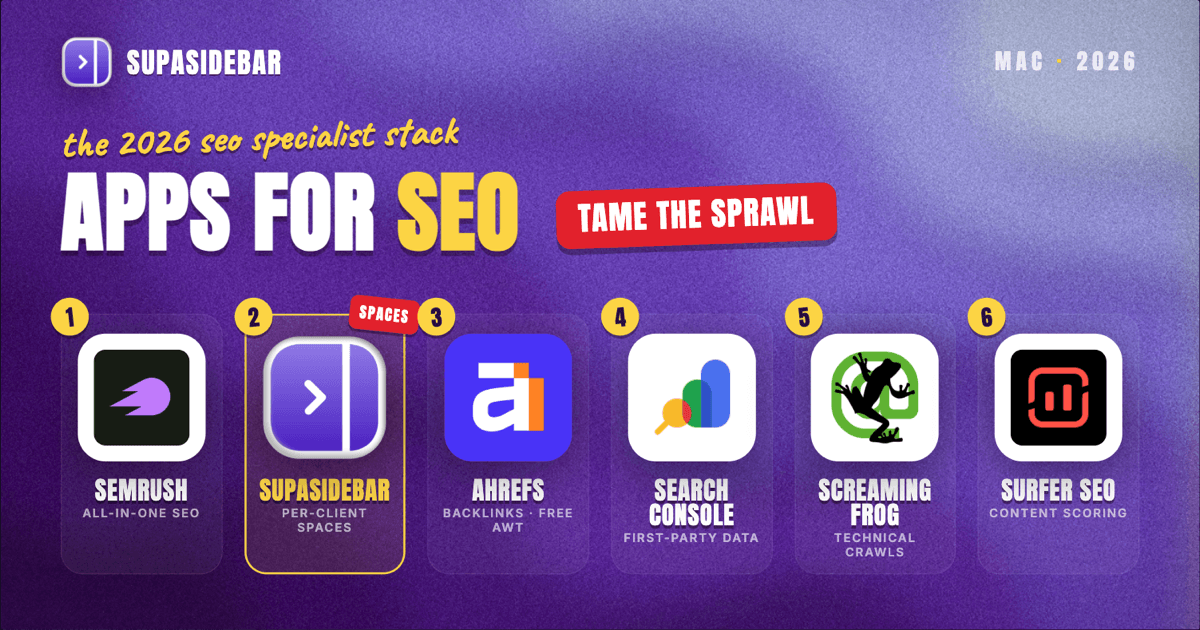
The best Mac apps for SEO specialists in 2026 are organized by the SEO job, not by suite: Semrush for all-in-one keyword research and competitor analysis, SupaSidebar for keeping each client's dashboards and research tabs grouped by Space across every browser, Ahrefs for backlink and own-site data, Google Search Console for first-party ranking truth, Screaming Frog for technical site crawls, and Surfer SEO for content optimization. An SEO specialist's real problem is rarely a missing tool, it is the sprawl: one client's audit in one tab pile, another client's rank tracker in another, Search Console open in a third, and half of them logged into a different browser. That sprawl is why the workspace layer earns a spot near the top of this list rather than the bottom. Two of the highest-value tools start free, Google Search Console is free for any verified site, and Screaming Frog crawls up to 500 URLs free, while Ahrefs Webmaster Tools is free on your own verified domains.
Quick navigation:
- Running marketing campaigns more broadly? → Best Mac Apps for Marketers 2026
- Building a focused, distraction-free setup? → Mac Workspace Setup for Deep Work 2026
- Drowning in open tabs specifically? → Too Many Tabs Open on Mac
- Comparing dedicated Mac bookmark and tab managers? → Best Mac Bookmark Managers
- Doing technical and on-page SEO from a Mac? You are in the right place. Keep reading.
| App | Job in the stack | Pricing model | Best for |
|---|---|---|---|
| Semrush | All-in-one research and tracking | Paid from $139.95/mo | One tool for keywords, audits, and competitors |
| SupaSidebar | Per-client workspace across browsers | Free version available | Several clients' dashboards and tabs across browsers |
| Ahrefs | Backlinks and own-site data | Free Webmaster Tools (own sites); paid from $29/mo | Backlink depth and free own-site auditing |
| Google Search Console | First-party ranking data | Free | The ground truth no third-party tool has |
| Screaming Frog | Technical site crawling | Free to 500 URLs; $259/yr | Deep technical audits on a Mac |
| Surfer SEO | Content optimization | Paid from $99/mo | Scoring drafts against the live SERP |
Why an SEO specialist's app stack isn't a generic "best apps" list
A salaried analyst lives inside one company's data and one set of logins. An SEO specialist usually runs several clients or properties in parallel, and each one drags in its own Search Console, its own rank tracker, its own audit, and its own deadline. The apps that matter for an SEO are not the flashiest, they are the ones that turn scattered ranking signals into decisions without burying the day in browser tabs: the keyword gap for one client, the backlink profile for another, the crawl that just finished, and the content brief waiting on a score.
So this list is organized by the jobs an SEO actually does every week - research, audit, track, crawl, optimize, and keep it all from collapsing into tab chaos. The tools are picked for in-house or agency use, a sensible free-to-paid path, and Mac-native behavior where it exists. The list leads with the all-in-one platform that anchors the research and the workspace layer that keeps the clients from colliding, then works through backlinks, first-party data, technical crawling, and on-page optimization.
The multi-client tab problem (and the workspace layer)
Here is the problem no rank tracker or crawler solves, and for an SEO juggling several clients at once it is the daily one. An SEO specialist's browser is several engagements deep at the same time: Client A has its Search Console, its Semrush project, its content doc, and a competitor's site open in one pile of tabs; Client B has its own audit dashboard and backlink report in another; the agency's own site has Ahrefs and a tracking sheet in a third. Some of it sits in Chrome because the client's Google Search Console and Analytics access live in a work profile there, some in Safari for quick SERP checks in a clean session, and some in a second browser used only for one client's logins. Finding "Client A's Search Console performance tab" turns into a window-by-window hunt, and closing a window to tidy up means losing a working set built over an afternoon.
Tab groups inside one browser do not fix this, because the tabs span browsers and profiles. Bookmarks do not fix it either, because half the value is the live, logged-in state of a working session that vanishes the moment the browser restarts.
SupaSidebar: keep each client's research tabs separated across browsers
SupaSidebar is the cross-browser workspace layer for SEO specialists: one Space per client keeps that engagement's dashboards, audits, and SERP tabs together and separated from every other client, across whichever browser each login lives in. For an SEO juggling several clients, SupaSidebar is arguably the most differentiated tool in the stack, the only one aimed squarely at the sprawl problem, which is why it sits near the top of this list rather than the end.
SupaSidebar is a native Mac app that adds one persistent sidebar across every major Mac browser - Safari, Chrome, Firefox, Edge, Arc, Brave, Vivaldi, Comet, and Dia among them (33 browsers in total counting channel variants). For an SEO the unit of organization is the client or property, and that maps directly to Spaces.
Live Tabs shows the open tabs from every running browser in one list, so the Chrome client-access pile and the Safari SERP-check pile stop being separate hunts. Command Panel (⌘⌃K) searches saved links and live tabs across all Spaces in one keystroke, which is the fastest way back to a buried Search Console or audit tab.
Air Traffic Control rules route links by URL pattern, so a rule can send every Search Console link to the right client's browser profile automatically. That keeps one client's Google login from opening inside another client's session.
A Reddit user described the underlying habit plainly: "The ability to organize multiple workspaces and flows is great! Perfect for keeping each project/motion grouped together." For an SEO that maps to one Space per client or property.
SupaSidebar organizes the tabs around the work, not the data. It is not a rank tracker or a crawler, and its search covers titles and URLs, not the contents inside a report. A free version is available, and 3,000+ Mac users have tried SupaSidebar.
Best for:
SEO specialists running two or more clients whose dashboards, audits, and SERP tabs live across different browsers and profiles and keep bleeding into each other.
Semrush: one platform for keywords, audits, and competitors
Semrush is the all-in-one SEO platform most specialists anchor their week to, covering keyword research, site audits, competitor analysis, and rank tracking in one login. Stitching together a separate keyword tool, a separate audit tool, and a separate competitor tool wastes the day reconciling three datasets, and Semrush removes that by putting them on one data layer.
Semrush starts at $139.95/month for the Pro plan, with Guru at $249.95/month adding historical data and content tools, and Business at $499.95/month adding API access and Share of Voice tracking, per Semrush pricing coverage. Annual billing trims roughly 17% off each tier.
The honest line on Semrush: it is the most expensive single line item in most SEO stacks, and Pro caps the number of tracked keywords and projects, so an SEO managing many clients often needs Guru or Business. For one or two properties, Pro covers research, auditing, and tracking without bolting on three separate subscriptions.
Best for:
SEO specialists who want keyword research, site audits, and competitor data on one platform instead of three tools.
Ahrefs: backlink depth and free own-site data
Ahrefs is the backlink and own-site research tool many SEOs pair with or run instead of Semrush, strongest on link data, content gap reports, and rank tracking. Backlinks remain a primary ranking signal, and Ahrefs' link index is the reason specialists keep it in the stack.
The detail many SEOs miss: Ahrefs Webmaster Tools is free for any verified site owner, covering Site Explorer and Site Audit on your own domains plus your backlink profile and organic rankings, per Ahrefs pricing coverage. The free tier stops at your own verified sites, so competitor research needs a paid plan, which starts at $29/month for Starter and climbs to $129/month for Lite (the cheapest tier with full rank tracking).
The practical path: an SEO auditing and tracking their own clients' verified sites gets real value from the free Webmaster Tools, and only pays once competitor backlink and keyword research becomes the daily work.
Best for:
SEO specialists who want deep backlink data and their own sites' audits free before paying for competitor intelligence.
Google Search Console: the first-party data no tool can replicate
Google Search Console is the free, first-party source of truth for how a site actually performs in Google, showing real impressions, clicks, average position, and the exact queries a page ranks for. Every third-party tool estimates rankings from a sample; Search Console reports what Google actually served, which makes it the one dataset an SEO should never skip.
Google Search Console is free for any verified property, with no plan tiers, per Google's Search Console documentation. The URL Inspection tool also lets an SEO request indexing of a new or updated page, which speeds up how fast changes get recrawled.
The catch worth naming: Search Console anonymizes a large share of long-tail queries, so the query report undercounts. It is the most accurate ranking source available and still an incomplete one, which is why specialists pair it with Semrush or Ahrefs for the fuller keyword picture.
Best for:
every SEO specialist - it is free, first-party, and the closest thing to ground truth in the stack.
Screaming Frog: deep technical crawls on a Mac
Screaming Frog SEO Spider is the technical-audit crawler for SEOs on a Mac: it crawls a site like a search engine, surfacing broken links, redirect chains, duplicate titles, missing metadata, and orphaned pages. Technical SEO problems hide in pages no one looks at, and a crawler is the only way to find them at scale.
Screaming Frog runs natively on macOS, and the free version crawls up to 500 URLs, which covers a small site or a focused section, per Screaming Frog's pricing. The paid license is $259/year and removes the URL cap while unlocking JavaScript rendering, scheduled crawls, custom extraction, and API integrations.
The practical split: a freelancer auditing small sites can live on the free 500-URL tier for a while, and the license becomes worth it the moment a client site runs into the thousands of URLs or a scheduled monthly crawl becomes part of the workflow.
Best for:
SEO specialists doing technical audits who want a real Mac-native crawler rather than a browser-tab checker.
Surfer SEO: scoring a draft against the live SERP
Surfer SEO is the on-page content-optimization tool for SEOs, scoring a draft against the pages currently ranking for a target query and flagging terms, headings, and length to match intent. Writing toward a guess about what Google wants is slow; Surfer turns the live SERP into a checklist.
Surfer's Essential plan is $99/month ($79/month billed annually) and includes the Content Editor for 30 articles a month plus page audits, per Surfer SEO pricing coverage. The SERP Analyzer is a paid add-on on the Essential plan rather than included.
The honest line on Surfer: it optimizes a page against what already ranks, which is excellent for matching intent and risky if treated as a substitute for original value - a draft can hit a perfect content score and still say nothing new. Used as a guardrail rather than a writer, it tightens on-page work fast.
Best for:
SEO specialists and content teams who want their drafts measured against the live SERP before publishing.
Which SEO specialist setup should you pick?
- If you are a freelancer or audit small sites: lean on the free layer - Google Search Console on every property, Screaming Frog's free 500-URL crawl, Ahrefs Webmaster Tools on your own verified sites, and the free version of SupaSidebar.
- If you run one or two properties and want one platform: Semrush Pro covers research, audits, and tracking without three separate subscriptions.
- If backlinks are your focus: pair Ahrefs with Search Console, and add a paid Ahrefs tier once competitor link research is daily.
- If you crawl large client sites: the Screaming Frog license pays for itself the moment a site passes 500 URLs or a scheduled crawl becomes routine.
- If you produce a lot of content: Surfer's Content Editor is the on-page guardrail, used to match intent rather than replace original value.
- If you juggle several clients across browsers and profiles: the workspace layer is your biggest win - tab sprawl is otherwise your daily tax, and SupaSidebar groups each client's dashboards and tabs by Space.
Conclusion: Picking the SEO specialist Mac setup
The 2026 verdict: anchor research and competitor work in Semrush, take backlink depth and free own-site audits from Ahrefs, treat Google Search Console as the first-party source of truth, run technical crawls in Screaming Frog, optimize drafts against the live SERP in Surfer, and keep each client's tabs and dashboards grouped by Space in SupaSidebar so the engagements stop colliding across browsers. Solo SEOs and freelancers can run most of this stack on free tiers, paying first for Semrush or a Screaming Frog license as client volume grows. Agencies and multi-client specialists feel the tab sprawl hardest, which is where the workspace layer earns a top slot rather than a footnote.
Try SupaSidebar (free tier) if your clients' SEO tabs are scattered across browsers right now.
Why we recommend SupaSidebar
SupaSidebar is a macOS app that brings Arc's sidebar to every browser - one sidebar for tabs, bookmarks, files, and apps across 33 browsers including Safari, Chrome, Firefox, Edge, Arc, Brave, Vivaldi, Comet, and Dia. For SEO specialists, it turns each client or property into a Space holding that engagement's dashboards, audits, research tabs, and saved links, searchable in one keystroke with Command Panel (⌘⌃K) no matter which browser they are open in. iCloud sync keeps the setup identical across an office Mac and a laptop, with no account required. macOS 14+ required.
FAQ
What apps do SEO specialists use on a Mac in 2026?
A common in-house or agency SEO stack is Semrush for all-in-one keyword research and competitor analysis, Ahrefs for backlinks and own-site data, Google Search Console for first-party ranking data, Screaming Frog for technical site crawls, Surfer SEO for content optimization, and SupaSidebar for organizing each client's tabs and dashboards across browsers. Several of these start free, so a solo SEO can build a working setup before paying for the all-in-one platforms.
What is the best free SEO tool for Mac?
Google Search Console is the strongest free option, and the one no SEO should skip, because it reports first-party impressions, clicks, average position, and the queries a page actually ranks for from Google directly rather than estimating them. Screaming Frog adds a free technical crawl up to 500 URLs, and Ahrefs Webmaster Tools is free for auditing and tracking your own verified sites, so a solo SEO can cover ranking data, technical audits, and own-site backlinks without paying.
Is Screaming Frog free on Mac?
Yes, up to a point. Screaming Frog SEO Spider runs natively on macOS and its free version crawls up to 500 URLs, which is enough for a small site or a focused section. The paid license is $259/year and removes the URL cap while adding JavaScript rendering, scheduled crawls, custom extraction, and API access, which become worth it once client sites run into the thousands of pages.
Do SEO specialists need both Semrush and Ahrefs?
Not necessarily. Semrush is the broader all-in-one platform (keyword research, audits, competitor analysis, rank tracking), while Ahrefs is strongest on backlink data and offers free Webmaster Tools for your own verified sites. Many SEOs pick one as their primary platform and lean on the free Ahrefs Webmaster Tools or Google Search Console for the gaps, only paying for both once the budget and client load justify two full subscriptions.
How do SEO specialists manage tabs for multiple clients on a Mac?
The reliable method is per-client workspaces plus cross-browser search. SupaSidebar creates one Space per client that holds its Search Console, audit dashboards, and research tabs, and its Live Tabs view plus Command Panel (⌘⌃K) search every running browser at once, so a tab in Chrome and a tab in Safari are found in the same keystroke. Air Traffic Control rules can route each client's links to the right browser profile automatically, which prevents opening one client's Google login inside another client's session.
How much does Semrush cost in 2026?
Semrush starts at $139.95/month for the Pro plan, with Guru at $249.95/month adding historical data and content tools, and Business at $499.95/month adding API access and Share of Voice tracking. Annual billing reduces each tier by roughly 17%. Pro caps tracked keywords and projects, so SEOs managing many clients often move up to Guru or Business.
By Kshetez Vinayak, founder of SupaSidebar. Last updated 2026-06-28.