

By Kshetez Vinayak, founder of SupaSidebar. Last updated June 18, 2026.
TL;DR:
The built-in bookmark systems in Safari and Chrome were designed for a few dozen saved pages, not a few hundred. Once a bookmark list passes roughly 100 entries, both browsers turn it into an unsearchable nested-folder pile with no tags, no notes, and no full-text search. The realistic bookmark alternatives in 2026 fall into three groups: a dedicated bookmark-manager extension (Raindrop.io is the common pick), a read-it-later service (Pocket-style apps), or a Mac sidebar app that captures bookmarks outside the browser entirely (SupaSidebar, free tier). Which one fits depends on whether the bookmarks live inside one browser or get split across Safari and Chrome on the same Mac. The full feature-by-feature comparison lives on the bookmark manager comparison page; this post explains why the built-in tools fall short and what category of alternative to reach for.
Looking for something specific?
- Comparing every bookmark manager side by side? → Best Bookmark Manager for Mac and Chrome 2026
- Need the same bookmarks usable in Chrome and Safari at once? → Cross-Browser Bookmark Sync
- Want something better than your browser's built-in bookmarks? → You're in the right place. Keep reading.
A bookmark alternative is any tool that replaces or sits on top of a browser's built-in bookmark feature - adding search, tags, notes, or cross-browser access that Safari and Chrome don't provide on their own. This post covers Safari and Chrome on macOS specifically. It does not cover one-time bookmark importing between browsers (that is a separate guide), and it does not rank individual products against each other in a table - the compare page already does that.
Why built-in bookmarks fall short
Safari and Chrome both ship a bookmark feature. Neither ships a bookmark manager. The difference matters once the list grows.
A bookmark in Safari or Chrome stores two things: a title and a URL. That's it. There's no field for a note explaining why the page was saved, no tags for cross-cutting topics, no thumbnail, and no full-text search of the saved pages. Organization happens through one mechanism only: nested folders. For 30 bookmarks, folders are fine. For 300, folders become the problem - a page about Mac keyboard shortcuts could reasonably live under "Mac", "productivity", "reference", or "read later", so it ends up in whichever folder was clicked first and is effectively lost.
The search situation is the sharper limitation. Chrome's bookmark manager (chrome://bookmarks) searches bookmark titles only. Safari's bookmark search does the same. Neither searches the content of the saved page, and neither searches notes, because there are no notes. So finding a saved article means remembering the exact words in its title - which is exactly the thing people forget. This is why so many saved bookmarks are never opened again: not because the pages stopped being useful, but because they became unfindable.
This isn't a niche complaint. On r/chrome, a thread titled simply "Alternatives for Chrome Bookmark Manager" collected a dozen replies of people describing the same wall. On r/Safari, the recurring ask is "extensions for bookmark management" - Safari users reaching past the built-in feature because it doesn't scale. The built-in bookmark bar works as a shortcut strip for 5–10 daily sites. It was never built to be an archive.
Bookmark alternatives for Safari
Safari's built-in bookmarks are the most limited of any major browser, and Safari also has the smallest extension ecosystem - which makes the "just install a bookmark extension" advice weaker here than it is for Chrome. Three categories of alternative are worth knowing.
Safari Tab Groups.
Apple's own partial answer. Tab Groups (introduced in Safari 15) let a set of tabs be saved together and named, and they sync across Apple devices via iCloud. For someone who works in clusters of pages - a research session, a trip-planning session - Tab Groups are closer to a workspace than a bookmark folder. The limit: a Tab Group is a set of open tabs, not a searchable archive, and it stays inside Safari. It does nothing for a Chrome user, and there's still no tagging or notes.
One migration trap worth knowing before you switch anything: Safari's File > Export Bookmarks does not include your Reading List. If you have years of saved articles in there, the free Reading List exporter pulls them out of Bookmarks.plist as standard bookmarks HTML.
A bookmark-manager extension.
Raindrop.io is the most commonly recommended option and does publish a Safari extension. It adds tags, notes, thumbnails, full-text search of saved pages, and a visual card layout - the actual "manager" layer Safari is missing. The cost is that it's a cloud service: bookmarks live in a Raindrop account rather than in Safari, the extension is a panel rather than the native bookmark bar, and Safari's extension permissions are stricter than Chrome's so some features feel more constrained. Pocket-style read-it-later apps (and newer entrants like Anybox) sit in the same category - better at the save and read later job than at being a daily reference tool.
A Mac sidebar app - bookmarks outside the browser.
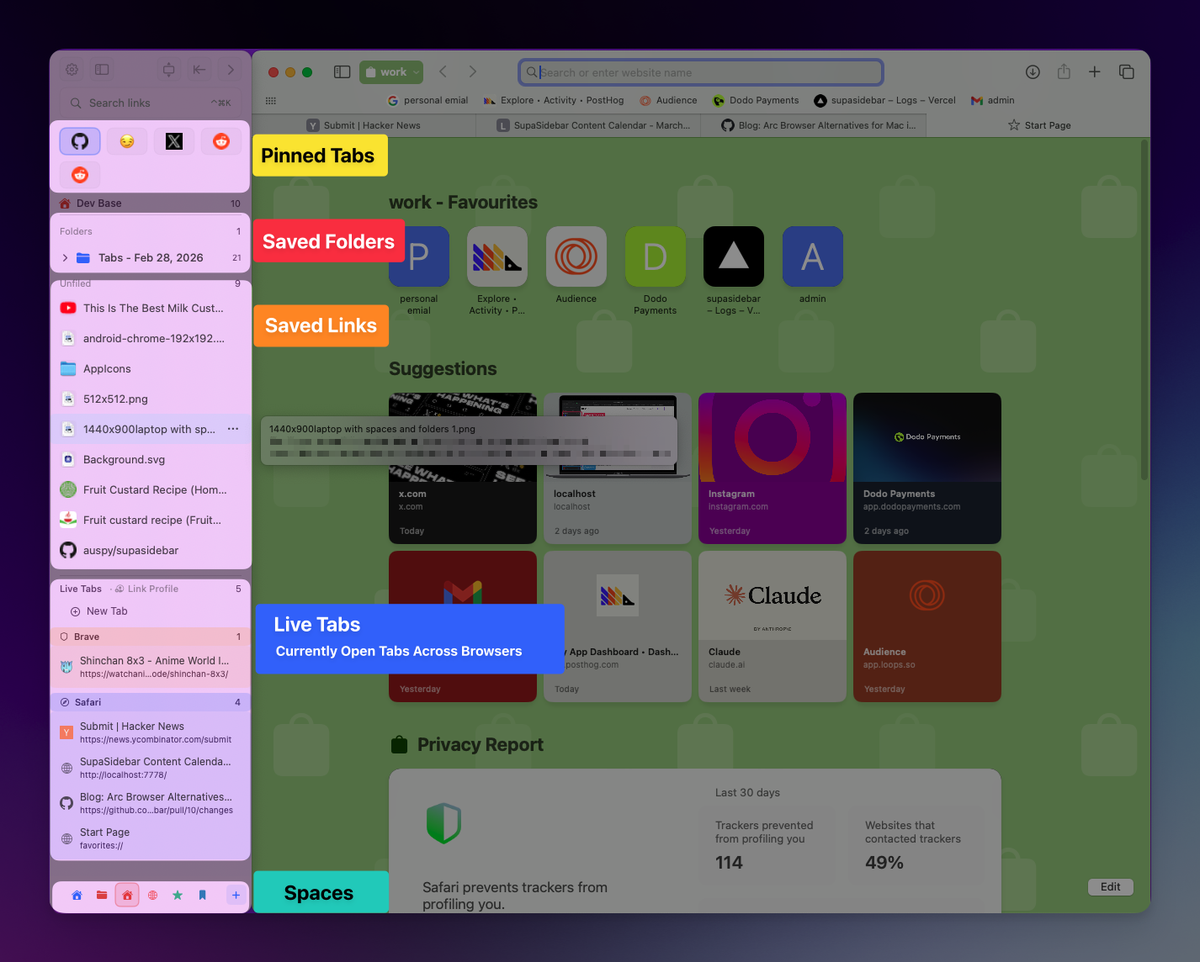
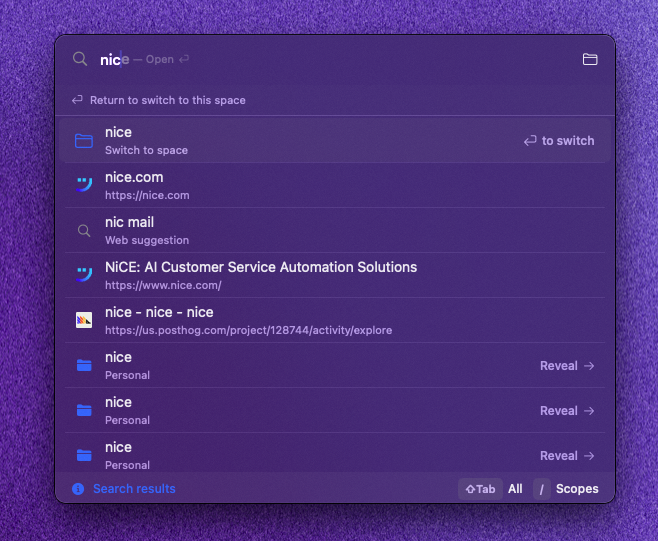
Instead of adding an extension inside Safari, this approach moves bookmarks out of Safari to the macOS level. SupaSidebar is the option in this category. It captures the current page with a global keyboard shortcut (⌘⌃S), stores it in a floating sidebar that sits beside any browser, and adds folders, Smart Folders that auto-file by rule, tags, and a fuzzy-search Command Panel (⌘⌃K) over everything saved. Because the store is a Mac app rather than a Safari feature, the same bookmarks are reachable whether Safari, Chrome, or Firefox is in front - which matters for the next section.
Bookmark alternatives for Chrome
Chrome's built-in bookmark manager is slightly better than Safari's - it has a dedicated chrome://bookmarks page and a larger extension store to draw from - but it hits the same ceiling: title-only search, folders as the only organization, no tags, no notes. The alternatives split the same three ways, with one extra Chrome-specific wrinkle.
A bookmark-manager extension.
This is where Chrome has the advantage. Raindrop.io, along with a long list of others, ships a Chrome extension that layers tags, notes, full-text search, and visual collections over the bare bookmark feature. For a user who lives entirely in Chrome, a single well-chosen extension closes most of the gap. The compare page breaks down the specific tools; the category-level point is that the extension route genuinely works for Chrome - better than it does for Safari.
Tab Groups and the Reading List.
Chrome's own built-in extras. Tab Groups collapse and color-code open tabs; the Reading List is a lightweight "save for later" queue. Both reduce tab clutter, neither is a searchable archive, and like Safari's versions they stay locked inside Chrome.
A Mac sidebar app - the cross-browser wrinkle.
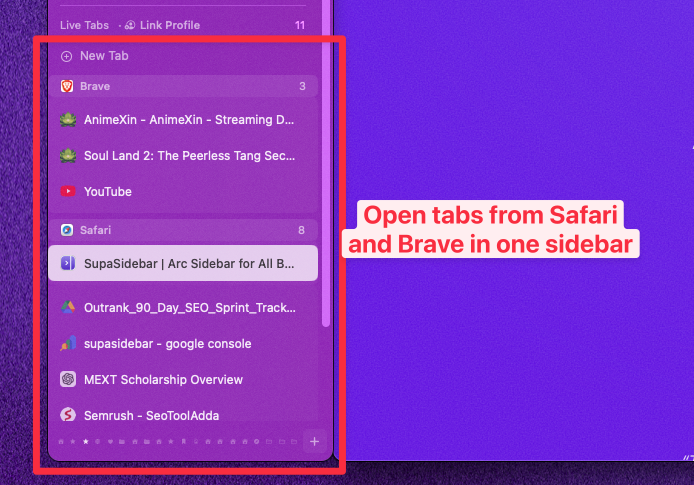
Here's the Chrome-specific catch: a typical Mac user doesn't only use Chrome. Chrome is often the work browser - it's where the company Google account and SSO are configured - while Safari handles personal browsing and battery life. A bookmark extension installed in Chrome does nothing in Safari, and vice versa. So the bookmarks fragment: some in Chrome, some in Safari, none findable from the other. A Mac sidebar app like SupaSidebar sidesteps this by holding bookmarks at the macOS level - ⌘⌃S saves to the same store from Chrome or Safari, and the sidebar serves them back to whichever browser is in front. For a single-browser Chrome user the extension route is fine. For a Chrome-plus-Safari user, the sidebar-app route is the one that doesn't leave half the bookmarks stranded.
How to pick a bookmark alternative
The decision comes down to two questions: how many bookmarks, and how many browsers.
If the bookmark list is small and lives in one browser, the honest answer is that the built-in feature plus a little folder discipline is enough - no alternative needed. The tools below earn their place once the list is genuinely an archive, not a shortcut strip.
If the list is large but stays inside one browser, a bookmark-manager extension is the most direct fix. It adds the search, tags, and notes layer exactly where the bookmarks already are. This works well for Chrome and acceptably for Safari, keeping in mind Safari's thinner extension support.
If the bookmarks are split across Safari and Chrome on the same Mac, the extension route can't close the gap - an extension only sees its own browser. That's the case for a Mac-level tool that holds bookmarks outside any single browser. The cross-browser bookmark sync guide goes deeper on this specific problem, including how it differs from syncing one browser's bookmarks across multiple Macs.
For the actual side-by-side - which tool has tags, which has full-text search, which is free, which is Mac-only - the bookmark manager comparison page lays it out in a table. This post is the "why and what category"; that page is the "which exact one."
Conclusion: What to use instead of built-in bookmarks
Built-in bookmarks in Safari and Chrome are a shortcut strip, not an archive - title-only search, folders as the only organization, no tags or notes. Past roughly 100 saved pages, both need a real bookmark alternative on top.
Single-browser users with a large list: a bookmark-manager extension like Raindrop.io closes the gap, and Chrome's larger extension store makes this route stronger for Chrome than for Safari. Safari-only users who think in sessions rather than archives: Safari Tab Groups are a usable middle ground, though they stay inside Safari. Users whose bookmarks are split across both Safari and Chrome on one Mac: an extension can't reach across browsers, so a Mac sidebar app that stores bookmarks at the macOS level - like SupaSidebar - is the option that keeps every bookmark findable from either browser. Anyone still deciding between specific products should start with the bookmark manager comparison page.
If the bookmarks are scattered across Safari and Chrome and that's the core frustration, try SupaSidebar (free tier) - it holds one bookmark store both browsers can pull from.
Why we recommend SupaSidebar
SupaSidebar is a macOS app that brings Arc's sidebar to every browser - one sidebar for tabs, bookmarks, files, and apps across 25+ browsers including Safari, Chrome, Firefox, Arc, Zen, Vivaldi, Brave, Helium, and Dia. For the bookmark-alternative problem specifically, the relevant part is that the bookmark store lives in the Mac app rather than inside a single browser: a page saved with ⌘⌃S from Chrome is the same saved item that shows up when Safari is in front, organized with folders, rule-based Smart Folders, and a fuzzy-search Command Panel that the built-in bookmark features don't offer. It works alongside whatever browser is already in use - it is not a browser, and not a browser extension. A free version is available.
FAQ
What is a good bookmark alternative for Safari?
The three realistic options are Safari Tab Groups (Apple's built-in, good for session-based saving but no tags or search of saved pages), a bookmark-manager extension like Raindrop.io (adds tags, notes, and full-text search, though Safari's extension support is thinner than Chrome's), or a Mac sidebar app like SupaSidebar that stores bookmarks at the macOS level so they're reachable from any browser. Which one fits depends on whether the bookmarks stay inside Safari or get split with another browser.
What is the best bookmark alternative for Chrome?
For a user who lives entirely in Chrome, a bookmark-manager extension is the most direct fix - Chrome's large extension store includes Raindrop.io and many others that add the search, tags, and notes the built-in manager lacks. For a user who also uses Safari, an extension only covers Chrome, so a Mac sidebar app that holds bookmarks outside the browser keeps both browsers' bookmarks in one place. See the bookmark manager comparison page for the specific tools.
Why are Chrome and Safari's built-in bookmarks not good enough?
Both store only a title and URL per bookmark, organize through nested folders only, and search bookmark titles rather than the content of saved pages. There are no tags and no notes. This works for a small set of daily-use sites but breaks down once the list becomes an archive of a few hundred pages, because folders force every page into one category and title-only search fails the moment the exact title is forgotten.
Is there a free bookmark alternative?
Yes. Several bookmark-manager extensions have free tiers, and SupaSidebar has a free version that includes the sidebar, folders, and Command Panel search. The comparison page notes which tools are free, which are freemium, and which are paid only.
Can I use the same bookmarks in both Safari and Chrome?
Not with the built-in features - Safari bookmarks sync only to Safari (via iCloud) and Chrome bookmarks sync only to Chrome (via a Google account). A browser extension is also single-browser by nature. The way to make one bookmark set usable from both is a Mac-level tool that stores bookmarks outside any browser; this is covered in detail in the cross-browser bookmark sync guide.
Do I need a bookmark alternative at all?
Not always. If the bookmark list is small - a few dozen daily-use sites - and lives in one browser, the built-in feature plus tidy folders is enough. A bookmark alternative earns its place when the list grows into a genuine archive of hundreds of pages, or when bookmarks are split across more than one browser on the same Mac.
Is Safari Tab Groups a replacement for bookmarks?
Partly. Tab Groups save and name a set of open tabs and sync across Apple devices, which is closer to a workspace than a folder. But a Tab Group is a set of open tabs rather than a searchable archive, it has no tags or notes, and it stays inside Safari - so it helps session-based workflows but doesn't replace a bookmark archive or help a multi-browser user.
By Kshetez Vinayak, founder of SupaSidebar. Last updated June 18, 2026.