
By Kshetez Vinayak, founder of SupaSidebar. Last updated July 30, 2026.
TL;DR
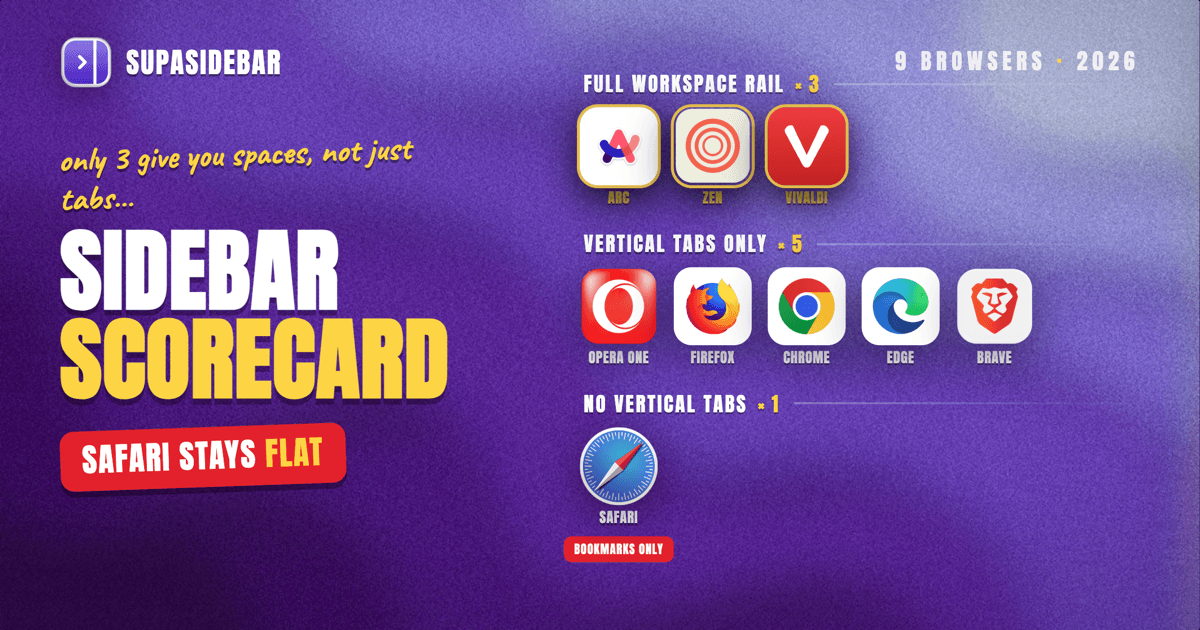
A browser sidebar is a vertical panel docked to the side of the window that holds tabs, bookmarks, or saved links instead of page content. Eight of the nine major Mac browsers now have one: Arc, Zen, Vivaldi, Opera One, Firefox, Chrome, Edge, and Brave. Safari is the last holdout with no vertical tab layout at all. But "has a sidebar" hides a big split, because a vertical tab strip only lists the tabs open right now, while an Arc-style sidebar also holds saved links and separate Spaces, and only Arc, Zen, and Vivaldi ship the second kind. Every one of them stops at the edge of its own browser, which is why anyone running two browsers ends up needing a Mac app such as SupaSidebar instead of a browser feature.
Quick navigation:
- Want a sidebar in Safari specifically? → How to Add a Sidebar to Safari
- Just after a vertical tab layout in Safari? → Safari Vertical Tabs
- Wondering whether Chrome's new vertical tabs are enough? → Chrome Vertical Tabs vs Arc Sidebar
- Running two or more browsers at the same time? → Why Multi-Browser Users Need a Unified Sidebar
- New to the whole Mac sidebar app category? → Mac Sidebar App
- Comparing which browsers ship one? You are in the right place. Keep reading.
At a glance: which Mac browsers have a sidebar in 2026
| Browser | What the sidebar is called | Open tabs in a vertical column? | Saved links + separate Spaces? | Best for |
|---|---|---|---|---|
| Arc | Sidebar | Yes | Yes (Spaces, pinned tabs) | People who want the original, and accept that it is frozen |
| Zen Browser | Sidebar | Yes | Yes (Workspaces, pinned tabs) | Arc refugees who want a free, actively developed clone |
| Vivaldi | Panel + vertical tab bar | Yes | Yes (Workspaces, Web Panels) | Power users who want to configure everything |
| Opera One | Sidebar + vertical tab strip | Yes (since July 2026) | Partly (Tab Islands, pinned grid) | People who live in messengers and web panels |
| Firefox | Sidebar | Yes (since Firefox 136) | No Spaces | Privacy-first users who want tabs, history, and bookmarks in one rail |
| Chrome | Side Panel + vertical tabs | Yes (since April 2026) | No Spaces | Chrome-only users who just want readable tab titles |
| Microsoft Edge | Vertical tabs + side pane | Yes (since 2021) | No, and the pinned-app list is being retired | Copilot-first workflows |
| Brave | Sidebar + vertical tabs | Yes, with tab trees | No Spaces | Privacy users who want a tab hierarchy |
| Safari | Sidebar (Bookmarks, Reading List, Tab Groups) | No | No | Battery life, at the cost of tab management |
SupaSidebar is deliberately not a row in that table, because it is not a browser. It is a Mac app that adds the rail on top of any of the nine, and it is covered further down.
What actually counts as a sidebar
A browser sidebar is a vertical panel docked to the side of the window that holds navigation content instead of page content. That is the whole definition, and it is loose enough that two very different features both qualify.
The first kind is a vertical tab strip. It takes the tabs that are open right now and stacks them down the left edge so titles stay readable past ten tabs. Chrome, Firefox, Edge, Brave, and Opera One all ship this.
The second kind is a workspace rail. It holds the open tabs, plus links saved permanently, plus pinned favourites, split across separate contexts you switch between. Arc called those Spaces. Zen calls them Workspaces. Vivaldi calls them Workspaces too.
The difference matters because they solve different problems. A vertical tab strip fixes readability. A workspace rail fixes context, which is the reason Arc users talk about missing the sidebar rather than missing the tabs. As one Reddit user put it: "I miss Arc's sidebar the most. Everything else I can live without."
Every option below is scored on both.
Arc: the sidebar every other browser is now copying
Arc has the sidebar the rest of the industry is chasing, and it is also the one you should be most careful about adopting. Arc's sidebar combines vertical tabs, pinned tabs, and Spaces in a single rail, with a command bar on top. It is still fully functional on Mac.
The catch is development. The Browser Company put Arc into maintenance mode on May 27, 2025, in an open letter to Arc members where CEO Josh Miller wrote that "for most people, Arc was simply too different, with too many new things to learn, for too little reward". Arc still gets security patches. It does not get new features.
Arc is also closed source, so there is no community fork to inherit it.
Best for:
people who already run Arc happily and are not worried about a browser that has stopped evolving.
Zen Browser: the closest free copy of Arc's sidebar
Zen Browser is the most complete free Arc-sidebar replacement on Mac, and the one most former Arc users land on. Zen is built on Firefox's Gecko engine and ships an Arc-style left sidebar with vertical tabs, pinned tabs, Workspaces for separate contexts, a Compact Mode that hides the rail until needed, and Zen Glance for link previews.
Zen is open source under MPL-2.0, with the source on GitHub and an active release cadence. That is the main structural advantage over Arc: someone is still working on it.
The cost of switching is the usual cost of switching engines. Extensions, sync, and site compatibility all come from the Firefox side of the world rather than the Chromium side.
Best for:
Arc refugees willing to change browsers outright to get Spaces back.
Vivaldi: panels and a vertical tab bar in the same window
Vivaldi has the most configurable sidebar of any mainstream Mac browser, and it separates the two sidebar jobs into two features. The Panel holds Bookmarks, History, Notes, Downloads, a Window Panel with a tree view of every open tab, and Web Panels that pin any website into the rail permanently.
Separately, the tab bar itself can be moved to the left edge as a vertical tab well with a scrollbar, so full tab titles stay visible. Vivaldi Workspaces then groups tabs and Tab Stacks by topic inside one window, with each Workspace holding its own set of tabs.
That combination is the closest a Chromium browser gets to Arc's model. The honest tradeoff is complexity. Vivaldi asks you to assemble your own interface, which is exactly why some people love it and others bounce off it in an afternoon.
Best for:
power users who want a workspace rail and enjoy configuring a browser.
Opera One: vertical tabs finally arrived in July 2026
Opera One got a vertical tab strip in July 2026, which closed the last obvious gap in its sidebar story. Opera has had a left sidebar for years holding messengers, AI tools, and pinned web panels. What it lacked was a way to see open tabs as a readable column.
That shipped this month. Per Opera's own explainer, switching on the vertical tab strip moves every tab into a resizable left panel showing favicon plus full title, the strip collapses for screen space, and pinned tabs sit at the top of the strip as a grid of icons. Tab Islands survive the switch between layouts in both directions.
Tab Islands are grouping, though, not persistent workspaces. They organise a session rather than holding a separate saved context you return to next week.
Best for:
people who run messengers and web apps in the rail alongside their tabs.
Firefox: a genuine sidebar with vertical tabs built in
Firefox has the most complete sidebar of the three big non-Arc-style browsers, and it is the one most people do not realise exists. The revamped Firefox sidebar holds bookmarks, history, tabs from other devices, and an AI chatbot panel, and it can host vertical tabs in the same rail.
Vertical tabs and the updated sidebar launched to all release users in Firefox 136. Turn them on in Settings, General, Browser Layout, or by right-clicking the tab strip and choosing Turn on Vertical Tabs. Mozilla is retiring the older sidebar entirely during 2026, migrating release users to the new one in Q2 and removing the old preference in Q3.
What Firefox does not have is Spaces. There is no persistent per-context rail, so the sidebar shows one flat world.
Best for:
privacy-minded users who want tabs, history, and bookmarks in a single rail.
Chrome: vertical tabs since April 2026, still no workspace rail
Chrome now has both halves of a sidebar, and neither half does what Arc's Spaces did. The Side Panel has held bookmarks, reading list, and history for a while. Vertical tabs are the new part: Google shipped them to desktop stable in April 2026, no flag needed, and they can collapse to a column of favicons.
Turn them on by right-clicking any Chrome window and choosing Show Tabs Vertically.
For a Chrome-only user, that is a real improvement. Titles stay readable, and tab groups are far easier to work with vertically than horizontally. What is still missing is a saved-links rail and separate contexts, so Chrome's vertical tabs are a layout change rather than a workflow change. That distinction is worth the detour if you are weighing it up, and the full Chrome vertical tabs versus Arc sidebar comparison walks the whole gap.
Best for:
Chrome-only users who want readable tab titles without installing anything.
Microsoft Edge: vertical tabs stay, the pinned app sidebar is going away
Edge had vertical tabs first and is now taking part of its sidebar back, which makes it the cautionary tale of this whole category. Edge has offered vertical tabs since 2021, and they work on macOS. The side pane is still there and now leans heavily on Copilot.
The pinned-app Sidebar is a different story. Microsoft has confirmed on its own Edge Sidebar support page that new apps can no longer be added and the quick-access list will be removed gradually. Users started seeing it disappear from stable builds in late April 2026. Copilot and the side pane itself stay.
That is the structural risk with any browser-native sidebar. The vendor owns it, and the vendor can reassign the space.
Best for:
Copilot-first workflows that do not depend on pinned web apps in the rail.
Brave: vertical tabs with a tab tree, no Spaces
Brave gives you the most structure of any Chromium browser's tab column without giving you contexts. Brave's vertical tabs are available on macOS and move open tabs to a stacked left column; right-click a horizontal tab and choose to use vertical tabs. Tree-style tab stacking reached stable in July 2026, so a tab opened from another tab nests underneath it as a child.
Brave's separate Sidebar holds Leo, bookmarks, history, and playlist panels.
Like Chrome and Firefox, Brave has no Spaces equivalent. The tree gives a session structure; it does not give you a work context and a personal context you switch between.
Best for:
privacy users who want a hierarchy inside one big pile of tabs.
Safari: the last major Mac browser with no vertical tabs
Safari has a sidebar but not a tab column, which is the single most common reason Mac users go looking for a sidebar app. Safari's sidebar has three modes: Tabs and Tab Groups, Bookmarks, and Reading List. Tab Groups let you name a set of tabs and reopen the whole set later from that sidebar.
What Safari does not offer is any setting that moves the tab strip vertically. The strip stays horizontal, so at thirty tabs the titles compress to unreadable favicons no matter what the sidebar is doing. There is a longer walkthrough of every workaround in the Safari vertical tabs guide.
Safari also has the best battery life on Apple silicon, which is why so few people are willing to leave it over a tab strip.
Best for:
battery life and macOS integration, if you can tolerate the tab strip.
The problem none of these sidebars solve
Every sidebar above stops at the edge of the browser that shipped it. Chrome's vertical tabs cannot see a Safari tab. Firefox's sidebar cannot hold a link you saved in Brave. Zen's Workspaces are Zen's alone. And a typical Mac setup is not one browser: it is Chrome for the work account because that is where the company SSO lives, Safari for personal browsing and battery life, and a third browser for whatever refuses to behave in the first two.
That is where the sidebar question stops being about which browser to pick. As one Reddit user described the need: "I've been wanting a way to manage my multiple browsers from a single source."
SupaSidebar: one sidebar that spans every browser on the Mac
SupaSidebar is a macOS app that gives you an Arc-style sidebar on top of whichever browser you are in, so the rail is the constant and the browser is the variable. It is not a browser and not an extension. It is a menu bar app that docks a floating panel to a screen edge with ⌘⇧Space, holding pinned items, saved links and folders, and a live list of open tabs from every supported browser at once.
That last part is what no browser-native sidebar can do, because a browser can only see its own tabs. SupaSidebar reads tabs across 32+ Mac browsers, including Safari, Chrome, Firefox, Edge, Arc, Brave, Vivaldi, Dia, and Comet, and clicking a tab in the list activates the existing tab instead of opening a duplicate. Spaces give you the per-context rail that Chrome, Firefox, Edge, and Brave all still lack, and they survive a browser switch because they do not live inside a browser.
Here is what that looks like for someone running two browsers:
| Example Space | What lives in it |
|---|---|
| Work (Chrome profile) | mail.google.com, linear.app, github.com, notion.so, the team Slack |
| Personal (Safari) | reddit.com, youtube.com, the banking login, a recipes folder |
Switching Space swaps the whole rail: pinned items, saved links, and folders all change together, while the live tab list keeps showing what is genuinely open in every browser. Air Traffic Control can then route a link to the right Space and open it in the right browser and profile automatically, so a Figma URL always lands in the work profile.
The honest scope limits: SupaSidebar is macOS 14+ only, it does not replace a browser or render pages beyond link previews, its search covers link titles, URLs, folder names, and notes rather than the contents of pages, and Live Tabs are local to the Mac rather than synced across devices. Only saved links sync, via iCloud, with no account required.
Best for:
anyone running two or more Mac browsers who wants one rail across all of them.
Which sidebar should you pick?
If you only use one browser and just want readable tab titles:
turn on your browser's native vertical tabs. Chrome, Firefox, Edge, Brave, and Opera One all have them now, and it costs nothing.
If you want Arc's full Spaces model and are happy to switch browsers:
use Zen Browser. It is the closest free copy and it is actively developed, which Arc is not.
If you want a workspace rail and enjoy configuring things:
use Vivaldi. Panels plus a vertical tab well plus Workspaces gets you most of the way in a Chromium browser.
If you are on Safari and refuse to leave:
Safari will not grow a vertical tab strip, so the rail has to come from outside the browser.
If you run two or more browsers:
no browser-native sidebar can help you, because each one only sees itself. That is the case for a Mac app that sits above all of them.
Conclusion: what to use in 2026
Eight of the nine major Mac browsers have a sidebar in 2026, and Safari is the exception with no vertical tab layout at all. But only Arc, Zen, and Vivaldi ship the version that holds saved links and separate Spaces rather than just the tabs open right now, and Arc has been in maintenance mode since May 2025.
Single-browser users should switch on whatever their browser already offers, since Chrome, Firefox, Brave, and Opera One all shipped vertical tabs without asking anyone to install anything. Browser-switchers who want Spaces back should look at Zen or Vivaldi. Safari users should accept that the tab strip is not going to change and add the rail from outside. Multi-browser users are the group no browser sidebar serves, because every one of them is blind to the other browsers on the machine.
If a single rail across every browser is the goal, try SupaSidebar (free version available). For a table-first, side-by-side view of the same options, there is a dedicated sidebar browsers comparison.
Why we recommend SupaSidebar
SupaSidebar is a macOS app that brings Arc's sidebar to every browser - one sidebar for tabs, bookmarks, files, and apps across 32+ browsers including Safari, Chrome, Firefox, Edge, Arc, Brave, Vivaldi, Dia, and Comet. More than 3,000 Mac users have tried SupaSidebar, and the reason it keeps coming up in Arc-replacement threads is that it does not ask anyone to change browsers to get the sidebar back.
The rail holds pinned items with 12 shortcut slots, saved links and folders, and a live view of open tabs from every supported browser. Spaces separate contexts. The Command Panel (⌘⌃K) searches saved links, recent items, and live tabs across every Space at once. Air Traffic Control routes links to the right Space, browser, and profile. Arc users can import an existing sidebar in three clicks: Preferences, Import and Export, Arc, Import. Saved links sync via iCloud with no account required, and a free version is available.
Two things it deliberately does not do: it is not a browser, and it does not replicate Arc's Boosts or Easels, which are browser-engine features rather than sidebar ones.
FAQ
Which browsers have a sidebar?
Arc, Zen Browser, Vivaldi, Opera One, Firefox, Chrome, Microsoft Edge, and Brave all have a sidebar or side panel on Mac in 2026. Safari has a sidebar for Bookmarks, Reading List, and Tab Groups, but no vertical tab layout. Only Arc, Zen, and Vivaldi combine vertical tabs with saved links and separate workspaces in one rail.
Does Chrome have a sidebar?
Yes. Chrome has a Side Panel for bookmarks, reading list, and history, and it added native vertical tabs to desktop stable in April 2026. Right-click any Chrome window and choose Show Tabs Vertically. Chrome still has no Spaces equivalent, so there is no saved-links rail or separate per-context view.
Does Safari have a sidebar with vertical tabs?
Safari has a sidebar with three modes (Tabs and Tab Groups, Bookmarks, and Reading List) but no vertical tab layout. There is no Safari setting that moves the horizontal tab strip to the side, and no Safari extension can add one, because the extension API cannot replace browser chrome. The rail has to come from a Mac app outside the browser.
What is the difference between vertical tabs and a browser sidebar?
Vertical tabs are a layout for the tabs that are open right now, stacked in a column so titles stay readable. A full sidebar also holds content that persists after those tabs close: saved links, pinned favourites, and separate contexts or Spaces. Chrome, Firefox, Edge, and Brave give you the first. Arc, Zen, and Vivaldi give you both.
Can I get a sidebar that works across all my browsers?
Not from a browser, because each browser's sidebar can only see its own tabs. A Mac app that sits above the browsers can. SupaSidebar shows live tabs from 32+ Mac browsers in one rail, keeps saved links and Spaces outside any single browser, and stays put when you switch from Chrome to Safari.
Which browser has the best sidebar on Mac?
Arc still has the best-designed sidebar, but it has been in maintenance mode since May 27, 2025, so Zen Browser is the better pick for anyone starting fresh: the same vertical tabs plus Workspaces model, free and open source, with active development. Vivaldi is the strongest option for people who want to configure the rail themselves.
Is a browser sidebar something the vendor can remove?
Yes, and it has already happened. Microsoft has confirmed it is retiring the pinned-app list in the Edge Sidebar, with new apps no longer addable and the quick-access list being removed gradually through 2026. Anything that lives inside a browser's interface is subject to that browser's roadmap.
By Kshetez Vinayak, founder of SupaSidebar. Last updated July 30, 2026.