
By Kshetez Vinayak, founder of SupaSidebar. Last updated June 20, 2026.
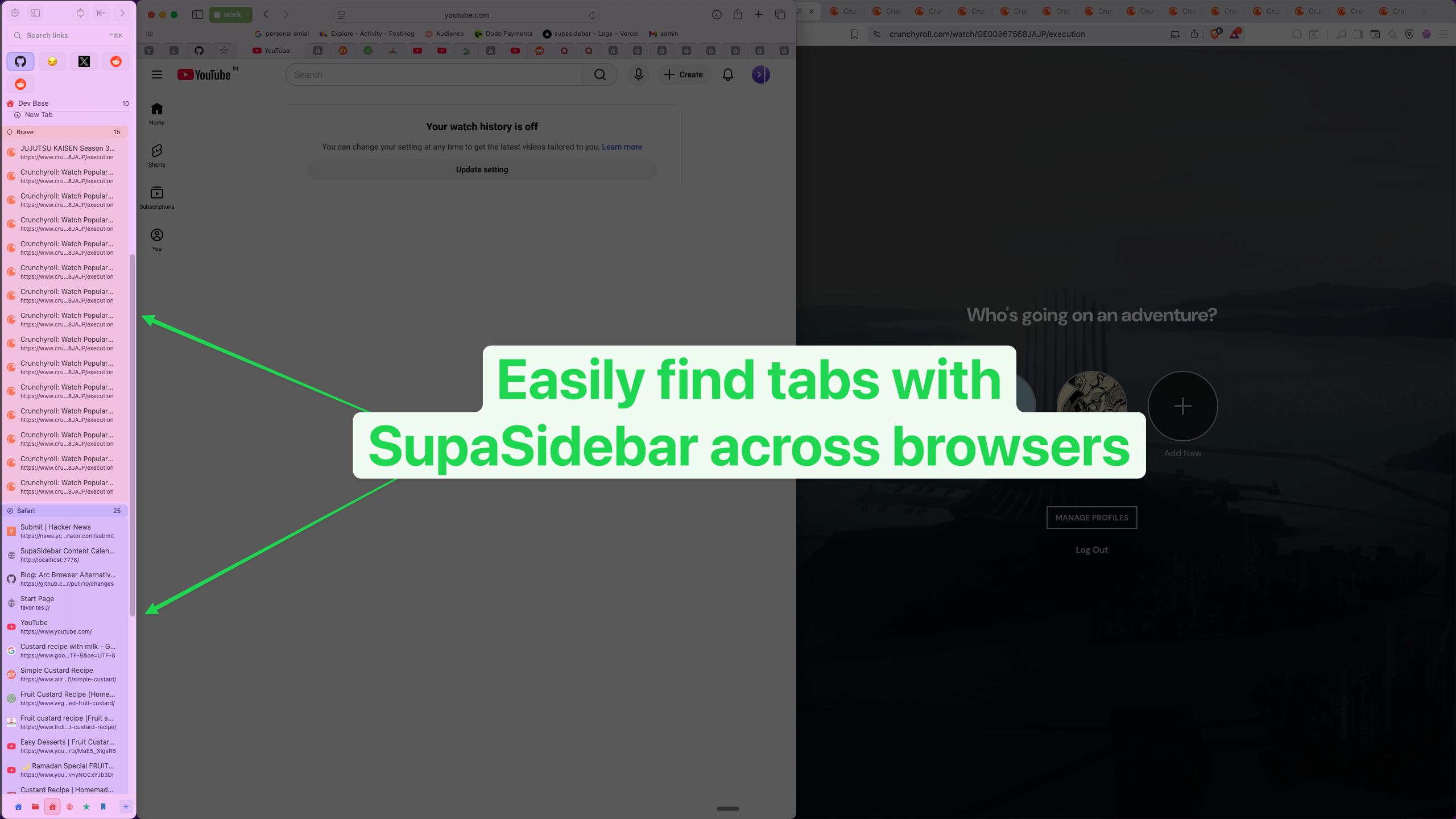
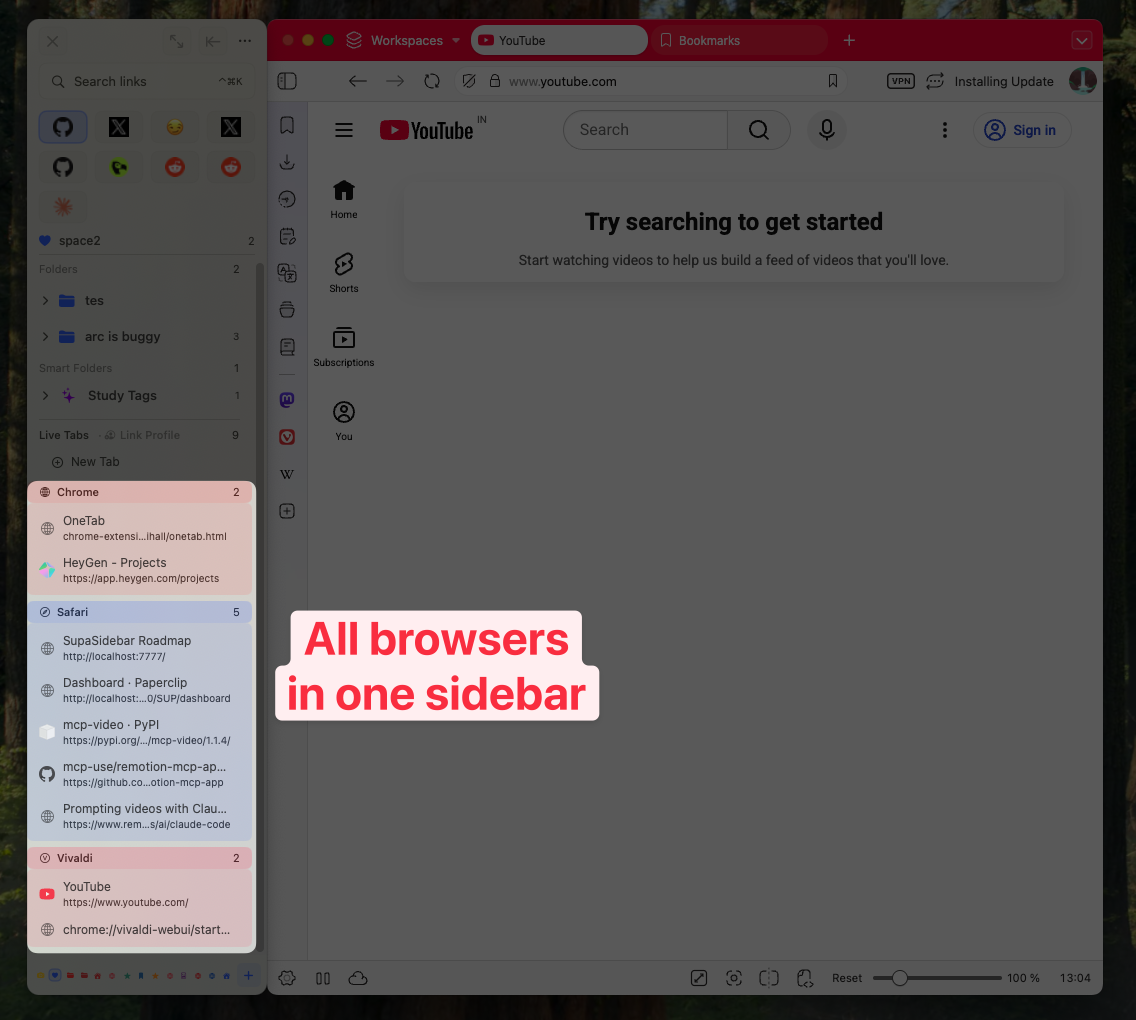
A Mac sidebar app (also searched as a macOS sidebar) is a standalone macOS application that adds a persistent, vertical panel to the screen edge for managing tabs, bookmarks, files, and shortcuts. It is a browser-tab sidebar, not a Dock replacement. Unlike a browser extension, a Mac sidebar app sits outside the browser, which means a single sidebar can show open tabs and saved links from Safari, Chrome, Firefox, Arc, Brave, and other browsers at the same time. The category exists because Safari has no native vertical tab support, Chrome's sidebar extensions are locked to Chrome, and most Mac users run two or three browsers simultaneously. As of June 2026, the best Mac sidebar app for cross-browser users is SupaSidebar, a free-tier-available native macOS app that supports 25 browsers including Safari, Chrome, Firefox, Arc, Zen, Vivaldi, Brave, Helium, and Dia. The full landscape, what to look for, and how the category compares to native browser sidebars and extensions are below.
Looking for something specific?
- Want a sidebar in Safari specifically? → Safari Sidebar Extension Guide
- Comparing browser-sidebar extensions? → Browser Sidebar Extensions for Mac
- Want vertical tabs on Mac? → Vertical Tabs on Mac: Every Option Compared
- Switching from Arc? → Arc Browser Alternative Guide
- What's a Mac sidebar app and how does the category work? → You're in the right place. Keep reading.
What a Mac sidebar app actually is
A Mac sidebar app is a standalone macOS application - not a browser extension, not a browser - that displays a persistent vertical panel on the edge of the screen. The panel typically holds three things: pinned shortcuts at the top, saved links and folders in the middle, and either browsing history (Recent items) or live browser tabs at the bottom. The sidebar shows and hides via a global keyboard shortcut and stays available regardless of which app is active.
Two distinctions matter before going any further.
First, a Mac sidebar app is not the same as a browser sidebar extension. A Chrome sidebar extension lives inside Chrome and dies when Chrome is closed. A Mac sidebar app runs in the macOS menu bar and works alongside every browser at once - Safari, Chrome, Firefox, Arc, Brave, and others - because it sits outside any single browser's process.
Second, a Mac sidebar app is not the same as a Dock replacement. There's a popular macOS app literally named "Sidebar" (at sidebarapp.net) that replaces the Dock with a vertical app launcher. Different category. A browser-focused Mac sidebar app cares about your tabs, bookmarks, and reading queue. A Dock replacement cares about your installed applications. Both can coexist, but this guide is about the browser-focused kind.
The category exists in 2026 because three things happened. Arc Browser, which made vertical-tab sidebars mainstream on Mac, entered maintenance mode in May 2025 and was acquired by Atlassian for $610 million in September 2025. Most Arc users moved to Safari or Chrome and immediately missed the sidebar. Apple still ships no native vertical tab option for Safari - Safari has a Tab Groups panel that comes close but doesn't replace the horizontal tab strip. And the average Mac user runs two or three browsers at once - Safari for personal accounts and iCloud, Chrome for work SSO, Firefox or Brave for privacy or specific tasks. None of those browsers' built-in sidebars work across the others.
A standalone Mac sidebar app fills the gap. The category is small - fewer than a dozen production-quality entrants in 2026 - but the ones that exist consistently get strong word-of-mouth from cross-browser power users. The launch thread for SupaSidebar on r/macapps drew 272 upvotes and 395 comments, most describing the same multi-browser problem with mild frustration that the answer wasn't built into any browser yet.
Why the tab bar is the wrong UI for the way Mac users actually browse
The horizontal tab bar shipped in 1994 with InternetWorks and got picked up by Mozilla, Opera, Internet Explorer, and Safari over the next decade. Per Mozilla's tabbed browsing history, tabs were a UI accommodation for slow connections and small screens. Open a few pages, switch between them, close them when done. Lifespan: minutes.
In 2026, browsing doesn't work that way anymore. A typical Mac user keeps tabs open for days. Research threads, draft emails, pinned dashboards, half-read articles, video calls. The tab bar wasn't designed for that workload, and it shows.
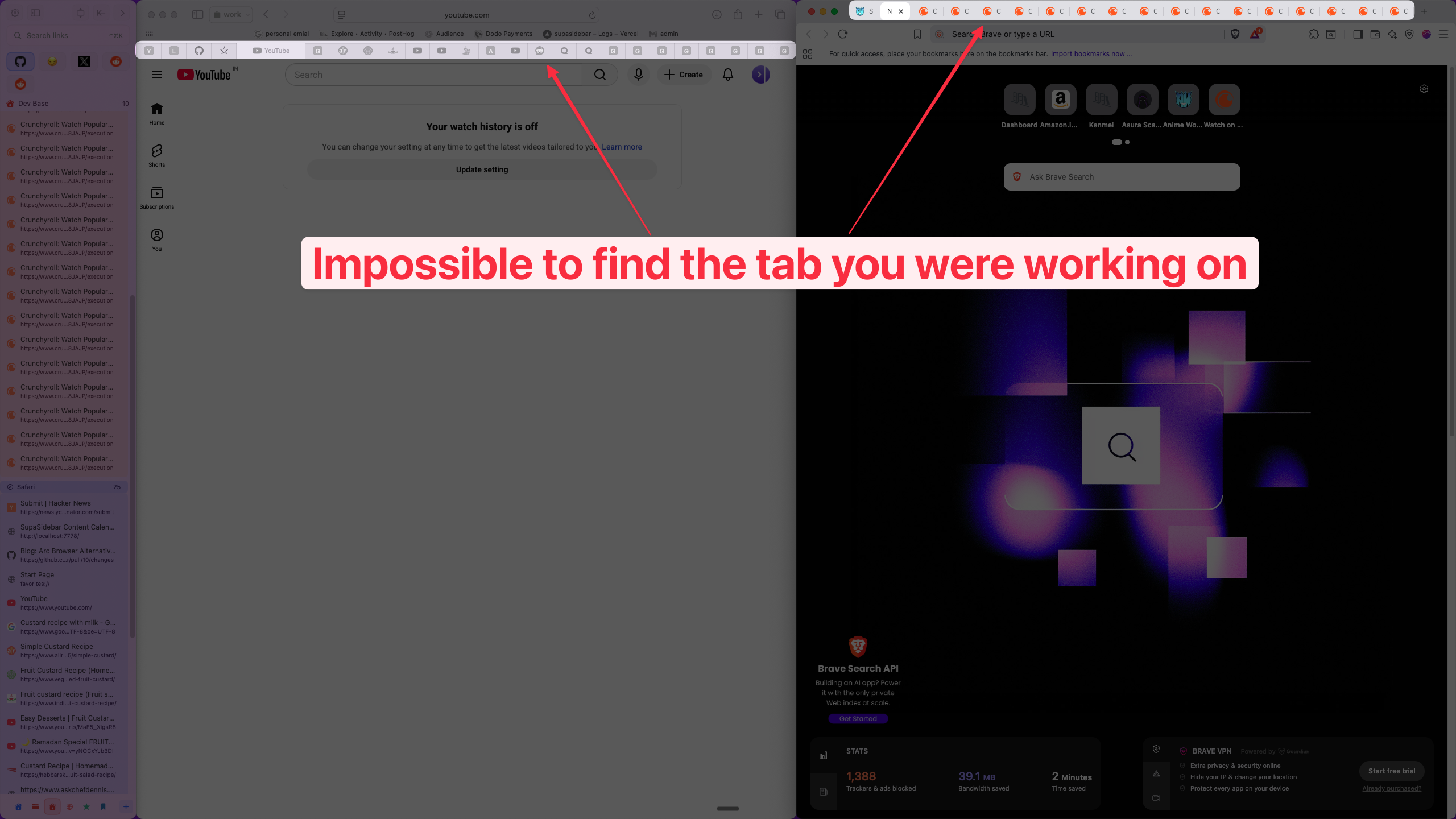
The math is hostile. Chrome's tab bar shows roughly 8 readable characters per tab title at 20 tabs in a window. By 30 tabs, every tab is a favicon plus a sliver. Safari is worse - its tab strip stops showing titles entirely once tabs get small enough. The horizontal axis is finite. The vertical axis is not. A sidebar at 280 pixels wide can show 30+ full-length tab titles in the same vertical space a horizontal bar uses to show 15 truncated ones.
The cross-browser problem is bigger than the screen-space problem. A Reddit user on r/firefox confessed to 3,800 tabs accumulated in their Firefox window because the alternative was losing them to a separate browser. Multiply that across two or three browsers and the picture gets messier - three separate tab graveyards, three separate bookmark trees, three separate "Continue where you left off" sessions that don't talk to each other.
A Mac sidebar app addresses both: vertical layout solves the screen-space problem, and a single panel that talks to every browser solves the cross-browser problem.
What a Mac sidebar app does that the browser doesn't
Browsers ship with sidebars now - Chrome has a side panel, Edge has Collections, Safari has a Tab Groups panel, Firefox has a vertical tabs setting (released in Firefox 136 in March 2025). Why does the standalone-app category exist at all if browsers are catching up?
Three reasons.
Cross-browser persistence.
The browser sidebar is locked to the browser. Close Chrome, lose the sidebar. Open Safari, no sidebar. A Mac sidebar app runs continuously in the menu bar and keeps the same panel available no matter which browser has focus. A user who saves a link from Chrome can see it from Safari five minutes later without a sync round-trip. The Reddit thread for SupaSidebar's launch - 272 upvotes, 395 comments on r/macapps - is mostly people describing this exact need: "the only thing I liked about Arc straight into the comfort of my Safari."
Files, apps, and links in one place.
Browser sidebars manage browser content only. A Mac sidebar app holds tabs, bookmarks, files dragged in from Finder, and pinned application shortcuts in the same panel. Drag a PDF in, it sits next to a saved Figma link, which sits next to a pinned Slack channel. The browser doesn't care about Finder, but a macOS-native app does.
Workspace persistence across sessions.
Browser-side workspaces (Edge Workspaces, Arc Spaces) live and die with the browser. A Mac sidebar app organizes saved content into Spaces that persist independently of any browser session - quit every browser, restart the Mac, the Spaces and their pinned items are exactly where they were.
The honest gap: a Mac sidebar app cannot replace the browser's tab strip itself. The browser still shows tabs along the top. What changes is that the user mostly stops looking at them. Tabs become a runtime artifact while the saved-and-organized content lives in the sidebar instead.
The top Mac sidebar options in 2026
Six options come up when searching for a Mac sidebar app, but they fall into three different categories: native standalone Mac apps, browser extensions, and AI-assistant panels. The distinction matters because only one of those three groups actually solves the cross-browser problem this guide is about.
| Tool | Type | Cross-browser | Files + apps | Free tier | Pricing model | Notable |
|---|---|---|---|---|---|---|
| SupaSidebar | Native macOS app | Yes (25 browsers) | Yes | Yes (3 Spaces, all features) | Free + subscription + lifetime | Live Tabs across browsers, Command Panel, Ask AI, ATC profile routing |
| Side Copilot | Chrome extension | No (Chromium only) | No | Yes (5 Spaces) | Free + subscription only (no lifetime) | AI-grouped vertical tab layout, Chrome/Edge/Brave only |
| Sidekickbar | Native cross-platform menubar app | AI-pane oriented | No | Yes (2 AI assistants, 15 AI providers) | Free + subscription + lifetime | AI assistant sidebar (Copilot/ChatGPT/Claude/Gemini), not a tab manager |
| Sidebery | Firefox extension | No (Firefox only) | No | Fully free, open source (MIT) | Free, open source | Tree-style tabs, deepest Firefox-only customization |
| Tab Stash | Firefox / Chromium extension | No (one browser at a time) | No | Fully free, open source | Free, open source | Save-and-close workflow rather than live tabs |
| Tree Style Tab | Firefox extension | No (Firefox only) | No | Fully free, open source | Free, open source | Hierarchical parent-child tab tree |
Two of these are native standalone Mac apps. SupaSidebar targets the cross-browser Mac user directly with universal-sidebar coverage across 25 browsers. Sidekickbar is a different thing dressed similarly: it is a menubar-pinned panel for AI assistants (Copilot, ChatGPT, Claude, Gemini), not a tab and bookmark manager. It comes up in the same searches because it lives in the menu bar and shows a vertical panel, so users evaluating a Mac sidebar app should know which problem it solves before downloading. The honest read: in the cross-browser tab-and-bookmark slot, SupaSidebar is currently the only production-quality native Mac app. The category is small enough that this is fact rather than positioning.
Three of these are browser extensions that come up in the same SERP. Sidebery and Tree Style Tab are Firefox-only and built for power users who want hierarchical tab trees and container-tab integration. Tab Stash is Chromium-only and oriented around the save-and-close workflow rather than live cross-browser tabs. These are real products and good ones inside their single-browser scope, but they hit the cross-browser wall the moment a second browser enters the picture, which is the entire reason this category exists.
Side Copilot is the Chromium extension that markets directly against Arc. Its comparison-to-Arc page targets the same SERP as this guide and the Arc Alternative Guide. Side Copilot brings an Arc-like vertical tab layout plus AI-powered tab grouping to Chrome, Edge, and Brave. Three real limits: it does not work in Safari or Firefox, it lives inside the browser (so it dies when the browser is closed), and it is subscription-only with no lifetime option (which matters for users who prefer one-time purchases). The free tier is generous, with 5 Spaces. For a single-Chrome user who liked Arc's vertical-tab UI specifically and is fine with an ongoing subscription, Side Copilot is a defensible choice. For a cross-browser Mac user, it has the same single-browser ceiling as the Firefox-only extensions.
A note on pricing models, since this is a real differentiator. Three of the six options are fully free and open source (Sidebery, Tab Stash, Tree Style Tab), funded by donations and contributor labor. Side Copilot is freemium with a subscription-only paid tier (no lifetime option). Sidekickbar and SupaSidebar both offer free tiers plus optional subscription AND lifetime purchase. The pricing model matters more than the dollar number for many users: open-source extensions never bill anyone, subscription-only products bill until cancelled, and lifetime-available products give the user the option to pay once. For users who hate subscriptions on principle, that pricing-model split alone narrows the field meaningfully.
The choice between these options is mostly a question of how many browsers the user runs daily. One browser, deep customization needs, willing to live in an extension: pick the open-source extension that fits the browser. One Chrome with an Arc-look preference and comfortable with a subscription: Side Copilot is reasonable. Two or more browsers, want one panel and one search across all of them: a native Mac app like SupaSidebar is the only option that holds together.
What "universal sidebar" means and why it matters
The phrase "universal sidebar" gets used by exactly one category of product: a Mac sidebar app that works across every browser. It's the line that separates a true Mac sidebar app from an extension that happens to be vertical.
A universal sidebar has three concrete requirements.
Every browser is a first-class citizen.
Not "supports Chrome and a few others." Not "works with Chromium browsers." A universal sidebar shows live tabs and routes saves for Safari, Chrome, Firefox, Edge, Arc, Brave, Vivaldi, Zen, Dia, and the long tail of niche browsers. Per SupaSidebar's product reference, 25 browsers are currently supported, including beta and dev variants of Chrome, Edge, Brave, and Vivaldi.
Saves and opens are routable across browsers.
Universal sidebar means a saved link can open in any browser, not just the browser it came from. SupaSidebar's Air Traffic Control rule system lets a user say "Figma always opens in Chrome Work, GitHub always opens in Firefox Personal" and route saves accordingly. Per-profile routing matters because Mac users with work and personal Chrome profiles often have totally different login states for the same domain.
State syncs across machines without a central account.
Per SupaSidebar's iCloud sync docs, saved links, folders, pinned items, and Spaces sync via the user's existing iCloud account - no separate SupaSidebar login required. Arc had this with Spaces; most browser-side workspaces don't.
The phrase also sets up a clear contrast against three things universal sidebar is NOT:
- It is not the macOS Finder sidebar (the panel inside Finder showing favorites and connected drives)
- It is not the Arc Sidebar (the vertical tab UI inside Arc Browser only - see the Arc Alternative Guide for that)
- It is not a Safari sidebar extension (those don't exist as a real category - see the Safari Sidebar Extension Guide for why)
Universal sidebar is the standalone-app category, full stop.
What to look for in a Mac sidebar app
Eight things separate a useful Mac sidebar app from a clone. In rough order of importance for cross-browser users:
1. Number of browsers supported.
This is the top filter. A sidebar that supports only Chromium browsers excludes everyone using Safari for iCloud integration. A sidebar that supports only Firefox excludes everyone else. Production Mac sidebar apps in 2026 support 10+ browsers; the strongest support 25+.
2. Live tabs vs saved-only.
Some sidebar apps only show what the user has manually saved. The stronger ones poll running browsers and show currently open tabs in real time. Live tabs let the user click to switch to an existing tab instead of opening a duplicate, which is the difference between a bookmark manager and a tab manager.
3. Command Panel / fuzzy search.
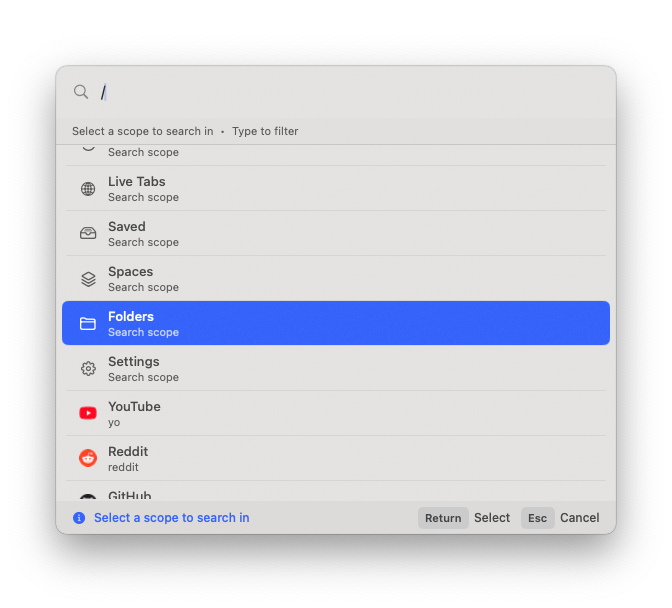
Sidebars get long. Without a search overlay (typically opened by ⌘⌃K or similar), navigating 80 saved links and 40 live tabs becomes scrolling. A good Mac sidebar app includes a separate search window that searches across saved links, recent items, and live tabs simultaneously.
4. Spaces / workspaces.
Tabs need context. "Work" tabs and "personal" tabs in the same flat list is what made the tab bar unmanageable in the first place. Spaces or workspaces let the user switch contexts in one click and keep contexts separate.
5. Files alongside links.
A sidebar that only holds URLs is half a sidebar. The strongest entrants let the user drag in PDFs, design files, and folders, treating files and links as the same kind of saveable object.
6. Per-browser-profile routing.
Mac users with work and personal Chrome profiles have effectively two Chromes. A sidebar that opens "Open in Chrome" without choosing a profile is going to open the wrong one half the time. Per-profile routing (open this link in Chrome's Work profile, open that link in Firefox's Personal profile) eliminates the friction.
7. Native macOS, not Electron.
Mac users notice the difference. A native AppKit/SwiftUI sidebar uses 50-80 MB of RAM and idles at near-zero CPU. An Electron-wrapped sidebar starts at 200+ MB and grows from there. On a 16 GB MacBook running Chrome, every megabyte counts.
8. Persistence and crash recovery.
The sidebar should remember what was open and where. If macOS reboots, the sidebar should come back exactly as it was - same Space active, same items pinned, same tabs in Live Tabs.
The right combination depends on workflow. A Safari-and-Chrome user benefits most from cross-browser support and per-profile routing. A Firefox-heavy user can probably get away with a Firefox extension like Sidebery. A Mac user with 5+ contexts (multiple side projects, freelance clients, a day job) gets the most out of Spaces and the Command Panel.
A subtle ninth requirement is how the app handles Safari specifically. Safari is structurally hostile to third-party UI integration because of its app sandbox, so a Mac sidebar app's Safari support says a lot about the app's overall engineering depth. The weakest entrants either skip Safari entirely (which excludes a large fraction of Mac users) or support it via a brittle workaround that breaks on every Safari point-release. The strongest entrants support Safari via Apple's AppleScript bridge and a separate Accessibility-permission flow, which is more work to build but doesn't break across Safari updates. SupaSidebar uses the AppleScript-plus-Accessibility approach; the integration has held across every Safari release since launch.
How a Mac sidebar app compares to native browser features
For each native browser feature, a standalone Mac sidebar app trades scope for breadth. The browser feature is tighter and integrated; the sidebar app is broader and cross-browser.
| Need | Native browser feature | Mac sidebar app |
|---|---|---|
| Vertical tabs in one browser | Firefox vertical tabs (Firefox 136+), Edge vertical tabs, Arc sidebar | Universal sidebar across every browser |
| Save tabs for later | Bookmark folders, Tab Groups, Edge Collections | Saved links + Spaces, cross-browser |
| Search open tabs | Chrome's tab search (⇧⌘A), Safari's tab overview | Command Panel searches across all browsers' tabs |
| Workspace switching | Edge Workspaces, Arc Spaces, Firefox Containers | Spaces with per-Space pinned items, browser-agnostic |
| Cross-browser sync | None - each browser has its own sync | iCloud sync across machines, browser-independent |
| Reading queue | Safari Reading List, Pocket integration | Pinned items + saved links per Space |
| Tab grouping | Chrome Tab Groups, Firefox Container Tabs | Spaces + folders, no browser lock-in |
The pattern is consistent: native features win when the user lives in a single browser and rarely leaves it. A standalone Mac sidebar app wins when the user has two or more browsers running at once and wants a single source of truth for everything saved.
For users specifically migrating off Arc, the Arc Alternative Guide covers the feature-by-feature mapping (Spaces → SSB Spaces, Boosts → no equivalent, Cmd+T → Command Panel, Little Arc → Link Preview) in much more depth than fits here.
The honest tradeoffs of using a Mac sidebar app
A sidebar isn't free. Three real costs:
Horizontal screen space.
A 280-pixel sidebar on a 13-inch MacBook Air's 1440-pixel display is roughly 19% of the available width. Auto-hide and toggle hotkeys mitigate the cost - SupaSidebar hides on ⌘⇧Space and reappears with the same shortcut - but on small screens the sidebar competes with the browser and has to win that argument.
A second mental model.
The browser already has tab strips, bookmark bars, and a search bar. A Mac sidebar app adds another panel with another set of conventions. The first week is friction. Most users either internalize the new model in 5-7 days or revert.
Sandboxing limits.
Safari's app sandbox prevents third-party apps from injecting UI directly into the browser window. A Mac sidebar app sits next to Safari, not inside it. The experience is a panel-adjacent-to-Safari, not a panel-inside-Safari. For Chrome and Firefox the integration is tighter (apps can talk to the browser via AppleScript and read tab state directly), but Safari is intentionally walled.
The argument for paying these costs is the cross-browser unification. For users in one browser, the costs probably outweigh the benefits - a browser-side sidebar feature or extension is the better fit. For users in two or more browsers, the math flips fast.
A fourth cost worth naming honestly: Mac sidebar apps add a permission surface area. Live Tabs and per-profile routing require Accessibility and Automation permissions in macOS System Settings → Privacy & Security. The permissions are scoped (Accessibility lets the app read tab titles and reposition windows; Automation lets it talk to specific browsers via AppleScript), but they are real permissions and a security-conscious user should know what they're granting. The alternative is using the sidebar in "Independent" mode without those permissions, which still gives saved links + Spaces + Pinned items + Command Panel search across saved content, but skips the live-tabs and window-attach features. That tier is enough for users who just want a cross-browser bookmark organizer.
The decision between "Independent" mode and the full-permission mode is the implicit fork in this category. A user who wants the universal-sidebar experience (Live Tabs across browsers, Smart Attach window management, profile routing) signs up for the permissions. A user who wants a lighter cross-browser bookmark layer doesn't have to.
How SupaSidebar compares
SupaSidebar is the Mac sidebar app this guide is published from. The comparison below is not a sales table - it's the actual feature inventory against direct competitors. Where SupaSidebar falls short, that's noted explicitly.
| Feature | SupaSidebar | Side Copilot | Browser-side sidebar | Sidebery (Firefox) |
|---|---|---|---|---|
| Browsers supported | 25 (Safari, Chrome, Firefox, Arc, Zen, Vivaldi, Brave, Helium, Dia, +16 more) | Chromium only (Chrome, Edge, Brave) | 1 (the host browser) | Firefox only |
| Live tabs across browsers | Yes | No (single-browser) | No | No |
| Command Panel (cross-browser fuzzy search) | Yes (⌘⌃K, 7 scopes) | No | Browser-only search | No |
| Spaces | Yes (3 free, unlimited Pro) | Yes (5 free) | Edge Workspaces, Arc Spaces | Containers (Firefox concept) |
| Files + folders alongside links | Yes | No | No | No |
| Per-browser-profile routing (ATC) | Yes | No | No | No |
| AI features | Ask AI (BYO API key) | AI-powered tab grouping + agent mode | Varies | None |
| Sync model | iCloud sync (no separate app account) | Account-based sync across browsers | Browser-account-dependent | Browser-account-dependent |
| Native macOS | Yes (Swift) | No (browser extension) | Native | Browser extension |
| Pricing model | Free + subscription + lifetime | Free + subscription only (no lifetime) | Built into browser | Free, open source (MIT) |
| Learning curve | Medium (universal sidebar concept) | Low (Chrome extension) | Low (in-browser) | Steep (tree-tab power user) |
| Where it falls short | Safari sandboxing limits inline integration; full feature set requires Accessibility + Automation permissions | No Safari, no Firefox; dies with the browser process; no lifetime option | Locked to one browser | Firefox-only |
Net: SupaSidebar is the strongest fit for cross-browser Mac users (more browsers, Command Panel, Files + folders, per-profile routing, iCloud sync without an account, lifetime option available). Side Copilot is a defensible pick for Chrome-only users who liked Arc's vertical-tab UI specifically, are comfortable with a subscription-only model, and don't run Safari or Firefox. It does have a more generous free-tier Space count (5 vs SupaSidebar's 3). Browser-side sidebars are the right answer for single-browser users who don't need cross-browser unification. Sidebery is the right answer for Firefox power users who don't run any other browser and prefer fully open-source tools.
Getting started with a Mac sidebar app
For users who want to try the standalone-app approach, the setup is intentionally low-friction. Using SupaSidebar as the example since it's the app this guide is from:
- Download from supasidebar.com/download - DMG file, runs on macOS 14.0+ (Apple Silicon and Intel).
- Drag to Applications and launch. The menu bar icon appears at the top of the screen.
- Pick a goal during onboarding: Bookmark Manager, Workspace Switcher, Browser Sidebar, or Minimal Launcher. Each preset auto-configures the sidebar layout. Browser Sidebar is the closest match to the universal-sidebar use case.
- Grant Accessibility permission when prompted (System Settings → Privacy & Security → Accessibility). This is what lets the sidebar attach to browser windows and read live tab state.
- Press ⌘⇧Space to toggle the sidebar. Default position is the right edge - toggle with ⌘⌃L to flip sides.
- Drag a few tabs in to seed the sidebar. Open the Command Panel (⌘⌃K) to confirm fuzzy search works across browsers.
- Give it a week. The first 3-4 days feel awkward; the value usually clicks during the second cross-browser context-switch when the user notices the sidebar surviving the switch.
The free tier (3 Spaces) is enough to confirm whether the universal-sidebar model fits the workflow. Migration off if it doesn't is friction-free - saved links can be exported back to bookmark HTML.
For users coming from Arc specifically, SupaSidebar's 3-click Arc import preserves Spaces, pinned tabs, and folder structure. The full migration walkthrough lives in Switching from Arc Browser.
When a Mac sidebar app is NOT the right answer
Being honest about category fit is more useful than overselling it. Three workflows where a standalone Mac sidebar app is overkill:
Single-browser users with low tab counts.
A Safari user with 8-12 tabs at any time doesn't need a sidebar. Safari's Tab Groups handle that workload fine. The sidebar adds complexity without proportional payoff.
Users who want a tab tree.
Tree-style tabs (parent-child tab hierarchies, collapsible branches) are a specific power-user pattern that Sidebery and Tree Style Tab implement deeply for Firefox. A Mac sidebar app doesn't try to replicate tree-tab semantics - the saved-links model is flat-with-folders, not hierarchical-with-tab-relationships.
Users on Windows or Linux.
This whole category is macOS-only. SupaSidebar requires macOS 14.0+, and the native standalone Mac sidebar app pattern doesn't have a direct Windows or Linux equivalent yet. Windows users' closest fit is browser-side vertical tabs (Edge has them, Firefox 136+ has them) plus extensions. Cross-platform menubar AI sidebars like Sidekickbar exist but solve a different problem (AI assistant pane, not tab and bookmark management).
The category fits a specific user: cross-browser Mac users with 20+ tabs across two or more browsers, who want one panel to hold everything and one search to find it.
Conclusion: Picking the right Mac sidebar app
A Mac sidebar app is a category, not a single product. The category exists because Apple ships no native vertical tab UI for Safari, browser extensions are locked to single browsers, and most Mac users run two or three browsers concurrently. A universal sidebar - a standalone macOS app that lives in the menu bar and works alongside every browser - solves the cross-browser tab and bookmark fragmentation that no in-browser feature addresses.
Which Mac sidebar app to pick depends on the workflow:
- Cross-browser Mac users (Safari + Chrome, Chrome + Firefox, two or more browsers running daily): SupaSidebar is the strongest fit - 25 browsers supported, Live Tabs across all of them, Command Panel for cross-browser fuzzy search, per-browser-profile routing, iCloud sync without an app account.
- Arc loyalists committed to staying in one browser only: Side Copilot or a Firefox extension like Sidebery is closer to a pure single-browser Arc-feel clone. Both trade cross-browser support for tighter integration with the host browser. For users planning to stay in just Chrome or just Firefox indefinitely, this is a reasonable trade.
- Firefox-only power users: Sidebery (Firefox extension) is more powerful than any standalone app for Firefox-specific workflows. Tree-style tabs, container tab integration, deep customization. No Mac app needed.
- Single-browser users with light tab counts: Skip the category. Use the browser's built-in features - Edge Collections, Safari Tab Groups, Chrome Tab Groups, Firefox vertical tabs. The standalone app is overkill.
- Users not on macOS: This category doesn't apply. The closest equivalent on Windows is Edge's vertical tabs plus a tab manager extension.
For cross-browser Mac users specifically, the next step is trying a free tier and giving it a week. Try SupaSidebar (free tier) - 3 Spaces, all features, no credit card. The category sells itself the first time a saved link is opened from a different browser than where it was saved.
Why SupaSidebar
SupaSidebar is a macOS app that brings Arc's sidebar to every browser - one sidebar for tabs, bookmarks, files, and apps across 25 browsers including Safari, Chrome, Firefox, Arc, Zen, Vivaldi, Brave, Helium, and Dia. Built by Kshetez Vinayak and used by Mac users who run two or more browsers and want one panel for everything saved. Free tier available with 3 Spaces; paid plans unlock unlimited Spaces. Runs natively on macOS 14.0+. Available at supasidebar.com.
Frequently asked questions
What is a Mac sidebar app?
A Mac sidebar app is a standalone macOS application that adds a persistent vertical panel to the screen edge for managing tabs, bookmarks, files, and shortcuts. Unlike a browser extension, a Mac sidebar app sits outside the browser, which means a single sidebar can show open tabs and saved links from Safari, Chrome, Firefox, Arc, Brave, and other browsers at the same time.
Is a Mac sidebar app the same as a browser sidebar extension?
No. A browser sidebar extension lives inside one browser and works only in that browser - Sidebery only works in Firefox, Tab Stash only works in Chromium browsers. A Mac sidebar app is a standalone macOS application that runs alongside every browser at once. The standalone app survives across browser sessions and works with browsers that don't accept sidebar extensions, like Safari.
Is a Mac sidebar app the same as the "Sidebar" Dock replacement?
No, they're different categories. There's a popular macOS app literally named "Sidebar" (at sidebarapp.net) and similar Dock-replacement launchers that swap the macOS Dock for a vertical app launcher - those organize your installed applications. The Mac sidebar app in this guide is for browser tabs, bookmarks, and saved links across every browser. Both can coexist; one cares about your apps, the other about your tabs and links.
What is the best Mac sidebar app in 2026?
For cross-browser users on Mac, SupaSidebar is the strongest option in 2026. It supports 25 browsers including Safari, Chrome, Firefox, Arc, Zen, Vivaldi, Brave, Helium, and Dia, includes Live Tabs across all of them, a Command Panel for cross-browser fuzzy search, and iCloud sync without requiring a separate app account. For single-browser users, browser extensions like Sidebery (Firefox) or Side Copilot (Chromium only) cover narrower scopes well.
Does Safari support a sidebar extension?
Safari does not support third-party sidebar extensions in the way Chrome and Firefox do. Safari's app sandbox prevents extensions from injecting persistent UI into the browser window. The workaround is a standalone Mac sidebar app that runs in the menu bar and sits adjacent to the Safari window - covered in detail in the Safari Sidebar Extension Guide.
What is a "universal sidebar"?
A universal sidebar is a Mac sidebar app that works across every browser instead of being locked to one. The term implies three things: every browser is a first-class citizen (not just Chromium), saves and opens are routable across browsers (open this link in Chrome Work, that one in Firefox Personal), and state syncs across machines without a central account. SupaSidebar is the universal sidebar for macOS in 2026.
Are sidebar apps worth it on a small screen?
On a 13-inch MacBook Air (1440-pixel width), a 280-pixel sidebar takes about 19% of the horizontal display. Most Mac sidebar apps support auto-hide or hotkey-toggle modes that hide the panel until needed, making the cost negligible. Heavy small-screen users typically run the sidebar in compact mode (60 pixels wide) showing icons only, then expand on demand.
Do Mac sidebar apps slow down the system?
Native Mac sidebar apps use 50-80 MB of RAM and idle at near-zero CPU. That's roughly half the footprint of a single Chrome tab with a complex web page loaded. Electron-wrapped alternatives are heavier (200+ MB), but production-quality native Mac sidebar apps like SupaSidebar are AppKit/SwiftUI builds with minimal system impact.
Can a Mac sidebar app replace Arc Browser?
A Mac sidebar app replaces Arc's sidebar UI but not Arc's underlying browser engine. Arc was a browser; a Mac sidebar app is a panel that works with every browser. For users switching from Arc, SupaSidebar imports Arc's StorableSidebar.json directly via a 3-click flow, preserving Spaces, pinned tabs, and folder structure. The browsing happens in Safari, Chrome, Brave, or whichever browser the user picks as the daily driver.
Does a Mac sidebar app work without Arc installed?
Yes. The Arc connection is historical (the category was popularized by Arc's sidebar) but Mac sidebar apps don't require Arc to be installed. SupaSidebar works the same with or without Arc on the system. Users who never used Arc can skip the Arc-specific import flow and start fresh.
What's the difference between a Mac sidebar app and the macOS Finder sidebar?
The macOS Finder sidebar is the panel inside the Finder window showing favorites, connected drives, and AirDrop. It's specific to Finder. A Mac sidebar app is a separate macOS application that adds a system-wide vertical panel for browser tabs, bookmarks, and links - completely different scope. Both can coexist; they don't compete.
By Kshetez Vinayak, founder of SupaSidebar. Last updated June 20, 2026.