
By Kshetez Vinayak, founder of SupaSidebar. Last updated July 14, 2026.
TL;DR:
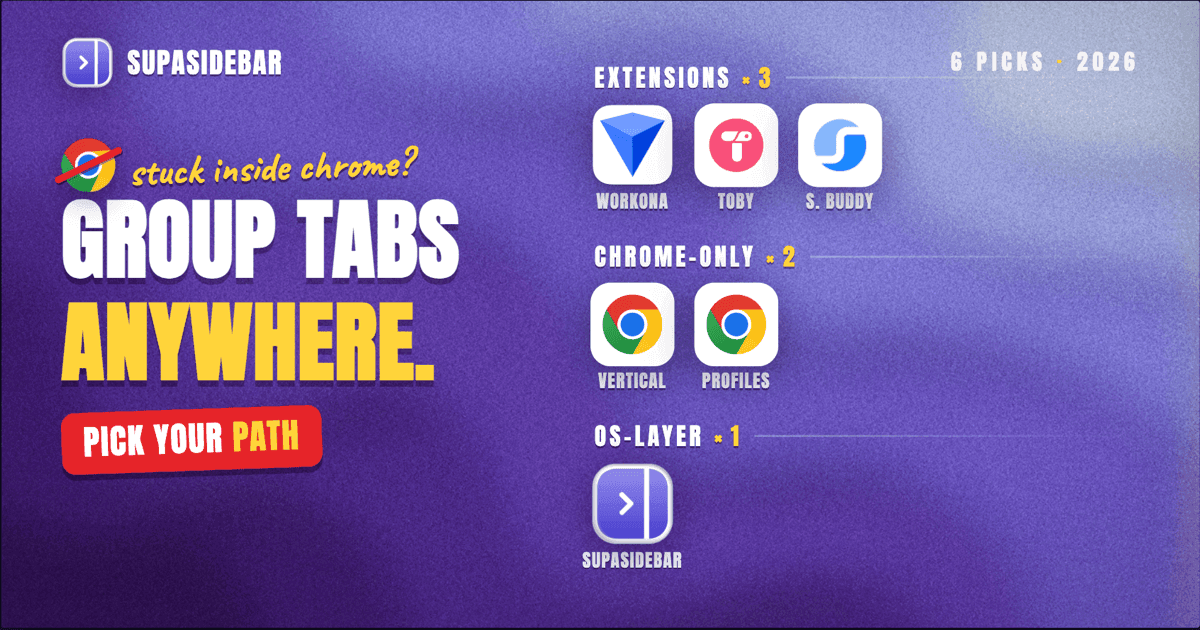
Chrome tab groups solve the easy half of tab chaos and leave the hard half. They are browser-locked (no Safari, no Firefox), they vanish if Chrome sync is off, they do not nest, and a single Chrome update can break tab scrolling and leave 100+ groups unusable overnight. The fastest fix path depends on what is breaking. For deeper grouping inside Chrome, Workona and Toby add workspace-style organization. For guaranteed persistence, Session Buddy saves sessions to a local store. For Chrome users who actually need their groups to carry across Safari and Firefox and Arc, the answer is not a Chrome extension at all - it is moving the grouping layer to a Mac sidebar app like SupaSidebar. The full alternative landscape and a decision framework are below.
Looking for something specific?
- How to use Chrome tab groups themselves? → How to save tab groups in Chrome
- Best tab manager extension for Chrome? → Best tab manager extensions for Chrome 2026
- Full Chrome tab management framework? → Chrome tab manager - the complete 2026 guide
- Chrome's own vertical tabs? → Chrome vertical tabs vs Arc sidebar 2026
- Looking for alternatives across every browser? → You're in the right place. Keep reading.
What a Chrome tab groups alternative actually is
A Chrome tab groups alternative is any tool that does the job native tab groups were built for - bundling related tabs under a label - while fixing at least one of the four real limits of the native feature. Some alternatives stay inside Chrome and add features Chrome does not (Workona's autosave, Session Buddy's snapshots, Toby's visual board). Others move the grouping layer outside Chrome entirely so the same groups work in Safari and Firefox too. Picking the right alternative depends on which limit is biting.
Why people look for an alternative
Chrome tab groups landed in 2020 and got "Save group" sync in 2024. They were a real improvement over a flat strip of 40 tabs. They are also flawed in ways that show up the moment a workflow grows past one browser or one window.
Limit 1: They are Chrome-only.
A saved group in Chrome does not appear in Safari, Firefox, Edge, Brave, Arc, or Zen. Open Safari to check email and the work group is invisible. Open Firefox for a privacy-isolated session and the research group is invisible. Every browser keeps its own siloed tab-organization story.
Limit 2: They vanish without sync.
Saved tab groups only persist if Chrome sync is on and the user is signed in. Work profiles often disable sync for compliance reasons. Shared family Macs sign in and out. Browser cache clears or a Chrome reinstall can drop the local copy before sync catches up. Reddit threads on r/chrome regularly surface users who lost their saved groups after a profile rebuild (thread).
Limit 3: No cross-window carry.
A tab group lives in the Chrome window where it was created. Drag a tab from group A to a different window and the group association is lost. Multi-monitor users who keep separate windows per task hit this constantly.
Limit 4: No nesting, no deep hierarchy.
A group is one level deep. There is no "Work > Client A > Active Projects" tree. Tree Style Tab in Firefox has shown for years that hierarchical grouping scales better past 30 tabs than flat grouping does. Chrome has chosen not to ship nesting.
The compounding problem.
A recent Chrome update removed tab scrolling for users with many groups, leaving the bottom rows of grouped tabs unreachable. One r/chrome user described the workflow break: "I have lots of tabs opened, mostly to separate schoolworks and entertainment. The new update just completely borked this setup, and I can't honestly move on from it lol. Using groups is just atrocious with the amount of tabs I have, using the search tabs on the upper left is just not it either." (Reddit, r/chrome) A native feature that one Chrome update can disable is fragile by definition.
The three categories of alternative
There are three real paths once Chrome's native tab groups stop working for a workflow. Each fixes a different limit. The first two stay inside Chrome. The third moves the problem to a different layer entirely.
| Path | What it fixes | What it does NOT fix | Best for |
|---|---|---|---|
| Better grouping inside Chrome (Workona, Toby, Session Buddy, TabGroup Vault) | Persistence, workspace separation, search, snapshot recovery | Cross-browser carry, single-vendor lock-in | Single-browser Chrome users who want depth |
| Chrome's own newer features (vertical tabs, profiles, Memory Saver) | Visual density, identity separation, RAM | Persistence across reinstalls, cross-browser carry | Users who want zero extensions |
| Moving grouping out of Chrome (Mac sidebar app like SupaSidebar) | Cross-browser carry, single source of truth for tabs, survives any browser update | Replicating in-window UI affordances Chrome users may have memorized | Multi-browser Mac users |
The right path depends on whether the problem is "Chrome's grouping is shallow" (paths 1 and 2) or "Chrome's grouping does not cross browsers" (path 3). Plenty of people need both - and the answer there is path 1 plus path 3, not one or the other.
Path 1: Better grouping inside Chrome
These extensions stay inside Chrome and either deepen tab groups or replace them with a workspace concept. They share one limit: everything they save lives inside Chrome.
Workona
Workona is a workspace-oriented Chrome extension. Workspaces are heavier than tab groups - each workspace gets its own collection of tabs, autosaves continuously, and survives Chrome reinstalls because the data sits on Workona's cloud rather than relying on Chrome sync. Tab groups inside a workspace are supported as a sub-organization. Workona is the most commonly recommended Chrome tab groups alternative on Reddit threads about workspace separation. For a head-to-head on Workona's workspace model vs SupaSidebar's, see Workona vs SupaSidebar.
What it adds over native tab groups:
- Autosave to Workona's cloud (not dependent on Chrome sync)
- Search across every tab in every workspace
- Tab suspension to free RAM
- Workspace templates for repeated project setups
What it does not add:
- Cross-browser carry - Workona's Safari and Firefox versions exist but are weaker, and a workspace created in Chrome does not transfer
- Free tier limits the number of workspaces (verify on workona.com at time of reading)
Toby
Toby treats tabs as bookmarks on a visual board. A "collection" replaces a tab group. Tabs get saved to the board, not held open in the browser. The pitch: most tabs do not need to stay open, they just need to be findable. Toby has been a long-running answer to tab overload in Chrome. For the deeper Toby comparison including persistence vs sidebar trade-offs, see Toby vs SupaSidebar.
What it adds over native tab groups:
- Visual board UX (cards, not just a strip)
- Closes tabs after saving them to free RAM
- Cross-device sync via Toby's cloud
What it does not add:
- Cross-browser sync - Toby's data lives in Toby's cloud, separate from Chrome and from any other browser
- Tabs are closed by default, which changes the working pattern (collection-first, not open-tab-first)
Session Buddy
Session Buddy is the classic local-first session manager for Chrome. It snapshots every open tab and window, restores sessions on demand, and survives crashes. It does not replace tab groups; it backs them up. For users whose worst-case scenario is losing three days of research to a Chrome crash, Session Buddy is the safety net Chrome's own session-restore should be.
What it adds over native tab groups:
- Local snapshot store (not dependent on Chrome sync)
- Crash recovery from any prior snapshot, not just the last session
- Export sessions to JSON for portability
- 1,000,000+ active users, 4.7 rating on the Chrome Web Store (listing)
What it does not add:
- Workspace concept - Session Buddy is restore-first, not organize-first
- Cross-browser support - Chrome only
TabGroup Vault
TabGroup Vault is the narrowest answer to the persistence problem - a Chrome extension built specifically to back up and restore named, colored tab groups. If the only thing missing from Chrome's native feature is guaranteed restore-after-anything, TabGroup Vault is the closest patch. The trade-off is scope: it does not deepen grouping or add workspaces, it just makes existing groups survive.
What it adds over native tab groups:
- Reliable backup and restore of group name, color, and tab order
- Recovery after a Chrome profile rebuild
What it does not add:
- Workspace concept or nesting
- Cross-browser anything
For a wider extension comparison covering Workona, Session Buddy, OneTab, and Tab Manager Plus head-to-head, see Best tab manager extensions for Chrome 2026. For the full Chrome tab management framework including memory savers and native search, see Chrome tab manager - the complete 2026 guide. For the specific create-save-restore mechanics of native tab groups themselves, see How to save tab groups in Chrome.
Path 2: Chrome's own features that partially replace tab groups
Two newer Chrome features change the calculus on whether a tab groups alternative is even needed.
Chrome vertical tabs (2026)
Chrome shipped native vertical tabs as a flag in early 2026, then made it stable with no flag required in April 2026 (Chrome 146) - right-click a tab and choose "Show Tabs Vertically," or go to Appearance > Tab strip position > Side. Vertical tabs replace the horizontal strip with a stacked left-side panel - more room for titles, easier scanning, no favicon collapse at 40+ tabs. Tab groups still work inside the vertical layout but the layout itself reduces the urgency of grouping. With visible full titles, the user can scan a flat list past 30 tabs in a way the horizontal strip blocks.
The catch: Chrome's vertical tabs are still not the default tab strip, ship with no workspace concept layered on top, and carry the same single-vendor lock-in as native tab groups. A workflow built on Chrome vertical tabs in 2026 is one Chrome decision away from being broken. For the deeper analysis of what Chrome vertical tabs do and do not replace, see Chrome vertical tabs vs Arc sidebar 2026.
Chrome profiles
Chrome profiles are an older feature but underused for grouping. Each profile gets its own bookmarks, history, extensions, and saved tab groups. Work in profile A, personal in profile B. The profile boundary is firmer than a tab group - it isolates cookies, sessions, and identity, not just visual organization. For users whose grouping need maps to "separate work from personal", profiles often do the job better than tab groups.
The limit: switching profiles opens a new window, which can mean three or four Chrome windows live at once. Tab groups inside each profile still help, but the overall window count climbs.
Path 3: Move grouping out of Chrome entirely
This is the path most "Chrome tab groups alternatives" articles skip. It is also the only path that fixes Limit 1 (browser-locked) and Limit 3 (no cross-window carry) at the same time.
If the workflow actually spans Chrome plus Safari (for Apple Pay or battery), plus Firefox (for a privacy-isolated session), plus occasionally Arc or Brave - then no Chrome extension can be the answer. The grouping layer has to live outside any single browser.
That is what a Mac sidebar app does. The sidebar is a separate macOS application that sits next to the active browser, holds tabs and bookmarks and folders, and reaches into every browser's open-tab list at once. Closing a Chrome window does not lose the sidebar's view of those tabs. Switching to Safari does not hide what was open in Chrome. The grouping persists at the OS layer, not the browser layer.
Where SupaSidebar fits
SupaSidebar is a macOS sidebar app that runs alongside whatever browser is in front. It has the equivalents of every Chrome-tab-groups feature plus the cross-browser layer Chrome cannot ship.
| Need | Chrome tab groups | SupaSidebar |
|---|---|---|
| Group related tabs | Yes, one level | Yes, via Spaces (multi-level via Folders inside Spaces) |
| Group survives Chrome reinstall | Only with sync on | Yes, iCloud sync, no account required |
| Group spans Chrome + Safari + Firefox + Arc | No | Yes, Live Tabs reads open tabs from 32+ browsers including Safari, Chrome, Firefox, Arc, Vivaldi, Brave, Helium, and Dia |
| Save and restore a session | No (Save group helps, but only inside Chrome) | Yes, Pinned Items + Spaces persist across browser closes |
| Search every tab in every group | Tab search is per-window | Command Panel (Cmd+Ctrl+K) searches every open tab in every browser |
| Survive a Chrome update breaking the tab strip | No - the same vendor controls the breaking change and the recovery | Yes - SupaSidebar is a separate app, Chrome updates do not change its UI |
SupaSidebar is a native Mac app (free version available), not a Chrome extension. It does not modify Chrome and does not depend on Chrome sync. macOS 14+ is required.
For a deeper read on the multi-browser problem itself and why the sidebar pattern fits it, see Mac sidebar app overview.
Decision framework: which path is right
The fastest way to pick is to name which limit is biting hardest.
| If the breaking point is... | The right path | Specific tool |
|---|---|---|
| Saved groups disappear when Chrome resyncs | Path 1, persistence fix | TabGroup Vault or Session Buddy |
| 8+ client projects blur into one tab strip | Path 1, workspace fix | Workona or Toby |
| Tab strip is unusable past 30 tabs | Path 2, layout fix | Chrome vertical tabs (Tab strip position > Side) |
| Work and personal need to be separated for compliance | Path 2, identity fix | Chrome profiles |
| Every group is invisible the moment Safari opens | Path 3, browser-layer fix | SupaSidebar |
| All of the above | Path 1 + Path 3 | Workona inside Chrome + SupaSidebar across browsers |
There is no rule that picks one. Many users end up combining a deeper Chrome extension (Workona for workspace structure) with a cross-browser sidebar (SupaSidebar for the layer Chrome cannot reach). The two solve different parts of the same problem and stack cleanly.
What about Firefox or Safari users searching for tab groups alternatives
This guide is Chrome-first because Chrome's tab-groups feature is what most users are trying to replace. Firefox has stronger native grouping options (Tree Style Tab, Sidebery, Multi-Account Containers) that already cover many of the limits above. Safari has weaker grouping (Tab Groups in Safari 16+ are bookmark-folder-shaped, not collapsible like Chrome's) and tends to send users straight to Path 3. The cross-browser argument for SupaSidebar applies to all three browsers equally - Mac users who keep Safari for battery, Chrome for compatibility, and Firefox for privacy need a single tab layer above the three.
Conclusion: Picking what to use
Chrome tab groups are the right starting point for users who live in one Chrome window. The alternatives become necessary the moment the workflow grows past that one window or that one browser. Each alternative fixes a specific limit, and the right pick depends on which limit is biting.
Single-browser Chrome users who want deeper organization should start with Workona for workspaces or Toby for visual boards. Users who lost saved groups to a Chrome resync should add Session Buddy or TabGroup Vault as a backup layer. Users frustrated by the tab strip itself should switch on Chrome's vertical tabs (Tab strip position > Side) before adding more extensions. Multi-browser Mac users who need their grouping to span Chrome plus Safari plus Firefox should move the grouping layer out of Chrome entirely with a Mac sidebar app.
Try SupaSidebar (free tier) if the breaking point is cross-browser. For the deeper how-to on Chrome's own tab groups before deciding, see How to save tab groups in Chrome.
Why we recommend SupaSidebar
SupaSidebar is a macOS app that brings Arc's sidebar to every browser - one sidebar for tabs, bookmarks, files, and apps across 32+ browsers including Safari, Chrome, Firefox, Arc, Vivaldi, Brave, Helium, and Dia. For users whose Chrome tab groups workflow breaks because the groups cannot follow them to other browsers, SupaSidebar is the only path that fixes that without giving up Chrome.
Spaces replace the tab-group concept and span every browser at once. Pinned Items survive any browser close or update. The Command Panel (Cmd+Ctrl+K) searches across every open tab in every browser, including the tabs that were in a Chrome tab group an hour ago. iCloud sync keeps the sidebar state consistent across Macs without requiring a SupaSidebar account.
The free version covers all core functionality including Live Tabs across every supported browser. macOS 14 (Sonoma) or later required.
Frequently Asked Questions
What are the best alternatives to Chrome tab groups in 2026?
The best alternatives split by what limit is being fixed. For deeper workspace structure inside Chrome, Workona and Toby are the standard picks. For guaranteed persistence and backup, Session Buddy and TabGroup Vault are the standard picks. For workflows that span Chrome plus Safari plus Firefox, a Mac sidebar app like SupaSidebar is the only path that fixes the cross-browser limit.
Why are people looking for alternatives to Chrome tab groups?
Four real limits drive the search: tab groups only work inside Chrome (no Safari, no Firefox), they vanish without Chrome sync, they do not nest, and a single Chrome update can break the tab strip and leave grouped tabs unreachable.
Is there a cross-browser version of Chrome tab groups?
Not as a native browser feature. Chrome's tab groups stay inside Chrome. The cross-browser equivalent exists at a different layer - a Mac sidebar app like SupaSidebar holds grouped tabs and bookmarks at the OS layer and reads open tabs from 32+ browsers at once.
Does Workona replace Chrome tab groups?
Workona deepens grouping inside Chrome with autosaved workspaces, cloud sync independent of Chrome sync, and tab suspension. It does not replace the cross-browser limit - a Workona workspace built in Chrome does not appear in Safari.
Can I save Chrome tab groups outside Chrome?
Two ways. TabGroup Vault saves named, colored groups to its own extension storage and can restore after a Chrome profile rebuild. SupaSidebar holds equivalent grouping (Spaces, Pinned Items) at the macOS layer where Chrome cannot touch it.
What is the best free alternative to Chrome tab groups?
For workspace structure: Toby has a free tier. For session backup: Session Buddy is free. For cross-browser grouping: SupaSidebar has a free tier covering Live Tabs across every supported browser. Workona's free tier has workspace limits - check workona.com for current numbers.
Will Chrome ever add cross-browser tab groups?
Unlikely. Chrome's tab groups, sync, and profile model are designed for Chrome users and Chrome accounts. Cross-browser tab sharing would require coordination with Apple, Mozilla, and the rest of the browser ecosystem that no single browser vendor has shipped to date.
Are Chrome vertical tabs an alternative to tab groups?
Partially. Vertical tabs (shipped as a flag in early 2026, then stable with no flag needed as of Chrome 146 in April 2026) make a long tab list scannable without grouping by giving every tab a full title in a stacked left-side panel. They are still not Chrome's default tab strip. Vertical tabs do not fix persistence, cross-browser carry, or workspace separation - they only fix the visual density problem the horizontal strip causes past 30 tabs.
By Kshetez Vinayak, founder of SupaSidebar. Last updated July 14, 2026.