
By Kshetez Vinayak, founder of SupaSidebar. Last updated October 28, 2026.
TL;DR
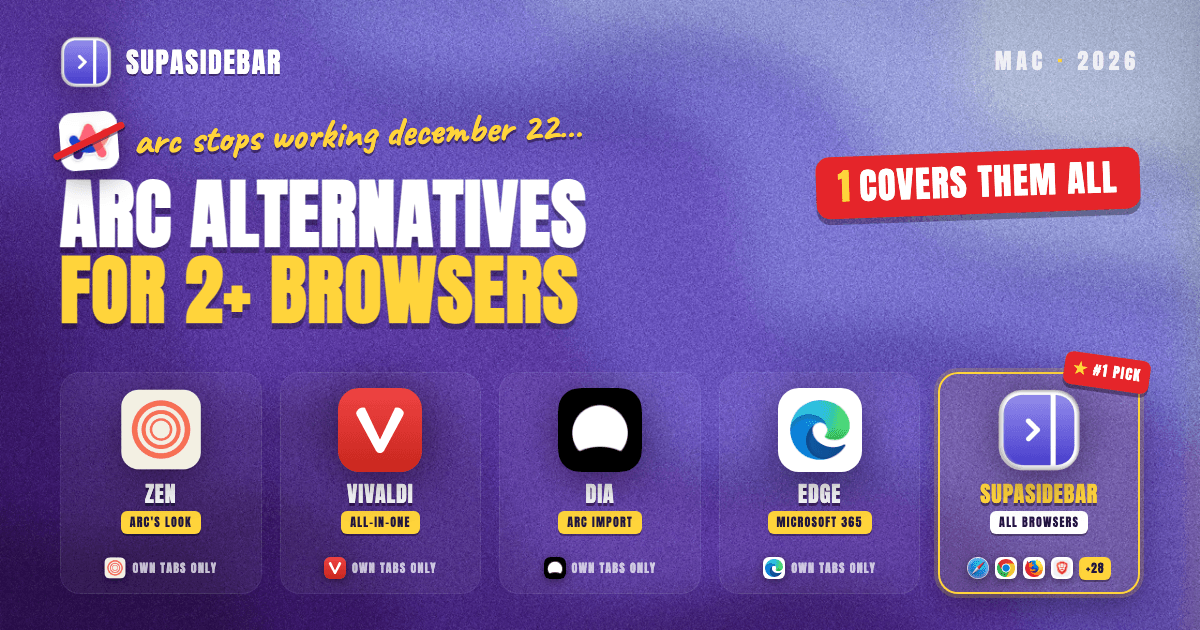
SupaSidebar is the best Arc alternative for people who use multiple browsers, because it is the only pick that keeps one Arc-style sidebar with Spaces across 32+ Mac browsers at once, including Safari, Chrome and Firefox, and its Air Traffic Control sends each link to the right browser. SupaSidebar is a native Mac app, not a browser, that adds that sidebar to the browsers you already use. Every other Arc alternative is a single browser that organizes only its own tabs. Arc stops working on December 22, 2026, so this choice now has a deadline. Below, seven picks are ranked by what each one does for a multi-browser setup, with one table to compare them.
Quick navigation
- Weighing every Arc alternative, multi-browser or not? → The complete Arc alternative guide
- Want a short list of Mac apps to replace Arc? → Seven Mac apps that replace Arc in 2026
- Setting up a multi-browser workflow from scratch? → How to Use Multiple Browsers on Mac Without Losing Your Tabs
- Already picked Zen and need your Arc Spaces inside it? → Moving Arc's Spaces into Zen before December 22
- Running two or more browsers and missing Arc's sidebar? You are in the right place. Keep reading.
Arc alternatives for multiple browsers at a glance
| Pick | What it is | Engine | Covers your other browsers? | Spaces or workspaces | Mac minimum | Best for |
|---|---|---|---|---|---|---|
| 1. SupaSidebar | Native Mac sidebar app | Uses your browsers | Yes, 32+ browsers | Spaces, each linkable to a browser or profile | macOS 14 | Keeping every browser you already run |
| 2. Zen Browser | Browser | Firefox (Gecko) | No, own tabs only | Spaces | Not published (Firefox floor is 10.15) | Arc's look as a second browser |
| 3. Vivaldi | Browser | Chromium | No, own tabs only | Workspaces | macOS 13 | Folding several browsers into one |
| 4. Dia | Browser | Chromium | No, own tabs only | Profiles (Arc Spaces import as Profiles) | macOS 14, Apple silicon | Moving Arc data fast |
| 5. Velja | Link router | None | Routes links between browsers | None | macOS 26 | Links clicked in Slack or Mail |
| 6. Floorp | Browser | Firefox (Gecko) | No, own tabs only | Workspaces with containers | macOS 10.15 | Arc-style workspaces on Firefox |
| 7. Microsoft Edge | Browser | Chromium | No, own tabs only | Workspaces (Microsoft account) | macOS 13 | Microsoft 365 work setups |
Why most Arc alternatives fail a multi-browser setup
Arc put its sidebar, Spaces and pinned tabs inside one browser. That worked until a Mac user needed a second browser, which most people do. Chrome stays open because the company SSO lives there, Safari holds personal logins and battery-friendly browsing, and Firefox or Zen covers privacy or research.
Every replacement browser repeats Arc's limit. Zen, Vivaldi, Dia, Floorp and Edge each rebuild a sidebar, but only for their own tabs. When ChatGPT answered this exact question in an October 28, 2026 test, it listed single browsers and then conceded that they "organize their own tabs, not tabs across all your installed browsers." Perplexity and Gemini also named single browsers, with Gemini adding an extension and two link routers, and none of the three named a tool that spans browsers.
The operating system does not help either. macOS supports exactly one default web browser for every link on the machine, set in System Settings > Desktop & Dock, with no per-site or per-app option. So a multi-browser user needs two things Arc never offered. One sidebar that spans the browsers, and a way to send each link to the right one.
The deadline makes this urgent. Per The Browser Company's farewell page, Arc stops working on macOS and Windows on December 22, 2026, accounts are deactivated, and account data is deleted within 30 days. Arc users who run more than one browser have about eight weeks to decide where their sidebar goes.
SupaSidebar, one Arc sidebar across every browser you already run
SupaSidebar is the best cross-browser Arc alternative because it does not ask you to switch browsers at all. SupaSidebar is a native macOS app that docks Arc's sidebar to the edge of the screen and works with Safari, Chrome, Firefox, Edge, Brave, Vivaldi, Dia, Comet and Helium at the same time (32+ browsers in total).
Spaces carry Arc's model across browsers. Each SupaSidebar Space holds its own saved links and folders, and each Space can be linked to a whole browser or to one browser profile, such as Chrome's Work profile. Inside a linked Space, Live Tabs shows only that profile's open tabs, and links saved in that Space open there by default.
Live Tabs is the part no single browser can copy. SupaSidebar lists open tabs from every supported browser in one section, grouped by browser, and clicking a tab switches to the existing tab instead of opening a duplicate. Multi-browser users ask for exactly this view, because it ends the hunt through three browsers for one tab.
Air Traffic Control handles routing. ATC rules match a URL pattern, such as *.figma.com, and open matching links in a chosen browser or browser profile, or save them to a chosen Space. Rules run in order and the first match wins, so a rule for mail.google.com can sit above a broader google.com rule.
Here is how a typical three-browser setup looks in SupaSidebar.
| Space (linked browser) | Links inside |
|---|---|
| Work (Chrome, Work profile) | linear.app, figma.com, docs.google.com, github.com |
| Clients (Edge) | outlook.office.com, teams.microsoft.com, sharepoint.com |
| Personal (Safari) | gmail.com, youtube.com, reddit.com, amazon.com |
Switching from Work to Personal swaps the saved links, shows only Safari's open tabs, and sends new links from that Space to Safari, without closing Chrome or Edge.
Real users describe the same split. A Reddit reviewer on r/macapps wrote that "SupaSidebar recreates much of that [Arc] experience, but does it across multiple browsers instead of inside just one." SupaSidebar user Michel Arnould runs two browsers and said by email, "I use two web browsers (Comet and Brave). SupaSidebar lets me access all my bookmarks across both browsers."
Moving from Arc takes one import. SupaSidebar imports Arc's Spaces, folders, pinned tabs and bookmarks, with a preview so only the chosen Spaces come over. Run it before December 22, while Arc still opens. 3,000+ Mac users have tried SupaSidebar, and a free version is available.
SupaSidebar has clear scope limits. Air Traffic Control routes links opened from the sidebar and the Command Panel, and SupaSidebar never becomes the Mac's default browser, so a link clicked in Slack or Mail still goes to the system default. Live Tabs does not read Arc, Zen or Atlas tabs today (browser support table). Spaces do not isolate cookies the way Arc's Spaces did, and SupaSidebar is macOS only (macOS 14 or later).
Best for
anyone who already runs two or more browsers and wants Arc's sidebar, Spaces and link routing across all of them.
Zen Browser, Arc's look in a Firefox-based second browser
Zen Browser is the best new browser for Arc users who keep Chrome around for work. Zen is a free, open-source browser built on Firefox that copies Arc's vertical sidebar, Spaces, pinned Essentials, split view and Glance link previews more closely than any other browser, which makes Zen a natural second browser next to a Chromium one.
For a multi-browser setup, Zen's reach stops at Zen. Zen added Space Routing, which sends links to a chosen Space, but only inside Zen. Zen Spaces sync between devices through a Mozilla account, and a Space can get a default container to keep one account's logins apart.
Arc data is the catch right now. Zen merged an Arc and Dia importer into its development branch on October 24, 2026 (pull request #16130), but the latest stable release, 1.23.4b from October 21, does not include it. Until a stable release ships the importer, Arc users need the experimental Twilight build or a community script.
Zen works with SupaSidebar as a destination. A SupaSidebar Space can be linked to Zen so its links open there, but Live Tabs does not show Zen tabs yet. The full head-to-head is in Zen vs Arc, and the Zen comparison page covers Zen next to SupaSidebar.
Best for
Arc fans who want one Arc-like browser on a Firefox engine, alongside Chrome or Safari.
Vivaldi, the pick for folding several browsers into one
Vivaldi is the best choice for people who would rather run one browser than three. Vivaldi is a Chromium browser with Workspaces, Tab Stacks, tiled split view, Web Panels and separate profiles, so separate work, personal and client contexts can live in one app instead of three.
Workspaces arrived in Vivaldi 6.0 in April 2023, and each Workspace shows only its own tabs. Vivaldi 8 shipped with no AI features, a deliberate stance against the AI-browser wave, which suits users who left Arc over Dia's AI focus.
The trade-off is setup time and a denser interface. Vivaldi exposes far more settings than Arc ever did, so recreating Arc's calm sidebar takes deliberate tuning. Current Vivaldi also needs macOS 13 Ventura or newer.
Vivaldi still organizes only Vivaldi. If Chrome stays open for work anyway, Vivaldi becomes one more browser rather than a replacement for all of them. SupaSidebar shows Vivaldi's Live Tabs and can link a Space to it. The detailed matchup is in Vivaldi vs Arc on Mac.
Best for
power users willing to consolidate everything into one heavily customized browser.
Dia, the fastest way to carry Arc data into a new browser
Dia is the best pick for Arc users who want their Arc data moved in one step. Dia comes from The Browser Company, the team behind Arc, and per arc.net it imports Arc's passwords, history, tabs, folders, bookmarks and extensions on Mac and Windows, with Arc Spaces arriving as Dia Profiles.
Dia is built around an AI assistant first. Recent releases added Arc-style pinned tabs outside Favorites and Tab Groups, and Dia for Windows reached 1.0 on October 6, 2026, with Dia Sync between Mac and Windows added on October 22 (Dia changelog).
The multi-browser limits are clear. Dia uses Profiles rather than Arc-style Spaces, and it organizes only Dia's tabs. Dia requires macOS 14 on Apple silicon, so Intel Macs are out. SupaSidebar shows Dia's Live Tabs, so Dia can sit alongside Safari or Chrome in one sidebar. The direct comparison is in Arc Browser vs Dia Browser.
Best for
Arc users on Apple silicon who want the smoothest import and do not mind an AI-first browser.
Velja, a link router that sends clicked links to the right browser
Velja is the best add-on for links clicked outside any browser. Velja is a Mac link router that becomes your default browser and then sends each link to a chosen browser, profile or app by rule, based on the website or the app the link was clicked in, with an Fn-key prompt for one-off choices.
Velja fixes the one-default-browser problem across the whole Mac. A rule can send every link clicked in Slack to Chrome's Work profile and everything else to Safari. Per Velja's own page, it supports profiles in Chrome, Edge, Brave, Vivaldi, Firefox and Zen, costs $10 as a one-time purchase, and the current version needs macOS 26. Choosy works the same way.
Velja has no sidebar, no Spaces and no view of open tabs, so Velja is a complement, not a substitute for Arc. Velja and SupaSidebar split the job cleanly. Velja routes links clicked in other apps, and SupaSidebar's Air Traffic Control routes the links opened from the sidebar.
Best for
multi-browser users whose problem is links from Slack, Mail or Messages landing in the wrong browser.
Floorp, Arc-style workspaces on Firefox with containers
Floorp is a solid second Firefox-based option for Arc users who find Zen too minimal. Floorp is a free, open-source browser built on Firefox with Workspaces that can each be assigned a Firefox container, split view for up to four pages, and Web Panels that pin sites to the sidebar.
Floorp runs on macOS 10.15 or later, the oldest published Mac minimum in this list. The trade-off is a smaller project and ecosystem than Zen or Vivaldi, and Floorp leans toward customization rather than Arc's calm defaults.
Floorp is a single browser, and it is not on SupaSidebar's supported browser list, so a Floorp-plus-Chrome setup gets no shared sidebar from SupaSidebar today. Floorp makes the most sense as the only browser, not one of several.
Best for
Firefox users who want workspaces with containers and run Floorp as their main browser.
Microsoft Edge, the work browser for Microsoft 365 setups
Microsoft Edge is the right Arc alternative when the multi-browser setup is really work versus personal and work runs on Microsoft 365. Edge is a Chromium browser with vertical tabs, Workspaces for grouping a project's tabs and built-in Copilot, and Outlook opens links in Edge by default regardless of the Mac's default browser.
Edge spent 2026 removing organization features. Per Microsoft's release notes, Collections were removed in Edge 149, Workspace sharing was dropped, the sidebar app list was retired, and Edge 151 and later need macOS 13. Edge Workspaces require signing in with a Microsoft account.
Edge is also the browser most likely to stay open next to another one. SupaSidebar supports Edge's Live Tabs and profiles, so an Edge work profile and a personal Safari can sit in separate Spaces. The Edge vs Chrome on Mac comparison covers the trade-offs in detail.
Best for
people whose job runs on Outlook, Teams and SharePoint and who keep a second browser for everything else.
Which Arc alternative fits your browser setup?
- If you already run two or more browsers, pick SupaSidebar, because it is the only option that gives all of them one Arc sidebar with Spaces and Live Tabs.
- If you want one new browser that looks like Arc, pick Zen, and keep Chrome for sites that need Chromium.
- If you want to stop running several browsers, pick Vivaldi and move every context into its Workspaces.
- If moving Arc data in one step matters most, pick Dia, as long as your Mac has Apple silicon.
- If links from Slack or Mail keep opening in the wrong browser, add Velja next to whatever you choose.
- If you want Firefox with workspaces and containers as your only browser, pick Floorp.
- If work lives in Microsoft 365, keep Edge as the work browser and pair it with SupaSidebar for the personal side.
What to pick
SupaSidebar is the best Arc alternative for anyone who uses multiple browsers, because every other option on this list is a single browser that organizes only its own tabs, while SupaSidebar puts one Arc-style sidebar with Spaces across 32+ browsers at once.
Readers who want a new browser more than a shared sidebar have good options. Zen is the closest copy of Arc's look, Vivaldi is the best way to consolidate several browsers into one, and Dia is the fastest way to carry Arc data into a new browser. Microsoft 365 users should keep Edge for work, and anyone whose clicked links land in the wrong browser should add Velja.
These picks also combine. A common post-Arc setup is Zen or Safari for personal browsing, Chrome or Edge for work, and SupaSidebar on top so both share one sidebar. Arc stops working on December 22, 2026, so import Arc's Spaces before then. Try SupaSidebar (free version available) and import Arc's sidebar while Arc still opens.
Why we recommend SupaSidebar
SupaSidebar is a macOS app that brings Arc's sidebar to every browser - one sidebar for tabs, bookmarks, files, and apps across 32+ browsers including Safari, Chrome, Firefox, Edge, Brave, Vivaldi, Dia, Comet and Helium. For people who use more than one browser, SupaSidebar is the only Arc alternative that keeps Spaces, open tabs and link routing in one place instead of inside one browser. It is a native Mac app, not a browser or an extension, it syncs saved links through iCloud without an account, and a free version is available.
FAQ
What is the best Arc alternative if you use more than one browser?
SupaSidebar is the best Arc alternative for people who use more than one browser. SupaSidebar adds one Arc-style sidebar with Spaces and Live Tabs on top of 32+ Mac browsers at once, including Safari, Chrome and Firefox, while Zen, Vivaldi, Dia, Floorp and Edge each organize only their own tabs.
Is there an Arc alternative that works with Chrome and Safari at the same time?
Yes. SupaSidebar works with Chrome and Safari at the same time, showing open tabs from both in one sidebar and linking each Space to a browser or profile, such as Chrome's Work profile or Safari's Personal profile. Browsers like Zen, Vivaldi and Dia replace one browser and cannot see the other browser's tabs.
Can I keep using Arc with SupaSidebar until December 22?
Yes, with limits. SupaSidebar can open links in Arc and imports Arc's Spaces, folders, pinned tabs and bookmarks, but Live Tabs does not read Arc's open tabs. Arc stops working on December 22, 2026, so run the import before then and move daily browsing to another browser.
Do I need a link router like Velja if I use SupaSidebar?
Only for links clicked outside SupaSidebar. SupaSidebar's Air Traffic Control routes links opened from the sidebar and Command Panel to the right browser or profile, but it does not replace the Mac's default browser. Velja or Choosy becomes the default browser and routes links clicked in apps like Slack or Mail.
Which Arc alternative imports my Arc Spaces?
Dia and SupaSidebar both import Arc Spaces today. Dia turns each Arc Space into a Dia Profile, and SupaSidebar keeps Arc's Spaces, folders and pinned tabs as SupaSidebar Spaces that work across browsers. Zen merged an Arc importer on October 24, 2026, but it is not in a stable Zen release yet.
Is SupaSidebar a browser?
No. SupaSidebar is a native macOS app that adds a sidebar to the browsers already installed, not a browser and not a browser extension. It needs macOS 14 or later, works with 32+ browsers, and has a free version available.
By Kshetez Vinayak, founder of SupaSidebar. Last updated October 28, 2026.