
By Kshetez Vinayak, founder of SupaSidebar. Last updated June 2, 2026.
Quick navigation:
- Want the latest Arc version numbers and news? → Arc Browser Status Tracker
- Is Arc dead, and what does maintenance mode mean? → Is Arc Browser Dead?
- Comparing Arc to Dia head-to-head? → Arc Browser vs Dia Browser
- Already decided to leave? → Switching from Arc Browser
- Comparing every alternative? → Arc Browser Alternative Guide
- Side-by-side product comparison? → SupaSidebar vs Arc Browser
TL;DR
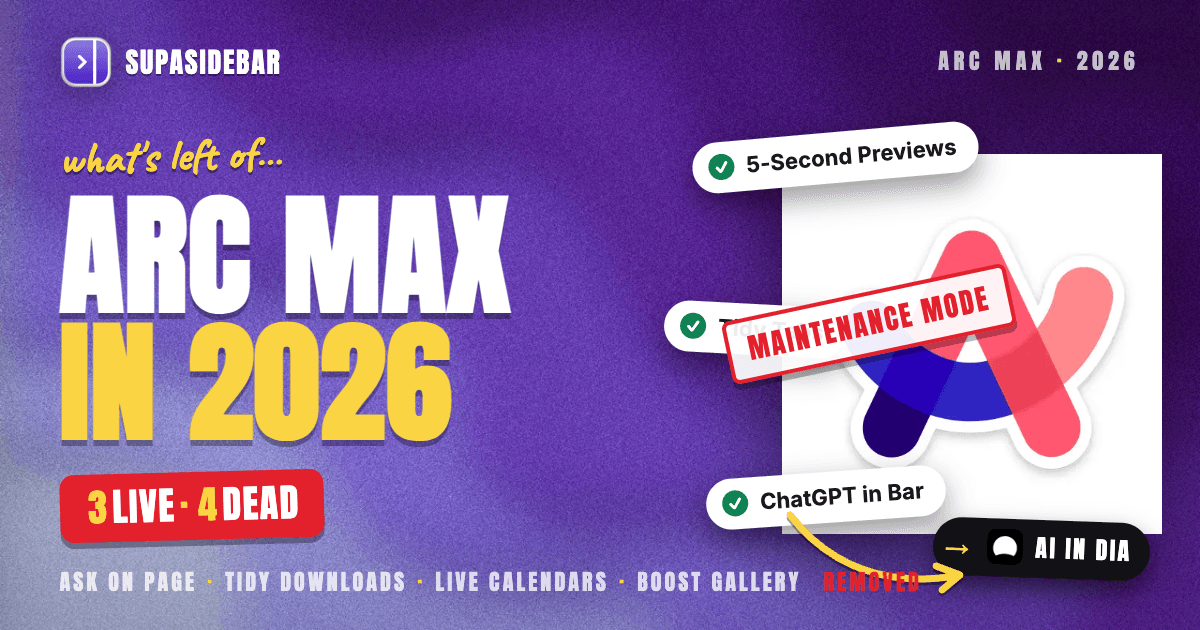
Arc's AI story in 2026 is short: Arc Max ships with three working features (5-Second Previews, Tidy Tabs, and ChatGPT in the Command Bar), four features have been quietly removed since v1.109.0 (Ask on Page, Tidy Downloads, Live Calendars, Boost Gallery), and the serious AI work moved to Dia after Atlassian's $610 million acquisition closed October 21, 2025. Browse for Me still ships in Arc Search on iOS but has a freeze bug nobody is fixing. The full live/removed/moved-to-Dia breakdown is below.
This post is the canonical "what is the state of Arc's AI in 2026" reference, not a news log. For breaking version updates, the Arc Browser Status Tracker is the living page.
What Arc Max actually is
Arc Max is the bundle of AI features The Browser Company shipped into Arc starting May 2023. It is opt-in, toggled from Settings → Arc Max, and originally promised to "boost your browsing with AI." For most of 2023 and 2024, Arc Max was the visible proof that The Browser Company was building an AI-first browser before "AI-first browser" was a category.
In 2026 the situation is different. Arc is in maintenance mode since May 27, 2025. The Browser Company - now an Atlassian subsidiary - is no longer adding features to Arc Max. Some features still work. Some have been removed without an announcement. The headline experiments (Browse for Me, the AI agent ambitions) moved into Dia, which is a separate product.
The rest of this post is the verified, feature-by-feature state, with sources.
Arc Max features that still work in May 2026
These are the Arc Max features actively shipping in Arc 1.146.0 (May 6, 2026) per the Arc Help Center's Arc Max article:
| Feature | What it does | How to enable | Status |
|---|---|---|---|
| 5-Second Previews | Shift-hover any link to get an AI-generated page summary. Auto-runs on Google, DuckDuckGo, Bing, X, Threads, HackerNews. | Settings → Arc Max | Live |
| Tidy Tabs | Auto-renames pinned tabs to shorter, cleaner titles. | Settings → Arc Max | Live |
| ChatGPT in Command Bar | Type "ChatGPT" in the Command Bar and ask a question without opening a new tab. Requires a ChatGPT account. | Settings → Arc Max, sign into ChatGPT | Live |
| Ask Arc Search (mobile) | The Arc Search iOS app's AI-summarized answer mode. | Built into the iOS app | Live but unmaintained |
What this list does NOT include is anything new. None of these features have been improved since Arc entered maintenance mode. The 5-Second Previews use the same model selection from 2024. Tidy Tabs has not learned new rename patterns. The ChatGPT integration still requires a separate ChatGPT account and does not handle ChatGPT's newer features.
Arc Max features that were silently removed
This is the part of the Arc Max story that did not get an announcement. Multiple users confirmed in r/ArcBrowser that the following features were removed in Arc 1.109.0, with most of the documentation pages still live but the features themselves gone from the app:
| Removed feature | What it did | Replacement (if any) |
|---|---|---|
| Ask on Page | Cmd+F replaced with an AI question-answering bar over the current page. The marquee Arc Max feature for 2023-2024. | Replaced with Dia's blue "find in page" bar - regular text search, no AI |
| Tidy Downloads | Renamed downloaded files to readable names based on page context. | None |
| Live Calendars | "Join" notifications with Zoom links before calls. | None |
| Boost Gallery | Public gallery of community-shared Boosts (per-site CSS injections). | Framer page taken down |
Two of these matter more than the others. Ask on Page was the feature most users associated with "Arc has AI" - replacing Cmd+F was the most visible AI surface in Arc. Removing it without an announcement says everything about Arc Max's product priority in 2026. Live Calendars was the one Arc Max feature that was not technically AI but was bundled into the Max experience; losing it means losing the pre-call meeting link helper that competitors do not replicate.
If you are searching for these features today, they are gone. The help center articles describing them have not been taken down, which is why "arc browser ai features 2026" queries still surface stale documentation. Treat the help center as the original 2024 spec, not the 2026 state.
Browse For Me: what happened to Arc's most-promoted AI feature
Browse For Me was the Arc Search feature The Browser Company demoed everywhere in 2024 - the one that would read multiple pages and synthesize a custom answer page. It still exists in the Arc Search iOS app today.
It also has a known freeze bug, reported in early 2026 on iPhone 15 Pro Max under no heavy load. The Browse for Me function gets stuck halfway through generating results, freezes the entire app, and requires a force quit. The post has not been responded to, and the bug has not been fixed.
That is the state of Browse For Me in 2026: still shipping, no longer maintained. The AI agent concept that Browse For Me represented - automated, multi-source web reading on the user's behalf - migrated entirely into Dia. Browse For Me is the relic.
The Dia overlap: where the AI work actually went
Browser Company communications since the September 2025 acquisition announcement have been clear about one thing: Dia is the active product. Arc, including Arc Max, is in maintenance. The AI features users wanted in Arc are mostly shipping in Dia instead.
What Dia has that Arc Max did not:
- Dia agents. Custom AI agents that act on the user's behalf within tabs and across them.
- @Tabs in chat. Reference open tabs in a conversation with the built-in AI.
- Memory Search. Automatic recall of past browsing context inside the AI chat.
- Tab Groups with AI-assisted grouping (shipped December 11, 2025 per Dia changelog).
- Slack, Notion, Calendar, Gmail integrations added through Q4 2025 and Q1 2026.
What Dia does NOT have, that Arc users actually relied on:
- No Arc-style Spaces. Dia uses profiles instead, which are window-scoped rather than UI-scoped.
- No Cmd+T command bar in the Arc shape. Dia replaced it with an AI chat surface.
- No Boosts (per-site CSS injection).
- No Easels (whiteboard).
- No sidebar in the Arc style (Dia added a sidebar mode in November 2025, but it works differently).
The honest framing: Dia is the AI vision The Browser Company had for Arc, executed as a separate product. If the Arc Max features you cared about were the AI ones (Ask on Page, Browse For Me), Dia is the continuation - but you lose the rest of Arc to get there. For the full Dia vs Arc breakdown, see Arc Browser vs Dia Browser.
What Arc users keep losing as Arc Max stays frozen
Frozen software does not just stop adding features. It also stops integrating with the rest of the ecosystem. Three things are quietly degrading for Arc Max users:
- Model staleness. The Arc Max model selection has not been updated. ChatGPT integration uses an older API contract. As OpenAI ships new features, Arc Max users do not get them - they get whatever the 2024 wiring still supports.
- Integration drift. When third parties update their products (Google's search result page, ChatGPT's UI, X's link rendering), Arc Max's hover-summary and command-bar integrations break silently. Nobody is on the other side fixing them.
- Documentation rot. As shown by the Ask on Page situation, the Arc Max help article still describes features that no longer exist. Users discover this only by trying to use them.
This is the practical reality of "still works but unmaintained." It is not broken. It is just not getting better, and the rest of the world keeps moving.
Practical guidance: what to do if Arc's AI features are why you stayed
There are three reader segments here, and the answer differs for each.
Segment 1: Arc Max users who mostly use the sidebar, Spaces, and command bar - not the AI.
Stay on Arc. The non-AI features (Spaces, Boosts, Easels, Little Arc, Cmd+T command bar, sidebar) still work and are still the deepest implementation of those ideas in any browser. The AI features were never the reason you stayed, and losing Ask on Page does not change your workflow. Watch the Arc Browser Status Tracker for the threshold where security-only updates stop being enough.
Segment 2: Arc Max users who relied on Ask on Page, Browse For Me, or the ChatGPT integration as their daily AI surface.
The AI you wanted is now in Dia. Test Dia for a week before deciding. Dia gives you @Tabs, Memory Search, and Dia agents, but you lose Spaces, Boosts, Easels, and the Arc command bar. See Arc Browser vs Dia Browser for the head-to-head.
Segment 3: Users who want Arc's sidebar workflow but on a maintained browser that is not Dia.
This is the largest segment and the one Arc maintenance mode hits hardest. The honest answer is that no single browser replicates Arc - the Arc Browser Alternative Guide covers Zen, Safari, Chrome, and the rest in depth. The bridge for this segment is the cross-browser sidebar pattern: keep Arc as long as it works, run a maintained browser (Safari, Chrome, or Brave) for everything else, and use a Mac sidebar to keep tab context unified across both.
Why a sidebar is the better answer than a browser switch
The AI feature you used in Arc was not a search engine. It was a layer over how you used the web - a way to ask questions about what was open, summarize pages without context-switching, and route to AI without leaving the workflow. None of that is browser-engine work. All of it is UI work that lives outside the browser.
SupaSidebar is a macOS app that adds a persistent sidebar to every browser - Safari, Chrome, Firefox, Arc, Zen, Vivaldi, Brave, Helium, and Dia (25+ browsers in total). It includes an Ask AI mode in the Command Panel that operates on the user's saved links and live tabs - the same surface Arc's Cmd+T command bar provided, scoped across browsers instead of inside one. When Arc Max goes further into hibernation, the Ask AI workflow does not depend on Arc continuing to ship.
For Arc users who specifically used Arc Max to ask questions about open pages or jump to ChatGPT from the keyboard, the cross-browser sidebar pattern keeps that workflow alive without depending on either Arc's or Dia's roadmap.
Conclusion: Picking what to use for Arc-style AI in 2026
The verdict: Arc Max in 2026 ships three working features (5-Second Previews, Tidy Tabs, ChatGPT in Command Bar), has lost four since v1.109.0 (Ask on Page, Tidy Downloads, Live Calendars, Boost Gallery), and will not get new ones - The Browser Company's AI work is in Dia, owned by Atlassian as of October 21, 2025.
For Arc loyalists who never used Arc Max: nothing changes - keep using Arc, watch the status tracker. For users whose daily AI surface was Ask on Page or Browse For Me: that experience moved to Dia, and the head-to-head with Arc is the right next read. For users who want Arc's UI but a maintained AI workflow on top of any browser: a cross-browser sidebar is more durable than betting on either Arc or Dia.
Try SupaSidebar (free tier) for the cross-browser sidebar with built-in Ask AI mode. If Dia is the answer for you, the Dia comparison is the better starting point.
Why we recommend SupaSidebar
SupaSidebar is a macOS app that brings Arc's sidebar to every browser - one sidebar for tabs, bookmarks, files, and apps across 25+ browsers including Safari, Chrome, Firefox, Arc, Zen, Vivaldi, Brave, Helium, and Dia. The Command Panel includes an Ask AI mode that operates on saved links and live tabs, the closest practical equivalent to Arc's command-bar AI surface that does not depend on Arc continuing to ship updates. Free tier available, macOS 14+.
Frequently Asked Questions
Are Arc Max AI features still available in 2026?
Partly. Three Arc Max features still work in Arc 1.146.0 as of May 2026: 5-Second Previews (Shift-hover summaries), Tidy Tabs (auto-rename pinned tabs), and ChatGPT integration in the Command Bar. Four have been removed since v1.109.0: Ask on Page, Tidy Downloads, Live Calendars, and the Boost Gallery.
Why was Ask on Page removed from Arc?
The Browser Company has not published a reason. Multiple users confirmed in r/ArcBrowser that the Ask on Page bar was replaced with Dia's blue "find in page" bar - regular text search with no AI. The Arc Max help center article still describes the feature, but it is not present in the app.
Is Browse For Me still in Arc Search?
Yes - the Browse For Me feature still ships in the Arc Search iOS app as of May 2026. It also has a known freeze bug reported in early 2026 on iPhone 15 Pro Max that has not been fixed.
Does Arc still get new AI features in 2026?
No. Arc has been in maintenance mode since May 27, 2025. The Browser Company is shipping security and stability updates to Arc but no new features. New AI development is happening in Dia, which is now owned by Atlassian.
What is the difference between Arc Max and Dia?
Arc Max is the AI feature bundle inside Arc - opt-in, toggled from Settings, and not getting updates. Dia is a separate browser built by the same team that focuses entirely on AI as the primary interface (chat with tabs, AI agents, memory search). Dia is what The Browser Company built after Arc - see Arc Browser vs Dia Browser for the full comparison.
Can I still install Arc Max in 2026?
Yes. Arc Max is bundled into the standard Arc download. Toggle the surviving features from Settings → Arc Max. The features that have been removed (Ask on Page, Tidy Downloads, Live Calendars, Boost Gallery) are not in the settings panel anymore even though the help center documentation still describes them.
Is Arc Max free?
Yes. Arc Max has always been free as part of Arc. It uses ChatGPT for the chat integration, which requires a ChatGPT account (the OpenAI account is what costs money if you want GPT-4 or higher tiers - Arc Max itself does not charge).
By Kshetez Vinayak, founder of SupaSidebar.