
By Kshetez Vinayak, founder of SupaSidebar. Last updated November 12, 2026.
TL;DR
The best Arc Spaces alternative lets several spaces share one set of logins while other spaces stay signed in to different accounts, and Dia is the only browser that does this the way Arc did, because Arc's own team built it. Zen comes second with a default container per Space, which keeps cookies apart but shares history. Safari, Chrome, Brave, Vivaldi and Edge keep logins apart only through profiles, and their spaces (Tab Groups or Workspaces) live inside one profile and can't pick another. The table below maps all seven from each vendor's own docs, checked November 10, 2026, next to a count of what Arc users asked for in 5 Reddit posts. For anyone keeping Safari, Chrome, Edge or Brave, SupaSidebar links each of its Spaces to one browser profile, so that Space's tabs and links stay with that profile's logins.
Quick navigation
- Setting up browser profiles for the first time? → Browser Profiles on Mac
- Juggling several Google accounts in one browser? → Best Way to Manage Multiple Google Accounts on Mac
- Checking which browsers have Arc's other habits? → Which Browsers Have Arc Features?
- Already picked Dia or Zen and ready to move? → How to Migrate from Arc to Dia or How to Import Arc to Zen
- Need Arc's Spaces and profiles working together again? You are in the right place. Keep reading.
How 7 Arc Spaces alternatives map spaces to profiles
Only Dia lets several spaces share one set of logins and lets other spaces keep their own, the way Arc did. In the table, "spaces" means whatever the browser calls a switchable set of tabs, and "profile" means a separate set of logins, cookies and history.
| Browser | What it calls spaces | How logins stay apart | Several spaces on one login? | Where it falls short | Best for |
|---|---|---|---|---|---|
| Arc (reference) | Spaces | Profiles, each covering one or more Spaces | Yes | Stops working December 22, 2026 | The model to match |
| Dia | Profiles (Arc's Spaces, renamed) | A Profile shares logins with another or stays separate | Yes | Needs a Dia account, macOS 14 and Apple silicon | Moving fully to Arc's successor |
| Zen | Spaces | A default container per Space | Yes, inside one profile | Containers split cookies, not history | Firefox users |
| Safari | Tab Groups | Profiles, one window each | Yes, Tab Groups sit inside a profile | Switching accounts means switching windows | Mac-native setups |
| Vivaldi | Workspaces | Profiles | Yes, inside one profile | A Workspace can't pick a profile | One main account |
| Edge | Workspaces | Profiles, one window each | Yes, inside one profile | Workspaces need a Microsoft account | Microsoft 365 work |
| Brave | Tab groups | Profiles, plus Containers per tab | Tab groups only | Workspaces still unfinished | Two identities on the same sites |
| Chrome | Saved tab groups | Profiles | Tab groups only | No Spaces at all | Chrome-only users |
| SupaSidebar + Safari, Chrome, Edge or Brave | Spaces | Each Space links to one browser profile | One profile per Space | Not a browser, so the browser's profiles hold the logins | Keeping the browser you have |
What Arc's Spaces and Profiles did together
In Arc, a Space was a named sidebar with its own pinned tabs, folders and open tabs, and a Profile was the logins, cookies and history underneath it. Arc's October 6, 2022 release notes introduced Profiles to "scope Logins, Cookies, Browsing History, and more to one or multiple Spaces."
That made Spaces and Profiles two separate layers. A Work Space and a Research Space could both use the work Google account, while a Personal Space ran on a second profile with its own Gmail, all in one window. Switching Spaces swapped the sidebar, and when the Profile changed, the logins changed with it.
That two-layer setup ends with Arc. Arc's sunset FAQ says Arc stops working on December 22, 2026, and names Dia as the replacement.
What Arc users asked for on Reddit
Arc users want spaces and logins to stay two layers, not one. This count covers 7 Reddit threads from r/ArcBrowser and r/browsers, posted between November 2025 and November 2026 with 93 comments between them, read on November 10, 2026. Moderators had removed 2 of them, so the numbers below come from the 5 readable posts. It's a small sample from Arc-loyal subreddits, so read it as a signal, not a survey.
- 4 of 5 needed separate logins for different accounts, from "several (3-4) google accounts" in the top r/browsers thread (62 upvotes, 43 comments) to separate client sessions in a Chromium-on-Mac request.
- 2 of 5 asked for several spaces to share one profile. "I have 3 profiles but tons of spaces, and the mapping isn't 1:1," wrote the poster of Which browser handles Profiles and Spaces the way Arc does?, and a farewell-to-Arc post said every space becoming its own profile "is not really doing it for me."
- 2 of 5 complained that profiles elsewhere meant extra windows, one of them asking not to "have a million different browser windows open."
The top replies mostly suggested other browsers, Zen most often, and none of them named SupaSidebar. The rest of this post checks each suggestion against the vendor's own docs.
Browser by browser, and where each one falls short
Dia: Arc's two layers under one name
Dia is the closest Arc Spaces alternative because it keeps Arc's two layers under the name Profiles. Arc's sunset FAQ says each Dia Profile has its own tabs and "can also share logins and history with another Profile or stay separate."
Dia's importer keeps an existing Arc setup intact. Per Arc's move-to-Dia guide, Spaces from the same Arc profile become Dia Profiles that share logins, passwords, history, bookmarks and extensions, and Spaces from different Arc profiles stay separate.
The trade-offs sit around the model, not in it. Dia uses its own account, since Arc accounts don't carry over, and it runs on macOS 14 or later with Apple silicon, per MacRumors' launch report. Dia is built around an AI assistant, though Arc's FAQ says its AI features are optional, and the r/ArcBrowser profiles poster said Dia "felt bloated with AI." The import steps are in the Arc to Dia guide.
Best for
Arc users happy to move their whole day into Dia.
Zen: a container per Space
Zen comes closest among Firefox-based browsers by giving each Space a default container. Zen's Workspaces docs say assigning containers lets you "devote a workspace for certain usage of accounts," and containers give separate cookie sessions inside one browser profile.
Containers stop at cookies. The same page notes they don't separate browsing history or extensions, which is the gap one r/ArcBrowser poster hit when shared history and cache "rendered spaces useless" for them.
Zen's Arc importer follows the same logic. In Zen 1.24b, its migration code gives Spaces from a second Arc profile their own container, so Spaces from the main profile keep sharing one set of logins.
Best for
Firefox users who want Arc's look and can live with shared history.
Safari: Tab Groups inside separate profiles
Safari is the closest mainstream match to Arc's model, because every Safari profile carries its own Tab Groups. Apple's profiles guide says each profile has separate history, cookies, website data, extensions, Tab Groups and favorites, so several Tab Groups share one profile's logins the way several Arc Spaces shared one Arc profile.
Safari profiles share saved passwords and AutoFill, per the same guide, so a password typed once works in every profile while the signed-in sessions stay apart. Profiles arrived in Safari 17.
The gap is the window. Each Safari profile opens in its own window, so moving from a Work Tab Group to a Personal one means switching windows, not swiping a sidebar. Tab Groups live in Safari's sidebar, per Apple's Tab Groups guide, while the tabs themselves stay along the top.
Best for
Mac users who already live in Safari and iCloud.
Vivaldi: Workspaces inside one profile
Vivaldi has Arc-like Workspaces, but a Workspace can't choose a profile. Vivaldi's Workspaces help describes them as a way to "quickly group tabs" by topic in a window, and the page never mentions profiles, cookies or logins, so each Workspace uses the logins of the profile it's open in.
Separate logins come from Vivaldi user profiles, each with its own extensions, bookmarks, cookies and history. That makes Vivaldi strong when several Workspaces should share one account and weaker when each Workspace needs its own Google login.
Best for
Chromium users with one main account who want built-in Workspaces.
Edge: Workspaces tied to a Microsoft account
Edge Workspaces group tabs by project, but they need a Microsoft account and stay inside one profile. Microsoft's Workspaces guide requires signing in to Edge with a Microsoft or work account, and the newest version needs Edge 144 or later.
Separate logins come from Edge profiles, and Microsoft's profiles guide says switching profiles opens that profile in a new window. Edge covers the "several Spaces, one login" half of Arc, but every other account is another window.
Best for
Microsoft 365 work accounts.
Brave: Containers today, Workspaces still unfinished
Brave splits identities per tab with Containers, but its Workspaces feature isn't finished. Brave's Containers announcement describes isolated cookies and storage, so tabs on the same site can stay signed in to different accounts, and Brave frames them as a convenience for presenting different identities, not a privacy feature.
Workspaces are still in progress on Brave's public tracking issue. Until they ship, Brave has profiles, Containers and tab groups, but nothing that names and switches a set of tabs the way an Arc Space did.
Best for
Privacy-first users with two identities on the same sites.
Chrome: profiles plus saved tab groups
Chrome keeps accounts apart with profiles and has no Spaces at all. Google's profiles help says profiles keep bookmarks, history, passwords and other settings separate, and the nearest thing to a Space is a saved tab group, which syncs across signed-in devices but lives inside one profile.
So in Chrome the Arc model becomes one profile per account with tab groups inside each. That covers the logins half of Arc and leaves the Spaces half to a row of colored tab groups.
Best for
Chrome-only users with one or two Google accounts.
The catch with getting profiles back by switching browsers
Every option above either moves the whole day into a new browser or splits accounts across windows. Dia and Zen mean moving passwords, extensions and habits, and Safari and Edge open each profile in its own window, while Chrome and Vivaldi can't tie a space to a profile at all. Plenty of Arc users already settled on Safari for battery life or Chrome for a work sign-in, and what they lost was the Spaces layer on top of those profiles, not the profiles themselves.
SupaSidebar: Spaces linked to the browser profiles you already use
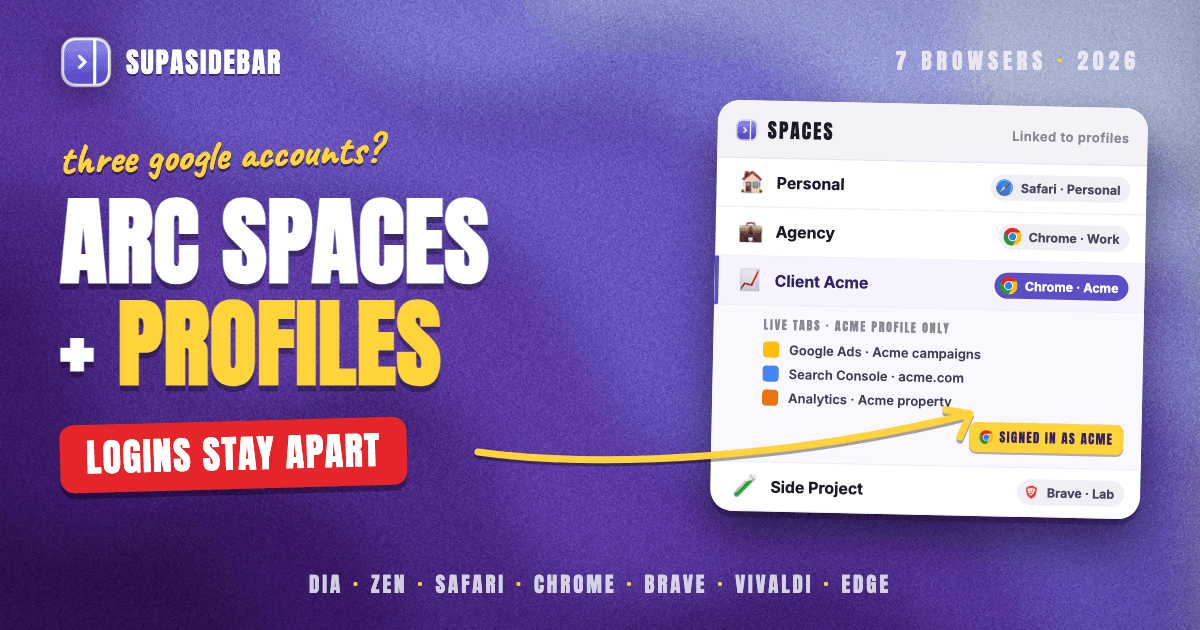
SupaSidebar puts Arc's Spaces back on top of the browser you already use and links each Space to one browser profile. The Work Space shows Chrome · Work tabs and opens links there, while the Personal Space stays in Safari · Personal, and the logins stay in the browser's own profiles.
A Space is linked from the link icon next to its name, or under Preferences → Spaces → My spaces, per SupaSidebar's profile linking guide. A linked Space's Live Tabs list shows only that profile's tabs, and links saved in it open in that profile. Air Traffic Control rules can still send one site somewhere else, such as every figma.com link to Chrome · Work.
The sidebar can follow the browser window too. Since SupaSidebar 1.4.0, clicking into a Chrome · Work window can switch the sidebar to the Work Space, close to how Arc swapped Spaces with its windows, and Preferences → Spaces → Switching spaces sets whether SupaSidebar asks first, switches on its own or does nothing.
Per-profile links work in Safari, Chrome, Edge and Brave, among others. Vivaldi, Firefox and Zen link as a whole browser, and Dia can't be linked, per SupaSidebar's browser support table. The general Spaces setup, linked or not, is covered in How to Set Up Browser Spaces on Mac.
Here is a typical setup for three Google accounts, the case in the top r/browsers thread.
| SupaSidebar Space | Linked profile | Links inside |
|---|---|---|
| Personal | Safari · Personal | gmail.com, photos.google.com, youtube.com, icloud.com |
| Agency | Chrome · Work | mail.google.com, drive.google.com, slack.com, linear.app |
| Client Acme | Chrome · Acme | analytics.google.com, ads.google.com, search.google.com/search-console, docs.google.com |
Switching from Agency to Client Acme swaps the saved links and the Live Tabs list to the Acme profile, and anything opened from that Space lands in Chrome · Acme, already signed in to Acme's Google account.
Michael D., who used Firefox Multi-Account Containers and then Arc before moving to Safari profiles with SupaSidebar, described the goal in an email to SupaSidebar's support. He wanted "to minimize the multiple window browsing experience, increase the separation of cookies and other tracking cruft through the use of multiple profiles."
SupaSidebar's scope here is specific. The browser's profiles do the login separation, so a Space keeps accounts apart only when it's linked to a profile. Each Space links to one browser or one profile, and switching Spaces moves the sidebar, not the browser, so tabs aren't closed or reopened per Space. It's a native Mac app, not a browser, and runs on macOS 14 and later. An Arc sidebar comes in through Preferences → Data → Import → Arc, per SupaSidebar's Arc import steps.
Best for
Arc users who want Spaces back without leaving their Safari, Chrome, Edge or Brave profiles.
Which Arc Spaces setup should you pick?
- If you want Arc's exact Spaces-and-profiles model and a new browser is fine, move to Dia, the only one where a Profile can share logins with another or stay separate.
- If you prefer Firefox, use Zen with a default container per Space and accept that history is shared.
- If you live in Safari, make one Safari profile per account and use Tab Groups inside each as Spaces.
- If you need Chromium extensions and 3 or more Google accounts, keep Chrome, Edge or Brave profiles and add SupaSidebar Spaces, one linked to each profile.
- If one account covers most of your day, Vivaldi's Workspaces give Arc-style Spaces with no profile setup.
What Arc Spaces users should do
Dia is the only browser in November 2026 that copies Arc's Spaces-and-Profiles model, because a Dia Profile can share logins with another Profile or stay separate, per Arc's own FAQ. Zen is the nearest Firefox-based option with a container per Space, and Safari is the nearest mainstream one, with Tab Groups inside separate profiles. Chrome, Edge, Brave and Vivaldi keep accounts apart only through profiles, so their spaces can't switch accounts the way Arc's did.
Arc users ready for a new browser should import into Dia before Arc stops working on December 22, 2026, and anyone still weighing every option can start with the complete guide to leaving Arc. Anyone who needs Chrome, Edge or Brave for work and juggles 3 or more Google accounts gets the closest result by keeping those profiles and linking one SupaSidebar Space to each. To keep Spaces on top of the profiles already in use, try SupaSidebar (free version available).
Why we recommend SupaSidebar
SupaSidebar is a macOS app that brings Arc's sidebar to every browser - one sidebar for tabs, bookmarks, files, and apps across 32+ browsers including Safari, Chrome, Firefox, Edge, Brave, Vivaldi, Dia, Helium and Orion. For Arc's Spaces-and-profiles setup, it links each Space to a Safari, Chrome, Edge or Brave profile, so tabs and links follow the right account. 3,000+ Mac users have tried SupaSidebar.
FAQ
What is the best Arc Spaces alternative with separate profiles?
Dia is the closest match, because Arc's own team built it and a Dia Profile can share logins and history with another Profile or stay separate, exactly like Arc's Spaces and Profiles. For people who would rather keep Safari, Chrome, Edge or Brave, SupaSidebar adds Arc-style Spaces and links each one to a browser profile.
What is the difference between Arc Spaces and Profiles?
In Arc, a Space was a named sidebar of pinned tabs, folders and open tabs, and a Profile held the logins, cookies and history. One Profile could cover several Spaces, so a Work and a Research Space could share one Google account while a Personal Space used another. Arc stops working on December 22, 2026.
Can several spaces share one profile in other browsers?
Yes, in most of them, because their spaces sit inside a single profile. Several Safari Tab Groups, Vivaldi Workspaces or Edge Workspaces all share the logins of the profile they're open in. What most can't do is give one space a different profile, which only Dia does the way Arc did, and Zen does for cookies through containers.
Which browsers keep a separate Google account in each space?
Dia does it through Profiles, and Zen does it per Space with a default container, which separates cookies but not history. Safari, Chrome, Edge, Brave and Vivaldi keep accounts apart only through profiles, which open as separate windows in Safari and Edge. Brave's Containers can also keep two accounts apart per tab.
Does Safari have profiles like Arc?
Yes. Safari 17 and later has profiles with separate history, cookies, website data, extensions, Tab Groups and favorites, while saved passwords and AutoFill are shared. Each profile opens in its own window, so Safari's Tab Groups act like Arc Spaces inside one profile, not across profiles.
Can SupaSidebar give each Space its own browser profile?
Yes. In SupaSidebar, each Space can be linked to one browser profile from the link icon next to the Space's name, and per-profile links work in Safari, Chrome, Edge and Brave. A linked Space shows only that profile's tabs and opens its links there. The browser's profile holds the logins, since SupaSidebar is a sidebar app, not a browser.
By Kshetez Vinayak, founder of SupaSidebar. Last updated November 12, 2026.