
By Kshetez Vinayak, founder of SupaSidebar. Last updated November 11, 2026.
TL;DR
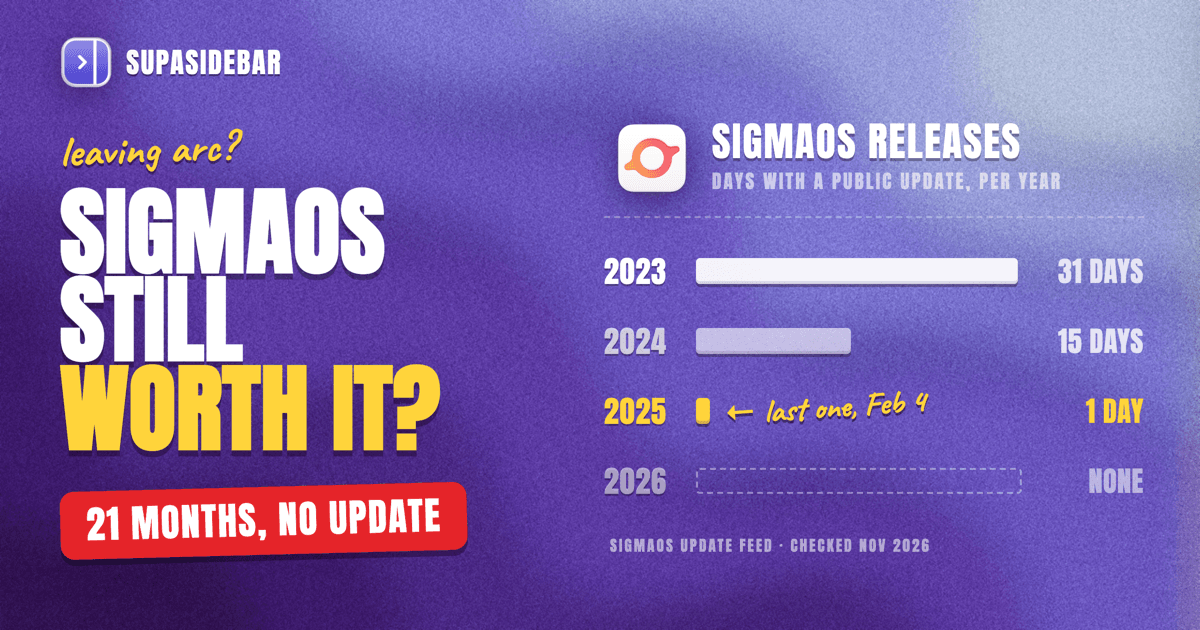
SigmaOS is a Mac-only browser built on Safari's WebKit engine that groups tabs into workspaces, and for most Arc users it is a risky place to move in 2026, because its own update feed lists the last public release, version 1.19.0, on February 4, 2025. The SigmaOS browser still downloads, and its site lists a free tier with unlimited workspaces and an importer for Arc's Spaces, pinned tabs and logins, with full use of its Airis AI at $20 or $30 a month. This review counts SigmaOS's public releases year by year from that feed (31 days in 2023, 15 in 2024, 1 in 2025, none in 2026), then covers its strengths, its gaps and the Arc import. Arc users who would rather not bet on another small browser before Arc stops working on December 22, 2026 can keep Arc's sidebar, Spaces and pinned tabs in Safari, Chrome or Brave with SupaSidebar, a Mac app that docks beside the browser they already use.
Quick navigation
- Not sure Arc is really ending? → Is Arc Browser Dead? What Happens Dec 22 and What Next
- Comparing every browser Arc users are moving to? → The complete guide to leaving Arc
- Leaning toward an Arc-style browser that still ships updates? → How Zen compares with Arc
- Want Arc's habits without learning a new browser? → Set up every Arc habit in any Mac browser
- Wondering whether SigmaOS is still worth it? You are in the right place. Keep reading.
SigmaOS vs Arc at a glance
SigmaOS copies Arc's core idea, a vertical sidebar of tabs grouped into separate contexts, and adds a built-in AI assistant, but it has shipped no public update since February 2025. The table compares Arc as it works until December 22, 2026, SigmaOS as listed on its site on November 9, 2026, and the option of keeping your current browser with SupaSidebar.
| Arc | SigmaOS | Your browser + SupaSidebar | |
|---|---|---|---|
| Status | Stops working Dec 22, 2026 (9to5Mac) | Last public update Feb 4, 2025 (update feed) | Works beside 32+ browsers, Safari, Chrome and Brave included |
| Engine | Chromium | WebKit, like Safari | Whatever your browser uses |
| Sidebar with vertical tabs | Yes | Yes, tabs as a to-do list | Yes, docked beside the browser |
| Spaces | Spaces | Workspaces, unlimited on the free tier | Spaces, each linked to a browser or profile |
| Pinned tabs | Favorites and pinned tabs | Tabs locked to a workspace | Pins per Space or across all Spaces |
| Command bar | ⌘T | Lazy Search on the Space key (cheat sheet) | Command Panel on ⌘T or ⌘N |
| Link preview window | Little Arc and Peek | Link previews | SupaView |
| AI built in | Arc Max (TechCrunch) | Airis, full use on paid plans | Ask AI for organizing links, with your own key |
| Import from Arc | Not needed | Spaces, pinned tabs, history, cookies | Spaces, folders, pinned tabs, history |
| Price | Free | Free, or $20 or $30 a month | Free version available |
What is the SigmaOS browser?
SigmaOS is a Mac web browser from a London startup that organizes tabs into workspaces and treats each open page like a task you can mark done. The company went through Y Combinator's Summer 2021 batch and raised a $4 million seed round led by LocalGlobe in November 2022, according to TechCrunch's funding report.
SigmaOS is built in native SwiftUI on WebKit, the engine behind Safari, yet it runs Chrome Web Store extensions, a pairing the SigmaOS homepage describes as a first for a WebKit browser. Its help docs say it supports the most popular extensions, not every one.
Airis, the SigmaOS AI assistant, first reached a limited group of users in June 2023, per TechCrunch's launch coverage. The SigmaOS homepage says Airis can chat about the page you are on, explain paragraphs, summarize a site and run "Look it up" web research across several pages.
One naming note helps avoid mix-ups. SigmaOS, sometimes written Sigma OS, is a different product from Sigma, a separate browser with a similar name, so facts about one do not carry over to the other.
Is SigmaOS still being updated in 2026?
SigmaOS has not shipped a public update in 21 months. Its update feed, the file the app checks for new versions, lists version 1.19.0 on February 4, 2025 as the newest public release, with macOS 12 as the minimum (SigmaOS update feed, checked November 9, 2026). That release was a performance update that fixed 17 bugs and made ⌘F search the current tab.
The same feed shows how sharply the pace fell. Counting days with a public release, SigmaOS shipped on 31 days in 2023, 15 days in 2024, 1 day in 2025 and none so far in 2026. The last burst came in October and November 2024, when version 1.18 added the Arc importer and a ChatGPT Search option.
SigmaOS has not announced an end, and its site still offers a free download and paid plans, so it reads as quiet rather than officially discontinued. Others have drawn a firmer line. AlternativeTo's SigmaOS page now labels the app discontinued, and of the six reviews listed there on November 9, 2026, the two written after the February 2025 release both give 1 star and describe development as stopped.
That history matters more to Arc users than to anyone else. The Browser Company put Arc into maintenance mode on May 27, 2025 (letter to Arc members), and Arc now stops working on December 22, 2026. Moving a whole workflow from one frozen browser into another quiet one repeats the same risk.
Arc users are not flocking to SigmaOS either. In a SupaSidebar count of 102 top replies across 11 r/ArcBrowser threads on November 6, 2026, including the "Arc is sunsetting" thread, 17 replies said they were moving to Zen and 20 named another browser, and none of those 20 named SigmaOS. The method and full split are in the Arc status breakdown, and a wider read of the subreddit is in what Arc users on Reddit moved to.
What SigmaOS does better than Arc
SigmaOS beats Arc in four places that matter to people leaving Arc: a free tier with unlimited workspaces, Safari's WebKit engine, an AI assistant that reads the page, and workspaces that can sign in to different accounts. Each of these is listed on the SigmaOS homepage as of November 9, 2026.
The free SigmaOS tier is more generous than it used to be. In 2022 the free plan capped users at three workspaces, per TechCrunch, and the current Basic plan lists unlimited workspaces, a built-in ad blocker and limited Airis use at no cost.
WebKit is a real difference for Mac laptops. Arc ran on Chromium, while SigmaOS uses the same engine as Safari and pitches it as better for battery life on Apple silicon.
SigmaOS treats tabs as tasks, which Arc never did. Per its homepage, pressing D marks a page done, locked tabs stay in their workspace, and Split Screen puts two sites side by side, much like Arc's Split View.
On paper, the SigmaOS Arc importer is thorough. Per SigmaOS's Arc migration guide, it brings over Spaces, Favorites, pinned tabs, history, extensions and cookies, so sites you were signed in to in Arc should stay signed in.
Where SigmaOS falls short for Arc users
SigmaOS's biggest weakness is time. With no public release since February 4, 2025 in its update feed, bugs found since then, and any changes newer macOS versions need, wait on a team that has gone quiet.
The price is unclear. The SigmaOS homepage lists Personal Pro at $20 a month and Personal Max at $30 a month, while its help docs still say Pro costs $10 a month or $8 a month billed yearly. Check the checkout page before paying, and note that SigmaOS's own Arc guide says that, unlike Arc, it is not a fully free product.
SigmaOS is Mac only. The homepage FAQ says iOS and Windows support is coming, but no iPhone or Windows app exists yet.
Extensions are a partial match. Arc ran the full Chrome Web Store catalog on Chromium, while SigmaOS's help docs promise the most popular extensions on WebKit, so a niche extension may not work.
How to move from Arc to SigmaOS
Moving from Arc to SigmaOS takes four steps, per SigmaOS's Arc migration guide, and it works only while Arc still opens, so finish before December 22, 2026. These are SigmaOS's own steps, not tested for this review.
- Install SigmaOS from sigmaos.com. The Arc importer needs version 1.18 or later, and the newest version in SigmaOS's update feed is 1.19.0, so check SigmaOS > About SigmaOS after installing.
- On first launch, choose Arc from the list of browsers to migrate from. Existing SigmaOS users type "Migrate Browser" in Lazy Search and pick Arc.
- Enter your Mac password if asked. SigmaOS needs it to import Arc's cookies, which keep you signed in to sites.
- For saved passwords, open arc://password-manager/settings in Arc and download the CSV file, then search "Import Passwords" in SigmaOS's Lazy Search and select that file. Delete the CSV afterward, since it holds your passwords in plain text.
Moving to SigmaOS means trusting a second small browser with the Spaces and pins Arc used to hold, and its update feed has been quiet since February 2025. The habits Arc users miss most, the sidebar, Spaces, pinned tabs and ⌘T, do not have to live inside a browser at all.
Keep Arc's sidebar in the browser you already use
SupaSidebar keeps Arc's sidebar, Spaces and pinned tabs in Safari, Chrome, Brave or any of 32+ Mac browsers, so an Arc user can leave Arc without trusting another new browser. SupaSidebar is a Mac sidebar app that docks beside the browser instead of replacing it, needs no browser extension and runs on macOS 14 or later.
The SupaSidebar Arc import brings in Spaces, folders, pinned tabs and bookmarks, with the steps in the docs, and SupaSidebar can also import the last 30 days of Arc history for search. Each Space can then be linked to a browser or a single profile, so links in a Work Space open in Chrome's work profile and links in a Personal Space open in Safari.
The Arc keys come along too. ⌘T or ⌘N opens SupaSidebar's Command Panel inside the browser like Arc's command bar, ⌃Tab jumps back to the last tab with the Tab Switcher, SupaView opens links from Slack or Mail in a small window like Little Arc, and Air Traffic Control sends each site to the right browser. Every habit is mapped browser by browser in which browsers have Arc features.
Here is how an Arc user with three Spaces might set it up.
| Space | Linked to | Pins and saved links |
|---|---|---|
| Work | Chrome, Work profile | mail.google.com, calendar.google.com, slack.com, linear.app |
| Side project | Brave | github.com, vercel.com, figma.com, notion.so |
| Personal | Safari | youtube.com, reddit.com, amazon.com, spotify.com |
Switching Spaces swaps the pins and saved links and shows only that Space's open tabs, as switching Spaces did in Arc.
SupaSidebar has limits worth knowing. It is not a browser, so it has no ad blocker or split screen inside one window, and its Ask AI organizes saved links with your own API key rather than reading web pages the way Airis does. Spaces do not separate sign-ins by themselves, so link each Space to a browser profile for that, and Live Tabs cannot read tabs from Arc or Zen.
Keeping a familiar browser is the point for many people leaving Arc. One Arc user going back to Safari with SupaSidebar summed it up in an r/ArcBrowser comment on October 27, 2026, "Just don’t want another browser which will disappear." 3,000+ Mac users have tried SupaSidebar so far.
Which setup should you pick?
- If you want a browser with AI built into every page, SigmaOS's free tier is worth a test, but keep a copy of your Arc data, because its last public update was February 4, 2025.
- If you want an Arc-style browser that still ships updates, start with how Zen compares with Arc.
- If you want The Browser Company's own successor, read what Dia keeps and drops from Arc.
- If you want to stay in Safari, Chrome or Brave, add SupaSidebar for the sidebar, Spaces, pinned tabs and ⌘T.
- If you want every option side by side, see seven Mac apps former Arc users pick.
Conclusion
SigmaOS is a thoughtful WebKit browser with a generous free tier and, on paper, a thorough Arc importer, but its update feed shows public releases on just one day since November 2024, the last on February 4, 2025. For people who just lost Arc to maintenance mode and a shutdown, that makes the SigmaOS browser hard to recommend as a long-term home.
Single-browser users who want AI on every page can still try SigmaOS for free, with their Arc data exported first. Arc fans who want the same look with active releases should look at Zen, and people who want The Browser Company's AI-first follow-up should look at Dia. Arc users who mainly miss the sidebar, Spaces and pinned tabs can keep Safari, Chrome or Brave and add SupaSidebar.
Whichever way you go, import your Arc Spaces before December 22, 2026, while Arc still opens. To keep Arc's sidebar in the browser you already use, try SupaSidebar (free version available).
Why we recommend SupaSidebar
SupaSidebar is a macOS app that brings Arc's sidebar to every browser - one sidebar for tabs, bookmarks, files, and apps across 32+ browsers including Safari, Chrome, Firefox, Edge, Brave, Vivaldi, Dia, Helium and Orion. For Arc users weighing SigmaOS, it brings back Spaces, pinned tabs, the ⌘T command bar, Ctrl+Tab, Little Arc and Air Traffic Control in a browser they already trust, with no new browser to learn.
FAQ
Is SigmaOS still being updated?
SigmaOS's own update feed lists version 1.19.0, released February 4, 2025, as its newest public release, checked on November 9, 2026. SigmaOS shipped public updates on 31 days in 2023 and 15 days in 2024, then on one day in 2025 and none in 2026. The company has not announced a shutdown, and its site still offers downloads and paid plans.
Is SigmaOS free?
SigmaOS has a free Basic plan with unlimited workspaces, an ad blocker and limited use of its Airis AI assistant. Its homepage lists Personal Pro at $20 a month and Personal Max at $30 a month for heavier AI use, while its older help docs still show $10 a month, so check the checkout page before paying. Its homepage also offers students and educators 50% off Pro.
Can SigmaOS import from Arc?
Yes, according to SigmaOS's Arc migration guide. Version 1.18 and later can import Arc's Spaces, Favorites, pinned tabs, history, extensions and cookies through its Migrate Browser option, though the import was not tested for this review. Saved passwords need a separate CSV export from Arc's password settings, and the import only works while Arc still runs, which ends on December 22, 2026.
Is SigmaOS based on Chromium or WebKit?
SigmaOS is built on WebKit, the same engine as Safari, with a native SwiftUI interface. Its help docs say it supports the most popular Chrome Web Store extensions, which is unusual for a WebKit browser, though not every extension is guaranteed to work.
Is SigmaOS better than Arc?
On paper, SigmaOS beats Arc on battery-friendly WebKit, free unlimited workspaces and a page-aware AI assistant, and Arc stops working on December 22, 2026 anyway. SigmaOS's weakness is its stalled release schedule, with no public update since February 4, 2025. Arc users who only want Arc's sidebar can add SupaSidebar to Safari, Chrome or Brave instead.
Does SigmaOS work on Windows or iPhone?
No. SigmaOS is available only on macOS, with macOS 12 as the minimum version in its update feed. Its homepage says iOS and Windows versions are coming, but neither had been released as of November 9, 2026.
By Kshetez Vinayak, founder of SupaSidebar.