
By Kshetez Vinayak, founder of SupaSidebar. Last updated 2026-06-15.
Quick navigation:
- Choosing a browser for research work? → Best Browser for Researchers on Mac 2026
- Setting up browser windows for a literature review? → Browser Setup for Researchers on Mac 2026
- Student building a study stack? → Best Mac Apps for Students 2026
- Researcher or academic building a Mac app stack? You are in the right place. Keep reading.
TL;DR
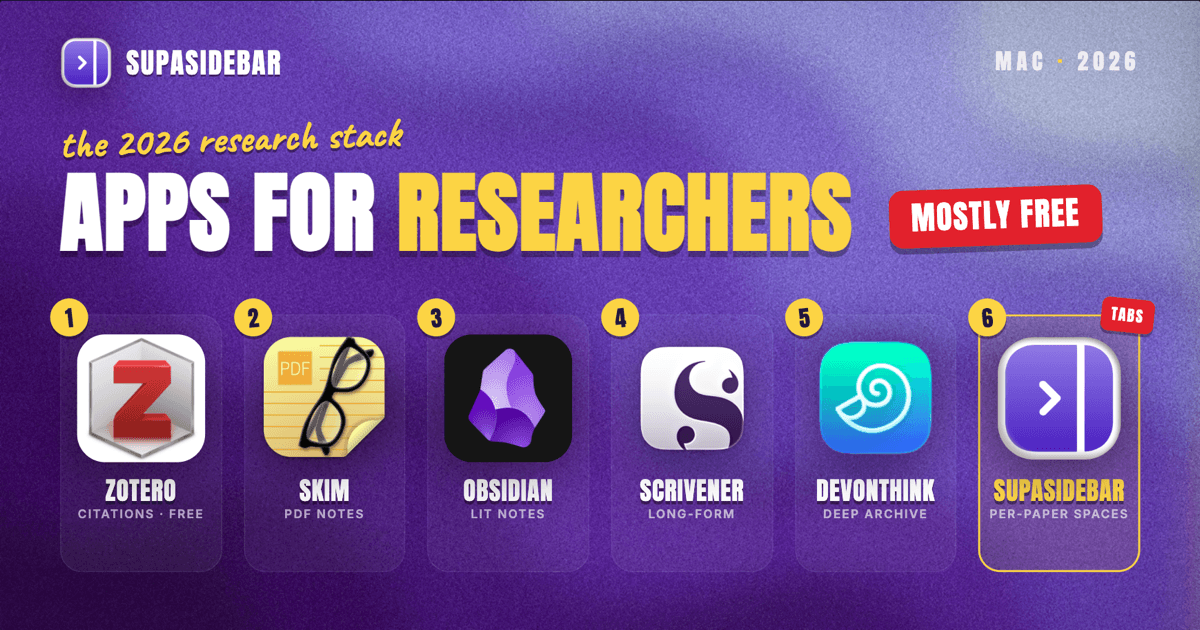
The best Mac apps for researchers in 2026 are a six-app stack: Zotero for reference management, Skim for PDF annotation, Obsidian for literature notes, SupaSidebar for keeping each paper's source tabs organized across browsers, Scrivener for long-form writing, and DEVONthink as the optional everything-archive. The striking part is the price: four of the six cost nothing, after Obsidian dropped its commercial license requirement in February 2025 and Zotero stayed free under its nonprofit parent. A complete academic stack now runs under $100 in one-time purchases unless DEVONthink joins it. The category-by-category breakdown, honest limitations, and the comparison table are below.
Scope:
Mac apps for the research workflow itself - collecting sources, reading and annotating, taking notes, writing, and organizing the digital mess in between. Not covered: statistics and analysis tools (R, SPSS, MATLAB), browser choice (that is the researcher browser comparison), and field-specific lab software.
Why the research stack is mostly free in 2026
Most "apps for academics" lists pad out to 15 or 20 tools. A working research stack is six apps, and every tool past that becomes another inbox to maintain. The more useful 2026 story is what happened to the price of the core.
Obsidian removed its commercial license requirement in February 2025, making the app free for all use including institutional and commercial work. Zotero remains free and open source, run by a nonprofit rather than a publisher. Skim has been free under a BSD license for years and still is. The result: the reading, referencing, and note-taking core of an academic Mac setup costs exactly nothing, and the paid tools left on the list (Scrivener, DEVONthink) are deliberate one-time or license purchases, not subscriptions.
That free core is not a compromise. It is the same toolset working researchers actually recommend to each other, for reasons covered app by app below.
Reference management: Zotero
Zotero is the reference manager to default to in 2026. It is free and open source, developed by the nonprofit Corporation for Digital Scholarship, which means no vendor lock-in and no publisher monetizing the library. The browser connector saves a paper's full metadata and PDF from a journal page in one click, citations drop into Word, Google Docs, and LibreOffice, and the style repository covers more than 10,000 citation formats. Since the Zotero 7 release, the built-in PDF reader handles annotation directly inside the app.
The honest limitation is file storage. Citation data syncs free with no limit, but attached PDFs count against 300 MB of free file storage, with paid tiers at $20 per year for 2 GB up to $120 per year for unlimited. A PDF-heavy library hits the free cap within a semester. The choices: pay the $20, point Zotero at a WebDAV server, or keep PDFs out of sync and let citation data travel alone.
Best for: every researcher, full stop. The rare exceptions are labs standardized on Mendeley or EndNote by mandate.
PDF reading and annotation: Skim
Skim is the dedicated PDF reader for academic reading on a Mac, and it is free and open source under a BSD license. It was the first free-software PDF reader for macOS and is still maintained, with version 1.7.11 running on anything from macOS 10.13 up. The academic-specific part: highlights, underlines, and sticky notes collect into a side list that exports as plain text, which turns a marked-up paper into ready material for literature notes. It also plays well with LaTeX and BibDesk workflows.
The trade-off is looks. Skim's interface is dated, and Apple's built-in Preview covers casual reading fine. Skim earns its place the day annotations need to leave the PDF and become notes, which is the whole job in a literature review.
Best for: heavy paper-reading with annotation export. Skip it if reading happens inside Zotero 7's built-in reader and that feels sufficient.
Literature notes and the knowledge base: Obsidian
Obsidian is where the reading turns into thinking. Notes live as plain Markdown files in a local folder, links connect a claim in one paper's notes to the contradicting result in another's, and the graph of connections grows into something close to a personal literature map. Since February 2025 the app is free for all use, including commercial and institutional work, with no license required.
Two practical notes. Syncing across Macs costs extra through the official service (Sync Standard is $4 per user per month billed annually) but a vault stored in an iCloud Drive folder syncs free. And community plugins connect Obsidian to Zotero, pulling citation metadata and PDF annotations straight into literature notes, which is the glue that makes the Zotero-Skim-Obsidian trio feel like one system.
Best for: literature notes, working through arguments, and any researcher who has lost an idea to a notebook they cannot search.
What no reference manager solves is the live session around a paper. An active literature session is not a list of saved papers, it is 30 open tabs: the publisher page, the supplementary materials, three Google Scholar result pages, the dataset repository, the lab wiki, the methods paper someone linked in a footnote. Zotero captures the paper; the open, half-read, deliberately-arranged session around it lives in browser tabs that vanish with one wrong click.
It gets worse across browsers. As one Reddit user described their setup: "I use different browser for different workflows like Safari for social media, Chrome for web development, and Firefox for research." Multi-browser separation is common and sensible, but it means the research tabs, the university SSO portal in one browser, and the reference checks in another never appear in one place, and browser tab groups cannot fix it because each browser only sees its own tabs.
Keeping each paper's source tabs together across browsers
SupaSidebar is the cross-browser workspace layer for researchers: one Space per paper or project that holds its source tabs, datasets, and local files across every browser. It runs natively on macOS and adds one persistent sidebar across every major Mac browser - Safari, Chrome, Firefox, Edge, Arc, Brave, Vivaldi, Comet, Dia, and more (33 browsers counting channel variants). For a researcher the natural unit of organization is the paper or project, and that maps directly to Spaces: one Space per paper, chapter, or grant, holding the publisher tabs, dataset portals, lab wiki links, and even local files and folders, since the sidebar saves files from Finder alongside links.
Three shortcuts do the daily work. Smart Save (⌘⌃S) files the current page into the active Space without leaving the browser. Save All Browser Tabs (⌘⌃T) captures an entire literature session into a folder in one stroke, turning "those 30 tabs from Tuesday's search" into a saved, reopenable set. Command Panel (⌘⌃K) searches saved links and live tabs across every Space and every running browser at once, which ends the window-by-window hunt for "that methods paper tab." Live Tabs shows the open tabs from all running browsers in a single list, and iCloud sync keeps the same Spaces on the office Mac and the laptop with no account required.
The honest limitations: SupaSidebar is not a reference manager, it stores links and files but does not format citations or capture bibliographic metadata, so it complements Zotero rather than replacing it. Search covers titles and URLs, not the text inside PDFs. And it requires macOS 14 or later. A free version is available, and 3,000+ Mac users have tried SupaSidebar.
Best for: researchers running multiple projects or papers in parallel, especially across more than one browser.
Long-form writing: Scrivener
Word processors handle papers. Book-length writing, a dissertation, a thesis, a monograph, is a different problem, and Scrivener is built for it. Chapters live as a tree of fragments that rearrange by drag, the corkboard shows the argument at outline altitude, and compile exports the manuscript to Word or other formats when the department demands a .docx. It is a $59.99 one-time purchase for macOS, $49.99 with an educational discount, with free updates for the life of the major version.
The honest limitation: collaboration. Track changes with co-authors and supervisors still happens in Word, and Scrivener works best as the single-author drafting environment that produces the file everyone else then argues over.
Best for: dissertations, theses, books, and any manuscript long enough that scrolling a single Word document stops working.
The research database question: DEVONthink
DEVONthink is the archive for everything that is not a citation: web clippings, scanned archive material, old course PDFs, interview transcripts, decades of accumulated department documents. Version 4, released as DEVONthink 4.0 "Copernicus" in June 2025, added AI-assisted features and switched the license model: a purchase now includes one year of updates, the license itself never expires, and the app simply stays on its last included version if the update period lapses. The change drew real criticism in DEVONthink's own community forum, worth reading before buying, though the license-never-expires design is more honest than a subscription.
The verdict to steal: most researchers do not need DEVONthink. Zotero plus a sensible folder structure covers a working library. DEVONthink earns its price at archive scale, tens of thousands of documents, OCR over scanned sources, and search that has outgrown both Finder and Spotlight.
Best for: archive-heavy fields (history, law, qualitative research) and anyone whose "papers" folder has become a second dissertation.
The research stack at a glance
| App | Job in the stack | Pricing model | Standout detail |
|---|---|---|---|
| Zotero | Reference capture and citations | Free, open source; optional storage from $20/yr | Nonprofit-run, unlimited free citation sync |
| Skim | PDF reading and annotation | Free, open source (BSD) | Annotations export as plain text notes |
| Obsidian | Literature notes, knowledge base | Free (incl. work use since Feb 2025); Sync $4/mo optional | Local Markdown, linked notes, Zotero plugins |
| SupaSidebar | Source tabs and files per project, across browsers | Free version available | One Space per paper, every browser in one sidebar |
| Scrivener | Long-form drafting | $59.99 one-time ($49.99 educational) | Built for dissertation-length manuscripts |
| DEVONthink 4 | Document archive and deep search | Paid license incl. 1 year of updates | OCR and search over huge libraries |
Conclusion: Picking the research stack
The 2026 verdict: start with the free core, Zotero, Skim, and Obsidian, which covers referencing, annotated reading, and literature notes at zero cost. Add Scrivener when the writing turns book-length, DEVONthink only at archive scale, and SupaSidebar the day source tabs start spanning browsers and projects.
By segment: PhD students should run the free trio plus educational-discount Scrivener and skip DEVONthink until the archive genuinely demands it. Faculty juggling several projects and grants get the most from per-project organization, one SupaSidebar Space per paper or grant, with Zotero as the shared bibliographic backbone. Humanities and qualitative researchers grow into Scrivener and DEVONthink fastest, since long manuscripts and scanned archives are their daily material. STEM researchers can usually stop at Zotero, Obsidian, and a sidebar, because datasets live in repositories rather than local archives.
Try SupaSidebar (free tier) if a literature session's tabs are scattered across browsers right now. For the browser underneath the stack, see the researcher browser comparison, and for arranging the windows themselves, the researcher browser setup guide.
Why we recommend SupaSidebar
SupaSidebar is a macOS app that brings Arc's sidebar to every browser - one sidebar for tabs, bookmarks, files, and apps across 33 browsers including Safari, Chrome, Firefox, Edge, Arc, Brave, Vivaldi, Comet, and Dia. For researchers, it turns each paper or project into a Space holding that project's publisher tabs, datasets, lab wikis, and local files, searchable in one keystroke with Command Panel (⌘⌃K) no matter which browser they are open in. iCloud sync keeps the same setup on an office Mac and a laptop, with no account required. macOS 14+ required.
FAQ
What is the best free reference manager for Mac?
Zotero. It is free, open source, and run by a nonprofit, with one-click capture from journal pages, citation plugins for Word and Google Docs, and more than 10,000 citation styles. Citation data syncs free without limits; only attached PDF storage beyond 300 MB costs money, starting at $20 per year.
Is Obsidian free for academic use?
Yes. Since February 2025, Obsidian is free for all use, including commercial, institutional, and government work, with no license required. The only common paid add-on is the official Sync service ($4 per user per month billed annually); storing a vault in an iCloud Drive folder syncs between Macs at no cost.
Is DEVONthink worth it for researchers?
Only at archive scale. For a normal working library, Zotero plus organized folders covers the job free. DEVONthink 4 earns its license price when the collection reaches tens of thousands of documents, scanned sources need OCR, and search has outgrown Spotlight, which mostly describes history, law, and qualitative research workflows.
What is the best free PDF annotation app for Mac?
Skim, for academic reading specifically. It is free and open source, and its highlights and sticky notes collect into a notes list that exports as plain text, which makes turning a marked-up paper into literature notes a copy-paste job instead of a retyping job. Apple's built-in Preview is fine for casual reading but keeps annotations locked inside the PDF.
How do researchers keep dozens of source tabs organized on a Mac?
The reliable pattern is one workspace per paper or project rather than one giant tab pile. SupaSidebar implements this across browsers: each project gets a Space holding its links, tabs, and files, Save All Browser Tabs (⌘⌃T) captures a whole session at once, and Command Panel search spans every browser's open tabs. Inside a single browser, tab groups work until the research crosses into a second browser.
Is Scrivener good for writing a thesis or dissertation?
Yes, it is the strongest Mac app for manuscript-length writing. Chapters live as rearrangeable fragments with a corkboard outline view, and the compile step exports to Word for supervisor comments. It costs $59.99 one-time ($49.99 educational). The caveat: collaborative track-changes rounds still happen in Word after compiling.
By Kshetez Vinayak, founder of SupaSidebar. Last updated 2026-06-15.