
By Kshetez Vinayak, founder of SupaSidebar. Last updated November 13, 2026.
TL;DR
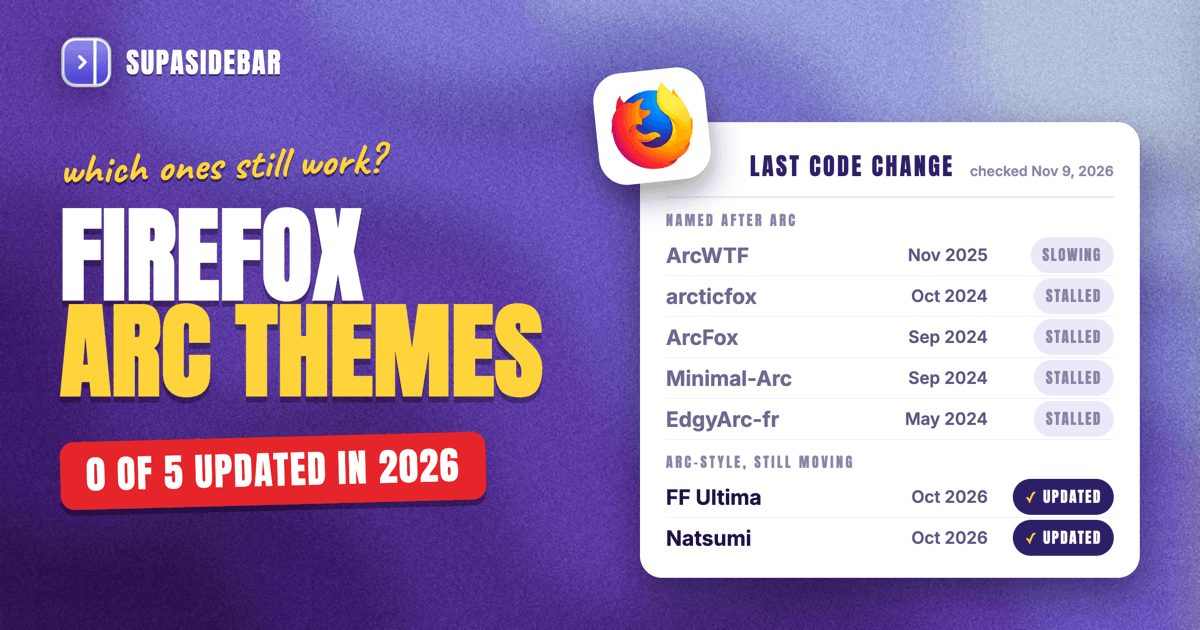
ArcWTF is still the best Firefox Arc theme for looks in 2026, but its last code change was on November 14, 2025, and none of the five Firefox themes with "Arc" in their name has had a code update this year. A Firefox Arc theme is a userChrome.css file or add-on that restyles Firefox with Arc's vertical tabs, slim toolbar and rounded page edges. For a theme that keeps pace with Firefox 159, FF Ultima and Natsumi both shipped updates in October 2026. Every theme copies Arc's look and none copies how Arc works, so Spaces, pinned tabs and the ⌘T command bar come from SupaSidebar, a Mac app that adds them beside Firefox.
Quick navigation
- Checking which browsers have Arc features built in? → Which browsers have Arc features, habit by habit
- Want Arc's habits back, not only its look? → How to replicate Arc features in any Mac browser
- Thinking about Zen instead of Firefox? → Zen vs Arc, compared feature by feature
- Still picking a browser to replace Arc? → The complete guide to leaving Arc
- Looking for an Arc theme for Firefox? You are in the right place. Keep reading.
Every Firefox Arc theme at a glance, with last update dates
Eight Arc-style Firefox themes were checked on November 9, 2026, and only two of them, FF Ultima and Natsumi, have had a code update in the last three months. The five themes named after Arc have had none in 2026. The table also lists Firefox's own vertical tabs, Zen and SupaSidebar, the three options that need no theme at all.
| Option | What it is | Last update | Maintained | Needs | Best for |
|---|---|---|---|---|---|
| ArcWTF | userChrome.css theme | Nov 14, 2025 | Slowing | Firefox vertical tabs | Closest copy of Arc's look |
| FF Ultima | userChrome.css theme | Oct 27, 2026 | Yes | Installer or file copy | An Arc-style layout that keeps up |
| Natsumi | userChrome.css theme | Oct 9, 2026 | Yes | Installer or file copy | A Zen-style look on plain Firefox |
| EdgyArc-fr | userChrome.css theme | May 30, 2024 | No | Sidebery add-on | Skip |
| ArcFox | Add-on plus CSS file | Sep 2024 | No | Add-on and CSS file | Skip |
| Firefox vertical tabs | Built into Firefox 136+ | Oct 27, 2026 | Yes | Nothing | Arc's layout with zero setup |
| Zen Browser | Firefox-based browser | Nov 6, 2026 | Yes | Switching browsers | Arc's look and Spaces in one app |
| SupaSidebar | Mac app beside Firefox | Nov 2026 | Yes | macOS 14+ | Arc's Spaces, pins and ⌘T in Firefox |
The method was simple. Each project's GitHub commit history and Firefox Add-ons listing was read against Firefox 159, released October 27, 2026. The themes were not installed one by one, so "Maintained" means recent code changes, not a hands-on test on every Mac.
ArcWTF - the closest Firefox Arc theme, now slowing down
ArcWTF is the Firefox Arc theme that looks most like Arc, and it is the one to try first if looks are the goal. Its author rebuilt ArcWTF for Firefox 137 and later on top of Firefox's own vertical tabs, so it no longer needs the Sidebery add-on, and the README says it runs on Windows, Linux and macOS.
ArcWTF has 1,716 GitHub stars, the most of any theme here with Arc in its name. It styles tab groups as Arc-like folders and turns on a popup address bar by default. The README also suggests pairing it with the Arc Dark Theme color theme from Firefox Add-ons.
The catch is upkeep. The last commit to ArcWTF landed on November 14, 2025, roughly a year of Firefox releases ago, and the issue tracker still has open reports such as "Firefox v140 broke sidebery visibility" and a January 2026 report of tabs not fitting on screen. You may need to fix small glitches yourself after a Firefox update.
Best for
Arc fans who want the closest look and can live with the odd broken detail.
FF Ultima - the best-maintained Arc-style layout
FF Ultima is the best-maintained choice for an Arc-style Firefox, with version 5.0 released on October 19, 2026 and code changes as late as October 27. FF Ultima is not named after Arc, but its vertical tabs layout, auto-hiding options and color settings get close to Arc's clean window.
FF Ultima has 1,248 GitHub stars, and its README says it supports Windows, Linux and macOS. The 5.0 release notes call it a beta that needs a full reinstall, while also saying the theme is stable and ready for use.
Almost every part of FF Ultima is an on or off setting, so an Arc feel takes some tuning instead of working out of the box.
Best for
anyone who wants an Arc-style Firefox that keeps working after updates.
Natsumi - a Zen-like look for plain Firefox
Natsumi is a maintained Firefox theme that borrows Zen Browser's look, with vertical tabs, an option to merge Firefox's toolbars into one, and color themes, some of which recreate Zen's own. Version 6.12.4 shipped on October 9, 2026, per the Natsumi releases page, and the project has 898 GitHub stars.
Natsumi comes with an installer for macOS and Linux, plus a manual install. Some of its features need JavaScript support on top of plain CSS, and its workspace options only work in Floorp, another Firefox-based browser, not in regular Firefox.
Best for
people who liked Zen's style but want to stay on Firefox.
EdgyArc-fr, ArcFox and ShyFox - older Arc themes to skip
EdgyArc-fr, ArcFox and ShyFox were popular Arc-style Firefox themes, and all three have stopped getting updates. Each one stopped changing before Firefox shipped native vertical tabs in March 2025, so a 2026 install is likely to break.
- EdgyArc-fr (706 stars) needs the Sidebery add-on, and its last release, published May 18, 2024, was written for Firefox 126.
- ArcFox (1,251 stars) pairs a Firefox add-on with a CSS file. Its last release came out in September 2024, and a note from its author at the top of the README explains the pause.
- ShyFox (2,122 stars) hides Firefox's interface in the window border, but its README now warns that the theme is not maintained and can be broken.
Two smaller ones are in the same state. The author of arcticfox says in its README that they no longer use it, and Minimal-Arc has not changed since September 2024.
Best for
nobody in 2026, unless you plan to maintain the CSS yourself.
Firefox vertical tabs - an Arc layout with no theme at all
Firefox's own vertical tabs give you Arc's basic layout with no theme, no CSS files and nothing to break after an update. Mozilla added vertical tabs in Firefox 136 on March 4, 2025, tab groups in Firefox 138 on April 29, 2025, and Split View in Firefox 149 on March 24, 2026.
Setting it up takes four steps, each taken from Mozilla's own release notes and announcements.
- Right-click the toolbar near the top of Firefox and choose Turn on Vertical Tabs.
- Pin the sites you open every day, and Firefox shows them in the sidebar with your open tabs, much like Arc's pinned tabs.
- Drag a tab on top of another, pause and drop it to start a tab group, which works as a folder.
- Select one or two tabs and choose Add to Split View or Open in Split View for Arc's side-by-side pages.
ArcWTF builds on this same setup, so it is the base layer for the best theme as well. Other Mac options are compared in the vertical tabs on Mac guide.
Best for
anyone who wants Arc's layout without touching userChrome.css.
What no Firefox Arc theme can add
A Firefox Arc theme changes how Firefox looks, not how it works. Arc's Spaces, pinned tabs that act like saved links, the ⌘T command bar and Little Arc all lived in Arc's own code, and a CSS file can't add code. ArcWTF's own README lists the tradeoff in two words, "No Spaces."
Firefox doesn't fill the gap on its own yet. In its November 17, 2025 tab groups update, Mozilla listed workspaces as something users had asked for and asked readers what they would want, and the Firefox 159 release notes add no workspaces. The Sidebery add-on comes closest inside Firefox, with tabs split into custom panels and about 55,000 daily users, per its Firefox Add-ons listing.
Arc stops working on December 22, 2026, per Arc's sunset key dates, so people moving to Firefox are about to lose Arc's habits, not only its colors, and those habits have to come from outside the browser.
SupaSidebar - Arc's Spaces, pinned tabs and ⌘T beside Firefox
SupaSidebar is a Mac app that docks Arc's sidebar beside Firefox and adds what no theme can, which is Spaces for your saved links, pinned items, a ⌘T search across every open tab and an import of your Arc Spaces. SupaSidebar runs next to Firefox instead of inside it, so it works with any theme above or none.
SupaSidebar reads Firefox's open tabs natively, with no add-on, and lists them in its Live Tabs section. Turn on ⌘T under Preferences → Browsers → Browser keys, and ⌘T in Firefox opens the Command Panel, which searches open tabs in every browser, saved links and history at once.
Spaces hold separate sets of saved links and folders, and ⌘⌃1 to ⌘⌃9 switch between them once turned on. SupaSidebar has 12 pin slots with their own shortcuts, and each Space can keep its own pins. Arc users can import their Arc Spaces, folders and pinned tabs in a few clicks.
Two more Arc habits come along. SupaView opens links from Slack or Mail in a small floating window once SupaSidebar is set as the default browser, the way Little Arc did, and Archived Tabs closes Firefox tabs you stop using and keeps them for 30 days, like Arc's auto-archive.
An Arc user moving to Firefox might set up SupaSidebar like this.
| Space | Saved and pinned links |
|---|---|
| Work | linear.app, github.com, figma.com, docs.google.com |
| Research | scholar.google.com, arxiv.org, zotero.org, wikipedia.org |
| Personal | gmail.com, youtube.com, notion.so, bank login |
Pressing ⌘⌃2 swaps the sidebar from Work to Research, with its own links and pins, while Firefox's open tabs stay where they are and remain one ⌘T search away.
SupaSidebar doesn't restyle Firefox's toolbar or tabs, so pair it with Firefox's vertical tabs or a theme for the look. Its Spaces organize links, not cookies or logins the way Arc's did, a Space can't be tied to a Firefox profile, ⌘L stays Firefox's own address bar, and it needs macOS 14 or later.
The French Mac site VVMac called SupaSidebar the option that "comes the closest" to Arc's sidebar (translated from French), alongside Zen's, in its March 2026 review.
Best for
Firefox users who miss Arc's Spaces, pins and command bar, not only its look.
Zen Browser - Firefox already styled like Arc
Zen Browser is the shortcut if you would rather switch browsers than theme one. Zen is built on Firefox and works with Firefox extensions, per Wikipedia, and ships Workspaces, Compact Mode, Glance and Split View out of the box, per the Zen website.
Zen's latest release came out on November 6, 2026, per GitHub. How close Zen gets to Arc is covered in Zen vs Arc, and its feature set in the Zen features guide.
Best for
people who want Arc's look and Spaces in one app and don't mind a new browser.
Which Firefox Arc setup should you pick?
- Want Arc's exact look? ArcWTF on top of Firefox's vertical tabs, as long as fixing small glitches after updates doesn't bother you.
- Want a theme that survives Firefox updates? FF Ultima, the most recently updated theme in this list.
- Liked Zen's style but staying on Firefox? Natsumi.
- Don't want to touch CSS at all? Firefox's own vertical tabs, tab groups and Split View.
- Miss Arc's Spaces, pins and ⌘T, not only its look? SupaSidebar beside Firefox, with or without a theme.
- Ready to leave Firefox for something Arc-like? Zen Browser.
Not sure Firefox is the right home after Arc at all? The Firefox vs Safari on Mac comparison covers speed, battery and privacy.
Conclusion - the best Firefox Arc theme in 2026
ArcWTF is the best Firefox Arc theme for looks, FF Ultima is the best for staying power, and Firefox's own vertical tabs are the safest base for both. Of the eight Arc-style themes checked on November 9, 2026, only FF Ultima and Natsumi had code changes in the past three months, and the five themes with "Arc" in the name had none this year.
Readers who only want the look should start with vertical tabs, then add ArcWTF or FF Ultima. Readers who used Arc for Spaces and pinned tabs need a tool beside Firefox, because no theme brings those back. Readers ready to switch browsers get the most Arc in one download from Zen.
With Arc stopping on December 22, 2026, the setup that keeps both the look and the habits is Firefox with vertical tabs, a theme if you like, and SupaSidebar (free version available) for Spaces, pins and ⌘T.
Why we recommend SupaSidebar
SupaSidebar is a macOS app that brings Arc's sidebar to every browser - one sidebar for tabs, bookmarks, files, and apps across 32+ browsers including Firefox, Safari, Chrome, Arc, Zen, Brave, Edge, Vivaldi, and Dia. For Firefox users, SupaSidebar adds Spaces, pinned items and a ⌘T search that no theme can, and it keeps working if you later move to another browser. 3,000+ Mac users have tried SupaSidebar, and the Mac sidebar app overview explains how it fits beside any browser.
FAQ
What is the best Firefox Arc theme in 2026?
ArcWTF is the closest copy of Arc's look for Firefox, though its last code change was on November 14, 2025. FF Ultima is the better pick for staying up to date, with version 5.0 released on October 19, 2026. Both work best on top of Firefox's built-in vertical tabs.
Is ArcWTF still maintained?
ArcWTF is still online, but its updates have slowed. Its last commit was on November 14, 2025, and its issue tracker has open bug reports from 2025 and January 2026. It was rebuilt for Firefox 137 and later on Firefox's native vertical tabs.
Can a Firefox theme add Arc's Spaces?
No. A Firefox theme only changes how Firefox looks, so it can't add Spaces, Arc's ⌘T command bar or Little Arc. ArcWTF's own README lists "No Spaces" as its tradeoff. Spaces for Firefox come from a separate tool such as SupaSidebar, a Mac app that runs beside Firefox, or from switching to Zen Browser.
Do Firefox Arc themes work on Mac?
Their authors list macOS as supported. ArcWTF, FF Ultima and Natsumi all name macOS in their READMEs, and Natsumi ships a macOS installer. None of the themes was installed and tested on a Mac for this post, so check each project's open issues before installing.
Is there an official Arc theme for Firefox?
No. Every Firefox Arc theme is a community project, and none comes from The Browser Company. The "Arc Theme", "Arc Darker Theme" and "Arc Dark Theme" color themes on Firefox Add-ons were last updated in 2020 and 2021, only change colors, and share their name with the older Arc desktop theme for Linux.
How do I install a userChrome.css theme in Firefox?
Open about:config, search for toolkit.legacyUserProfileCustomizations.stylesheets and set it to true. Then open about:support, click Open Directory next to Profile Directory, create a folder named chrome if there isn't one, and copy the theme's files into it. Restart Firefox for the theme to load.
By Kshetez Vinayak, founder of SupaSidebar. Last updated November 13, 2026.