
By Kshetez Vinayak, Founder of SupaSidebar
TL;DR:
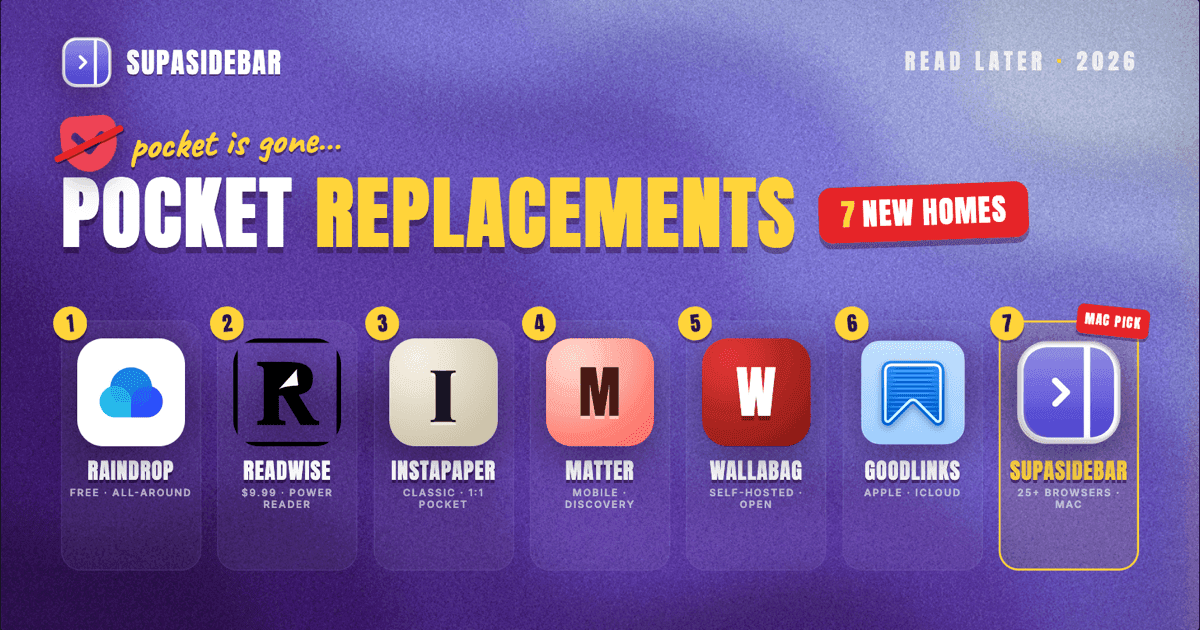
Pocket shut down on July 8, 2025. For most people, Raindrop.io is the best free replacement - unlimited bookmarks, collections, and a reader mode that works across browsers. If you want a dedicated reading app with highlights, RSS, and AI features, Readwise Reader ($9.99/mo) is the most complete option. If you just need to save articles without leaving your browser and access them from any browser on your Mac, SupaSidebar keeps everything in a persistent sidebar. This post compares seven alternatives head-to-head so you can pick the one that fits how you actually read.
Looking for something specific?
- Want a direct SupaSidebar vs Pocket breakdown? → SupaSidebar vs Pocket
- Looking at Raindrop instead? → Raindrop.io alternatives (2026)
- Already here for the full roundup? → Keep reading.
Mozilla announced Pocket's shutdown in May 2025, citing a shift in how people browse and consume content. The service went dark on July 8, 2025. After a three-month export window, all user data was permanently deleted by November 2025.
For millions of users who relied on Pocket to save articles, the shutdown left a gap. Pocket was simple - click a button, read later. Most alternatives try to do more, which makes the choice harder than it should be.
This post breaks down seven Pocket replacements by what they actually do well, what they charge, and which browsers they support. No tool is perfect for everyone. The right pick depends on whether you need a bookmark organizer, a reading app, a cross-browser layer, or something that handles newsletters and RSS alongside saved articles.
What Made Pocket Work (and What to Look for in a Replacement)
Pocket succeeded because it solved one problem cleanly: save this page now, read it later. One click to save. A clean reading view. Sync across devices. That was it.
When evaluating replacements, these are the features that matter most:
Save speed matters more than feature count.
If saving an article takes more than two clicks, you will stop using the app. Browser extensions or native share sheet integration are non-negotiable.
Cross-device sync is table stakes.
Pocket synced between phone, tablet, and desktop. Any replacement needs to do the same, or you will end up with articles trapped on one device.
A clean reading view separates read-later apps from bookmark managers.
Stripping ads, navigation, and popups from an article is the core value proposition. Without it, you are just saving URLs.
Offline reading is underrated.
Pocket cached articles locally so you could read on planes, subways, or anywhere without a connection. Not every alternative does this.
Data portability prevents the next Pocket situation.
Pocket's shutdown proved that closed platforms can disappear. Look for export options and open formats.
The 7 Best Pocket Alternatives in 2026
1. Raindrop.io - Best Free All-Around Replacement
Raindrop.io is a visual bookmark manager with a built-in reader mode that doubles as a Pocket replacement. It is the most popular free option among former Pocket users - and for good reason.
What it does well:
Raindrop organizes saved links into nested collections with tags, and its reader mode strips pages down to clean text. The free tier includes unlimited bookmarks, collections, and cross-device sync. Browser extensions exist for Chrome, Firefox, Safari, and Edge. The visual card layout makes browsing saved articles more pleasant than scanning a text list.
Where it falls short:
Raindrop is a bookmark manager first, a read-later app second. There is no text-to-speech, no newsletter ingestion, and no RSS support on the free tier. Full-text search requires the Pro plan. Offline reading is limited compared to dedicated reading apps.
Pricing:
Free for unlimited bookmarks and collections. Pro plan adds full-text search, permanent copies, duplicate detection, AI assistant, and cloud backup. Monthly and yearly billing available with a ~20% yearly discount.
Browser support:
Chrome, Firefox, Safari, Edge, Brave, Opera. Mobile apps for iOS and Android.
Best for:
People who used Pocket primarily as a bookmark organizer and want a free replacement that works across browsers. See our Raindrop vs SupaSidebar comparison if you also need a Mac sidebar that keeps saved articles accessible from every browser, or the Raindrop.io alternatives roundup if Raindrop itself is not the right fit.
2. Readwise Reader - Best for Serious Readers
Readwise Reader combines articles, PDFs, newsletters, RSS feeds, ebooks, and YouTube transcripts into a single reading hub. It is the most feature-rich option on this list, and it is priced accordingly.
What it does well:
Reader handles almost every format you might want to save. Articles, PDFs, EPUBs, email newsletters, RSS feeds, and YouTube transcripts all land in one inbox. The highlighting system is genuinely best-in-class - highlights sync to Notion, Obsidian, Roam, and Logseq automatically. The daily review feature resurfaces past highlights using spaced repetition, which means you actually remember what you read months later. The AI layer (Ghostreader) generates summaries, flashcards, and Q&A prompts from your highlights.
Where it falls short:
The price. At $9.99/month ($119.88/year), Reader costs significantly more than most alternatives. There is no free tier - only a 30-day trial. The app can feel overwhelming if you just want to save an article and read it later. The learning curve is real.
Pricing:
$9.99/month billed annually ($12.99 monthly). No free plan. 30-day free trial includes full access. A Lite plan at $5.59/month includes only the highlight resurfacing feature without Reader.
Browser support:
Chrome, Firefox, Safari extensions. iOS and Android apps. Web app works in any browser.
Best for:
Heavy readers who annotate, take notes, and want their highlights to flow into a knowledge management system. Worth the price if you read 5+ articles per week and care about retention.
3. Instapaper - The Original Read-Later App
Instapaper launched in 2008, one year after Pocket. It has always been Pocket's closest direct competitor and remains a solid, straightforward reading app.
What it does well:
Instapaper's reading experience is clean and distraction-free. The free tier includes unlimited article saving, a stripped-down reading view, and cross-device sync. Kindle integration sends articles directly to your Kindle for e-ink reading. The app's simplicity is its strength - it does one thing and does it well.
Where it falls short:
Instapaper's Premium pricing doubled in 2024, going from $2.99 to $5.99/month. The free tier limits highlights to 5 per article. There is no RSS support, no newsletter management, and no PDF handling. The app has not evolved much in recent years, which is either a feature (stability) or a bug (stagnation), depending on your perspective.
Pricing:
Free for unlimited article saving with basic features. Premium at $5.99/month or $59.99/year adds full-text search, unlimited notes, text-to-speech with AI voices, speed reading, and PDF support.
Browser support:
Chrome, Firefox, Safari extensions. iOS and Android apps. Kindle integration.
Best for:
People who want the closest 1:1 Pocket replacement with a clean reading experience. The free tier covers most casual use cases.
4. Matter - Best Free Mobile Reading Experience
Matter is a reading app that focuses on content discovery alongside save-for-later functionality. It is the most visually polished option on this list, especially on mobile.
What it does well:
Matter's free plan is generous - unlimited article saving, browser extensions, full-text search, and customizable reading themes. The app curates article recommendations, which means it can surface interesting content rather than just storing what you save. The reading interface is clean and well-designed, particularly on iOS.
Where it falls short:
Newsletter management, RSS feeds, highlighting, and AI features are all locked behind the Premium paywall. Matter is mobile-first, and the desktop web experience is not as polished. The app is relatively new (compared to Instapaper or Raindrop), which raises questions about long-term sustainability - a real concern after both Pocket and Omnivore shut down.
Pricing:
Free for unlimited article saving with basic features. Premium at $8/month or $60/year adds HD text-to-speech, newsletters, RSS, highlighting, and AI summaries.
Browser support:
Chrome, Safari, Firefox extensions. iOS and Android apps. Web reader.
Best for:
iPhone users who want a beautiful reading app with content discovery built in. The free tier covers casual save-for-later needs.
5. Wallabag - Best Self-Hosted Option
Wallabag is an open-source, self-hosted read-later application. After both Pocket and Omnivore shut down, self-hosting has become more appealing for users who want full control over their data.
What it does well:
You own your data completely. No company can shut down and delete your library. Wallabag handles article saving, tagging, and a clean reading view. It supports RSS feed export (so you can read saved articles in any RSS reader), annotations, and full-text search. Browser extensions and mobile apps exist. The hosted version (wallabag.it) costs €11/year if you do not want to self-host.
Where it falls short:
Self-hosting requires technical knowledge - you need a server, a database, and the willingness to maintain them. The UI is functional but not beautiful. Mobile apps are not as polished as Matter or Instapaper. There is no text-to-speech, no AI features, and no content discovery.
Pricing:
Free (self-hosted). Hosted service at wallabag.it costs €11/year or €4 for 3 months. A supporter tier at €30/year funds continued development.
Browser support:
Chrome, Firefox extensions. iOS and Android apps. Any browser via web interface.
Best for:
Technical users who want full data ownership and are willing to trade polish for control. Also a good choice for anyone who was burned by the Omnivore shutdown (Omnivore was also open-source, but the hosted service disappeared when ElevenLabs acqui-hired the team in November 2024).
6. GoodLinks - Best for Apple Users
GoodLinks is a native Apple app for saving and reading articles. It uses iCloud for sync, which means no account creation and no third-party servers.
What it does well:
GoodLinks is fast, native, and private. Articles sync via iCloud across iPhone, iPad, and Mac. The reading view is clean and customizable. Tags and smart folders help organize saved content. Because it is a one-time purchase with no subscription, you pay once and own it.
Where it falls short:
Apple only. No Windows, no Android, no web version. If you use any non-Apple device, GoodLinks cannot follow you there. There is no browser extension for Chrome (only Safari). No RSS, no newsletters, no text-to-speech.
Pricing:
One-time purchase on the App Store. Universal app (works on iPhone, iPad, and Mac with a single purchase). After one year, new premium features require an optional GoodLinks Premium subscription - but all features unlocked during your subscription stay permanently, even if you cancel.
Browser support:
Safari extension only. macOS, iOS, iPadOS apps.
Best for:
Apple-ecosystem users who want a simple, private, subscription-free reading app. The iCloud sync means zero account setup.
7. SupaSidebar - Best for Multi-Browser Users Who Save to Read Later
SupaSidebar takes a different approach. Instead of being a dedicated read-later app, it is a Mac sidebar that keeps your saved articles, bookmarks, and open tabs accessible from any browser - all in one persistent panel.
What it does well:
SupaSidebar works across 32+ browsers on Mac. Save a link from Chrome, find it instantly from Safari or Firefox. The sidebar stays open alongside whatever you are doing, so saved articles are always one click away rather than buried in a separate app. Spaces let you organize saved content by context (work research, personal reading, project references). The Command Panel (triggered with a keyboard shortcut from any app) provides instant fuzzy search across everything you have saved. Links are stored locally on your Mac, not on a third-party server.
Where it falls short:
SupaSidebar is not a reading app. There is no reader mode that strips page content, no text-to-speech, and no annotation system. It does not handle RSS or newsletters. It is Mac-only - no iOS companion app for reading on your phone. If you need a dedicated distraction-free reading experience, pair it with one of the other tools on this list.
Pricing:
Free tier with 3 Spaces and unlimited bookmarks. Paid plans available, including a one-time lifetime purchase option.
Browser support:
Works with 32+ browsers on macOS, including Safari, Chrome, Firefox, Brave, Arc, Edge, Opera, Vivaldi, and more.
Best for:
Mac users who save articles across multiple browsers and want everything accessible from one sidebar - without having to open a separate app to find what they saved. Works well as a "save without deciding" tool: dump articles into the sidebar now, organize or read later. For a direct feature breakdown, see SupaSidebar vs Pocket.
Quick Comparison Table
| Tool | Free Tier | Paid Price | Platforms | Reader Mode | Offline | RSS/Newsletter |
|---|---|---|---|---|---|---|
| Raindrop.io | Unlimited bookmarks | Pro plan (~20% yearly discount) | All browsers, iOS, Android | Yes | Limited | No (free) |
| Readwise Reader | 30-day trial | $9.99/mo annual | All browsers, iOS, Android | Yes | Yes | Yes |
| Instapaper | Unlimited saves | $5.99/mo or $59.99/yr | All browsers, iOS, Android, Kindle | Yes | Yes | No |
| Matter | Unlimited saves | $8/mo or $60/yr | Chrome, Safari, Firefox, iOS, Android | Yes | Yes | Premium only |
| Wallabag | Self-hosted | €11/yr (hosted) | All browsers, iOS, Android | Yes | Limited | RSS export |
| GoodLinks | N/A | One-time purchase + optional yearly upgrades | Safari, macOS, iOS | Yes | Yes | No |
| SupaSidebar | 3 Spaces free | Free tier; paid plans (lifetime option) | 32+ Mac browsers | No | Local storage | No |
What Happened to Omnivore?
Omnivore deserves a mention because it was many users' first choice after Pocket. It was open-source, free, and feature-rich - articles, highlights, RSS, newsletters, and PDF support.
Then ElevenLabs acqui-hired the Omnivore team in November 2024. The service went offline. All user data was deleted. There was no extended export window, no transition plan, and no warning beyond a blog post.
The Omnivore shutdown, followed by Pocket's shutdown six months later, created a trust crisis in the read-later space. Two of the most popular options disappeared within half a year. This is why data portability and sustainable business models matter when choosing a replacement. A free app with no clear revenue model is a risk. A self-hosted option eliminates that risk entirely. A paid app with transparent pricing at least has a business model that can sustain itself.
How to Choose the Right Pocket Replacement
The "best" alternative depends on how you used Pocket:
If you saved articles casually and want something free:
Start with Raindrop.io. The free tier is generous, it works across browsers, and the reading view is good enough for most articles. Instapaper's free tier is also solid if you prefer a dedicated reading app over a bookmark manager. (For a wider bookmark-first view, our bookmark managers comparison and best bookmark manager for Chrome on Mac cover Raindrop, Toby, and SupaSidebar side by side.)
If you read heavily and annotate:
Readwise Reader is expensive but unmatched. The highlight system, daily reviews, and integrations with note-taking apps make it the clear choice for people who treat reading as a knowledge-building activity.
If you use multiple browsers on Mac:
SupaSidebar bridges the gap between browsers so you do not need to remember where you saved something. It is not a reader app, but it solves the "I saved this somewhere" problem that Pocket users who switch between Safari and Chrome know well. See how to sync bookmarks across Chrome, Safari, and Firefox for the broader cross-browser angle.
If you care about data ownership:
Wallabag. Self-host it and your library survives any company shutdown. The hosted option at €11/year is also the cheapest paid alternative on this list.
If you are all-in on Apple:
GoodLinks. One-time purchase, iCloud sync, no subscription. Simple and private.
If you want content discovery alongside saving:
Matter. The recommendation engine surfaces articles you might have missed, and the free tier covers basic save-for-later needs.
Frequently Asked Questions
Why did Mozilla shut down Pocket?
Mozilla announced in May 2025 that Pocket would close on July 8, 2025, citing changes in how people browse and consume content. Mozilla acquired Pocket in 2017, but the service was not generating enough revenue to justify continued development. User data was permanently deleted by November 2025 after a three-month export window.
Is Omnivore still available as a Pocket alternative?
No. Omnivore shut down in November 2024 after ElevenLabs acqui-hired the team. The service is completely offline, and all user data has been deleted. The open-source code is still available on GitHub if you want to self-host, but the hosted service no longer exists.
What is the best free Pocket replacement?
Raindrop.io offers the most complete free tier - unlimited bookmarks, collections, tags, and cross-device sync. Instapaper and Matter also have strong free tiers, though with more limitations on features like highlighting and search.
Can I import my Pocket data into these alternatives?
If you exported your Pocket data before the November 2025 deadline, most alternatives accept Pocket's HTML export format. Raindrop.io, Readwise Reader, Instapaper, and Wallabag all have Pocket import tools. If you missed the export window, your Pocket data is gone - Mozilla deleted it permanently.
Which Pocket alternative works across all browsers?
Raindrop.io and Readwise Reader have the widest browser extension support among dedicated reading apps. SupaSidebar works with 32+ browsers on Mac but is not a reading app - it is a sidebar that organizes saved links across browsers.
Kshetez Vinayak is the founder of SupaSidebar, a Mac sidebar app that works across 32+ browsers.