
By Kshetez Vinayak, founder of SupaSidebar. Last updated May 15, 2026.
TL;DR:
On a Mac in 2026, Safari is the better default for ecosystem fit and out-of-box battery numbers (up to 24 hours of video streaming on the M4 14" MacBook Pro per Apple's published specs), while Brave is the better default for privacy without configuration and for cutting power on ad-heavy sites - an independent BrowserBench power test measured Brave drawing 45% less average power than Safari during active browsing. The deciding factor is the engine: Safari runs WebKit and stays locked to Apple's release cycle, Brave runs Chromium and ships with the full Chrome Web Store. The full privacy, battery, engine, and Brave Rewards breakdown is below, plus the part neither browser solves - tab management once a Mac runs more than one browser.
Looking for something more specific?
- Best for battery life? -> Best Browser for Mac with Battery Life 2026
- Safari vs Chrome specifically? -> Safari vs Chrome on Mac 2026
- Considering Zen or Arc instead? -> Safari vs Zen vs Arc on Mac 2026
- What does Reddit say? -> Best Mac Browser: Reddit's Picks 2026
- Comparing every browser? -> Best Browser for Mac in 2026
Brave vs Safari on Mac: the 30-second verdict
Brave vs Safari on a Mac in 2026 comes down to one structural choice: WebKit locked to Apple's release cycle, or Chromium with the full extension ecosystem. Safari is the better default browser for Mac users who live inside Apple's ecosystem - it ships with macOS, integrates with iCloud Keychain, Handoff, and Apple Pay, and posts class-leading battery numbers in Apple's own tests. Brave is the better default browser for Mac users who want strong privacy with zero setup, the Chrome Web Store, and a browser that also runs on Windows, Linux, and Android.
This post covers the practical Brave-vs-Safari tradeoffs on macOS for privacy, battery, performance, extensions, and the optional crypto layer. It does NOT cover iOS or iPadOS in depth (both browsers behave differently on mobile, and on iOS every browser is still required to use WebKit), Windows or Linux (Safari is not available there), or three-way comparisons against Chrome, Firefox, Arc, and Zen - those live in the Mac browser guide.
Neither browser is wrong. The honest pattern from Mac browser communities is that this is rarely a permanent decision: people run Safari for the Apple integration and battery, then keep a second browser open for the work that Safari handles badly. A 432-upvote thread on r/MacOS is literally titled "What's the best browser for Mac (excluding Safari)?" - the question itself assumes Safari is already installed and the reader wants the other one.
Brave vs Safari on Mac: side-by-side comparison
The head-to-head on the dimensions Mac users actually weigh in 2026. Power numbers are from an independent powermetrics-based benchmark; battery-life hours are from Apple's published specs (Safari) and the same independent test extrapolated to a 50Wh battery (Brave).
| Feature | Safari 26 (macOS Tahoe) | Brave (Chromium) |
|---|---|---|
| Engine | WebKit (Apple) | Blink / Chromium |
| Privacy defaults | Strong - ITP, on-device tracker blocking | Strongest - Brave Shields blocks ads + trackers by default |
| Average power, active browsing | ~1,356 mW (BrowserBench test) | ~743 mW (BrowserBench test, 45% lower) |
| Battery (best case) | Up to 24h video on M4 per Apple specs | No vendor spec; independent test extrapolates ~67h browsing on a 50Wh cell |
| RAM (10 tabs, idle) | ~1.5 GB | Higher per-tab overhead than Safari, lower than stock Chrome |
| Extension store | Safari Web Extensions (~250 listed) | Full Chrome Web Store (200,000+) |
| Built-in ad blocker | No (relies on content blockers) | Yes - Brave Shields, on by default |
| iCloud Keychain | Native | Via system, not integrated |
| Handoff to iPhone/iPad | Yes | No |
| Apple Pay in browser | Native (Touch ID) | Web checkout only |
| Crypto / rewards layer | None | Brave Rewards + Brave Wallet (both optional, disable-able) |
| Cross-platform | Apple devices only | macOS, Windows, Linux, Android, iOS |
| macOS minimum version | Ships with macOS; current on Tahoe 26 | macOS 12 Monterey or later |
| Updates | With macOS or via Software Update | Independent, on Chromium's cycle |
| Open source | No | Yes (core is open source) |
| Vertical sidebar / vertical tabs | No (left-rail bookmark drawer only) | No (extensions or flag required) |
The split is clean. Safari wins the things Apple controls end to end - battery in Apple's own tests, ecosystem handoffs, and the fact that it is already installed. Brave wins the things that come from being a Chromium browser with a privacy team - default ad blocking, the full extension catalog, cross-platform reach, and lower power on the ad-heavy sites where Brave Shields does the most work.
The catch that does not fit in a comparison table: neither Safari nor Brave has a real vertical sidebar in 2026, even though that is the single tab-management feature most Mac power users want once they pass 20 tabs. Safari has a left-rail bookmark drawer that doubles as a Tab Group selector. Brave inherits Chromium's flag-based vertical tab strip - a flat list, no spaces. Arc had the best version of this UX, then Arc entered maintenance mode in May 2025. That gap is why a separate sidebar app has become a common workaround regardless of which browser a Mac user picks.
The engine difference: WebKit vs Chromium is the real fork in the road
Most Brave-vs-Safari comparisons lead with privacy. The more durable difference is the rendering engine, because the engine decides what each browser can and cannot do for years.
Safari runs WebKit, Apple's engine. WebKit is fast, power-efficient on Apple Silicon, and tightly integrated with macOS - but it ships on Apple's schedule. New web platform features arrive when Apple decides to ship them, and Safari updates are tied to macOS updates or Software Update. The current release is Safari 26, part of macOS Tahoe; macOS Tahoe 26.5 shipped on May 11, 2026, and Tahoe 26.4 brought back Safari's compact tab bar for users who prefer the slimmed-down layout.
Brave runs Blink, the Chromium engine. That means Brave inherits Chrome's web compatibility, Chrome's update cadence, and the full Chrome Web Store. Anything that works in Chrome works in Brave. The tradeoff is that Brave also inherits Chromium's constraints - including Manifest V3, the extension platform change that limited how ad blockers can operate (Brave's own built-in Shields are unaffected, since they are not an extension).
Why this matters in practice: the engine choice is sticky. A WebKit site quirk in Safari is Apple's to fix on Apple's timeline. A Chromium feature gap in Brave gets closed whenever Chromium ships it. If a workflow depends on a specific web app behaving correctly, the engine - not the brand - is what determines whether it works. This is also why Safari and Chrome comparisons and Brave comparisons overlap: Brave and Chrome share an engine, so most Brave-vs-Safari engine tradeoffs are the same WebKit-vs-Chromium tradeoffs in a different wrapper.
Privacy: both are good, Brave needs zero setup
Privacy is the dimension where Brave was built to win, and on a Mac in 2026 it largely does - but Safari is closer than Brave's marketing suggests.
Safari ships with Intelligent Tracking Prevention (ITP) on by default. ITP isolates third-party cookies, blocks known fingerprinting attempts, and expires tracking data aggressively. With an iCloud+ subscription, Private Relay routes Safari traffic through two relays so neither Apple nor the destination site sees the full picture, and Hide My Email generates burner addresses for signups. None of this requires configuration. What Safari does NOT do by default is block ads - ITP limits tracking, but ads still render unless a content blocker is installed.
Brave ships with Brave Shields on by default, and Shields blocks ads and trackers, not just tracking cookies. That is the practical difference: open the same ad-heavy news site in both browsers and Safari shows the ads (tracking-limited), while Brave shows the page with the ads stripped out. Brave also blocks fingerprinting, upgrades connections to HTTPS, and does not tie browsing to a sign-in account the way Chrome does.
The honest read: both are strong privacy choices and both are dramatically better than stock Chrome. Safari's advantage is that Private Relay and Hide My Email are genuinely useful and require an iCloud+ plan many Mac users already pay for. Brave's advantage is that default ad blocking is the single highest-impact privacy and performance feature, and Brave is the only one of the two that does it out of the box. If privacy with zero configuration is the priority, Brave is the cleaner default. If the Apple-ecosystem privacy features (Private Relay, Hide My Email) matter more, Safari holds up well.
Battery and power: the test that complicates the "Safari wins" assumption
"Safari has the best battery life on Mac" is the conventional wisdom, and Apple's own numbers back it: Apple's MacBook Pro tech specs list up to 24 hours of video streaming and up to 16 hours of wireless web browsing on the M4 14" MacBook Pro running Safari. Those are real, class-leading numbers - measured on Apple's gentle test workload of cycling through popular sites at reduced brightness.
But Apple does not publish equivalent Brave numbers, so the comparison has to come from independent testing - and the independent testing complicates the assumption. Developer Mihnea Radulescu built BrowserBench, a powermetrics-based tool that uses AppleScript to simulate active browsing (cycling tabs, scrolling) across 10 real websites, measuring CPU and GPU power draw every second over a 2-minute test. The result, published June 2025: Brave averaged 743 mW versus Safari's 1,356 mW during active browsing - Brave used about 45% less power. Extrapolated to a 50Wh MacBook battery, that worked out to roughly 67 hours of browsing for Brave versus 37 hours for Safari, with Brave also showing lower peak draw (8.3W vs Safari's 10.5W).
Why the gap, when Safari is supposed to be the efficient one? Because the test browses ad-heavy sites actively, and Brave Shields strips out the ads, autoplay video, and tracker scripts that consume power. Safari renders all of that. The lesson is not "Safari has bad battery life" - on a mostly-idle workday, or on video streaming where there is nothing for Shields to block, Safari's Apple-tuned WebKit still does extremely well. The lesson is that on the modern ad-heavy web, blocking the ads matters more for power than the engine does. This is the same finding as the independent Chrome-vs-Safari battery testing: the 2020-era "Safari always wins battery" advice is now workload-dependent.
The honest 2026 verdict on battery: Safari for sustained light loads and video, Brave for heavy real-world browsing on ad-laden sites. The gap in either direction is smaller than absolute claims suggest, and it swings on what the browser is actually used for. The full benchmark breakdown across every Mac browser is in the battery life guide.
Extensions and compatibility: Brave's clearest structural win
Extensions are where the engine difference becomes a concrete advantage. Brave, being Chromium-based, has the full Chrome Web Store - over 200,000 extensions. Safari's extension catalog has around 250 listings by most counts. The order-of-magnitude gap is the most lopsided difference in this comparison.
What that looks like in practice. Password managers (1Password, Bitwarden, Dashlane) work in both, but ship updates to Chromium browsers like Brave sooner. Developer tools - React, Vue, Svelte DevTools, framework-specific debuggers - are years ahead in the Chromium ecosystem. Web apps that "almost work" in Safari, like certain Figma plugins or screen-share modes in some video tools, just work in Brave because they were built and tested against Chromium first.
Brave does inherit one Chromium constraint here: Manifest V3 changed how ad-blocking extensions can operate, which is why the full uBlock Origin became uBlock Origin Lite for Chromium browsers. But Brave's own Brave Shields are built into the browser, not delivered as an extension, so the Manifest V3 limitation does not touch Brave's core ad blocking. A Brave user gets default ad blocking that is unaffected by the extension-platform change, plus access to the rest of the catalog.
The reverse case - things that work in Safari but not Brave - is short: Apple Pay with Touch ID, a handful of iCloud-tied web apps, and some WebKit-only experiments. For most Mac users who lean on extensions for anything beyond a password manager, Brave's catalog is a real, structural advantage.
Brave Rewards and the crypto layer: optional, and that matters
Brave includes two features Safari has no equivalent for: Brave Rewards and Brave Wallet. Brave Rewards lets users opt into privacy-respecting Brave Ads and earn Basic Attention Token (BAT) for viewing them, which can then be used to tip creators. Brave Wallet is a built-in crypto wallet. Brave has been moving BAT payouts to self-custody on Solana, giving users direct ownership rather than custodial accounts.
The single most important fact about this layer for a Mac user choosing a browser: it is entirely optional. Both Brave Rewards and Brave Wallet can be fully disabled in settings, and when they are, Brave behaves like a clean, fast, ad-blocking Chromium browser with no crypto UI anywhere. A reader who has no interest in crypto loses nothing by choosing Brave - they just turn the feature off and never see it again.
For readers who do want it, the rewards model is a genuine differentiator: Brave is the only mainstream browser that pays attention back to the user instead of selling it. Brave surpassed 100 million monthly active users in 2025, so the model is not fringe. But it should not be the deciding factor in a Brave-vs-Safari choice. Brave earns its pick on the privacy, engine, and extension reasons above; Rewards is a bonus to ignore or enable. Safari simply has nothing in this category, which is neither a pro nor a con for most users - it is just a difference.
System requirements: a real consideration on older Macs
This is the one practical area where Safari has a structural edge that has nothing to do with features: it is already installed, and it stays current with macOS.
Brave's current macOS requirement is macOS 12 Monterey or later. macOS Mojave, Catalina, and Big Sur are no longer supported by current Brave - users on macOS 11 Big Sur are frozen on an older Brave build (version 1.80.x, Chromium 138) that no longer receives updates. If a Mac is running an OS older than Monterey and cannot upgrade, current Brave is not an option, while Safari on that machine still works (just an older Safari).
For anyone on a reasonably current Mac - macOS Monterey through Tahoe - this is a non-issue; Brave installs and updates normally. But for Mac users on aging hardware that Apple has stopped supporting with new macOS versions, "which browser stays updated" is a real question, and Safari's answer is simply "the one already on the machine." It is worth checking the macOS version before assuming Brave is on the table.
What neither Brave nor Safari solves: tabs across browsers
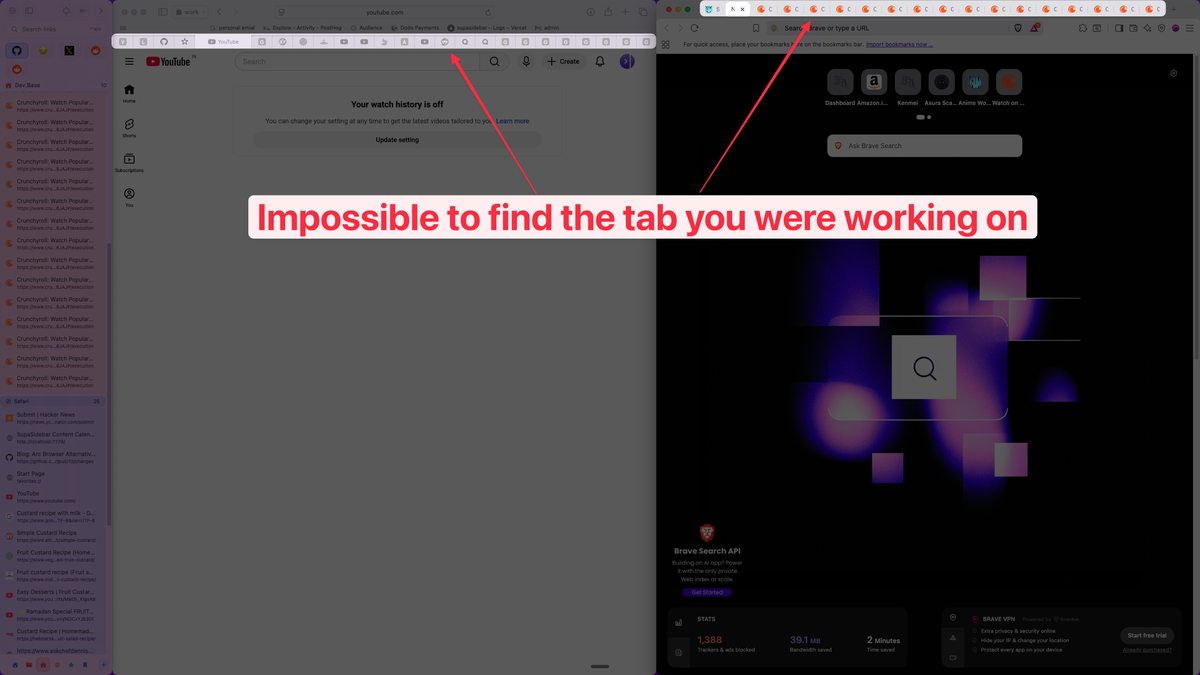
Here is the structural problem that picking Brave or Safari does not fix: the moment a Mac user runs both - and most do - each browser becomes a closed island. Safari sees Safari tabs. Brave sees Brave tabs. Neither knows the other exists, and macOS has no native feature that shows every open tab across every browser in one place.
This is the pattern in Mac browser communities. The r/macapps thread "safari vs the rest: is it actually the best browser for mac?" drew 385 comments precisely because the answer is "it depends, and most people end up running more than one anyway." Once that happens, the cost is not the browser choice - it is the tab sprawl across two browsers, two bookmark stores, two sync histories.
A few categories of tools fill the gap:
- Browser pickers like Velja or Browserosaurus: route link clicks to the chosen browser. Solves outbound routing, not finding a tab already open somewhere.
- Cross-browser extensions like Toby: show tabs across browsers, but require installing the extension in every browser separately.
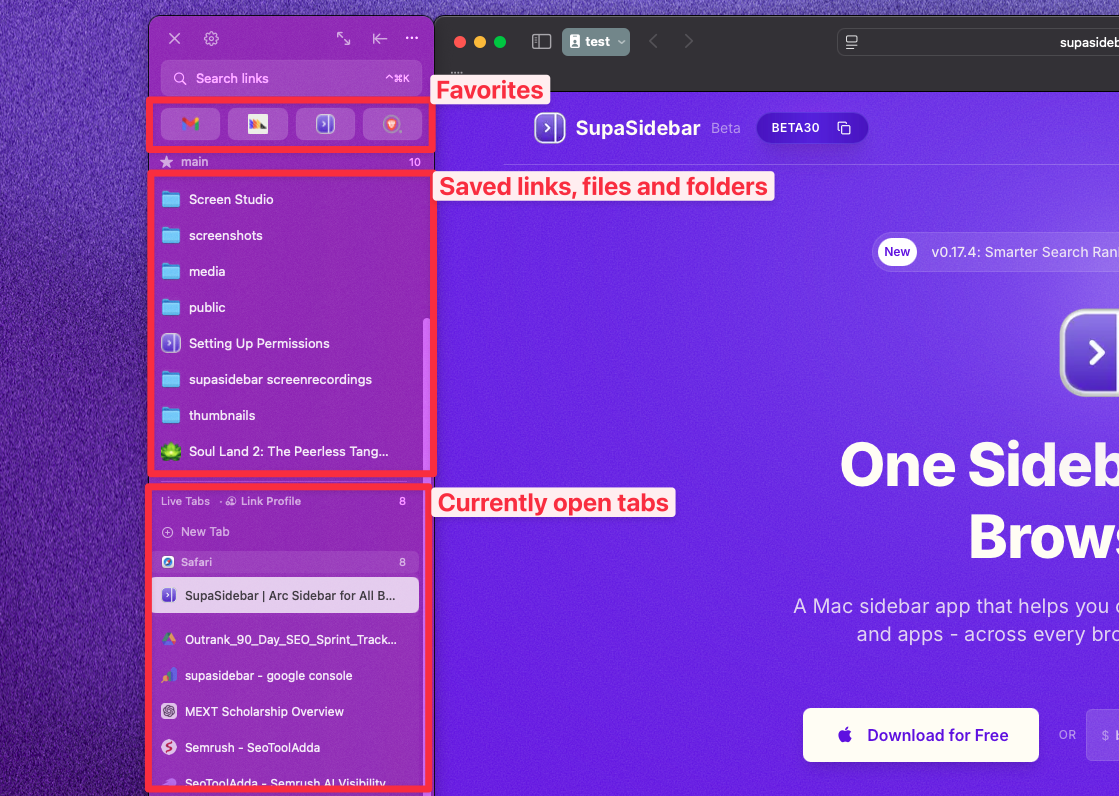
- Mac sidebar apps like SupaSidebar: a native macOS app that adds a persistent sidebar showing every open tab across every browser, without browser extensions.
SupaSidebar is built for exactly the Brave-and-Safari situation. It is a macOS app that runs alongside any browser and shows a unified sidebar across 25+ browsers including Safari, Chrome, Firefox, Arc, Zen, Vivaldi, Brave, Helium, and Dia. What it does specifically for a Brave-plus-Safari setup:
- Live Tabs across browsers: every open tab from Brave AND Safari (and any other supported browser) appears in one sidebar, grouped by browser, each with a real browser icon. Click a tab to jump straight to it in its native browser.
- Spaces: organize saved links into separate workspaces - a common split is one Space tied to Safari for personal browsing, one tied to Brave for everything else - with iCloud sync across Macs.
- Air Traffic Control (ATC): a rule system that routes URLs to the right browser automatically. Set "all
*.figma.comlinks open in Brave" once, and the next Figma link opens there regardless of which browser made the click. - Command Panel (⌘⌃K): fuzzy search across saved links, history, AND live tabs from every browser at once.
The free version covers 3 Spaces and all 25+ browsers, runs on macOS 14 or later, and imports an existing Arc sidebar in three clicks. The point is not to replace Brave or Safari - it is to stop treating the browser choice as the thing that has to solve tab management, when it structurally cannot.
Conclusion: What to pick
Brave vs Safari on a Mac in 2026: Safari is the better default for Apple-ecosystem users who want it already installed, integrated with iCloud Keychain and Handoff, and posting Apple's class-leading battery numbers (up to 24 hours of video on the M4 per Apple's specs). Brave is the better default for privacy with zero setup, default ad blocking that cut power 45% versus Safari in an independent BrowserBench test, the full Chrome Web Store, and cross-platform reach to Windows, Linux, and Android.
Different readers get different answers. Mac users deep in the Apple ecosystem who use Handoff and Apple Pay daily: Safari. Privacy-focused users who want ads blocked without installing anything: Brave. Anyone who needs a specific Chrome extension or develops against Chromium: Brave, for the engine. Users on a Mac running macOS older than Monterey: Safari, because current Brave will not install. Users who also work on Windows or Android: Brave, for one browser everywhere. And Mac power users running both browsers daily - the realistic majority - should pick the default that fits the ecosystem and accept that tab management is a separate problem to solve.
For Mac users running Brave and Safari side by side, a unified sidebar across both beats trying to keep tab state straight in each browser separately. Try SupaSidebar (free tier) if a Mac sidebar across both fits the workflow. For the full landscape including Chrome, Firefox, Edge, Zen, and the post-Arc options, the Mac browser guide covers every option.
Why we recommend SupaSidebar for the Brave-and-Safari setup
SupaSidebar is a macOS app that brings Arc's sidebar to every browser - one sidebar for tabs, bookmarks, files, and apps across 25+ browsers including Safari, Chrome, Firefox, Arc, Zen, Vivaldi, Brave, Helium, and Dia. For Mac users running Brave and Safari together, it solves the specific problem neither browser solves alone: seeing every open tab across both browsers in one place, saving any tab with a single keyboard shortcut regardless of which browser owns it, and routing new links to the right browser via rules instead of manual copy-paste. Free version available, runs on macOS 14+, and imports existing Arc sidebars in three clicks.
FAQ
Is Brave better than Safari on Mac in 2026?
It depends on the priority. Safari is better for Apple-ecosystem integration (iCloud Keychain, Handoff, Apple Pay) and ships with macOS. Brave is better for privacy with zero configuration (Brave Shields blocks ads and trackers by default), for the full Chrome Web Store, and for working across Windows, Linux, and Android. Neither is universally "better" - Safari suits ecosystem-first users, Brave suits privacy-first and cross-platform users.
Which uses less battery, Brave or Safari, on a Mac?
It depends on the workload. Apple's published specs give Safari up to 24 hours of video streaming on the M4 MacBook Pro - class-leading for light, idle use. But an independent powermetrics-based BrowserBench test measured Brave drawing 45% less average power than Safari during active browsing of ad-heavy sites, because Brave Shields strips out the ads and trackers that consume power. Safari wins idle and video; Brave wins heavy real-world browsing.
Is Brave's privacy actually better than Safari's?
Brave blocks ads and trackers by default; Safari limits tracking via Intelligent Tracking Prevention but still renders ads unless a content blocker is installed. Both are far more private than stock Chrome. Brave's edge is default ad blocking with zero setup. Safari's edge is Private Relay and Hide My Email for users with an iCloud+ plan. For privacy without configuration, Brave is the cleaner default.
Do I have to use the crypto features in Brave?
No. Brave Rewards and Brave Wallet are both entirely optional and can be fully disabled in settings. With them off, Brave behaves like a clean, fast, ad-blocking Chromium browser with no crypto UI anywhere. Brave is worth choosing for the privacy and extension reasons; the rewards layer is a bonus that can be ignored.
What macOS version does Brave require?
Current Brave requires macOS 12 Monterey or later. macOS Mojave, Catalina, and Big Sur are no longer supported - users on macOS 11 Big Sur are frozen on an older Brave build that no longer updates. Safari, by contrast, ships with whatever macOS version a Mac runs. On any Mac running Monterey through Tahoe, Brave installs and updates normally.
Can Brave run Chrome extensions on Mac?
Yes. Brave is built on Chromium, so it uses the full Chrome Web Store - over 200,000 extensions. Safari uses its own Safari Web Extensions API with roughly 250 listings. This is the most lopsided difference between the two browsers. Brave does inherit Chromium's Manifest V3 extension limits, but its built-in Brave Shields ad blocking is not an extension and is unaffected.
Should I use Brave and Safari at the same time on a Mac?
Many Mac users do - Safari for Apple-ecosystem tasks and battery-sensitive use, Brave for privacy-first browsing and Chrome extensions. The downside is tab sprawl: each browser is a closed island that cannot see the other's tabs. A Mac sidebar app like SupaSidebar shows live tabs from both Brave and Safari (plus 23+ other browsers) in one sidebar, with rule-based link routing and a single save-tab shortcut.
By Kshetez Vinayak, founder of SupaSidebar. Last updated May 15, 2026.