
By Kshetez Vinayak, founder of SupaSidebar. Last updated 2026-06-03.
Looking for something specific?
- Want the latest Arc news and updates? → Arc Browser Status Tracker
- Wondering if Arc is dead and what maintenance mode means? → Is Arc Browser Dead?
- Ready to keep the sidebar UX in any browser? → How to Replicate Arc's Features on Any Browser
- Comparing every Arc alternative? → Arc Browser alternative guide
- Want SupaSidebar side-by-side with Arc? → SupaSidebar vs Arc Browser
TL;DR
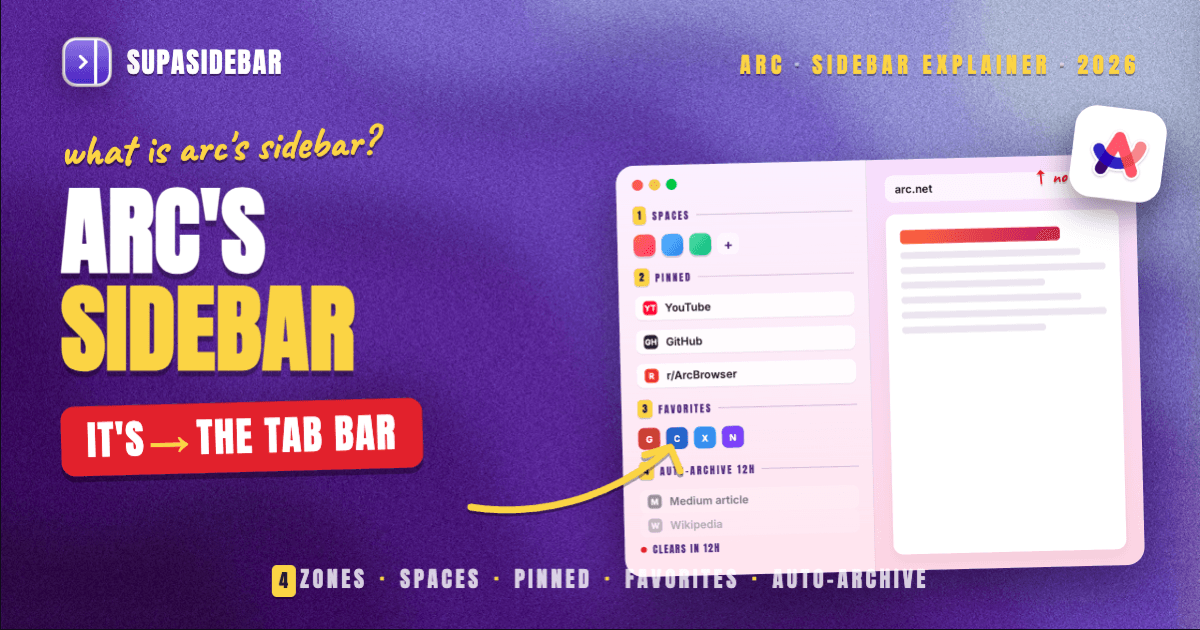
Arc Browser's sidebar is a vertical workspace panel on the left edge of the window that replaces the traditional horizontal tab bar. It holds four zones, Spaces at the top, pinned tabs in the middle, a favorites row, and an archived-tabs section that auto-clears after 12 hours by default. It is the feature most Arc users name as the reason they stayed, and the feature Dia and other successors have not matched. The Browser Company put the browser into maintenance mode in May 2025 (per the official Substack letter), and Atlassian acquired the company in September 2025, so the sidebar as a product is frozen but still functional.
What Arc's sidebar actually is
The Arc sidebar is a single vertical panel that sits permanently on the left side of the browser window. Tabs run top-to-bottom instead of left-to-right. The space that traditional browsers spend on a horizontal tab bar, a bookmark bar, and a URL field, Arc collapses into one column.
Three design decisions make it distinct from every other browser sidebar:
- Tabs live in the sidebar, not above the page. Arc does not have a horizontal tab strip. The sidebar IS the tab bar.
- The sidebar can be hidden. When hidden, the page takes the full width of the window, and the URL/command bar is summoned with ⌘T instead of being permanently visible.
- Tabs auto-archive. Unpinned tabs disappear after 12 hours by default (configurable in Settings, per the Arc Help Center). The sidebar is not a tab graveyard, it is meant to stay short.
That third point is the philosophical break with Chrome and Safari. In Chrome, tabs accumulate until the titles shrink to favicons. In Arc, tabs accumulate for half a day and then clean themselves up. The sidebar is built around the idea that a tab is a session, not a bookmark.
The four zones of the Arc sidebar
Reading top to bottom in any Arc window, the sidebar contains:
| Zone | What lives there | Behavior |
|---|---|---|
| Spaces row | A row of colored icons at the top, one per Space | Click to switch between work/personal/research contexts |
| Pinned tabs | Persistent tabs the user pinned, organized in folders | Survive the auto-archive, sync across devices |
| Favorites bar | Up to a few "always-visible" tabs that follow you across every Space | Like a global pin, shared across all Spaces |
| Open (unpinned) tabs | The session tabs, anything opened recently | Auto-archive after 12 hours unless pinned |
Each zone behaves differently. Pins are intentional, the user picked them. Favorites are even more intentional, picked once and surfaced everywhere. The bottom zone is the working memory, designed to be cleared.
Spaces are the unit users talk about the most. A Space is a named, color-coded container for pinned tabs and folders. Each Space has its own pinned-tabs section and its own auto-archive bucket. Switching from "Work" to "Personal" hides all the work tabs without closing them. It is the closest analog in mainstream browsers to having multiple profiles, except faster, lighter, and visible in one click instead of a profile switcher.
The command bar is part of the sidebar story
Arc's command bar (⌘T) is not technically the sidebar, but the two are designed together. When the sidebar is hidden, the command bar replaces the URL field. When the sidebar is visible, the command bar still handles new tabs, search, navigation, and switching to existing tabs by name.
The point: Arc's sidebar is not a panel bolted onto a normal browser. The URL bar, the tab list, and the bookmarks bar are all collapsed into the sidebar + command bar pair. That is why other browsers' "sidebar features" feel different even when the UI looks similar.
How Arc's sidebar differs from Chrome, Edge, Safari, and Vivaldi sidebars
Other browsers have sidebars. None of them work the way Arc's does.
| Browser | What it calls a sidebar | What it actually is |
|---|---|---|
| Chrome | Side panel | A panel for bookmarks, reading list, and history. Tabs are still in the horizontal tab bar. |
| Edge | Sidebar | A panel for Copilot, search, and tools. Tabs are still horizontal. Vertical tabs is a separate, optional view. |
| Safari | Sidebar | Toggleable panel for Tab Groups, bookmarks, reading list. Horizontal tab bar stays. |
| Firefox | Sidebar | Bookmarks, history, synced tabs. Vertical tabs shipped in Firefox 136 in March 2025 as a separate feature. |
| Vivaldi | Panels | A column of icons that opens contextual panels (notes, mail, tab list). Vertical tabs available separately. |
| Brave | Vertical tabs | A vertical tab strip. Spaces and pinned-folder hierarchy are not present. |
| Arc | The sidebar | The tab bar, the pin list, the bookmarks bar, and the Spaces switcher, all in one column. The horizontal tab bar is gone. |
The pattern is clear: Chrome, Edge, Firefox, Safari, and Vivaldi treat the sidebar as an extra panel beside the existing tab bar. Arc treats the sidebar as a replacement for the tab bar. That replacement is what users describe when they say "Arc's sidebar" and what they keep failing to find when they switch to other browsers.
What Arc users specifically loved about it
The Arc subreddit and the broader Mac-app community return to the same list of details when asked what kept them on Arc. From a recent r/ArcBrowser thread on leaving and coming back:
- The vertical layout solves favicon-shrink. Tab titles in a vertical sidebar can be long enough to read, even with 30 tabs open. Horizontal tab bars run out of width at 8-10 tabs.
- Spaces switch contexts without closing tabs. One click and the work tabs vanish, the personal tabs appear. Closing and reopening tabs is the alternative.
- Auto-archive removes the "should I close this tab" decision. The browser handles it. The pin list is the keep-list.
- The hidden-sidebar mode reclaims the full window width. When focus matters, the sidebar goes away entirely, and the command bar stands in for the URL field.
Quoting one Arc user who tried every alternative and went back:
"I do like [Dia] but the vertical tabs sidebar is nowhere near as nice as Arc. In fact, I tried the sidebar in Dia and it's just not the same as Arc so I've largely kept it at horizontal tabs."
That post is the single clearest description of the gap. Other browsers have added vertical sidebars after Arc, but the sidebar as designed in Arc is still not duplicated anywhere else.
How to get this without using Arc
Arc's sidebar is still functional in 2026, just frozen, but for people who want the sidebar UX in a browser that is still getting updates, the practical answer is to keep using a maintained browser (Safari, Chrome, Brave, or Zen) and layer an Arc-style sidebar on top of it. The complete walkthrough lives in the how-to guide on replicating Arc's features on any browser. That post handles the setup; this post is the definitional explainer.
Conclusion: what "Arc's sidebar" means in one paragraph
Arc Browser's sidebar is the vertical, four-zone workspace panel that replaced Arc's tab bar, bookmark bar, and URL field with a single column containing Spaces, pinned tabs, favorites, and auto-archiving session tabs. It is the feature Arc users keep naming as the reason they stayed, and the feature that no mainstream browser has matched even after Arc entered maintenance mode in May 2025. Anyone evaluating Arc replacements in 2026 should focus less on "does this browser have a sidebar" and more on "does this sidebar replace the tab bar or just add a panel next to it", because that is the actual design decision Arc made. For readers who want the sidebar UX without staying on a frozen browser, the feature-by-feature replacement walkthrough is the next stop.
Frequently Asked Questions
What is Arc Browser's sidebar?
Arc Browser's sidebar is a vertical panel on the left side of the window that replaces the traditional horizontal tab bar. It holds four zones: a Spaces row at the top, pinned tabs in folders below, a favorites bar shared across Spaces, and auto-archiving session tabs at the bottom. Unlike Chrome's, Edge's, or Safari's sidebar (which sits beside the tab bar), Arc's sidebar IS the tab bar.
How does Arc's sidebar work?
The sidebar combines four things that other browsers keep separate. Spaces let users switch between named, color-coded contexts (work, personal, research) with one click. Pinned tabs persist and sync. The favorites bar surfaces a few global tabs across every Space. Open tabs at the bottom auto-archive after 12 hours by default, configurable in Settings, so the sidebar stays short instead of accumulating like Chrome's tab bar.
What are Arc Spaces?
Spaces are named, color-coded containers inside the Arc sidebar. Each Space has its own pinned tabs, its own folders, and its own auto-archive bucket. Switching Spaces hides one set of tabs and reveals another without closing anything. It is similar to having multiple browser profiles but faster to switch and lighter to maintain.
Why is Arc's sidebar different from Chrome's or Safari's sidebar?
Chrome, Edge, Safari, and Firefox treat their sidebars as extra panels next to the existing tab bar (bookmarks, reading list, AI chat, etc.). Arc removed the horizontal tab bar entirely and put the tab list inside the sidebar. That structural decision is what makes Arc's sidebar feel categorically different rather than just a vertical-tab option.
Is Arc's sidebar still available in 2026?
Yes, Arc as a product still works in 2026. The Browser Company put Arc into maintenance mode on May 27, 2025 (per the official Substack letter), meaning bug and security fixes only, no new features. Atlassian acquired The Browser Company in September 2025. The sidebar still exists and works, it is just frozen.
Did Dia replace Arc's sidebar?
Not in feature parity. Dia added vertical tabs, a sidebar mode, pinned tabs, and a focus mode in November 2025, but Arc users who tried Dia consistently report that the sidebar "is not the same as Arc". Dia uses profiles instead of Spaces, and the command bar was replaced with an AI chat. The structural decisions are different.
What is the difference between Arc's sidebar and Arc's command bar?
The sidebar is the persistent left panel that holds Spaces, pinned tabs, and session tabs. The command bar (⌘T) is a separate overlay for typing URLs, searching, switching to existing tabs by name, and opening new tabs. They are designed together, the command bar replaces the URL field when the sidebar is hidden, but they are not the same surface.
By Kshetez Vinayak, founder of SupaSidebar. Last updated 2026-06-03.