
By Kshetez Vinayak, founder of SupaSidebar. Last updated May 16, 2026.
TL;DR:
ADHD tab hoarding is a working memory adaptation - each open tab compensates for information the brain cannot reliably hold in mind. Standard "just close what you don't need" advice fails because it demands executive function, the exact cognitive resource ADHD affects. What works instead: making everything findable (so closing feels safe), using spatial organization that matches how ADHD attention moves, and externalizing mental context into something persistent and visible. SupaSidebar addresses these three needs with cross-browser fuzzy search, persistent Spaces, and an always-visible sidebar across Safari, Chrome, Firefox, Brave, and 25+ browsers in total.
Sixty tabs. Titles compressed to unreadable favicons. Three browsers running simultaneously, each holding a different thread of whatever got interesting 20 minutes ago. Sound familiar?
For people with ADHD, this is not a discipline problem. It is a cognitive adaptation. Every open tab is a thought externalized, a "don't forget this" anchor placed in the environment because the brain's working memory cannot reliably hold it. Research on ADHD and working memory confirms that reduced working memory capacity is a core ADHD trait, and the browser tab bar has become the default prosthetic memory for millions of people navigating the internet with ADHD.
The problem is not the tabs. The problem is that browsers were designed for people who open five tabs, use them, and close them. That is not how ADHD works.
Why ADHD Brains Hoard Tabs (The Neuroscience)
The typical advice for tab overload - "just close what you don't need" - misses the point entirely for ADHD. Neurotypical tab management assumes several things: the ability to remember what each tab was for, trust that the information can be found again, quick decision-making about what is "important" versus "not important," and doing the organizational work without getting derailed for 45 minutes. For ADHD, every single one of those assumptions breaks down.
Tabs as prosthetic memory.
Dr. Russell Barkley's research on executive function and self-regulation in ADHD establishes that ADHD brains have reduced capacity to hold information in mind while doing other things. Open tabs compensate for this deficit. Each tab is a physical reminder that something exists, that a task was in progress, that a piece of information matters. Closing a tab removes that external anchor with no guarantee the brain will reconstruct the context later.
Loss anxiety is functional, not dramatic.
When a research tab closes and the brain cannot reliably retrieve "what was that article about cognitive load?" - that tab is genuinely gone. The ADHD brain knows this and resists closing. Research from Different Brains confirms that people with ADHD try to supplement working memory using browser tabs, and the anxiety about closing them is a rational response to a real cognitive limitation.
Tab switching IS the ADHD workflow.
Neurotypical productivity advice says "focus on one task." ADHD brains often work better by cycling between contexts - reading three paragraphs of an article, switching to reply to an email, jumping back to the research, opening a new tangent that suddenly becomes interesting. Studies on attentional set shifting in ADHD show that while context switching costs are higher for ADHD individuals (approximately 50% greater than neurotypical controls in cognitive switching tasks), the cycling pattern itself is how ADHD attention regulation actually functions. The tabs accumulate as a natural byproduct.
The shame spiral compounds the problem.
Guilt about having "too many tabs" creates avoidance. The tab bar becomes something to not look at. More tabs accumulate. Tab bankruptcy - closing everything - provides temporary relief but destroys working context, and the cycle restarts within 24-48 hours.
If you want a judgment-free read on where you sit, the 30-second Tab Hoarder quiz gives you a score and one fix matched to how you browse - no "just close them" advice.
Why Standard Tab Management Advice Fails for ADHD
Most "fix your tabs" guides recommend systems that rely on executive function - the exact cognitive resource ADHD affects most.
"Use tab groups."
Tab groups require categorizing tabs as they open. That is an executive function tax on every single new tab. For ADHD brains, adding friction to tab-opening means the system gets abandoned within a week. The result: four named tab groups and 30 ungrouped tabs.
"Use a read-later app."
Saving to Pocket or Instapaper requires a decision ("is this read-later or active?") and trust ("the app will be checked later"). ADHD brains know the truth: Pocket becomes another inbox that never gets checked. Out of sight, out of mind is literal for ADHD, not figurative. (Side-by-side: SupaSidebar vs Pocket.)
"Set a tab limit."
Extensions that cap tab count create pressure without solving the underlying need. The limit gets hit, overridden, and ignored. Or worse - something important gets closed, and two hours disappear trying to find it again.
"Just bookmark everything."
Bookmarks are where tabs go to die. The act of bookmarking feels productive but creates no ongoing visibility. With 200+ bookmarks and no consistent folder system, finding anything requires the same kind of search-and-retrieval that ADHD brains struggle with. The tab is bookmarked, but it will never be found. (For those who do want a session-saving approach that actually works, how to save all open tabs covers the full set of methods across browsers.)
The common thread: these solutions add organizational overhead and reduce visibility. ADHD needs the opposite - less overhead, more visibility.
What Actually Works: ADHD-Friendly Tab Strategies
The strategies that stick for ADHD brains share three properties: low activation energy (they work without requiring a stop-and-organize step), persistent visibility (important things stay visible without effort), and safe closing (tabs can be closed knowing the information will be found again).
Strategy 1: Make Everything Findable (So Closing Feels Safe)
The root cause of tab hoarding is "this might not be findable again." Remove that fear and closing becomes easy.
Universal tab search solves this directly. Instead of scanning 60 tab titles (impossible when they are 2 pixels wide), typing a few characters finds the tab instantly across every open browser.
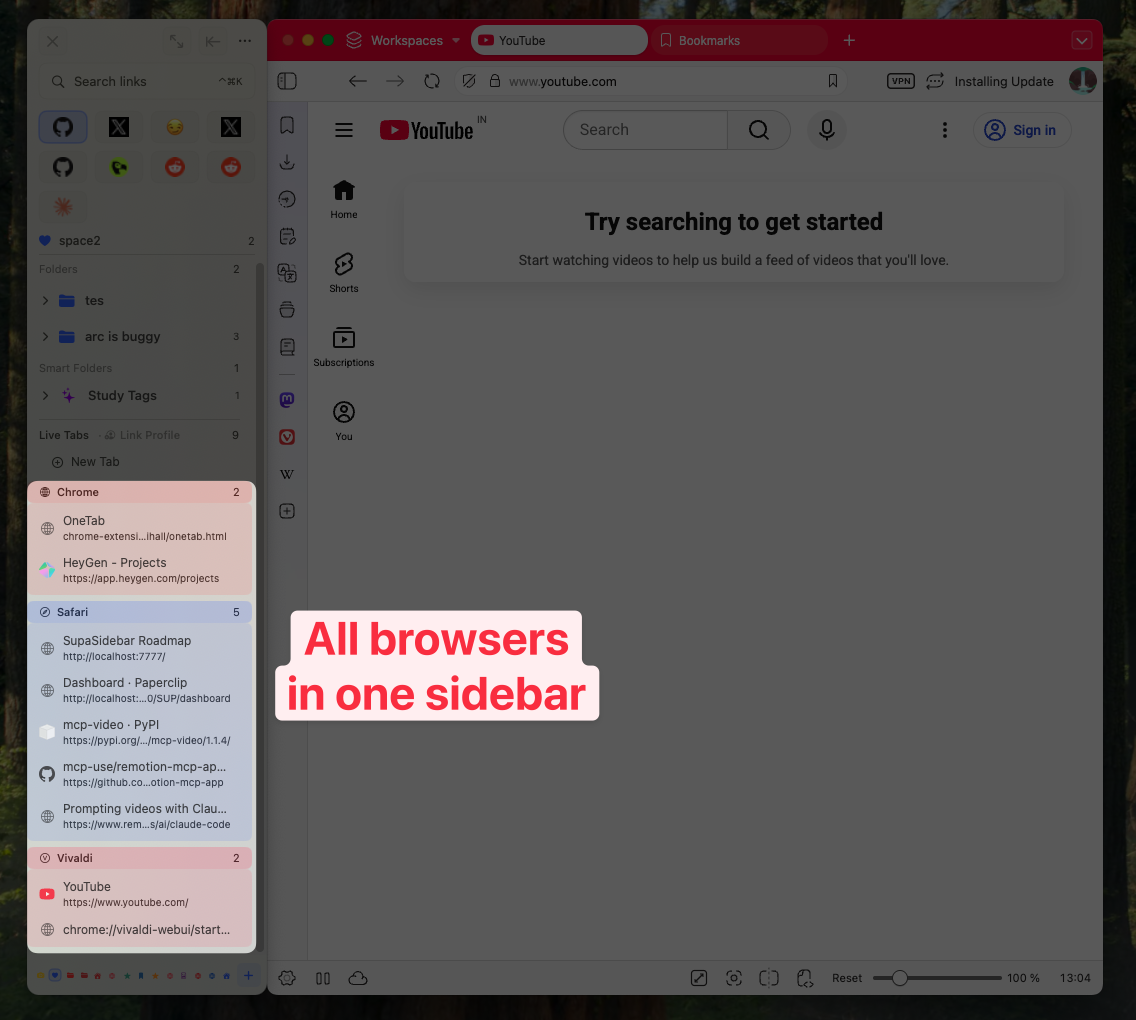
SupaSidebar's Command Panel (⌘⌃K) provides exactly this - fuzzy search across all open tabs in Safari, Chrome, Firefox, Brave, and any other connected browser. Type "research" and see every tab with "research" in the title or URL, regardless of which browser holds it. Finding a tab takes 2 seconds instead of 30 seconds of scrolling through compressed favicons. (Walkthrough: find an open tab instantly on Mac.)
When finding things is instant, closing stops being scary. Keeping 15 tabs visible "just in case" becomes unnecessary when any of them can be pulled up in a keystroke.
Strategy 2: Use Spatial Organization (Spaces, Not Folders)
ADHD brains respond well to spatial memory - remembering WHERE something was, even when the name is forgotten.
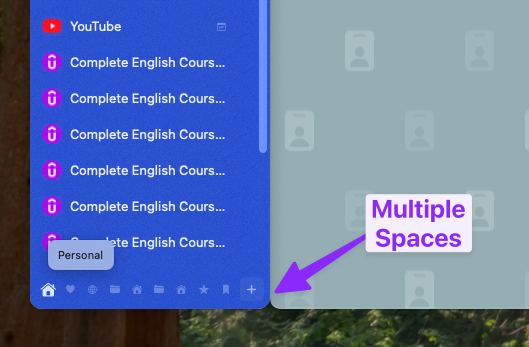
SupaSidebar Spaces work better than tab groups for ADHD because they create distinct visual contexts. Instead of "Work tab group" (a text label that requires reading), each Space looks and feels different - different pinned tabs, different saved links, different browser associations. A "Research" Space holds reference tabs, citation tools, and notes. A "Work" Space holds Slack, project management, and email. Switching between Spaces is one click, and each Space holds its own context independently.
The ADHD-specific advantage: when attention gets pulled into a different task (and it will), the previous context sits exactly where it was left, in its Space. No tab archaeology required to reconstruct where things were.
Strategy 3: Externalize the "Don't Forget" List
Instead of keeping tabs open as reminders, the reminder function can move to something persistent and always visible.
A sidebar pinned next to the browser serves as continuous peripheral awareness. Important links, active project tabs, and saved resources stay visible WITHOUT being open tabs consuming memory and CPU.
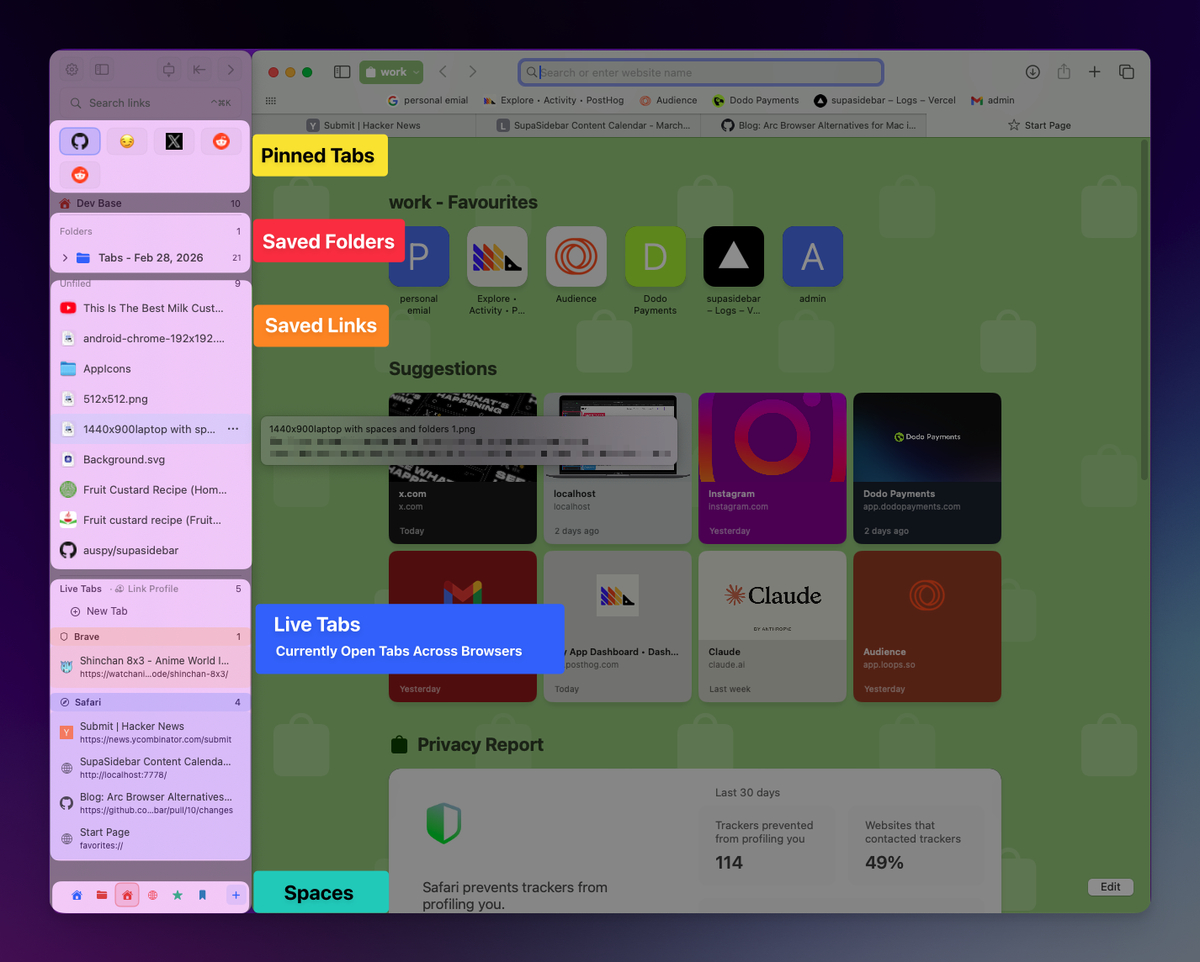
SupaSidebar's saved links and pinned tabs function specifically as this externalized memory. Pinning the five things needed for a current project and saving the ten links referenced weekly means they are always visible in the sidebar, whether or not they are open as tabs. The sidebar is persistent across browser sessions - it does not disappear when a browser restarts.
Strategy 4: Embrace the Multi-Browser Reality
Many people with ADHD run multiple browsers - Chrome for work (Google Workspace SSO), Safari for personal (iCloud sync), maybe Firefox for research or Brave for privacy. This is a reasonable response to different contexts, not a problem to fix.
But it multiplies the tab problem. Thirty tabs in Chrome AND 25 in Safari AND 15 in Firefox. Each browser has its own search, its own history, its own tab management. Nothing talks to anything else.
SupaSidebar is a macOS sidebar app that brings all browser tabs into one persistent panel - one sidebar for tabs, bookmarks, files, and apps across Safari, Chrome, Firefox, Brave, and 25+ browsers in total. The Live Tabs feature shows every open tab from every connected browser in real time. No more switching between three browsers to find a tab that was "somewhere."
For ADHD, this reduces the number of places to look, which directly reduces executive function demand. One place to search, one place to scan, one persistent sidebar instead of three separate browser interfaces. (More on this pattern: why multi-browser users need a unified sidebar.)
Strategy 5: The 5-Minute Weekly Tab Sweep
Complete tab bankruptcy - closing everything - feels liberating for about four hours. Then the same 50 tabs are back. A sustainable alternative:
The Friday 5-minute sweep.
Once a week, five minutes with a timer (ADHD brains respond to timers). For each tab: save it to the sidebar if it will be needed again, close it otherwise. Five minutes, not fifty. If the sweep is not finished, stop anyway. The goal is maintenance, not perfection.
Recent Tabs as a safety net.
SupaSidebar keeps a history of every tab visited, even across browsers. Closed something important? Search Recent Tabs and reopen it. This makes the weekly cleanup low-risk - nothing is permanently gone.
Tool Comparison: What Works for ADHD Tab Management
Not every tool works for every ADHD brain. Here is an honest assessment of the available options and their ADHD-specific tradeoffs.
| Tool | What It Does | ADHD Strengths | ADHD Weaknesses | Platform |
|---|---|---|---|---|
| SupaSidebar | Cross-browser sidebar with Spaces, Command Panel, persistent saved links, Live Tabs | Low friction, always visible, works across 25+ browsers, instant fuzzy search, persistent Spaces | macOS only | macOS 14+ |
| Workona | Tab manager + workspace organizer | Good workspace metaphor, auto-saves tabs | Chrome only, subscription model, complex setup | Chrome extension |
| OneTab | Converts all tabs to a list with one click | Instant declutter, extremely simple | Out of sight = forgotten for ADHD, Chrome only, known data loss issues | Chrome extension |
| Sidebery | Tree-style sidebar tabs | Visual hierarchy, always visible sidebar | Firefox only, requires configuration | Firefox extension |
| Session Buddy | Save and restore tab sessions | Good for "tab bankruptcy" recovery | Chrome only, no persistent visibility | Chrome extension |
| Tab Session Manager | Cross-browser session save/restore | Works on Firefox and Chrome, auto-save | No sidebar visibility, requires manual restore | Browser extension |
The core distinction: most tab management tools are Chrome-only extensions that solve the single-browser problem. For ADHD users running multiple browsers (which is common, because context separation across browsers is part of the ADHD workflow), single-browser tools leave the bigger problem untouched. SupaSidebar is the only option that unifies tabs across all browsers into one persistent, always-visible sidebar. For a deeper comparison of tab-saving extensions specifically, see the best tab saver extensions comparison.
The ADHD Tab Management Stack
After building a tab management app used by Mac users across 25+ browsers and hearing directly from users with ADHD about how they actually work, the minimum viable system comes down to five components:
-
A universal search tool
so any tab can be found in under 3 seconds. SupaSidebar's Command Panel (⌘⌃K) searches across all browsers at once. Browser-specific search shortcuts (⌘⇧A in Chrome, ⌘⇧L in Safari) work for single-browser setups.
-
Spaces or workspaces
to separate contexts visually. SupaSidebar Spaces create distinct containers for different projects or life areas. Separate browser windows per project also work, though they lack persistence.
-
A persistent sidebar
for the top 10-15 links referenced constantly. SupaSidebar's pinned tabs and saved links provide this. A well-curated browser bookmark bar serves a similar function, though without cross-browser visibility.
-
A weekly 5-minute cleanup
with a timer. Not a deep organizational session. Five minutes maximum.
-
Permission to have 20 tabs open.
Twenty well-organized tabs in a sidebar is fine. The goal is not zero tabs. The goal is tabs that can be found and used without a 30-second search.
What This Is Not
This is not medical advice. ADHD is a clinical condition with evidence-based treatments including medication, cognitive behavioral therapy, and coaching. Tab management tools are environmental accommodations, not treatment. For anyone who relates to everything in this post but has not been evaluated for ADHD, speaking with a professional is worth considering.
This is not "ADHD is your superpower." Tab hoarding is frustrating. Executive dysfunction is real. The strategies here are practical accommodations for a genuine challenge, not a reframing of difficulty as a quirky productivity hack.
This is not a complete ADHD productivity system. Tabs are one piece of the digital environment. Task management, time management, and emotional regulation are separate challenges that need separate strategies. For the general (non-ADHD-specific) tab overload problem on Mac, the guide to fixing too many open tabs on Mac covers the broader browser-by-browser approach.
Conclusion: Working With ADHD Attention, Not Against It
ADHD tab hoarding is a working memory adaptation that affects an estimated 8.7% of adults navigating increasingly tab-heavy digital workflows. The fix is not fewer tabs - it is better infrastructure around the tabs: instant search so closing feels safe, spatial organization that matches how ADHD attention moves, and persistent visibility so the brain does not need to hold everything in working memory.
For single-browser users on macOS, Sidebery (Firefox) or built-in tab groups (Chrome/Safari) provide some of these properties. For multi-browser users - which is common among ADHD users because context separation across browsers is part of the workflow - SupaSidebar is the only tool that unifies everything into one searchable, persistent sidebar. The Command Panel (⌘⌃K) alone removes the "what if this can't be found again" anxiety that drives most tab hoarding.
Try SupaSidebar free - see if cross-browser search and Spaces change how tab management feels.
Why SupaSidebar for ADHD Tab Management
SupaSidebar is a macOS app that brings Arc's sidebar to every browser - one sidebar for tabs, bookmarks, files, and apps across 25+ browsers including Safari, Chrome, Firefox, Arc, Zen, Vivaldi, Brave, Helium, and Dia. Several features directly address the ADHD tab patterns described in this post: Command Panel (⌘⌃K) provides instant cross-browser fuzzy search, eliminating the "can't find it" anxiety. Spaces create persistent visual context separation for different projects or life areas. The always-visible sidebar keeps important links accessible without them being open tabs. And Live Tabs across multiple browsers means one place to look instead of three.
Frequently Asked Questions
Is ADHD tab hoarding actually different from normal tab hoarding?
Yes, in both degree and cause. Everyone accumulates tabs, but ADHD tab hoarding is driven by working memory deficits - each tab compensates for information the brain cannot reliably hold in mind. Neurotypical tab hoarding is usually about procrastination or loose organizational habits. ADHD tab hoarding is a functional adaptation to a cognitive difference. Effective fixes must account for this: reducing the memory demand, not just reducing the tab count.
How many tabs is "too many" for someone with ADHD?
There is no universal number. The real question is whether any tab can be found within 10 seconds. If yes, the tab count is fine, even at 40. If minutes are spent searching across browsers or reopening things that were closed, the system is broken regardless of count. SupaSidebar's Command Panel makes 40+ tabs manageable because fuzzy search across all browsers is instant. Without cross-browser search, even 20 tabs become overwhelming when titles are truncated to favicons.
Will closing all tabs help with ADHD overwhelm?
Short-term, yes - tab bankruptcy provides immediate relief from visual clutter. Long-term, no - the tabs return within 24-48 hours because the underlying working memory need has not changed. A better approach: move essential tabs into a persistent sidebar or Spaces, then close the rest. This provides the visual relief without destroying working context.
Can a sidebar app replace a read-later app for ADHD?
For many ADHD users, yes. Read-later apps like Pocket fail for ADHD because they rely on "out of sight, check later" behavior, which ADHD makes unreliable. A sidebar keeps saved links visible at all times, in the peripheral vision, next to the browser. SupaSidebar's pinned tabs and saved links serve the "save for later" function while maintaining the visibility that ADHD requires. The key difference: Pocket hides content behind an app switch; SupaSidebar keeps it one glance away.
What is the difference between SupaSidebar Spaces and browser tab groups?
Tab groups are colored labels inside one browser window - they organize tabs but do not change the visual context or persist across sessions. SupaSidebar Spaces are separate containers that persist across browser restarts, each with their own pinned tabs, saved links, and folder structure. For ADHD, the critical difference is that Spaces provide spatial and visual separation (being "in" a different context), while tab groups are labels within the same overwhelming tab bar. Spaces also work across multiple browsers, which tab groups cannot do.
Do ADHD users actually need multiple browsers?
Many do, and it is a reasonable adaptation. Chrome for work (SSO, Google Workspace), Safari for personal (iCloud sync, Apple Pay), Brave or Firefox for privacy-sensitive browsing. Each browser creates a natural context boundary. The problem is that each browser has its own tab management, search, and history. SupaSidebar solves this by providing one unified sidebar that shows Live Tabs from all connected browsers in real time - the context separation stays, but the fragmentation goes away.
By Kshetez Vinayak, founder of SupaSidebar.