
By Kshetez Vinayak, founder of SupaSidebar. Last updated June 15, 2026.
TL;DR:
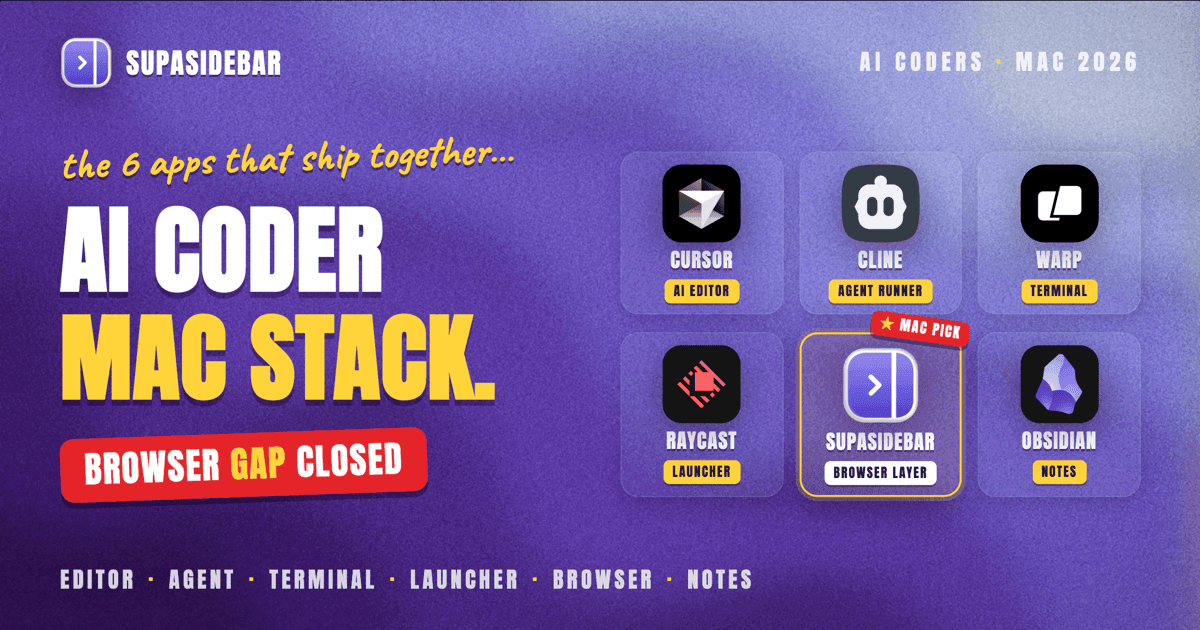
The Mac stack that actually composes into an AI coding workflow in 2026 is six categories deep: an AI-native editor (Cursor or Claude Code), a terminal that understands AI (Warp), a launcher to glue everything together (Raycast), browser-context tools that let the agent see your open tabs (SupaSidebar via MCP), an open-source agent runner (Cline or Aider) for repo-wide tasks, and a notes layer (Obsidian) that doubles as the agent's long-term memory. The order matters less than how they connect. The piece most stacks miss is the browser, and that is where AI coding sessions still break down today. Rankings, picks per persona, and setup notes below.
Quick navigation:
- What is "vibe coding" and how does MCP fit in? → Vibe coding with SupaSidebar via MCP
- Why do AI assistants ignore open browser tabs? → Claude can't see your browser tabs
- Just want a clean dev browser setup, not an AI stack? → Browser setup for developers on Mac
What "AI coding" actually means on Mac in 2026
The AI coding stack is no longer "VS Code plus Copilot." The default 2026 workflow looks like this: an AI-native editor that runs agentic edits across multiple files, a terminal that explains its own output, an MCP layer so the agent can read external context (browser tabs, Linear, Slack, Figma), and a launcher that keeps everything one keystroke away. The pieces overlap; pick the ones that fit the workflow rather than collecting the full set.
Three constraints shape every decision below:
- Agents read your codebase, your terminal, and your files. They do NOT, by default, read your browser. That gap is the single biggest source of friction in AI coding workflows, and it is what MCP servers are increasingly built to close.
- Latency compounds. Every app switch, every URL copy-paste, every "what was that prompt from last week" tax is multiplied across hundreds of agent turns per day. The tools that save 5 seconds per turn save 30 minutes per session.
- Mac-native still matters. Electron tools dominate AI coding (Cursor, VS Code, Claude Desktop, Cline). The Mac-native apps in the stack (Raycast, Warp, native sidebars) are the glue that compensates for Electron's lack of system integration.
The six categories that make up the stack
1. AI-native editor: Cursor or Claude Code
Cursor
is the default for most AI coders on Mac in 2026. It is a VS Code fork with three things VS Code does not have natively: an agent mode that runs multi-file edits, an @codebase symbol that gives the model project-wide context, and a Cmd+K inline edit prompt that beats Copilot for surgical changes. Cursor's free tier is generous; Pro is around $20/month at time of writing, with Business at $40 per seat (verify on cursor.com - pricing changes).
Claude Code
is Anthropic's CLI-first agent. It runs in the terminal, not the editor, and it is built around long-running agent tasks that can plan, execute, and verify across multiple turns without per-step approval. The trade-off: Claude Code is less interactive than Cursor for line-by-line work but better for "implement this whole feature" tasks where the agent owns the full lifecycle. Pricing depends on the underlying Claude API; flat-rate plans are also available via the Claude Pro / Max tier.
The honest take:
most working AI coders run both. Cursor for inline edits, refactors, and "rewrite this function" prompts. Claude Code for "implement this PR end-to-end" tasks. Switching cost is low because both can read the same codebase.
2. Agent runner: Cline, Aider, or Continue
The category most stacks underweight. Editor-integrated agents (Cursor, Copilot) work best for in-flow edits. Standalone agent runners shine when the task is bigger than the editor's context window or when the workflow needs full control over prompts and tool calls.
Cline
(formerly Claude Dev) runs inside VS Code as an extension but acts as a full agent: plans, executes shell commands with approval, edits files, reads docs. It is open source and bring-your-own-key, which makes it cheaper than Cursor for heavy use if the underlying API cost is lower than Cursor's subscription. The trade-off: every action requires approval by default, which is safer but slower.
Aider
is terminal-first, git-native, and built around the "every change is a commit" pattern. It auto-commits every agent edit so the diff history IS the agent's audit trail. Power users love it. The learning curve is steeper than Cursor; the reward is fine-grained control over what the agent touches.
Continue
is the VS Code extension that closest resembles Copilot's UX but with custom model support. Use it if the workflow is Copilot-shaped but the team wants to use Claude, Gemini, or a local model instead.
The pick:
Cline for one-off agentic tasks that need terminal access. Aider for git-native workflows. Continue for teams transitioning from Copilot.
3. AI-native terminal: Warp
Warp replaces iTerm or Terminal.app with a terminal that has AI built in. Three features matter for AI coding: AI command suggestions (describe what you want in plain English, get the command), error explanation (pipe a stack trace, get a fix), and Warp Drive (shared command notebooks across the team). Warp is free for individual use; paid tiers add team collaboration features.
The reason Warp matters in the AI coding stack: most agentic workflows still produce terminal output that the human has to interpret. A terminal that pre-interprets errors and suggests next commands cuts the "what does this error mean" loop dramatically. For Claude Code and Cline users specifically, Warp is the natural home for the agent's runtime context.
Alternatives worth knowing: Wave Terminal (open source, similar AI features), Ghostty (no AI, but fastest GPU-rendered terminal on Mac if performance matters more than AI features).
4. Launcher and glue: Raycast
Raycast is the keyboard-driven launcher that ties the stack together. The relevant features for AI coding: the Raycast AI chat (Cmd+Space, ask a question, get an answer without leaving the keyboard), AI commands (custom prompts callable by keyword), and extensions for Linear, GitHub, Notion, Vercel, and every other dashboard a coder lives in.
The argument for Raycast in this stack is mundane and important: app switching is the friction tax. Raycast collapses "switch to Linear, find the issue, copy the title, switch back to Cursor, paste" into a 4-keystroke command. Multiply that across an AI coding session and the savings are real.
Raycast Pro is $8/month (verify on raycast.com); the free tier covers the launcher and most extensions.
5. Browser context layer: SupaSidebar via MCP
SupaSidebar via MCP is the browser-context layer for AI coding: it hands Claude, Cursor, or any MCP client a live view of every open tab across every browser, so the agent reads what is on screen instead of waiting for copy-paste. The category most AI coding listicles skip. Agents can read your codebase, your terminal, and your filesystem. By default they cannot read your browser. The docs page open in Chrome, the Stack Overflow tab in Safari, the localhost preview in Arc, the GitHub issue in Firefox - all invisible to the agent unless something bridges them.
This is the browser context problem, and it is the single biggest gap in most AI coding workflows. The typical workaround is the manual copy-paste loop: switch to browser, copy URL, switch to Claude or Cursor, paste, add context, switch back. The Anthropic team shipped MCP in November 2024 specifically to close this kind of gap, and one of the natural fits for MCP is browser-tab access.
It exposes Live Tabs across 33 browsers (Safari, Chrome, Firefox, Edge, Arc, Brave, Vivaldi, Comet, and Dia, counting channel variants) through an MCP server. With it connected to Claude Desktop, Cursor, or any MCP-compatible client, the agent can list every open tab across every browser, search by title or URL, and act on them - without the human becoming the URL-pasting middleman.
The setup is one server entry in the MCP client config; full walkthrough at Vibe coding with SupaSidebar MCP. The free tier covers MCP access; details at supasidebar.com.
A Reddit comment from a web developer who runs four browsers for cross-browser testing summed up the fit: "As a web dev could be really useful the amount of browsers i have" - r/macapps, on the first SSB post. The use case is exactly this: when the testing workflow already spans Chrome + Safari + Firefox + Brave, the AI coding workflow inherits that browser sprawl, and the agent needs a way to read across all of it.
6. Notes and agent memory: Obsidian
Every AI coding workflow eventually needs a place to store the prompts, snippets, and decisions that emerge from agent sessions. The shared answer in 2026 is Obsidian: local-first markdown files, plugin ecosystem deep enough to integrate with Claude/Cursor/Raycast, and a file format the agent can natively read.
The advanced pattern: point the agent at the Obsidian vault as a knowledge base. Cursor's @docs directive, Cline's read-file tool, and Claude Code's filesystem access all work natively with markdown. The agent's "long-term memory" becomes whatever the human chose to write down. Cheaper and more controllable than vector-database-as-memory architectures, and there is no API cost.
Alternatives: Notion (better collaboration, worse local-first story), Logseq (more structured, smaller plugin ecosystem), Apple Notes (works fine, no agent integration).
The honest "which app per persona" pick
Different AI coding workflows need different subsets of the stack. The comparison table below covers the three most common personas:
| Persona | Editor | Agent runner | Terminal | Launcher | Browser layer | Notes |
|---|---|---|---|---|---|---|
| Solo indie / vibe coder | Cursor | Cursor agent + occasional Cline | Warp | Raycast | SupaSidebar via MCP | Obsidian |
| Senior IC at a startup | Cursor + Claude Code | Aider for git-native tasks | Warp | Raycast | SupaSidebar via MCP | Obsidian + Notion |
| Open-source contributor | Claude Code + Aider | Aider (git-first) | Warp or Ghostty | Raycast | SupaSidebar via MCP | Obsidian |
Notice the constants: Warp + Raycast + SupaSidebar (for browser context) + Obsidian show up in every row. The editor and agent runner are where workflows diverge.
What about Copilot, Codeium, and Tabnine?
Inline-completion-only tools belong to a previous generation of the stack. GitHub Copilot is still excellent at line-by-line autocomplete and pair-programming-style suggestions, and many developers keep it on alongside Cursor for the autocomplete layer specifically. Codeium and Tabnine occupy similar ground, with stronger free tiers.
The honest framing: completion tools are a feature, not a stack. They live inside the editor (Cursor, VS Code) and complement agent-runner tools rather than competing with them. Most AI coders run Cursor with Copilot disabled (Cursor's tab completion is comparable) but keep Copilot as a fallback for the rare moments Cursor's offline.
Setup notes the listicles skip
A few things that matter and rarely show up in app roundups:
API key hygiene.
AI coding workflows route API keys to Cursor, Cline, Claude Code, Warp, and Raycast simultaneously. Use direnv or 1Password CLI to keep keys per-project rather than globally exported. A leaked key from a CLI tool with billing access is a faster failure mode than most developers expect.
MCP server reliability.
MCP is still pre-1.0 in many client implementations. Run MCP servers as background processes managed by launchd (Mac's native service runner) rather than letting them run as ad-hoc terminal processes. The SupaSidebar MCP server includes a launchd helper for this specifically.
Browser permission grants.
Tools that read browser context (SupaSidebar, browser MCP servers) need macOS Accessibility permission. Grant once, verify the permission persists through macOS updates (it sometimes resets after major versions like macOS 14 to macOS 15).
Context window math.
Cursor and Claude Code both have effective context limits. Long-running sessions accumulate context that exceeds the limit silently. Restart the agent loop every 50-100 turns rather than waiting for degradation. This is the single biggest "AI coding feels broken" cause in real workflows.
The diff review discipline.
Agentic tools generate code fast. Most AI coding incidents come from the agent committing changes the human did not review carefully. Auto-commit (Aider) is fine if every commit is reviewed before push; staged-without-commit (Cursor default) is fine if the diff is reviewed before staging. Mixing patterns is the dangerous case.
What this stack does NOT solve
Being honest about gaps in the recommended stack matters more than promoting it:
- Code review. None of these tools replace careful human review of agent-produced code, especially for security-sensitive paths (auth, payments, file uploads). The agent is a fast junior; the human is still the reviewer of record.
- Test infrastructure. AI coding moves fast; the test suite has to keep up. If the repo has no tests, agentic editing accelerates the rate at which silent bugs ship. Add tests before going deep on agent workflows.
- Long-running architectural decisions. Agents are excellent at "implement this spec." They are mediocre at "decide whether this should be a microservice or a module." Keep architectural decisions in human-led discussion (and documented in Obsidian).
- Quoting AI output as fact. Anything an agent claims about an external system (API behavior, library docs, browser quirks) needs verification. The fastest verification is opening the relevant docs page in the browser - which is exactly why the browser context layer (rule 5) matters as much as the editor.
Conclusion: Picking the AI coding stack that fits
The verdict for most AI coders on Mac in 2026: Cursor + Warp + Raycast + Obsidian as the base, plus an agent runner (Cline or Aider) for repo-wide tasks, plus a browser context layer (SupaSidebar via MCP) that the agent can read.
The base four are mostly settled in 2026; the agent runner and browser layer are where workflows still diverge meaningfully.
By persona:
- Solo indie coders / vibe coders: Cursor + Warp + Raycast + Obsidian + SupaSidebar (MCP). Cursor's agent handles 80% of tasks; the rest fall to occasional Cline runs.
- Senior ICs at startups: Add Claude Code on top for "implement this PR end-to-end" tasks the editor's agent shouldn't own. Aider becomes the default when git-native discipline matters.
- Open-source contributors: Skip Cursor in favor of Claude Code + Aider on cost grounds (bring-your-own-key beats subscription at low usage). Keep Warp + Raycast + SupaSidebar regardless.
- Teams of 3-10 engineers: Add Raycast Pro and Warp's team tier for shared commands and notebooks. The cross-browser context layer (SupaSidebar) matters more, not less, at this size because workflows fork across browsers per-engineer.
Next action:
start with the editor + agent pick (Cursor or Claude Code), then add the browser context layer second (it is the gap most workflows leave open the longest). Try SupaSidebar (free tier) for the MCP browser layer; full setup walkthrough at Vibe coding with SupaSidebar via MCP.
Why we recommend SupaSidebar
SupaSidebar is a Mac sidebar app that brings Arc's sidebar to every browser - one sidebar for tabs, bookmarks, files, and apps across 33 browsers including Safari, Chrome, Firefox, Edge, Arc, Brave, Vivaldi, Comet, and Dia. For AI coders specifically, it adds an MCP server that exposes Live Tabs to Claude Desktop, Cursor, Cline, and any MCP-compatible client - which means the agent can read browser context (docs, GitHub, localhost, Stack Overflow) without the human becoming a URL-pasting middleman.
The free tier covers MCP access and three Spaces. macOS 14+ required. Setup walkthrough at Vibe coding with SupaSidebar MCP.
Frequently Asked Questions
What is the best AI coding tool for Mac in 2026?
The default is Cursor (an AI-native VS Code fork with agent mode and @codebase context) for inline edits and refactors, plus Claude Code (Anthropic's CLI agent) for end-to-end "implement this feature" tasks. Most working AI coders run both. Pair either with Warp (AI-native terminal), Raycast (launcher), and SupaSidebar (browser context layer via MCP) to close the gaps the editor leaves open.
Do I need both Cursor and Claude Code?
Not strictly, but most AI coders end up using both because they cover different workflows. Cursor is editor-integrated and faster for line-by-line edits, refactors, and inline prompts. Claude Code is CLI-first and better for long-running agentic tasks that own a whole feature. Switching cost is low since both read the same codebase. Start with one, add the other once a workflow gap appears.
How do I let Cursor or Claude Code see my open browser tabs?
Browser tabs are invisible to AI coding tools by default. The fix in 2026 is MCP (Model Context Protocol) plus a browser-context server. SupaSidebar's MCP server exposes Live Tabs from 33 browsers (Safari, Chrome, Firefox, Edge, Arc, Brave, Vivaldi, Comet, and Dia) to any MCP-compatible client. Setup is one entry in the client's MCP config. Full walkthrough at Vibe coding with SupaSidebar MCP.
Is Cline a replacement for Cursor?
No, they overlap but serve different roles. Cline runs as a VS Code extension and gives the user fine-grained approval over every agent action - safer, slower, bring-your-own-key. Cursor runs as a standalone editor with tighter agent integration and a subscription model. Many developers run Cursor as the daily driver and Cline for one-off agentic tasks that need terminal access with approval gates.
What is MCP and why does it matter for AI coding on Mac?
MCP (Model Context Protocol) is Anthropic's open standard for connecting AI assistants to external tools and data. Released November 2024, MCP lets clients like Claude Desktop, Cursor, and Cline talk to external services through a standard interface. For AI coding, the relevant MCP servers are the ones that bridge context the agent cannot see by default: browsers, dashboards, design tools, and project management. SupaSidebar's MCP server is the browser-context bridge for Mac.
What is the cheapest AI coding stack for Mac?
Cline (free, bring-your-own-key) + Aider (free, bring-your-own-key) + Warp (free tier) + Raycast (free tier) + SupaSidebar (free tier with MCP) + Obsidian (free) + a single API key (Claude or GPT-4o-mini on the cheapest plan that still has good output). Total monthly cost can stay under $20 with light usage. The pricier alternative (Cursor Pro + Claude Pro + Raycast Pro) lands around $50-60/month but trades cost for tighter integration.
Do I still need GitHub Copilot if I use Cursor?
Most Cursor users either disable Copilot entirely (Cursor's tab completion is comparable and the doubled-up suggestions get noisy) or keep it as a fallback. Copilot is excellent at line-by-line autocomplete but does not have Cursor's agent mode or @codebase symbol. The honest framing: completion is a feature, not a stack. Pick the editor first, add completion if needed.
What's the difference between Cursor's agent and Claude Code?
Cursor's agent runs inside the editor and is optimized for short-to-medium agentic tasks: multi-file refactors, "implement this function," "fix this bug across the repo." Claude Code is CLI-first and built for longer-horizon tasks where the agent owns planning, execution, and verification across many turns. Practical rule: if the task description starts with "edit," use Cursor's agent. If it starts with "build," use Claude Code.
By Kshetez Vinayak, founder of SupaSidebar. Last updated June 15, 2026.