
By Kshetez Vinayak, founder of SupaSidebar. Last updated 2026-06-15.
TL;DR
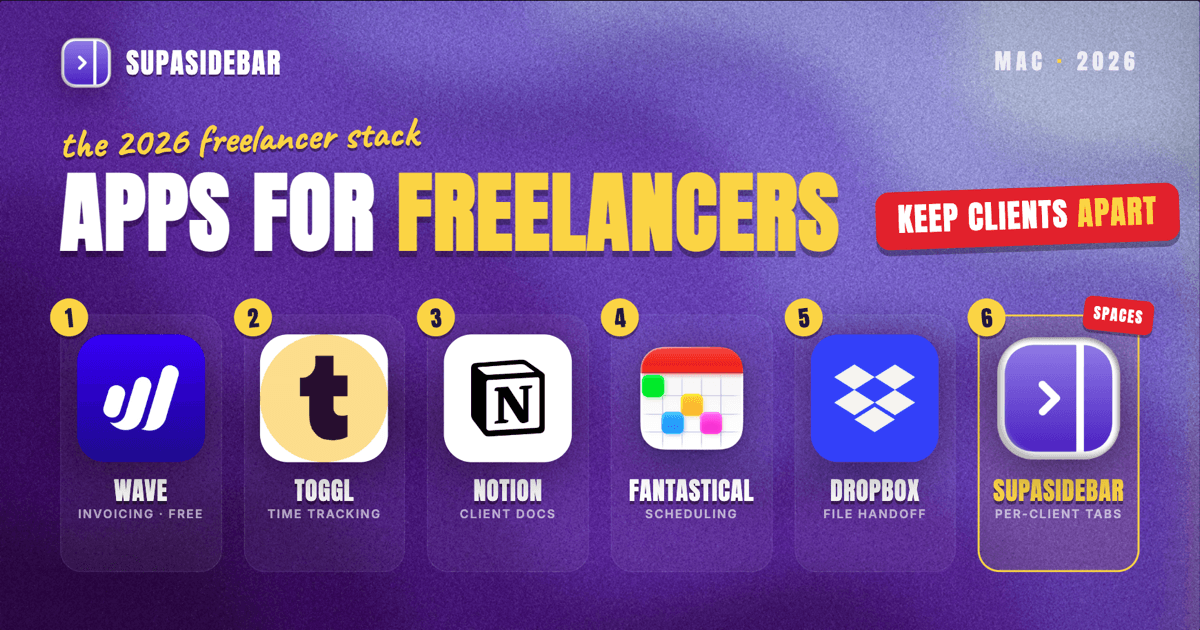
The best Mac apps for freelancers in 2026 are a job-by-job stack, not one all-in-one suite: Wave or FreshBooks for invoicing and books, SupaSidebar for keeping each client's tabs, portals, and links separated by Space across every browser, Toggl Track for time tracking, Notion for client docs and proposals, Fantastical for scheduling across client calendars, and a cloud drive like Dropbox for file handoff. The freelancer's real problem is not finding tools, it is keeping three or four clients from bleeding into each other - which is why workspace separation matters as much as the billing app. Most of this stack runs free or near-free: Wave invoices are free, Toggl Track's free plan has no time limit, and Notion's personal plan covers solo work.
Quick navigation:
- Working remotely or traveling between clients? → Best Mac Apps for Remote Workers 2026
- Building a focused, distraction-free setup? → Mac Workspace Setup for Deep Work 2026
- Still studying or freelancing on the side? → Best Mac Apps for Students 2026
- Full-time freelancer building a Mac stack? You are in the right place. Keep reading.
| App | Job in the stack | Pricing model | Best for |
|---|---|---|---|
| Wave | Invoicing and books | Free core; Pro $16/mo | Freelancers who want zero-cost invoicing |
| FreshBooks | Advanced invoicing, retainers | $19/mo Lite (no free tier) | Complex billing and retainers |
| SupaSidebar | Per-client workspace across browsers | Free version available | Running 2+ clients across different browsers |
| Toggl Track | Time tracking | Free (no time limit); Starter $9/mo | Anyone billing by the hour |
| Notion | Client docs and proposals | Free personal plan | One searchable home per client |
| Fantastical / Apple Calendar | Scheduling | Paid / built-in free | Coordinating several client calendars |
| Dropbox / iCloud Drive | File handoff | Paid tiers / built-in free | Sending deliverables without email bloat |
| CleanShot X | Annotated feedback | Paid (one-time tiers) | "Look here" annotated screenshots |
Why a freelancer's app stack isn't a generic "best apps" list
A salaried employee uses one company's tools, one inbox, and one set of logins. A freelancer runs three or four parallel businesses at once - each client with its own portal, its own shared drive, its own Slack or email thread, and its own deadline. The apps that matter are not the flashiest, they are the ones that keep those parallel tracks from colliding: the wrong invoice to the wrong client, last month's tab still open when this month's call starts, the file saved to the wrong folder.
So this list is organized by the jobs a freelancer actually has to do every week - get paid, track hours, talk to clients, hand off files, and keep it all separated. The tools are picked for solo use, low or no monthly cost, and Mac-native polish where it exists.
Invoicing and accounting: get paid without overhead
Wave
Wave is the free baseline for freelancer billing on a Mac: unlimited invoices, expense tracking, and receipt scanning at no monthly cost, per Wave's own pricing. Payments cost the standard processing fee (2.9% plus a fixed fee per card transaction, lower for bank transfer), and a Pro tier at $16/month adds automatic reminders and unlimited receipt scanning. For a freelancer sending a handful of invoices a month, the free tier covers the whole job.
Best for: freelancers who want zero-cost invoicing and light books without learning full accounting software.
FreshBooks
FreshBooks is the upgrade when invoicing becomes a real workflow - retainers, project budgets, time-to-invoice conversion, and client-by-client expense tracking. There is no free tier; the Lite plan is $19/month and caps at five billable clients, with Plus at $38/month for up to fifty, per FreshBooks' pricing page. The reason freelancers pay for it over Wave is the polish: proposals, automatic late-payment reminders, and a client portal that makes a one-person operation look established.
Best for: freelancers whose billing is complex enough that the time saved beats the $19/month, especially anyone juggling retainers.
The problem no billing app or time tracker solves is tab sprawl across clients. A freelancer's browser is several clients deep at once: client A's project portal, shared drive, and reference docs in one pile of tabs; client B's CMS login, brand assets, and a half-written proposal in another; the freelancer's own banking, invoicing, and email scattered between them, some in Chrome where a client's SSO lives, some in Safari for personal browsing. Tab groups inside one browser do not fix this because the tabs span browsers, and bookmarks do not fix it because half the value is the live, open state of a working session that disappears the moment the browser restarts.
Keeping each client's tabs separated across browsers
SupaSidebar is the cross-browser workspace layer for freelancers: one Space per client that keeps each client's portal, drive, and working tabs separated across every browser. It runs natively on macOS and adds one persistent sidebar across every major Mac browser - Safari, Chrome, Firefox, Edge, Arc, Brave, Vivaldi, Comet, Dia, and more (33 browsers counting channel variants). For a freelancer the unit of organization is the client, and that maps directly to Spaces: one Space per client holding their portal, shared drive, brand assets, and working tabs, separated from every other client and from personal browsing. Live Tabs shows the open tabs from every running browser in one list, so the Chrome work pile and the Safari personal pile stop being separate hunts. Command Panel (⌘⌃K) searches saved links and live tabs across all Spaces in one keystroke.
Two freelancer-specific details earn the spot in this list. Air Traffic Control rules route links by URL pattern - a rule can send every link from a client's domain to the right browser profile automatically, so client A's portal never opens logged in as client B. And Save All Browser Tabs (⌘⌃T) captures an entire working session into a folder in one shortcut, which turns "those tabs from yesterday's client call" into a saved, reopenable set inside that client's Space.
A Reddit user described the core need plainly: "I've been wanting a way to manage my multiple browsers from a single source." That is the freelancer's per-client, cross-browser problem in one sentence. For someone running three or four clients at once, keeping their portals and logins from colliding is the most differentiated win in the stack after getting paid, which is why it ranks this high. A free version is available, and 3,000+ Mac users have tried SupaSidebar.
Best for: freelancers running two or more clients whose portals, drives, and tabs live across different browsers and keep bleeding into each other.
Tracking the hours that turn into invoices
Toggl Track is the time-tracking pick for freelancers on a Mac: its free plan genuinely covers solo work, with unlimited time tracking, project organization, and no time limit on the free tier (up to five users, which a freelancer never approaches), per Toggl's pricing. Hours are inventory for a freelancer, and the ones that go untracked are the ones that go unbilled. The paid Starter plan at $9/user/month adds billable rates, rounding, and saved reports - worth it once tracked hours feed directly into invoices.
The practical habit that matters more than the app: start the timer when the work starts, tag it by client, and the end-of-month invoice writes itself. A freelancer who reconstructs hours from memory always undercounts.
Best for: any freelancer billing by the hour or wanting honest data on where projects actually run over.
Keeping every client's docs and notes in one place
Notion is the consolidation layer for a freelancer's client docs on a Mac: one workspace holding a page per client with the brief, the proposal, meeting notes, deliverable checklists, and the running invoice log. Most freelancer communication otherwise splits across email, the client's Slack, and a pile of shared docs. The personal plan is free for solo use and covers unlimited pages, per Notion's pricing. Templates turn a new client into a filled-out project page in a minute instead of a blank doc.
Notion does not replace the client's own tools - the freelancer still answers email and shows up in the client's Slack. It replaces the freelancer's scattered personal notes about each client with one searchable home.
Best for: freelancers who currently keep client details across Apple Notes, email drafts, and Desktop folders.
Coordinating meetings across several client calendars
For scheduling, Apple Calendar (free with macOS) covers a freelancer with two or three clients, and Fantastical is the upgrade once four or more calendars collide. Apple Calendar syncs across devices and handles multiple calendar accounts; Fantastical adds natural-language event entry ("call with client B Thursday 2pm"), a cleaner multi-calendar view, and openings/scheduling links so clients book time without the back-and-forth. The rule of thumb: a freelancer juggling four or more separate client calendars feels Fantastical's value daily; one or two clients can stay on the built-in app.
Best for: freelancers coordinating meetings across several clients who want booking links and fast event entry.
File handoff: a cloud drive plus a screenshot tool
Two small jobs eat more freelancer time than they should: getting the final file to the client, and explaining what to look at.
- A cloud drive (Dropbox, Google Drive, or iCloud Drive) for the handoff itself. The deliverable goes in a shared folder or a share link, not a 40MB email attachment that bounces. Most freelancers already have one; the discipline is one folder structure per client, mirrored locally and in the cloud so the right file is always one place.
- CleanShot X (or any annotation tool) for the "look here" part. Capture the deliverable, draw the arrow, label the change, send the link. It replaces the screenshot-export-annotate-attach chain with one flow, and scrolling capture handles full-page grabs of long pages.
Neither is glamorous. Both remove the friction from the last mile of every project, which is where freelancers lose hours to formatting and re-sending.
Which freelancer setup should you pick?
- If you are part-time or just starting: run the entire stack free - Wave, Toggl Track, Notion personal, Apple Calendar, iCloud Drive, and the free version of SupaSidebar. Pay for nothing until the work forces it.
- If you are full-time with retainers: pay for FreshBooks and Toggl Starter so billable hours convert straight to invoices and nothing goes unbilled.
- If you run three or more clients across different browsers: the workspace layer is your biggest win - SupaSidebar keeps each client's tabs and portals separated by Space, which is the daily tax client separation otherwise charges.
- If you are a single-client contractor: skip the workspace layer and lean on a deep-work setup instead.
- If you mostly write or create for clients: start from the Mac app stack for writers and content creators.
- If you freelance as a developer: see the Mac stack for AI coders.
- If you travel or work remotely: pair this stack with the remote-worker Mac stack.
Conclusion: Picking the freelancer Mac setup
The 2026 verdict: start with Wave for free invoicing and Toggl Track for free time tracking, add Notion to keep every client in one searchable home, and spend any real budget on the workflow layer - FreshBooks if billing gets complex, and SupaSidebar to keep each client's tabs and portals separated by Space.
Try SupaSidebar (free tier) if client tabs are scattered across browsers right now.
Why we recommend SupaSidebar
SupaSidebar is a macOS app that brings Arc's sidebar to every browser - one sidebar for tabs, bookmarks, files, and apps across 33 browsers including Safari, Chrome, Firefox, Edge, Arc, Brave, Vivaldi, Comet, and Dia. For freelancers, it turns each client into a Space holding that client's portal, shared drive, brand assets, and live working tabs, searchable in one keystroke with Command Panel (⌘⌃K) no matter which browser they are open in. iCloud sync keeps the setup identical across a desktop and a travel laptop, with no account required. macOS 14+ required.
FAQ
What apps do freelancers use on a Mac in 2026?
A common solo-freelancer stack is Wave or FreshBooks for invoicing, Toggl Track for time tracking, Notion for client docs and proposals, Fantastical or Apple Calendar for scheduling, a cloud drive like Dropbox for file handoff, and SupaSidebar for organizing each client's tabs and portals across browsers. Most of these run free or near-free, so the stack scales with the number of clients rather than a fixed subscription bill.
What is the best free invoicing app for freelancers on Mac?
Wave is the strongest free option - its core invoicing and accounting are permanently free, including unlimited invoices and receipt scanning, with only payment-processing fees on paid invoices. FreshBooks is the paid upgrade at $19/month when billing involves retainers, proposals, or a client portal, but it has no free tier, so freelancers on a budget usually start with Wave.
How do freelancers manage multiple clients on a Mac?
The two jobs that matter are separation and retrieval. Separation: one workspace per client so client A's tabs, files, and logins never mix with client B's. Retrieval: search that spans everything. SupaSidebar handles both across browsers with per-client Spaces and Command Panel search over saved links and live tabs, while Notion keeps the per-client docs and proposals in one place. Together they stop the constant context-switching tax of running several clients at once.
Is Toggl Track free for freelancers?
Yes. Toggl Track's free plan has no time limit and supports unlimited time tracking, project organization, and calendar integration for up to five users, which a solo freelancer never approaches. The paid Starter plan at $9/user/month adds billable rates, time rounding, and saved reports, which becomes worth it once tracked hours feed directly into client invoices.
Do freelancers need accounting software, or just an invoicing app?
For most solo freelancers, an invoicing app with basic expense tracking is enough - Wave covers invoices, expenses, and simple books for free. Dedicated accounting software becomes worth it once there are employees, complex tax situations, or multiple revenue streams. The practical line: if a spreadsheet plus Wave answers the two questions that matter - total earned and total spent - full accounting software is overkill.
What is the best way to keep client work organized across browsers?
The reliable method is per-client workspaces plus cross-browser search. SupaSidebar creates one Space per client that holds that client's portal, drive, and working tabs, and its Live Tabs view plus Command Panel (⌘⌃K) search every running browser at once, so a tab in Chrome and a tab in Safari are found in the same keystroke. Air Traffic Control rules can route each client's links to the right browser profile automatically, which prevents logging into the wrong client's account.
By Kshetez Vinayak, founder of SupaSidebar. Last updated 2026-06-15.