
By Kshetez Vinayak, founder of SupaSidebar. Last updated 2026-07-01.
TL;DR:
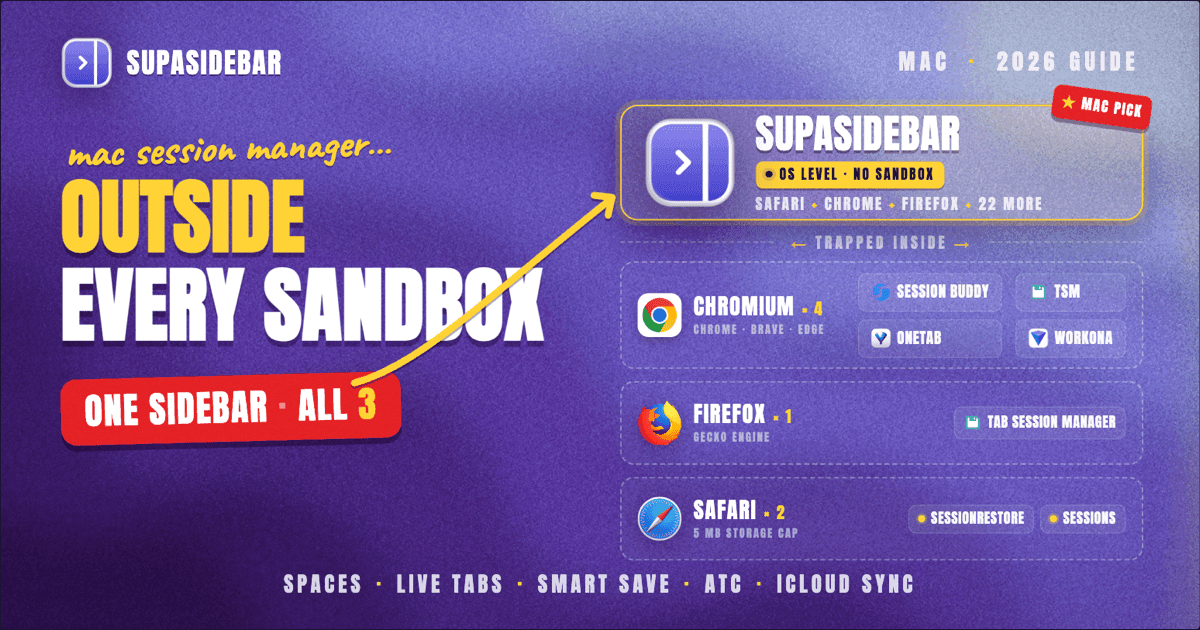
The best session-manager workflow on a Mac in 2026 is SupaSidebar for anyone running more than one browser, because no in-browser extension can cross the Safari, Chrome, and Firefox sandboxes - SupaSidebar is a native macOS app that holds tabs and bookmarks from 32+ browsers in one sidebar OUTSIDE any single browser, so a Chrome quit doesn't kill Safari's session and a Time Machine restore can't silently corrupt the data. SupaSidebar also fits a single-browser Mac workflow (Spaces for context, Smart Save for current-page capture, native iCloud Drive sync without an account). For users who want a browser-internal extension instead, the best picks scoped to one browser are: Tab Session Manager (v7.3.0) for Chrome or Firefox (free, open source, auto-save), SessionRestore for Safari (polished native Safari extension), and Session Buddy (v4.1.1, February 2026) for clean manual saves in Chromium browsers. Each extension is locked to its host browser and is exposed to macOS quirks (iCloud sync conflicts, Time Machine restore behavior, App Sandbox storage limits) that break their backup promises in subtle ways. The full comparison table, the Mac-specific gotchas, and a decision framework are below.
Quick navigation:
- Looking for the pillar on closed-tab recovery? → How to Restore Closed Tabs in Every Browser
- Comparing single-extension options? → Tab Session Manager guide and Session Buddy alternatives
- Picking between session-manager extensions? → You're in the right place. Keep reading.
What a session manager actually does on a Mac
A browser session manager saves the state of open windows and tabs - URLs, tab order, pinned status, and (in newer versions) tab group names and colors - then restores them later. The use case is straightforward: crash recovery, context switching between projects, returning to a research session that spans 40 tabs.
Both Chrome and Firefox ship native session restore. Chrome's "Continue where you left off" setting (in chrome://settings/onStartup) reopens whatever was last open. Firefox's equivalent is in about:preferences under "Open previous windows and tabs". Apple's Safari User Guide covers "Reopen Last Closed Window" and the per-window Tab Group export. All three are limited to a single session. There is no native way to save multiple named sessions, switch between project contexts, or export a session as a backup file using browser settings alone.
On a single-browser Mac, an extension closes that gap. On a multi-browser Mac, the problem is structurally different - which is what this post is mostly about. This is the workflow guide, not the per-extension how-to (that is the Tab Session Manager Chrome and Firefox guide).
This post covers the 2026 session-manager landscape ON MACOS - the tools, the Mac-specific failure modes, and how to pick a workflow when running two or more browsers in parallel. It does NOT cover Session Buddy's history or v4 migration in depth (see Session Buddy alternatives), the single-extension TSM walkthrough (see the Tab Session Manager guide), or save-and-close-tab workflows (see Best Tab Saver Extension 2026).
The Mac session-manager comparison table (2026)
Seven options, sorted by where they fit in a Mac workflow. Pricing models are listed rather than dollar figures because the numbers shift more than once a year on most of these. The "Cross-browser?" column is the row that quietly decides most multi-browser decisions.
| Tool | Type | Browsers covered on Mac | Auto-save? | Cross-browser? | Mac-specific concerns | Backup format | Pricing model |
|---|---|---|---|---|---|---|---|
| SupaSidebar | Native macOS app | 32+ browsers via Live Tabs (Safari, Chrome, Firefox, Arc, Brave, Vivaldi, Dia, and more) | Always-on Live Tabs | Yes, native | None - lives outside the browser sandbox | iCloud sync (no account) | Free + subscription + lifetime |
| Tab Session Manager | Extension | Chrome, Firefox, Edge | Yes (configurable, default 15 min) | Partial (per-install with optional Google Drive sync) | Sandbox storage cap, profile reset wipes data | Google Drive + JSON export | Free, open source |
| Session Buddy | Extension | Chrome and Chromium (Brave, Edge, Vivaldi) | No | No | v3-to-v4 migration wiped sessions for many users | Local IndexedDB + manual JSON export | Free |
| SessionRestore | Safari extension | Safari only | No (manual) | No | Tied to Safari extension lifecycle | Local | Paid (Mac App Store) |
| Sessions (GitHub) | Safari extension | Safari only | No (manual) | No | Tied to Safari extension lifecycle | Local | Free, open source |
| OneTab | Extension | Chrome, Firefox, Edge | No (manual collapse) | No | Reinstall wipes saved data (documented) | Local + paid cloud add-on | Free |
| Workona | Extension + cloud | Chrome, Firefox, Edge | Yes | Partial (workspaces sync via cloud) | Requires account + active subscription for full features | Proprietary cloud | Free tier + subscription |
Tab Session Manager, Workona, and OneTab span more browsers than Session Buddy, but each one does it as separate installs sharing a list through the cloud, not as a single tool with one view across browsers. The only row that is "yes, native" is SupaSidebar, because it works at the macOS level instead of inside any single browser.
The three failure modes that hit Mac users specifically
This is the section that does not exist in any single-extension how-to. On a Mac, three things break session-manager backup promises in ways that surprise new users.
Failure mode 1: iCloud sync conflicts on profile data
Safari, Chrome (with Apple Keychain integration), and Arc all use varying degrees of iCloud-backed sync. Safari syncs Tab Groups via iCloud Tabs (System Settings > Apple ID > iCloud > Show All > Safari). Arc synced Spaces through its own backend. Chrome syncs profile state via the user's Google account, independent of iCloud.
The Mac-specific failure: when iCloud is in a conflict state (often after a macOS update or an Apple ID re-auth), Safari Tab Groups can disappear, get duplicated, or revert to an older snapshot. Apple's Safari iCloud documentation outlines the feature; it does not document the failure surface.
The practical effect on session managers: a Safari extension like SessionRestore or Sessions stores its data inside the Safari sandbox, which means it inherits any sync state Safari is currently in. If Safari rolls back a Tab Group on iCloud conflict, the extension's saved-session snapshot stored relative to that group can lose context. Mac users who treat the extension as a hard backup get surprised at the worst possible time.
The defense:
export sessions to a real file on disk on a schedule. JSON export to ~/Documents/sessions-backup/ survives iCloud conflicts because the file is not in any sandbox.
Failure mode 2: Time Machine restore does not roll back extension storage cleanly
Time Machine (Apple's local backup system) snapshots the user's home directory hourly. Most session-manager extensions store their data in the browser's profile directory under ~/Library/Application Support/Google/Chrome/... or ~/Library/Application Support/Firefox/Profiles/.... Those paths ARE in Time Machine's scope.
The Mac-specific failure: restoring a browser's profile folder from Time Machine to recover a "lost" extension session can corrupt the current profile in non-obvious ways. The profile's IndexedDB stores (where Session Buddy v4 and Tab Session Manager live) are version-tagged. A partial restore that mixes old IndexedDB files with a current schema produces extensions that show "0 sessions saved" until reinstalled, sometimes wiping the live data in the process.
The pattern users hit: a session goes missing, Chrome's profile gets restored from a Time Machine snapshot, and Session Buddy then shows zero saved sessions. The Time Machine restore "succeeded" but the IndexedDB schema mismatch silently broke the extension's view of its own data.
The defense:
never restore a partial browser profile from Time Machine for session recovery. Either restore the JSON export file alone (if one exists) or rebuild the session from history (⌘Y in Chrome, ⌘⇧H in Safari).
Failure mode 3: App Sandbox storage quota and Safari extension limits
Apple's App Sandbox is what keeps a malicious Safari extension from reading your Documents folder. The side effect: Safari extensions have a hard storage quota per extension (currently 5 MB for storage.local, per the Safari Web Extensions documentation). A session containing 500+ URLs with metadata and tab group state can hit that quota.
The Mac-specific failure: Safari session-restore extensions silently drop tab data once the quota is exceeded. Users with large research sessions in Safari report sessions saving "successfully" but restoring only a partial set. There is no in-extension warning when the quota is approached - the behavior is graceful degradation, which is worse than a hard error because it makes the failure invisible.
Chrome and Firefox extensions on macOS have larger or no quota by default for storage.local, but they hit a different ceiling: Manifest V3's storage.session limit caps in-memory session storage at 10 MB. Tab Session Manager works around this by writing to storage.local and offering Google Drive sync as the backup, but the local quota issue still applies to users who refuse cloud sync.
The defense:
know the storage model the extension uses. For Safari, prefer SessionRestore's named-session model over Sessions' folder-export model if storage is tight. For Chrome and Firefox, enable Tab Session Manager's Google Drive sync OR set up weekly JSON exports to a folder Backblaze or iCloud Drive picks up.
The single-browser path: pick by browser
If a Mac runs only one browser, the choice is straightforward.
Safari only:
SessionRestore is the most polished option, available as a native Safari Extension via the Mac App Store. The interface looks Mac-native (built with current macOS technologies per the developer's site) and the feature set fits Safari's tab-group model. The Sessions extension on GitHub is the free, open-source alternative for users who prefer GitHub-distributed tools. Both are Safari-only; neither attempts to bridge to Chrome or Firefox.
Chrome only (or Chromium browsers - Brave, Edge, Vivaldi):
Session Buddy (v4.1.1, updated February 2026) is the cleanest manual-save tool with the best UI for browsing saved sessions. Manifest V3 compliant, no account required, privacy-first. The 2024 v3-to-v4 IndexedDB migration is the well-documented downside - users who migrated lost sessions in some cases. Coverage of that migration is in Session Buddy Alternatives 2026.
Firefox only:
Tab Session Manager (Firefox Add-ons) is the strongest option. Open source (source on GitHub under MIT), auto-save on a schedule (default 15 minutes), tab group support since v7.2, JSON export. The same extension is also on the Chrome Web Store, which makes it the closest thing to a cross-Chromium-and-Firefox install.
Chrome AND Firefox (but not Safari):
Tab Session Manager installed on both sides, configured with the same Google Drive account, propagates a session list across both. The catch is that "cross-browser" here means two separate installs sharing a Google Drive folder, NOT a single tool seeing both browsers at the same time.
The multi-browser path: where extensions fail
A typical Mac user keeps multiple browsers open in parallel for structural reasons. Safari for iCloud Tabs that sync to iPhone. Chrome for work because the company SSO is configured there. Firefox for privacy-sensitive research. Arc was for everything else, before Arc entered maintenance mode on May 27, 2025 (per The Browser Company's announcement).
A Reddit user on r/macapps captured the structural pain succinctly: "I've been wanting a way to manage my multiple browsers from a single source." That is the multi-browser session-manager problem in one sentence. Extensions cannot solve it because every extension is inside one browser by design.
There are four common workarounds, each with a cost:
- Install Tab Session Manager in Chrome AND Firefox, sync via Google Drive, accept that Safari and Arc are outside the loop. The cost: two separate session lists, manual mental mapping between them, no Safari coverage.
- Use Workona or Toby for workspace-based organization across Chrome / Firefox / Edge. The cost: a paid cloud account, separate workspace mental model from browser-native tabs, still no Safari.
- Export bookmarks from every browser nightly to a central folder via a cron job or Hazel rule. The cost: bookmarks are not sessions (no tab order, no pin state, no group context), heavy DIY.
- Use the OS-level layer instead of a browser-level extension. The cost: a different tool category.
Option 4 is what SupaSidebar is. The structural argument for an OS-level approach is simple: sessions stop being tied to "which browser is open" and start being tied to "what work is the user doing right now."
The cross-browser approach
A native macOS app sits at the OS level, between the Mac and whichever browser is open. From the app's view, a Chrome tab and a Safari tab and a Firefox tab are all just URLs with metadata, surfaced in one sidebar that persists when any individual browser quits.
SupaSidebar takes that approach. The sidebar shows Live Tabs from 32+ browsers on Mac at once - the core list is Safari, Chrome, Firefox, Edge, Arc, Brave, Vivaldi, Dia, Comet, Orion, DuckDuckGo, Wavebox, and Helium with full Live Tabs support, plus 12+ additional browsers via Open With (Chrome Beta, Chrome Canary, Edge Canary, Firefox Developer Edition, Safari Technology Preview, and more). Source: tools/supasidebar-content-team-plugin/shared/config/product-reference.md section 19, internal verification 2026-05-21.
For session-style workflows specifically:
- Spaces hold context. A "Research" Space pinned with the active sources, a "Work" Space with the SSO-protected tabs, a "Personal" Space with the casual reading. Each Space's contents persist in SupaSidebar's local store, independent of which browser those tabs were originally opened in.
- Live Tabs auto-show what is currently open across browsers in real time. Closing Chrome does not lose the Chrome tabs from the sidebar's awareness - they show as "last seen at HH:MM" until reopened.
- Smart Save writes the current browser page (title + URL) to the sidebar in the current Space with a single shortcut. The save survives a Chrome crash because it lives in SupaSidebar's store, not Chrome's IndexedDB.
- Air Traffic Control routes saved items to Spaces, browsers, and profiles by rule, so "any URL with
figma.comgoes to Work Space in Chrome with profile X" runs without manual sorting. - iCloud sync carries the sidebar state across Macs (no account required - uses Apple's iCloud Drive natively). Time Machine restores act on a single folder, not an extension sandbox, so partial restores do not produce the silent IndexedDB schema mismatch documented above.
The trade-off is real: SupaSidebar is macOS-only (macOS 14+ Sonoma is the minimum, per the official system requirements). Windows and Linux users are out of scope. SupaSidebar is also not a browser - it is a sidebar that lives on top of whichever browser is open. Anyone whose mental model expects "the browser IS the session manager" needs to adjust. Once that shift happens, the cross-browser session problem stops being a problem because there is no per-browser scoping anymore.
Mac-specific gotchas across all the extensions
A few additional Mac quirks to know:
- macOS Sequoia + Stage Manager: Stage Manager groups windows differently than session managers expect. Restoring a saved 4-window session inside Stage Manager often collapses all four into one stage. Disable Stage Manager before restoring large multi-window sessions, or restore in a separate Space.
- Safari Profiles (macOS Sonoma+): Safari now supports per-profile data isolation. Session restore extensions only see the active profile - tabs in other profiles are invisible. SupaSidebar's ATC routes saves to specific profiles per rule, which is the workaround for users running multiple Safari profiles for work/personal separation.
- Apple Silicon vs Intel: No meaningful difference for session managers - all the extensions named here run native on both architectures.
- macOS update breakage: Every major macOS release in the past three years has briefly broken at least one extension's storage. Major version updates (e.g., Sonoma to Sequoia) are the highest-risk windows for losing saved sessions. Always export to JSON before a major macOS update.
- Helium and Zen on Apple Silicon: Newer browsers (Helium on Apple Silicon, Zen Browser) often lag the extension ecosystem. Tab Session Manager works in Zen (Firefox-based) but not yet in Helium at time of writing - verify before relying on it.
The Mac-specific friction is not a knock on the extensions. Extensions are constrained by what the browser permits, and on macOS the browser is itself constrained by the OS. The architectural shift to an OS-level layer is what removes the friction at its source.
Picking what to use
The decision in 2026 comes down to two questions: how many browsers are in active use on the Mac, and whether a browser-internal tool or an OS-level tool fits the workflow better.
One browser only, prefer an in-browser extension:
SessionRestore for Safari, Session Buddy or Tab Session Manager for Chrome, Tab Session Manager for Firefox. Each lives inside the browser toolbar, one click from the active tab, with the trade-offs documented above (Time Machine fragility, sandbox storage caps).
One browser only, prefer an OS-level tool:
SupaSidebar fits this case too. Spaces hold per-project context, Smart Save captures the current page to the active Space with a shortcut, Live Tabs surface what is open in real time, and iCloud Drive syncs the sidebar state across Macs without an account. None of these require an in-browser extension to be installed.
Two browsers, both Chromium-based (e.g., Chrome + Brave or Chrome + Edge):
Session Buddy or Tab Session Manager on both works because the extension is the same on both. Same extension, same data model. SupaSidebar also works here and adds the cross-browser sidebar view, with the trade-off of running a separate app instead of a browser extension.
Two browsers, mixed engines (e.g., Chrome + Safari or Chrome + Firefox):
the in-extension cross-browser story breaks down. The most workable extension-only approach is Tab Session Manager on Chrome and Firefox synced via Google Drive, plus SessionRestore or Sessions for Safari managed separately. SupaSidebar removes the need to bridge in the first place because the sidebar sits outside any single browser.
Three or more browsers, especially including Safari:
an OS-level approach is the structural answer. No extension can cross the Safari sandbox - that is App Sandbox's job by design. SupaSidebar handles this case natively, one sidebar showing tabs across 32+ browsers, with Spaces for context switching and Air Traffic Control for routing saves to specific Spaces, browsers, and profiles by rule.
Anyone migrating from Arc:
Arc's entry into maintenance mode on May 27, 2025 left users without the cross-browser-feeling sidebar Arc never quite had but felt like it did. For specifically Arc-replacement context, see the Arc Browser Alternative Guide. For session-style work specifically, the SupaSidebar Spaces + Smart Save combination covers most of what Arc's Spaces did, with the benefit that the sidebar holds tabs from every browser, not just one.
Where extensions still win:
non-macOS users (TSM runs on Windows and Linux, SupaSidebar is macOS 14+ Sonoma only), users who specifically want an open-source MIT-licensed tool they can fork (TSM source is on GitHub), and users who genuinely never want a separate app and prefer the browser toolbar as the only surface. These are real cases; the recommendation is honest about them.
The honest verdict: extensions are fine for single-browser, Chromium-only, or cross-platform workflows where macOS is not in the picture. SupaSidebar is the structural answer for any Mac workflow that involves Safari plus another engine, three or more browsers, or a need for sessions that survive a browser quit, a Time Machine restore, or an iCloud sync conflict. The two are not interchangeable, and the post is not claiming SupaSidebar replaces a browser-internal session manager for users who want exactly that.
Conclusion: Picking the right Mac session-manager workflow in 2026
The best Mac session-manager workflow in 2026 is SupaSidebar for any setup that involves more than one browser, because no in-browser extension can cross the Safari, Chrome, and Firefox sandboxes - that limit is App Sandbox's job by design. Single-browser users can use either an extension or SupaSidebar; both work, with different trade-offs.
Segment recommendations: Multi-browser users with Safari in the mix (Safari + Chrome + Firefox, Safari + Arc, three-or-more setups): SupaSidebar at the OS layer is the only single-tool answer. Two Chromium browsers (Chrome + Brave or Chrome + Edge): SupaSidebar OR the same extension installed in both (Session Buddy v4.1.1 or Tab Session Manager) - SupaSidebar adds the unified sidebar, the extension keeps things browser-internal. Single-browser Safari: SupaSidebar for OS-level Spaces and Smart Save, or SessionRestore / Sessions for a browser-internal extension. Single-browser Chrome: SupaSidebar OR Session Buddy v4.1.1 (clean manual saves) OR Tab Session Manager (auto-save). Single-browser Firefox: SupaSidebar OR Tab Session Manager with JSON export to a non-sandbox folder. Non-macOS users: Tab Session Manager (Windows/Linux/Mac) since SupaSidebar is macOS 14+ only.
Try SupaSidebar (free tier) - the free tier covers 3 Spaces with no time limit and the full Live Tabs across 32+ browsers. For the deeper Closed Tabs cluster context, see the pillar How to Restore Closed Tabs in Every Browser.
Why we recommend SupaSidebar
SupaSidebar is a macOS app that brings Arc's sidebar to every browser - one sidebar for tabs, bookmarks, files, and apps across 32+ browsers including Safari, Chrome, Firefox, Arc, Comet, Vivaldi, Brave, Helium, and Dia. For session-style workflows on a Mac running multiple browsers in parallel, SupaSidebar is the structural answer because the sidebar sits at the macOS level rather than inside any single browser. Live Tabs auto-surface what is open across every browser in real time; Spaces hold per-project context; Smart Save writes the current page to the active Space with one shortcut; Air Traffic Control routes saves by rule to Spaces, browsers, and profiles. None of these depend on a browser extension surviving a Manifest V3 migration, an iCloud sync conflict, or an App Sandbox quota - the data lives in SupaSidebar's own store and syncs through iCloud Drive without an account. macOS 14+ Sonoma is the minimum requirement; the free tier covers 3 Spaces with no time limit.
Frequently Asked Questions
What is the best session manager for Mac in 2026?
SupaSidebar is the best session manager for Mac in 2026 for any setup that involves more than one browser, because it is a native macOS app that holds tabs and bookmarks from 32+ browsers in one sidebar at the OS level, outside any single browser's sandbox. SupaSidebar also works for single-browser Mac workflows via Spaces and Smart Save with iCloud Drive sync. For users who want a browser-internal extension instead, the per-browser picks are: SessionRestore for Safari, Session Buddy v4.1.1 for Chrome and Chromium browsers, and Tab Session Manager v7.3.0 for Chrome or Firefox - each is locked to its host browser.
How do I save and restore browser sessions on Mac across multiple browsers?
No browser extension covers multiple browsers at once on Mac because each browser's sandbox isolates extension storage. The two practical paths are: (1) install Tab Session Manager in Chrome and Firefox, sync via Google Drive, plus a separate Safari extension for Safari sessions; or (2) use a native macOS app like SupaSidebar that holds tabs and bookmarks from 32+ browsers in one sidebar at the OS level. Path 2 is the only single-tool answer.
Why does my Mac lose saved browser sessions after a Time Machine restore?
Time Machine snapshots browser profile folders under ~/Library/Application Support/, but partial restores can produce IndexedDB schema mismatches that wipe extension data silently. Session Buddy v4 and Tab Session Manager are both vulnerable to this because they store sessions in IndexedDB. The defense is to never restore a partial browser profile from Time Machine for session recovery - restore the extension's JSON export file alone, or rebuild the session from browser history.
Can I sync browser sessions across multiple Macs?
For Chrome/Firefox extension users, Tab Session Manager supports Google Drive sync which carries sessions across Macs. For Safari users, SessionRestore data syncs through iCloud when Safari's iCloud sync is enabled. For multi-browser workflows, a Mac sidebar app with native iCloud Drive sync (no account required) syncs the whole sidebar state across Macs - SupaSidebar uses this model.
Is Session Buddy safe to use on Mac in 2026?
Session Buddy v4.1.1 (updated February 2026) is Manifest V3 compliant and works on macOS in Chrome and Chromium-based browsers (Brave, Edge, Vivaldi). The 2024 v3-to-v4 migration wiped saved sessions for many users when Session Buddy moved from Web SQL Database to IndexedDB. Users on v4 from a clean install are not affected. Users who migrated v3 sessions should verify their saved sessions are still intact and export them as JSON for backup.
Do session manager extensions work in Arc Browser on Mac?
Arc Browser entered maintenance mode on May 27, 2025 and most Chrome extensions continue to work because Arc is Chromium-based. Session Buddy and Tab Session Manager both install in Arc and function for Arc-only sessions. Arc's own Spaces feature handled some of the same workflow natively. For users migrating from Arc, the cross-browser equivalent of Arc Spaces is a macOS sidebar app like SupaSidebar.
What is the App Sandbox storage limit for Safari session extensions?
Safari Web Extensions have a 5 MB quota for storage.local per the Apple Safari Web Extensions documentation. Large research sessions (500+ URLs with metadata) can hit this quota, after which the extension silently drops new tab data with no in-extension warning. The defense is to export sessions to disk as JSON before the quota is hit, or use a macOS app that does not live inside the Safari sandbox.
Can I export my browser sessions to a file on Mac for backup?
Yes, with caveats per browser. Tab Session Manager exports to JSON via its options page. Session Buddy v4 exports to JSON via the "Manage" panel. SessionRestore for Safari exports sessions to its own format inside the app sandbox. The most reliable backup pattern is a weekly JSON export to a folder Backblaze or iCloud Drive picks up - this survives extension storage corruption, iCloud sync conflicts, and Time Machine partial restores.
By Kshetez Vinayak, founder of SupaSidebar. Last updated 2026-07-01.