
By Kshetez Vinayak, founder of SupaSidebar. Last updated June 21, 2026.
TL;DR:
Session Buddy v4.1.1 still works in Chrome and Chromium browsers in 2026, but the V3-to-V4 migration in early 2024 wiped years of saved sessions for many users and the support forums are still full of the fallout. For a free Session Buddy alternative on Chrome, Tab Session Manager is the best pick because it auto-saves on a schedule and runs on both Chrome and Firefox. For users who outgrew the manual save-and-restore cycle, OneTab (list-collapser), Tab Stash (Firefox save-and-close shelf), and Workona (workspace organizer) cover different workflows. None of them work cross-browser - install Session Buddy or any of these in Chrome and the Safari and Firefox tabs are still on their own. On a Mac running more than one browser, SupaSidebar is the structural answer: a macOS app, not an extension, that auto-shows tabs from 25+ browsers in one sidebar without any manual session management. Full comparison table, the v4 data-loss story, and a decision framework below.
Looking for something specific?
- Want the auto-saving Session Buddy alternative? → Tab Session Manager guide
- Comparing OneTab and Toby instead? → Toby vs OneTab vs SupaSidebar
- Here for Session Buddy alternatives? → Keep reading.
Why people search for Session Buddy alternatives in 2026
Session Buddy has been a Chrome Web Store fixture for over a decade, and for most of that decade the recommendation was straightforward: install it, name your sessions, restore when needed. That changed in 2024.
Session Buddy v3 was built on Web SQL Database, a browser API Google announced for deprecation. To stay alive on Chrome, the extension was rebuilt from scratch into v4 using IndexedDB. The migration was the rewrite's biggest weakness. The official Session Buddy troubleshooting page and the sessionbuddy-discuss Google Group collected hundreds of "lost everything" reports from users whose v3 collections did not survive the upgrade. Threads like "Lost all v4 saved collections (sessions)" and "After auto updating to v4, all [Unnamed sessions] were gone" capture the pattern: users woke up to a Session Buddy update notice and years of saved sessions gone.
Session Buddy is now on v4.1.1, updated February 13, 2026, fully Manifest V3 compliant. The extension itself works. But the trust hit pushed a wave of users toward alternatives, and that wave has not entirely subsided.
The other reasons people look beyond Session Buddy in 2026 are structural and were true even before v4:
- Chrome-only. Session Buddy runs in Chrome and Chromium-based browsers (Edge, Brave, Vivaldi). There is no Firefox version. There has never been a Safari version. A 2014 thread in the discussion group asked for Firefox support; the answer is still no.
- No cloud sync. Session Buddy stores data in the local browser profile via IndexedDB. If the profile corrupts or gets wiped, the sessions go with it. Manual JSON export is the only backup, and most users do not remember to do it weekly.
- Manual save model. Session Buddy needs an explicit save action before closing tabs. Auto-save was never the design. Users who close a window without saving lose that session.
- No tab group structure on restore. Sessions restore as windows of tabs, but Chrome's native tab group names, colors, and collapse states do not survive the round-trip cleanly.
The Reddit r/macapps comment that summed up the structural complaint about extensions in general fits Session Buddy exactly: a Reddit user wrote, "love that this sits at the OS level instead of just being another extension." That comment was about SupaSidebar specifically, but it points at why extension-based session managers like Session Buddy hit a ceiling for users running more than one browser.
The Session Buddy alternatives comparison table (2026)
Six tools, sorted by workflow type and what they cover that Session Buddy does not. Dollar figures are deliberately left out because pricing tiers shift more than once a year on most of these and a partial column misleads more than it helps. The pricing model (free / free + subscription / free + lifetime) is listed instead.
| Tool | Workflow | Runs in | Auto-save? | Cross-browser? | Cloud sync | Pricing model |
|---|---|---|---|---|---|---|
| SupaSidebar | Live sidebar (macOS app) | 25+ browsers on macOS | Always-on Live Tabs | Yes, native | iCloud (no account) | Free + subscription + lifetime |
| Tab Session Manager | Auto-save session manager | Chrome, Firefox, Edge | Yes (configurable) | Partial (per-install with optional Google Drive sync) | Google Drive | Free, open source |
| OneTab | List-collapser | Chrome, Firefox, Edge | No | No | No | Free |
| Tab Stash | Save-and-close shelf | Firefox | No | No | Firefox Sync (bookmarks) | Free, open source |
| Workona | Workspace organizer | Chrome, Firefox, Edge | Yes | Partial (workspace cloud) | Proprietary cloud | Free tier + subscription |
| Toby | Visual board | Chrome, Firefox, Edge | Yes | Partial (account cloud) | Proprietary cloud | Free tier + subscription |
| Session Buddy (for reference) | Manual session manager | Chrome (Chromium) | No | No | No | Free |
The "Cross-browser?" column is the one that quietly decides most multi-browser decisions. Session Buddy is locked to Chromium. Tab Session Manager, Workona, and Toby span more browsers, but each one does it as separate installs that share a list through the cloud, not as a single tool with one view across browsers. SupaSidebar is the only row that is "yes, native" because it works at the macOS level instead of inside any single browser.
Tab Session Manager: the free auto-save replacement
Tab Session Manager by sienori is the most direct free replacement for Session Buddy in 2026, and it covers Session Buddy's two biggest gaps: auto-save and Firefox support. It is also open source, with the source code on GitHub under MIT license.
Where it improves on Session Buddy:
- Auto-save on a schedule. Default is every 15 minutes with the last 10 sessions retained. Both numbers are configurable. The forgot-to-save-before-closing failure mode that hits Session Buddy users does not happen here.
- Cross-browser builds. Same extension is on the Chrome Web Store and Firefox Add-ons. Configure both with the same Google Drive account and sessions propagate.
- Tab group support since v7.2. Chrome tab group names, colors, and collapsed/expanded states are saved alongside regular tabs.
- JSON export for real backup. Sessions export to a local
.jsonfile that survives browser profile corruption. This is the v4-migration-paranoia answer: if a future browser update wipes extension storage, the JSON on disk still has the data.
Where it does not match Session Buddy:
- Less polished UI. Session Buddy's interface, especially the saved-tab search, is cleaner. Tab Session Manager is functional rather than pretty.
- The "cross-browser" claim has a catch. It is two installs sharing a Google Drive folder, not one tool seeing both browsers at once.
For most Session Buddy refugees who want the same model with auto-save and Firefox, Tab Session Manager is the answer. For deeper coverage of how it works, see the Tab Session Manager guide.
OneTab: the list-collapser for memory relief
OneTab is the right answer for a different problem. Where Session Buddy thinks in named sessions, OneTab thinks in piles. Click the toolbar icon and every open tab in the current window collapses into a single list page, freeing the memory those tabs were using. The tabs are not gone, they sit as links on the list page, and they restore one at a time or all at once.
Where it fits as a Session Buddy alternative: someone whose actual pain is a hot Chrome with too much RAM in use, rather than a need to restore a specific Tuesday research session, is in OneTab territory, not Session Buddy territory. OneTab is also genuinely free with no paid tier and no account.
Where it does not: organization. The list is chronological. There are no named sessions, no real folders, no auto-backup, and no cloud sync. The same data-loss risk applies, with a documented twist - OneTab's own troubleshooting page warns users not to reinstall the extension because it will wipe saved data. Multiple threads on Google's Chrome support forum document users losing years of saved tabs to extension resets.
OneTab is the right pick if the goal is fast memory relief. It is the wrong pick as a Session Buddy replacement for someone whose actual use was organized named sessions.
For a deeper view of OneTab specifically, see the OneTab alternatives roundup.
Tab Stash: the Firefox save-and-close shelf
Tab Stash is the Firefox-side answer. It is free, open source, and does not have a true Chrome equivalent. The model is different from both Session Buddy and OneTab: stash a tab and it leaves the window and lands in a saved group, organized into buckets, and the user comes back to the shelf when ready.
Tab Stash stores everything as real Firefox bookmarks under the hood, which means Firefox Sync carries the stash across devices automatically. No accounts, no cloud service, no separate sync setup. That is a real upside for users who do not want yet another service-side dependency.
Where it fits as a Session Buddy alternative: Firefox-only users whose tabs are mostly a queue of things to deal with rather than a workspace to keep live. The save-and-close loop reduces visual clutter and the bookmark backend means the data has a path that does not depend on the extension surviving.
Where it does not: anyone in Chrome (Tab Stash has a Chrome listing but the Firefox version is the one it is built around), and anyone whose workflow is named-session-based rather than tab-by-tab. Because the storage is real Firefox bookmarks, anyone wanting those stashes visible outside Firefox should also look at cross-browser bookmark sync.
Workona: the workspace organizer
Workona is the heaviest-touch option in this list and it solves a different problem. Where Session Buddy saves point-in-time snapshots of windows, Workona organizes tabs into named workspaces (Project A, Project B, Personal, Research) that persist across sessions, sync through Workona's own cloud, and integrate with services like Google Drive, Asana, and GitHub.
Where it fits as a Session Buddy alternative: someone whose actual pain is tabs spread across three projects with no clear separation, rather than the want to save and restore a specific window. Workona ships with auto-save of tabs into workspaces, so the manual-save discipline that breaks for Session Buddy users does not apply.
Where it does not: cost, account dependency, and weight. Workona requires a Google account to function. The free tier caps workspaces. The Pro subscription removes the cap. Tabs sync through Workona's cloud rather than locally, so workspace data lives on a service that could change terms or go dark. For someone who just wanted Session Buddy's save-and-restore loop with auto-save, Workona is more tool than the job needs.
For deeper coverage of Workona specifically, see the Workona alternatives roundup.
Toby: the visual board
Toby is the outlier because it is not really a session manager. It is a visual workspace built around boards of tabs displayed as cards. Tabs go into collections, the new-tab page becomes a Toby board, and the board doubles as a launchpad. It is the most visual option in this list and the one that suits people who think spatially about their work.
Where it fits as a Session Buddy alternative: someone who wants a curated, shareable board of resources rather than a list of point-in-time snapshots. Toby's collections persist, sync across devices through Toby's own cloud, and can be shared with collaborators.
Where it does not: weight and account dependency. Toby asks for more setup than Session Buddy ever did. Someone who just wants the save-a-window-and-restore-it loop will find Toby's board model heavier than the job requires. For a head-to-head with OneTab, see Toby vs OneTab vs SupaSidebar.
What none of these extensions solve: the cross-browser pile
Here is the problem the table points at. A typical Mac setup is not one browser. It is Chrome for work because that is where the company sign-on is configured, Safari for personal browsing because it is lighter on battery, and maybe Firefox or a third browser for something specific. Tabs accumulate in all of them.
Session Buddy can only ever rescue one of those piles. Install it and the Safari and Firefox tabs are still on their own. Switch to Tab Session Manager and the same is true unless three separate installs are kept in sync. The extension model has a structural ceiling and the ceiling is the browser the extension lives in. This is not a flaw in Session Buddy specifically, it is the boundary of what any browser extension can be.
For a single-browser user the ceiling never gets hit and the right answer is genuinely one of the extensions above (see How to Save All Open Tabs for native and extension-based methods per browser). For a multi-browser Mac user the ceiling is the whole problem.
The cross-browser approach
The way past that ceiling is to stop trying to save tabs from inside a browser and instead see them from above all the browsers, at the operating-system level. That is what SupaSidebar does.
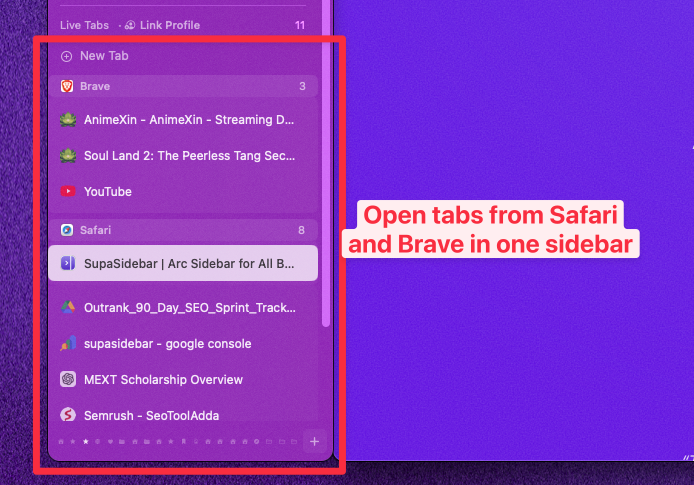
SupaSidebar is a native macOS app, not a browser extension. It adds a persistent sidebar that works alongside any browser, and its Live Tabs section shows the tabs currently open across every supported browser at once, grouped by browser. Pinned items and Saved folders sit in their own sections, available across every Space, with saved links syncing across Macs through iCloud with no account required. Because it talks to browsers through macOS rather than through an extension API, it reaches 25+ browsers including Safari, Chrome, Firefox, Arc, Zen, Vivaldi, Brave, Helium, and Dia, the same Safari that no Session Buddy alternative in this list covers.
The Reddit r/macapps comment said it directly: "love that this sits at the OS level instead of just being another extension." That is the structural difference. An extension is scoped to its browser by design. An OS-level app is not.
The honest tradeoffs: SupaSidebar is macOS-only, so Windows and Linux users are better served by Tab Session Manager with Google Drive sync. And it is an app to install rather than a one-click extension, which is slightly more setup than clicking "Add to Chrome." It has a free tier, so the cost of finding out whether the cross-browser model fits is zero.
Picking what to use
The best Session Buddy alternative in 2026 is the tool that matches the workflow, not the most-installed one. For a free auto-save Chrome session manager that also covers Firefox, Tab Session Manager is the direct answer. For fast memory relief from a tab pile, OneTab. For a Firefox save-and-close shelf, Tab Stash. For a project-workspace organizer with paid sync, Workona. For a visual board of curated tabs, Toby.
The split that decides most picks is single-browser versus multi-browser. Single-browser users should pick from the extensions above by workflow type and never think about it again, because the ceiling of the extension model is not a problem they will hit. Multi-browser Mac users hit that ceiling immediately, because no Session Buddy alternative listed here can see past the browser it is installed in. For them, SupaSidebar is the better answer: a macOS app that shows and saves tabs across 25+ browsers, including the Safari that every extension here leaves uncovered, with iCloud sync and no manual session discipline required.
If a unified Mac sidebar across every browser fits the workflow, try SupaSidebar (free tier). For a deeper look at session-manager extensions specifically, see the Tab Session Manager guide. For the broader landscape of tab-saver extensions, see Best Tab Saver Extensions for Chrome (2026).
Why we recommend SupaSidebar
SupaSidebar is a macOS app that brings Arc's sidebar to every browser, one sidebar for tabs, bookmarks, files, and apps across 25+ browsers including Safari, Chrome, Firefox, Arc, Zen, Vivaldi, Brave, Helium, and Dia. For session management specifically, the difference from Session Buddy and every alternative in this comparison is structural: an extension lives inside the single browser it is installed in, while SupaSidebar works at the operating-system level and can show and save tabs from every supported browser at once. The Live Tabs section means the save-and-restore cycle that Session Buddy users have to remember to run does not exist - the tabs are already visible and saveable from a single sidebar, with iCloud sync carrying saved links across Macs without an account. For anyone running more than one browser on a Mac, that is the gap that matters, and it is the gap a Session Buddy alternative extension cannot close.
FAQ
What is the best free alternative to Session Buddy in 2026?
Tab Session Manager is the best free Session Buddy alternative for users who want the same named-session model with auto-save and Firefox support added. It is open source, runs on Chrome, Firefox, and Edge, auto-saves on a configurable schedule, and supports optional Google Drive sync. For a different workflow - dumping tabs into a single list to reclaim memory - OneTab is the free pick.
Is Session Buddy still working in 2026?
Yes. Session Buddy v4.1.1 was updated February 13, 2026, and is fully Manifest V3 compliant. It runs on Chrome and other Chromium-based browsers including Edge, Brave, and Vivaldi. The extension itself works. The trust issue from the 2024 V3-to-V4 migration, which wiped saved sessions for many users, is what pushed a wave of users toward alternatives, but the current version is stable.
Why did Session Buddy users lose their sessions?
Session Buddy v3 used Web SQL Database, which Google announced for deprecation. To stay compliant with Manifest V3, Session Buddy was rewritten as v4 using IndexedDB. The migration from V3 to V4 was unreliable for many users, and the sessionbuddy-discuss Google Group collected hundreds of lost-session reports after the upgrade. The official troubleshooting page acknowledges the migration issue and offers a manual recovery path using DB Browser for SQLite to extract data from the old database file.
Is there a Session Buddy alternative for Firefox?
Session Buddy itself has never had a Firefox version. The two strongest Firefox-side alternatives are Tab Session Manager, which is the same auto-save session-manager model as Session Buddy and works in both Chrome and Firefox, and Tab Stash, which is Firefox-only and stores stashed tabs as real Firefox bookmarks. For users on Mac who run Firefox alongside other browsers, SupaSidebar is the cross-browser option because it sees Firefox tabs alongside tabs from every other browser it supports - 25+ in total.
Is there a Session Buddy alternative that works across multiple browsers?
Most Session Buddy alternatives are browser extensions, and an extension can only see the browser it is installed in. Tab Session Manager comes closest among extensions, with builds for Chrome, Firefox, and Edge plus optional Google Drive sync, but it works as separate installs sharing a list. SupaSidebar is the only true cross-browser option on macOS because it is a native app rather than an extension and shows tabs from 25+ browsers in one sidebar.
Does Session Buddy have cloud sync?
No. Session Buddy stores all data locally in the browser profile via IndexedDB. There is no built-in cloud sync. The only backup method is manual JSON export from the extension. For cloud sync as a Session Buddy alternative, Tab Session Manager offers Google Drive sync, and Workona and Toby use their own proprietary clouds. SupaSidebar syncs saved links across Macs through iCloud without requiring an account.
What is the best Session Buddy alternative for a multi-browser Mac user?
For a Mac user running two or more browsers, SupaSidebar is the structural answer because it works at the operating-system level and shows tabs from every supported browser in one sidebar. No Session Buddy alternative extension can do this - they are all scoped to the single browser they live in. Tab Session Manager with Google Drive sync is the best extension-based answer for cross-browser users on Windows or Linux, where SupaSidebar is not available.