
By Kshetez Vinayak, founder of SupaSidebar. Last updated June 14, 2026.
TL;DR:
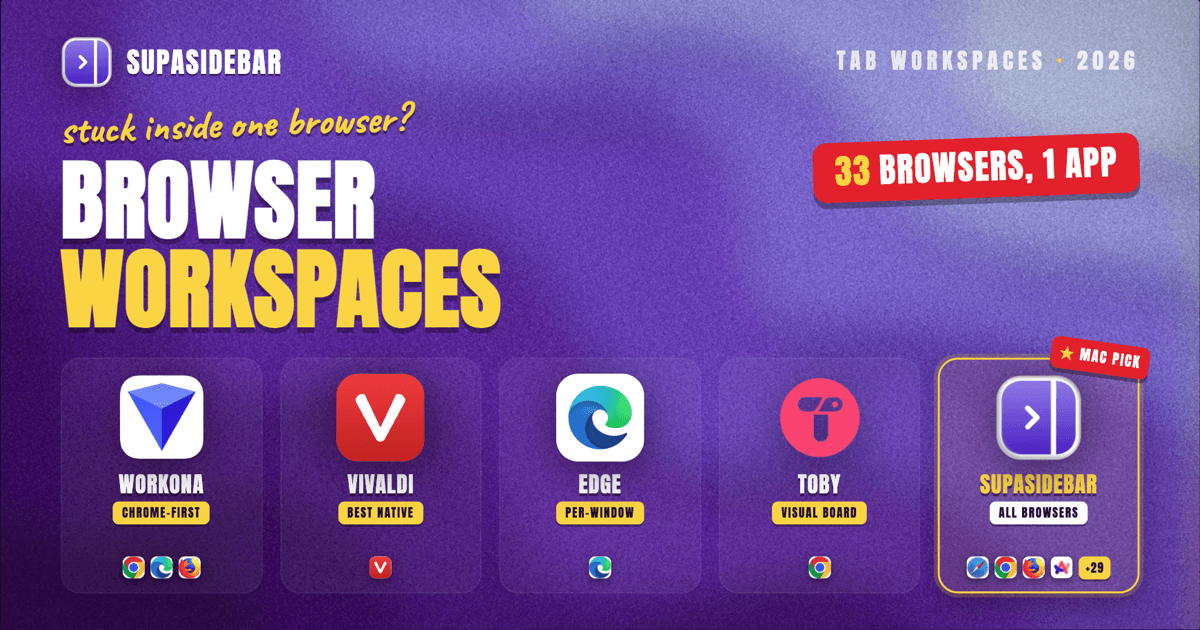
A browser workspace manager groups tabs into named, switchable contexts - one workspace per project, client, or course. For Mac users working across more than one browser, SupaSidebar is the strongest pick in 2026 because its Spaces work across every browser at once, 33 in total including Safari, Chrome, Firefox, Arc, Zen, Vivaldi, Brave, Helium, and Dia. Workona is the most established single-browser extension, and Vivaldi ships the best native implementation. The full comparison, including what Microsoft just changed about Edge Workspaces, is below.
Looking for something specific?
- Replacing Workona specifically? → Workona Alternatives (2026)
- Want one app that reopens your whole project setup? → The Mac App That Saves Tabs and App State
- Comparing every workspace manager? → You're in the right place. Keep reading.
What a browser workspace manager actually does
A browser workspace manager is a tool that groups browser tabs and links into separate, named contexts - workspaces - so that switching from "Client A" to "Client B" or from "Thesis research" to "Job hunt" takes one click instead of a scan through 40 shrunken tab titles. The good ones persist across restarts, sync, and stay out of the way until needed.
This post compares the six options worth using in 2026: native workspace features (Vivaldi, Edge, Chrome's saved tab groups), extensions (Workona, Toby), and the app-based route (SupaSidebar). It does not cover one-time session saving or crash recovery - different job, different tools.
Workspaces are not tab groups, and the difference matters. A tab group is a labeled cluster inside one window; every group stays visible in the tab strip. A workspace hides everything that does not belong to the current context. Grouping reduces clutter. Workspaces remove it.
The category exists because tabs stopped fitting in one strip
The average knowledge worker runs the same loop every day: a work project in Chrome because that is where the company SSO lives, research piling up in a second window, personal tabs mixed in, and a side project somewhere behind all of it. By mid-afternoon, finding the right tab takes longer than opening a duplicate.
Arc Browser was the first mainstream attempt to fix this with Spaces built into the browser itself, and it worked well enough to build a devoted user base. Then The Browser Company put Arc into maintenance mode on May 27, 2025, and the lesson landed hard: a workspace system that lives inside one browser is only as durable as that browser's roadmap.
The other browsers have shipped pieces of the idea. Chrome added saved tab groups that sync across devices. Vivaldi has had native Workspaces since version 6.0 in April 2023. Microsoft built Workspaces into Edge, then spent early 2026 restructuring the feature. Zen Browser carries the Arc-style workspace torch on the Firefox side (covered in the Zen features guide).
Every one of these is single-browser by design. Edge Workspaces cannot see a Chrome tab. Vivaldi Workspaces cannot see a Safari tab. For anyone whose work genuinely spans two or more browsers, the native features organize one silo and ignore the rest. That gap is where the dedicated tools come in.
The best browser workspace managers in 2026
1. SupaSidebar - workspaces across every browser (Mac)
SupaSidebar is a macOS app that brings Arc's sidebar to every browser - one sidebar for tabs, bookmarks, files, and apps across 33 browsers including Safari, Chrome, Firefox, Arc, Zen, Vivaldi, Brave, Helium, and Dia. Its workspaces are called Spaces: each Space holds the links, folders, and pinned items for one project, and the Live Tabs section shows currently open tabs from every running browser in one list.
That cross-browser scope is the differentiating feature, and as of mid-2026 no other workspace manager has it. A freelancer can keep a "Client A" Space with the client's staging site, Figma files, and brief, open them in Chrome, check Safari rendering, and never lose the project context, because the workspace lives outside any single browser. One shortcut (⌘⌃T) saves all of a browser's open tabs into a folder, and an optional advanced mode can close a Space's tabs when leaving it and reopen them on return. 3,000+ Mac users have tried SupaSidebar, and a free version is available.
One Reddit user put it this way: "The ability to organize multiple workspaces and flows is great! Perfect for keeping each project/motion grouped together."
The honest limits: it is Mac-only (macOS 14+), and Spaces organize links and tabs rather than isolating browser sessions - separate logins still need browser profiles, which SupaSidebar can route to but does not replace. Tabs shown in Live Tabs are local to the machine; only saved links sync via iCloud.
Best for:
Mac users with 2+ browsers, or anyone who wants project organization that survives switching browsers.
2. Workona - the established Chrome-first extension
Workona defined the workspace-extension category and remains the most polished option inside Chrome, Edge, and Firefox. Workspaces persist across restarts, sync through a Workona account, and integrate with tools like Google Drive and Notion.
Two caveats. First, Workona's free plan caps at 5 workspaces, down from 10 previously, with Pro at $8/month at the time of writing - meaningfully more than most tools in this list. Second, it is an extension, so it works only inside the browser it is installed in, and tab data lives in Workona's cloud. The full breakdown of where it shines and where it frustrates is in the Workona alternatives comparison.
Best for:
Single-browser Chrome or Edge users, including on Windows, who want mature workspace tooling and don't mind the account.
3. Vivaldi Workspaces - the best native implementation
Vivaldi has shipped native Workspaces since 6.0 in April 2023, the longest-standing native implementation among major browsers. Workspaces sit in the tab bar, each showing only its own tabs, and they combine with Vivaldi's tab stacks and split view. The Vivaldi 8.0 redesign in May 2026 rebuilt the tab-management backend and kept Workspaces front and center, notable in a year when other vendors trimmed features.
The constraint is the obvious one: the workspaces live and die inside Vivaldi (how Vivaldi's sidebar stacks up against a cross-browser one).
Best for:
Users willing to make Vivaldi their only browser and organize everything natively.
4. Microsoft Edge Workspaces - native, but recently restructured
Edge Workspaces gives each project its own Edge window with its own tab set that persists and syncs. It is genuinely useful, but 2026 has been a turbulent year for it: Microsoft retired the shared/collaborative side of Workspaces in early 2026, making the feature personal-only and migrating its data to Edge Sync, and separately removed the adjacent Collections feature. Anyone who built team workflows on shared Edge Workspaces had to move.
That churn is worth weighing. Native features are free and integrated, but the vendor can restructure them at any time, and this one just did.
Best for:
Committed Edge users who want per-project windows without installing anything, and who only need personal (not shared) workspaces.
5. Chrome saved tab groups - the lightweight default
Chrome does not have a true workspace manager, but saved tab groups are the closest native approximation: name a group, color it, save it, and sync it across devices. For one or two recurring contexts, this is free and already installed.
The ceiling arrives fast. Groups stay in the tab strip rather than swapping contexts, there is no per-project window state, and nothing exists outside Chrome. Group-level workflows are covered in depth in the dedicated Chrome tab group guides rather than here.
Best for:
Chrome-only users with light needs - a couple of stable contexts, no cross-browser work.
6. Toby - collections rather than live workspaces
Toby is a Chrome extension (around 300,000 users on the Chrome Web Store at the time of writing) that replaces the new-tab page with visual collections of saved tabs. It is closer to a save-and-restore board than a live workspace switcher: tabs get filed into collections and reopened later, rather than hidden and shown as active contexts.
For visual thinkers who like a card-based board of projects, it works well. For fast context switching during the workday, the open-file-reopen loop adds friction that true workspace managers avoid.
Best for:
Visual organizers who batch their work and don't need live switching.
Comparison: the six options side by side
| Tool | Type | Browsers covered | Free tier | Where data lives | Best for |
|---|---|---|---|---|---|
| SupaSidebar | Mac app | 33 (Safari, Chrome, Firefox, Arc, Zen, Vivaldi, Brave, Helium, Dia, more) | Free version available | On-device + iCloud | Multi-browser Mac users |
| Workona | Extension | Chrome, Edge, Firefox (one at a time) | 5 workspaces | Workona cloud account | Single-browser power users |
| Vivaldi Workspaces | Native | Vivaldi only | Free (built in) | Vivaldi sync | All-in Vivaldi users |
| Edge Workspaces | Native | Edge only | Free (built in) | Edge Sync (personal-only since 2026) | Committed Edge users |
| Chrome saved tab groups | Native | Chrome only | Free (built in) | Google account sync | Light, Chrome-only needs |
| Toby | Extension | Chrome | Free tier | Toby cloud account | Visual collection organizers |
Single-browser or cross-browser: the actual decision
Most "best workspace manager" comparisons rank features. The more useful question is structural: does the work live in one browser or several?
If one browser genuinely holds everything - work SSO, personal accounts, research - a native feature or Workona is the simpler answer, and switching tools buys little. The 2026 caveat is durability: Arc went into maintenance mode, Edge Workspaces dropped its sharing layer, and Collections disappeared entirely. A workspace system tied to one vendor's browser inherits that vendor's priorities.
If the work spans browsers - Chrome for the client's stack, Safari for battery on the laptop, Firefox for testing - every single-browser option leaves tabs orphaned outside the system. That split is exactly what a browser-independent layer fixes, and it is why a persistent sidebar across browsers ends up being the answer for multi-browser Mac setups. As one freelance web developer using Spaces per client put it: "The ability to flick between browsers is so liberating."
Conclusion: picking a browser workspace manager in 2026
For Mac users working across two or more browsers, SupaSidebar is the pick - its Spaces are the only workspaces that span all 33 supported browsers, with a free version to start. Single-browser users have solid options: Workona for Chrome or Edge (strongest tooling, 5 free workspaces, $8/month beyond), Vivaldi for the best native implementation, and Chrome's saved tab groups when needs are light. Edge Workspaces still works for personal use but just lost its sharing layer, and Toby suits collection-style organizers more than context switchers.
Windows and Linux users should default to Workona or a native feature, since SupaSidebar is Mac-only.
Try SupaSidebar (free version) for the cross-browser route, or start with the Workona alternatives breakdown if the choice is between extensions.
Why we recommend SupaSidebar
SupaSidebar is a macOS app that brings Arc's sidebar to every browser - one sidebar for tabs, bookmarks, files, and apps across 33 browsers including Safari, Chrome, Firefox, Arc, Zen, Vivaldi, Brave, Helium, and Dia. For workspace management specifically, that means Spaces that hold a project's links and folders regardless of which browser opens them, Live Tabs that show every browser's open tabs in one list, and a Save All Browser Tabs shortcut (⌘⌃T) that files a whole window's worth of work into a folder in one press. It requires macOS 14 or later, and a free version is available.
FAQ
What is a browser workspace manager?
A browser workspace manager is a tool that organizes browser tabs and links into separate named contexts (workspaces), one per project or task, so switching contexts takes one click instead of searching through dozens of open tabs. Workspace managers come in three forms: native browser features (Vivaldi Workspaces, Edge Workspaces), extensions (Workona, Toby), and standalone apps that work across browsers (SupaSidebar on Mac).
What is the difference between tab groups and a workspace?
A tab group is a labeled, collapsible cluster of tabs that stays visible in the browser's tab strip. A workspace hides every tab that does not belong to the current context and shows only the active project's tabs. Tab groups reduce visual clutter inside one window; workspaces switch the whole working context. Chrome offers tab groups natively but has no true workspace feature.
Does Chrome have a built-in workspace manager?
No. Chrome's closest native feature is saved tab groups, which can be named, saved, and synced across devices, but groups remain visible in the tab strip rather than acting as switchable contexts. Chrome users who want real workspaces use an extension like Workona or, on a Mac, an app-level tool like SupaSidebar that works alongside Chrome and every other browser.
What happened to Microsoft Edge Workspaces in 2026?
Microsoft restructured Edge Workspaces in early 2026: the shared/collaborative functionality was retired, workspace data moved from OneDrive to the Edge Sync service, and the feature became personal-only. Edge Workspaces still exists for individual use, but teams that relied on shared workspaces had to migrate. Microsoft also removed the adjacent Collections feature from Edge in 2026.
Can one workspace include tabs from different browsers?
With native features and extensions, no - Edge Workspaces, Vivaldi Workspaces, Workona, and Toby each operate inside a single browser. SupaSidebar is the exception on Mac: its Spaces hold a project's links independently of any browser, and its Live Tabs section shows open tabs from all running browsers (33 supported) in one sidebar, so one project context can span Safari, Chrome, and Firefox at once.
By Kshetez Vinayak, founder of SupaSidebar.