
By Kshetez Vinayak, founder of SupaSidebar. Last updated July 21, 2026.
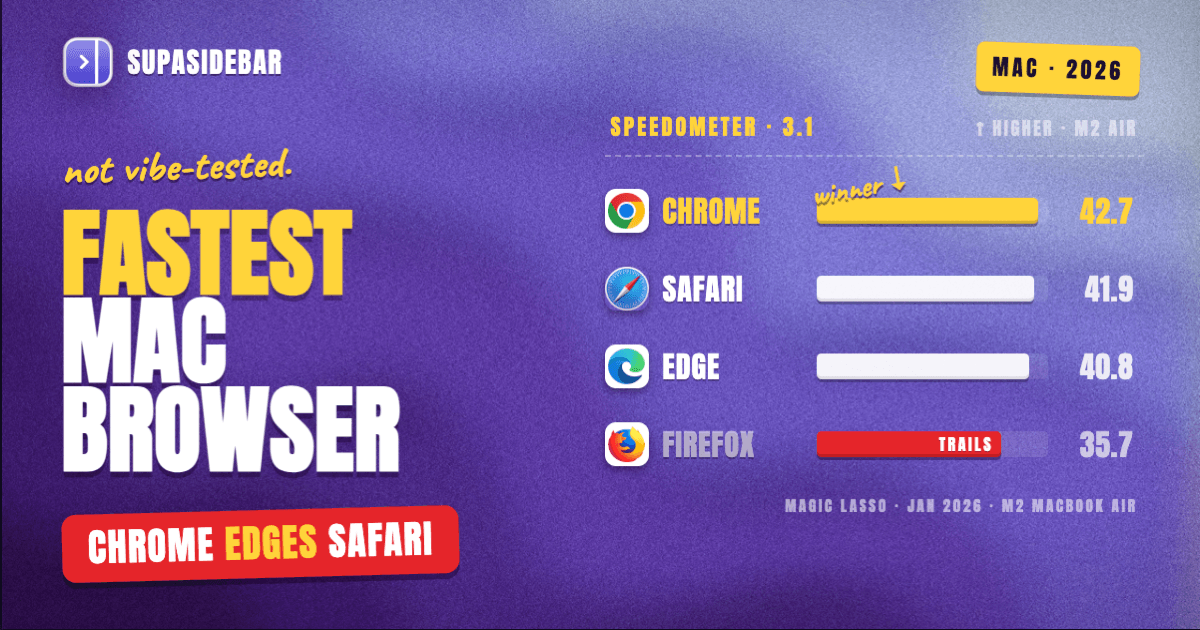
Chrome and Safari are tied for the fastest browser on Mac in 2026 by the industry-standard Speedometer 3.1 and JetStream 2.2 tests. Chrome scored 42.7 on Speedometer 3.1 vs Safari's 41.9 on an M2 MacBook Air, and 419.2 to Safari's 436.8 on JetStream 2.2 (Magic Lasso, January 2026). Safari still wins graphics decisively: 8088.73 vs Chrome's 6582.95 on MotionMark 1.3.1, about 23 percent faster (same source). On an M4 MacBook Pro, Chrome 139 hit a record 52.35 on Speedometer 3.1 in June 2025 (Chromium blog, confirmed by MacRumors). Firefox trails everything; full numbers below.
Looking for something specific?
- Want the broad "best browser for Mac" answer? → Best Browser for Mac in 2026
- Care about battery, not pure speed? → Best Browser for Mac with Battery Life in 2026
- Want the Apple Silicon angle (M1-M4 performance)? → Best Browser for Apple Silicon Mac in 2026
- Looking for raw benchmark numbers? You're in the right place. Keep reading.
What "fastest browser for Mac" actually means
"Fast" is a bundle of separate things, and most blog rankings conflate them. A clean comparison separates four:
- JavaScript responsiveness - how quickly the browser runs the code on modern web apps (Gmail, Figma, Notion, Linear). Measured by Speedometer 3.1.
- Raw JavaScript and WebAssembly throughput - how quickly the JS engine grinds through heavy code. Measured by JetStream 2.2.
- Graphics performance - smoothness of scrolling, transitions, WebGL, CSS animations. Measured by MotionMark 1.3.1.
- Energy efficiency - how much battery the browser burns while delivering that speed.
These have different winners in 2026. Chrome and Safari are tied on JavaScript responsiveness for the first time since 2023. Safari still wins graphics by a wide margin. Edge wins energy efficiency. Firefox is fourth in every category that matters.
This post pulls the actual published numbers from the Magic Lasso 2026 browser comparison (tested on an M2 MacBook Air 15" with 16GB RAM running macOS Tahoe 26.2 in January 2026), Google's own Chromium blog post on Chrome's Speedometer 3.1 record (tested on M4 MacBook Pro), and the MacRumors confirmation of the same numbers. What this post covers: pure browser performance on macOS Apple Silicon Macs. What it does NOT cover: battery in depth (covered in the battery satellite), RAM usage (covered in Safari vs Chrome), privacy, or Windows/Linux numbers.
The benchmarks the industry actually uses
Three Mac-relevant browser benchmarks, all developed and maintained by browserbench.org, a joint project by Apple, Google, and Mozilla engineers. These are the ones to trust because every major browser vendor optimizes against them.
| Benchmark | What it tests | Why it matters |
|---|---|---|
| Speedometer 3.1 | Web application responsiveness on a basket of modern frameworks (React, Vue, Angular, Svelte, Lit, Preact, vanilla JS) running TodoMVC-style apps. Tests HTML parsing, JS/JSON processing, DOM interaction, CSS layout, and pixel rendering (Chromium blog) | Closest single-number proxy for "how fast does Gmail, Figma, or Notion feel" |
| JetStream 2.2 | Raw JavaScript and WebAssembly performance across 64 tests (microbenchmarks plus larger apps) (WebKit blog) | Best for code-heavy apps: dev tools, in-browser IDEs, complex SPAs |
| MotionMark 1.3.1 | Graphics performance under load (animations, scrolling, transforms) | Best for CSS-heavy designs, scroll performance, WebGL content |
Speedometer 3 in particular was released in March 2024 as a joint effort by the WebKit, Chromium, and Gecko teams (Apple, Google, Intel, Microsoft, and Mozilla all contributed). That was the first time all three engines collaborated on a single benchmark. The numbers from Speedometer 3.x are the closest thing the industry has to an agreed-upon performance score.
Speedometer 3.1 results on Apple Silicon
These numbers come from the Magic Lasso 2026 browser comparison, tested on an M2 MacBook Air 15" with 16GB RAM running macOS Tahoe 26.2 in January 2026. Each browser was run three times; the table shows the average.
| Browser | Version tested | Speedometer 3.1 score |
|---|---|---|
| Chrome | 143.0.7499.193 | 42.7 |
| Safari | 26.2 (21623.1.14.11.9) | 41.9 |
| Edge | 143.0.3650.96 | 40.8 |
| Firefox | 146.0.1 | 35.7 |
Higher is better. Chrome edged ahead of Safari for the first time since Speedometer 3 launched, and Magic Lasso called it "a major upset" since Safari had led the test for the previous two years.
For a different hardware reference point: in June 2025, Google reported Chrome 139 scoring 52.35 on Speedometer 3.1 on an M4 MacBook Pro running macOS 15, "the highest ever score" on the benchmark. MacRumors confirmed the number and noted Apple has not recently published comparable Safari benchmark figures. The 52.35 result also represents a 22 percent improvement over Chrome's August 2024 score on the same benchmark, per Google's update to the original post.
Firefox in the Magic Lasso test scored 35.7, about 84 percent of Chrome's 42.7. Magic Lasso noted that "Firefox achieves only 60-80% of the speed of the fastest browsers" across both responsiveness tests.
JetStream 2.2 results on Apple Silicon
Same hardware, same Magic Lasso test run.
| Browser | JetStream 2.2 score |
|---|---|
| Safari 26.2 | 436.8 |
| Chrome 143 | 419.2 |
| Edge 143 | 413.3 |
| Firefox 146 | 270.9 |
Higher is better. Safari, Chrome, and Edge cluster within 6 percent of each other. Firefox at 270.9 is 62 percent of Safari's score, which is the largest single-benchmark gap in the test. The Gecko engine's SpiderMonkey runtime has been the JS-performance laggard since the JetStream 2 launch in 2019, when Safari 12.1 beat Firefox 66.0.1 by 68 percent on JetStream 2 across the original test suite. The gap has narrowed but Firefox still trails.
If a user runs Notion, Figma, Linear, or in-browser dev tools all day, Safari and Chromium browsers will all feel snappier than Firefox. Among the three top browsers, the difference is small enough that "fastest JS" is functionally a three-way tie.
MotionMark 1.3.1 results on Apple Silicon
This is the benchmark where Safari's WebKit-on-Metal compositing pulls clear ahead. Same hardware, same Magic Lasso test run.
| Browser | MotionMark 1.3.1 score |
|---|---|
| Safari 26.2 | 8088.73 |
| Chrome 143 | 6582.95 |
| Edge 143 | 6003.25 |
| Firefox 146 | 1497.44 |
Safari is 22.9 percent faster than Chrome on graphics. Magic Lasso put it bluntly: "Safari easily wins and beats Chrome (in second place) with almost 25 percent faster graphics performance." Safari also improved 11 percent year-over-year on MotionMark from the 2025 test.
Firefox is the outlier. Its 2026 MotionMark score is 15 percent lower than its 2025 score, suggesting a graphics regression during the year. Magic Lasso noted: "Firefox's already lacklustre graphics performance seems to have regressed further." For users running CSS-heavy sites, WebGL content (3D viewers, in-browser games, design tools like Spline or Vectary), or anything with smooth scroll requirements, Firefox is a clear avoid.
Edge at 6003.25 is the second-best Chromium browser on graphics, ~9 percent behind Chrome. The Chromium browsers compete on roughly the same graphics pipeline, so the differences between them mostly reflect their respective UI overhead.
Energy efficiency: Edge wins, Safari loses
Magic Lasso also measured energy efficiency using macOS Activity Monitor's 12-hour Power metric while running the three speed benchmarks. Lower is better.
| Browser | Average Energy Impact |
|---|---|
| Edge 143 | 3236.83 |
| Chrome 143 | 3593.27 |
| Firefox 146 | 3639.51 |
| Safari 26.2 | 4271.39 |
Edge used about 25 percent less energy than Safari. That is a complete reversal from Safari's historical battery-king position, and Magic Lasso attributes it to "Microsoft engineers reportedly contributing optimisations to the Chromium codebase to improve its energy efficiency on Apple devices during 2025."
Safari paid for its graphics lead with the worst energy efficiency in the test. The trade-off is real: pushing 8000+ on MotionMark while staying inside the same battery envelope as Edge's 6000 score is a tighter constraint than the WebKit team could meet this year. For users who care about battery life over raw graphics, the 2025 winner became the 2026 loser. The battery satellite post covers this trade-off in detail.
Cold-launch speed: where Safari still wins by default
Cold launch is the time from clicking the dock icon to a window that accepts input. No published industry benchmark covers this on macOS, but the structural reason Safari launches faster is documented: WebKit is shared with Mail, Notes, the App Store, Messages, and dozens of other system apps. macOS keeps WebKit warm at all times. Safari only has to render its own chrome on launch.
Chromium browsers have to spin up the V8 engine from cold. Firefox has to initialize Gecko. The gap is most noticeable on the first launch after a reboot and on lower-RAM Macs where the OS has dropped browser memory. Reviewers consistently report Safari launching in under a second from cold on Apple Silicon Macs, with Chromium browsers taking 1-2 seconds. The structural advantage is intrinsic to macOS, not something other browsers can patch around.
Perceived speed and why Chrome feels fast even when it ties
Chrome's reputation for being "fast" predates the 2026 Speedometer tie. Chrome runs aggressive prefetching: when a user hovers over a link, Chrome's Navigation Predictor and prerender system starts fetching the next page in the background. By the time the user clicks, the page is partially loaded. The Chromium blog explicitly documents this as a deliberate optimization in the same post that announced Chrome's Speedometer 3.1 record.
Safari does some link prefetching too (Safari 17.5+ added it), but Chrome's implementation is more aggressive and works on more page types. The result: Chrome can feel faster on first-time page navigations even when the underlying benchmark numbers say tied or behind.
This matters for specific use cases: heavy news-site browsing, e-commerce, anything with lots of click-and-read patterns. It does NOT matter for web app use (Gmail, Linear, Notion) where the page loads once and stays loaded.
Brave inherits Chrome's prefetching behavior because Brave is Chromium-based. Brave also adds tracker blocking via Brave Shields, which speeds up real-world page loads because fewer third-party scripts have to download and execute. Magic Lasso did not include Brave in the 2026 test, but Brave's Speedometer 3.1 scores typically track within 2-3 percent of Chrome's on the same hardware because the engine and the prefetching are the same.
The tab-count caveat (why "fastest" stops mattering past 50 tabs)
There is a ceiling to single-browser performance, and it is the tab count. Past 50-80 open tabs (depending on RAM), every browser slows down because background tabs compete for CPU and memory. Safari's process-per-tab model handles this slightly better than Chrome's process-per-site model up to a point, then they converge.
The benchmarks above are all single-tab measurements. They tell a complete story for users running 10-20 tabs. They tell a misleading story for users running 60+ tabs across multiple browsers, because at that scale the bottleneck stops being browser performance and starts being workflow friction. Finding the right tab takes longer than waiting for any single page to load.
There is a specific gap none of these speed tests measure: the time spent context-switching between browsers when a user keeps Safari open for personal browsing, Chrome open for work G-Suite, and a third browser open for a project. Each browser is fast individually; the combination is slow because tabs scatter and there is no single sidebar across them.
Where SupaSidebar fits as the speed optimization
The fastest browser stays fast when it is not holding 100 tabs. SupaSidebar is a Mac app that adds a single sidebar across 32+ browsers (Safari, Chrome, Firefox, Arc, Vivaldi, Brave, Helium, and Dia among them), so users can keep their fastest browser at the tab count where it actually wins benchmarks and still reach every browser tab from one place.
The pattern: pick the fastest browser per the benchmarks above (Safari for graphics-heavy work, Chrome or Safari for general web apps, Edge for battery), keep the active tab count in that browser low (~10-20 tabs), and let the SupaSidebar sidebar hold the long-term tab list across every browser. The browser stays fast because it is not loaded down; the user does not lose tab context because the sidebar persists.
This is the same workaround the battery-life satellite makes for the energy axis. The constraint is different (speed vs battery) but the workaround is the same: keep each browser at its sweet spot, use the cross-browser sidebar for everything else.
How to read these numbers honestly
A few notes on what the benchmarks above do and do not prove:
- Hardware matters. Magic Lasso's numbers are M2 MacBook Air 15" with 16GB RAM. The Chromium blog's record 52.35 is M4 MacBook Pro on macOS 15. M1 and M2 scores will be lower; M4 Pro/Max scores higher. Relative ordering between browsers holds, but absolute numbers shift with chip generation.
- macOS version matters. Safari ships with macOS; Chromium browsers do not. The Magic Lasso test was on Tahoe 26.2 (released late 2025). Older macOS versions usually mean older Safari, which means lower scores.
- Three browsers in a near-tie is the real story. The Chrome vs Safari Speedometer gap (42.7 vs 41.9) is under 2 percent. JetStream gap is 4 percent the other way. Within a single test run, the margin of error can swallow that. The honest reading is "Chrome, Safari, and Edge are within margin of error on raw browser responsiveness; Safari is decisively ahead on graphics; everyone is ahead of Firefox."
- Extensions slow everything. Magic Lasso tested clean browsers. A real browser with 5-10 extensions will score 10-20 percent lower across the board. Ad blockers like uBlock Origin or Brave Shields slow benchmarks slightly but speed up real-world page loads (fewer scripts to download).
- Speed is not the only axis. Edge won energy. Safari won graphics and privacy. Chrome won standards compliance and tied on speed. Firefox lost everything in this round. Pick by the trade-off that matters most for the workflow.
Conclusion: Picking what to use
The fastest browser for Mac in 2026 is Chrome or Safari depending on the workload: Chrome edges Safari on Speedometer 3.1 by 1.9 percent (42.7 vs 41.9), Safari edges Chrome on JetStream 2.2 by 4.2 percent (436.8 vs 419.2), and Safari decisively wins MotionMark 1.3.1 by 22.9 percent (8088.73 vs 6582.95). Edge follows close behind on speed and wins energy efficiency outright. Firefox trails all three on every speed and graphics test.
Different reader types get different answers. Mac users on Apple Silicon who run graphics-heavy sites (design tools, WebGL, anything with smooth scroll): Safari, the 23 percent MotionMark lead is the largest gap in the test. Users who want Chromium compatibility (Chrome extensions, work G-Suite) at speeds that now match Safari: Chrome on Speedometer is the verified pick. Users who care about battery life over peak speed: Edge, which uses 25 percent less energy than Safari while staying within 2 points on Speedometer. Users hitting Firefox for ideology: it works fine for light browsing but is 17 percent slower on Speedometer, 38 percent slower on JetStream, and 81 percent slower on graphics. Users running heavy multi-browser workflows: the fastest single browser still hits a tab-count wall around 50 tabs; the cross-browser sidebar workaround is below.
Try SupaSidebar (free tier) for the cross-browser sidebar that keeps the primary browser uncluttered, or read the Apple Silicon-specific browser breakdown for M-chip-by-M-chip recommendations.
Why we recommend SupaSidebar
SupaSidebar is a macOS app that brings Arc's sidebar to every browser - one sidebar for tabs, bookmarks, files, and apps across 32+ browsers including Safari, Chrome, Firefox, Arc, Vivaldi, Brave, Helium, and Dia. The speed benefit is not from SupaSidebar making any browser faster on benchmarks. The benefit is keeping the primary browser uncluttered so the speed it does have is not wasted holding 80 tabs. Safari's 8088.73 MotionMark score and Chrome's 42.7 Speedometer score both assume a single test tab, not a browser drowning in workflow tabs. Past 50 tabs every browser converges to the same "slow." SupaSidebar moves the long-term tab list out of the browser and into the sidebar, keeping the browser at the tab count where it is actually fast.
FAQ
What is the fastest browser for Mac in 2026?
Chrome and Safari are tied for the fastest browser on Mac in 2026. Chrome scored 42.7 on Speedometer 3.1 vs Safari's 41.9 on an M2 MacBook Air (Magic Lasso, January 2026). Safari scored 436.8 on JetStream 2.2 vs Chrome's 419.2. Safari decisively won graphics: 8088.73 vs 6582.95 on MotionMark 1.3.1, about 23 percent faster. On an M4 MacBook Pro, Chrome 139 set a record 52.35 on Speedometer 3.1 in June 2025 (Chromium blog).
Is Chrome faster than Safari on Mac?
Chrome is slightly faster than Safari on Speedometer 3.1 (42.7 vs 41.9, about 2 percent ahead) but slightly slower on JetStream 2.2 (419.2 vs 436.8, about 4 percent behind) per the Magic Lasso 2026 test on an M2 MacBook Air. Safari is decisively faster on graphics (MotionMark 8088.73 vs 6582.95, about 23 percent ahead). The honest reading: Chrome and Safari are tied on overall browser responsiveness; Safari wins graphics.
What is the fastest Chromium browser for Mac?
Chrome leads the Chromium pack on Mac in 2026 per the Magic Lasso 2026 test (Speedometer 3.1: 42.7, JetStream 2.2: 419.2, MotionMark 1.3.1: 6582.95). Edge follows close behind (40.8 / 413.3 / 6003.25) but wins energy efficiency, using 25 percent less battery than Safari while staying within 2 Speedometer points of Chrome. Brave was not in the test, but Brave's Speedometer scores typically track within 2-3 percent of Chrome's because the engine is identical and Brave inherits Chrome's prefetching.
How do Speedometer 3, JetStream 2, and MotionMark differ?
Speedometer 3.1 measures responsiveness on modern web frameworks (React, Vue, Angular, Svelte) running TodoMVC-style apps - tests HTML parsing, JavaScript, JSON, DOM, CSS, and pixel rendering (Chromium blog). JetStream 2.2 measures raw JavaScript and WebAssembly performance across 64 micro and macro tests (WebKit blog). MotionMark 1.3.1 measures graphics performance under animation load. All three are developed jointly by Apple, Google, and Mozilla engineers, the closest thing to an industry-agreed speed score.
Does Firefox have slower JavaScript on Mac than Safari?
Yes. Firefox scored 270.9 on JetStream 2.2 vs Safari's 436.8 in the Magic Lasso 2026 test, about 38 percent slower on heavy JavaScript workloads. The gap on Speedometer 3.1 is smaller but still significant: Firefox 35.7 vs Safari 41.9, about 17 percent slower. Firefox uses the Gecko engine with the SpiderMonkey JavaScript runtime, which has trailed WebKit's JavaScriptCore on JetStream since the original JetStream 2 launch in 2019.
Which browser uses the least battery on Mac?
Edge uses the least battery in 2026 per the Magic Lasso 2026 test, with an Average Energy Impact of 3236.83 - about 25 percent less than Safari's 4271.39. This is a reversal from Safari's historical lead. Magic Lasso attributes it to "Microsoft engineers reportedly contributing optimisations to the Chromium codebase to improve its energy efficiency on Apple devices during 2025." Chrome (3593.27) and Firefox (3639.51) sit between Edge and Safari.
Does running multiple browsers slow my Mac down?
Running multiple browsers slows the overall system because each browser holds its own memory and competes for CPU on background tabs. The slowdown becomes noticeable past 50-80 total tabs across browsers on a 16GB MacBook. The fix is not to use fewer browsers (most Mac users genuinely need Safari for some sites and Chrome or Brave for others); the fix is to keep the active tab count low in each browser. A cross-browser sidebar like SupaSidebar holds the long-term tab list outside any single browser, so each browser stays at the tab count where it scores highest on the benchmarks above.
By Kshetez Vinayak, founder of SupaSidebar.