
By Kshetez Vinayak, founder of SupaSidebar. Last updated November 4, 2026.
TL;DR
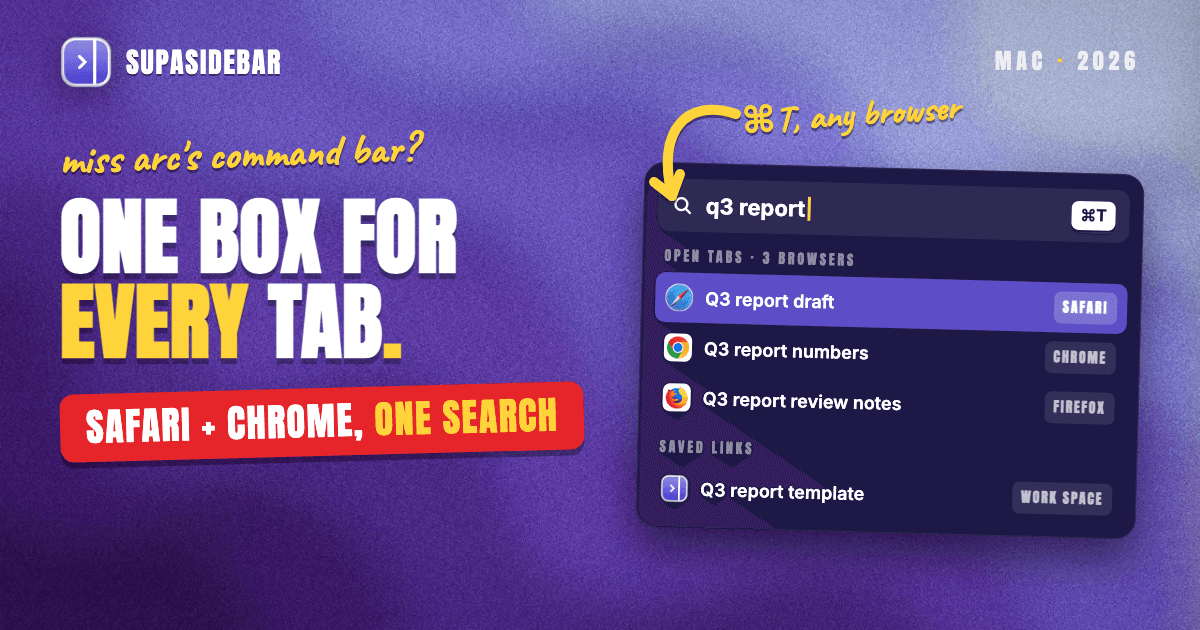
Arc's Command Bar was one box behind ⌘T that found an open tab, a past page or a command, and neither Chrome nor Safari ships anything like it. For anyone who uses more than one browser, the honest Arc command bar alternative is SupaSidebar's Command Panel. SupaSidebar's Command Panel is a Mac keyboard launcher that searches open tabs in 20+ browsers, saved links from every Space, the last 30 days of browser history and its own settings from one shortcut, and it can take over ⌘T inside Safari and Chrome so the Arc habit still works. Chrome alone gets close with its @tabs, @history and @bookmarks shortcuts, and Safari alone has Tab Overview search, but each only sees its own tabs. Arc stops working on December 22, 2026, so the habit needs a new home before then.
Quick navigation
- Want every Arc feature back, not just the Command Bar? → How to Replicate Arc Features in Any Browser on Mac
- Only need the built-in tab finders, browser by browser? → How to Find Any Open Tab Instantly on Mac
- Moving your Arc Spaces into Chrome? → How to Move Arc to Chrome Before December 22
- Moving your Arc Spaces into Safari? → Move Arc to Safari Before December 22 and Keep the Sidebar
- Still choosing where to go after Arc? → The complete Arc alternatives guide
- Missing ⌘T and the one box that found everything? You are in the right place. Keep reading.
Arc command bar alternatives, side by side
| What Arc's Command Bar did | Chrome, built in | Safari, built in | SupaSidebar's Command Panel |
|---|---|---|---|
| Opened on ⌘T | ⌘T opens a blank tab and the address bar | ⌘T opens a blank tab and the Smart Search field | ⌘⌃K anywhere, or ⌘T inside a browser (opt-in) |
| Switched to an open tab | @tabs or the tab search panel | Tab Overview search, "Switch to Tab" suggestions | Open tabs from 20+ browsers in one list |
| Suggested pages from history | @history | Top Hits from history and bookmarks | 30 days of history from Chrome, Arc, Firefox and 9 more |
| Found folders and bookmarks | @bookmarks | Top Hits from bookmarks | Saved links in every Space, imported bookmarks included |
| Ran commands (Split View, New Space) | A few Chrome Actions | None | SupaSidebar settings and commands, plus Ask AI |
| Searched one site | Site search shortcuts | Quick Website Search | Website scopes like /yo (YouTube) and /gh (GitHub) |
| Browsers it can see | Chrome only | Safari only | Every browser with Live Tabs support |
What Arc's Command Bar actually did
Arc's Command Bar replaced the blank new tab with a search box that answered "where is that page?" before it answered anything else. Press ⌘T, type a few letters, and Arc offered the tab already open, the page from history, the folder in the sidebar, or a fresh search.
Per Arc's own guide to multitasking, the Command Bar opened new tabs, switched to a tab that was already open, pulled up an extension, found a folder tucked away somewhere, and created a new Space, folder or Notion doc. Commands such as Add Split View and Open Shortcuts ran from the same box.
Two smaller habits mattered as much. ⌘L opened the Command Bar on the current tab's address, as How-To Geek's tour of Arc describes, and Site Search let a site shortcut plus Tab search one website directly. URL suggestions came from the query and from previous browsing history.
The real feature was the habit. One shortcut, one box, and no decision about where to look first. That habit now has a deadline, because The Browser Company announced on October 22, 2026 that Arc stops working on December 22, 2026, with accounts deactivated. Rebuilding it means picking one of three routes, a browser's own search, a browser that still ships a command bar, or a cross-browser launcher such as SupaSidebar.
Does Chrome have a command bar like Arc's?
Chrome has most of the ingredients of Arc's Command Bar, but they sit behind prefixes rather than in one box. Google added three address-bar shortcuts in December 2022, @tabs, @bookmarks and @history. Type @tabs, a space and a word, and Chrome lists matching open tabs.
The tab search panel in Chrome's tab strip covers the same ground with a mouse. The full rundown of Chrome's built-in tab finders, shortcut by shortcut, lives in How to Find Any Open Tab Instantly on Mac.
Arc's Site Search maps to Chrome's site search shortcuts, which let a keyword in the address bar search one website. Commands are thinner. Chrome Actions, added in Chrome 87, run a handful of tasks such as clearing browsing data, nowhere near Arc's list.
Chrome's real limit is the window frame. @tabs finds Chrome tabs and nothing else, so a page open in Safari might as well not exist. A Chrome extension can add an Arc-style palette, but an extension lives inside Chrome and can't read another browser's tabs. SupaSidebar's Command Panel gets around that by running as a Mac app outside every browser.
Does Safari have a command bar like Arc's?
Safari has no command bar, so Arc users moving to Safari rebuild the habit from three separate parts. ⌘⇧\ opens Tab Overview, per Apple's Safari keyboard shortcuts, and typing there filters tabs in the current window only, as How-To Geek's Safari walkthrough shows.
The Smart Search field does a little more. Typing part of a tab's title brings up a "Switch to Tab" suggestion, a trick MacMost covers in its Safari search tips. Apple's Safari search settings add a Top Hit drawn from bookmarks and browsing history, plus Quick Website Search, which remembers searches made inside a site.
What Safari lacks is the command half. There is no box that creates a folder, toggles a setting or opens a split view. And like Chrome, Safari's search stops at Safari, so a Chrome tab never shows up. Searching Safari and Chrome tabs from the same box takes a Mac-level tool such as SupaSidebar's Command Panel.
Which browsers still ship a real command bar?
Two Mac browsers still ship a true command bar, Dia and Vivaldi, and both stop at their own window frame. They are the closest thing to Arc's Command Bar inside a single browser.
Dia, from the team that built Arc, keeps a command bar. According to Dia's changelog, version 1.7.0 (December 1, 2025) put bookmarks in Command Bar results alongside history, 1.8.0 added "new ..." commands that start a document, and 1.14.0 (January 15, 2026) made ⌘⇧A search tabs across all windows in the current profile. The Dia command bar also routes a query to Chat or to Google. The full move is covered in the Arc to Dia guide.
Vivaldi's Quick Commands open with ⌘E on a Mac and search open tabs, closed tabs, bookmarks, history, notes and Vivaldi's own commands. Of the browsers compared here, Vivaldi ships the most complete built-in command palette.
Dia and Vivaldi are good answers for a reader who will live in one browser. Neither sees a tab open in Safari or Chrome, which is the gap SupaSidebar's Command Panel was built for.
The gap no browser closes is the second browser
Leaving Arc often means landing in two browsers, not one. A typical setup after Arc keeps Chrome for work, because the company login and extensions live there, and Safari for personal browsing or battery life. Every browser's built-in command bar searches one of those, never both.
One person who emailed SupaSidebar about this runs three browsers, with every window full of tabs, and described the daily cost plainly. The hunt was never just for the page, it was for which browser, which window and which tab held it, and whether it had been bookmarked at all. A command bar that sees one browser answers a third of that question.
SupaSidebar's Command Panel brings Arc's ⌘T to every browser
SupaSidebar's Command Panel is the closest match to Arc's Command Bar for anyone using more than one browser. One shortcut, ⌘⌃K by default, searches open tabs in Safari, Chrome, Firefox, Edge, Brave, Vivaldi, Dia and the other Live Tabs browsers, plus saved links, recent history and settings. Return switches to the tab in whichever browser already has it open.
SupaSidebar is a native Mac app, not an extension, so the Command Panel reads tabs through macOS's automation and accessibility interfaces rather than living inside one browser. The Command Panel docs list what one search covers.
- Open tabs from every browser with Live Tabs support, 20+ in total, including Safari, Chrome, Firefox, Edge, Brave, Vivaldi, Dia, Helium and Orion. Picking one switches to the existing tab instead of opening a duplicate.
- Saved links from every Space, not only the current one. Bookmarks imported from Safari, Chrome, Firefox or Arc become saved links, so they show up too.
- Browser history from the last 30 days, imported from Chrome, Arc, Firefox, Brave, Edge, Vivaldi, Zen, Atlas, Comet, Helium, Firefox Developer Edition and Orion, per the Recent Links docs. Safari and DuckDuckGo visits are recorded only while SupaSidebar is running.
- Settings, Spaces and folders, each with its own scope. Type
/to pick a scope or a site, such as/yofor YouTube or/ghfor GitHub. - Ask AI, which runs on the user's own AI provider key and can search the sidebar, open links and create folders from a plain-language request.
The search is fuzzy, so "fecebook" still finds Facebook. That forgiveness is most of what made Arc's bar feel fast.
The ⌘T habit survives the move
The Arc reflex of pressing ⌘T and typing still works. An opt-in setting makes ⌘T (or ⌘N) open SupaSidebar's Command Panel whenever a browser is in front, while every other app keeps its own ⌘T. The SupaSidebar 1.7.0 beta, released November 1, 2026, adds ⌘L, which opens the panel on the current page's address for editing, the same move Arc's ⌘L made.
Arc's Split View has a stand-in too. Searching "tile" in the Command Panel finds the Auto-Tile Windows setting, which turns on SupaSidebar's Window Tiling so browser windows sit side by side.
A two-browser setup, searched from one box
Here is how a Chrome-for-work, Safari-for-life setup looks in SupaSidebar, with each Space linked to the browser its links open in.
| Space | Opens in | Links inside |
|---|---|---|
| Client work | Chrome, work profile | app.hubspot.com, docs.google.com, linear.app |
| Personal | Safari | youtube.com, mail.icloud.com, reddit.com/r/macapps |
With both browsers open, pressing ⌘T in Safari and typing "linear" brings up the Linear tab that is open in Chrome, and Return jumps straight to it. Picking /yo from the scope picker instead narrows the results to YouTube pages, saved and open alike.
That cross-browser fit is what independent users notice first. As u/amerpie wrote in an r/macapps review of SupaSidebar, "It is built for exactly this use case: people who use multiple browsers and need a way to consolidate browser context without paying a constant productivity tax every time they switch."
Where the Command Panel falls short of Arc
SupaSidebar's Command Panel can't see Arc's own open tabs. Arc, Zen and Atlas have no Live Tabs support, so while Arc is still installed its tabs won't appear, though its last 30 days of history and its imported sidebar will.
Its commands are SupaSidebar's commands. It can't pin a tab to Chrome's tab strip or run Chrome's own menu items the way Arc's bar acted inside Arc. It also searches titles and addresses, not the text inside a page, it needs macOS Automation permission to read browser tabs, and SupaSidebar requires macOS 14 or later. The panel's lesser-known tricks, from site scopes to profile routing, are collected in this guide to the Command Panel's hidden extras.
Which command bar setup should you pick?
- If Chrome is your only browser, learn
@tabs,@historyand@bookmarks, and add site search shortcuts for the sites searched most. - If Safari is your only browser, use ⌘⇧\ for Tab Overview and let the Smart Search field's "Switch to Tab" suggestion do the rest.
- If a command bar built into the browser matters most, Dia and Vivaldi are the two that still ship one.
- If you use two or more browsers, SupaSidebar's Command Panel is the only option here that searches all of them from one box.
- If you are still on Arc until December 22, import Arc's sidebar into SupaSidebar now, so Arc's Spaces, folders and pinned tabs stay searchable after Arc goes dark.
What Arc users should do about the Command Bar
No browser replaces Arc's Command Bar on its own. Chrome's @tabs, @history and @bookmarks shortcuts and Safari's Tab Overview search cover the find-a-tab half for one browser each, Dia and Vivaldi keep a real command bar inside their own window, and only a Mac-level tool like SupaSidebar's Command Panel searches tabs across 20+ browsers at once.
Single-browser Chrome users should learn the three @ shortcuts, which take a minute to memorize. Single-browser Safari users get the closest result from ⌘⇧\ plus Smart Search. Readers who want the bar inside the browser itself should try Dia or Vivaldi before December 22. Anyone splitting the day between Chrome and Safari, or any two browsers, gets Arc's one-box habit back only with a cross-browser launcher, and SupaSidebar can bind it to ⌘T.
To keep Arc's ⌘T working in Safari and Chrome, try SupaSidebar (free version available).
Why we recommend SupaSidebar
SupaSidebar is a macOS app that brings Arc's sidebar to every browser - one sidebar for tabs, bookmarks, files, and apps across 32+ browsers including Safari, Chrome, Firefox, Edge, Brave, Vivaldi, Dia, Helium and Orion. For Arc users, its Command Panel is the part that replaces ⌘T, searching open tabs, saved links and recent history in every supported browser from one box.
FAQ
Does Chrome have a command bar like Arc?
Not as one box. Chrome splits Arc's Command Bar across the @tabs, @bookmarks and @history address-bar shortcuts, the tab search panel, site search shortcuts and a few Chrome Actions. All of them search Chrome only.
Does Safari have a command bar like Arc?
No. Safari offers Tab Overview search with ⌘⇧, "Switch to Tab" suggestions in the Smart Search field, and Quick Website Search, but no box that runs commands. Its search covers Safari tabs only, and Tab Overview filters the current window.
What is the best Arc command bar alternative on a Mac?
For one browser, Vivaldi's Quick Commands (⌘E) and Dia's command bar are the closest built-in matches. For two or more browsers, SupaSidebar's Command Panel is the closest match, because it searches open tabs in 20+ browsers, saved links and 30 days of history from one shortcut.
Can ⌘T open a command bar in Safari and Chrome?
Yes, with SupaSidebar. An opt-in setting makes ⌘T open SupaSidebar's Command Panel whenever a browser is in front, while other apps keep ⌘T. Without it, ⌘T in Safari and Chrome opens a blank tab.
Does Dia have Arc's command bar?
Dia has its own command bar. Its changelog shows bookmarks and history in command bar results since version 1.7.0 (December 2025), "new ..." commands since 1.8.0, and ⌘⇧A tab search across all windows of the current profile since 1.14.0 (January 2026). It searches Dia only.
Can one command bar search tabs in Safari and Chrome at the same time?
Not a built-in one. Every browser's search stops at its own tabs, so a cross-browser search needs a Mac app that reads tabs through macOS Automation. SupaSidebar's Command Panel does this for Safari, Chrome and 20+ other browsers.
Will Arc's Command Bar stop working on December 22, 2026?
Yes. The Browser Company announced on October 22, 2026 that Arc stops working on macOS and Windows on December 22, 2026, and accounts are deactivated. The Command Bar goes with it.
By Kshetez Vinayak, founder of SupaSidebar. Last updated November 4, 2026.