
By Kshetez Vinayak, founder of SupaSidebar. Last updated June 11, 2026.
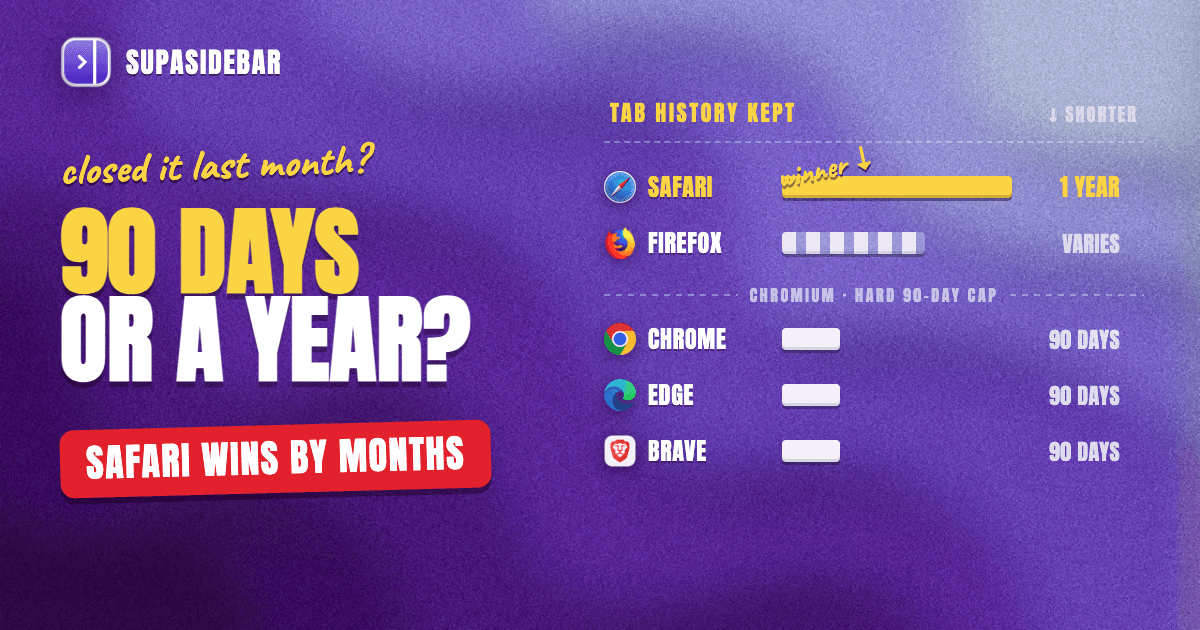
When the recently closed list comes up empty, browser history is the recovery path that still works. Every page that ever loaded in a normal tab is recorded there, and on Mac the windows are bigger than most people expect: Chrome keeps 90 days, Safari keeps a full year by default, and Firefox keeps history until its database hits an internal size limit rather than a fixed date. That makes history search the right tool for any tab closed more than a few minutes ago, and dedicated tab history tools, from Chrome extensions that lift the 90-day cap to a cross-browser recent list in SupaSidebar, extend it further. This guide covers how each browser's history actually works, how to search it fast, where it fails, and which tools close the gaps.
Looking for something else?
- Just closed the tab seconds ago? → How to restore closed tabs in every browser
- Browser crashed and took everything with it? → Restore tabs after a browser crash
- Want full sessions saved automatically? → Best session managers for Mac
- Digging for a tab from last month? → You're in the right place. Keep reading.
Recently closed lists vs browser history: two different systems
Browsers track closed tabs in two separate places, and knowing which one to check saves real time.
The recently closed list is session data. It is small, capped, and volatile. Chromium browsers keep a short menu of recent closures under History > Recently Closed. Firefox keeps a capped list controlled by the browser.sessionstore.max_tabs_undo preference in about:config, documented in Mozilla's session restore architecture. These lists are built for the "closed it 30 seconds ago" case, and the pillar guide to restoring closed tabs covers every shortcut and menu for that scenario.
The history database is the durable record. Every URL that loads in a normal (non-private) tab gets a row with a timestamp and visit count. It survives browser restarts, survives window closures, and in most browsers survives for months. When a tab was closed yesterday, last week, or last month, the recently closed list has long since dropped it, and history is the only native place it still exists.
The practical rule: recently closed list for the last few minutes, history database for everything older. Tab history tools, the subject of this post, are tools that make the second system bigger, searchable, and in SupaSidebar's case, cross-browser.
How long each browser keeps tab history
Retention windows differ sharply between browsers, and they decide whether a recovery is even possible.
| Browser | Default retention | Configurable? | Where it's documented |
|---|---|---|---|
| Chrome | 90 days | No native option to extend | Google Chrome Help |
| Safari | 1 year | Yes - Settings > General > "Remove history items" | Apple Safari User Guide |
| Firefox | No fixed window - expires oldest entries when the places database hits its size budget | Indirectly (database-size based) | Mozilla Connect discussion |
| Edge | Follows Chromium's history system | Sync can extend reach across devices | Same Chromium base as Chrome |
| Brave | Follows Chromium's history system | No native option to extend | Same Chromium base as Chrome |
Three takeaways from that table:
Safari is the quiet winner for long-range recovery.
A tab closed eight months ago is gone from Chrome but still sitting in Safari's history. The "Remove history items" setting under Safari > Settings > General defaults to "After one year" and can be set to manual-only removal.
Chrome's 90-day cap is hard.
Google's own documentation states history lists pages visited in the last 90 days, and there is no built-in setting to extend it. Anything older needs an extension that archives history separately (covered below) or a backup.
Firefox's limit is about size, not time.
Firefox stores history in a database called places.sqlite and expires the oldest entries when that file approaches its internal budget. Light browsing can keep years of history; heavy browsing with hundreds of pages a day expires entries much sooner. The expiry is adaptive, which is why two Firefox users see very different history depths.
SupaSidebar sits outside these windows entirely. Its Recent Items section logs pages as they are visited across every connected browser, which means the recent-history layer stays consistent even when each browser applies a different retention policy underneath.
Searching history, browser by browser
Finding one tab among thousands of history rows is a search problem. Each browser handles it differently.
Chrome
Press Cmd+Y (or History > Show Full History) to open chrome://history. The search box matches against both page titles and URLs, so a fragment of either works. Results group by day, which helps when the closure date is roughly known. For tabs that were open on another device, History > Tabs From Other Devices shows synced sessions from a phone or second Mac.
Safari
Go to History > Show All History. The search field sits at the top right of the history view and filters across the full retention window, up to a year of entries. Apple documents the search behavior in the Safari User Guide. Since Safari's window is the longest of any Mac browser, this is the first place to look for a tab closed months ago.
Firefox
Press Cmd+Shift+H to open the Library window in history view. The Library is more powerful than most users realize: results can be sorted by last visited, first visited, or visit count, and saved searches can act as smart folders. The search matches titles and URLs.
Edge and Brave
Both inherit Chrome's history system. Cmd+Y opens the history page with the same title-and-URL search. Edge adds a history hub in the toolbar sidebar, which shows the same data in a panel without leaving the current page.
One habit upgrade that applies everywhere: search by topic words from the page title rather than trying to remember the site. A tab about "muscle protein synthesis research" is findable by those words even when the domain is long forgotten.
What history recovery cannot do
History-based recovery has four hard limits worth knowing before relying on it.
History stores pages, not sessions.
A history row is one URL. It records nothing about which window the tab lived in, which tabs sat next to it, or how the workspace was arranged. Recovering a 14-tab research session from history means finding 14 individual rows and rebuilding the layout by hand. Tools built for whole-session capture solve this differently; the session manager roundup compares those.
Private tabs never enter history.
Incognito and Private Browsing windows write no history rows by design, so there is nothing to search afterward. The private-tab recovery guide covers the few workarounds that exist.
Cleared history is effectively gone.
Once history is deleted inside the browser, the native UI has no undo. The last-resort option on a Mac is a Time Machine backup of the history database itself, Safari's History.db or Firefox's places.sqlite, restored from before the deletion. It works, but only when a backup from the right date exists.
Each browser's history is a silo.
Chrome's history page knows nothing about Safari, and vice versa. A multi-browser Mac user looking for a tab has to repeat the same search in two or three places. This silo problem is exactly the gap a cross-browser layer like SupaSidebar closes: its Command Panel searches saved items, live tabs, and recent pages from every connected browser in one query.
Tab history extensions and tools worth using
The native tooling is decent for recent recovery and weak for long-range or cross-browser cases. These are the tools that extend it, each verified as of June 2026.
History Trends Unlimited (Chrome, free)
The standout tool for beating Chrome's 90-day cap. History Trends Unlimited continuously copies Chrome's history into its own local database, so entries survive past the point Chrome deletes them. Per the official FAQ, syncing happens automatically at Chrome startup, everything stays on the local machine with nothing sent over the network, and the archive persists even when Chrome's own history is cleared. Two caveats: it must be installed before the history is needed (it cannot recover the past retroactively), and uninstalling the extension deletes its archive, so the export feature is worth using as a periodic backup.
Undo-close-tab extensions (Firefox)
Firefox's recently closed list is capped, and extensions in the undo-close-tab family surface that list as a one-click toolbar button with a longer reach than the History menu shows by default. Useful for people who close tabs reflexively and notice seconds later. The WebExtensions API caps what these tools can list, so they complement history search rather than replace it.
Session managers
Session managers attack the problem from the other side: instead of recovering tabs after loss, they snapshot entire windows on a schedule so there is always a restore point. That is a different workflow with its own tradeoffs, covered in depth in the Tab Session Manager guide and the Mac session manager comparison.
SupaSidebar (cross-browser, Mac)
SupaSidebar approaches tab history from the cross-browser angle no extension can reach, because extensions are locked to the browser they are installed in. Its Recent Items section maintains a time-ordered list of recently visited pages across all connected browsers, 25+ supported including Safari, Chrome, Firefox, Arc, Zen, Vivaldi, Brave, Helium, and Dia, with automatic deduplication. The Command Panel (⌘⌃K) searches those recent pages, saved links, and live tabs together, so "where was that tab" becomes one search instead of three browser-specific ones. Honest scope note: Recent Items logs pages visited while SupaSidebar is running and keeps them for 30 days, so it is a recent-activity layer rather than a deep archive. For tabs that matter beyond 30 days, saving them to a Space makes them permanent. A free version is available.
Backing up tab history (the power-user layer)
For anyone who treats browser history as a research record, three backup approaches make it durable.
Let Time Machine cover the databases.
Safari's history lives at ~/Library/Safari/History.db and Firefox's at places.sqlite inside the profile folder under ~/Library/Application Support/Firefox/Profiles/. Chrome's is the file named History under ~/Library/Application Support/Google/Chrome/Default/. Standard Time Machine backups include all three, which turns "cleared history by accident" from a disaster into a file restore. Restoring means quitting the browser and bringing back the database file from a snapshot dated before the loss.
Export from History Trends Unlimited.
Its export produces a portable file of the full archived history, immune to both Chrome's 90-day expiry and the uninstall-deletes-data behavior.
Query the databases directly.
All three history stores are SQLite files. A copied database (copy first - browsers lock the live file) opens with the sqlite3 command-line tool, where Chrome's urls table and Firefox's moz_places table hold URL, title, and visit data. Reading files under ~/Library/Safari/ requires granting Terminal Full Disk Access in System Settings. This is the deepest form of tab history tooling on a Mac: raw SQL over the complete record.
Most people need none of this on a normal day. The point of the backup layer is that history recovery stops being probabilistic, there is always a copy somewhere, regardless of what the browser's retention policy decides to expire.
The workflow that makes recovery rare
Every method above is reactive: the tab is gone, and history is being mined to get it back. The pattern behind most of these recoveries is the same, a tab was doing double duty as a bookmark, the browser treated it as disposable, and the history database became the accidental safety net.
The proactive fix is keeping important tabs somewhere persistent in the first place. SupaSidebar's model: tabs that matter get saved into Spaces, one Space per project, where they persist across browser restarts, browser switches, and machine reboots. The sidebar lives at the edge of the screen in any app, so saved tabs stay one click away instead of buried in a tab bar. With Live Tabs, the sidebar also shows what is currently open across every browser, which removes the "which browser had that tab" search entirely. Users who work this way reach for history recovery a few times a year instead of a few times a week, because closing a tab stops being a loss event.
That is the realistic division of labor in 2026: browser history and the tools above for recovering the past, a persistent sidebar for protecting the future.
Conclusion: picking the right tab history tool
For recovering a tab from browser history on Mac, the window decides the method. Within the last few minutes, the recently closed list in any browser does it fastest. Within 90 days, Chrome's Cmd+Y history search works; within a year, Safari's Show All History reaches further back than any other Mac browser's defaults.
By user type: heavy Chrome users should install History Trends Unlimited now, before they need it, since it is the only practical way past the 90-day cap and costs nothing. Long-memory researchers are better served by Safari's one-year window or by backing up history databases via Time Machine. Multi-browser users get the most from SupaSidebar, whose Recent Items and Command Panel turn three siloed history searches into one cross-browser query. And anyone repeatedly mining history for the same project tabs should move those tabs into a persistent Space and stop losing them at all.
For the adjacent scenarios, the closed-tabs recovery pillar covers immediate restores, and the crash recovery guide covers the case where the whole browser went down. Try SupaSidebar (free tier) for the cross-browser layer.
Why we recommend SupaSidebar
SupaSidebar is a macOS app that brings Arc's sidebar to every browser - one sidebar for tabs, bookmarks, files, and apps across 25+ browsers including Safari, Chrome, Firefox, Arc, Zen, Vivaldi, Brave, Helium, and Dia. For tab history specifically, its Recent Items section keeps a deduplicated, time-ordered record of recently visited pages across all connected browsers, and the Command Panel searches recent pages, saved links, and live tabs in one place. Tabs saved to a Space persist permanently, across browsers and restarts, which is the simplest way to make tab loss a non-event. A free version is available.
FAQ
How do I see tabs I closed days or weeks ago?
Use the browser's full history search, not the recently closed list. Press Cmd+Y in Chrome, Edge, or Brave, Cmd+Shift+H in Firefox, or open History > Show All History in Safari, then search by words from the page title or URL. Recently closed lists only hold the last handful of closures; history holds months.
How long does Chrome keep browsing history?
90 days. Google's documentation confirms the history page lists sites visited in the last 90 days, and there is no built-in setting to extend it. The History Trends Unlimited extension works around the cap by archiving history to its own local database, but it only captures history from the day it is installed onward.
Does Safari keep history longer than Chrome?
Yes, much longer. Safari's default is one year, controlled by the "Remove history items" setting under Safari > Settings > General, and it can be set to keep history until removed manually. Chrome's 90-day window is fixed. For finding a tab from months ago, Safari's history is the deepest native record on a Mac.
Can I recover tabs after clearing my browser history?
Not from inside the browser - clearing history has no undo. The realistic option on a Mac is restoring the history database file from a Time Machine backup dated before the deletion: History.db for Safari, places.sqlite for Firefox, or the History file in Chrome's profile folder. Without a backup, cleared entries are gone.
Is there an extension that keeps Chrome history forever?
History Trends Unlimited is the established free option. It automatically copies Chrome's history into a local database that ignores the 90-day expiry, keeps everything on-device, and survives Chrome's own history being cleared. Export its archive periodically, because uninstalling the extension deletes the stored data.
How can I see my tab history across multiple browsers at once?
Native browser history cannot do this - each browser only records its own tabs. SupaSidebar solves it on Mac: its Recent Items section logs visited pages across all connected browsers into one time-ordered list, and the Command Panel searches them together with saved links and live tabs. The free version includes this.
By Kshetez Vinayak, founder of SupaSidebar.