
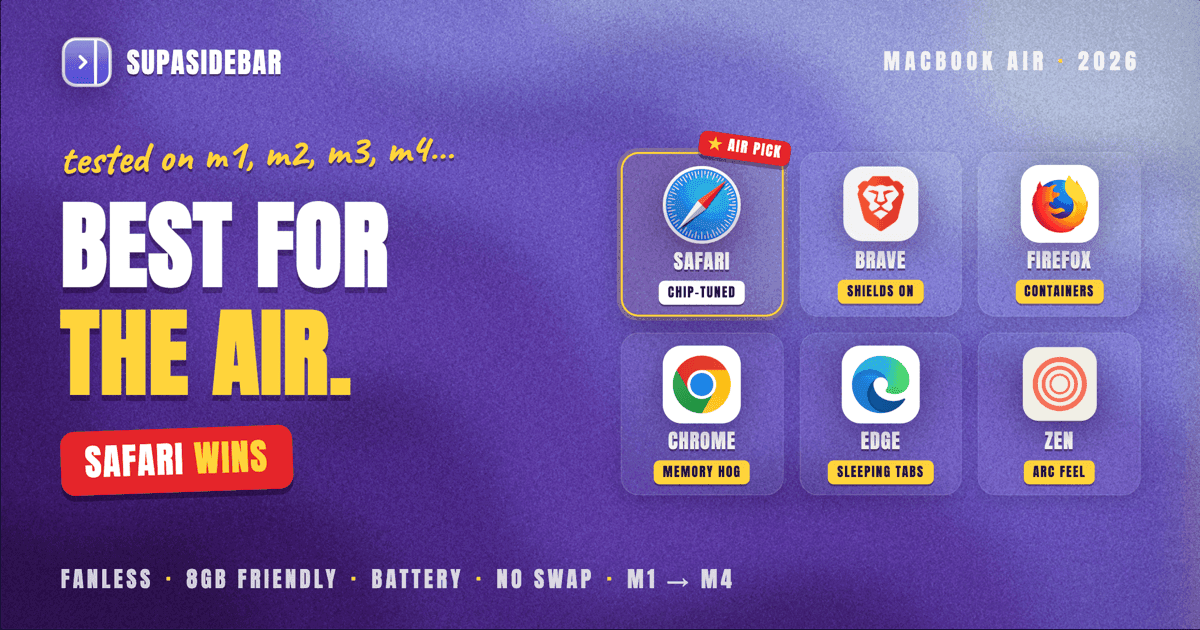
For a MacBook Air in 2026, Safari is the best browser - the fanless chassis and the smaller battery punish heavy Chromium browsers harder than they do a MacBook Pro, and Safari is the only browser tuned for the exact M-series chip inside the Air. Brave is the strong second pick when ad-heavy sites are the main workload, because Brave's Shields cut bandwidth and battery roughly 30-50% versus Chrome on those sites.
Chrome is the wrong default on an Air, especially an 8GB M1 or M2 Air, where it will swap to disk and feel sluggish under 20+ tabs. The model-by-model picks (M1 through M4), the fanless-throttling rules, and the one setup that fixes Safari's biggest weakness are below.
Looking for something specific?
- Comparing every Mac browser, not just for the Air? -> Best Browser for Mac in 2026
- On a MacBook Pro instead? -> Best Browser for MacBook Pro in 2026
- Just want the battery-life ranking? -> Best Browser for Mac with Battery Life 2026
- Want the broader Apple Silicon picture (Air and Pro together)? -> Best Browser for Apple Silicon Macs
- On a MacBook Air (M1-M4)? -> You're in the right place. Keep reading.
By Kshetez Vinayak, founder of SupaSidebar. Last updated May 31, 2026.
Why the MacBook Air changes the browser answer
The MacBook Air is the most browser-sensitive Mac Apple makes. It has no fan. It usually has less RAM than a Pro. Its battery is smaller. Each of those three things narrows which browsers behave well on the machine.
The best browser for a MacBook Air in 2026 is Safari, because Safari is the only browser Apple tunes for the M-series chip in the Air and because its lighter memory footprint matches the Air's constraints. Brave is the second pick on ad-heavy workloads. Chrome is the wrong default, especially on an 8GB M1 or M2 Air where it will swap to disk and turn into a worse-performing version of Safari. Firefox is reasonable on M3 and M4 Airs where there is more headroom to absorb its RAM use.
This post segments the recommendation by chip generation (M1 through M4) and by what the Air is actually being used for. It covers the fanless throttling problem, RAM behavior on 8GB / 16GB / 24GB Airs, real-world battery numbers, and which browser to pick for a specific MacBook Air. What it does NOT cover: deep powermetrics benchmarks (those live in the Mac browser battery life comparison), MacBook Pros (covered separately in Best Browser for MacBook Pro in 2026), Intel Macs, or Windows and Linux.
The fanless chassis is the real reason the Air is different
Most "best browser for Mac" articles miss this entirely: the MacBook Air has no fan. Every MacBook Air ever made, from the original 2008 model through every Apple Silicon generation, cools the chip passively through the aluminum chassis.
Passive cooling works beautifully for short bursts. The chip sprints, generates heat, and the chassis absorbs it. But under sustained load, the heat has nowhere to go, so macOS throttles the chip down to stay within thermal limits. A heavy browser - many tabs, a video call, ad-laden sites, lots of background extension activity - is exactly the kind of sustained load that triggers throttling on an Air. A MacBook Pro has an active fan, spins it up, and dumps the heat. The Air cannot.
This is why a browser that performs identically on an Air and a Pro in a 5-minute benchmark can feel very different over a 4-hour work session. The Pro stays at full clock; the Air settles into a throttled lower clock once the chassis warms up. Heavy Chromium browsers warm the chassis faster than Safari does because they run more processes (one per tab, plus extension processes), wake the CPU more often, and decode video less efficiently on some codecs. The combination is what makes Chrome feel "slower over time" on an Air specifically.
The thermal problem is the Air's defining constraint. Any browser recommendation for an Air starts there.
RAM headroom: the second Air-specific constraint
The MacBook Air ships with less RAM than the Pro. In 2026, an Air's RAM tiers are 16GB / 24GB on M4 (Apple raised the base from 8GB to 16GB with M4), and 8GB / 16GB / 24GB on M1, M2, and M3 Airs still in use. Apple's M4 MacBook Air tech specs confirm the new 16GB baseline.
8GB is the configuration where browser choice matters most. A Chromium browser with 20 tabs, 4-5 active extensions, and a couple of Google Docs open will routinely use 4-6GB of physical memory on its own, leaving little for everything else. When macOS runs out of memory, it swaps to the SSD. SSD swap is fast on Apple Silicon but it still introduces stutter and burns write cycles. On an 8GB M1 or M2 Air, a Chromium browser plus Slack plus a video call is enough to trigger swap.
Safari uses less memory than Chromium browsers under typical loads. Its process model is tighter, its tab suspension is more aggressive, and it does not need to host extension runtimes the way Chrome does. The exact gap varies by workload, but the qualitative pattern is consistent: Safari is the browser that lets an 8GB Air feel snappy for the longest.
On 16GB and 24GB Airs, the RAM constraint relaxes. Chrome and Firefox become viable, especially for users who actually need the extension ecosystem. But even on a 16GB Air, the fanless chassis still penalizes heavy browsers under sustained load. RAM was the second Air-specific constraint; thermals are still the first.
Battery life on the Air's smaller battery
The MacBook Air's battery is smaller than the Pro's. The 13" M4 Air ships with a 53.8 Wh battery; the 14" M4 MacBook Pro ships with 72.4 Wh, per Apple's published tech specs. That is roughly 35% more battery on the Pro, on the same chip generation. Browser efficiency on the Air pays back into a smaller pool to begin with.
Apple's published Safari numbers for the Air (from Apple's tech specs):
| MacBook Air | Wireless web (Safari) | Video streaming (Safari) | Battery |
|---|---|---|---|
| 13" M4 | Up to 16 hours | Up to 18 hours | 53.8 Wh |
| 15" M4 | Up to 16 hours | Up to 18 hours | 66.5 Wh |
| 13" M3 | Up to 15 hours | Up to 18 hours | 52.6 Wh |
| 15" M3 | Up to 15 hours | Up to 18 hours | 66.5 Wh |
| 13" M2 | Up to 15 hours | Up to 18 hours | 52.6 Wh |
| 13" M1 (8GB) | Up to 15 hours | Up to 18 hours | 49.9 Wh |
Apple's numbers come from controlled tests using Safari with display brightness at 8 clicks from the bottom. They are deliberately gentle and they are Safari-only. Real-world battery life with Slack, Notion, Figma, and 30 tabs is significantly lower for any browser. Independent testing on the M4 Air specifically measured around 15 hours of mixed web browsing per Tom's Guide, which is consistent with Apple's published range under heavier workloads.
There is no equivalent Apple-published Chrome figure for the Air. To compare browsers, independent benchmarks are the only data. The most honest finding from those benchmarks: the gap between Safari and Chrome on M-series Macs is smaller than common wisdom suggests, but it is real, and it grows on the Air specifically because the Air has less battery to absorb the difference.
The independent benchmarks worth knowing:
- Birchtree's 36-hour test (2024, M2 Pro MacBook Pro 14", Chrome 128 vs Safari 17.6): Safari consumed 18.67% of battery on average, Chrome 17.33% over 3-hour test cycles. That is Chrome using about 9% less battery than Safari on a Pro. On an Air the relative result is similar but the absolute hours saved are smaller (smaller battery).
- Mihnea Radulescu's BrowserBench: Brave's peak power draw measured at 8.3W vs Safari's 10.5W on the same workload. Brave's Shields strip the ad and tracker load before it ever hits the renderer, which on ad-heavy sites is the largest battery win available.
- Brave's own published 1.0 performance test: Brave claims 30-50% bandwidth and battery savings versus Chrome with Shields on. Vendor-published, treat with appropriate skepticism, but the methodology is documented and reproducible.
On a MacBook Air, the practical implication is this: pick Safari for general battery life on the gentle workloads Apple's numbers describe, pick Brave when most browsing is ad-heavy sites (news, video, social), and avoid Chrome as a default - Chrome is fine on a Pro, but the Air does not have the battery or the thermals to absorb it.
Each browser on the MacBook Air, ranked
1. Safari - the default pick on every MacBook Air
Safari is the right browser for most MacBook Air users in 2026 across every Air configuration from M1 8GB through M4 24GB. Three reasons specific to the Air:
- Tuned for the chip. WebKit, Safari's engine, is built by Apple and tuned for the M-series chip generations - the Air gets the benefit of that tuning directly. No third-party browser can match it on day one of a new chip.
- Lower memory footprint. Matters most on 8GB Airs but pays back at every RAM tier.
- Most-efficient video decode path. Safari hardware-decodes everything macOS supports, which is the single largest battery saver for the YouTube and video-call workloads most Airs handle.
What Safari gets wrong on the Air is the same thing it gets wrong on every Mac: tab and bookmark management past 20 tabs. The tab titles shrink to favicons. Profiles help with separation but do not solve the tab-graveyard problem.
The fix is to keep Safari for the battery and add a separate sidebar layer on top - which is what SupaSidebar does (covered below in "The setup that fixes Safari's biggest weakness").
2. Brave - the strongest second pick on ad-heavy workloads
Brave is the right pick for MacBook Air users whose browsing is heavy on ad-laden sites (news, social, video). Brave Shields block ads and trackers by default at the network layer, which translates into measurable bandwidth and battery savings on those sites - Brave's own published tests claim 30-50% reductions versus Chrome and independent testing shows the gap is real.
Brave runs on the Chromium engine, so it has full extension compatibility (Chrome Web Store extensions work directly). On an Air, the practical Brave trade-off is that it still uses more RAM than Safari per tab; the Shields-driven battery wins partially offset the Chromium-baseline overhead, but only on ad-heavy sites. On a gentle workload like Apple's own battery test (cycling through 25 popular sites), Safari still wins.
Pick Brave on the Air when the workload is genuinely ad-heavy. Pick Safari when it is not.
3. Firefox - viable on M3 and M4 Airs, marginal on M1 and M2
Firefox in 2026 ships with Multi-Account Containers and a tighter memory profile than Chromium browsers, which makes it more interesting on the Air than Chrome is. Mozilla shipped native Apple Silicon Firefox in version 84 and has invested in performance work since.
The Air-specific catch is that Firefox still uses more RAM than Safari and lacks Safari's chip-specific tuning. On an 8GB M1 or M2 Air, Firefox plus a video call plus a few dozen tabs gets close to the memory ceiling. On 16GB+ Airs (any M3 with 16GB, every M4), Firefox is genuinely usable as a daily driver, especially for users who need its privacy posture or containers.
Pick Firefox on an Air when the RAM tier is 16GB or higher and the workload values privacy (containers) over Chromium extension compatibility.
4. Chrome - the wrong default for a MacBook Air
Chrome is the wrong default browser on a MacBook Air, especially on 8GB Airs. Three Air-specific problems:
- RAM. Chrome's process model means even moderate tab counts (20-30) consume 4-6GB of physical RAM. On 8GB Airs that pushes the machine into swap; on 16GB Airs it eats the headroom needed for everything else.
- Thermals. Chrome's background activity warms the chassis faster than Safari does, which triggers macOS throttling on the fanless Air sooner.
- Battery. The Birchtree result above showed Chrome at near-parity with Safari on a Pro - the Air's smaller battery turns "near parity" into "noticeably worse runtime."
Chrome's Memory Saver and Energy Saver help. They suspend inactive tabs and slow animations below 20% battery. Turn them on if Chrome is unavoidable (a work tool only Chrome supports, for example). But neither feature changes the underlying conclusion: an Air is not the Mac that absorbs Chrome's overhead gracefully. A Pro is. The Air is not.
Pick Chrome on an Air only when a specific work tool requires it and nothing else suffices.
5. Edge - similar profile to Chrome, with slightly better defaults
Microsoft Edge runs on Chromium with Sleeping Tabs and Efficiency Mode enabled by default, which produces a 25-minute battery improvement on average and roughly 26% memory reduction with sleeping tabs versus active background tabs. That tightens the gap with Safari versus Chrome, but it does not close it. On a MacBook Air, Edge is "Chrome with better defaults" - still a Chromium browser, still more RAM and thermal load than Safari.
Pick Edge on an Air when Microsoft 365 integration is the actual reason. Otherwise Safari or Brave is the better pick.
6. Zen - the niche pick for Arc refugees
Zen is the open-source Firefox-based browser that captures the Arc spirit (Workspaces, Compact Mode, vertical tabs) for users who want Arc's UX without Arc's maintenance-mode status. On a MacBook Air, Zen inherits Firefox's Gecko engine, so the RAM and battery picture is similar to Firefox: viable on 16GB+ M3 and M4 Airs, marginal on 8GB M1 and M2 Airs.
Pick Zen on an Air when the Arc UX matters more than Safari's efficiency gap, and the Air has 16GB or more.
7. Vivaldi, Opera, Orion, others - special-case picks
Vivaldi and Opera are Chromium browsers with more customization. On an Air they carry Chromium's RAM and thermal cost without the Shields battery win Brave gets. Orion is Kagi's WebKit-based browser that runs both Chrome and Firefox extensions - because it shares WebKit with Safari, it gets close to Safari's efficiency on the Air. Orion is a real second-Safari pick on the Air if extension support matters and Safari's built-in extension story falls short.
Pick Vivaldi or Opera on an Air only when their specific power-user features are non-negotiable. Pick Orion when WebKit efficiency plus extension support is the actual requirement.
Model-by-model picks: which browser for which MacBook Air
The Air's chip generation and RAM tier shifts the recommendation. Here is the practical matrix:
| Your Mac | First pick | Second pick | Avoid |
|---|---|---|---|
| MacBook Air M1 (8GB) | Safari | Brave (ad-heavy workload only) | Chrome, Firefox (RAM-constrained) |
| MacBook Air M1 (16GB) | Safari | Brave or Firefox | Chrome (still over-spec for the chip) |
| MacBook Air M2 (8GB) | Safari | Brave (ad-heavy workload only) | Chrome |
| MacBook Air M2 / M3 (16GB+) | Safari | Brave or Firefox | Chrome as primary |
| MacBook Air M4 (16GB base) | Safari (or any browser for light use) | Brave for ad-heavy, Firefox for privacy | Chrome only if a tool forces it |
| MacBook Air M4 (24GB) | Safari, or any browser for moderate use | Brave / Firefox / Edge per preference | Nothing specifically; M4 24GB absorbs more |
The pattern across the matrix: Safari is the first pick at every tier; the second pick shifts based on workload; Chrome moves from "avoid" to "tolerable if needed" as the Air's RAM and chip generation improve, but it never becomes a first pick on any Air.
This is the opposite of the MacBook Pro picture, where active cooling and more RAM make Chrome and Arc and other Chromium browsers genuinely viable. The Air is the constraint; the Pro is the freedom.
The setup that fixes Safari's biggest weakness on the Air
Safari is the right browser for a MacBook Air. Safari's tab and bookmark management past 20 tabs is its biggest weakness. Profiles help with separation but tabs still pile up.
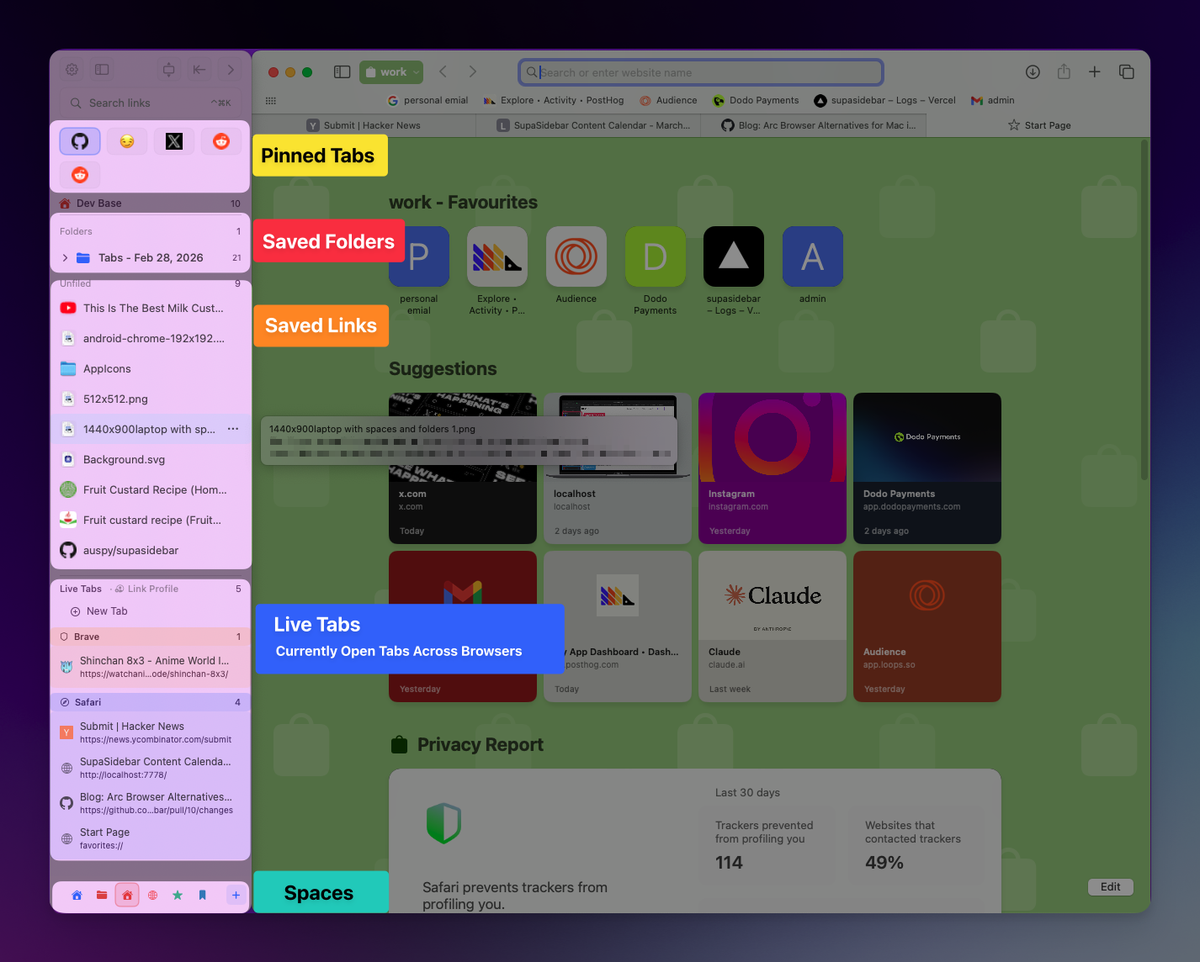
The cleanest fix on an Air is to keep Safari for the battery and add a separate sidebar layer on top - one that shows live tabs from Safari, lets you organize bookmarks and folders alongside them, and works across other browsers when needed. That is what SupaSidebar is built for. It runs as a native macOS app (not an extension), so Safari's efficiency and battery profile are preserved. The sidebar floats at the screen edge and shows tabs, bookmarks, files, and apps from every installed browser, organized into Spaces.
"Moved from Arc to Safari, only thing I missed was the sidebar. This is it." - SupaSidebar user, Reddit
"I would love to try to wean myself off Arc and switch to Safari for full macos integration. But without Arc sidebar that will never happen. But... is there a solution for that? Supasidebar?" - SupaSidebar user, email
For a MacBook Air user picking Safari for the battery and thermals, the SupaSidebar layer adds tab and bookmark management that Safari does not have natively. The combination keeps the Air at maximum battery life while addressing the productivity problem Safari has at scale.
What about Arc on a MacBook Air?
Arc still runs on a MacBook Air. The Browser Company entered Arc into maintenance mode on May 27, 2025, and Atlassian acquired the company for $610 million in cash on October 21, 2025, shifting focus to Dia. Arc is not getting active development, but it is not dead. On an Air specifically, Arc inherits Chromium's RAM and thermal cost - it is closer to "Chrome with better UX" than "Safari with a sidebar."
For Air users on Arc today: keep it as long as it works for the workflow, but plan the move. The Arc cluster covers the migration choices in depth: Arc Browser Alternatives Guide for the broad comparison, Is Arc Browser Dead? for the maintenance-mode picture, and Switching from Arc Browser for the migration path.
For Air users who want Arc's sidebar feel without Arc's overhead: Safari plus SupaSidebar is the lowest-RAM, longest-battery substitute available on a fanless chassis.
Conclusion: Picking the right browser for your MacBook Air in 2026
For most MacBook Air users, Safari is the right browser - efficient, chip-tuned, and the only one Apple publishes battery numbers for. Brave is the second pick on ad-heavy workloads, where its Shields produce measurable battery and bandwidth savings. Chrome is the wrong default on any Air, especially 8GB M1 and M2 Airs.
Segment recommendations:
- MacBook Air M1 (8GB): Safari. Add a sidebar layer like SupaSidebar to fix the tab-graveyard problem; the Air has no RAM to give to a heavier browser.
- MacBook Air M2 / M3 (8GB or 16GB): Safari first, Brave second for ad-heavy browsing. Avoid Chrome as a daily driver.
- MacBook Air M4 (16GB or 24GB): Safari is still the right first pick, but the RAM ceiling has lifted enough that Brave, Firefox, or Edge are viable secondary picks for users who genuinely need them.
- Air users on Arc: Plan the migration. Arc is in maintenance mode and the Air's fanless chassis rewards lighter browsers anyway.
- Air users coming from a MacBook Pro: The Pro forgave Chrome; the Air will not. Switch to Safari and accept the trade.
For the broader Mac browser picture (not Air-specific), see Best Browser for Mac in 2026. For the sibling post on MacBook Pros (where the picture is very different), see Best Browser for MacBook Pro in 2026. Try SupaSidebar (free tier) if Safari plus a cross-browser sidebar fits the Air workflow.
Why we recommend SupaSidebar
SupaSidebar is a macOS app that brings Arc's sidebar to every browser - one sidebar for tabs, bookmarks, files, and apps across 32+ browsers including Safari, Chrome, Firefox, Arc, Vivaldi, Brave, Helium, and Dia. It runs as a native Mac app (not a browser extension), so the browser the user picks for battery and thermals stays the browser the machine runs - SupaSidebar just adds the sidebar UX on top.
On a MacBook Air specifically, this matters because the Air's constraints (fanless chassis, smaller battery, often 8GB or 16GB RAM) push users toward Safari for efficiency, but Safari's tab and bookmark management is the weakest part of the experience past 20 tabs. SupaSidebar fills that gap. Live Tabs from Safari appear in the sidebar with real-time updates, Spaces let you separate work and personal contexts, and the Command Panel (⌘⌃K) gives Spotlight-style search across every tab, bookmark, and folder. The sidebar also reaches into Chrome, Firefox, Brave, or any of the other 32+ supported browsers - useful for the rare case when a single tool forces a non-Safari browser on the Air.
The free tier covers the core sidebar across every browser. Download SupaSidebar from supasidebar.com - macOS 14+ (Sonoma and later), Intel and Apple Silicon.
Frequently Asked Questions
What is the best browser for a MacBook Air M1 in 2026?
Safari is the best browser for a MacBook Air M1, especially on the 8GB configuration. Safari's lower memory footprint and chip-tuned WebKit engine make it the only browser that consistently keeps an 8GB M1 Air responsive under typical 20+ tab workloads. Brave is the second pick when most browsing is on ad-heavy sites. Chrome is the wrong default on any M1 Air.
What is the best browser for a MacBook Air M4 in 2026?
Safari is still the right first pick for a MacBook Air M4, but the M4 Air's 16GB base RAM and improved efficiency mean Brave, Firefox, and Edge are all genuinely viable as secondary browsers. Chrome is tolerable on an M4 Air for short sessions but still warms the fanless chassis faster than Safari does.
Why does the MacBook Air punish heavy browsers more than a MacBook Pro?
The MacBook Air has no fan. Under sustained load, macOS throttles the M-series chip down to stay within thermal limits, which makes heavy Chromium browsers feel slower over a long work session. A MacBook Pro has an active fan and can dump heat indefinitely, so browser choice on a Pro is mostly about features rather than thermals. See Best Browser for MacBook Pro in 2026 for the Pro-specific picks.
Is Safari faster than Chrome on a MacBook Air?
On benchmark scores, Safari and Chrome are within roughly 6% of each other on M-series Macs - Speedometer 3.1 results on an M4 MacBook Pro put Safari at 43.61 and Chrome at 41.10. The Air-specific reason Safari feels faster in practice is the fanless chassis: under sustained load, Chrome warms the chip enough to trigger throttling, and Safari does not. The benchmark gap is small; the real-world gap on an Air is larger.
How much battery does Chrome actually use versus Safari on a MacBook Air?
Birchtree's 36-hour test on an M2 Pro MacBook Pro found Chrome 128 used about 9% less battery than Safari 17.6 on a controlled web-browsing workload. The Air has a smaller battery than the Pro, so the absolute hours saved are smaller, but the relative pattern is similar. The bigger battery story on the Air is Brave's Shields stripping ad load - Brave reports 30-50% battery savings versus Chrome on ad-heavy sites.
Can I use Arc on a MacBook Air in 2026?
Arc still runs on a MacBook Air. Arc entered maintenance mode on May 27, 2025 and the team's focus shifted to Dia after the Atlassian acquisition. On an Air specifically, Arc carries Chromium's RAM and thermal cost without the active development that would justify it. For Air users on Arc, see Switching from Arc Browser for the migration paths.
Does a MacBook Air M3 handle Chrome better than an M1 Air?
Yes, somewhat. The M3 brought meaningful efficiency gains over the M1, and on a 16GB M3 Air, Chrome with Memory Saver enabled and a reasonable tab count (20-30) is workable for a full work day. On an 8GB M1 Air, the same workload pushes the machine into swap. Safari is still the first pick on every Air generation, but Chrome moves from "wrong default" to "tolerable secondary" between M1 and M3.
What is the most private browser for a MacBook Air?
Brave and Firefox are the two strongest privacy picks on an Air. Brave's Shields block ads and trackers at the network layer; Firefox's Multi-Account Containers isolate cookies and login state per container. On an 8GB Air, Brave is the more practical pick (lighter footprint); on a 16GB+ Air, either works. Safari's Intelligent Tracking Prevention is also strong but does less than Brave Shields on the worst ad-heavy sites.
By Kshetez Vinayak, founder of SupaSidebar. Last updated May 31, 2026.