
By Kshetez Vinayak, founder of SupaSidebar. Last updated November 1, 2026.
TL;DR
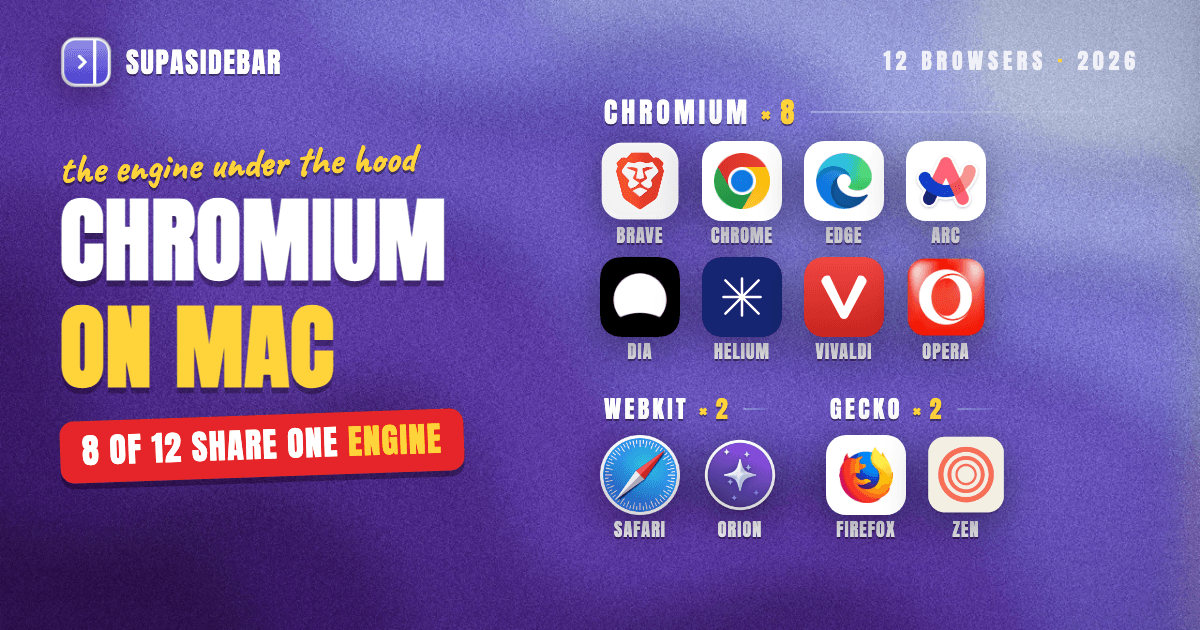
Eight of the twelve Mac browsers people ask about most are Chromium-based (Chrome, Edge, Brave, Vivaldi, Opera, Arc, Dia and Helium), two run on Apple's WebKit (Safari and Orion), and two run on Mozilla's Gecko (Firefox and Zen). The best Chromium browser for most Mac users in 2026 is Brave, because it still runs full uBlock Origin after Chrome dropped it, syncs between devices, and moved to Chrome's newest Chromium one day after Chrome in October. Helium is the best Chromium pick for Arc users who want vertical tabs without Google services. The engine table, what the engine actually changes, and the picks by need are below. The engine decides extensions, sync and Google services, but not the sidebar, and SupaSidebar keeps one sidebar across all three engines.
Quick navigation
- Leaving Arc and weighing Helium? → Helium vs Arc Browser
- Want the full review of Dia, not just its engine? → Dia Browser Mac Review
- Looking for an open-source browser with Arc's look? → Is There an Open-Source Arc Browser?
- Care most about low memory use? → Best Lightweight Browsers for Mac
- Comparing every Mac browser, not just Chromium ones? → Best Browser for Mac in 2026
- Want to know which engine each Mac browser runs on? You are in the right place. Keep reading.
Every Mac browser's engine at a glance
| Browser | Engine | Built on | Chrome Web Store extensions | SupaSidebar Live Tabs | Best for |
|---|---|---|---|---|---|
| Chrome | Blink | Chromium (Google) | Yes | Yes | Google account users |
| Edge | Blink | Chromium, since January 2020 | Yes | Yes | Microsoft 365 work |
| Brave | Blink | Chromium | Yes, plus full uBlock Origin | Yes | Privacy with no setup |
| Vivaldi | Blink | Chromium (Extended Stable) | Yes | Yes | Heavy customizers |
| Opera | Blink | Chromium | Mostly, via a helper add-on | Not supported | Opera's built-in extras |
| Arc | Blink | Chromium | Yes | No, imports instead | Nobody new, ends December 22 |
| Dia | Blink | Chromium | Yes | Yes | AI chat built into browsing |
| Helium | Blink | ungoogled-chromium | Yes, uBlock Origin built in | Yes | Arc's side tabs, no Google |
| Safari | WebKit | Apple's WebKit | No, Safari extensions | Yes | Battery life on Apple silicon |
| Orion | WebKit | Apple's WebKit | Partly, plus Firefox add-ons | Yes | WebKit with Chrome extensions |
| Firefox | Gecko | Mozilla's Gecko | No, Firefox add-ons | Yes | Non-Chromium with full uBlock Origin |
| Zen | Gecko | Firefox | No, Firefox add-ons | No | Arc-style Spaces on Firefox |
Which Mac browsers are Chromium-based?
Chrome, Edge, Brave, Vivaldi, Opera, Arc, Dia and Helium are all Chromium-based on Mac, which means they render pages with Google's Blink engine and run the V8 JavaScript engine. Safari and Orion are not Chromium-based. They use Apple's WebKit. Firefox and Zen use Mozilla's Gecko.
Chromium is the open-source project Google builds Chrome from. Any company can take that code, add its own interface and features, and ship a new browser. That is why so many browsers on a Mac look different but load pages the same way.
The three engines share more history than most people expect. Blink began as a fork of Apple's WebKit, which Google announced on April 3, 2013, according to TechCrunch's report on the Blink fork. So Chrome and Safari descend from the same code, while Gecko grew up separately at Mozilla.
The biggest move to Chromium came from Microsoft. The rebuilt Edge, based on the Chromium open-source project, became available for Windows and macOS on January 15, 2020, per Microsoft's launch post for the new Edge. Since then, Firefox and its forks are the only mainstream Mac browsers not built on Chromium or WebKit.
Is Arc, Dia or Helium Chromium-based?
Arc, Dia and Helium are all Chromium-based, and they are the three browsers people ask about most because they look nothing like Chrome. The interface is the part that changes. The engine underneath is the same Blink engine Chrome uses.
Is Arc Chromium-based?
Yes, Arc is built on Chromium, so it runs Chrome Web Store extensions and renders pages like Chrome. That matters less every week, because The Browser Company set Arc's shutdown for December 22, 2026, when Arc stops working on macOS and Windows, per 9to5Mac's report on Arc's sunset date. No one should start on Arc now. Current users should save their sidebar with the Arc sidebar export guide or import it into SupaSidebar, then look at the open-source Arc options for another Chromium base with Arc's look.
Is Dia browser Chromium-based?
Yes, Dia is Chromium-based, and it keeps up with Chrome closely. Dia 1.54.0 for macOS, released October 22, 2026, runs on Chromium M156, the same major version as Chrome. Dia's difference from Chrome is its AI chat layer, not its engine, as the Dia browser review covers in detail.
Is Helium browser Chromium-based?
Yes, Helium is Chromium-based, but it starts from ungoogled-chromium rather than Google's own build. The Helium project on GitHub describes a private, open-source browser with Google services removed and uBlock Origin preinstalled. It runs Chrome Web Store extensions and has a vertical tabs layout, which is why Arc users compare it with Arc in Helium vs Arc. SupaSidebar shows Helium's open tabs in Live Tabs, the same as Chrome's.
Zen, by contrast, is not Chromium-based. It is a Firefox browser with an Arc-style sidebar, as the Zen Browser review explains. Orion is the odd one out on WebKit, because it runs many Chrome and Firefox extensions, per Kagi's Orion site.
Same engine, different Chromium versions
"Chromium-based" does not mean "as current as Chrome." Each company merges new Chromium releases on its own schedule, so security fixes and web features reach each browser at a different time.
| Browser | Chromium version (late October 2026) | Release date |
|---|---|---|
| Chrome 156 | 156 | October 20, 2026 |
| Brave 1.98.60 | 156 | October 21, 2026 |
| Dia 1.54.0 | 156 | October 22, 2026 |
| Helium (macOS build) | 156 | October 22, 2026 |
| Opera 138 | 154 | October 20, 2026 |
| Vivaldi 8.2 | 152 Extended Stable | September 3, 2026 |
Chrome moved to a two-week stable release cadence starting with Chrome 153 on September 8, 2026, per Google's Chrome release announcement. Brave shipped version 1.98.60 on Chromium 156 a day after Chrome, and Helium's October 22 macOS build was on Chromium 156 as well.
Opera 138 shipped on Chromium 154, per Opera's desktop release blog. Vivaldi 8.2 sits on Chromium 152 Extended Stable, a slower Chromium track that takes new features every eight weeks but still gets security fixes, per OMG Ubuntu's Vivaldi 8.2 coverage. Neither is unsafe, but a browser two to four versions behind Chrome gets new web features later.
What the engine changes in practice
The engine decides four things a Mac user notices day to day, which are extensions, ad blocking, sync and how much Google is built in. It does not decide the interface, the sidebar or the tab layout, which each browser builds on top.
| What changes | Chromium browsers | WebKit (Safari, Orion) | Gecko (Firefox, Zen) |
|---|---|---|---|
| Extensions | Chrome Web Store | Safari extensions, Orion also takes Chrome and Firefox ones | Firefox add-ons |
| Full uBlock Origin | Brave and Helium | Not in Safari | Yes |
| Sync | Each browser's own account | iCloud in Safari | Mozilla account |
| Google services built in | Chrome only | No | No |
| How SupaSidebar reads tabs | AppleScript | AppleScript | macOS Accessibility (Firefox) |
Extensions are the biggest reason to stay on Chromium.
Every Chromium browser can install from the Chrome Web Store, so an extension-heavy setup moves from Chrome to Brave, Edge, Dia or Helium without changes. Moving to Safari or Firefox means finding a different version of each extension, or living without some.
Ad blocking now splits the Chromium family.
Google removed all remaining Manifest V2 extensions, including uBlock Origin, from the Chrome Web Store on August 31, 2026, per the Chrome Manifest V2 deprecation timeline, leaving only uBlock Origin Lite for Chrome. Brave hosts Manifest V2 extensions itself and said it will keep supporting full uBlock Origin, per CyberInsider's report on the purge. Helium takes a different route and builds its own fork of uBlock Origin into the browser, with CNAME uncloaking, per the Helium README. Microsoft is also turning off Manifest V2 in Edge, with the consumer transition targeted for the end of 2026, per the Microsoft Edge developer blog.
Sync does not cross Chromium browsers.
Since March 15, 2021, Google has limited third-party Chromium browsers' access to Google-only services such as Chrome Sync, per Google's notice to Chromium packagers. So Brave, Edge and Vivaldi each sync through their own account, and Helium has no sync at all yet.
Memory depends more on the browser than the engine.
In Cloudwards' Vivaldi review, Vivaldi used less RAM than Brave and Firefox at both low and high loads, even though it ran slower than Brave and Chrome, so two Chromium browsers can differ more than Chromium and Gecko do. Safari is usually the most power-efficient choice on Apple silicon, as the Mac battery life comparison measures.
SupaSidebar works on all three engines because it reads tabs from outside the browser, through AppleScript for Chromium browsers and Safari and through macOS Accessibility for Firefox. No browser extension is involved, so the engine choice stays open.
The best Chromium browser for Mac in 2026
The best Chromium browser for Mac in 2026 is Brave for most people, Helium for Arc users who want a minimal browser without Google, and Edge or Chrome only when work accounts decide for you. These picks rank by what a Mac user gives up, since every option renders pages the same way.
Brave, the best Chromium browser for most Mac users
Brave is the best Chromium browser for most Mac users because it keeps full uBlock Origin after Chrome's August 2026 purge, runs Chrome Web Store extensions, and shipped Chromium 156 one day after Chrome did. Ad and tracker blocking work out of the box, and Brave Sync carries bookmarks and settings between devices, which Helium cannot do yet.
Brave is not for everyone. XDA's Tanveer Singh left Brave over its crypto features, built-in AI and memory use, per his switch to Helium on XDA, and Brave needs macOS Ventura 13 or later. The Brave browser review covers both sides.
Best for
Mac users who want Chrome's extensions and speed with strong ad blocking on day one.
Helium, the best Chromium pick for Arc users without Google
Helium is the best Chromium browser for Arc users who want vertical tabs, a built-in uBlock Origin and no Google services in one free, open-source app. Helium's GitHub repository has more than 22,000 stars and a GPL-3.0 license, and its macOS builds run current Chromium.
Helium has no Spaces and no sync yet, so it copies Arc's look more than Arc's workflow. Its own Arc importer brings pinned tabs and folders across as bookmarks, and Arc-style Spaces can sit on top of Helium through SupaSidebar.
Best for
Arc users who want Chromium and side tabs in a browser with Google's services removed.
Edge and Chrome, when work decides
Edge is the better Chromium browser for Microsoft 365 work, and Chrome is the better one for Google Workspace accounts. Both run current Chromium, but Chrome has already dropped full uBlock Origin and Edge is phasing it out. The Edge vs Chrome comparison covers RAM and battery, and SupaSidebar can link a Space to a single Chrome or Edge work profile.
Best for
Mac users whose company account, single sign-on or admin policy already lives in one of them.
Vivaldi, Dia and Opera, for specific tastes
Vivaldi suits users who want to rearrange every toolbar, panel and tab stack, as the Vivaldi browser review explains. Dia suits users who want an AI chat built into the browser. Opera suits users who like its built-in extras, though it runs two Chromium versions behind Chrome. Arc is the one Chromium browser not to pick, since it stops working on December 22.
Best for
users whose one must-have feature only one of these browsers offers.
Ungoogled Chromium vs Helium
Ungoogled Chromium and Helium both strip Google out of Chromium, but Helium is the better choice for most Mac users because it ships finished features while ungoogled-chromium leaves most of its tweaks off by default. Helium is built on top of ungoogled-chromium, so the two share the same privacy base.
The ungoogled-chromium project describes itself as "Google Chromium, sans dependency on Google web services," and notes that almost all of its extra features must be manually activated. On a Mac it installs through Homebrew with a cask. It is close to stock Chromium, without Google.
Helium adds what ungoogled-chromium leaves out. It builds in its own uBlock Origin, anonymizes Chrome Web Store requests through Helium's services, and adds vertical tabs, split view and more than 13,000 bang shortcuts processed locally. That makes Helium the pick for daily use, and ungoogled-chromium the pick for users who want plain Chromium with nothing added.
Best for
Helium for nearly everyone, ungoogled-chromium for users who want to configure every privacy switch themselves.
Changing engines, or even changing Chromium browsers, still costs something the engine table does not show. Pinned sites, folders, tab groups and Arc-style Spaces live inside each browser, so every switch means rebuilding them. Arc users face that before December 22, and plenty of Mac users never pick one engine at all, keeping Chrome for a work login and Safari for battery life.
SupaSidebar keeps one sidebar across Chromium, WebKit and Gecko
SupaSidebar is a native Mac sidebar that sits outside the browser, so the same Spaces, pinned sites and saved links work whether a Mac user picks a Chromium, WebKit or Gecko browser. Switching from Arc to Helium, or from Chrome to Safari, no longer means rebuilding the setup. SupaSidebar is not a browser and not an extension.
SupaSidebar shows open tabs in Live Tabs from Chromium browsers (Chrome, Edge, Brave, Vivaldi, Dia and Helium), WebKit browsers (Safari and Orion) and Firefox, across 32+ supported browsers in total. Clicking a tab switches to it instead of opening a duplicate. A Space can also be linked to a browser, or to one profile in browsers that support it, so the Space opens its links there and shows only that browser's tabs.
Here is a setup for a Mac user who works in Helium, browses personally in Safari and tests sites across all three engines.
| SupaSidebar Space | Linked browser | Links inside |
|---|---|---|
| Work | Helium (Chromium) | github.com, linear.app, mail.google.com, figma.com |
| Personal | Safari (WebKit) | youtube.com, icloud.com, reddit.com |
| Testing | None, shows tabs from every browser | caniuse.com, developer.mozilla.org, web.dev |
Switching Spaces swaps the whole sidebar with one shortcut, and each linked Space opens its links in its own browser. If Helium is replaced by Brave next year, the Work Space is relinked and nothing else changes. In a review on r/macapps, one user called SupaSidebar "built for exactly this use case: people who use multiple browsers and need a way to consolidate browser context without paying a constant productivity tax every time they switch."
SupaSidebar has limits worth knowing. Arc and Zen get no Live Tabs (Arc imports its sidebar instead, and Zen gets basic saving and opening), Firefox cannot be linked to a Space, and Opera is not on the supported list, per the SupaSidebar browser support table. It does not move extensions, passwords or history, since those belong to each browser, and it needs macOS 14 or later.
Best for
Mac users who switch engines, run two browsers at once, or are leaving Arc and do not want to rebuild their sidebar again.
Which Mac browser engine should you pick?
- If your extensions matter most, stay on Chromium. Brave, Edge, Dia and Helium all install from the Chrome Web Store.
- If you want full uBlock Origin, pick Brave or Helium on Chromium, or Firefox on Gecko. Chrome no longer offers it.
- If battery life comes first, pick Safari on WebKit, or Orion for WebKit with Chrome extensions.
- If you are leaving Arc and want its look, pick Helium. For Arc's Spaces on Firefox, Zen is the closer match.
- If you want no Google services at all, pick Helium, or ungoogled-chromium for a plain build.
- If you use more than one browser, keep the sidebar outside them with SupaSidebar, so the engine choice stays reversible.
The bottom line on Chromium browsers for Mac
Eight of the twelve most-asked Mac browsers run on Chromium, and Brave is the best of them for most users in 2026, because it kept full uBlock Origin after Chrome removed it on August 31, syncs between devices and runs the same Chromium version as Chrome. Safari and Orion are the WebKit alternatives, and Firefox and Zen are the Gecko ones.
Arc users who want to stay on Chromium should pick Helium for Arc's side tabs without Google, or Dia for The Browser Company's AI-first successor. Users tied to a work account should keep Edge or Chrome and accept the weaker ad blocking. Users who care most about battery life should leave Chromium for Safari. Users who split their day across two engines should stop rebuilding sidebars inside each browser.
To keep one set of Spaces, pinned sites and live tabs across Chromium, WebKit and Firefox browsers, try SupaSidebar (free version available).
Why we recommend SupaSidebar
SupaSidebar is a macOS app that brings Arc's sidebar to every browser - one sidebar for tabs, bookmarks, files, and apps across 32+ browsers including Safari, Chrome, Firefox, Edge, Brave, Vivaldi, Helium, Dia and Orion. It reads tabs from Chromium, WebKit and Gecko browsers from outside the browser, so picking or changing an engine never means rebuilding the sidebar. For a full tour of how a universal sidebar works on macOS, see the Mac sidebar app guide.
FAQ
What is the best Chromium browser for Mac?
Brave is the best Chromium browser for most Mac users in 2026, because it keeps full uBlock Origin, runs Chrome Web Store extensions, syncs between devices and runs the same Chromium version as Chrome. Helium is the better pick for Arc users who want vertical tabs without Google services, and Edge suits Microsoft 365 work.
Is Chrome the same as Chromium?
No. Chromium is the open-source browser project Google builds Chrome from, and Chrome adds Google's own services on top, such as signing in to sync with a Google account. Edge, Brave, Vivaldi, Opera, Arc, Dia and Helium are built from the same Chromium code by other companies.
Are Safari and Firefox Chromium-based?
No. Safari runs on Apple's WebKit engine and Firefox runs on Mozilla's Gecko engine. Orion also uses WebKit and Zen is built on Firefox, so neither is Chromium-based. Chromium's Blink engine began as a 2013 fork of WebKit, but the two are separate engines today.
Does every Chromium browser get Chrome's updates at the same time?
No. Each browser merges new Chromium releases on its own schedule. In late October 2026, Chrome, Brave, Dia and Helium were on Chromium 156, Opera 138 was on Chromium 154, and Vivaldi 8.2 was on Chromium 152 Extended Stable, a slower track that still gets security fixes.
Do Chrome extensions work in every Chromium browser?
Mostly. Chrome, Edge, Brave, Vivaldi, Dia, Arc and Helium all install from the Chrome Web Store, and Opera uses a helper add-on that does not handle every extension. Full uBlock Origin is the main exception, since Chrome removed it in August 2026, and Brave and Helium are the Chromium browsers that still run it.
What is the difference between ungoogled Chromium and Helium?
Ungoogled-chromium is Chromium with Google's web services removed and most extra features switched off until enabled by hand. Helium is built on ungoogled-chromium and adds a built-in uBlock Origin, anonymized Chrome Web Store requests, vertical tabs and split view. Helium suits daily use, and ungoogled-chromium suits users who want a plain build.
By Kshetez Vinayak, founder of SupaSidebar. Last updated November 1, 2026.